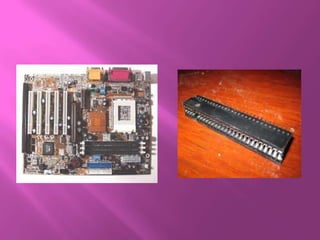
   A computer processes and stores data as a
    series of electronic bits. These bits transfer
    internally within the circuitry of the computer
    along the electrical channels.
   Each channel, called a bus, allows the both
    inside and attached system unit to
    communicate with each other.
   Buses are used to transfer bits of input devices
    to memory, from memory to processor, from
    processor to memory and from memory to
    output.
   Buses consist of two parts – Data bus and
    address bus.
   Data bus- to transfer actual data
   Address bus- to transfer information about
    where the data should reside in the memory.
   The size of the bus, known as bus width
    determines the number of width the computer
    can transmit at one time.
   The larger the number of bits handled by the
    bus, the faster the computers transfers data.
   The wider the bus, the fewer the number of
    transfer steps required and the faster the
    transfer of data.
   In conjunction with the bus width, many
    computer professionals refer to the computers
    word size.
   Word size is the number of bits a compueter
    can interprate and execute at a given time.
   Computers with larger word size ca process
    more data in the same amount of time than
    computers with a smaller word size.
   Every bus also have got clock speed.
   Just like the processor, manufacturers state the
    clock speed for each busses is in hertz.
   Todays processors have got 1600MHz.
   The higher the bus clock speed, the faster the
    transmission of data, which results in
    programme running faster
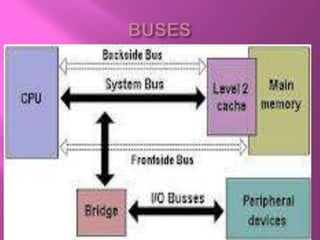
   A computer has got 3 main types of busses :
   A system bus, a back side bus and an
    expansion bus.
   A system bus, also known as the Front side bus
    (FSB) is part of the motherboard and connects
    the processor to the cache.
   An expansion bus allows the processor to
    communicate with pheripherals
   A backside bus (BSB) connects the processor to
    the cache.
Buses in a computer
Buses in a computer
Buses in a computer

Buses in a computer

  • 2.
    A computer processes and stores data as a series of electronic bits. These bits transfer internally within the circuitry of the computer along the electrical channels.  Each channel, called a bus, allows the both inside and attached system unit to communicate with each other.
  • 3.
    Buses are used to transfer bits of input devices to memory, from memory to processor, from processor to memory and from memory to output.  Buses consist of two parts – Data bus and address bus.  Data bus- to transfer actual data  Address bus- to transfer information about where the data should reside in the memory.
  • 4.
    The size of the bus, known as bus width determines the number of width the computer can transmit at one time.  The larger the number of bits handled by the bus, the faster the computers transfers data.  The wider the bus, the fewer the number of transfer steps required and the faster the transfer of data.
  • 5.
    In conjunction with the bus width, many computer professionals refer to the computers word size.  Word size is the number of bits a compueter can interprate and execute at a given time.  Computers with larger word size ca process more data in the same amount of time than computers with a smaller word size.
  • 6.
    Every bus also have got clock speed.  Just like the processor, manufacturers state the clock speed for each busses is in hertz.  Todays processors have got 1600MHz.  The higher the bus clock speed, the faster the transmission of data, which results in programme running faster
  • 7.
    A computer has got 3 main types of busses :  A system bus, a back side bus and an expansion bus.  A system bus, also known as the Front side bus (FSB) is part of the motherboard and connects the processor to the cache.  An expansion bus allows the processor to communicate with pheripherals  A backside bus (BSB) connects the processor to the cache.