Linux For Embedded Systems
ForArabs
Ahmed ElArabawy
Course 102:
UnderstandingLinux
Lecture 28:
Virtual FileSystems
A Virtual FileSystem
• A virtual filesystem is a filesystem that resides in memory and does
not have physical files stored on some storage device
• Instead, it is just a way to send information between the user
application and the kernel in the form of reading a file or writing to a
file
• Examples of virtual filesystems are
• The procfs filesystem which is mounted in /proc
• The sysfs filesystem which is ususally mounted in /sys
• When we write to a virtual filesystem file (as in /proc or /sys), we
are sending information to the kernel for processing, and not storing
data in a file
• When we are reading from a file in a virtual filesystem, we are
actually querying the kernel, and causing some processing with
some output, and not just reading from a file
• That is why, when we list files in a virtual filesystem, we normally
find the timestamp showing the current time, and the file size
maybe zero although we get data when we perform a read (through
cat command for example)
A Window to the Kernel
• The procfs and sysfs filesystems are one way to learn a lot of
information about the kernel by user space applications
• Most files in /proc are read only but some are writable
(specially in /proc/sys/ )
• There are more files that are writable in /sys
A Treasure of Information
• There are a lot of information that you can read from the /proc and /sys
• Information about processes, memory, interrupts, filesystems, hardware
devices, network, and much more
• The initial role for /proc was to carry information about the processes,
but it ended up with much more information
• The initial role for /sys was to carry information about the system
devices and hardware buses but it also ended up with much more info
The Unknown Soldier
• A lot of commands that we worked with in previous lectures does
nothing except reading information from /proc and /sys and print it
after some organization
• Examples are : ps, top, mount, uptime, …
• If you unmount /proc or /sys, a lot of commands will fail to perform
its job
/proc
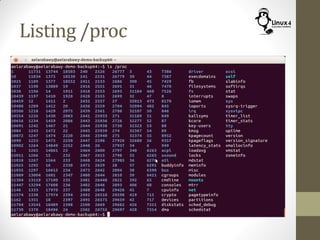
Listing /proc
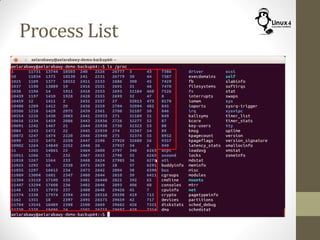
Process List
Process List
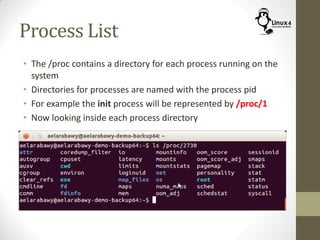
• The /proc contains a directory for each process running on the
system
• Directories for processes are named with the process pid
• For example the init process will be represented by /proc/1
• Now looking inside each process directory
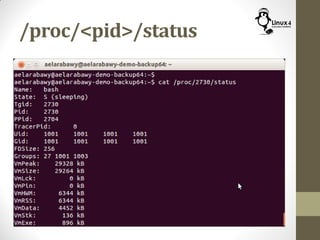
/proc/<pid>/status
/proc/cpuinfo
• This file will carry the information about the processor cores in
the machine
• It will show a list of all the processor cores with their
attributes
• Core number
• Processor name, family, and model name
• Cache Size
• Does it have a FPU
• Processor Speed in MHz
/proc/interrupts
• This file will report information on the processor interrupts
• It will have a table for interrupts for all the cores in the system
to show the number of interrupts for every interrupt line on
each processor, and how many times this interrupt happened
• It will also show which devices are servicing these interrupts
/proc/modules
• This file will list all the KLM (Kernel Loadable Modules) that
are loaded in the system
• The contents of this file are used by the command
$ lsmod
/proc/cmdline
• This file shows the command line arguments that where
passed to the kernel at its startup
• It will state things like
• Location of the root file system
• Where does the kernel send its messages (the different consoles)
• Should the kernel be “quiet” which means, it will not send its
output to a console
• Location of the boot image for the kernel
/proc/kcore
• This file represents all the physical memory of the system
• Size of this file is same as the physical memory + 4 bytes
• Don’t try to list the file content since it is huge and will
probably hang your system
• It can be used with debugger to analyze memory issues during
development
/sys
/sys
• The sysfs is similar to the procfs from the perspective that it is
a virtual filesystem, and reading/writing to its files trigger
functionality in the kernel
• However, it comes with some differences,
• It mainly targets the description of attributes of system devices
and hardware (both configuration and statistics)
• Its output/input is formatted to be used by a program, and hence
it is not very human readable in some cases
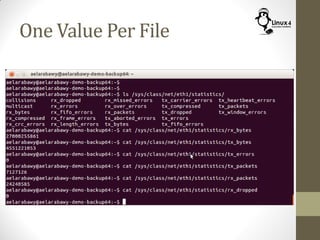
• Each file represents one value (whether input or output)
• It does not have files that carry tables of information, or a list of
parameters.
• If you need to show 4 counter statistics, then you will have 4
readable files in /sys (each file will contain a single counter value)
• If you need to configure two attributes of a device, you will need 2
writable files in /sys
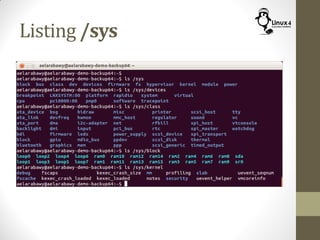
Listing /sys
One Value Per File
http://Linux4EmbeddedSystems.com

Course 102: Lecture 28: Virtual FileSystems

  • 1.
    Linux For EmbeddedSystems ForArabs Ahmed ElArabawy Course 102: UnderstandingLinux
  • 2.
  • 3.
    A Virtual FileSystem •A virtual filesystem is a filesystem that resides in memory and does not have physical files stored on some storage device • Instead, it is just a way to send information between the user application and the kernel in the form of reading a file or writing to a file • Examples of virtual filesystems are • The procfs filesystem which is mounted in /proc • The sysfs filesystem which is ususally mounted in /sys • When we write to a virtual filesystem file (as in /proc or /sys), we are sending information to the kernel for processing, and not storing data in a file • When we are reading from a file in a virtual filesystem, we are actually querying the kernel, and causing some processing with some output, and not just reading from a file • That is why, when we list files in a virtual filesystem, we normally find the timestamp showing the current time, and the file size maybe zero although we get data when we perform a read (through cat command for example)
  • 4.
    A Window tothe Kernel • The procfs and sysfs filesystems are one way to learn a lot of information about the kernel by user space applications • Most files in /proc are read only but some are writable (specially in /proc/sys/ ) • There are more files that are writable in /sys
  • 5.
    A Treasure ofInformation • There are a lot of information that you can read from the /proc and /sys • Information about processes, memory, interrupts, filesystems, hardware devices, network, and much more • The initial role for /proc was to carry information about the processes, but it ended up with much more information • The initial role for /sys was to carry information about the system devices and hardware buses but it also ended up with much more info
  • 6.
    The Unknown Soldier •A lot of commands that we worked with in previous lectures does nothing except reading information from /proc and /sys and print it after some organization • Examples are : ps, top, mount, uptime, … • If you unmount /proc or /sys, a lot of commands will fail to perform its job
  • 7.
  • 8.
  • 9.
  • 10.
    Process List • The/proc contains a directory for each process running on the system • Directories for processes are named with the process pid • For example the init process will be represented by /proc/1 • Now looking inside each process directory
  • 11.
  • 12.
    /proc/cpuinfo • This filewill carry the information about the processor cores in the machine • It will show a list of all the processor cores with their attributes • Core number • Processor name, family, and model name • Cache Size • Does it have a FPU • Processor Speed in MHz
  • 13.
    /proc/interrupts • This filewill report information on the processor interrupts • It will have a table for interrupts for all the cores in the system to show the number of interrupts for every interrupt line on each processor, and how many times this interrupt happened • It will also show which devices are servicing these interrupts
  • 14.
    /proc/modules • This filewill list all the KLM (Kernel Loadable Modules) that are loaded in the system • The contents of this file are used by the command $ lsmod
  • 15.
    /proc/cmdline • This fileshows the command line arguments that where passed to the kernel at its startup • It will state things like • Location of the root file system • Where does the kernel send its messages (the different consoles) • Should the kernel be “quiet” which means, it will not send its output to a console • Location of the boot image for the kernel
  • 16.
    /proc/kcore • This filerepresents all the physical memory of the system • Size of this file is same as the physical memory + 4 bytes • Don’t try to list the file content since it is huge and will probably hang your system • It can be used with debugger to analyze memory issues during development
  • 17.
  • 18.
    /sys • The sysfsis similar to the procfs from the perspective that it is a virtual filesystem, and reading/writing to its files trigger functionality in the kernel • However, it comes with some differences, • It mainly targets the description of attributes of system devices and hardware (both configuration and statistics) • Its output/input is formatted to be used by a program, and hence it is not very human readable in some cases • Each file represents one value (whether input or output) • It does not have files that carry tables of information, or a list of parameters. • If you need to show 4 counter statistics, then you will have 4 readable files in /sys (each file will contain a single counter value) • If you need to configure two attributes of a device, you will need 2 writable files in /sys
  • 19.
  • 20.
  • 21.