Hunting malware with
   Volatility v2.0


      Frank Boldewin
        CAST Forum
     December 2011
     (English edition)
What is Volatility?


   Forensics framework to acquire digital
   artifacts from memory dumps
   Completely written in Python
   Current stable version is 2.0.1
   Easy to use plugin interface
   Supports the following x86 Windows versions
     Windows    XP SP 2, 3
     Windows    2003 Server SP 0, 1, 2
     Windows    Vista SP 0, 1, 2
     Windows    2008 Server SP 1, 2
     Windows    7 SP 0, 1


                                            2
How does Volatility work?


  Volatility versions <=1.3 only supported
  Windows XP and searched for hardcoded
  values, e.g. to detect the Kernel Processor
  Control Region (KPCR)
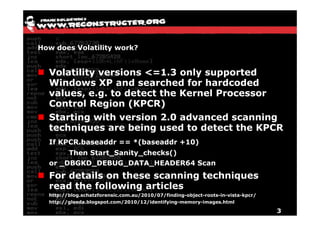
  Starting with version 2.0 advanced scanning
  techniques are being used to detect the KPCR
  If KPCR.baseaddr == *(baseaddr +10)
       Then Start_Sanity_checks()
  or _DBGKD_DEBUG_DATA_HEADER64 Scan
  For details on these scanning techniques
  read the following articles
  http://blog.schatzforensic.com.au/2010/07/finding-object-roots-in-vista-kpcr/
  http://gleeda.blogspot.com/2010/12/identifying-memory-images.html

                                                                                  3
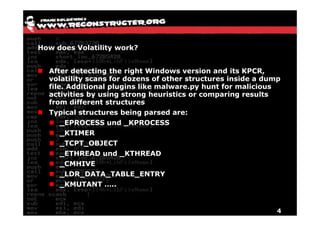
How does Volatility work?


  After detecting the right Windows version and its KPCR,
  volatility scans for dozens of other structures inside a dump
  file. Additional plugins like malware.py hunt for malicious
  activities by using strong heuristics or comparing results
  from different structures
  Typical structures being parsed are:
      _EPROCESS und _KPROCESS
      _KTIMER
      _TCPT_OBJECT
      _ETHREAD und _KTHREAD
      _CMHIVE
      _LDR_DATA_TABLE_ENTRY
      _KMUTANT …..


                                                              4
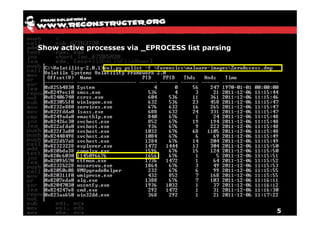
Show active processes via _EPROCESS list parsing


                                                   5
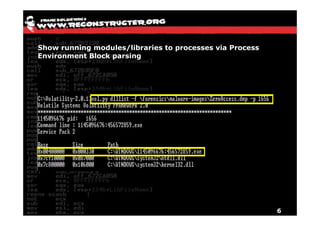
Show running modules/libraries to processes via Process
Environment Block parsing


                                                          6
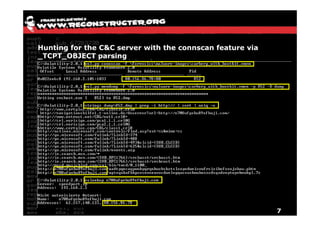
Hunting for the C&C server with the connscan feature via
_TCPT_OBJECT parsing


                                                           7
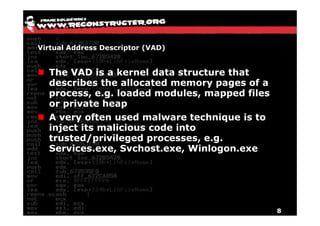
Virtual Address Descriptor (VAD)


  The VAD is a kernel data structure that
  describes the allocated memory pages of a
  process, e.g. loaded modules, mapped files
  or private heap
  A very often used malware technique is to
  inject its malicious code into
  trusted/privileged processes, e.g.
  Services.exe, Svchost.exe, Winlogon.exe


                                               8
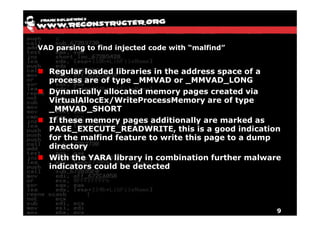
VAD parsing to find injected code with “malfind”


  Regular loaded libraries in the address space of a
  process are of type _MMVAD or _MMVAD_LONG
  Dynamically allocated memory pages created via
  VirtualAllocEx/WriteProcessMemory are of type
  _MMVAD_SHORT
  If these memory pages additionally are marked as
  PAGE_EXECUTE_READWRITE, this is a good indication
  for the malfind feature to write this page to a dump
  directory
  With the YARA library in combination further malware
  indicators could be detected


                                                     9
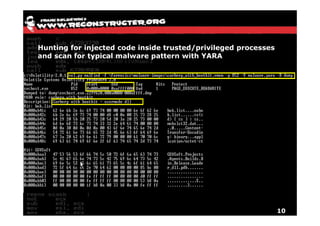
Hunting for injected code inside trusted/privileged processes
and scan for typical malware pattern with YARA


                                                                10
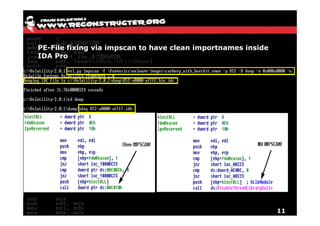
PE-File fixing via impscan to have clean importnames inside
IDA Pro


                                                              11
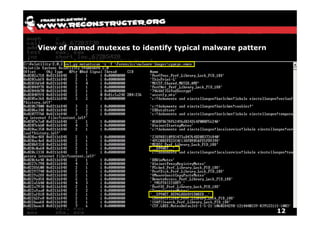
View of named mutexes to identify typical malware pattern


                                                            12
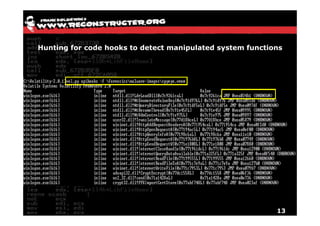
Hunting for code hooks to detect manipulated system functions


                                                           13
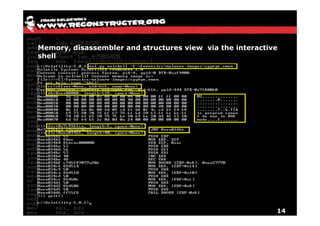
Memory, disassembler and structures view via the interactive
shell


                                                           14
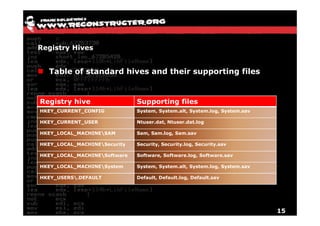
Registry Hives


  Table of standard hives and their supporting files


Registry hive                 Supporting files
HKEY_CURRENT_CONFIG           System, System.alt, System.log, System.sav

HKEY_CURRENT_USER             Ntuser.dat, Ntuser.dat.log

HKEY_LOCAL_MACHINESAM        Sam, Sam.log, Sam.sav

HKEY_LOCAL_MACHINESecurity   Security, Security.log, Security.sav

HKEY_LOCAL_MACHINESoftware   Software, Software.log, Software.sav

HKEY_LOCAL_MACHINESystem     System, System.alt, System.log, System.sav

HKEY_USERS.DEFAULT           Default, Default.log, Default.sav


                                                                           15
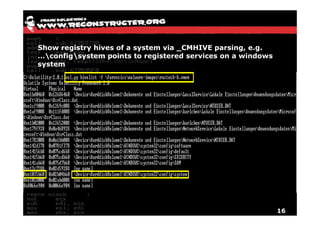
Show registry hives of a system via _CMHIVE parsing, e.g.
…configsystem points to registered services on a windows
system


                                                             16
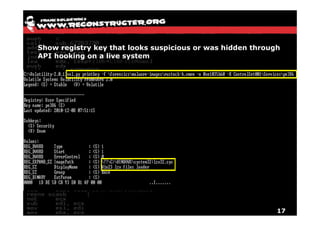
Show registry key that looks suspicious or was hidden through
API hooking on a live system


                                                            17
Interrupt Descriptor Table (IDT)


  The Interrupt Descriptor Table (IDT) is a structure
  which is used when dispatching interrupts
  Interrupts can interrupt an execution of a program to
  to handle an event
  Interrupts could be a result of a hardware signal or
  software based using the INT instruction
  The IDT descriptor table can handle 256 entries
  The descriptor to the table can be written with the
  instruction LIDT and read with SIDT


                                                      18
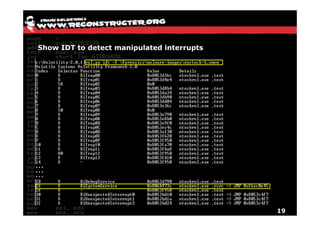
Show IDT to detect manipulated interrupts


                                            19
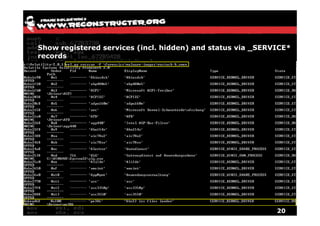
Show registered services (incl. hidden) and status via _SERVICE*
records


                                                            20
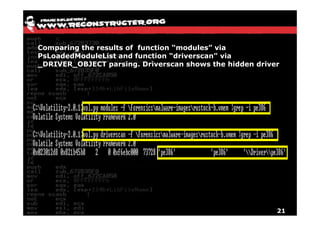
Comparing the results of function “modules” via
PsLoadedModuleList and function “driverscan” via
_DRIVER_OBJECT parsing. Driverscan shows the hidden driver


                                                         21
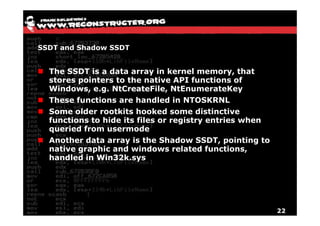
SSDT and Shadow SSDT


  The SSDT is a data array in kernel memory, that
  stores pointers to the native API functions of
  Windows, e.g. NtCreateFile, NtEnumerateKey
  These functions are handled in NTOSKRNL
  Some older rootkits hooked some distinctive
  functions to hide its files or registry entries when
  queried from usermode
  Another data array is the Shadow SSDT, pointing to
  native graphic and windows related functions,
  handled in Win32k.sys


                                                         22
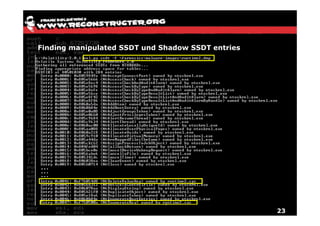
Finding manipulated SSDT und Shadow SSDT entries


                                                   23
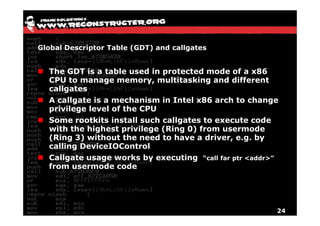
Global Descriptor Table (GDT) and callgates


  The GDT is a table used in protected mode of a x86
  CPU to manage memory, multitasking and different
  callgates
  A callgate is a mechanism in Intel x86 arch to change
  privilege level of the CPU
  Some rootkits install such callgates to execute code
  with the highest privilege (Ring 0) from usermode
  (Ring 3) without the need to have a driver, e.g. by
  calling DeviceIOControl
  Callgate usage works by executing “call far ptr <addr>”
  from usermode code


                                                        24
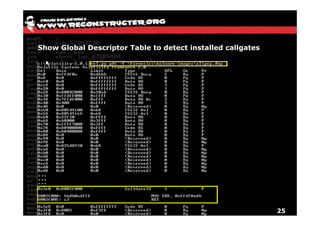
Show Global Descriptor Table to detect installed callgates


                                                             25
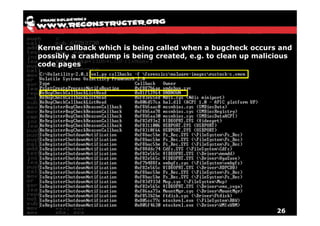
Kernel callback which is being called when a bugcheck occurs and
possibly a crashdump is being created, e.g. to clean up malicious
code pages


                                                             26
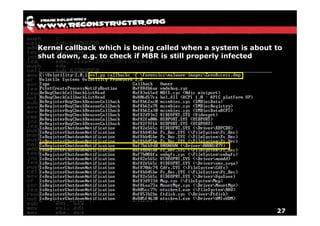
Kernel callback which is being called when a system is about to
shut down, e.g. to check if MBR is still properly infected


                                                             27
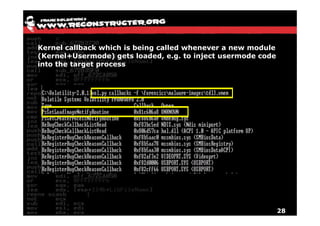
Kernel callback which is being called whenever a new module
(Kernel+Usermode) gets loaded, e.g. to inject usermode code
into the target process


                                                              28
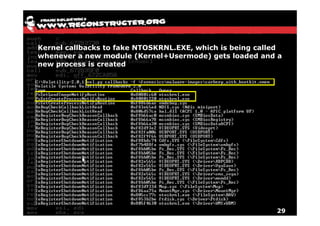
Kernel callbacks to fake NTOSKRNL.EXE, which is being called
whenever a new module (Kernel+Usermode) gets loaded and a
new process is created


                                                          29
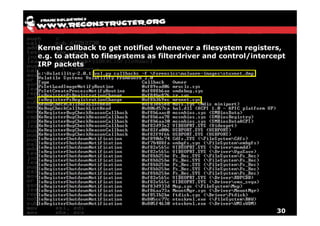
Kernel callback to get notified whenever a filesystem registers,
e.g. to attach to filesystems as filterdriver and control/intercept
IRP packets


                                                                30
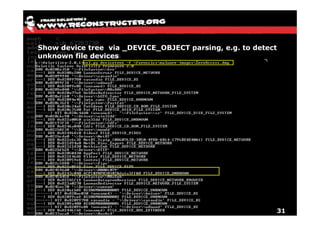
Show device tree via _DEVICE_OBJECT parsing, e.g. to detect
unknown file devices


                                                              31
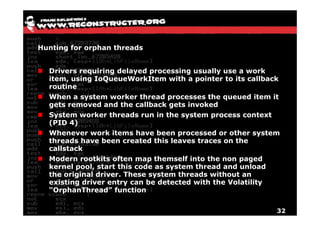
Hunting for orphan threads


  Drivers requiring delayed processing usually use a work
  item, using IoQueueWorkItem with a pointer to its callback
  routine
  When a system worker thread processes the queued item it
  gets removed and the callback gets invoked
  System worker threads run in the system process context
  (PID 4)
  Whenever work items have been processed or other system
  threads have been created this leaves traces on the
  callstack
  Modern rootkits often map themself into the non paged
  kernel pool, start this code as system thread and unload
  the original driver. These system threads without an
  existing driver entry can be detected with the Volatility
  “OrphanThread” function


                                                           32
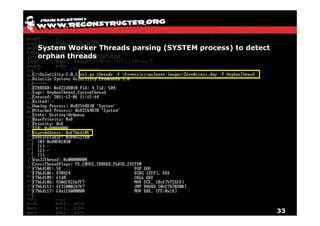
System Worker Threads parsing (SYSTEM process) to detect
orphan threads


                                                           33
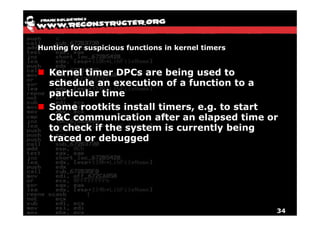
Hunting for suspicious functions in kernel timers


  Kernel timer DPCs are being used to
  schedule an execution of a function to a
  particular time
  Some rootkits install timers, e.g. to start
  C&C communication after an elapsed time or
  to check if the system is currently being
  traced or debugged


                                                    34
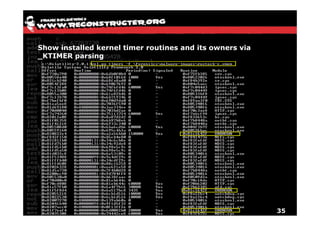
Show installed kernel timer routines and its owners via
_KTIMER parsing


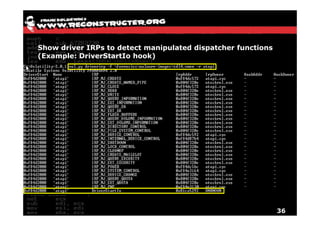
                                                          35
Show driver IRPs to detect manipulated dispatcher functions
(Example: DriverStartIo hook)


                                                              36
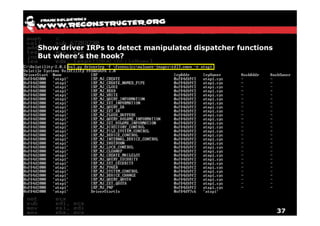
Show driver IRPs to detect manipulated dispatcher functions
But where’s the hook?


                                                              37
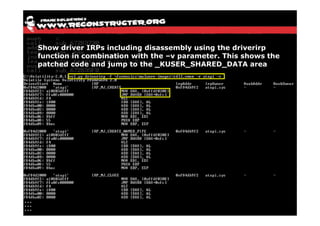
Show driver IRPs including disassembly using the driverirp
function in combination with the –v parameter. This shows the
patched code and jump to the _KUSER_SHARED_DATA area


                                                            38
Conclusion


  Volatility is a very powerful tool, which is able
  to detect even the most advanced rootkits if
  it’s being used properly.
  The analyst should have good windows
  knowledge to combine the different functions
  in a smart way and draw the right conclusions
  False positives could be caused by security
  software like HIPS, AV or personal firewalls,
  as they act in a very similar way malware
  does. The only way to be 100% sure if the
  code is malicious or not the investigator has
  to disassemble the dumped code resp. alerted
  functions
                                                39
Questions?


             40

Hunting malware with volatility v2.0

  • 1.
    Hunting malware with Volatility v2.0 Frank Boldewin CAST Forum December 2011 (English edition)
  • 2.
    What is Volatility? Forensics framework to acquire digital artifacts from memory dumps Completely written in Python Current stable version is 2.0.1 Easy to use plugin interface Supports the following x86 Windows versions Windows XP SP 2, 3 Windows 2003 Server SP 0, 1, 2 Windows Vista SP 0, 1, 2 Windows 2008 Server SP 1, 2 Windows 7 SP 0, 1 2
  • 3.
    How does Volatilitywork? Volatility versions <=1.3 only supported Windows XP and searched for hardcoded values, e.g. to detect the Kernel Processor Control Region (KPCR) Starting with version 2.0 advanced scanning techniques are being used to detect the KPCR If KPCR.baseaddr == *(baseaddr +10) Then Start_Sanity_checks() or _DBGKD_DEBUG_DATA_HEADER64 Scan For details on these scanning techniques read the following articles http://blog.schatzforensic.com.au/2010/07/finding-object-roots-in-vista-kpcr/ http://gleeda.blogspot.com/2010/12/identifying-memory-images.html 3
  • 4.
    How does Volatilitywork? After detecting the right Windows version and its KPCR, volatility scans for dozens of other structures inside a dump file. Additional plugins like malware.py hunt for malicious activities by using strong heuristics or comparing results from different structures Typical structures being parsed are: _EPROCESS und _KPROCESS _KTIMER _TCPT_OBJECT _ETHREAD und _KTHREAD _CMHIVE _LDR_DATA_TABLE_ENTRY _KMUTANT ….. 4
  • 5.
    Show active processesvia _EPROCESS list parsing 5
  • 6.
    Show running modules/librariesto processes via Process Environment Block parsing 6
  • 7.
    Hunting for theC&C server with the connscan feature via _TCPT_OBJECT parsing 7
  • 8.
    Virtual Address Descriptor(VAD) The VAD is a kernel data structure that describes the allocated memory pages of a process, e.g. loaded modules, mapped files or private heap A very often used malware technique is to inject its malicious code into trusted/privileged processes, e.g. Services.exe, Svchost.exe, Winlogon.exe 8
  • 9.
    VAD parsing tofind injected code with “malfind” Regular loaded libraries in the address space of a process are of type _MMVAD or _MMVAD_LONG Dynamically allocated memory pages created via VirtualAllocEx/WriteProcessMemory are of type _MMVAD_SHORT If these memory pages additionally are marked as PAGE_EXECUTE_READWRITE, this is a good indication for the malfind feature to write this page to a dump directory With the YARA library in combination further malware indicators could be detected 9
  • 10.
    Hunting for injectedcode inside trusted/privileged processes and scan for typical malware pattern with YARA 10
  • 11.
    PE-File fixing viaimpscan to have clean importnames inside IDA Pro 11
  • 12.
    View of namedmutexes to identify typical malware pattern 12
  • 13.
    Hunting for codehooks to detect manipulated system functions 13
  • 14.
    Memory, disassembler andstructures view via the interactive shell 14
  • 15.
    Registry Hives Table of standard hives and their supporting files Registry hive Supporting files HKEY_CURRENT_CONFIG System, System.alt, System.log, System.sav HKEY_CURRENT_USER Ntuser.dat, Ntuser.dat.log HKEY_LOCAL_MACHINESAM Sam, Sam.log, Sam.sav HKEY_LOCAL_MACHINESecurity Security, Security.log, Security.sav HKEY_LOCAL_MACHINESoftware Software, Software.log, Software.sav HKEY_LOCAL_MACHINESystem System, System.alt, System.log, System.sav HKEY_USERS.DEFAULT Default, Default.log, Default.sav 15
  • 16.
    Show registry hivesof a system via _CMHIVE parsing, e.g. …configsystem points to registered services on a windows system 16
  • 17.
    Show registry keythat looks suspicious or was hidden through API hooking on a live system 17
  • 18.
    Interrupt Descriptor Table(IDT) The Interrupt Descriptor Table (IDT) is a structure which is used when dispatching interrupts Interrupts can interrupt an execution of a program to to handle an event Interrupts could be a result of a hardware signal or software based using the INT instruction The IDT descriptor table can handle 256 entries The descriptor to the table can be written with the instruction LIDT and read with SIDT 18
  • 19.
    Show IDT todetect manipulated interrupts 19
  • 20.
    Show registered services(incl. hidden) and status via _SERVICE* records 20
  • 21.
    Comparing the resultsof function “modules” via PsLoadedModuleList and function “driverscan” via _DRIVER_OBJECT parsing. Driverscan shows the hidden driver 21
  • 22.
    SSDT and ShadowSSDT The SSDT is a data array in kernel memory, that stores pointers to the native API functions of Windows, e.g. NtCreateFile, NtEnumerateKey These functions are handled in NTOSKRNL Some older rootkits hooked some distinctive functions to hide its files or registry entries when queried from usermode Another data array is the Shadow SSDT, pointing to native graphic and windows related functions, handled in Win32k.sys 22
  • 23.
    Finding manipulated SSDTund Shadow SSDT entries 23
  • 24.
    Global Descriptor Table(GDT) and callgates The GDT is a table used in protected mode of a x86 CPU to manage memory, multitasking and different callgates A callgate is a mechanism in Intel x86 arch to change privilege level of the CPU Some rootkits install such callgates to execute code with the highest privilege (Ring 0) from usermode (Ring 3) without the need to have a driver, e.g. by calling DeviceIOControl Callgate usage works by executing “call far ptr <addr>” from usermode code 24
  • 25.
    Show Global DescriptorTable to detect installed callgates 25
  • 26.
    Kernel callback whichis being called when a bugcheck occurs and possibly a crashdump is being created, e.g. to clean up malicious code pages 26
  • 27.
    Kernel callback whichis being called when a system is about to shut down, e.g. to check if MBR is still properly infected 27
  • 28.
    Kernel callback whichis being called whenever a new module (Kernel+Usermode) gets loaded, e.g. to inject usermode code into the target process 28
  • 29.
    Kernel callbacks tofake NTOSKRNL.EXE, which is being called whenever a new module (Kernel+Usermode) gets loaded and a new process is created 29
  • 30.
    Kernel callback toget notified whenever a filesystem registers, e.g. to attach to filesystems as filterdriver and control/intercept IRP packets 30
  • 31.
    Show device treevia _DEVICE_OBJECT parsing, e.g. to detect unknown file devices 31
  • 32.
    Hunting for orphanthreads Drivers requiring delayed processing usually use a work item, using IoQueueWorkItem with a pointer to its callback routine When a system worker thread processes the queued item it gets removed and the callback gets invoked System worker threads run in the system process context (PID 4) Whenever work items have been processed or other system threads have been created this leaves traces on the callstack Modern rootkits often map themself into the non paged kernel pool, start this code as system thread and unload the original driver. These system threads without an existing driver entry can be detected with the Volatility “OrphanThread” function 32
  • 33.
    System Worker Threadsparsing (SYSTEM process) to detect orphan threads 33
  • 34.
    Hunting for suspiciousfunctions in kernel timers Kernel timer DPCs are being used to schedule an execution of a function to a particular time Some rootkits install timers, e.g. to start C&C communication after an elapsed time or to check if the system is currently being traced or debugged 34
  • 35.
    Show installed kerneltimer routines and its owners via _KTIMER parsing 35
  • 36.
    Show driver IRPsto detect manipulated dispatcher functions (Example: DriverStartIo hook) 36
  • 37.
    Show driver IRPsto detect manipulated dispatcher functions But where’s the hook? 37
  • 38.
    Show driver IRPsincluding disassembly using the driverirp function in combination with the –v parameter. This shows the patched code and jump to the _KUSER_SHARED_DATA area 38
  • 39.
    Conclusion Volatilityis a very powerful tool, which is able to detect even the most advanced rootkits if it’s being used properly. The analyst should have good windows knowledge to combine the different functions in a smart way and draw the right conclusions False positives could be caused by security software like HIPS, AV or personal firewalls, as they act in a very similar way malware does. The only way to be 100% sure if the code is malicious or not the investigator has to disassemble the dumped code resp. alerted functions 39
  • 40.