Linux For Embedded Systems
ForArabs
Ahmed ElArabawy
Course 102:
UnderstandingLinux
Lecture 6:
Seeking Help
Why ??
• Linux Command Line Interface is a very rich interface with
hundreds of commands
• Each command comes with a lot of variations, options,
argument types, …
• We learn about the popular and frequently used forms but It
is impossible to remember all possible usage of commands
• Hence, we need a way to find more information about the
different commands and their different usage forms
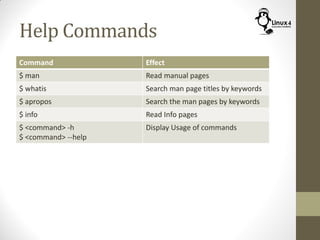
Help Commands
Command Effect
$ man Read manual pages
$ whatis Search man page titles by keywords
$ apropos Search the man pages by keywords
$ info Read Info pages
$ <command> -h
$ <command> --help
Display Usage of commands
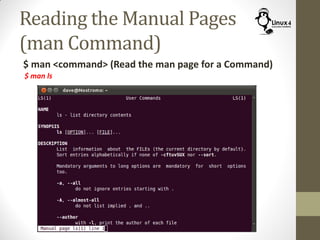
Reading the Manual Pages
(man Command)
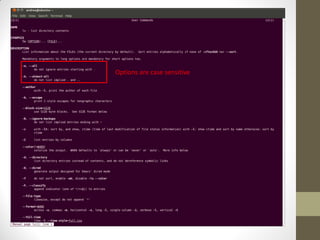
$ man <command> (Read the man page for a Command)
$ man ls
Options are case sensitive
Where are the Manual Pages ??
• The “man” command reads from the manual pages stored in
your distribution
• The location of these pages may differ slightly based on the
distribution
• Use the command ‘manpath’ to know the location of the man
pages on your machine
$ manpath
• This command identify the location of the man pages based
on the configuration file “/etc/manpath.cfg”
• Sometimes we will have an Environment variable MANPATH
for that purpose too
$ echo $MANPATH
• Typically they are located in /usr/share/man/
The Manual Sections
• The “man” pages are classified into multiple sections with
numbers:
(1) for commands
(2) for System calls
(3) C Library functions
(4) Special filenames
(5) file formats for Linux files
(6) games and things like screen savers
(7) word processing packages & Misc
(8) System administration commands
Selecting the Manual Section
• We can decide which section we want to show from the man page
$ man <n> <name>
• Example:
$ man 1 passwd (manual page for the command passwd)
$ man 5 passwd (manual page for the /etc/passwd file)
$ man passwd (Default is section 1; the command)
• To learn more about the man command,
$ man man
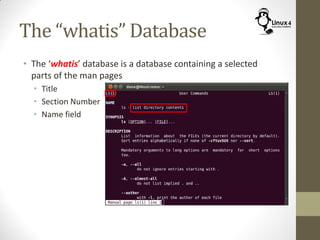
The “whatis” Database
• The ‘whatis’ database is a database containing a selected
parts of the man pages
• Title
• Section Number
• Name field
The “whatis” Database
• The ‘whatis’ database is a database containing a selected
parts of the man pages
• Title
• Section Number
• Name field
• This database is used with the commands,
$ whatis
$ apropos
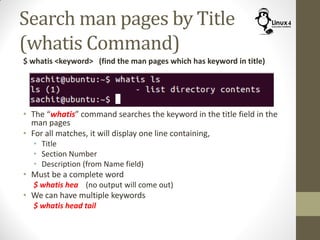
Search man pages by Title
(whatis Command)
$ whatis <keyword> (find the man pages which has keyword in title)
• The “whatis” command searches the keyword in the title field in the
man pages
• For all matches, it will display one line containing,
• Title
• Section Number
• Description (from Name field)
• Must be a complete word
$ whatis hea (no output will come out)
• We can have multiple keywords
$ whatis head tail
Searching Manual Pagesby Keywords
(aproposCommand)
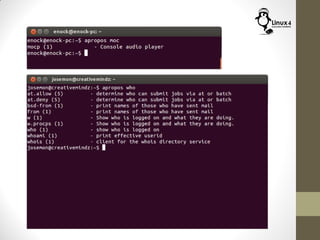
$ apropos <keyword> (find the man pages with keyword in title, Name)
• The ‘man’ command assumes that you know the command name
• What if you don’t know the command name and just have a
keyword ??
• The solution is to use ‘apropos’ command
• ‘apropos’ command receives a keyword, and searches both the
‘title’ and the ‘Name’ field in the whatis database for this keyword
• It then prints a single line (the Name field) for each command
matching the keyword
$ apropos <keyword>
• Examples:
$ apropos process (Searches for all commands dealing with process)
$ apropos proce (even a part of a word can be used)
• Note, the same output can be achieved via,
$ man -k <keyword>
Using the Command Info Pages
(info Command)
$ info <Command> (Display the Info pages on the command)
• Info pages are similar to man pages but created by the GNU
project for the GNU applications
$ info gzip
$ info emacs
• To know more about this command
$ info info
• The GNU commands will have both man pages and info pages
• The info pages are usually more recent and are somewhat easier
to use
• Sometimes, the man pages refer to the Info pages
HELP FROM WITHIN
Help From Within
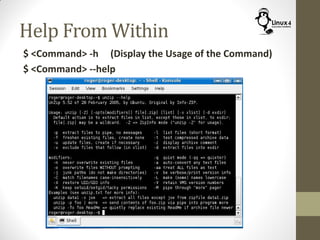
$ <Command> -h (Display the Usage of the Command)
$ <Command> --help
SEARCHING THE WEB
Search the Web
• You can perform a normal web search
• Popular links,
• The Linux Information Project
http://www.linfo.org/
• The Linux Documentation Project
http://www.tldp.org/
• StackOverFlow
http://stackoverflow.com/
And Many More…
http://Linux4EmbeddedSystems.com

Course 102: Lecture 6: Seeking Help

  • 1.
    Linux For EmbeddedSystems ForArabs Ahmed ElArabawy Course 102: UnderstandingLinux
  • 2.
  • 3.
    Why ?? • LinuxCommand Line Interface is a very rich interface with hundreds of commands • Each command comes with a lot of variations, options, argument types, … • We learn about the popular and frequently used forms but It is impossible to remember all possible usage of commands • Hence, we need a way to find more information about the different commands and their different usage forms
  • 4.
    Help Commands Command Effect $man Read manual pages $ whatis Search man page titles by keywords $ apropos Search the man pages by keywords $ info Read Info pages $ <command> -h $ <command> --help Display Usage of commands
  • 5.
    Reading the ManualPages (man Command) $ man <command> (Read the man page for a Command) $ man ls
  • 6.
  • 7.
    Where are theManual Pages ?? • The “man” command reads from the manual pages stored in your distribution • The location of these pages may differ slightly based on the distribution • Use the command ‘manpath’ to know the location of the man pages on your machine $ manpath • This command identify the location of the man pages based on the configuration file “/etc/manpath.cfg” • Sometimes we will have an Environment variable MANPATH for that purpose too $ echo $MANPATH • Typically they are located in /usr/share/man/
  • 8.
    The Manual Sections •The “man” pages are classified into multiple sections with numbers: (1) for commands (2) for System calls (3) C Library functions (4) Special filenames (5) file formats for Linux files (6) games and things like screen savers (7) word processing packages & Misc (8) System administration commands
  • 9.
    Selecting the ManualSection • We can decide which section we want to show from the man page $ man <n> <name> • Example: $ man 1 passwd (manual page for the command passwd) $ man 5 passwd (manual page for the /etc/passwd file) $ man passwd (Default is section 1; the command) • To learn more about the man command, $ man man
  • 10.
    The “whatis” Database •The ‘whatis’ database is a database containing a selected parts of the man pages • Title • Section Number • Name field
  • 11.
    The “whatis” Database •The ‘whatis’ database is a database containing a selected parts of the man pages • Title • Section Number • Name field • This database is used with the commands, $ whatis $ apropos
  • 12.
    Search man pagesby Title (whatis Command) $ whatis <keyword> (find the man pages which has keyword in title) • The “whatis” command searches the keyword in the title field in the man pages • For all matches, it will display one line containing, • Title • Section Number • Description (from Name field) • Must be a complete word $ whatis hea (no output will come out) • We can have multiple keywords $ whatis head tail
  • 13.
    Searching Manual PagesbyKeywords (aproposCommand) $ apropos <keyword> (find the man pages with keyword in title, Name) • The ‘man’ command assumes that you know the command name • What if you don’t know the command name and just have a keyword ?? • The solution is to use ‘apropos’ command • ‘apropos’ command receives a keyword, and searches both the ‘title’ and the ‘Name’ field in the whatis database for this keyword • It then prints a single line (the Name field) for each command matching the keyword $ apropos <keyword> • Examples: $ apropos process (Searches for all commands dealing with process) $ apropos proce (even a part of a word can be used) • Note, the same output can be achieved via, $ man -k <keyword>
  • 15.
    Using the CommandInfo Pages (info Command) $ info <Command> (Display the Info pages on the command) • Info pages are similar to man pages but created by the GNU project for the GNU applications $ info gzip $ info emacs • To know more about this command $ info info • The GNU commands will have both man pages and info pages • The info pages are usually more recent and are somewhat easier to use • Sometimes, the man pages refer to the Info pages
  • 16.
  • 17.
    Help From Within $<Command> -h (Display the Usage of the Command) $ <Command> --help
  • 18.
  • 19.
    Search the Web •You can perform a normal web search • Popular links, • The Linux Information Project http://www.linfo.org/ • The Linux Documentation Project http://www.tldp.org/ • StackOverFlow http://stackoverflow.com/ And Many More…
  • 20.