

FBW
22-10-2013

Wim Van Criekinge
Practicum Bioinformatica

• Practicum PC Zaal D
– 9u00 – 11u30

• Recap - Installeren en werken met
TextPad
• Regex
• Arrays/hashes
Programming

• Variables
• Flow control (if, regex …)
• Loops
• input/output
• Subroutines/object
Three Basic Data Types

• Scalars - $
• Arrays of scalars - @
• Associative arrays of
scalers or Hashes - %
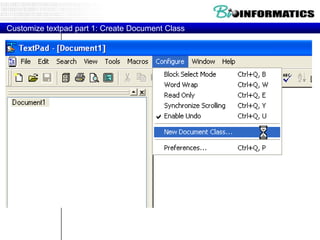
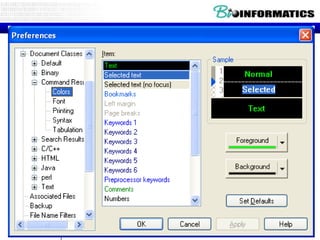
Customize textpad part 1: Create Document Class
• Document classes
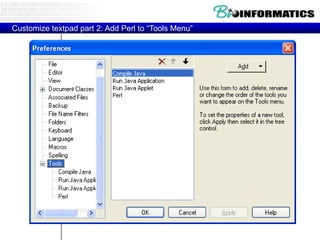
Customize textpad part 2: Add Perl to “Tools Menu”
• Syntax highlighting

• Run program (prompt for parameters)
• Show line numbers
• Clip-ons for web with perl syntax
• ….
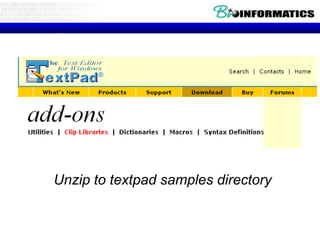
Unzip to textpad samples directory
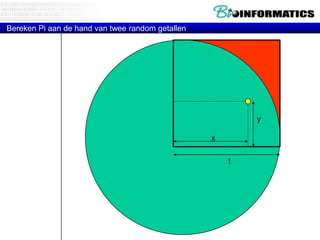
Bereken Pi aan de hand van twee random getallen

y
x
1
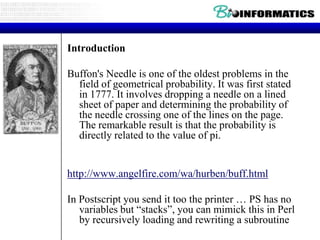
Introduction
Buffon's Needle is one of the oldest problems in the
field of geometrical probability. It was first stated
in 1777. It involves dropping a needle on a lined
sheet of paper and determining the probability of
the needle crossing one of the lines on the page.
The remarkable result is that the probability is
directly related to the value of pi.

http://www.angelfire.com/wa/hurben/buff.html
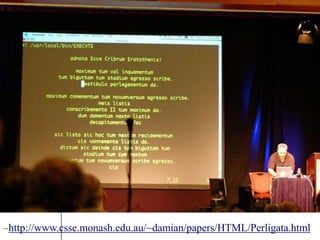
In Postscript you send it too the printer … PS has no
variables but “stacks”, you can mimick this in Perl
by recursively loading and rewriting a subroutine
–http://www.csse.monash.edu.au/~damian/papers/HTML/Perligata.html
Two brief diversions (warnings & strict)

• Use warnings;
• Use strict;
• strict – forces you to „declare‟ a variable the
first time you use it.
– usage: use strict; (somewhere near the top of
your script)

• declare variables with „my‟
– usage: my $variable;
–
or: my $variable = „value‟;

• my sets the „scope‟ of the variable. Variable
exists only within the current block of code
• use strict and my both help you to debug
errors, and help prevent mistakes.
Practicum Bioinformatica

• Practicum PC Zaal D
– 8u30 – 11u30

•
•
•
•

Recap
Installeren en werken met TextPad
Regex
Arrays/hashes
What is a regular expression?

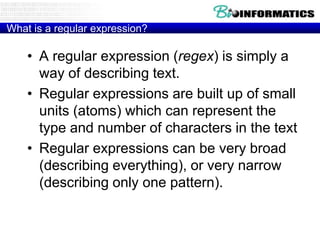
• A regular expression (regex) is simply a
way of describing text.
• Regular expressions are built up of small
units (atoms) which can represent the
type and number of characters in the text
• Regular expressions can be very broad
(describing everything), or very narrow
(describing only one pattern).
Why would you use a regex?

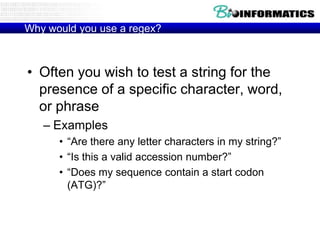
• Often you wish to test a string for the
presence of a specific character, word,
or phrase
– Examples
• “Are there any letter characters in my string?”
• “Is this a valid accession number?”
• “Does my sequence contain a start codon
(ATG)?”
Regular Expressions
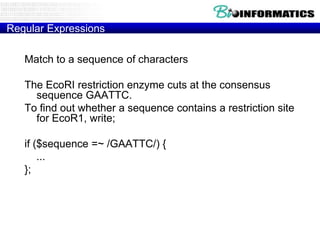
Match to a sequence of characters

The EcoRI restriction enzyme cuts at the consensus
sequence GAATTC.
To find out whether a sequence contains a restriction site
for EcoR1, write;
if ($sequence =~ /GAATTC/) {
...
};
• [m]/PATTERN/[g][i][o]
• s/PATTERN/PATTERN/[g][i][e][o]
• tr/PATTERNLIST/PATTERNLIST/[c][d][s]
Regular Expressions
Match to a character class
• Example
• The BstYI restriction enzyme cuts at the consensus sequence rGATCy,
namely A or G in the first position, then GATC, and then T or C. To find
out whether a sequence contains a restriction site for BstYI, write;
• if ($sequence =~ /[AG]GATC[TC]/) {...}; # This will match all of
AGATCT, GGATCT, AGATCC, GGATCC.
Definition
• When a list of characters is enclosed in square brackets [], one and
only one of these characters must be present at the corresponding
position of the string in order for the pattern to match. You may specify
a range of characters using a hyphen -.
• A caret ^ at the front of the list negates the character class.
Examples
• if ($string =~ /[AGTC]/) {...}; # matches any nucleotide
• if ($string =~ /[a-z]/) {...}; # matches any lowercase letter
• if ($string =~ /chromosome[1-6]/) {...}; # matches chromosome1,
chromosome2 ... chromosome6
• if ($string =~ /[^xyzXYZ]/) {...}; # matches any character except x, X, y,
Y, z, Z
Constructing a Regex

• Pattern starts and ends with a /

/pattern/

– if you want to match a /, you need to escape it
• / (backslash, forward slash)
– you can change the delimiter to some other
character, but you probably won‟t need to
• m|pattern|

• any „modifiers‟ to the pattern go after the last /
•
•
•
•

i : case insensitive /[a-z]/i
o : compile once
g : match in list context (global)
m or s : match over multiple lines
Looking for a pattern

• By default, a regular expression is applied to
$_ (the default variable)
– if (/a+/) {die}
• looks for one or more „a‟ in $_

• If you want to look for the pattern in any other
variable, you must use the bind operator
– if ($value =~ /a+/) {die}
• looks for one or more „a‟ in $value

• The bind operator is in no way similar to the
„=„ sign!! = is assignment, =~ is bind.
– if ($value = /[a-z]/) {die}
• Looks for one or more „a‟ in $_, not $value!!!
Regular Expression Atoms

• An „atom‟ is the smallest unit of a regular
expression.
• Character atoms
•
•
•
•

0-9, a-Z match themselves
. (dot) matches everything
[atgcATGC] : A character class (group)
[a-z] : another character class, a through z
More atoms
•
•
•
•
•
•

d - All Digits
D - Any non-Digit
s - Any Whitespace (s, t, n)
S - Any non-Whitespace
w - Any Word character [a-zA-Z_0-9]
W - Any non-Word character
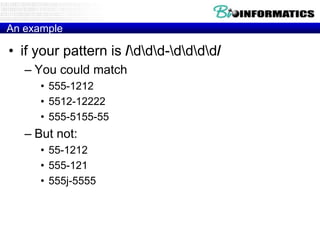
An example

• if your pattern is /ddd-dddd/
– You could match
• 555-1212
• 5512-12222
• 555-5155-55

– But not:
• 55-1212
• 555-121
• 555j-5555
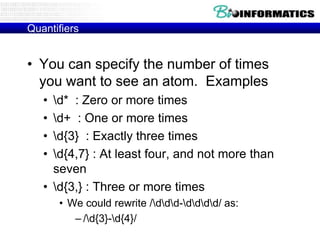
Quantifiers

• You can specify the number of times
you want to see an atom. Examples
•
•
•
•

d* : Zero or more times
d+ : One or more times
d{3} : Exactly three times
d{4,7} : At least four, and not more than
seven
• d{3,} : Three or more times
• We could rewrite /ddd-dddd/ as:
– /d{3}-d{4}/
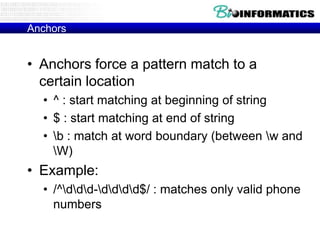
Anchors

• Anchors force a pattern match to a
certain location
• ^ : start matching at beginning of string
• $ : start matching at end of string
• b : match at word boundary (between w and
W)

• Example:
• /^ddd-dddd$/ : matches only valid phone
numbers
Grouping

• You can group atoms together with
parentheses
• /cat+/ matches cat, catt, cattt
• /(cat)+/ matches cat, catcat, catcatcat

• Use as many sets of parentheses as you
need
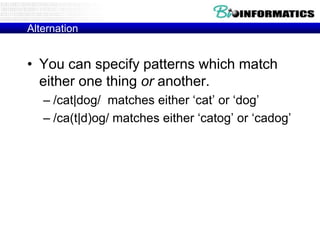
Alternation

• You can specify patterns which match
either one thing or another.
– /cat|dog/ matches either „cat‟ or „dog‟
– /ca(t|d)og/ matches either „catog‟ or „cadog‟
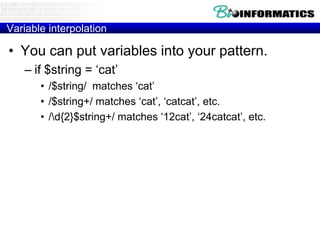
Variable interpolation

• You can put variables into your pattern.
– if $string = „cat‟
• /$string/ matches „cat‟
• /$string+/ matches „cat‟, „catcat‟, etc.
• /d{2}$string+/ matches „12cat‟, „24catcat‟, etc.
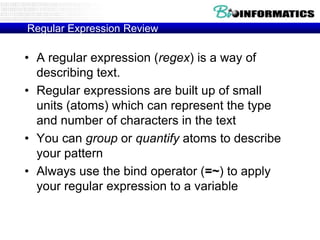
Regular Expression Review

• A regular expression (regex) is a way of
describing text.
• Regular expressions are built up of small
units (atoms) which can represent the type
and number of characters in the text
• You can group or quantify atoms to describe
your pattern
• Always use the bind operator (=~) to apply
your regular expression to a variable
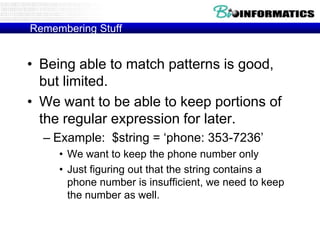
Remembering Stuff

• Being able to match patterns is good,
but limited.
• We want to be able to keep portions of
the regular expression for later.
– Example: $string = „phone: 353-7236‟
• We want to keep the phone number only
• Just figuring out that the string contains a
phone number is insufficient, we need to keep
the number as well.
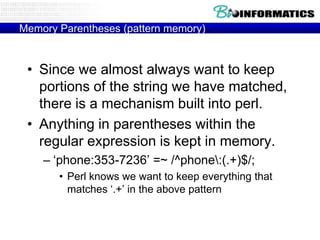
Memory Parentheses (pattern memory)

• Since we almost always want to keep
portions of the string we have matched,
there is a mechanism built into perl.
• Anything in parentheses within the
regular expression is kept in memory.
– „phone:353-7236‟ =~ /^phone:(.+)$/;
• Perl knows we want to keep everything that
matches „.+‟ in the above pattern
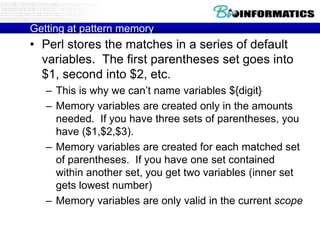
Getting at pattern memory

• Perl stores the matches in a series of default
variables. The first parentheses set goes into
$1, second into $2, etc.
– This is why we can‟t name variables ${digit}
– Memory variables are created only in the amounts
needed. If you have three sets of parentheses, you
have ($1,$2,$3).
– Memory variables are created for each matched set
of parentheses. If you have one set contained
within another set, you get two variables (inner set
gets lowest number)
– Memory variables are only valid in the current scope
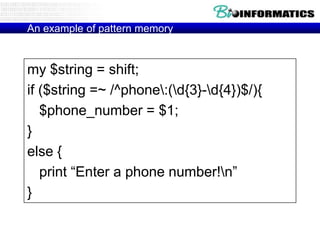
An example of pattern memory

my $string = shift;
if ($string =~ /^phone:(d{3}-d{4})$/){
$phone_number = $1;
}
else {
print “Enter a phone number!n”
}
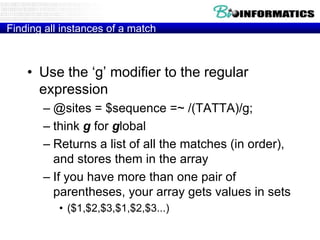
Finding all instances of a match

• Use the „g‟ modifier to the regular
expression
– @sites = $sequence =~ /(TATTA)/g;
– think g for global
– Returns a list of all the matches (in order),
and stores them in the array
– If you have more than one pair of
parentheses, your array gets values in sets
• ($1,$2,$3,$1,$2,$3...)
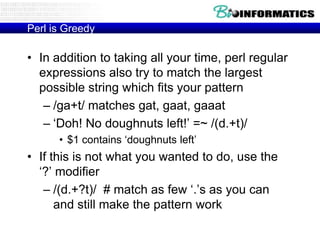
Perl is Greedy

• In addition to taking all your time, perl regular
expressions also try to match the largest
possible string which fits your pattern
– /ga+t/ matches gat, gaat, gaaat
– „Doh! No doughnuts left!‟ =~ /(d.+t)/
• $1 contains „doughnuts left‟

• If this is not what you wanted to do, use the
„?‟ modifier
– /(d.+?t)/ # match as few „.‟s as you can
and still make the pattern work
Substitute function

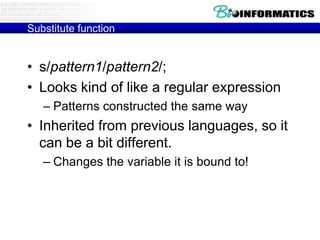
• s/pattern1/pattern2/;
• Looks kind of like a regular expression
– Patterns constructed the same way

• Inherited from previous languages, so it
can be a bit different.
– Changes the variable it is bound to!
Using s

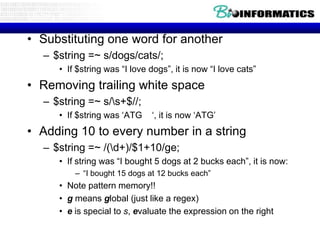
• Substituting one word for another
– $string =~ s/dogs/cats/;
• If $string was “I love dogs”, it is now “I love cats”

• Removing trailing white space
– $string =~ s/s+$//;
• If $string was „ATG

„, it is now „ATG‟

• Adding 10 to every number in a string
– $string =~ /(d+)/$1+10/ge;
• If string was “I bought 5 dogs at 2 bucks each”, it is now:
– “I bought 15 dogs at 12 bucks each”

• Note pattern memory!!
• g means global (just like a regex)
• e is special to s, evaluate the expression on the right
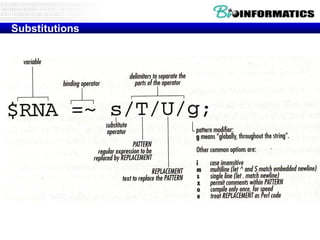
Substitutions
tr function

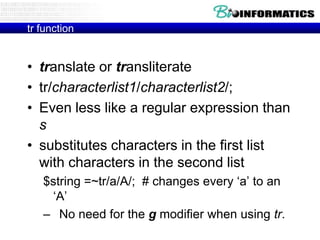
• translate or transliterate
• tr/characterlist1/characterlist2/;
• Even less like a regular expression than
s
• substitutes characters in the first list
with characters in the second list
$string =~tr/a/A/; # changes every „a‟ to an
„A‟
– No need for the g modifier when using tr.
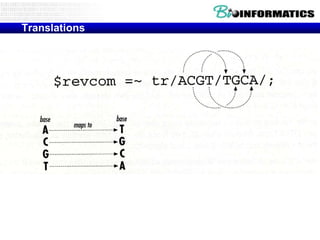
Translations
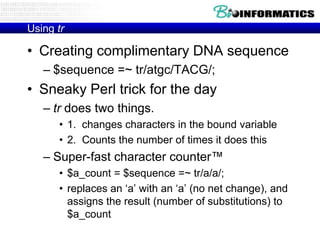
Using tr

• Creating complimentary DNA sequence
– $sequence =~ tr/atgc/TACG/;

• Sneaky Perl trick for the day
– tr does two things.
• 1. changes characters in the bound variable
• 2. Counts the number of times it does this

– Super-fast character counter™
• $a_count = $sequence =~ tr/a/a/;
• replaces an „a‟ with an „a‟ (no net change), and
assigns the result (number of substitutions) to
$a_count
• Regex-Related Special Variables
• Perl has a host of special variables that get filled after every m// or s///
regex match. $1, $2, $3, etc. hold the backreferences. $+ holds the last
(highest-numbered) backreference. $&(dollar ampersand) holds the entire
regex match.
• @- is an array of match-start indices into the string. $-[0] holds the start of
the entire regex match, $-[1] the start of the first backreference, etc.
Likewise, @+ holds match-end indices (ends, not lengths).
• $' (dollar followed by an apostrophe or single quote) holds the part of the
string after (to the right of) the regex match. $` (dollar backtick) holds the
part of the string before (to the left of) the regex match. Using these
variables is not recommended in scripts when performance matters, as it
causes Perl to slow down all regex matches in your entire script.
• All these variables are read-only, and persist until the next regex match is
attempted. They are dynamically scoped, as if they had an implicit 'local'
at the start of the enclosing scope. Thus if you do a regex match, and call
a sub that does a regex match, when that sub returns, your variables are
still set as they were for the first match.
• Finding All Matches In a String
• The "/g" modifier can be used to process all regex
matches in a string. The first m/regex/g will find the
first match, the second m/regex/g the second match,
etc. The location in the string where the next match
attempt will begin is automatically remembered by
Perl, separately for each string. Here is an example:
• while ($string =~ m/regex/g) { print "Found '$&'. Next
attempt at character " . pos($string)+1 . "n"; } The
pos() function retrieves the position where the next
attempt begins. The first character in the string has
position zero. You can modify this position by using
the function as the left side of an assignment, like in
pos($string) = 123;.
Regex

• O‟Reilly book: Mastering regular expressions
(2nd edition)
• Regular Expressions Tutorial
• http://www.regularexpressions.info/examples.html
Oefeningen practicum 2

1. Which of following 4 sequences (seq1/2/3/4)
a) contains a “Galactokinase signature”
http://us.expasy.org/prosite/

b) How many of them?
c) Where (hints:pos and $&) ?
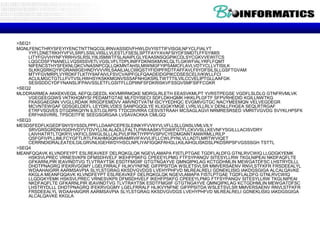
>SEQ1
MGNLFENCTHRYSFEYIYENCTNTTNQCGLIRNVASSIDVFHWLDVYISTTIFVISGILNFYCLFIALYT
YYFLDNETRKHYVFVLSRFLSSILVIISLLVLESTLFSESLSPTFAYYAVAFSIYDFSMDTLFFSYIMIS
LITYFGVVHYNFYRRHVSLRSLYIILISMWTFSLAIAIPLGLYEAASNSQGPIKCDLSYCGKVVEWITCS
LQGCDSFYNANELLVQSIISSVETLVGSLVFLTDPLINIFFDKNISKMVKLQLTLGKWFIALYRFLFQMT
NIFENCSTHYSFEKNLQKCVNASNPCQLLQKMNTAHSLMIWMGFYIPSAMCFLAVLVDTYCLLVTISILK
SLKKQSRKQYIFGRANIIGEHNDYVVVRLSAAILIALCIIIIQSTYFIDIPFRDTFAFFAVLFIIYDFSILSLLGSFTGVAM
MTYFGVMRPLVYRDKFTLKTIYIIAFAIVLFSVCVAIPFGLFQAADEIDGPIKCDSESCELIVKWLLFCI
ACLILMGCTGTLLFVTVSLHWHSYKSKKMGNVSSSAFNHGKSRLTWTTTILVILCCVELIPTGLLAAFGK
SESISDDCYDFYNANSLIFPAIVSSLETFLGSITFLLDPIINFSFDKRISKVFSSQVSMFSIFFCGKR
>SEQ2
MLDDRARMEA AKKEKVEQIL AEFQLQEEDL KKVMRRMQKE MDRGLRLETH EEASVKMLPT YVRSTPEGSE VGDFLSLDLG GTNFRVMLVK
VGEGEEGQWS VKTKHQMYSI PEDAMTGTAE MLFDYISECI SDFLDKHQMK HKKLPLGFTF SFPVRHEDID KGILLNWTKG
FKASGAEGNN VVGLLRDAIK RRGDFEMDVV AMVNDTVATM ISCYYEDHQC EVGMIVGTGC NACYMEEMQN VELVEGDEGR
MCVNTEWGAF GDSGELDEFL LEYDRLVDES SANPGQQLYE KLIGGKYMGE LVRLVLLRLV DENLLFHGEA SEQLRTRGAF
ETRFVSQVES DTGDRKQIYN ILSTLGLRPS TTDCDIVRRA CESVSTRAAH MCSAGLAGVI NRMRESRSED VMRITVGVDG SVYKLHPSFK
ERFHASVRRL TPSCEITFIE SEEGSGRGAA LVSAVACKKA CMLGQ
>SEQ3
MESDSFEDFLKGEDFSNYSYSSDLPPFLLDAAPCEPESLEINKYFVVIIYVLVFLLSLLGNSLVMLVILY
SRVGRSGRDNVIGDHVDYVTDVYLLNLALADLLFALTLPIWAASKVTGWIFGTFLCKVVSLLKEVNFYSGILLLACISVDRY
LAIVHATRTLTQKRYLVKFICLSIWGLSLLLALPVLIFRKTIYPPYVSPVCYEDMGNNTANWRMLLRILP
QSFGFIVPLLIMLFCYGFTLRTLFKAHMGQKHRAMRVIFAVVLIFLLCWLPYNLVLLADTLMRTWVIQET
CERRNDIDRALEATEILGILGRVNLIGEHWDYHSCLNPLIYAFIGQKFRHGLLKILAIHGLISKDSLPKDSRPSFVGSSSGH TSTTL
>SEQ4
MEANFQQAVK KLVNDFEYPT ESLREAVKEF DELRQKGLQK NGEVLAMAPA FISTLPTGAE TGDFLALDFG GTNLRVCWIQ LLGDGKYEMK
HSKSVLPREC VRNESVKPII DFMSDHVELF IKEHFPSKFG CPEEEYLPMG FTFSYPANQV SITESYLLRW TKGLNIPEAI NKDFAQFLTE
GFKARNLPIR IEAVINDTVG TLVTRAYTSK ESDTFMGIIF GTGTNGAYVE QMNQIPKLAG KCTGDHMLIN MEWGATDFSC LHSTRYDLLL
DHDTPNAGRQ IFEKRVGGMY LGELFRRALF HLIKVYNFNE GIFPPSITDA WSLETSVLSR MMVERSAENV RNVLSTFKFR FRSDEEALYL
WDAAHAIGRR AARMSAVPIA SLYLSTGRAG KKSDVGVDGS LVEHYPHFVD MLREALRELI GDNEKLISIG IAKDGSGIGA ALCALQAVKE
KKGLA MEANFQQAVK KLVNDFEYPT ESLREAVKEF DELRQKGLQK NGEVLAMAPA FISTLPTGAE TGDFLALDFG GTNLRVCWIQ
LLGDGKYEMK HSKSVLPREC VRNESVKPII DFMSDHVELF IKEHFPSKFG CPEEEYLPMG FTFSYPANQV SITESYLLRW TKGLNIPEAI
NKDFAQFLTE GFKARNLPIR IEAVINDTVG TLVTRAYTSK ESDTFMGIIF GTGTNGAYVE QMNQIPKLAG KCTGDHMLIN MEWGATDFSC
LHSTRYDLLL DHDTPNAGRQ IFEKRVGGMY LGELFRRALF HLIKVYNFNE GIFPPSITDA WSLETSVLSR MMVERSAENV RNVLSTFKFR
FRSDEEALYL WDAAHAIGRR AARMSAVPIA SLYLSTGRAG KKSDVGVDGS LVEHYPHFVD MLREALRELI GDNEKLISIG IAKDGSGIGA
ALCALQAVKE KKGLA
Three Basic Data Types

• Scalars - $
• Arrays of scalars - @
• Associative arrays of scalers or
Hashes - %
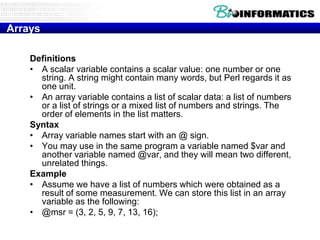
Arrays
Definitions
• A scalar variable contains a scalar value: one number or one
string. A string might contain many words, but Perl regards it as
one unit.
• An array variable contains a list of scalar data: a list of numbers
or a list of strings or a mixed list of numbers and strings. The
order of elements in the list matters.
Syntax
• Array variable names start with an @ sign.
• You may use in the same program a variable named $var and
another variable named @var, and they will mean two different,
unrelated things.
Example
• Assume we have a list of numbers which were obtained as a
result of some measurement. We can store this list in an array
variable as the following:
• @msr = (3, 2, 5, 9, 7, 13, 16);
The foreach construct
The foreach construct iterates over a list of scalar
values (e.g. that are contained in an array) and
executes a block of code for each of the values.
• Example:
–
–
–
–
–

foreach $i (@some_array) {
statement_1;
statement_2;
statement_3; }
Each element in @some_array is aliased to the variable $i in
turn, and the block of code inside the curly brackets {} is
executed once for each element.

• The variable $i (or give it any other name you wish) is
local to the foreach loop and regains its former value
upon exiting of the loop.
• Remark $_
Examples for using the foreach construct - cont.

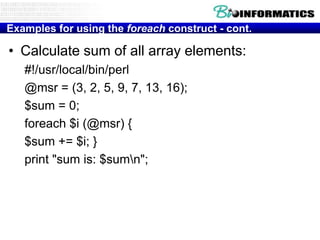
• Calculate sum of all array elements:
#!/usr/local/bin/perl
@msr = (3, 2, 5, 9, 7, 13, 16);
$sum = 0;
foreach $i (@msr) {
$sum += $i; }
print "sum is: $sumn";
Accessing individual array elements

Individual array elements may be accessed by
indicating their position in the list (their index).
Example:
@msr = (3, 2, 5, 9, 7, 13, 16);
indexvalue 0 3 1 2 2 5 3 9 4 7 5 13 6 16
First element: $msr[0] (here has the value of 3),
Third element: $msr[2] (here has the value of
5),
and so on.
The sort function
The sort function receives a list of variables (or an array) and returns the sorted list.
@array2 = sort (@array1);

#!/usr/local/bin/perl
@countries = ("Israel", "Norway", "France", "Argentina");
@sorted_countries = sort ( @countries);
print "ORIG: @countriesn", "SORTED: @sorted_countriesn";
Output:
ORIG: Israel Norway France Argentina
SORTED: Argentina France Israel Norway
#!/usr/local/bin/perl
@numbers = (1 ,2, 4, 16, 18, 32, 64);
@sorted_num = sort (@numbers);
print "ORIG: @numbers n", "SORTED: @sorted_num n";
Output:
ORIG: 1 2 4 16 18 32 64
SORTED: 1 16 18 2 32 4 64
Note that sorting numbers does not happen numerically, but by the string values of
each number.
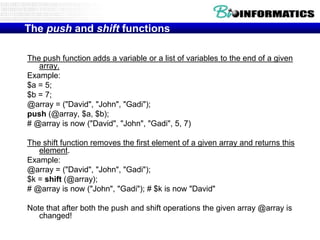
The push and shift functions
The push function adds a variable or a list of variables to the end of a given
array.
Example:
$a = 5;
$b = 7;
@array = ("David", "John", "Gadi");
push (@array, $a, $b);
# @array is now ("David", "John", "Gadi", 5, 7)
The shift function removes the first element of a given array and returns this
element.
Example:
@array = ("David", "John", "Gadi");
$k = shift (@array);
# @array is now ("John", "Gadi"); # $k is now "David"
Note that after both the push and shift operations the given array @array is
changed!
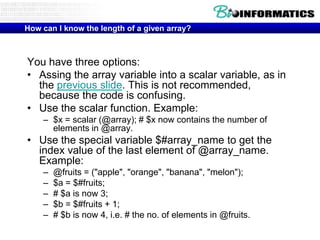
How can I know the length of a given array?

You have three options:
• Assing the array variable into a scalar variable, as in
the previous slide. This is not recommended,
because the code is confusing.
• Use the scalar function. Example:
– $x = scalar (@array); # $x now contains the number of
elements in @array.

• Use the special variable $#array_name to get the
index value of the last element of @array_name.
Example:
–
–
–
–
–

@fruits = ("apple", "orange", "banana", "melon");
$a = $#fruits;
# $a is now 3;
$b = $#fruits + 1;
# $b is now 4, i.e. # the no. of elements in @fruits.
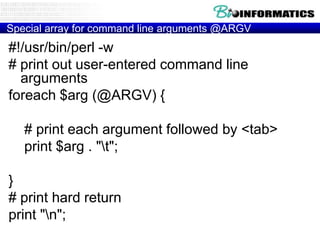
Special array for command line arguments @ARGV

#!/usr/bin/perl -w
# print out user-entered command line
arguments
foreach $arg (@ARGV) {
# print each argument followed by <tab>
print $arg . "t";
}
# print hard return
print "n";
Perl Array review
• An array is designated with the ‘@’ sign
• An array is a list of individual elements
• Arrays are ordered
– Your list stays in the same order that you created it, although
you can add or subtract elements to the front or back of the
list

• You access array elements by number, using the
special syntax:
– $array[1]
returns the „1th‟ element of the array (remember
perl starts counting at zero)

• You can do anything with an array element that
you can do with a scalar variable (addition,
subtraction, printing … whatever)
Generate random string

for($n=1;$n<=50;$n++){

@a = ("A","C","G","T");
$b=$a[rand(@a)];
$r.=$b;
}
print $r;
Text Processing Functions
The split function
• The split function splits a string to a list of substrings according to the
positions of a given delimiter. The delimiter is written as a pattern
enclosed by slashes: /PATTERN/. Examples:
• $string = "programming::course::for::bioinformatics";
• @list = split (/::/, $string);
• # @list is now ("programming", "course", "for", "bioinformatics") # $string
remains unchanged.
• $string = "protein kinase Ct450 Kilodaltonst120 Kilobases";
• @list = split (/t/, $string); #t indicates tab #
• @list is now ("protein kinase C", "450 Kilodaltons", "120 Kilobases")
Text Processing Functions
The join function
• The join function does the opposite of split. It receives a delimiter and a
list of strings, and joins the strings into a single string, such that they are
separated by the delimiter.
• Note that the delimiter is written inside quotes.
• Examples:
• @list = ("programming", "course", "for", "bioinformatics");
• $string = join ("::", @list);
• # $string is now "programming::course::for::bioinformatics"
• $name = "protein kinase C"; $mol_weight = "450 Kilodaltons";
$seq_length = "120 Kilobases";
• $string = join ("t", $name, $mol_weight, $seq_length);
• # $string is now: # "protein kinase Ct450 Kilodaltonst120 Kilobases"
Three Basic Data Types

• Scalars - $
• Arrays of scalars - @
• Associative arrays of scalers or
Hashes - %
When is an array not good enough?

• Sometimes you want to associate a given
value with another value. (name/value pairs)
(Rob => 353-7236, Matt => 353-7122,
Joe_anonymous => 555-1212)
(Acc#1 => sequence1, Acc#2 => sequence2, Acc#n
=> sequence-n)

• You could put this information into an array,
but it would be difficult to keep your names
and values together (what happens when you
sort? Yuck)
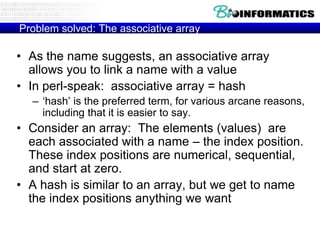
Problem solved: The associative array

• As the name suggests, an associative array
allows you to link a name with a value
• In perl-speak: associative array = hash
– „hash‟ is the preferred term, for various arcane reasons,
including that it is easier to say.

• Consider an array: The elements (values) are
each associated with a name – the index position.
These index positions are numerical, sequential,
and start at zero.
• A hash is similar to an array, but we get to name
the index positions anything we want
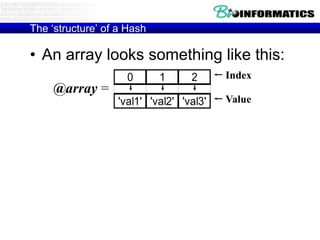
The „structure‟ of a Hash

• An array looks something like this:
@array =

0

1

2

'val1' 'val2' 'val3'

Index
Value
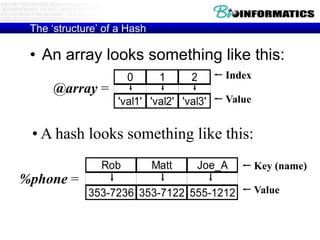
The „structure‟ of a Hash

• An array looks something like this:
0

@array =

1

2

'val1' 'val2' 'val3'

Index
Value

• A hash looks something like this:
Rob

Matt

Joe_A

%phone =
353-7236 353-7122 555-1212

Key (name)

Value
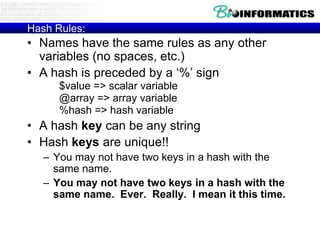
Hash Rules:

• Names have the same rules as any other
variables (no spaces, etc.)
• A hash is preceded by a „%‟ sign
$value => scalar variable
@array => array variable
%hash => hash variable

• A hash key can be any string
• Hash keys are unique!!
– You may not have two keys in a hash with the
same name.
– You may not have two keys in a hash with the
same name. Ever. Really. I mean it this time.
Creating a hash

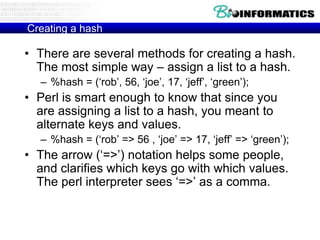
• There are several methods for creating a hash.
The most simple way – assign a list to a hash.
– %hash = („rob‟, 56, „joe‟, 17, „jeff‟, „green‟);

• Perl is smart enough to know that since you
are assigning a list to a hash, you meant to
alternate keys and values.
– %hash = („rob‟ => 56 , „joe‟ => 17, „jeff‟ => „green‟);

• The arrow („=>‟) notation helps some people,
and clarifies which keys go with which values.
The perl interpreter sees „=>‟ as a comma.
Getting at values

• You should expect by now that there is some
way to get at a value, given a key.
• You access a hash key like this:
– $hash{„key‟}

• This should look somewhat familiar
– $array[21] : refer to a value associated with a
specific index position in an array
– $hash{key} : refer to a value associated with a
specific key in a hash
Getting at values, continued

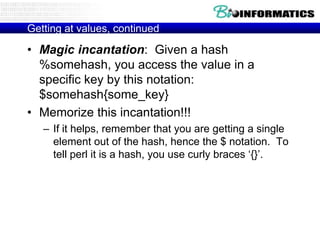
• Magic incantation: Given a hash
%somehash, you access the value in a
specific key by this notation:
$somehash{some_key}
• Memorize this incantation!!!
– If it helps, remember that you are getting a single
element out of the hash, hence the $ notation. To
tell perl it is a hash, you use curly braces „{}‟.
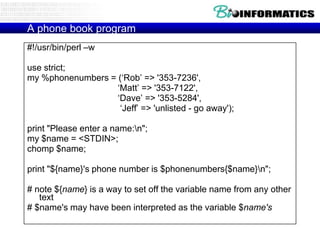
A phone book program
#!/usr/bin/perl –w
use strict;
my %phonenumbers = („Rob‟ => '353-7236',
„Matt‟ => '353-7122',
„Dave‟ => '353-5284',
„Jeff‟ => 'unlisted - go away');
print "Please enter a name:n";
my $name = <STDIN>;
chomp $name;
print "${name}'s phone number is $phonenumbers{$name}n";

# note ${name} is a way to set off the variable name from any other
text
# $name's may have been interpreted as the variable $name's
Count unique things with a hash

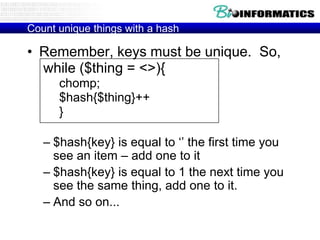
• Remember, keys must be unique. So,
while ($thing = <>){
chomp;
$hash{$thing}++
}
– $hash{key} is equal to „‟ the first time you
see an item – add one to it
– $hash{key} is equal to 1 the next time you
see the same thing, add one to it.
– And so on...
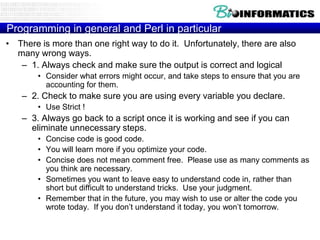
Printing a Hash

• Of course there is a way to print a hash.
It isn‟t as easy as printing an array:
– print @array; orprint “@array”;
– There is no equivalent print %hash;

• We must visit each key and print its
associated value. Sounds like a job for
a loop...
Printing a hash (continued)

• First, create a list of keys. Fortunately, there is
a function for that:
– keys %hash (returns a list of keys)

• Next, visit each key and print its associated
value:
foreach (keys %hash){
print “The key $_ has the value $hash{$_}n”;
}

• One complication. Hashes do not maintain any
sort of order. In other words, if you put
key/value pairs into a hash in a particular
order, you will not get them out in that order!!
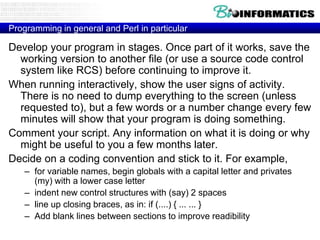
Programming in general and Perl in particular
• There is more than one right way to do it. Unfortunately, there are also
many wrong ways.
– 1. Always check and make sure the output is correct and logical
• Consider what errors might occur, and take steps to ensure that you are
accounting for them.

– 2. Check to make sure you are using every variable you declare.
• Use Strict !

– 3. Always go back to a script once it is working and see if you can
eliminate unnecessary steps.
• Concise code is good code.
• You will learn more if you optimize your code.
• Concise does not mean comment free. Please use as many comments as
you think are necessary.
• Sometimes you want to leave easy to understand code in, rather than
short but difficult to understand tricks. Use your judgment.
• Remember that in the future, you may wish to use or alter the code you
wrote today. If you don‟t understand it today, you won‟t tomorrow.
Programming in general and Perl in particular

Develop your program in stages. Once part of it works, save the
working version to another file (or use a source code control
system like RCS) before continuing to improve it.
When running interactively, show the user signs of activity.
There is no need to dump everything to the screen (unless
requested to), but a few words or a number change every few
minutes will show that your program is doing something.
Comment your script. Any information on what it is doing or why
might be useful to you a few months later.
Decide on a coding convention and stick to it. For example,
– for variable names, begin globals with a capital letter and privates
(my) with a lower case letter
– indent new control structures with (say) 2 spaces
– line up closing braces, as in: if (....) { ... ... }
– Add blank lines between sections to improve readibility
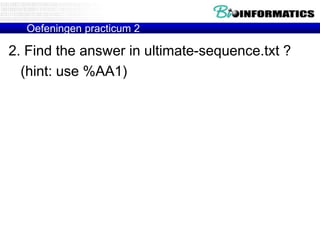
Oefeningen practicum 2

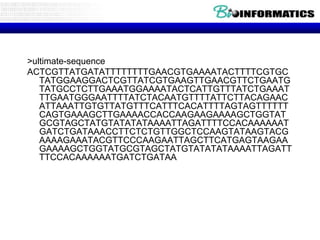
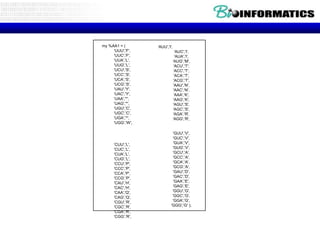
2. Find the answer in ultimate-sequence.txt ?
(hint: use %AA1)
>ultimate-sequence
ACTCGTTATGATATTTTTTTTGAACGTGAAAATACTTTTCGTGC
TATGGAAGGACTCGTTATCGTGAAGTTGAACGTTCTGAATG
TATGCCTCTTGAAATGGAAAATACTCATTGTTTATCTGAAAT
TTGAATGGGAATTTTATCTACAATGTTTTATTCTTACAGAAC
ATTAAATTGTGTTATGTTTCATTTCACATTTTAGTAGTTTTTT
CAGTGAAAGCTTGAAAACCACCAAGAAGAAAAGCTGGTAT
GCGTAGCTATGTATATATAAAATTAGATTTTCCACAAAAAAT
GATCTGATAAACCTTCTCTGTTGGCTCCAAGTATAAGTACG
AAAAGAAATACGTTCCCAAGAATTAGCTTCATGAGTAAGAA
GAAAAGCTGGTATGCGTAGCTATGTATATATAAAATTAGATT
TTCCACAAAAAATGATCTGATAA
my %AA1 = (
'UUU','F',
'UUC','F',
'UUA','L',
'UUG','L',
'UCU','S',
'UCC','S',
'UCA','S',
'UCG','S',
'UAU','Y',
'UAC','Y',
'UAA','*',
'UAG','*',
'UGU','C',
'UGC','C',
'UGA','*',
'UGG','W',

'CUU','L',
'CUC','L',
'CUA','L',
'CUG','L',
'CCU','P',
'CCC','P',
'CCA','P',
'CCG','P',
'CAU','H',
'CAC','H',
'CAA','Q',
'CAG','Q',
'CGU','R',
'CGC','R',
'CGA','R',
'CGG','R',

'AUU','I',
'AUC','I',
'AUA','I',
'AUG','M',
'ACU','T',
'ACC','T',
'ACA','T',
'ACG','T',
'AAU','N',
'AAC','N',
'AAA','K',
'AAG','K',
'AGU','S',
'AGC','S',
'AGA','R',
'AGG','R',

'GUU','V',
'GUC','V',
'GUA','V',
'GUG','V',
'GCU','A',
'GCC','A',
'GCA','A',
'GCG','A',
'GAU','D',
'GAC','D',
'GAA','E',
'GAG','E',
'GGU','G',
'GGC','G',
'GGA','G',
'GGG','G' );
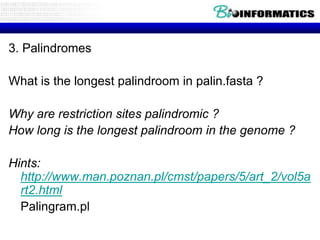
3. Palindromes

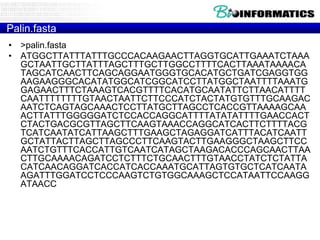
What is the longest palindroom in palin.fasta ?
Why are restriction sites palindromic ?
How long is the longest palindroom in the genome ?
Hints:
http://www.man.poznan.pl/cmst/papers/5/art_2/vol5a
rt2.html
Palingram.pl
Palin.fasta
• >palin.fasta
• ATGGCTTATTTATTTGCCCACAAGAACTTAGGTGCATTGAAATCTAAA
GCTAATTGCTTATTTAGCTTTGCTTGGCCTTTTCACTTAAATAAAACA
TAGCATCAACTTCAGCAGGAATGGGTGCACATGCTGATCGAGGTGG
AAGAAGGGCACATATGGCATCGGCATCCTTATGGCTAATTTTAAATG
GAGAACTTTCTAAAGTCACGTTTTCACATGCAATATTCTTAACATTTT
CAATTTTTTTTGTAACTAATTCTTCCCATCTACTATGTGTTTGCAAGAC
AATCTCAGTAGCAAACTCCTTATGCTTAGCCTCACCGTTAAAAGCAA
ACTTATTTGGGGGATCTCCACCAGGCATTTTATATATTTTGAACCACT
CTACTGACGCGTTAGCTTCAAGTAAACCAGGCATCACTTCTTTTACG
TCATCAATATCATTAAGCTTTGAAGCTAGAGGATCATTTACATCAATT
GCTATTACTTAGCTTAGCCCTTCAAGTACTTGAAGGGCTAAGCTTCC
AATCTGTTTCACCATTGTCAATCATAGCTAAGACACCCAGCAACTTAA
CTTGCAAAACAGATCCTCTTTCTGCAACTTTGTAACCTATCTCTATTA
CATCAACAGGATCACCATCACCAAATGCATTAGTGTGCTCATCAATA
AGATTTGGATCCTCCCAAGTCTGTGGCAAAGCTCCATAATTCCAAGG
ATAACC
Palingram.pl
#!E:perlbinperl -w
$line_input = "edellede parterretrap trap op sirenes en er is popart test";
$line_input =~ s/s//g;
$l = length($line_input);
for ($m = 0;$m<=$l-1;$m++)
{
$line = substr($line_input,$m);
print "length=$m:$lt".$line."n";
for $n (8..25)
{
print "Set van palingramn";
$re = qr /[a-z]{$n}/;
while(($key, $value) = each
print "pattern ($n) = $ren";
$regexes[$n-8] = $re;
{
}
print "$key => $valuen";
foreach (@regexes)
{
}
while ($line =~ m/$_/g)
{
$endline = $';
$match = $&;
$all = $match.$endline;
$revmatch = reverse($match);
if ($all =~ /^($revmatch)/)
{
$palindrome = $revmatch . "*" . $1 ;
$palhash{$palindrome}++;
}
}
}
}

(%palhash))

Bioinformatics p2-p3-perl-regexes v2013-wim_vancriekinge

  • 2.
  • 3.
    Practicum Bioinformatica • PracticumPC Zaal D – 9u00 – 11u30 • Recap - Installeren en werken met TextPad • Regex • Arrays/hashes
  • 4.
    Programming • Variables • Flowcontrol (if, regex …) • Loops • input/output • Subroutines/object
  • 5.
    Three Basic DataTypes • Scalars - $ • Arrays of scalars - @ • Associative arrays of scalers or Hashes - %
  • 6.
    Customize textpad part1: Create Document Class
  • 7.
  • 8.
    Customize textpad part2: Add Perl to “Tools Menu”
  • 9.
    • Syntax highlighting •Run program (prompt for parameters) • Show line numbers • Clip-ons for web with perl syntax • ….
  • 10.
    Unzip to textpadsamples directory
  • 11.
    Bereken Pi aande hand van twee random getallen y x 1
  • 12.
    Introduction Buffon's Needle isone of the oldest problems in the field of geometrical probability. It was first stated in 1777. It involves dropping a needle on a lined sheet of paper and determining the probability of the needle crossing one of the lines on the page. The remarkable result is that the probability is directly related to the value of pi. http://www.angelfire.com/wa/hurben/buff.html In Postscript you send it too the printer … PS has no variables but “stacks”, you can mimick this in Perl by recursively loading and rewriting a subroutine
  • 13.
  • 14.
    Two brief diversions(warnings & strict) • Use warnings; • Use strict; • strict – forces you to „declare‟ a variable the first time you use it. – usage: use strict; (somewhere near the top of your script) • declare variables with „my‟ – usage: my $variable; – or: my $variable = „value‟; • my sets the „scope‟ of the variable. Variable exists only within the current block of code • use strict and my both help you to debug errors, and help prevent mistakes.
  • 15.
    Practicum Bioinformatica • PracticumPC Zaal D – 8u30 – 11u30 • • • • Recap Installeren en werken met TextPad Regex Arrays/hashes
  • 16.
    What is aregular expression? • A regular expression (regex) is simply a way of describing text. • Regular expressions are built up of small units (atoms) which can represent the type and number of characters in the text • Regular expressions can be very broad (describing everything), or very narrow (describing only one pattern).
  • 17.
    Why would youuse a regex? • Often you wish to test a string for the presence of a specific character, word, or phrase – Examples • “Are there any letter characters in my string?” • “Is this a valid accession number?” • “Does my sequence contain a start codon (ATG)?”
  • 18.
    Regular Expressions Match toa sequence of characters The EcoRI restriction enzyme cuts at the consensus sequence GAATTC. To find out whether a sequence contains a restriction site for EcoR1, write; if ($sequence =~ /GAATTC/) { ... };
  • 19.
  • 20.
    Regular Expressions Match toa character class • Example • The BstYI restriction enzyme cuts at the consensus sequence rGATCy, namely A or G in the first position, then GATC, and then T or C. To find out whether a sequence contains a restriction site for BstYI, write; • if ($sequence =~ /[AG]GATC[TC]/) {...}; # This will match all of AGATCT, GGATCT, AGATCC, GGATCC. Definition • When a list of characters is enclosed in square brackets [], one and only one of these characters must be present at the corresponding position of the string in order for the pattern to match. You may specify a range of characters using a hyphen -. • A caret ^ at the front of the list negates the character class. Examples • if ($string =~ /[AGTC]/) {...}; # matches any nucleotide • if ($string =~ /[a-z]/) {...}; # matches any lowercase letter • if ($string =~ /chromosome[1-6]/) {...}; # matches chromosome1, chromosome2 ... chromosome6 • if ($string =~ /[^xyzXYZ]/) {...}; # matches any character except x, X, y, Y, z, Z
  • 21.
    Constructing a Regex •Pattern starts and ends with a / /pattern/ – if you want to match a /, you need to escape it • / (backslash, forward slash) – you can change the delimiter to some other character, but you probably won‟t need to • m|pattern| • any „modifiers‟ to the pattern go after the last / • • • • i : case insensitive /[a-z]/i o : compile once g : match in list context (global) m or s : match over multiple lines
  • 22.
    Looking for apattern • By default, a regular expression is applied to $_ (the default variable) – if (/a+/) {die} • looks for one or more „a‟ in $_ • If you want to look for the pattern in any other variable, you must use the bind operator – if ($value =~ /a+/) {die} • looks for one or more „a‟ in $value • The bind operator is in no way similar to the „=„ sign!! = is assignment, =~ is bind. – if ($value = /[a-z]/) {die} • Looks for one or more „a‟ in $_, not $value!!!
  • 23.
    Regular Expression Atoms •An „atom‟ is the smallest unit of a regular expression. • Character atoms • • • • 0-9, a-Z match themselves . (dot) matches everything [atgcATGC] : A character class (group) [a-z] : another character class, a through z
  • 24.
    More atoms • • • • • • d -All Digits D - Any non-Digit s - Any Whitespace (s, t, n) S - Any non-Whitespace w - Any Word character [a-zA-Z_0-9] W - Any non-Word character
  • 25.
    An example • ifyour pattern is /ddd-dddd/ – You could match • 555-1212 • 5512-12222 • 555-5155-55 – But not: • 55-1212 • 555-121 • 555j-5555
  • 26.
    Quantifiers • You canspecify the number of times you want to see an atom. Examples • • • • d* : Zero or more times d+ : One or more times d{3} : Exactly three times d{4,7} : At least four, and not more than seven • d{3,} : Three or more times • We could rewrite /ddd-dddd/ as: – /d{3}-d{4}/
  • 27.
    Anchors • Anchors forcea pattern match to a certain location • ^ : start matching at beginning of string • $ : start matching at end of string • b : match at word boundary (between w and W) • Example: • /^ddd-dddd$/ : matches only valid phone numbers
  • 28.
    Grouping • You cangroup atoms together with parentheses • /cat+/ matches cat, catt, cattt • /(cat)+/ matches cat, catcat, catcatcat • Use as many sets of parentheses as you need
  • 29.
    Alternation • You canspecify patterns which match either one thing or another. – /cat|dog/ matches either „cat‟ or „dog‟ – /ca(t|d)og/ matches either „catog‟ or „cadog‟
  • 30.
    Variable interpolation • Youcan put variables into your pattern. – if $string = „cat‟ • /$string/ matches „cat‟ • /$string+/ matches „cat‟, „catcat‟, etc. • /d{2}$string+/ matches „12cat‟, „24catcat‟, etc.
  • 31.
    Regular Expression Review •A regular expression (regex) is a way of describing text. • Regular expressions are built up of small units (atoms) which can represent the type and number of characters in the text • You can group or quantify atoms to describe your pattern • Always use the bind operator (=~) to apply your regular expression to a variable
  • 32.
    Remembering Stuff • Beingable to match patterns is good, but limited. • We want to be able to keep portions of the regular expression for later. – Example: $string = „phone: 353-7236‟ • We want to keep the phone number only • Just figuring out that the string contains a phone number is insufficient, we need to keep the number as well.
  • 33.
    Memory Parentheses (patternmemory) • Since we almost always want to keep portions of the string we have matched, there is a mechanism built into perl. • Anything in parentheses within the regular expression is kept in memory. – „phone:353-7236‟ =~ /^phone:(.+)$/; • Perl knows we want to keep everything that matches „.+‟ in the above pattern
  • 34.
    Getting at patternmemory • Perl stores the matches in a series of default variables. The first parentheses set goes into $1, second into $2, etc. – This is why we can‟t name variables ${digit} – Memory variables are created only in the amounts needed. If you have three sets of parentheses, you have ($1,$2,$3). – Memory variables are created for each matched set of parentheses. If you have one set contained within another set, you get two variables (inner set gets lowest number) – Memory variables are only valid in the current scope
  • 35.
    An example ofpattern memory my $string = shift; if ($string =~ /^phone:(d{3}-d{4})$/){ $phone_number = $1; } else { print “Enter a phone number!n” }
  • 36.
    Finding all instancesof a match • Use the „g‟ modifier to the regular expression – @sites = $sequence =~ /(TATTA)/g; – think g for global – Returns a list of all the matches (in order), and stores them in the array – If you have more than one pair of parentheses, your array gets values in sets • ($1,$2,$3,$1,$2,$3...)
  • 37.
    Perl is Greedy •In addition to taking all your time, perl regular expressions also try to match the largest possible string which fits your pattern – /ga+t/ matches gat, gaat, gaaat – „Doh! No doughnuts left!‟ =~ /(d.+t)/ • $1 contains „doughnuts left‟ • If this is not what you wanted to do, use the „?‟ modifier – /(d.+?t)/ # match as few „.‟s as you can and still make the pattern work
  • 38.
    Substitute function • s/pattern1/pattern2/; •Looks kind of like a regular expression – Patterns constructed the same way • Inherited from previous languages, so it can be a bit different. – Changes the variable it is bound to!
  • 39.
    Using s • Substitutingone word for another – $string =~ s/dogs/cats/; • If $string was “I love dogs”, it is now “I love cats” • Removing trailing white space – $string =~ s/s+$//; • If $string was „ATG „, it is now „ATG‟ • Adding 10 to every number in a string – $string =~ /(d+)/$1+10/ge; • If string was “I bought 5 dogs at 2 bucks each”, it is now: – “I bought 15 dogs at 12 bucks each” • Note pattern memory!! • g means global (just like a regex) • e is special to s, evaluate the expression on the right
  • 40.
  • 41.
    tr function • translateor transliterate • tr/characterlist1/characterlist2/; • Even less like a regular expression than s • substitutes characters in the first list with characters in the second list $string =~tr/a/A/; # changes every „a‟ to an „A‟ – No need for the g modifier when using tr.
  • 42.
  • 43.
    Using tr • Creatingcomplimentary DNA sequence – $sequence =~ tr/atgc/TACG/; • Sneaky Perl trick for the day – tr does two things. • 1. changes characters in the bound variable • 2. Counts the number of times it does this – Super-fast character counter™ • $a_count = $sequence =~ tr/a/a/; • replaces an „a‟ with an „a‟ (no net change), and assigns the result (number of substitutions) to $a_count
  • 44.
    • Regex-Related SpecialVariables • Perl has a host of special variables that get filled after every m// or s/// regex match. $1, $2, $3, etc. hold the backreferences. $+ holds the last (highest-numbered) backreference. $&(dollar ampersand) holds the entire regex match. • @- is an array of match-start indices into the string. $-[0] holds the start of the entire regex match, $-[1] the start of the first backreference, etc. Likewise, @+ holds match-end indices (ends, not lengths). • $' (dollar followed by an apostrophe or single quote) holds the part of the string after (to the right of) the regex match. $` (dollar backtick) holds the part of the string before (to the left of) the regex match. Using these variables is not recommended in scripts when performance matters, as it causes Perl to slow down all regex matches in your entire script. • All these variables are read-only, and persist until the next regex match is attempted. They are dynamically scoped, as if they had an implicit 'local' at the start of the enclosing scope. Thus if you do a regex match, and call a sub that does a regex match, when that sub returns, your variables are still set as they were for the first match.
  • 45.
    • Finding AllMatches In a String • The "/g" modifier can be used to process all regex matches in a string. The first m/regex/g will find the first match, the second m/regex/g the second match, etc. The location in the string where the next match attempt will begin is automatically remembered by Perl, separately for each string. Here is an example: • while ($string =~ m/regex/g) { print "Found '$&'. Next attempt at character " . pos($string)+1 . "n"; } The pos() function retrieves the position where the next attempt begins. The first character in the string has position zero. You can modify this position by using the function as the left side of an assignment, like in pos($string) = 123;.
  • 46.
    Regex • O‟Reilly book:Mastering regular expressions (2nd edition) • Regular Expressions Tutorial • http://www.regularexpressions.info/examples.html
  • 47.
    Oefeningen practicum 2 1.Which of following 4 sequences (seq1/2/3/4) a) contains a “Galactokinase signature” http://us.expasy.org/prosite/ b) How many of them? c) Where (hints:pos and $&) ?
  • 48.
    >SEQ1 MGNLFENCTHRYSFEYIYENCTNTTNQCGLIRNVASSIDVFHWLDVYISTTIFVISGILNFYCLFIALYT YYFLDNETRKHYVFVLSRFLSSILVIISLLVLESTLFSESLSPTFAYYAVAFSIYDFSMDTLFFSYIMIS LITYFGVVHYNFYRRHVSLRSLYIILISMWTFSLAIAIPLGLYEAASNSQGPIKCDLSYCGKVVEWITCS LQGCDSFYNANELLVQSIISSVETLVGSLVFLTDPLINIFFDKNISKMVKLQLTLGKWFIALYRFLFQMT NIFENCSTHYSFEKNLQKCVNASNPCQLLQKMNTAHSLMIWMGFYIPSAMCFLAVLVDTYCLLVTISILK SLKKQSRKQYIFGRANIIGEHNDYVVVRLSAAILIALCIIIIQSTYFIDIPFRDTFAFFAVLFIIYDFSILSLLGSFTGVAM MTYFGVMRPLVYRDKFTLKTIYIIAFAIVLFSVCVAIPFGLFQAADEIDGPIKCDSESCELIVKWLLFCI ACLILMGCTGTLLFVTVSLHWHSYKSKKMGNVSSSAFNHGKSRLTWTTTILVILCCVELIPTGLLAAFGK SESISDDCYDFYNANSLIFPAIVSSLETFLGSITFLLDPIINFSFDKRISKVFSSQVSMFSIFFCGKR >SEQ2 MLDDRARMEA AKKEKVEQIL AEFQLQEEDLKKVMRRMQKE MDRGLRLETH EEASVKMLPT YVRSTPEGSE VGDFLSLDLG GTNFRVMLVK VGEGEEGQWS VKTKHQMYSI PEDAMTGTAE MLFDYISECI SDFLDKHQMK HKKLPLGFTF SFPVRHEDID KGILLNWTKG FKASGAEGNN VVGLLRDAIK RRGDFEMDVV AMVNDTVATM ISCYYEDHQC EVGMIVGTGC NACYMEEMQN VELVEGDEGR MCVNTEWGAF GDSGELDEFL LEYDRLVDES SANPGQQLYE KLIGGKYMGE LVRLVLLRLV DENLLFHGEA SEQLRTRGAF ETRFVSQVES DTGDRKQIYN ILSTLGLRPS TTDCDIVRRA CESVSTRAAH MCSAGLAGVI NRMRESRSED VMRITVGVDG SVYKLHPSFK ERFHASVRRL TPSCEITFIE SEEGSGRGAA LVSAVACKKA CMLGQ >SEQ3 MESDSFEDFLKGEDFSNYSYSSDLPPFLLDAAPCEPESLEINKYFVVIIYVLVFLLSLLGNSLVMLVILY SRVGRSGRDNVIGDHVDYVTDVYLLNLALADLLFALTLPIWAASKVTGWIFGTFLCKVVSLLKEVNFYSGILLLACISVDRY LAIVHATRTLTQKRYLVKFICLSIWGLSLLLALPVLIFRKTIYPPYVSPVCYEDMGNNTANWRMLLRILP QSFGFIVPLLIMLFCYGFTLRTLFKAHMGQKHRAMRVIFAVVLIFLLCWLPYNLVLLADTLMRTWVIQET CERRNDIDRALEATEILGILGRVNLIGEHWDYHSCLNPLIYAFIGQKFRHGLLKILAIHGLISKDSLPKDSRPSFVGSSSGH TSTTL >SEQ4 MEANFQQAVK KLVNDFEYPT ESLREAVKEF DELRQKGLQK NGEVLAMAPA FISTLPTGAE TGDFLALDFG GTNLRVCWIQ LLGDGKYEMK HSKSVLPREC VRNESVKPII DFMSDHVELF IKEHFPSKFG CPEEEYLPMG FTFSYPANQV SITESYLLRW TKGLNIPEAI NKDFAQFLTE GFKARNLPIR IEAVINDTVG TLVTRAYTSK ESDTFMGIIF GTGTNGAYVE QMNQIPKLAG KCTGDHMLIN MEWGATDFSC LHSTRYDLLL DHDTPNAGRQ IFEKRVGGMY LGELFRRALF HLIKVYNFNE GIFPPSITDA WSLETSVLSR MMVERSAENV RNVLSTFKFR FRSDEEALYL WDAAHAIGRR AARMSAVPIA SLYLSTGRAG KKSDVGVDGS LVEHYPHFVD MLREALRELI GDNEKLISIG IAKDGSGIGA ALCALQAVKE KKGLA MEANFQQAVK KLVNDFEYPT ESLREAVKEF DELRQKGLQK NGEVLAMAPA FISTLPTGAE TGDFLALDFG GTNLRVCWIQ LLGDGKYEMK HSKSVLPREC VRNESVKPII DFMSDHVELF IKEHFPSKFG CPEEEYLPMG FTFSYPANQV SITESYLLRW TKGLNIPEAI NKDFAQFLTE GFKARNLPIR IEAVINDTVG TLVTRAYTSK ESDTFMGIIF GTGTNGAYVE QMNQIPKLAG KCTGDHMLIN MEWGATDFSC LHSTRYDLLL DHDTPNAGRQ IFEKRVGGMY LGELFRRALF HLIKVYNFNE GIFPPSITDA WSLETSVLSR MMVERSAENV RNVLSTFKFR FRSDEEALYL WDAAHAIGRR AARMSAVPIA SLYLSTGRAG KKSDVGVDGS LVEHYPHFVD MLREALRELI GDNEKLISIG IAKDGSGIGA ALCALQAVKE KKGLA
  • 50.
    Three Basic DataTypes • Scalars - $ • Arrays of scalars - @ • Associative arrays of scalers or Hashes - %
  • 51.
    Arrays Definitions • A scalarvariable contains a scalar value: one number or one string. A string might contain many words, but Perl regards it as one unit. • An array variable contains a list of scalar data: a list of numbers or a list of strings or a mixed list of numbers and strings. The order of elements in the list matters. Syntax • Array variable names start with an @ sign. • You may use in the same program a variable named $var and another variable named @var, and they will mean two different, unrelated things. Example • Assume we have a list of numbers which were obtained as a result of some measurement. We can store this list in an array variable as the following: • @msr = (3, 2, 5, 9, 7, 13, 16);
  • 52.
    The foreach construct Theforeach construct iterates over a list of scalar values (e.g. that are contained in an array) and executes a block of code for each of the values. • Example: – – – – – foreach $i (@some_array) { statement_1; statement_2; statement_3; } Each element in @some_array is aliased to the variable $i in turn, and the block of code inside the curly brackets {} is executed once for each element. • The variable $i (or give it any other name you wish) is local to the foreach loop and regains its former value upon exiting of the loop. • Remark $_
  • 53.
    Examples for usingthe foreach construct - cont. • Calculate sum of all array elements: #!/usr/local/bin/perl @msr = (3, 2, 5, 9, 7, 13, 16); $sum = 0; foreach $i (@msr) { $sum += $i; } print "sum is: $sumn";
  • 54.
    Accessing individual arrayelements Individual array elements may be accessed by indicating their position in the list (their index). Example: @msr = (3, 2, 5, 9, 7, 13, 16); indexvalue 0 3 1 2 2 5 3 9 4 7 5 13 6 16 First element: $msr[0] (here has the value of 3), Third element: $msr[2] (here has the value of 5), and so on.
  • 55.
    The sort function Thesort function receives a list of variables (or an array) and returns the sorted list. @array2 = sort (@array1); #!/usr/local/bin/perl @countries = ("Israel", "Norway", "France", "Argentina"); @sorted_countries = sort ( @countries); print "ORIG: @countriesn", "SORTED: @sorted_countriesn"; Output: ORIG: Israel Norway France Argentina SORTED: Argentina France Israel Norway #!/usr/local/bin/perl @numbers = (1 ,2, 4, 16, 18, 32, 64); @sorted_num = sort (@numbers); print "ORIG: @numbers n", "SORTED: @sorted_num n"; Output: ORIG: 1 2 4 16 18 32 64 SORTED: 1 16 18 2 32 4 64 Note that sorting numbers does not happen numerically, but by the string values of each number.
  • 56.
    The push andshift functions The push function adds a variable or a list of variables to the end of a given array. Example: $a = 5; $b = 7; @array = ("David", "John", "Gadi"); push (@array, $a, $b); # @array is now ("David", "John", "Gadi", 5, 7) The shift function removes the first element of a given array and returns this element. Example: @array = ("David", "John", "Gadi"); $k = shift (@array); # @array is now ("John", "Gadi"); # $k is now "David" Note that after both the push and shift operations the given array @array is changed!
  • 57.
    How can Iknow the length of a given array? You have three options: • Assing the array variable into a scalar variable, as in the previous slide. This is not recommended, because the code is confusing. • Use the scalar function. Example: – $x = scalar (@array); # $x now contains the number of elements in @array. • Use the special variable $#array_name to get the index value of the last element of @array_name. Example: – – – – – @fruits = ("apple", "orange", "banana", "melon"); $a = $#fruits; # $a is now 3; $b = $#fruits + 1; # $b is now 4, i.e. # the no. of elements in @fruits.
  • 58.
    Special array forcommand line arguments @ARGV #!/usr/bin/perl -w # print out user-entered command line arguments foreach $arg (@ARGV) { # print each argument followed by <tab> print $arg . "t"; } # print hard return print "n";
  • 59.
    Perl Array review •An array is designated with the ‘@’ sign • An array is a list of individual elements • Arrays are ordered – Your list stays in the same order that you created it, although you can add or subtract elements to the front or back of the list • You access array elements by number, using the special syntax: – $array[1] returns the „1th‟ element of the array (remember perl starts counting at zero) • You can do anything with an array element that you can do with a scalar variable (addition, subtraction, printing … whatever)
  • 60.
    Generate random string for($n=1;$n<=50;$n++){ @a= ("A","C","G","T"); $b=$a[rand(@a)]; $r.=$b; } print $r;
  • 61.
    Text Processing Functions Thesplit function • The split function splits a string to a list of substrings according to the positions of a given delimiter. The delimiter is written as a pattern enclosed by slashes: /PATTERN/. Examples: • $string = "programming::course::for::bioinformatics"; • @list = split (/::/, $string); • # @list is now ("programming", "course", "for", "bioinformatics") # $string remains unchanged. • $string = "protein kinase Ct450 Kilodaltonst120 Kilobases"; • @list = split (/t/, $string); #t indicates tab # • @list is now ("protein kinase C", "450 Kilodaltons", "120 Kilobases")
  • 62.
    Text Processing Functions Thejoin function • The join function does the opposite of split. It receives a delimiter and a list of strings, and joins the strings into a single string, such that they are separated by the delimiter. • Note that the delimiter is written inside quotes. • Examples: • @list = ("programming", "course", "for", "bioinformatics"); • $string = join ("::", @list); • # $string is now "programming::course::for::bioinformatics" • $name = "protein kinase C"; $mol_weight = "450 Kilodaltons"; $seq_length = "120 Kilobases"; • $string = join ("t", $name, $mol_weight, $seq_length); • # $string is now: # "protein kinase Ct450 Kilodaltonst120 Kilobases"
  • 63.
    Three Basic DataTypes • Scalars - $ • Arrays of scalars - @ • Associative arrays of scalers or Hashes - %
  • 64.
    When is anarray not good enough? • Sometimes you want to associate a given value with another value. (name/value pairs) (Rob => 353-7236, Matt => 353-7122, Joe_anonymous => 555-1212) (Acc#1 => sequence1, Acc#2 => sequence2, Acc#n => sequence-n) • You could put this information into an array, but it would be difficult to keep your names and values together (what happens when you sort? Yuck)
  • 65.
    Problem solved: Theassociative array • As the name suggests, an associative array allows you to link a name with a value • In perl-speak: associative array = hash – „hash‟ is the preferred term, for various arcane reasons, including that it is easier to say. • Consider an array: The elements (values) are each associated with a name – the index position. These index positions are numerical, sequential, and start at zero. • A hash is similar to an array, but we get to name the index positions anything we want
  • 66.
    The „structure‟ ofa Hash • An array looks something like this: @array = 0 1 2 'val1' 'val2' 'val3' Index Value
  • 67.
    The „structure‟ ofa Hash • An array looks something like this: 0 @array = 1 2 'val1' 'val2' 'val3' Index Value • A hash looks something like this: Rob Matt Joe_A %phone = 353-7236 353-7122 555-1212 Key (name) Value
  • 68.
    Hash Rules: • Nameshave the same rules as any other variables (no spaces, etc.) • A hash is preceded by a „%‟ sign $value => scalar variable @array => array variable %hash => hash variable • A hash key can be any string • Hash keys are unique!! – You may not have two keys in a hash with the same name. – You may not have two keys in a hash with the same name. Ever. Really. I mean it this time.
  • 69.
    Creating a hash •There are several methods for creating a hash. The most simple way – assign a list to a hash. – %hash = („rob‟, 56, „joe‟, 17, „jeff‟, „green‟); • Perl is smart enough to know that since you are assigning a list to a hash, you meant to alternate keys and values. – %hash = („rob‟ => 56 , „joe‟ => 17, „jeff‟ => „green‟); • The arrow („=>‟) notation helps some people, and clarifies which keys go with which values. The perl interpreter sees „=>‟ as a comma.
  • 70.
    Getting at values •You should expect by now that there is some way to get at a value, given a key. • You access a hash key like this: – $hash{„key‟} • This should look somewhat familiar – $array[21] : refer to a value associated with a specific index position in an array – $hash{key} : refer to a value associated with a specific key in a hash
  • 71.
    Getting at values,continued • Magic incantation: Given a hash %somehash, you access the value in a specific key by this notation: $somehash{some_key} • Memorize this incantation!!! – If it helps, remember that you are getting a single element out of the hash, hence the $ notation. To tell perl it is a hash, you use curly braces „{}‟.
  • 72.
    A phone bookprogram #!/usr/bin/perl –w use strict; my %phonenumbers = („Rob‟ => '353-7236', „Matt‟ => '353-7122', „Dave‟ => '353-5284', „Jeff‟ => 'unlisted - go away'); print "Please enter a name:n"; my $name = <STDIN>; chomp $name; print "${name}'s phone number is $phonenumbers{$name}n"; # note ${name} is a way to set off the variable name from any other text # $name's may have been interpreted as the variable $name's
  • 73.
    Count unique thingswith a hash • Remember, keys must be unique. So, while ($thing = <>){ chomp; $hash{$thing}++ } – $hash{key} is equal to „‟ the first time you see an item – add one to it – $hash{key} is equal to 1 the next time you see the same thing, add one to it. – And so on...
  • 74.
    Printing a Hash •Of course there is a way to print a hash. It isn‟t as easy as printing an array: – print @array; orprint “@array”; – There is no equivalent print %hash; • We must visit each key and print its associated value. Sounds like a job for a loop...
  • 75.
    Printing a hash(continued) • First, create a list of keys. Fortunately, there is a function for that: – keys %hash (returns a list of keys) • Next, visit each key and print its associated value: foreach (keys %hash){ print “The key $_ has the value $hash{$_}n”; } • One complication. Hashes do not maintain any sort of order. In other words, if you put key/value pairs into a hash in a particular order, you will not get them out in that order!!
  • 76.
    Programming in generaland Perl in particular • There is more than one right way to do it. Unfortunately, there are also many wrong ways. – 1. Always check and make sure the output is correct and logical • Consider what errors might occur, and take steps to ensure that you are accounting for them. – 2. Check to make sure you are using every variable you declare. • Use Strict ! – 3. Always go back to a script once it is working and see if you can eliminate unnecessary steps. • Concise code is good code. • You will learn more if you optimize your code. • Concise does not mean comment free. Please use as many comments as you think are necessary. • Sometimes you want to leave easy to understand code in, rather than short but difficult to understand tricks. Use your judgment. • Remember that in the future, you may wish to use or alter the code you wrote today. If you don‟t understand it today, you won‟t tomorrow.
  • 77.
    Programming in generaland Perl in particular Develop your program in stages. Once part of it works, save the working version to another file (or use a source code control system like RCS) before continuing to improve it. When running interactively, show the user signs of activity. There is no need to dump everything to the screen (unless requested to), but a few words or a number change every few minutes will show that your program is doing something. Comment your script. Any information on what it is doing or why might be useful to you a few months later. Decide on a coding convention and stick to it. For example, – for variable names, begin globals with a capital letter and privates (my) with a lower case letter – indent new control structures with (say) 2 spaces – line up closing braces, as in: if (....) { ... ... } – Add blank lines between sections to improve readibility
  • 78.
    Oefeningen practicum 2 2.Find the answer in ultimate-sequence.txt ? (hint: use %AA1)
  • 79.
  • 80.
    my %AA1 =( 'UUU','F', 'UUC','F', 'UUA','L', 'UUG','L', 'UCU','S', 'UCC','S', 'UCA','S', 'UCG','S', 'UAU','Y', 'UAC','Y', 'UAA','*', 'UAG','*', 'UGU','C', 'UGC','C', 'UGA','*', 'UGG','W', 'CUU','L', 'CUC','L', 'CUA','L', 'CUG','L', 'CCU','P', 'CCC','P', 'CCA','P', 'CCG','P', 'CAU','H', 'CAC','H', 'CAA','Q', 'CAG','Q', 'CGU','R', 'CGC','R', 'CGA','R', 'CGG','R', 'AUU','I', 'AUC','I', 'AUA','I', 'AUG','M', 'ACU','T', 'ACC','T', 'ACA','T', 'ACG','T', 'AAU','N', 'AAC','N', 'AAA','K', 'AAG','K', 'AGU','S', 'AGC','S', 'AGA','R', 'AGG','R', 'GUU','V', 'GUC','V', 'GUA','V', 'GUG','V', 'GCU','A', 'GCC','A', 'GCA','A', 'GCG','A', 'GAU','D', 'GAC','D', 'GAA','E', 'GAG','E', 'GGU','G', 'GGC','G', 'GGA','G', 'GGG','G' );
  • 81.
    3. Palindromes What isthe longest palindroom in palin.fasta ? Why are restriction sites palindromic ? How long is the longest palindroom in the genome ? Hints: http://www.man.poznan.pl/cmst/papers/5/art_2/vol5a rt2.html Palingram.pl
  • 85.
  • 86.
    Palingram.pl #!E:perlbinperl -w $line_input ="edellede parterretrap trap op sirenes en er is popart test"; $line_input =~ s/s//g; $l = length($line_input); for ($m = 0;$m<=$l-1;$m++) { $line = substr($line_input,$m); print "length=$m:$lt".$line."n"; for $n (8..25) { print "Set van palingramn"; $re = qr /[a-z]{$n}/; while(($key, $value) = each print "pattern ($n) = $ren"; $regexes[$n-8] = $re; { } print "$key => $valuen"; foreach (@regexes) { } while ($line =~ m/$_/g) { $endline = $'; $match = $&; $all = $match.$endline; $revmatch = reverse($match); if ($all =~ /^($revmatch)/) { $palindrome = $revmatch . "*" . $1 ; $palhash{$palindrome}++; } } } } (%palhash))