Perl Programming
                 Course
             Working with text
            Regular expressions


Krassimir Berov

I-can.eu
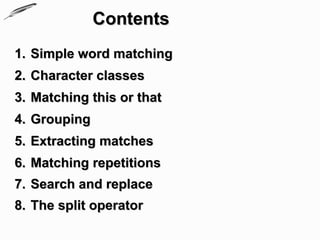
Contents
1. Simple word matching
2. Character classes
3. Matching this or that
4. Grouping
5. Extracting matches
6. Matching repetitions
7. Search and replace
8. The split operator
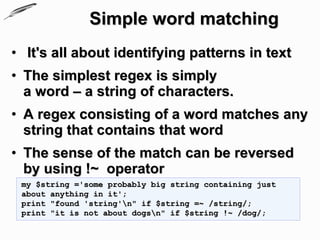
Simple word matching
• It's all about identifying patterns in text
• The simplest regex is simply
  a word – a string of characters.
• A regex consisting of a word matches any
  string that contains that word
• The sense of the match can be reversed
  by using !~ operator
 my $string ='some probably big string containing just
 about anything in it';
 print "found 'string'n" if $string =~ /string/;
 print "it is not about dogsn" if $string !~ /dog/;
Simple word matching
                                                  (2)
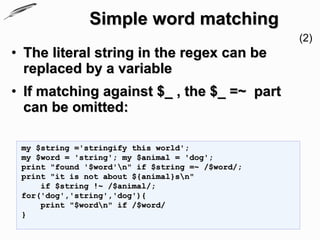
• The literal string in the regex can be
  replaced by a variable
• If matching against $_ , the $_ =~ part
  can be omitted:

 my $string ='stringify this world';
 my $word = 'string'; my $animal = 'dog';
 print "found '$word'n" if $string =~ /$word/;
 print "it is not about ${animal}sn"
     if $string !~ /$animal/;
 for('dog','string','dog'){
     print "$wordn" if /$word/
 }
Simple word matching
                                                   (3)
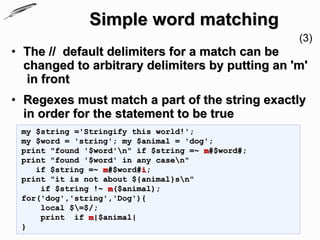
• The // default delimiters for a match can be
  changed to arbitrary delimiters by putting an 'm'
  in front
• Regexes must match a part of the string exactly
  in order for the statement to be true
 my $string ='Stringify this world!';
 my $word = 'string'; my $animal = 'dog';
 print "found '$word'n" if $string =~ m#$word#;
 print "found '$word' in any casen"
    if $string =~ m#$word#i;
 print "it is not about ${animal}sn"
     if $string !~ m($animal);
 for('dog','string','Dog'){
     local $=$/;
     print if m|$animal|
 }
Simple word matching
                                                     (4)
• perl will always match at the earliest possible
  point in the string
 my $string ='Stringify this stringy world!';
 my $word = 'string';
 print "found '$word' in any casen"
    if $string =~ m{$word}i;

• Some characters, called metacharacters, are
  reserved for use in regex notation. The
  metacharacters are (14):
 { } [ ] ( ) ^ $ . | * + ? 

• A metacharacter can be matched by putting a
  backslash before it
 print "The string n'$string'n contains a DOTn"
     if $string =~ m|.|;
Simple word matching
                                                        (5)
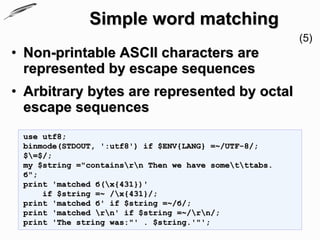
• Non-printable ASCII characters are
  represented by escape sequences
• Arbitrary bytes are represented by octal
  escape sequences
 use utf8;
 binmode(STDOUT, ':utf8') if $ENV{LANG} =~/UTF-8/;
 $=$/;
 my $string ="containsrn Then we have sometttabs.
 б";
 print 'matched б(x{431})'
     if $string =~ /x{431}/;
 print 'matched б' if $string =~/б/;
 print 'matched rn' if $string =~/rn/;
 print 'The string was:"' . $string.'"';
Simple word matching
                                                          (6)
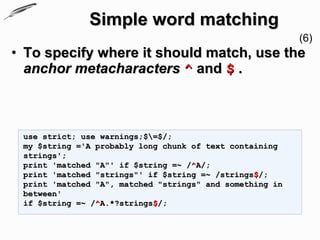
• To specify where it should match, use the
  anchor metacharacters ^ and $ .


 use strict; use warnings;$=$/;
 my $string ='A probably long chunk of text containing
 strings';
 print 'matched "A"' if $string =~ /^A/;
 print 'matched "strings"' if $string =~ /strings$/;
 print 'matched "A", matched "strings" and something in
 between'
 if $string =~ /^A.*?strings$/;
Character classes
• A character class allows a set of possible
  characters, to match
• Character classes are denoted by brackets [ ]
  with the set of characters to be possibly matched
  inside
• The special characters for a character class are
  - ]  ^ $ and are matched using an escape
• The special character '-' acts as a range operator
  within character classes so you can write [0-9]
  and [a-z]
Character classes
• Example
 use strict; use warnings;$=$/;
 my $string ='A probably long chunk of text containing
 strings';
 my $thing = 'ong ung ang enanything';
 my $every = 'iiiiii';
 my $nums   = 'I have 4325 Euro';
 my $class = 'dog';
 print 'matched any of a, b or c'
    if $string =~ /[abc]/;

 for($thing, $every, $string){
     print 'ingy brrrings nothing using: '.$_
         if /[$class]/
 }
 print $nums if $nums =~/[0-9]/;
Character classes
• Perl has several abbreviations for common character
  classes
   • d is a digit – [0-9]
   • s is a whitespace character – [ trnf]
   • w is a word character
     (alphanumeric or _) – [0-9a-zA-Z_]
   • D is a negated d – any character but a digit [^0-9]
   • S is a negated s; it represents any non-whitespace
     character [^s]
   • W is a negated w – any non-word character
   • The period '.' matches any character but "n"
   • The dswDSW inside and outside of character classes
   • The word anchor b matches a boundary between a word
     character and a non-word character wW or Ww
Character classes
• Example
 my $digits ="here are some digits3434 and then ";

 print 'found digit' if $digits =~/d/;

 print 'found alphanumeric' if $digits =~/w/;

 print 'found space' if $digits =~/s/;

 print 'digit followed by space, followed by letter'
    if $digits =~/ds[A-z]/;
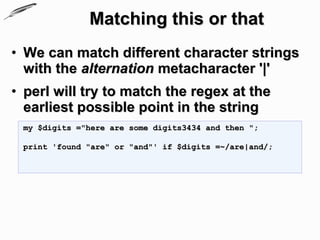
Matching this or that
• We can match different character strings
  with the alternation metacharacter '|'
• perl will try to match the regex at the
  earliest possible point in the string
 my $digits ="here are some digits3434 and then ";

 print 'found "are" or "and"' if $digits =~/are|and/;
Extracting matches
• The grouping metacharacters () also
  allow the extraction of the parts of a
  string that matched
• For each grouping, the part that matched
  inside goes into the special variables $1 ,
  $2 , etc.
• They can be used just as ordinary
  variables
Extracting matches
• The grouping metacharacters () allow a part of a
  regex to be treated as a single unit
• If the groupings in a regex are nested, $1 gets the
  group with the leftmost opening parenthesis, $2
  the next opening parenthesis, etc.
  my $digits ="here are some digits3434 and then678 ";

  print 'found a letter followed by leters or digits":'.$1
      if $digits =~/[a-z]([a-z]|d+)/;
  print 'found a letter followed by digits":'.$1
      if $digits =~/([a-z](d+))/;
  #                   $1    $2
  print 'found letters followed by digits":'.$1
      if $digits =~/([a-z]+)(d+)/;
  #                   $1     $2
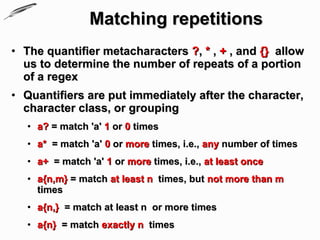
Matching repetitions
• The quantifier metacharacters ?, * , + , and {} allow
  us to determine the number of repeats of a portion
  of a regex
• Quantifiers are put immediately after the character,
  character class, or grouping
   • a? = match 'a' 1 or 0 times
   • a* = match 'a' 0 or more times, i.e., any number of times
   • a+ = match 'a' 1 or more times, i.e., at least once
   • a{n,m} = match at least n times, but not more than m
     times
   • a{n,} = match at least n or more times
   • a{n} = match exactly n times
Matching repetitions


use strict; use warnings;$=$/;
my $digits ="here are some digits3434 and then678 ";

print 'found some letters followed by leters or
digits":'.$1 .$2
if $digits =~/([a-z]{2,})(w+)/;

print 'found three letter followed by   digits":'.$1 .$2
if $digits =~/([a-z]{3}(d+))/;

print 'found up to four letters followed by   digits":'.
$1 .$2
if $digits =~/([a-z]{1,4})(d+)/;
Matching repetitions
• Greeeedy

 use strict; use warnings;$=$/;
 my $digits ="here are some digits3434 and then678 ";

 print 'found as much as possible letters
 followed by digits":'.$1 .$2
 if $digits =~/([a-z]*)(d+)/;
Search and replace
• Search and replace is performed using
  s/regex/replacement/modifiers.
• The replacement is a Perl double quoted string
  that replaces in the string whatever is matched with
  the regex .
• The operator =~ is used to associate a string with
  s///.
• If matching against $_ , the $_ =~ can be dropped.
• If there is a match, s/// returns the number of
  substitutions made, otherwise it returns false
Search and replace
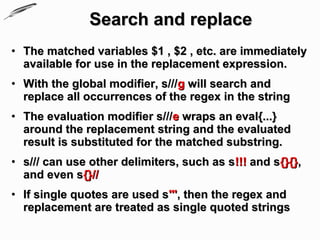
• The matched variables $1 , $2 , etc. are immediately
  available for use in the replacement expression.
• With the global modifier, s///g will search and
  replace all occurrences of the regex in the string
• The evaluation modifier s///e wraps an eval{...}
  around the replacement string and the evaluated
  result is substituted for the matched substring.
• s/// can use other delimiters, such as s!!! and s{}{},
  and even s{}//
• If single quotes are used s''', then the regex and
  replacement are treated as single quoted strings
Search and replace
• Example

 #TODO....
The split operator
• split /regex/, string
 splits string into a list of substrings and
 returns that list
• The regex determines the character sequence
  that string is split with respect to
 #TODO....
Regular expressions

• Resources
  • perlrequick - Perl regular expressions quick start
  • perlre - Perl regular expressions
  • perlreref - Perl Regular Expressions Reference
  • Beginning Perl
    (Chapter 5 – Regular Expressions)
Regular expressions


Questions?

Working with text, Regular expressions

  • 1.
    Perl Programming Course Working with text Regular expressions Krassimir Berov I-can.eu
  • 2.
    Contents 1. Simple wordmatching 2. Character classes 3. Matching this or that 4. Grouping 5. Extracting matches 6. Matching repetitions 7. Search and replace 8. The split operator
  • 3.
    Simple word matching •It's all about identifying patterns in text • The simplest regex is simply a word – a string of characters. • A regex consisting of a word matches any string that contains that word • The sense of the match can be reversed by using !~ operator my $string ='some probably big string containing just about anything in it'; print "found 'string'n" if $string =~ /string/; print "it is not about dogsn" if $string !~ /dog/;
  • 4.
    Simple word matching (2) • The literal string in the regex can be replaced by a variable • If matching against $_ , the $_ =~ part can be omitted: my $string ='stringify this world'; my $word = 'string'; my $animal = 'dog'; print "found '$word'n" if $string =~ /$word/; print "it is not about ${animal}sn" if $string !~ /$animal/; for('dog','string','dog'){ print "$wordn" if /$word/ }
  • 5.
    Simple word matching (3) • The // default delimiters for a match can be changed to arbitrary delimiters by putting an 'm' in front • Regexes must match a part of the string exactly in order for the statement to be true my $string ='Stringify this world!'; my $word = 'string'; my $animal = 'dog'; print "found '$word'n" if $string =~ m#$word#; print "found '$word' in any casen" if $string =~ m#$word#i; print "it is not about ${animal}sn" if $string !~ m($animal); for('dog','string','Dog'){ local $=$/; print if m|$animal| }
  • 6.
    Simple word matching (4) • perl will always match at the earliest possible point in the string my $string ='Stringify this stringy world!'; my $word = 'string'; print "found '$word' in any casen" if $string =~ m{$word}i; • Some characters, called metacharacters, are reserved for use in regex notation. The metacharacters are (14): { } [ ] ( ) ^ $ . | * + ? • A metacharacter can be matched by putting a backslash before it print "The string n'$string'n contains a DOTn" if $string =~ m|.|;
  • 7.
    Simple word matching (5) • Non-printable ASCII characters are represented by escape sequences • Arbitrary bytes are represented by octal escape sequences use utf8; binmode(STDOUT, ':utf8') if $ENV{LANG} =~/UTF-8/; $=$/; my $string ="containsrn Then we have sometttabs. б"; print 'matched б(x{431})' if $string =~ /x{431}/; print 'matched б' if $string =~/б/; print 'matched rn' if $string =~/rn/; print 'The string was:"' . $string.'"';
  • 8.
    Simple word matching (6) • To specify where it should match, use the anchor metacharacters ^ and $ . use strict; use warnings;$=$/; my $string ='A probably long chunk of text containing strings'; print 'matched "A"' if $string =~ /^A/; print 'matched "strings"' if $string =~ /strings$/; print 'matched "A", matched "strings" and something in between' if $string =~ /^A.*?strings$/;
  • 9.
    Character classes • Acharacter class allows a set of possible characters, to match • Character classes are denoted by brackets [ ] with the set of characters to be possibly matched inside • The special characters for a character class are - ] ^ $ and are matched using an escape • The special character '-' acts as a range operator within character classes so you can write [0-9] and [a-z]
  • 10.
    Character classes • Example use strict; use warnings;$=$/; my $string ='A probably long chunk of text containing strings'; my $thing = 'ong ung ang enanything'; my $every = 'iiiiii'; my $nums = 'I have 4325 Euro'; my $class = 'dog'; print 'matched any of a, b or c' if $string =~ /[abc]/; for($thing, $every, $string){ print 'ingy brrrings nothing using: '.$_ if /[$class]/ } print $nums if $nums =~/[0-9]/;
  • 11.
    Character classes • Perlhas several abbreviations for common character classes • d is a digit – [0-9] • s is a whitespace character – [ trnf] • w is a word character (alphanumeric or _) – [0-9a-zA-Z_] • D is a negated d – any character but a digit [^0-9] • S is a negated s; it represents any non-whitespace character [^s] • W is a negated w – any non-word character • The period '.' matches any character but "n" • The dswDSW inside and outside of character classes • The word anchor b matches a boundary between a word character and a non-word character wW or Ww
  • 12.
    Character classes • Example my $digits ="here are some digits3434 and then "; print 'found digit' if $digits =~/d/; print 'found alphanumeric' if $digits =~/w/; print 'found space' if $digits =~/s/; print 'digit followed by space, followed by letter' if $digits =~/ds[A-z]/;
  • 13.
    Matching this orthat • We can match different character strings with the alternation metacharacter '|' • perl will try to match the regex at the earliest possible point in the string my $digits ="here are some digits3434 and then "; print 'found "are" or "and"' if $digits =~/are|and/;
  • 14.
    Extracting matches • Thegrouping metacharacters () also allow the extraction of the parts of a string that matched • For each grouping, the part that matched inside goes into the special variables $1 , $2 , etc. • They can be used just as ordinary variables
  • 15.
    Extracting matches • Thegrouping metacharacters () allow a part of a regex to be treated as a single unit • If the groupings in a regex are nested, $1 gets the group with the leftmost opening parenthesis, $2 the next opening parenthesis, etc. my $digits ="here are some digits3434 and then678 "; print 'found a letter followed by leters or digits":'.$1 if $digits =~/[a-z]([a-z]|d+)/; print 'found a letter followed by digits":'.$1 if $digits =~/([a-z](d+))/; # $1 $2 print 'found letters followed by digits":'.$1 if $digits =~/([a-z]+)(d+)/; # $1 $2
  • 16.
    Matching repetitions • Thequantifier metacharacters ?, * , + , and {} allow us to determine the number of repeats of a portion of a regex • Quantifiers are put immediately after the character, character class, or grouping • a? = match 'a' 1 or 0 times • a* = match 'a' 0 or more times, i.e., any number of times • a+ = match 'a' 1 or more times, i.e., at least once • a{n,m} = match at least n times, but not more than m times • a{n,} = match at least n or more times • a{n} = match exactly n times
  • 17.
    Matching repetitions use strict;use warnings;$=$/; my $digits ="here are some digits3434 and then678 "; print 'found some letters followed by leters or digits":'.$1 .$2 if $digits =~/([a-z]{2,})(w+)/; print 'found three letter followed by digits":'.$1 .$2 if $digits =~/([a-z]{3}(d+))/; print 'found up to four letters followed by digits":'. $1 .$2 if $digits =~/([a-z]{1,4})(d+)/;
  • 18.
    Matching repetitions • Greeeedy use strict; use warnings;$=$/; my $digits ="here are some digits3434 and then678 "; print 'found as much as possible letters followed by digits":'.$1 .$2 if $digits =~/([a-z]*)(d+)/;
  • 19.
    Search and replace •Search and replace is performed using s/regex/replacement/modifiers. • The replacement is a Perl double quoted string that replaces in the string whatever is matched with the regex . • The operator =~ is used to associate a string with s///. • If matching against $_ , the $_ =~ can be dropped. • If there is a match, s/// returns the number of substitutions made, otherwise it returns false
  • 20.
    Search and replace •The matched variables $1 , $2 , etc. are immediately available for use in the replacement expression. • With the global modifier, s///g will search and replace all occurrences of the regex in the string • The evaluation modifier s///e wraps an eval{...} around the replacement string and the evaluated result is substituted for the matched substring. • s/// can use other delimiters, such as s!!! and s{}{}, and even s{}// • If single quotes are used s''', then the regex and replacement are treated as single quoted strings
  • 21.
    Search and replace •Example #TODO....
  • 22.
    The split operator •split /regex/, string splits string into a list of substrings and returns that list • The regex determines the character sequence that string is split with respect to #TODO....
  • 23.
    Regular expressions • Resources • perlrequick - Perl regular expressions quick start • perlre - Perl regular expressions • perlreref - Perl Regular Expressions Reference • Beginning Perl (Chapter 5 – Regular Expressions)
  • 24.