Perl: Part 4
THINKING IN
LINE NOISE
PROGRAMMING
52 LINUX MAGAZINE Issue 22 • 2002
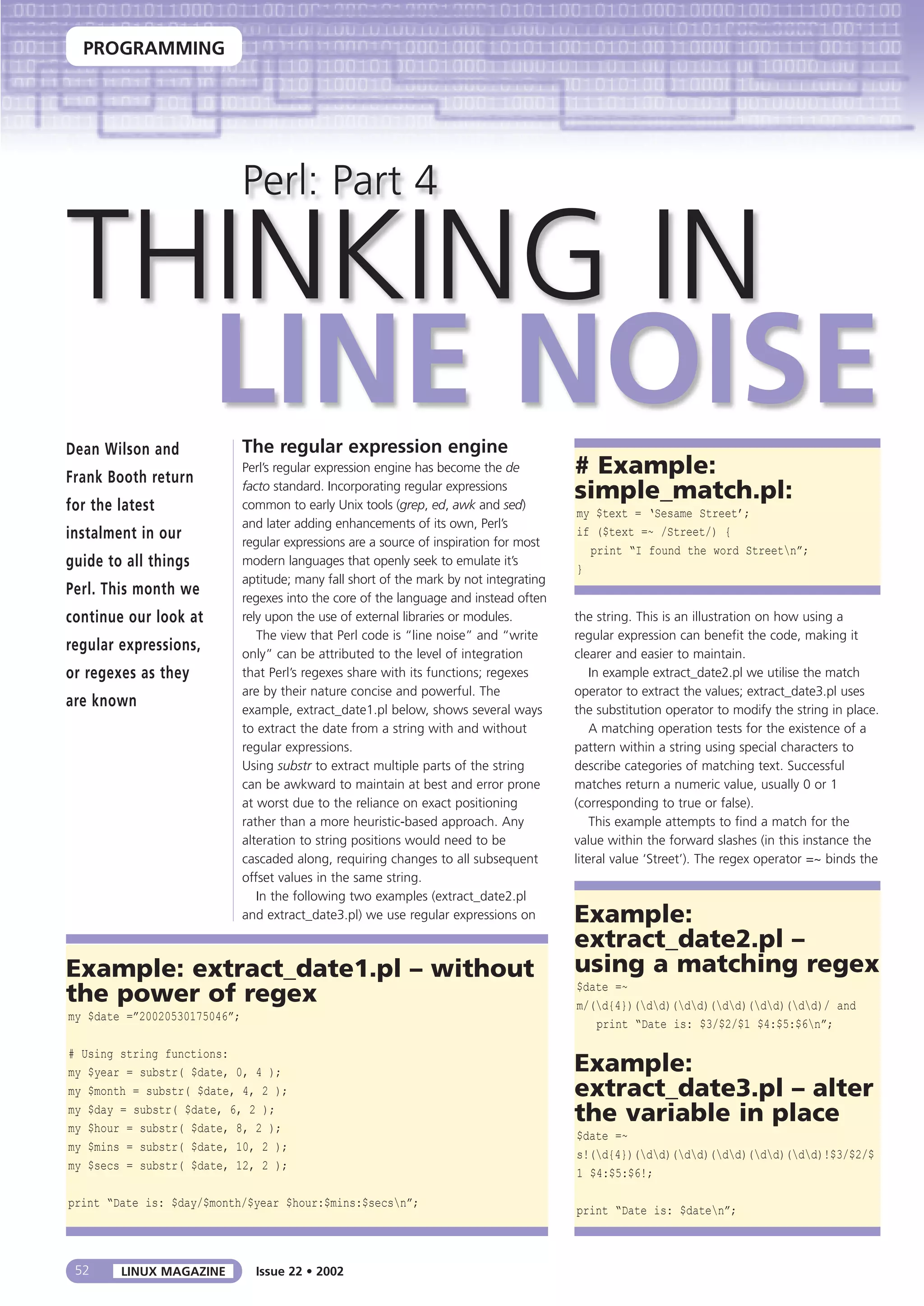
Example: extract_date1.pl – without
the power of regex
my $date =”20020530175046”;
# Using string functions:
my $year = substr( $date, 0, 4 );
my $month = substr( $date, 4, 2 );
my $day = substr( $date, 6, 2 );
my $hour = substr( $date, 8, 2 );
my $mins = substr( $date, 10, 2 );
my $secs = substr( $date, 12, 2 );
print “Date is: $day/$month/$year $hour:$mins:$secsn”;
Example:
extract_date2.pl –
using a matching regex
$date =~
m/(d{4})(dd)(dd)(dd)(dd)(dd)/ and
print “Date is: $3/$2/$1 $4:$5:$6n”;
Example:
extract_date3.pl – alter
the variable in place
$date =~
s!(d{4})(dd)(dd)(dd)(dd)(dd)!$3/$2/$
1 $4:$5:$6!;
print “Date is: $daten”;
the string. This is an illustration on how using a
regular expression can benefit the code, making it
clearer and easier to maintain.
In example extract_date2.pl we utilise the match
operator to extract the values; extract_date3.pl uses
the substitution operator to modify the string in place.
A matching operation tests for the existence of a
pattern within a string using special characters to
describe categories of matching text. Successful
matches return a numeric value, usually 0 or 1
(corresponding to true or false).
This example attempts to find a match for the
value within the forward slashes (in this instance the
literal value ‘Street’). The regex operator =~ binds the
Dean Wilson and
Frank Booth return
for the latest
instalment in our
guide to all things
Perl. This month we
continue our look at
regular expressions,
or regexes as they
are known
The regular expression engine
Perl’s regular expression engine has become the de
facto standard. Incorporating regular expressions
common to early Unix tools (grep, ed, awk and sed)
and later adding enhancements of its own, Perl’s
regular expressions are a source of inspiration for most
modern languages that openly seek to emulate it’s
aptitude; many fall short of the mark by not integrating
regexes into the core of the language and instead often
rely upon the use of external libraries or modules.
The view that Perl code is “line noise” and “write
only” can be attributed to the level of integration
that Perl’s regexes share with its functions; regexes
are by their nature concise and powerful. The
example, extract_date1.pl below, shows several ways
to extract the date from a string with and without
regular expressions.
Using substr to extract multiple parts of the string
can be awkward to maintain at best and error prone
at worst due to the reliance on exact positioning
rather than a more heuristic-based approach. Any
alteration to string positions would need to be
cascaded along, requiring changes to all subsequent
offset values in the same string.
In the following two examples (extract_date2.pl
and extract_date3.pl) we use regular expressions on
# Example:
simple_match.pl:
my $text = ‘Sesame Street’;
if ($text =~ /Street/) {
print “I found the word Streetn”;
}
PROGRAMMING
53LINUX MAGAZINEIssue 22 • 2002
#Example
simple_cap.pl
my $text = “Just another perl hacker”;
if ($text =~ /((perl)|(python)|(ruby))/ ){
print “This person can code $1n”;
}
variable $text to the regular expression. The variable
is then interrogated until the first match for the
pattern is found within the variables contents or the
end of the string is reached. If successful the match
returns a value that is true whilst leaving the contents
of the variable unchanged.
Here we show how simple it is to use a regular
expression in a position you would normally expect to
find a function or a comparison operator. In this case
finding the first occurrence of the target word
(contained in $word) on a line and then reporting the
line and the line number where the match is found.
Regular expressions allow us to perform pattern
matching upon strings using meta-characters. This
enables us to match a large number of possible
strings implicitly. The most common meta-characters
used are: . * + ? | (). Some of these meta-characters
may be familiar, being common to many Unix tools.
Be careful though, Perl’s regular expressions are a
superset of the standard regexes commonly found in
older Unix and GNU tools, so the meta-characters
may have different meanings.
The following example matches both the correct
and American spellings of the word ‘colour’:
foreach ( ‘Living color’ , ‘Blue is the colour’
) {
if ( /colou?r/ ) {
print “$_ has the word color or colour”;
}
}
In this example we introduce a type of meta-
character called a quantifier, the ? in the regular
expression means zero or one occurrence of the
preceding character, ie the ‘u’ in the pattern is
optional. Other quantifiers are:
+ one or more occurrences.
* zero or more occurrences.
See the Quantifier boxout for a more complete list.
It is often desirable to have a set of alternatives
that you wish to match from. In this example we
attempt to match the name of a popular scripting
language or python by using the pipe | operator to
enable us to select from alternatives.
The pipe meta-character presents a list of
alternatives, the values are separated by pipes and
compared sequentially. If a match is found the
remaining pipes are ignored and comparison resumes
after the last value in the alternation (this is the value
immediately following the last |).
In the example simple_cap.pl we use
parentheses to both group values into sub-patterns
(or atoms as they are also known) and to capture
the matching value into the $1 variable so we can
use the matched value later. This is known as
capturing and will be covered in greater depth in
subsequent sections.
One of the important aspects of alternation is
that it affects an atom rather than a single letter
so in the above example, simple_cap.pl, we can
use parenthesis to create three atoms, each
Example: greplite.pl
die “usage: greplite.pl <word> <file>n” unless @ARGV > 1;
my $word = shift;
while (<>) {
print “Line $.: $_” if $_ =~ /$word/o;
}
Quantifiers
Quantifier Num of Matches
? Match zero or one time
* Match zero or more times
+ Match one or more times
{NUM} Match exactly NUM times
{MIN,} Match at least MIN times
{MIN,MAX} Match at least MIN but no more than MAX times
A regular expression with no modifiers
will match just the once. While this is a
sound principle it is often desirable to
override the default behaviour and
match a variable number of times, this
is where you would use a quantifier.
A quantifier takes the preceding atom
(sub-pattern) and attempts to repeat the
match a variable number of times based
upon the quantifier used. The table
below shows the quantifiers and the
number of matches they attempt:
While we will cover the exact method
of matching and the steps attempted
when we return to cover the internals
of the Perl regular expression engine
it is important to know that by
default quantifiers are greedy. Each
open ended quantifier (Such as the +
and * attempt to match as many
times as possible providing that the
greediness does not cause the whole
match to fail.
As you can see in greedy_regex.pl,
if left unchecked the .* can consume
far more than you would expect. You
can limit the match to be minimal in
nature rather than greedy by
appending a ? after the quantifier.
When used in this manner the ? sheds
its properties as a quantifier and
instead limits the match (makes the
match minimal) to consume as little as
possible while still being successful.
PROGRAMMING
54 LINUX MAGAZINE Issue 22 • 2002
containing a whole word that we can then use in
the alternation.
#means try and match ‘perl’ or ‘python’ or
‘ruby’
((perl)|(python)|(ruby))/
If you leave out the grouping then the alternation will
try to match one of the following words:
perlythonuby or perlythoruby
perpythonuby or perpythoruby
In essence it is potentially matching one of the
characters on either side of the pipe, since there are
no brackets to force precedence in any other manner
the single character is the default.
Anchors away
Anchors are used to tether a regular expression to
the end or beginning of a line. They’re used to
speed up a search or more accurately specify the
position of a pattern within a string. The ^ (aka
carat or circumflex) matches the start of a line in a
string. The $ matches the end of a line.
In the example delint.pl anchors are used to
remove all lines that are either empty or begin with
a comment. Working through the example in
sequence, we remove lines with hashes #; the .*
pattern will match any number of characters after
the first hash encountered to the end of the string
and remove them.
The next regex uses the s character class which
matches any white-space, ie ‘tabs and spaces’.
Lines that begin with a comment # are also
skipped, as the comment runs to the end of the
line. Finally remaining leading and trailing white
space are removed.
If we wanted the domain name from an email
address we could use anchors and grouping to
capture the information. This short script will grab
a domain name from a possible email address and
attempt to ping that domain.
The example simplemail.pl uses grouping, where
a sub-pattern’s actual match is recorded in one of
Perl’s internal variables ($1..$9..etc. – these
variables are read only ). The sub-pattern to be
captured is indicated using parentheses and the
results, if any, are stored in the numbered variable
corresponding to the order of captured matches
Example:
greedy_regex.pl
my $quote = “There’s no place like home”;
#Default, greedy
$quote =~ /e(.*)e/;
#This prints “re’s no place like hom”
print “I matched ‘$1’n”;
# parsimonious/minimal matching
$quote =~ /e(.*?)e/;
#this prints ‘r’
print “I matched ‘$1’n”;
Example: delint.pl
while (<>) {
#Basic comment remover
s/s#.*$//;
#Skips blank lines
next if /^s*$/;
#skips lines beginning with comments
next if /^#/;
#skips lines beginning with comments
s/^s+//;
#This strips trailing whitespace
s/s+$//;
print;
}
Example: simplemail.pl
my $email = ‘example@example.com’;
if ($email =~ /@(.*?)$/ ) {
print “Found domain $1 in emailn”;
open (P, “| ping –c 4 $1”) or die “Can’t
pingn”;
while(<P>) {
print $_; # $_ can be excluded
}
close P;
}
Example: quote01.pl
my $quote = “take off and nuke the site from
orbit”;
$quote =~
m/(?:and)s((w*)sw+s(w*)s(w*))/;
print “$2n$3n$4n$1n”;
PROGRAMMING
55LINUX MAGAZINEIssue 22 • 2002
within the current regex. The regex in the example
anchors to the end of the string and works back to
the @ character in the string to retrieve the
domain name.
We use two types of grouping in the above
example. The first type we cover is non-capturing
(?:), this allows us to group a sub-expression
without storing the results in a variable. The
remaining groups all capture the results if the
match is successful. Notice that the parentheses are
nested. This enables us to capture the overall result
and then subsets of this result. This example will
capture test in the following variables:
$1 = nuke the site from
$2 = nuke
$3 = site
$4 = from
The outer parentheses capture the whole match
and the nested ones capture individual words.
Class act
Character classes are a means of providing a wide
variety of characters as alternatives, rather like a
pipe. However a character class can only ever
provide alternative characters, where the pipe can
offer alternative patterns. Character classes are
contained within square brackets [ and ].
/h[oaiu]t/;
will match the words hot, hat, hit and hut. It could
be written using pipes in this way:
/ho|a|i|ut/;
Which is less legible and requires more effort to
maintain as the options are added to. Obviously the
more characters we add to a class the more
pronounced the advantage is. There is, however, more
to character classes. This example shows many of the
extra syntactic sugar found in character classes:
/[a-zd_@.-]/i
This example matches characters that are valid in an
email address, it could be used for a cursory
validation of an email address. It works using a
variety of methods:
a-z is a range of literal characters, a,b,c,d....,x,y,z
d a predefined character class for digits ( 0,1,2,..,8,9
)
_@. is any of the characters _ or @ or .
In the example we use an unescaped dot, which
rather than matching any single character as it
normally would, matches a literal dot. This may seem
strange at first but it makes little sense for the
“match anything” meta-character to retain its
behaviour in a character class. The loss of meta-
characters’ special properties within a character is
almost across the board except for –, which is used
for ranges and ^ which we will cover later.
If you wish to match a literal – in a character class
it must be specified as either the first or last character
in the class. We can choose what not to match with
The leaning toothpick effect
In many regular expressions the / character
is required within the matching section.
Which can often render the regex illegible.
The example below illustrates this:
s/CVSROOT=/usr/local/cvsrepos//CVSR
OOT=/usr/shared/cvsrepos//g;
This simple regex substitutes one path for
another. The number of forward and
backward slashes make it very hard to
understand what the regex is doing, this is
sometimes called the ‘leaning toothpick
syndrome’. The backslash is required to
escape each of the forward slashes so the
Perl interpreter doesn’t end the operation
prematurely.
Perl accepts almost any ASCII character
for its separator, as long as the type of
regex is qualified with an ‘m’ for match or
an ‘s’ for substitution. Here is the first
example of altering the delimiter to allow a
cleaner, more readable regex:
s!CVSROOT=/usr/local/cvsrepos/!CVSROOT=
/usr/shared/cvsrepos/!g;
In this example we change the regex
delimiter to an exclamation mark
so that forward slashes lose their special
meaning and do not require
escaping. Perl allows a significant amount of
flexibility in the
delimiters you may use and even allows you
to use paired delimiters such as parentheses,
curly braces and angle brackets:
s(CVSROOT=/usr/local/cvsrepos/)(CVSROOT
=/usr/shared/cvsrepos/)g;
s{CVSROOT=/usr/local/cvsrepos/}(CVSROOT
=/usr/shared/cvsrepos/)g;
s<CVSROOT=/usr/local/cvsrepos/><CVSROOT
=/usr/shared/cvsrepos/>g;
Using paired delimiters (such as [,],(,),{,} )
can clarify where the find and replace
sections occur within the regular expression.
If you have both sections of a substitution
in paired delimiters you can further increase
the readability of the expression by placing
the different sections on separate lines.
Furthermore, different paired delimiters can
be used to separate the match and
substitution sections of the regular expression.
s<CVSROOT=/usr/local/cvsrepos/>
(CVSROOT=/usr/shared/cvsrepos/)g;
PROGRAMMING
56 LINUX MAGAZINE Issue 22 • 2002
by negating a character class, using ^, when we need
to fail on a small or unspecified set of values:
for (<>) {
/&[^a-z#d]+;/ and print “Bad entity name:
$_”;
}
An important aspect of negative character classes is that
unless they are followed by a ‘*’ quantifier then they are
still required to match a character outside of the
negative character class.
At first glance the example above may seem to work
but it hides a subtle bug. If the string “camel.” is
attempted against the regular expression then it will
match but the string “camel” will fail. This is because
the negative class ([^s]) has to match but in this case it
fails, since there are no more characters to match
against. In this instance * (zero or more can be used to
great effect).
The literal part of the pattern (camel) is checked
against the string matching letter by letter until the
pattern progresses to the negative class, this then has
nothing to match against that is not an ‘s’ and so fails,
forcing the whole match to fail.
Perl character class shortcuts
Now that you have seen how to use both positive and
negative character classes we can introduce you to
another of Perl’s pioneering developments in regular
expressions, character class shortcuts.
As you can see from Table 1, all of the common
shortcuts are back-slashed single letters where the
lowercase letter is a positive match and the uppercase
version is a negative.
In the code sample above we use an anchored Perl
character class (in this case s) to match any lines that
consist of only whitespace. The $blank variable is then
incremented for each match made until we run out of
lines and exit the while loop.
Next we divide $blank with the special implicit
variable $. (which holds the current line number, in this
case the number of the last line read in) and divide by
100 to get the percentage of blank to non-blank lines.
The last line of the example passed both the variable
$percent and the string to follow it to the ‘print’
function as a list, causing each to be printed in turn.
If the code sample was rewritten without the s then
the equivalent handwritten character class would be [
tnrf]. The s shortcut is both clearer and less error
prone and should be used out of preference.
Now that we have covered s we can move on to the
d (digit) shortcut.
The matchip.pl example above takes a single
argument and then checks to confirm if it is in the form
of an IPv4 address (ie 127.0.0.1). Rather than using the
very coarse matching d+, which would allow any
number of digits greater than one, we use a different
quantifier that allows the specification of a minimum
and an optional maximum number of times to match
the preceding atom. This is represented in the example
by the numbers inside the curly braces. First we give the
atom to match; which in this case is a d. We then open
the curly braces and put the number specifying the
minimum number of times to match followed by a
comma and then the maximum number of times to
match.
If you wished to match an exact number of times you
change the syntax slightly and put the number without
a comma: {5} would match the preceding atom exactly
five times. It is also possible to have an open ended
match with a minimum number of desired matches but
no limit to the number of times the match is permitted,
this is achieved by not putting a maximum value after
the comma, {3,} would be successful if the atom to the
left of it matched three or more times.
In matchip.pl we use this to allow between one and
three digits in a row ({1,3}) followed by a dot and then
the same pattern thrice more but without a tailing dot.
While this alone is more than satisfactory over the
handwritten character class version it can be made even
Table 1: Common character
class shortcuts
Symbol Meaning
d digit
D non-digit
s whitespace
S non-whitespace
w word
W non-word
Example
count_blank.pl
my $blank;
while(<>) {
$blank++ if /^s*$/;
}
my $percent = ($blank / $. * 100);
print $percent, “% of the file is emptyn”;
Example:
comp_camel.pl
my $book = “camel”;
print “Matchn” if $book =~ m/camel[^s]/;
PROGRAMMING
57LINUX MAGAZINEIssue 22 • 2002
simpler with the application of grouping and a
quantifier:
We can change the line containing the regular
expression from:
if ($ip =~
/^d{1,3}.d{1,3}.d{1,3}.d{1,3}$/) {
#Full program is in matchip_group.pl
if ($ip =~ /^d{1,3}(.d{1,3}){3}$/) {
And now, rather than repeating the digit matches, we
put the pattern inside grouping parentheses so that the
attempted match for the literal dot and the one to three
digits is a single atom and then apply the curly quantifier
so that it must match three times. This makes the regex
more compact and easier to grasp as you only need to
work out what the one match does and then repeat it.
We next move on to the last of the common shortcut
classes, w. The shortcut for word is slightly different
from what you may expect as it covers the characters
that would often be considered tokens in a programm-
ing language rather real words. It covers the range of [a-
zA-Z0-9_] (lower and uppercase letters, digits and the
underscore), the most notable absence is -.
If you wish to match a string if it only contains
alphabetic characters then you will need to use either
the handwritten character class [a-zA-Z], the slightly
more complex [^Wd_], which matches only
alphabetics, or use the POSIX [:alpha:] which has the
(possible) benefit of understanding locale settings
(see perldoc perllocale for more details on this
complex subject).
While the above code snippets are enough to put you
along the path of working with words, strings and w
there are some more thorny aspects involved in
matching words in real text. Many words have
punctuation characters in them that make matching
more difficult than you would at first expect. For
example words with apostrophes require additional
effort, fortunately Perl provides features such as words
boundaries to simplify this kind of task but that is
beyond the scope of this introduction to regular
expressions. Never fear though, we will return to cover
them in the near future (or you can look up the
suggestion in perldoc perlre if you just can’t wait).
POSIX character classes
Now we have covered character classes and Perl’s
common shortcut character classes we can give a brief
overview of the last type of character classes you may
see in Perl code; the POSIX character class.
POSIX is a set of standards that dictate how, among
other things, interfaces should be presented to allow
easier porting of applications from one POSIX
compatible system to another. POSIX has its own
character class notation that in Perl is used only when
creating character classes.
#This checks if book is a string of characters
and numbers
my $book =~ /^[[:alpha:][:digit:]]+$/; # valid
#This looks like it should match empty lines
my $book =~ /^[:space:]*$/; # invalid
The second line of code in the example fails because the
[:space:] is being used as a character class rather than
used inside a character class. Perl’s regular expression
engine interprets the pattern as a character class
containing the characters “:” “s” “p” “a” “c” and “e”
while ignoring the duplicated “:”. The pattern you
probably intended to use is:
# valid, note the double ‘[[‘ and ‘]]’
my $book =~ /^[[:space:]]*$/;
This article has introduced the more common aspects of
regular expressions. It is by no means an exhaustive
guide though, given that Perl and its regular expressions
are syntactically rich and offer an abundance of
alternative methods, such as positive and negative look-
aheads that are useful tools but destined for coverage in
the future.
Example: matchip.pl
#Check that an argument has been provided. if
not exit.
die “usage: match_ip.pl <ip address>n” unless
$ARGV[0];
#Remove the newline
chomp(my $ip = shift);
#Try and match an IP Address.
if ($ip =~
/^d{1,3}.d{1,3}.d{1,3}.d{1,3}$/) {
print “$ip seems validn”;
}
else {
print “$ip is not a valid ipn”;
}
Info
You may want to continue your studies and if so, to assist you, here are a few
invaluable references on the topic of regular expressions.
Perl regular
expressions documentation perldoc perlre
Mastering Regular
Expressions (2nd Ed) http://www.oreilly.com/catalog/regex2/
Sed and Awk Pocket Reference http://www.oreilly.com/catalog/sedawkrepr2/
Japhy’s Regex Book http://japhy.perlmonk.org/book/

Perl_Part4

  • 1.
    Perl: Part 4 THINKINGIN LINE NOISE PROGRAMMING 52 LINUX MAGAZINE Issue 22 • 2002 Example: extract_date1.pl – without the power of regex my $date =”20020530175046”; # Using string functions: my $year = substr( $date, 0, 4 ); my $month = substr( $date, 4, 2 ); my $day = substr( $date, 6, 2 ); my $hour = substr( $date, 8, 2 ); my $mins = substr( $date, 10, 2 ); my $secs = substr( $date, 12, 2 ); print “Date is: $day/$month/$year $hour:$mins:$secsn”; Example: extract_date2.pl – using a matching regex $date =~ m/(d{4})(dd)(dd)(dd)(dd)(dd)/ and print “Date is: $3/$2/$1 $4:$5:$6n”; Example: extract_date3.pl – alter the variable in place $date =~ s!(d{4})(dd)(dd)(dd)(dd)(dd)!$3/$2/$ 1 $4:$5:$6!; print “Date is: $daten”; the string. This is an illustration on how using a regular expression can benefit the code, making it clearer and easier to maintain. In example extract_date2.pl we utilise the match operator to extract the values; extract_date3.pl uses the substitution operator to modify the string in place. A matching operation tests for the existence of a pattern within a string using special characters to describe categories of matching text. Successful matches return a numeric value, usually 0 or 1 (corresponding to true or false). This example attempts to find a match for the value within the forward slashes (in this instance the literal value ‘Street’). The regex operator =~ binds the Dean Wilson and Frank Booth return for the latest instalment in our guide to all things Perl. This month we continue our look at regular expressions, or regexes as they are known The regular expression engine Perl’s regular expression engine has become the de facto standard. Incorporating regular expressions common to early Unix tools (grep, ed, awk and sed) and later adding enhancements of its own, Perl’s regular expressions are a source of inspiration for most modern languages that openly seek to emulate it’s aptitude; many fall short of the mark by not integrating regexes into the core of the language and instead often rely upon the use of external libraries or modules. The view that Perl code is “line noise” and “write only” can be attributed to the level of integration that Perl’s regexes share with its functions; regexes are by their nature concise and powerful. The example, extract_date1.pl below, shows several ways to extract the date from a string with and without regular expressions. Using substr to extract multiple parts of the string can be awkward to maintain at best and error prone at worst due to the reliance on exact positioning rather than a more heuristic-based approach. Any alteration to string positions would need to be cascaded along, requiring changes to all subsequent offset values in the same string. In the following two examples (extract_date2.pl and extract_date3.pl) we use regular expressions on # Example: simple_match.pl: my $text = ‘Sesame Street’; if ($text =~ /Street/) { print “I found the word Streetn”; }
  • 2.
    PROGRAMMING 53LINUX MAGAZINEIssue 22• 2002 #Example simple_cap.pl my $text = “Just another perl hacker”; if ($text =~ /((perl)|(python)|(ruby))/ ){ print “This person can code $1n”; } variable $text to the regular expression. The variable is then interrogated until the first match for the pattern is found within the variables contents or the end of the string is reached. If successful the match returns a value that is true whilst leaving the contents of the variable unchanged. Here we show how simple it is to use a regular expression in a position you would normally expect to find a function or a comparison operator. In this case finding the first occurrence of the target word (contained in $word) on a line and then reporting the line and the line number where the match is found. Regular expressions allow us to perform pattern matching upon strings using meta-characters. This enables us to match a large number of possible strings implicitly. The most common meta-characters used are: . * + ? | (). Some of these meta-characters may be familiar, being common to many Unix tools. Be careful though, Perl’s regular expressions are a superset of the standard regexes commonly found in older Unix and GNU tools, so the meta-characters may have different meanings. The following example matches both the correct and American spellings of the word ‘colour’: foreach ( ‘Living color’ , ‘Blue is the colour’ ) { if ( /colou?r/ ) { print “$_ has the word color or colour”; } } In this example we introduce a type of meta- character called a quantifier, the ? in the regular expression means zero or one occurrence of the preceding character, ie the ‘u’ in the pattern is optional. Other quantifiers are: + one or more occurrences. * zero or more occurrences. See the Quantifier boxout for a more complete list. It is often desirable to have a set of alternatives that you wish to match from. In this example we attempt to match the name of a popular scripting language or python by using the pipe | operator to enable us to select from alternatives. The pipe meta-character presents a list of alternatives, the values are separated by pipes and compared sequentially. If a match is found the remaining pipes are ignored and comparison resumes after the last value in the alternation (this is the value immediately following the last |). In the example simple_cap.pl we use parentheses to both group values into sub-patterns (or atoms as they are also known) and to capture the matching value into the $1 variable so we can use the matched value later. This is known as capturing and will be covered in greater depth in subsequent sections. One of the important aspects of alternation is that it affects an atom rather than a single letter so in the above example, simple_cap.pl, we can use parenthesis to create three atoms, each Example: greplite.pl die “usage: greplite.pl <word> <file>n” unless @ARGV > 1; my $word = shift; while (<>) { print “Line $.: $_” if $_ =~ /$word/o; } Quantifiers Quantifier Num of Matches ? Match zero or one time * Match zero or more times + Match one or more times {NUM} Match exactly NUM times {MIN,} Match at least MIN times {MIN,MAX} Match at least MIN but no more than MAX times A regular expression with no modifiers will match just the once. While this is a sound principle it is often desirable to override the default behaviour and match a variable number of times, this is where you would use a quantifier. A quantifier takes the preceding atom (sub-pattern) and attempts to repeat the match a variable number of times based upon the quantifier used. The table below shows the quantifiers and the number of matches they attempt: While we will cover the exact method of matching and the steps attempted when we return to cover the internals of the Perl regular expression engine it is important to know that by default quantifiers are greedy. Each open ended quantifier (Such as the + and * attempt to match as many times as possible providing that the greediness does not cause the whole match to fail. As you can see in greedy_regex.pl, if left unchecked the .* can consume far more than you would expect. You can limit the match to be minimal in nature rather than greedy by appending a ? after the quantifier. When used in this manner the ? sheds its properties as a quantifier and instead limits the match (makes the match minimal) to consume as little as possible while still being successful.
  • 3.
    PROGRAMMING 54 LINUX MAGAZINEIssue 22 • 2002 containing a whole word that we can then use in the alternation. #means try and match ‘perl’ or ‘python’ or ‘ruby’ ((perl)|(python)|(ruby))/ If you leave out the grouping then the alternation will try to match one of the following words: perlythonuby or perlythoruby perpythonuby or perpythoruby In essence it is potentially matching one of the characters on either side of the pipe, since there are no brackets to force precedence in any other manner the single character is the default. Anchors away Anchors are used to tether a regular expression to the end or beginning of a line. They’re used to speed up a search or more accurately specify the position of a pattern within a string. The ^ (aka carat or circumflex) matches the start of a line in a string. The $ matches the end of a line. In the example delint.pl anchors are used to remove all lines that are either empty or begin with a comment. Working through the example in sequence, we remove lines with hashes #; the .* pattern will match any number of characters after the first hash encountered to the end of the string and remove them. The next regex uses the s character class which matches any white-space, ie ‘tabs and spaces’. Lines that begin with a comment # are also skipped, as the comment runs to the end of the line. Finally remaining leading and trailing white space are removed. If we wanted the domain name from an email address we could use anchors and grouping to capture the information. This short script will grab a domain name from a possible email address and attempt to ping that domain. The example simplemail.pl uses grouping, where a sub-pattern’s actual match is recorded in one of Perl’s internal variables ($1..$9..etc. – these variables are read only ). The sub-pattern to be captured is indicated using parentheses and the results, if any, are stored in the numbered variable corresponding to the order of captured matches Example: greedy_regex.pl my $quote = “There’s no place like home”; #Default, greedy $quote =~ /e(.*)e/; #This prints “re’s no place like hom” print “I matched ‘$1’n”; # parsimonious/minimal matching $quote =~ /e(.*?)e/; #this prints ‘r’ print “I matched ‘$1’n”; Example: delint.pl while (<>) { #Basic comment remover s/s#.*$//; #Skips blank lines next if /^s*$/; #skips lines beginning with comments next if /^#/; #skips lines beginning with comments s/^s+//; #This strips trailing whitespace s/s+$//; print; } Example: simplemail.pl my $email = ‘example@example.com’; if ($email =~ /@(.*?)$/ ) { print “Found domain $1 in emailn”; open (P, “| ping –c 4 $1”) or die “Can’t pingn”; while(<P>) { print $_; # $_ can be excluded } close P; } Example: quote01.pl my $quote = “take off and nuke the site from orbit”; $quote =~ m/(?:and)s((w*)sw+s(w*)s(w*))/; print “$2n$3n$4n$1n”;
  • 4.
    PROGRAMMING 55LINUX MAGAZINEIssue 22• 2002 within the current regex. The regex in the example anchors to the end of the string and works back to the @ character in the string to retrieve the domain name. We use two types of grouping in the above example. The first type we cover is non-capturing (?:), this allows us to group a sub-expression without storing the results in a variable. The remaining groups all capture the results if the match is successful. Notice that the parentheses are nested. This enables us to capture the overall result and then subsets of this result. This example will capture test in the following variables: $1 = nuke the site from $2 = nuke $3 = site $4 = from The outer parentheses capture the whole match and the nested ones capture individual words. Class act Character classes are a means of providing a wide variety of characters as alternatives, rather like a pipe. However a character class can only ever provide alternative characters, where the pipe can offer alternative patterns. Character classes are contained within square brackets [ and ]. /h[oaiu]t/; will match the words hot, hat, hit and hut. It could be written using pipes in this way: /ho|a|i|ut/; Which is less legible and requires more effort to maintain as the options are added to. Obviously the more characters we add to a class the more pronounced the advantage is. There is, however, more to character classes. This example shows many of the extra syntactic sugar found in character classes: /[a-zd_@.-]/i This example matches characters that are valid in an email address, it could be used for a cursory validation of an email address. It works using a variety of methods: a-z is a range of literal characters, a,b,c,d....,x,y,z d a predefined character class for digits ( 0,1,2,..,8,9 ) _@. is any of the characters _ or @ or . In the example we use an unescaped dot, which rather than matching any single character as it normally would, matches a literal dot. This may seem strange at first but it makes little sense for the “match anything” meta-character to retain its behaviour in a character class. The loss of meta- characters’ special properties within a character is almost across the board except for –, which is used for ranges and ^ which we will cover later. If you wish to match a literal – in a character class it must be specified as either the first or last character in the class. We can choose what not to match with The leaning toothpick effect In many regular expressions the / character is required within the matching section. Which can often render the regex illegible. The example below illustrates this: s/CVSROOT=/usr/local/cvsrepos//CVSR OOT=/usr/shared/cvsrepos//g; This simple regex substitutes one path for another. The number of forward and backward slashes make it very hard to understand what the regex is doing, this is sometimes called the ‘leaning toothpick syndrome’. The backslash is required to escape each of the forward slashes so the Perl interpreter doesn’t end the operation prematurely. Perl accepts almost any ASCII character for its separator, as long as the type of regex is qualified with an ‘m’ for match or an ‘s’ for substitution. Here is the first example of altering the delimiter to allow a cleaner, more readable regex: s!CVSROOT=/usr/local/cvsrepos/!CVSROOT= /usr/shared/cvsrepos/!g; In this example we change the regex delimiter to an exclamation mark so that forward slashes lose their special meaning and do not require escaping. Perl allows a significant amount of flexibility in the delimiters you may use and even allows you to use paired delimiters such as parentheses, curly braces and angle brackets: s(CVSROOT=/usr/local/cvsrepos/)(CVSROOT =/usr/shared/cvsrepos/)g; s{CVSROOT=/usr/local/cvsrepos/}(CVSROOT =/usr/shared/cvsrepos/)g; s<CVSROOT=/usr/local/cvsrepos/><CVSROOT =/usr/shared/cvsrepos/>g; Using paired delimiters (such as [,],(,),{,} ) can clarify where the find and replace sections occur within the regular expression. If you have both sections of a substitution in paired delimiters you can further increase the readability of the expression by placing the different sections on separate lines. Furthermore, different paired delimiters can be used to separate the match and substitution sections of the regular expression. s<CVSROOT=/usr/local/cvsrepos/> (CVSROOT=/usr/shared/cvsrepos/)g;
  • 5.
    PROGRAMMING 56 LINUX MAGAZINEIssue 22 • 2002 by negating a character class, using ^, when we need to fail on a small or unspecified set of values: for (<>) { /&[^a-z#d]+;/ and print “Bad entity name: $_”; } An important aspect of negative character classes is that unless they are followed by a ‘*’ quantifier then they are still required to match a character outside of the negative character class. At first glance the example above may seem to work but it hides a subtle bug. If the string “camel.” is attempted against the regular expression then it will match but the string “camel” will fail. This is because the negative class ([^s]) has to match but in this case it fails, since there are no more characters to match against. In this instance * (zero or more can be used to great effect). The literal part of the pattern (camel) is checked against the string matching letter by letter until the pattern progresses to the negative class, this then has nothing to match against that is not an ‘s’ and so fails, forcing the whole match to fail. Perl character class shortcuts Now that you have seen how to use both positive and negative character classes we can introduce you to another of Perl’s pioneering developments in regular expressions, character class shortcuts. As you can see from Table 1, all of the common shortcuts are back-slashed single letters where the lowercase letter is a positive match and the uppercase version is a negative. In the code sample above we use an anchored Perl character class (in this case s) to match any lines that consist of only whitespace. The $blank variable is then incremented for each match made until we run out of lines and exit the while loop. Next we divide $blank with the special implicit variable $. (which holds the current line number, in this case the number of the last line read in) and divide by 100 to get the percentage of blank to non-blank lines. The last line of the example passed both the variable $percent and the string to follow it to the ‘print’ function as a list, causing each to be printed in turn. If the code sample was rewritten without the s then the equivalent handwritten character class would be [ tnrf]. The s shortcut is both clearer and less error prone and should be used out of preference. Now that we have covered s we can move on to the d (digit) shortcut. The matchip.pl example above takes a single argument and then checks to confirm if it is in the form of an IPv4 address (ie 127.0.0.1). Rather than using the very coarse matching d+, which would allow any number of digits greater than one, we use a different quantifier that allows the specification of a minimum and an optional maximum number of times to match the preceding atom. This is represented in the example by the numbers inside the curly braces. First we give the atom to match; which in this case is a d. We then open the curly braces and put the number specifying the minimum number of times to match followed by a comma and then the maximum number of times to match. If you wished to match an exact number of times you change the syntax slightly and put the number without a comma: {5} would match the preceding atom exactly five times. It is also possible to have an open ended match with a minimum number of desired matches but no limit to the number of times the match is permitted, this is achieved by not putting a maximum value after the comma, {3,} would be successful if the atom to the left of it matched three or more times. In matchip.pl we use this to allow between one and three digits in a row ({1,3}) followed by a dot and then the same pattern thrice more but without a tailing dot. While this alone is more than satisfactory over the handwritten character class version it can be made even Table 1: Common character class shortcuts Symbol Meaning d digit D non-digit s whitespace S non-whitespace w word W non-word Example count_blank.pl my $blank; while(<>) { $blank++ if /^s*$/; } my $percent = ($blank / $. * 100); print $percent, “% of the file is emptyn”; Example: comp_camel.pl my $book = “camel”; print “Matchn” if $book =~ m/camel[^s]/;
  • 6.
    PROGRAMMING 57LINUX MAGAZINEIssue 22• 2002 simpler with the application of grouping and a quantifier: We can change the line containing the regular expression from: if ($ip =~ /^d{1,3}.d{1,3}.d{1,3}.d{1,3}$/) { #Full program is in matchip_group.pl if ($ip =~ /^d{1,3}(.d{1,3}){3}$/) { And now, rather than repeating the digit matches, we put the pattern inside grouping parentheses so that the attempted match for the literal dot and the one to three digits is a single atom and then apply the curly quantifier so that it must match three times. This makes the regex more compact and easier to grasp as you only need to work out what the one match does and then repeat it. We next move on to the last of the common shortcut classes, w. The shortcut for word is slightly different from what you may expect as it covers the characters that would often be considered tokens in a programm- ing language rather real words. It covers the range of [a- zA-Z0-9_] (lower and uppercase letters, digits and the underscore), the most notable absence is -. If you wish to match a string if it only contains alphabetic characters then you will need to use either the handwritten character class [a-zA-Z], the slightly more complex [^Wd_], which matches only alphabetics, or use the POSIX [:alpha:] which has the (possible) benefit of understanding locale settings (see perldoc perllocale for more details on this complex subject). While the above code snippets are enough to put you along the path of working with words, strings and w there are some more thorny aspects involved in matching words in real text. Many words have punctuation characters in them that make matching more difficult than you would at first expect. For example words with apostrophes require additional effort, fortunately Perl provides features such as words boundaries to simplify this kind of task but that is beyond the scope of this introduction to regular expressions. Never fear though, we will return to cover them in the near future (or you can look up the suggestion in perldoc perlre if you just can’t wait). POSIX character classes Now we have covered character classes and Perl’s common shortcut character classes we can give a brief overview of the last type of character classes you may see in Perl code; the POSIX character class. POSIX is a set of standards that dictate how, among other things, interfaces should be presented to allow easier porting of applications from one POSIX compatible system to another. POSIX has its own character class notation that in Perl is used only when creating character classes. #This checks if book is a string of characters and numbers my $book =~ /^[[:alpha:][:digit:]]+$/; # valid #This looks like it should match empty lines my $book =~ /^[:space:]*$/; # invalid The second line of code in the example fails because the [:space:] is being used as a character class rather than used inside a character class. Perl’s regular expression engine interprets the pattern as a character class containing the characters “:” “s” “p” “a” “c” and “e” while ignoring the duplicated “:”. The pattern you probably intended to use is: # valid, note the double ‘[[‘ and ‘]]’ my $book =~ /^[[:space:]]*$/; This article has introduced the more common aspects of regular expressions. It is by no means an exhaustive guide though, given that Perl and its regular expressions are syntactically rich and offer an abundance of alternative methods, such as positive and negative look- aheads that are useful tools but destined for coverage in the future. Example: matchip.pl #Check that an argument has been provided. if not exit. die “usage: match_ip.pl <ip address>n” unless $ARGV[0]; #Remove the newline chomp(my $ip = shift); #Try and match an IP Address. if ($ip =~ /^d{1,3}.d{1,3}.d{1,3}.d{1,3}$/) { print “$ip seems validn”; } else { print “$ip is not a valid ipn”; } Info You may want to continue your studies and if so, to assist you, here are a few invaluable references on the topic of regular expressions. Perl regular expressions documentation perldoc perlre Mastering Regular Expressions (2nd Ed) http://www.oreilly.com/catalog/regex2/ Sed and Awk Pocket Reference http://www.oreilly.com/catalog/sedawkrepr2/ Japhy’s Regex Book http://japhy.perlmonk.org/book/