 Advance Python 
Unit-1
 Regular Expressions and Text Processing
Regular Expressions:
 Special Symbols and Characters,
 Regexes and Python,
 A Longer Regex example (like Data Generators, matching a
string etc.)
Text Processing:
 Comma Sepearated values,
 JavaScript Object Notation(JSON),
 Python and XML
Regular Expressions
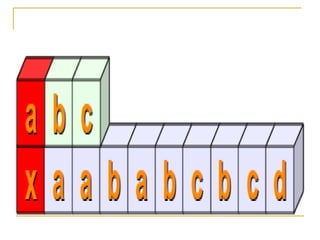
 A regular expression is a special sequence of
characters that helps you match or find other
strings or sets of strings, using a specialized
syntax held in a pattern.
 The module re provides full support for Perl-
like regular expressions in Python.
 The re module raises the exception re.error if
an error occurs while compiling or using a
regular expression.
 When writing regular expression in Python, it
is recommended that you use raw strings
instead of regular Python strings.
 Raw strings begin with a special prefix (r) and
signal Python not to interpret backslashes
and special metacharacters in the string,
allowing you to pass them through directly to
the regular expression engine.
 This means that a pattern like "nw" will not
be interpreted and can be written as r"nw"
instead of "nw" as in other languages,
which is much easier to read.
Components of Regular Expressions
 Literals:
 Any character matches itself, unless it is a
metacharacter with special meaning. A series of
characters find that same series in the input text, so the
template "raul" will find all the appearances of "raul" in
the text that we process.
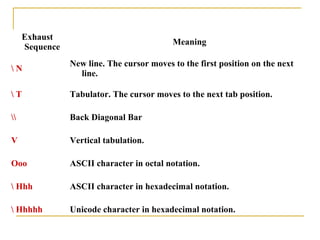
 Escape Sequences:
 The syntax of regular expressions allows us to use the
escape sequences that we know from other
programming languages for those special cases such
as line ends, tabs, slashes, etc.
Exhaust
Sequence
Meaning
 N
New line. The cursor moves to the first position on the next
line.
 T Tabulator. The cursor moves to the next tab position.
 Back Diagonal Bar
V Vertical tabulation.
Ooo ASCII character in octal notation.
 Hhh ASCII character in hexadecimal notation.
 Hhhhh Unicode character in hexadecimal notation.
 Character classes:
 You can specify character classes
enclosing a list of characters in brackets [],
which you will find any of the characters from
the list.
 If the first symbol after the "[" is "^", the class
finds any character that is not in the list.
 Metacharacters:
 Metacharacters are special characters which
are the core of regular expressions .
 As they are extremely important to understand
the syntax of regular expressions and there are
different types.
Metacharacters - delimiters
 This class of metacharacters allows us to delimit where we want to
search the search patterns.
Metacharacter Description
^
“Caret”,Line start, it negates the choice. [^0-9] denotes
the choice "any character but a digit".
$ End of line
TO Start text.
Z Matches end of string. If a newline exists, it matches
just before newline.
z Matches end of string.
. Any character on the line.
b
Matches the empty string, but only at the start or end
of a word.
 B
Matches the empty string, but not at the start or end
of a word.
Metacharacters - Predefined classes
 These are predefined classes that provide us with the use
of regular expressions.
Metacharacter Description
w
Matches any alphanumeric character; equivalent to [a-zA-Z0-9_]. With
LOCALE, it will match the set [a-zA-Z0-9_] plus characters defined as
letters for the current locale.
 W A non-alphanumeric character.
 d Matches any decimal digit; equivalent to the set [0-9].
 D
The complement of d. It matches any non-digit character;
equivalent to the set [^0-9].
s Matches any whitespace character; equivalent to [ tnrfv].
 S
The complement of s. It matches any non-whitespace
character; equiv. to [^ tnrfv]
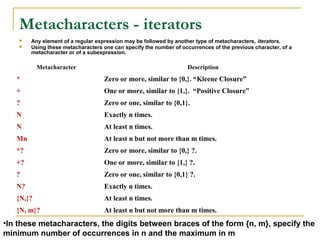
Metacharacters - iterators
 Any element of a regular expression may be followed by another type of metacharacters, iterators.
 Using these metacharacters one can specify the number of occurrences of the previous character, of a
metacharacter or of a subexpression.
Metacharacter Description
* Zero or more, similar to {0,}. “Kleene Closure”
+ One or more, similar to {1,}. “Positive Closure”
? Zero or one, similar to {0,1}.
N Exactly n times.
N At least n times.
Mn At least n but not more than m times.
*? Zero or more, similar to {0,} ?.
+? One or more, similar to {1,} ?.
? Zero or one, similar to {0,1} ?.
N? Exactly n times.
{N,}? At least n times.
{N, m}? At least n but not more than m times.
•In these metacharacters, the digits between braces of the form {n, m}, specify the
minimum number of occurrences in n and the maximum in m
 Demo
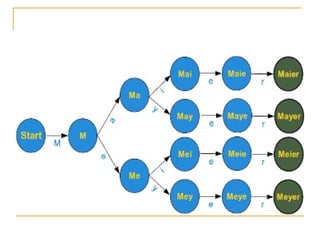
 Square brackets, "[" and "]", are used to
include a character class.
 [xyz] means e.g. either an "x", an "y"
or a "z".
 Let's look at a more practical example:
r"M[ae][iy]er"
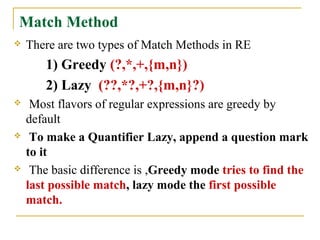
Match Method
 There are two types of Match Methods in RE
1) Greedy (?,*,+,{m,n})
2) Lazy (??,*?,+?,{m,n}?)
 Most flavors of regular expressions are greedy by
default
 To make a Quantifier Lazy, append a question mark
to it
 The basic difference is ,Greedy mode tries to find the
last possible match, lazy mode the first possible
match.
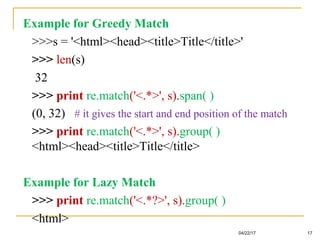
Example for Greedy Match
>>>s = '<html><head><title>Title</title>'
>>> len(s)
32
>>> print re.match('<.*>', s).span( )
(0, 32) # it gives the start and end position of the match
>>> print re.match('<.*>', s).group( )
<html><head><title>Title</title>
Example for Lazy Match
>>> print re.match('<.*?>', s).group( )
<html>
04/22/17 17
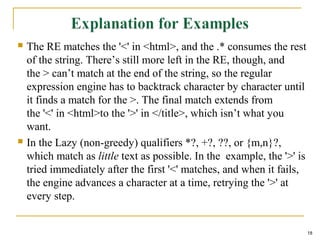
 The RE matches the '<' in <html>, and the .* consumes the rest
of the string. There’s still more left in the RE, though, and
the > can’t match at the end of the string, so the regular
expression engine has to backtrack character by character until
it finds a match for the >. The final match extends from
the '<' in <html>to the '>' in </title>, which isn’t what you
want.
 In the Lazy (non-greedy) qualifiers *?, +?, ??, or {m,n}?,
which match as little text as possible. In the example, the '>' is
tried immediately after the first '<' matches, and when it fails,
the engine advances a character at a time, retrying the '>' at
every step.
18
Match Function
 The match function checks whether a regular
expression matches is the beginning of a string. It is
based on the following format:
Match (regular expression, string, [flag])
 Flag values:
 Flag re.IGNORECASE: There will be no difference between
uppercase and lowercase letters
 Flag re.VERBOSE: Comments and spaces are ignored (in the
expression).
 Note that this method stops after the first match, so
this is best suited for testing a regular expression
more than extracting data.
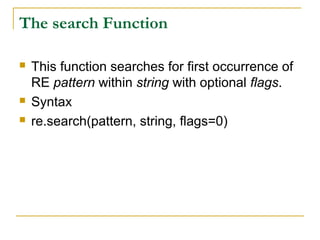
The search Function
 This function searches for first occurrence of
RE pattern within string with optional flags.
 Syntax
 re.search(pattern, string, flags=0)
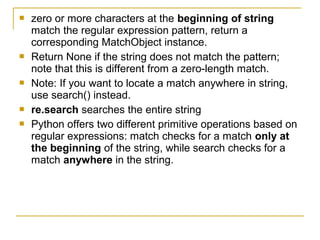
 zero or more characters at the beginning of string
match the regular expression pattern, return a
corresponding MatchObject instance.
 Return None if the string does not match the pattern;
note that this is different from a zero-length match.
 Note: If you want to locate a match anywhere in string,
use search() instead.
 re.search searches the entire string
 Python offers two different primitive operations based on
regular expressions: match checks for a match only at
the beginning of the string, while search checks for a
match anywhere in the string.
24
Modifier Description
re.I
re.IGONRECASE
Performs case-insensitive matching
re.L
re.LOCALE
Interprets words according to the current locale. This
interpretation affects the alphabetic group (w and W), as
well as word boundary behavior (b and B).
re.M
re.MULTILINE
Makes $ match the end of a line (not just the end of the
string) and makes ^ match the start of any line (not just
the start of the string).
re.S
re.DOTALL
Makes a period (dot) match any character, including a
newline.
re.u
re.UNICODE
Interprets letters according to the Unicode character set.
This flag affects the behavior of w, W, b, B.
re.x
re.VERBOSE
It ignores whitespace (except inside a set [] or when
escaped by a backslash) and treats unescaped # as a
comment marker.
OPTION FLAGS
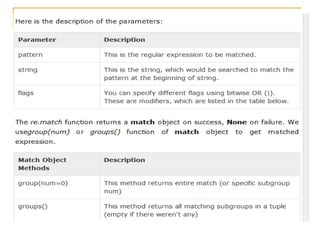
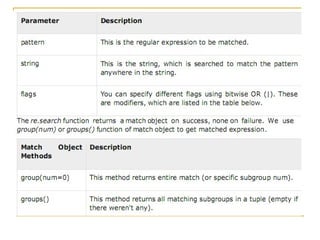
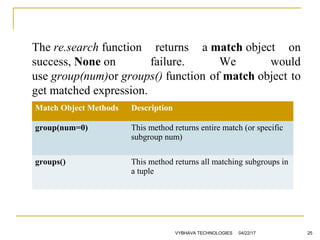
The re.search function returns a match object on
success, None on failure. We would
use group(num)or groups() function of match object to
get matched expression.
04/22/17VYBHAVA TECHNOLOGIES 25
Match Object Methods Description
group(num=0) This method returns entire match (or specific
subgroup num)
groups() This method returns all matching subgroups in
a tuple
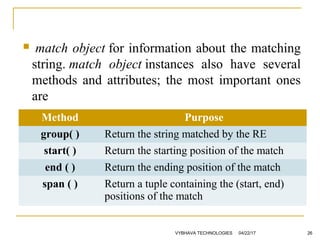
 match object for information about the matching
string. match  object instances also have several
methods and attributes; the most important ones
are
04/22/17VYBHAVA TECHNOLOGIES 26
Method Purpose
group( ) Return the string matched by the RE
start( ) Return the starting position of the match
end ( ) Return the ending position of the match
span ( ) Return a tuple containing the (start, end)
positions of the match
""" This program illustrates is
one of the regular expression method i.e., search()"""
import re
# importing Regular Expression built-in module
text = 'This is my First Regulr Expression Program'
patterns = [ 'first', 'that‘, 'program' ]
# In the text input which patterns you have to search
for pattern in patterns:
print 'Looking for "%s" in "%s" ->' % (pattern, text),
if re.search(pattern, text,re.I):
print 'found a match!'
# if given pattern found in the text then execute the 'if' condition
else:
print 'no match'
# if pattern not found in the text then execute the 'else' condition
04/22/17VYBHAVA TECHNOLOGIES 27
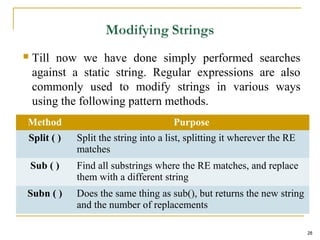
 Till now we have done simply performed searches
against a static string. Regular expressions are also
commonly used to modify strings in various ways
using the following pattern methods.
28
Method Purpose
Split ( ) Split the string into a list, splitting it wherever the RE
matches
Sub ( ) Find all substrings where the RE matches, and replace
them with a different string
Subn ( ) Does the same thing as sub(), but returns the new string
and the number of replacements
Regular expressions are compiled into pattern objects,
which have methods for various operations such as
searching for pattern matches or performing
string substitutions
Split Method:
Syntax:
re.split(string,[maxsplit=0])
Eg:
>>>p = re.compile(r'W+')
>>> p.split(‘This is my first split example string')
[‘This', 'is', 'my', 'first', 'split', 'example']
>>> p.split(‘This is my first split example string', 3)
[‘This', 'is', 'my', 'first split example']
29
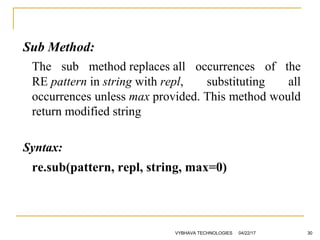
Sub Method:
The sub method replaces all occurrences of the
RE pattern in string with repl, substituting all
occurrences unless max provided. This method would
return modified string
Syntax:
re.sub(pattern, repl, string, max=0)
04/22/17VYBHAVA TECHNOLOGIES 30
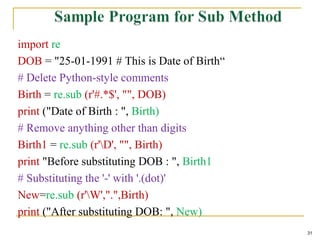
import re
DOB = "25-01-1991 # This is Date of Birth“
# Delete Python-style comments
Birth = re.sub (r'#.*$', "", DOB)
print ("Date of Birth : ", Birth)
# Remove anything other than digits
Birth1 = re.sub (r'D', "", Birth)
print "Before substituting DOB : ", Birth1
# Substituting the '-' with '.(dot)'
New=re.sub (r'W',".",Birth)
print ("After substituting DOB: ", New)
31
Findall:
 Return all non-overlapping matches of pattern in string, as a
list of strings.
 The string is scanned left-to-right, and matches are returned
in the order found.
 If one or more groups are present in the pattern, return a list
of groups; this will be a list of tuples if the pattern has more
than one group.
 Empty matches are included in the result unless they touch
the beginning of another match.
Syntax:
re.findall (pattern, string, flags=0)
32
import re
line='Python Orientation course helps professionals fish best opportunities‘
Print “Find all words starts with p”
print re.findall(r"bp[w]*",line)
print "Find all five characthers long words"
print re.findall(r"bw{5}b", line)
# Find all four, six characthers long words
print “find all 4, 6 char long words"
print re.findall(r"bw{4,6}b", line)
# Find all words which are at least 13 characters long
print “Find all words with 13 char"
print re.findall(r"bw{13,}b", line)
04/22/17VYBHAVA TECHNOLOGIES 33
Finditer
Return an iterator yielding MatchObject instances
over all non-overlapping matches for the
RE pattern in string.
The string is scanned left-to-right, and matches are
returned in the order found.
Empty matches are included in the result unless they
touch the beginning of another match.
Always returns a list.
Syntax:
re.finditer(pattern, string, flags=0)
34
import re
string="Python java c++ perl shell ruby tcl c c#"
print re.findall(r"bc[W+]*",string,re.M|re.I)
print re.findall(r"bp[w]*",string,re.M|re.I)
print re.findall(r"bs[w]*",string,re.M|re.I)
print re.sub(r'W+',"",string)
it = re.finditer(r"bc[(Ws)]*", string)
for match in it:
print "'{g}' was found between the indices
{s}".format(g=match.group(),s=match.span())
35
re.compile()
 If you want to use the same regexp more than once
in a script, it might be a good idea to use a regular
expression object, i.e. the regex is compiled.
The general syntax:
 re.compile(pattern[, flags])
 compile returns a regex object, which can be used later
for searching and replacing.
 The expressions behaviour can be modified by
specifying a flag value.
 compile() compiles the regular expression into a regular
expression object that can be used later with
.search(), .findall() or .match().
 Compiled regular objects usually are not
saving much time, because Python internally
compiles AND CACHES regexes whenever
you use them with re.search() or re.match().
 The only extra time a non-compiled regex
takes is the time it needs to check the cache,
which is a key lookup of a dictionary.
groupdict()
 A groupdict() expression returns a
dictionary containing all the named
subgroups of the match, keyed by the
subgroup name.
Extension notation
 Extension notations start with a (? but the ? does not mean o or 1
occurrence in this context.
 Instead, it means that you are looking at an extension notation.
 The parentheses usually represents grouping but if you see (? then
instead of thinking about grouping, you need to understand that you are
looking at an extension notation.
Unpacking an Extension Notation
example: (?=.com)
step1: Notice (? as this indicates you have an extension notation
step2: The very next symbol tells you what type of extension notation.
Extension notation Symbols
 (?aiLmsux)
 (One or more letters from the set "i" (ignore case), "L",
"m"(mulitline), "s"(. includes newline), "u", "x"(verbose).)
 The group matches the empty string; the letters set the
corresponding flags (re.I, re.L, re.M, re.S, re.U, re.X) for the
entire regular expression.
 This is useful if you wish to include the flags as part of the
regular expression, instead of passing a flag argument to
the compile() function.
 Note that the (?x) flag changes how the expression is
parsed.
 It should be used first in the expression string, or after one
or more whitespace characters. If there are non-whitespace
characters before the flag, the results are undefined.
 (?...)
 This is an extension notation (a "?" following
a "(" is not meaningful otherwise).
 The first character after the "?" determines
what the meaning and further syntax of the
construct is.
 Extensions usually do not create a new
group; (?P<name>...) is the only exception to
this rule. Following are the currently
supported extensions.
 (?:...)
 A non-grouping version of regular
parentheses.
 Matches whatever regular expression is
inside the parentheses, but the substring
matched by the group cannot be retrieved
after performing a match or referenced later
in the pattern.
 (?P<name>...)
 Similar to regular parentheses, but the substring matched by
the group is accessible via the symbolic group name name.
 Group names must be valid Python identifiers, and each
group name must be defined only once within a regular
expression.
 A symbolic group is also a numbered group, just as if the
group were not named. So the group named 'id' in the
example above can also be referenced as the numbered
group 1.
 For example, if the pattern is (?P<id>[a-zA-Z_]w*), the
group can be referenced by its name in arguments to
methods of match objects, such as m.group('id') or
m.end('id'), and also by name in pattern text (for example, (?
P=id)) and replacement text (such as g<id>).
 (?P=name)
 Matches whatever text was matched by the earlier
group named name.
 (?#...)
 A comment; the contents of the parentheses are
simply ignored.
 (?=...)
 Matches if ... matches next, but doesn't consume
any of the string.
 This is called a lookahead assertion.
 For example, Isaac (?=Asimov) will match 'Isaac '
only if it's followed by 'Asimov'.
 (?!...)
 Matches if ... doesn't match next.
 This is a negative lookahead assertion.
 For example, Isaac (?!Asimov) will match
'Isaac ' only if it's not followed by 'Asimov'.
 (?<=...)
 Matches if the current position in the string is
preceded by a match for ... that ends at the
current position.
 This is called a positive lookbehind assertion. (?
<=abc)def will match "abcdef", since the
lookbehind will back up 3 characters and check
if the contained pattern matches.
 The contained pattern must only match strings
of some fixed length, meaning that abc or a|b
are allowed, but a* isn't.
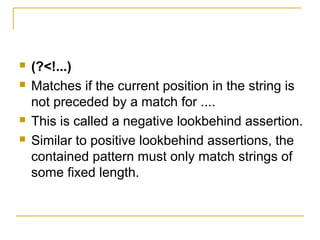
 (?<!...)
 Matches if the current position in the string is
not preceded by a match for ....
 This is called a negative lookbehind assertion.
 Similar to positive lookbehind assertions, the
contained pattern must only match strings of
some fixed length.
Adv. python regular expression by Rj

Adv. python regular expression by Rj

  • 1.
  • 2.
    Unit-1  Regular Expressionsand Text Processing Regular Expressions:  Special Symbols and Characters,  Regexes and Python,  A Longer Regex example (like Data Generators, matching a string etc.) Text Processing:  Comma Sepearated values,  JavaScript Object Notation(JSON),  Python and XML
  • 3.
    Regular Expressions  Aregular expression is a special sequence of characters that helps you match or find other strings or sets of strings, using a specialized syntax held in a pattern.  The module re provides full support for Perl- like regular expressions in Python.  The re module raises the exception re.error if an error occurs while compiling or using a regular expression.
  • 5.
     When writingregular expression in Python, it is recommended that you use raw strings instead of regular Python strings.  Raw strings begin with a special prefix (r) and signal Python not to interpret backslashes and special metacharacters in the string, allowing you to pass them through directly to the regular expression engine.  This means that a pattern like "nw" will not be interpreted and can be written as r"nw" instead of "nw" as in other languages, which is much easier to read.
  • 6.
    Components of RegularExpressions  Literals:  Any character matches itself, unless it is a metacharacter with special meaning. A series of characters find that same series in the input text, so the template "raul" will find all the appearances of "raul" in the text that we process.  Escape Sequences:  The syntax of regular expressions allows us to use the escape sequences that we know from other programming languages for those special cases such as line ends, tabs, slashes, etc.
  • 7.
    Exhaust Sequence Meaning N New line.The cursor moves to the first position on the next line. T Tabulator. The cursor moves to the next tab position. Back Diagonal Bar V Vertical tabulation. Ooo ASCII character in octal notation. Hhh ASCII character in hexadecimal notation. Hhhhh Unicode character in hexadecimal notation.
  • 8.
     Character classes: You can specify character classes enclosing a list of characters in brackets [], which you will find any of the characters from the list.  If the first symbol after the "[" is "^", the class finds any character that is not in the list.  Metacharacters:  Metacharacters are special characters which are the core of regular expressions .  As they are extremely important to understand the syntax of regular expressions and there are different types.
  • 9.
    Metacharacters - delimiters This class of metacharacters allows us to delimit where we want to search the search patterns. Metacharacter Description ^ “Caret”,Line start, it negates the choice. [^0-9] denotes the choice "any character but a digit". $ End of line TO Start text. Z Matches end of string. If a newline exists, it matches just before newline. z Matches end of string. . Any character on the line. b Matches the empty string, but only at the start or end of a word. B Matches the empty string, but not at the start or end of a word.
  • 10.
    Metacharacters - Predefinedclasses  These are predefined classes that provide us with the use of regular expressions. Metacharacter Description w Matches any alphanumeric character; equivalent to [a-zA-Z0-9_]. With LOCALE, it will match the set [a-zA-Z0-9_] plus characters defined as letters for the current locale. W A non-alphanumeric character. d Matches any decimal digit; equivalent to the set [0-9]. D The complement of d. It matches any non-digit character; equivalent to the set [^0-9]. s Matches any whitespace character; equivalent to [ tnrfv]. S The complement of s. It matches any non-whitespace character; equiv. to [^ tnrfv]
  • 11.
    Metacharacters - iterators Any element of a regular expression may be followed by another type of metacharacters, iterators.  Using these metacharacters one can specify the number of occurrences of the previous character, of a metacharacter or of a subexpression. Metacharacter Description * Zero or more, similar to {0,}. “Kleene Closure” + One or more, similar to {1,}. “Positive Closure” ? Zero or one, similar to {0,1}. N Exactly n times. N At least n times. Mn At least n but not more than m times. *? Zero or more, similar to {0,} ?. +? One or more, similar to {1,} ?. ? Zero or one, similar to {0,1} ?. N? Exactly n times. {N,}? At least n times. {N, m}? At least n but not more than m times. •In these metacharacters, the digits between braces of the form {n, m}, specify the minimum number of occurrences in n and the maximum in m
  • 12.
  • 13.
     Square brackets,"[" and "]", are used to include a character class.  [xyz] means e.g. either an "x", an "y" or a "z".  Let's look at a more practical example: r"M[ae][iy]er"
  • 16.
    Match Method  Thereare two types of Match Methods in RE 1) Greedy (?,*,+,{m,n}) 2) Lazy (??,*?,+?,{m,n}?)  Most flavors of regular expressions are greedy by default  To make a Quantifier Lazy, append a question mark to it  The basic difference is ,Greedy mode tries to find the last possible match, lazy mode the first possible match.
  • 17.
    Example for GreedyMatch >>>s = '<html><head><title>Title</title>' >>> len(s) 32 >>> print re.match('<.*>', s).span( ) (0, 32) # it gives the start and end position of the match >>> print re.match('<.*>', s).group( ) <html><head><title>Title</title> Example for Lazy Match >>> print re.match('<.*?>', s).group( ) <html> 04/22/17 17
  • 18.
     The REmatches the '<' in <html>, and the .* consumes the rest of the string. There’s still more left in the RE, though, and the > can’t match at the end of the string, so the regular expression engine has to backtrack character by character until it finds a match for the >. The final match extends from the '<' in <html>to the '>' in </title>, which isn’t what you want.  In the Lazy (non-greedy) qualifiers *?, +?, ??, or {m,n}?, which match as little text as possible. In the example, the '>' is tried immediately after the first '<' matches, and when it fails, the engine advances a character at a time, retrying the '>' at every step. 18
  • 19.
    Match Function  Thematch function checks whether a regular expression matches is the beginning of a string. It is based on the following format: Match (regular expression, string, [flag])  Flag values:  Flag re.IGNORECASE: There will be no difference between uppercase and lowercase letters  Flag re.VERBOSE: Comments and spaces are ignored (in the expression).  Note that this method stops after the first match, so this is best suited for testing a regular expression more than extracting data.
  • 21.
    The search Function This function searches for first occurrence of RE pattern within string with optional flags.  Syntax  re.search(pattern, string, flags=0)
  • 23.
     zero ormore characters at the beginning of string match the regular expression pattern, return a corresponding MatchObject instance.  Return None if the string does not match the pattern; note that this is different from a zero-length match.  Note: If you want to locate a match anywhere in string, use search() instead.  re.search searches the entire string  Python offers two different primitive operations based on regular expressions: match checks for a match only at the beginning of the string, while search checks for a match anywhere in the string.
  • 24.
    24 Modifier Description re.I re.IGONRECASE Performs case-insensitivematching re.L re.LOCALE Interprets words according to the current locale. This interpretation affects the alphabetic group (w and W), as well as word boundary behavior (b and B). re.M re.MULTILINE Makes $ match the end of a line (not just the end of the string) and makes ^ match the start of any line (not just the start of the string). re.S re.DOTALL Makes a period (dot) match any character, including a newline. re.u re.UNICODE Interprets letters according to the Unicode character set. This flag affects the behavior of w, W, b, B. re.x re.VERBOSE It ignores whitespace (except inside a set [] or when escaped by a backslash) and treats unescaped # as a comment marker. OPTION FLAGS
  • 25.
    The re.search functionreturns a match object on success, None on failure. We would use group(num)or groups() function of match object to get matched expression. 04/22/17VYBHAVA TECHNOLOGIES 25 Match Object Methods Description group(num=0) This method returns entire match (or specific subgroup num) groups() This method returns all matching subgroups in a tuple
  • 26.
     match object forinformation about the matching string. match  object instances also have several methods and attributes; the most important ones are 04/22/17VYBHAVA TECHNOLOGIES 26 Method Purpose group( ) Return the string matched by the RE start( ) Return the starting position of the match end ( ) Return the ending position of the match span ( ) Return a tuple containing the (start, end) positions of the match
  • 27.
    """ This programillustrates is one of the regular expression method i.e., search()""" import re # importing Regular Expression built-in module text = 'This is my First Regulr Expression Program' patterns = [ 'first', 'that‘, 'program' ] # In the text input which patterns you have to search for pattern in patterns: print 'Looking for "%s" in "%s" ->' % (pattern, text), if re.search(pattern, text,re.I): print 'found a match!' # if given pattern found in the text then execute the 'if' condition else: print 'no match' # if pattern not found in the text then execute the 'else' condition 04/22/17VYBHAVA TECHNOLOGIES 27
  • 28.
     Till nowwe have done simply performed searches against a static string. Regular expressions are also commonly used to modify strings in various ways using the following pattern methods. 28 Method Purpose Split ( ) Split the string into a list, splitting it wherever the RE matches Sub ( ) Find all substrings where the RE matches, and replace them with a different string Subn ( ) Does the same thing as sub(), but returns the new string and the number of replacements
  • 29.
    Regular expressions arecompiled into pattern objects, which have methods for various operations such as searching for pattern matches or performing string substitutions Split Method: Syntax: re.split(string,[maxsplit=0]) Eg: >>>p = re.compile(r'W+') >>> p.split(‘This is my first split example string') [‘This', 'is', 'my', 'first', 'split', 'example'] >>> p.split(‘This is my first split example string', 3) [‘This', 'is', 'my', 'first split example'] 29
  • 30.
    Sub Method: The submethod replaces all occurrences of the RE pattern in string with repl, substituting all occurrences unless max provided. This method would return modified string Syntax: re.sub(pattern, repl, string, max=0) 04/22/17VYBHAVA TECHNOLOGIES 30
  • 31.
    import re DOB ="25-01-1991 # This is Date of Birth“ # Delete Python-style comments Birth = re.sub (r'#.*$', "", DOB) print ("Date of Birth : ", Birth) # Remove anything other than digits Birth1 = re.sub (r'D', "", Birth) print "Before substituting DOB : ", Birth1 # Substituting the '-' with '.(dot)' New=re.sub (r'W',".",Birth) print ("After substituting DOB: ", New) 31
  • 32.
    Findall:  Return allnon-overlapping matches of pattern in string, as a list of strings.  The string is scanned left-to-right, and matches are returned in the order found.  If one or more groups are present in the pattern, return a list of groups; this will be a list of tuples if the pattern has more than one group.  Empty matches are included in the result unless they touch the beginning of another match. Syntax: re.findall (pattern, string, flags=0) 32
  • 33.
    import re line='Python Orientationcourse helps professionals fish best opportunities‘ Print “Find all words starts with p” print re.findall(r"bp[w]*",line) print "Find all five characthers long words" print re.findall(r"bw{5}b", line) # Find all four, six characthers long words print “find all 4, 6 char long words" print re.findall(r"bw{4,6}b", line) # Find all words which are at least 13 characters long print “Find all words with 13 char" print re.findall(r"bw{13,}b", line) 04/22/17VYBHAVA TECHNOLOGIES 33
  • 34.
    Finditer Return an iteratoryielding MatchObject instances over all non-overlapping matches for the RE pattern in string. The string is scanned left-to-right, and matches are returned in the order found. Empty matches are included in the result unless they touch the beginning of another match. Always returns a list. Syntax: re.finditer(pattern, string, flags=0) 34
  • 35.
    import re string="Python javac++ perl shell ruby tcl c c#" print re.findall(r"bc[W+]*",string,re.M|re.I) print re.findall(r"bp[w]*",string,re.M|re.I) print re.findall(r"bs[w]*",string,re.M|re.I) print re.sub(r'W+',"",string) it = re.finditer(r"bc[(Ws)]*", string) for match in it: print "'{g}' was found between the indices {s}".format(g=match.group(),s=match.span()) 35
  • 37.
    re.compile()  If youwant to use the same regexp more than once in a script, it might be a good idea to use a regular expression object, i.e. the regex is compiled. The general syntax:  re.compile(pattern[, flags])  compile returns a regex object, which can be used later for searching and replacing.  The expressions behaviour can be modified by specifying a flag value.  compile() compiles the regular expression into a regular expression object that can be used later with .search(), .findall() or .match().
  • 38.
     Compiled regularobjects usually are not saving much time, because Python internally compiles AND CACHES regexes whenever you use them with re.search() or re.match().  The only extra time a non-compiled regex takes is the time it needs to check the cache, which is a key lookup of a dictionary.
  • 39.
    groupdict()  A groupdict()expression returns a dictionary containing all the named subgroups of the match, keyed by the subgroup name.
  • 40.
    Extension notation  Extensionnotations start with a (? but the ? does not mean o or 1 occurrence in this context.  Instead, it means that you are looking at an extension notation.  The parentheses usually represents grouping but if you see (? then instead of thinking about grouping, you need to understand that you are looking at an extension notation. Unpacking an Extension Notation example: (?=.com) step1: Notice (? as this indicates you have an extension notation step2: The very next symbol tells you what type of extension notation.
  • 41.
    Extension notation Symbols (?aiLmsux)  (One or more letters from the set "i" (ignore case), "L", "m"(mulitline), "s"(. includes newline), "u", "x"(verbose).)  The group matches the empty string; the letters set the corresponding flags (re.I, re.L, re.M, re.S, re.U, re.X) for the entire regular expression.  This is useful if you wish to include the flags as part of the regular expression, instead of passing a flag argument to the compile() function.  Note that the (?x) flag changes how the expression is parsed.  It should be used first in the expression string, or after one or more whitespace characters. If there are non-whitespace characters before the flag, the results are undefined.
  • 42.
     (?...)  Thisis an extension notation (a "?" following a "(" is not meaningful otherwise).  The first character after the "?" determines what the meaning and further syntax of the construct is.  Extensions usually do not create a new group; (?P<name>...) is the only exception to this rule. Following are the currently supported extensions.
  • 43.
     (?:...)  Anon-grouping version of regular parentheses.  Matches whatever regular expression is inside the parentheses, but the substring matched by the group cannot be retrieved after performing a match or referenced later in the pattern.
  • 44.
     (?P<name>...)  Similarto regular parentheses, but the substring matched by the group is accessible via the symbolic group name name.  Group names must be valid Python identifiers, and each group name must be defined only once within a regular expression.  A symbolic group is also a numbered group, just as if the group were not named. So the group named 'id' in the example above can also be referenced as the numbered group 1.  For example, if the pattern is (?P<id>[a-zA-Z_]w*), the group can be referenced by its name in arguments to methods of match objects, such as m.group('id') or m.end('id'), and also by name in pattern text (for example, (? P=id)) and replacement text (such as g<id>).
  • 45.
     (?P=name)  Matcheswhatever text was matched by the earlier group named name.  (?#...)  A comment; the contents of the parentheses are simply ignored.  (?=...)  Matches if ... matches next, but doesn't consume any of the string.  This is called a lookahead assertion.  For example, Isaac (?=Asimov) will match 'Isaac ' only if it's followed by 'Asimov'.
  • 46.
     (?!...)  Matchesif ... doesn't match next.  This is a negative lookahead assertion.  For example, Isaac (?!Asimov) will match 'Isaac ' only if it's not followed by 'Asimov'.
  • 47.
     (?<=...)  Matchesif the current position in the string is preceded by a match for ... that ends at the current position.  This is called a positive lookbehind assertion. (? <=abc)def will match "abcdef", since the lookbehind will back up 3 characters and check if the contained pattern matches.  The contained pattern must only match strings of some fixed length, meaning that abc or a|b are allowed, but a* isn't.
  • 48.
     (?<!...)  Matchesif the current position in the string is not preceded by a match for ....  This is called a negative lookbehind assertion.  Similar to positive lookbehind assertions, the contained pattern must only match strings of some fixed length.