

FBW 30-09-2010 Wim Van Criekinge
 
Practicum Bioinformatica Practicum  Inleiding tot Perl Write your first PERL program ! Execute your first.pl
Perl is a High-level Scripting language Larry Wall created Perl in 1987 P ractical  E xtraction ( a )nd  R eporting  L anguage (or Pathologically Eclectic Rubbish Lister) Born from a system administration tool Faster than sh or csh Sslower than C No need for sed, awk, tr, wc, cut, … Perl is open and free http://conferences.oreillynet.com/eurooscon/ What is Perl ?
Perl is available for most computing platforms: all flavors of UNIX (Linux), MS-DOS/Win32, Macintosh, VMS, OS/2, Amiga, AS/400, Atari Perl is a computer language that is: Interpreted, compiles at run-time (need for perl.exe !) Loosely “typed” String/text oriented Capable of using multiple syntax formats In Perl, “there’s more than one way to do it” What is Perl ?
Ease of use  by novice programmers Flexible  language: Fast software prototyping (quick and dirty creation of small analysis programs) Expressiveness . Compact code, Perl Poetry: @{$_[$#_]||[]} Glutility : Read disparate files and parse the relevant data into a new format Powerful  pattern matching  via “regular expressions” (Best Regular Expressions on Earth) With the advent of the WWW, Perl has become the language of choice to create  Common Gateway Interface (CGI)  scripts to handle form submissions and create compute severs on the WWW. Open Source – Free . Availability of Perl modules for Bioinformatics and Internet.  Why use Perl for bioinformatics ?
Some tasks are still better done with other languages (heavy computations / graphics) C(++),C#, Fortran, Java (Pascal,Visual Basic)  With perl you can write simple programs fast, but on the other hand it is also suitable for large and complex programs. (yet, it is not adequate for very large projects) Python Larry Wall: “For programmers, laziness is a virtue” Why NOT use Perl for bioinformatics ?
Sequence manipulation and analysis Parsing results of sequence analysis programs (Blast, Genscan, Hmmer etc) Parsing database (eg Genbank) files Obtaining multiple database entries over the internet … What bioinformatics tasks are suited to Perl ?
Example of problems we will be solving Primary Sequence analysis Perform alignments Simulation experiments to explain Blast statistics Predicting protein topology Predicting secondary structures “ Real-life” problems Proteomics: Given aa masses find protein in database …
Perl (op CD-ROM):  Perl is available for various operating systems. To download Perl and install it on your computer, have a look at the following resources:  www.perl.com  (O'Reilly).  Downloading Perl Software   ActiveState . ActivePerl for  Windows , as well as for Linux and Solaris.  ActivePerl binary packages .  CPAN PHPTriad:  bevat Apache/PHP en MySQL: http://sourceforge.net/projects/phptriad Perl installation
Check installation Command-line flags for perl Perl – v Gives the current version of Perl Perl –e Executes Perl statements from the comment line. Perl –e “print 42;” Perl –e “print \”Two\n\lines\n\”;” Perl –we Executes and print warnings Perl –we “print ‘hello’;x++;”
How to enter your first program ? Gebruik een editor  DOS: EDIT Windows:  NOTEPAD (Let op!) Word(Pad) -> TEXT FILE TextPad en/of VIM Scite: http://www.scintilla.org/SciTE.html
To start the DOS editor type EDIT at the command prompt Edit text editor: Command line interface text editor Not a word processor Cannot format data in documents Cannot manipulate environment The Command Prompt Text Editor
CD: Change Direcory ! DIR  myfile.*  - show a listing of any file with the name myfile, ending in ANY extension DIR  *file.dat  - show a listing of files beginning with any characters, ending in file and having a .dat extension DIR  *.*  - show a listing of ALL files in current directory Some MSDOS commands
Program files:  Named by programmer Commonly have .COM, .EXE, or  .BAT extensions It is these that do not require the user to use the extension when executing. Review of File-Naming Rules
Conceptually the syntax is: COPY source destination For example: Copy  myfile.doc  yourfile.doc  This will make a duplicate of the source file, myfile.doc with the name yourfile.doc  The COPY Command
DOSKEY: Recalls and edits command lines Keeps command history Used to write a macro-can record strokes to perform a series of operations, then copy the “history” to a file and execute it at a later date. DOSKEY
Path: Route followed by OS to locate, save, and/or retrieve a file Brief Introduction to Subdirectories—The Path
Probleem Ofwel kan je perl starten Ofwel kan je het script niet vinden Ofwel kan je een file nodig in het script niet vinden Oplossing Don’t panic ! Gebruikt absolute path-namen  D:\Perl\bin\perl.exe D:\temp\Test.pl Let wel in je script met je de slash “escape” $filename = “d:\\Temp\\pdb.fasta” Het absolute pad probleem …
Oplossingen (II) Kopieer al de files in dezelfde directory !  Dus als je perl start vanuit D:\Perl\bin met perl kan je wel verwijzen naar D:\Temp\test.pl maar dan moet ook de absolute verwijzing gebruikt worden voor $filename ofwel moet je pdb.fasta copieren naar D:\Perl\Bin Pas het zoekpad aan zodat je perl overal kan starten Path (geeft het zoekpad) Set Path (past het pad aan, Voorzichtig !). Gebruik de dos environment variabele %path% om een directory toe te voegen Set path=%path%;d:\Perl\bin  (nadien kan de aanpassing controleren door “path” uit te voeren) Het absolute pad probleem …
Keyboard: Standard input device Screen: Standard output device Redirection Redirection . . .  changes output from monitor to somewhere else ( usually file or printer ).
Redirecting output to a File The command: dir > directfile.txt   will send the output of the dir command to a text file NOT to the screen.  There is NO response on the screen.  You can then print the contents of the file. Redirection
Perl
Perl is mostly a free format language: add spaces, tabs or new lines wherever you want.  For clarity, it is recommended to write each statement in a separate line, and use indentation in nested structures.  Comments: Anything from the # sign to the end of the line is a comment. (There are no multi-line comments).  A perl program consists of all of the Perl statements of the file taken collectively as one big routine to execute.  General Remarks
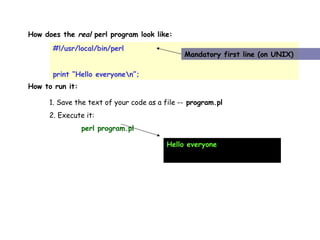
How does the  real  perl program look like:  #!/usr/local/bin/perl print “Hello everyone\n”; Mandatory first line (on UNIX) How to run it:  1. Save the text of your code as a file --  program.pl 2. Execute it: perl program.pl Hello everyone
Three Basic Data Types Scalars - $ Arrays of scalars - @ Associative arrays of scalers or Hashes - %
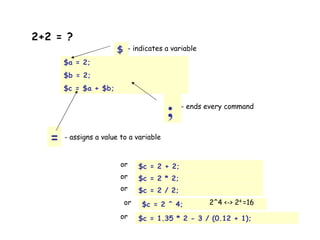
2+2 = ?   $a = 2; $b = 2; $c = $a + $b; $ - indicates a variable ; - ends every command = - assigns a value to a variable $c = 2 + 2; or $c = 2 * 2; or $c = 2 / 2; or $c = 2 ^ 4; or 2^4 <-> 2 4  =16 $c = 1.35 * 2 - 3 / (0.12 + 1); or
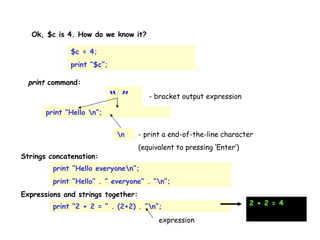
Ok, $c is 4. How do we know it?  print “Hello \n”; print  command:  $c = 4; print “$c”; “ ” - bracket output expression \n - print a end-of-the-line character (equivalent to pressing ‘Enter’) print “Hello everyone\n”; print “Hello” . ” everyone” . “\n”; Strings concatenation:  Expressions and strings together:  print “2 + 2 = “ . (2+2) . ”\n”; expression 2 + 2 = 4
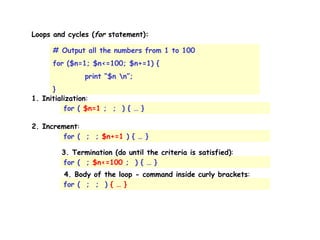
Loops and cycles ( for  statement):  # Output all the numbers from 1 to 100 for ($n=1; $n<=100; $n+=1) { print “$n \n”; } 1. Initialization : for (  $n=1  ;  ;  ) { … } 2. Increment : for (  ;  ;  $n+=1  ) { … } 3. Termination (do until the criteria is satisfied) : for (  ;  $n<=100  ;  ) { … } 4. Body of the loop - command inside curly brackets : for (  ;  ;  )  { … }
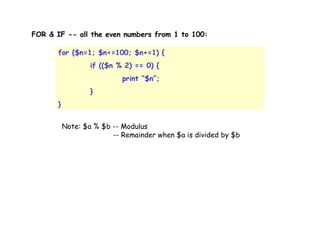
FOR & IF -- all the even numbers from 1 to 100:  for ($n=1; $n<=100; $n+=1) { if (($n % 2) == 0) { print “$n”; } } Note: $a % $b -- Modulus    -- Remainder when $a is divided by $b
Two brief diversions (warnings & strict) Use warnings  strict – forces you to ‘declare’ a variable the first time you use it. usage:  use strict;  (somewhere near the top of your script) declare variables with ‘ my ’ usage:  my $variable; or:  my $variable = ‘value’; my  sets the ‘scope’ of the variable.  Variable exists only within the current block of code use strict  and  my  both help you to debug errors, and help prevent mistakes.
Grabbing user input #!... Use strict; Print “Enter a greeting: “; My $greeting = <>; Print $greeting; <> operator, also called the “diamond operator”. This accesses what the usr types at the keyboard and brings it into the program for use
Voorbeeldprogramma: DNA-invoer.pl #!e:\perl\bin\perl.exe –w  use strict; print &quot;Voer in DNA in:\n&quot;;  while (my $dna=<>) { chomp($dna); my $l = length($dna); print &quot;DNA: &quot;.$dna.&quot;\n&quot;; $dna =~ s/[^atcgATCG]//g; my $l2 = length($dna); if ($l2 < $l) { print &quot;removed &quot;.($l-$l2).&quot; illegal characters\n&quot;; } else { print &quot;OK\n&quot;; } print &quot;Lengte van het DNA: &quot;.$l2.&quot;\n&quot;; }
Unary Arithmetic Operators eg. Autoincrement ++ If you place one of the auto operators before the variable, it is known as a pre-incremented (pre-decremented) variable. Its value will be changed before it is referenced. If it is placed after the variable, it is known as a post-incremented (post-decremented) variable and its value is changed after it is used For example: $a = 5; # $a is assigned 5  $b = ++$a; # $b is assigned the incremented value of $a, 6  $c = $a--; # $c is assigned 6, then $a is decremented to 5  #!e:\perl\bin\perl.exe $getal1 = 5; print $getal1.&quot;\n&quot;; print $getal1++.&quot;\n&quot;; print ++$getal1.&quot;\n&quot;;
Logical and Comparison operators Equal (True if $a is equal to $b) Numeric: == String: eq And: && Or: ||
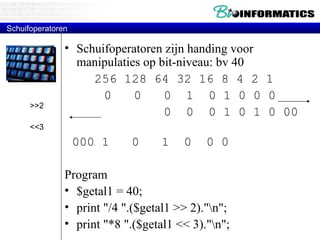
Schuifoperatoren Schuifoperatoren zijn handing voor manipulaties op bit-niveau: bv 40 256 128 64 32 16 8 4 2 1   0  0  0  1  0 1 0 0 0   0  0  0 1 0 1 0 00  000 1  0  1  0  0 0 Program $getal1 = 40; print &quot;/4 &quot;.($getal1 >> 2).&quot;\n&quot;; print &quot;*8 &quot;.($getal1 << 3).&quot;\n&quot;; >>2 <<3
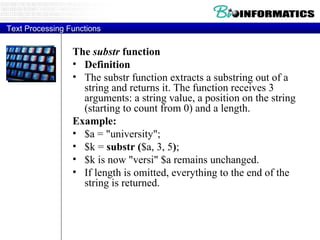
Text Processing Functions The  substr  function Definition The substr function extracts a substring out of a string and returns it. The function receives 3 arguments: a string value, a position on the string (starting to count from 0) and a length.  Example: $a = &quot;university&quot;;  $k =  substr ( $a, 3, 5 ) ;  $k is now &quot;versi&quot; $a remains unchanged.  If length is omitted, everything to the end of the string is returned.
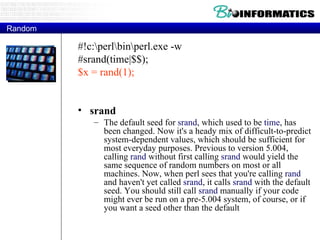
Random #!c:\perl\bin\perl.exe -w #srand(time|$$); $x = rand(1); srand  The default seed for  srand , which used to be  time , has been changed. Now it's a heady mix of difficult-to-predict system-dependent values, which should be sufficient for most everyday purposes. Previous to version 5.004, calling  rand  without first calling  srand  would yield the same sequence of random numbers on most or all machines. Now, when perl sees that you're calling  rand  and haven't yet called  srand , it calls  srand  with the default seed. You should still call  srand  manually if your code might ever be run on a pre-5.004 system, of course, or if you want a seed other than the default
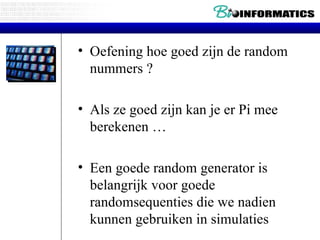
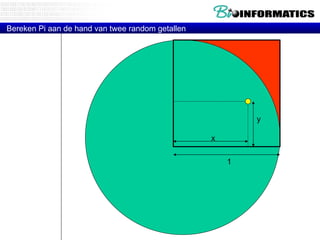
Oefening hoe goed zijn de random nummers ? Als ze goed zijn kan je er Pi mee berekenen … Een goede random generator is belangrijk voor goede randomsequenties die we nadien kunnen gebruiken in simulaties
Bereken Pi aan de hand van twee random getallen 1 x y
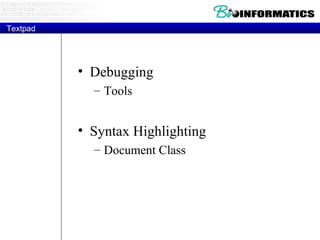
Textpad Debugging Tools Syntax Highlighting Document Class

Bioinformatica 29-09-2011-p1-introduction

  • 1.
  • 2.
    FBW 30-09-2010 WimVan Criekinge
  • 3.
  • 4.
    Practicum Bioinformatica Practicum Inleiding tot Perl Write your first PERL program ! Execute your first.pl
  • 5.
    Perl is aHigh-level Scripting language Larry Wall created Perl in 1987 P ractical E xtraction ( a )nd R eporting L anguage (or Pathologically Eclectic Rubbish Lister) Born from a system administration tool Faster than sh or csh Sslower than C No need for sed, awk, tr, wc, cut, … Perl is open and free http://conferences.oreillynet.com/eurooscon/ What is Perl ?
  • 6.
    Perl is availablefor most computing platforms: all flavors of UNIX (Linux), MS-DOS/Win32, Macintosh, VMS, OS/2, Amiga, AS/400, Atari Perl is a computer language that is: Interpreted, compiles at run-time (need for perl.exe !) Loosely “typed” String/text oriented Capable of using multiple syntax formats In Perl, “there’s more than one way to do it” What is Perl ?
  • 7.
    Ease of use by novice programmers Flexible language: Fast software prototyping (quick and dirty creation of small analysis programs) Expressiveness . Compact code, Perl Poetry: @{$_[$#_]||[]} Glutility : Read disparate files and parse the relevant data into a new format Powerful pattern matching via “regular expressions” (Best Regular Expressions on Earth) With the advent of the WWW, Perl has become the language of choice to create Common Gateway Interface (CGI) scripts to handle form submissions and create compute severs on the WWW. Open Source – Free . Availability of Perl modules for Bioinformatics and Internet. Why use Perl for bioinformatics ?
  • 8.
    Some tasks arestill better done with other languages (heavy computations / graphics) C(++),C#, Fortran, Java (Pascal,Visual Basic) With perl you can write simple programs fast, but on the other hand it is also suitable for large and complex programs. (yet, it is not adequate for very large projects) Python Larry Wall: “For programmers, laziness is a virtue” Why NOT use Perl for bioinformatics ?
  • 9.
    Sequence manipulation andanalysis Parsing results of sequence analysis programs (Blast, Genscan, Hmmer etc) Parsing database (eg Genbank) files Obtaining multiple database entries over the internet … What bioinformatics tasks are suited to Perl ?
  • 10.
    Example of problemswe will be solving Primary Sequence analysis Perform alignments Simulation experiments to explain Blast statistics Predicting protein topology Predicting secondary structures “ Real-life” problems Proteomics: Given aa masses find protein in database …
  • 11.
    Perl (op CD-ROM): Perl is available for various operating systems. To download Perl and install it on your computer, have a look at the following resources: www.perl.com (O'Reilly). Downloading Perl Software ActiveState . ActivePerl for Windows , as well as for Linux and Solaris. ActivePerl binary packages . CPAN PHPTriad: bevat Apache/PHP en MySQL: http://sourceforge.net/projects/phptriad Perl installation
  • 12.
    Check installation Command-lineflags for perl Perl – v Gives the current version of Perl Perl –e Executes Perl statements from the comment line. Perl –e “print 42;” Perl –e “print \”Two\n\lines\n\”;” Perl –we Executes and print warnings Perl –we “print ‘hello’;x++;”
  • 13.
    How to enteryour first program ? Gebruik een editor DOS: EDIT Windows: NOTEPAD (Let op!) Word(Pad) -> TEXT FILE TextPad en/of VIM Scite: http://www.scintilla.org/SciTE.html
  • 14.
    To start theDOS editor type EDIT at the command prompt Edit text editor: Command line interface text editor Not a word processor Cannot format data in documents Cannot manipulate environment The Command Prompt Text Editor
  • 15.
    CD: Change Direcory! DIR myfile.* - show a listing of any file with the name myfile, ending in ANY extension DIR *file.dat - show a listing of files beginning with any characters, ending in file and having a .dat extension DIR *.* - show a listing of ALL files in current directory Some MSDOS commands
  • 16.
    Program files: Named by programmer Commonly have .COM, .EXE, or .BAT extensions It is these that do not require the user to use the extension when executing. Review of File-Naming Rules
  • 17.
    Conceptually the syntaxis: COPY source destination For example: Copy myfile.doc yourfile.doc This will make a duplicate of the source file, myfile.doc with the name yourfile.doc The COPY Command
  • 18.
    DOSKEY: Recalls andedits command lines Keeps command history Used to write a macro-can record strokes to perform a series of operations, then copy the “history” to a file and execute it at a later date. DOSKEY
  • 19.
    Path: Route followedby OS to locate, save, and/or retrieve a file Brief Introduction to Subdirectories—The Path
  • 20.
    Probleem Ofwel kanje perl starten Ofwel kan je het script niet vinden Ofwel kan je een file nodig in het script niet vinden Oplossing Don’t panic ! Gebruikt absolute path-namen D:\Perl\bin\perl.exe D:\temp\Test.pl Let wel in je script met je de slash “escape” $filename = “d:\\Temp\\pdb.fasta” Het absolute pad probleem …
  • 21.
    Oplossingen (II) Kopieeral de files in dezelfde directory ! Dus als je perl start vanuit D:\Perl\bin met perl kan je wel verwijzen naar D:\Temp\test.pl maar dan moet ook de absolute verwijzing gebruikt worden voor $filename ofwel moet je pdb.fasta copieren naar D:\Perl\Bin Pas het zoekpad aan zodat je perl overal kan starten Path (geeft het zoekpad) Set Path (past het pad aan, Voorzichtig !). Gebruik de dos environment variabele %path% om een directory toe te voegen Set path=%path%;d:\Perl\bin (nadien kan de aanpassing controleren door “path” uit te voeren) Het absolute pad probleem …
  • 22.
    Keyboard: Standard inputdevice Screen: Standard output device Redirection Redirection . . . changes output from monitor to somewhere else ( usually file or printer ).
  • 23.
    Redirecting output toa File The command: dir > directfile.txt will send the output of the dir command to a text file NOT to the screen. There is NO response on the screen. You can then print the contents of the file. Redirection
  • 24.
  • 25.
    Perl is mostlya free format language: add spaces, tabs or new lines wherever you want. For clarity, it is recommended to write each statement in a separate line, and use indentation in nested structures. Comments: Anything from the # sign to the end of the line is a comment. (There are no multi-line comments). A perl program consists of all of the Perl statements of the file taken collectively as one big routine to execute. General Remarks
  • 26.
    How does the real perl program look like: #!/usr/local/bin/perl print “Hello everyone\n”; Mandatory first line (on UNIX) How to run it: 1. Save the text of your code as a file -- program.pl 2. Execute it: perl program.pl Hello everyone
  • 27.
    Three Basic DataTypes Scalars - $ Arrays of scalars - @ Associative arrays of scalers or Hashes - %
  • 28.
    2+2 = ? $a = 2; $b = 2; $c = $a + $b; $ - indicates a variable ; - ends every command = - assigns a value to a variable $c = 2 + 2; or $c = 2 * 2; or $c = 2 / 2; or $c = 2 ^ 4; or 2^4 <-> 2 4 =16 $c = 1.35 * 2 - 3 / (0.12 + 1); or
  • 29.
    Ok, $c is4. How do we know it? print “Hello \n”; print command: $c = 4; print “$c”; “ ” - bracket output expression \n - print a end-of-the-line character (equivalent to pressing ‘Enter’) print “Hello everyone\n”; print “Hello” . ” everyone” . “\n”; Strings concatenation: Expressions and strings together: print “2 + 2 = “ . (2+2) . ”\n”; expression 2 + 2 = 4
  • 30.
    Loops and cycles( for statement): # Output all the numbers from 1 to 100 for ($n=1; $n<=100; $n+=1) { print “$n \n”; } 1. Initialization : for ( $n=1 ; ; ) { … } 2. Increment : for ( ; ; $n+=1 ) { … } 3. Termination (do until the criteria is satisfied) : for ( ; $n<=100 ; ) { … } 4. Body of the loop - command inside curly brackets : for ( ; ; ) { … }
  • 31.
    FOR & IF-- all the even numbers from 1 to 100: for ($n=1; $n<=100; $n+=1) { if (($n % 2) == 0) { print “$n”; } } Note: $a % $b -- Modulus -- Remainder when $a is divided by $b
  • 32.
    Two brief diversions(warnings & strict) Use warnings strict – forces you to ‘declare’ a variable the first time you use it. usage: use strict; (somewhere near the top of your script) declare variables with ‘ my ’ usage: my $variable; or: my $variable = ‘value’; my sets the ‘scope’ of the variable. Variable exists only within the current block of code use strict and my both help you to debug errors, and help prevent mistakes.
  • 33.
    Grabbing user input#!... Use strict; Print “Enter a greeting: “; My $greeting = <>; Print $greeting; <> operator, also called the “diamond operator”. This accesses what the usr types at the keyboard and brings it into the program for use
  • 34.
    Voorbeeldprogramma: DNA-invoer.pl #!e:\perl\bin\perl.exe–w use strict; print &quot;Voer in DNA in:\n&quot;; while (my $dna=<>) { chomp($dna); my $l = length($dna); print &quot;DNA: &quot;.$dna.&quot;\n&quot;; $dna =~ s/[^atcgATCG]//g; my $l2 = length($dna); if ($l2 < $l) { print &quot;removed &quot;.($l-$l2).&quot; illegal characters\n&quot;; } else { print &quot;OK\n&quot;; } print &quot;Lengte van het DNA: &quot;.$l2.&quot;\n&quot;; }
  • 35.
    Unary Arithmetic Operatorseg. Autoincrement ++ If you place one of the auto operators before the variable, it is known as a pre-incremented (pre-decremented) variable. Its value will be changed before it is referenced. If it is placed after the variable, it is known as a post-incremented (post-decremented) variable and its value is changed after it is used For example: $a = 5; # $a is assigned 5 $b = ++$a; # $b is assigned the incremented value of $a, 6 $c = $a--; # $c is assigned 6, then $a is decremented to 5 #!e:\perl\bin\perl.exe $getal1 = 5; print $getal1.&quot;\n&quot;; print $getal1++.&quot;\n&quot;; print ++$getal1.&quot;\n&quot;;
  • 36.
    Logical and Comparisonoperators Equal (True if $a is equal to $b) Numeric: == String: eq And: && Or: ||
  • 37.
    Schuifoperatoren Schuifoperatoren zijnhanding voor manipulaties op bit-niveau: bv 40 256 128 64 32 16 8 4 2 1 0 0 0 1 0 1 0 0 0 0 0 0 1 0 1 0 00 000 1 0 1 0 0 0 Program $getal1 = 40; print &quot;/4 &quot;.($getal1 >> 2).&quot;\n&quot;; print &quot;*8 &quot;.($getal1 << 3).&quot;\n&quot;; >>2 <<3
  • 38.
    Text Processing FunctionsThe substr function Definition The substr function extracts a substring out of a string and returns it. The function receives 3 arguments: a string value, a position on the string (starting to count from 0) and a length. Example: $a = &quot;university&quot;; $k = substr ( $a, 3, 5 ) ; $k is now &quot;versi&quot; $a remains unchanged. If length is omitted, everything to the end of the string is returned.
  • 39.
    Random #!c:\perl\bin\perl.exe -w#srand(time|$$); $x = rand(1); srand The default seed for srand , which used to be time , has been changed. Now it's a heady mix of difficult-to-predict system-dependent values, which should be sufficient for most everyday purposes. Previous to version 5.004, calling rand without first calling srand would yield the same sequence of random numbers on most or all machines. Now, when perl sees that you're calling rand and haven't yet called srand , it calls srand with the default seed. You should still call srand manually if your code might ever be run on a pre-5.004 system, of course, or if you want a seed other than the default
  • 40.
    Oefening hoe goedzijn de random nummers ? Als ze goed zijn kan je er Pi mee berekenen … Een goede random generator is belangrijk voor goede randomsequenties die we nadien kunnen gebruiken in simulaties
  • 41.
    Bereken Pi aande hand van twee random getallen 1 x y
  • 42.
    Textpad Debugging ToolsSyntax Highlighting Document Class