Reg1u01lar Expressions 
Danny Bryant 
City of Atlanta
Danny Bryant 
About the Presenter IT Manager, Sr.- City of Atlanta 
@dbcapoeira 
dbryant@atlantaga.gov 
http://www.dbaOnTap.com 
Danny Bryant 
User Groups: ODTUG | OAUG | IOUG 
Publications & Media 
ODTUG (blog) – 
How’d You First Get Involved with ODTUG? 
RMOUG – SQL>SELECT 
Regular Expressions: A Love/Hate 
Relationship 
Oracle Podcast 
SQL Dev 4.0 in Action at the 
City of Atlanta
The City of Atlanta 
• Overview 
▫ Includes the Mayor/Executive Offices (13 Departments), Judicial and Board Officers, 
and City Council (16 Members) 
▫ Metropolitan Statistical Area (MSA) is the 9th largest metropolitan area in the country 
▫ Population of 443,775 citizens (2012 US Census estimate) 
▫ Manages Hartsfield-Jackson International Airport, the world's busiest airport by 
serving over 95MM passengers in 2012 
▫ Approximately 7,500 active employees and 5,000 retirees 
▫ $1.8B Operating Budget
The City of Atlanta 
• Oracle Footprint 
▫ Enterprise Resource Planning (ERP) Applications (eBS 11.5.10.2) 
● Financials 
● Human Resources Management System 
● Procurement 
● Discoverer Reporting 
▫ Siebel Customer Relationship Management (CRM) Applications 
▫ Enterprise Performance Management (EPM) Applications (v11.1.2) 
● Hyperion Public Sector Planning and Budgeting 
● Hyperion Financial Management 
▫ Oracle Business Intelligence Enterprise Edition (OBIEE v11.1.1.2) 
● Human Resources Analytics 
● Financial Analytics
Agenda 
• Simple Pattern Matching 
• What are Regular Expressions 
• META Characters 
▫ Examples 
• Regular Expression Function 
▫ Examples
Simple Pattern Matching 
LIKE Operator 
%(multiple characters) 
_ (single character)
Simple Pattern Matching 
LIKE Operator with ‘%” 
SELECT first_name, last_name 
FROM employees 
WHERE last_name LIKE ‘Ba%'
Simple Pattern Matching 
LIKE Operator with ‘_’ 
SELECT first_name, last_name 
FROM employees 
WHERE last_name LIKE ‘Ba_da’
Simple Pattern Matching 
What if you needed to find all words where every 
second character is a vowel? 
Regular Expressions
What are Regular Expressions? 
• Methods of describing both simple and complex 
patterns for searching and manipulating 
• Uses META Characters for pattern matching 
• Oracle’s implementation is an extension of the 
POSIX (Portable Operating System for UNIX)
META Characters 
Symbol Description 
^ Marks the start of a line 
$ Marks the end of a line 
[ ] Matching list 
| Operator for specifying alternative matches (logical OR) 
? Matches zero or one occurrence 
. Matches any character except NULL 
{m} Matches exactly m times 
{m,n} Matches at leastm times but no more than n times 
[: :] Specifies a character class and matches any character in the class 
 Escape character
META Characters 
Symbol Description 
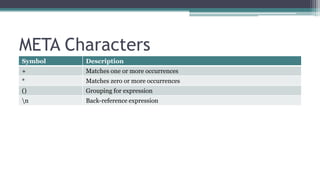
+ Matches one or more occurrences 
* Matches zero or more occurrences 
() Grouping for expression 
n Back-reference expression
META Characters 
Examples
^ Beginning of a line 
Example: ^(Oracle) Match 
Oracle Open World √ 
The Oracle at Delphi X 
Oracle √
$ End of a line 
Example: (Oracle)$ Match 
Welcome to Oracle √ 
The Oracle at Delphi X 
Oracle √
(string1|string2)logical OR 
Example: Ste(v|ph)en Match 
Stephen √ 
Stefan X 
Steven √
.(dot) Single character match 
Example: 
re.d 
Match 
read √ 
rear X 
reed √
. Breakdown (re.d) 
Character Check Success 
r r e a d 
r e a r 
r e e d 
√ 
√ 
√ 
e r e a d 
r e a r 
r e e d 
√ 
√ 
√ 
. (A-Z,a-z) r e a d 
r e a r 
r e e d 
√ 
√ 
√ 
d r e a d 
r e a r 
r e e d 
√ 
X 
√
{m} Matches exactly m times 
Example: 
s{2} 
Match 
password √ 
sister X 
essential √
{m} Breakdown (s{2}) 
password Check sister Check 
p X s √ 
a X i X 
s √ s √ 
s √ t X 
w X e X 
o X r X 
r X 
d X
*(star) Matches zero or more 
Example: 
ab*c 
Match 
abc √ 
acc X 
ac √
* Breakdown (ab*c) 
abc Check acc Check 
a √ a √ 
b √ c X 
c √ c X
Regular Expression Functions 
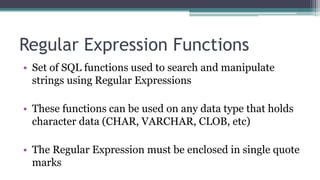
• Set of SQL functions used to search and manipulate 
strings using Regular Expressions 
• These functions can be used on any data type that holds 
character data (CHAR, VARCHAR, CLOB, etc) 
• The Regular Expression must be enclosed in single quote 
marks
Regular Expression Functions 
Function name Description 
REGEXP_LIKE Similar to the LIKE operator but allows for the use of regular 
expressions in matching 
REGEXP_REPLACE Search and replace text using regular expression pattern 
REGEXP_INSTR Searches for a string using regular expression pattern and returns the 
position when match is found 
REGEXP_SUBSTR Searches for a string using regular expression pattern and returns the 
matched substring 
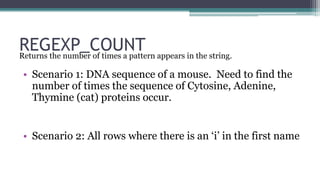
REGEXP_COUNT Returns the number of times a pattern appears in the string.
REGEXP_LIKE 
Similar to the LIKE operator but allows for the use of regular 
expressions in matching
REGEXP_LIKE 
All employees first name of Steven or Stephen
REGEXP_LIKE 
All employees first name of Steven or Stephen 
Meta Character Description 
^ Start of the string 
Ste Beginning letters of the string 
( Starts the group 
v Is next character a ‘v’ 
| OR 
ph Are next characters ‘ph’ 
) End the group 
en Ending letters of string 
$ End of the string
REGEXP_REPLACE 
Search and replace text using regular expression pattern
REGEXP_REPLACE 
Reformat phone number from ###.###.#### to 
1 (###)-###-####
REGEXP_REPLACE 
Meta Character Description 
[[:digit:]]{3} Three digits (group 1) 
. Then a ‘.’ (Since the ‘.’ is a META Character, we have to use the  to 
‘escape’ it) 
[[:digit:]]{3} Three digits (group 2) 
. Then a ‘.’ 
[[:digit:]]{4} Four digits (group 3)
REGEXP_REPLACE 
Replacements Description (sample 404.777.9311) 
1 Start with a 1 
(1) Enclose group 1 in () -> (404) 
- Add a ‘-’ 
2 Group 2 -> 777 
- Add a ‘-’ 
3 Group 3 -> 9311 
RESULT 1 (404)-777-9311
REGEXP_INSTR 
Searches for a string using regular expression pattern and 
returns the position when match is found
REGEXP_INSTR 
Search for addresses that don’t start with a number and list the 
position of the first non-alpha character
REGEXP_INSTR 
Search for addresses that don’t start with a number and list the 
position of the first non-alpha character 
Meta Character Description 
[ Start of the expression 
^ Starts with 
[:alpha:] Alpha characters 
] End of the expression
REGEXP_SUBSTR 
Searches for a string using regular expression pattern and 
returns the matched substring
REGEXP_SUBSTR 
Only return POSITION department name
REGEXP_SUBSTR 
Only return POSITION department name 
Meta Character Description 
. Escape the ‘.’ 
[A-z-]+ Matches one or more occurrences of alpha 
characters 
. Escape the ‘.’ 
1 Starting position 
1 Nth occurrences 
‘i’ Ignore case 
2 Sub-expression to return
REGEXP_COUNT 
Returns the number of times a pattern appears in the string. 
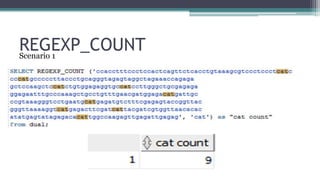
• Scenario 1: DNA sequence of a mouse. Need to find the 
number of times the sequence of Cytosine, Adenine, 
Thymine (cat) proteins occur. 
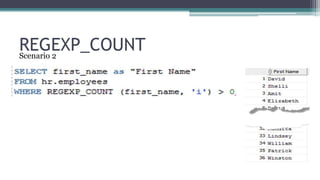
• Scenario 2: All rows where there is an ‘i’ in the first name
REGEXP_COUNT 
Scenario 1
REGEXP_COUNT 
Scenario 2
Q/A
@dbcapoeira 
dbryant@atlantaga.gov 
http://www.dbaOnTap.com 
Danny Bryant
SUBMIT YOUR ABSTRACTS TODAY!

Regular Expressions 101 Introduction to Regular Expressions

  • 1.
    Reg1u01lar Expressions DannyBryant City of Atlanta
  • 2.
    Danny Bryant Aboutthe Presenter IT Manager, Sr.- City of Atlanta @dbcapoeira dbryant@atlantaga.gov http://www.dbaOnTap.com Danny Bryant User Groups: ODTUG | OAUG | IOUG Publications & Media ODTUG (blog) – How’d You First Get Involved with ODTUG? RMOUG – SQL>SELECT Regular Expressions: A Love/Hate Relationship Oracle Podcast SQL Dev 4.0 in Action at the City of Atlanta
  • 3.
    The City ofAtlanta • Overview ▫ Includes the Mayor/Executive Offices (13 Departments), Judicial and Board Officers, and City Council (16 Members) ▫ Metropolitan Statistical Area (MSA) is the 9th largest metropolitan area in the country ▫ Population of 443,775 citizens (2012 US Census estimate) ▫ Manages Hartsfield-Jackson International Airport, the world's busiest airport by serving over 95MM passengers in 2012 ▫ Approximately 7,500 active employees and 5,000 retirees ▫ $1.8B Operating Budget
  • 4.
    The City ofAtlanta • Oracle Footprint ▫ Enterprise Resource Planning (ERP) Applications (eBS 11.5.10.2) ● Financials ● Human Resources Management System ● Procurement ● Discoverer Reporting ▫ Siebel Customer Relationship Management (CRM) Applications ▫ Enterprise Performance Management (EPM) Applications (v11.1.2) ● Hyperion Public Sector Planning and Budgeting ● Hyperion Financial Management ▫ Oracle Business Intelligence Enterprise Edition (OBIEE v11.1.1.2) ● Human Resources Analytics ● Financial Analytics
  • 5.
    Agenda • SimplePattern Matching • What are Regular Expressions • META Characters ▫ Examples • Regular Expression Function ▫ Examples
  • 6.
    Simple Pattern Matching LIKE Operator %(multiple characters) _ (single character)
  • 7.
    Simple Pattern Matching LIKE Operator with ‘%” SELECT first_name, last_name FROM employees WHERE last_name LIKE ‘Ba%'
  • 8.
    Simple Pattern Matching LIKE Operator with ‘_’ SELECT first_name, last_name FROM employees WHERE last_name LIKE ‘Ba_da’
  • 9.
    Simple Pattern Matching What if you needed to find all words where every second character is a vowel? Regular Expressions
  • 10.
    What are RegularExpressions? • Methods of describing both simple and complex patterns for searching and manipulating • Uses META Characters for pattern matching • Oracle’s implementation is an extension of the POSIX (Portable Operating System for UNIX)
  • 11.
    META Characters SymbolDescription ^ Marks the start of a line $ Marks the end of a line [ ] Matching list | Operator for specifying alternative matches (logical OR) ? Matches zero or one occurrence . Matches any character except NULL {m} Matches exactly m times {m,n} Matches at leastm times but no more than n times [: :] Specifies a character class and matches any character in the class Escape character
  • 12.
    META Characters SymbolDescription + Matches one or more occurrences * Matches zero or more occurrences () Grouping for expression n Back-reference expression
  • 13.
  • 14.
    ^ Beginning ofa line Example: ^(Oracle) Match Oracle Open World √ The Oracle at Delphi X Oracle √
  • 15.
    $ End ofa line Example: (Oracle)$ Match Welcome to Oracle √ The Oracle at Delphi X Oracle √
  • 16.
    (string1|string2)logical OR Example:Ste(v|ph)en Match Stephen √ Stefan X Steven √
  • 17.
    .(dot) Single charactermatch Example: re.d Match read √ rear X reed √
  • 18.
    . Breakdown (re.d) Character Check Success r r e a d r e a r r e e d √ √ √ e r e a d r e a r r e e d √ √ √ . (A-Z,a-z) r e a d r e a r r e e d √ √ √ d r e a d r e a r r e e d √ X √
  • 19.
    {m} Matches exactlym times Example: s{2} Match password √ sister X essential √
  • 20.
    {m} Breakdown (s{2}) password Check sister Check p X s √ a X i X s √ s √ s √ t X w X e X o X r X r X d X
  • 21.
    *(star) Matches zeroor more Example: ab*c Match abc √ acc X ac √
  • 22.
    * Breakdown (ab*c) abc Check acc Check a √ a √ b √ c X c √ c X
  • 23.
    Regular Expression Functions • Set of SQL functions used to search and manipulate strings using Regular Expressions • These functions can be used on any data type that holds character data (CHAR, VARCHAR, CLOB, etc) • The Regular Expression must be enclosed in single quote marks
  • 24.
    Regular Expression Functions Function name Description REGEXP_LIKE Similar to the LIKE operator but allows for the use of regular expressions in matching REGEXP_REPLACE Search and replace text using regular expression pattern REGEXP_INSTR Searches for a string using regular expression pattern and returns the position when match is found REGEXP_SUBSTR Searches for a string using regular expression pattern and returns the matched substring REGEXP_COUNT Returns the number of times a pattern appears in the string.
  • 25.
    REGEXP_LIKE Similar tothe LIKE operator but allows for the use of regular expressions in matching
  • 26.
    REGEXP_LIKE All employeesfirst name of Steven or Stephen
  • 27.
    REGEXP_LIKE All employeesfirst name of Steven or Stephen Meta Character Description ^ Start of the string Ste Beginning letters of the string ( Starts the group v Is next character a ‘v’ | OR ph Are next characters ‘ph’ ) End the group en Ending letters of string $ End of the string
  • 28.
    REGEXP_REPLACE Search andreplace text using regular expression pattern
  • 29.
    REGEXP_REPLACE Reformat phonenumber from ###.###.#### to 1 (###)-###-####
  • 30.
    REGEXP_REPLACE Meta CharacterDescription [[:digit:]]{3} Three digits (group 1) . Then a ‘.’ (Since the ‘.’ is a META Character, we have to use the to ‘escape’ it) [[:digit:]]{3} Three digits (group 2) . Then a ‘.’ [[:digit:]]{4} Four digits (group 3)
  • 31.
    REGEXP_REPLACE Replacements Description(sample 404.777.9311) 1 Start with a 1 (1) Enclose group 1 in () -> (404) - Add a ‘-’ 2 Group 2 -> 777 - Add a ‘-’ 3 Group 3 -> 9311 RESULT 1 (404)-777-9311
  • 32.
    REGEXP_INSTR Searches fora string using regular expression pattern and returns the position when match is found
  • 33.
    REGEXP_INSTR Search foraddresses that don’t start with a number and list the position of the first non-alpha character
  • 34.
    REGEXP_INSTR Search foraddresses that don’t start with a number and list the position of the first non-alpha character Meta Character Description [ Start of the expression ^ Starts with [:alpha:] Alpha characters ] End of the expression
  • 35.
    REGEXP_SUBSTR Searches fora string using regular expression pattern and returns the matched substring
  • 36.
    REGEXP_SUBSTR Only returnPOSITION department name
  • 37.
    REGEXP_SUBSTR Only returnPOSITION department name Meta Character Description . Escape the ‘.’ [A-z-]+ Matches one or more occurrences of alpha characters . Escape the ‘.’ 1 Starting position 1 Nth occurrences ‘i’ Ignore case 2 Sub-expression to return
  • 38.
    REGEXP_COUNT Returns thenumber of times a pattern appears in the string. • Scenario 1: DNA sequence of a mouse. Need to find the number of times the sequence of Cytosine, Adenine, Thymine (cat) proteins occur. • Scenario 2: All rows where there is an ‘i’ in the first name
  • 39.
  • 40.
  • 41.
  • 42.
  • 43.

Editor's Notes

  • #38 This is of particular interest to me because now you don’t have to find the start and end points of the substring.