
Regular Expressions for the
Web Application Developer
             By Andrew Kandels
Regular Expressions
Regular expressions provide a concise, flexible means for
matching strings of text, such as words or patterns of
characters.
POSIX                                 PCRE
Portable Operating System Interface   Perl Compatible Regular Expressions


• Traditional Unix regular            •   Perl 5 Extended Features
  expression syntax                   •   Native C Extension
                                      •   Generally Faster
• PHP’s ereg_ functions               •   Optimization Qualifiers

• Basic and extended versions Used by:
                              • Programming languages
                              • Apache and other servers
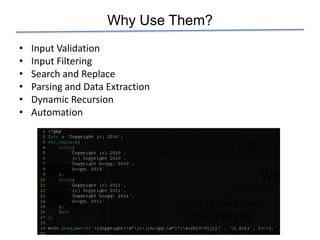
Why Use Them?
•   Input Validation
•   Input Filtering
•   Search and Replace
•   Parsing and Data Extraction
•   Dynamic Recursion
•   Automation
In PHP, POSIX = Deprecated
ereg_* functions are now deprecated in newer versions of
PHP.
Switching to preg_* is generally pain free. Pain points:

•   Different matching criteria (greed)
•   preg_* requires delimiters
•   Different characters require escape sequences
•   preg favors option modifiers over functions
Anatomy of a PHP Regular Expression


                           /foo/i
• Delimiters
• Pattern to match
• Options/modifiers
preg_replace(
   „/(href|src)=„([^‟])*‟/i‟,
   „1=“2”‟,
   $str
);
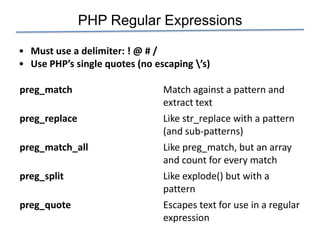
PHP Regular Expressions

• Must use a delimiter: ! @ # /
• Use PHP’s single quotes (no escaping ’s)

preg_match                      Match against a pattern and
                                extract text
preg_replace                    Like str_replace with a pattern
                                (and sub-patterns)
preg_match_all                  Like preg_match, but an array
                                and count for every match
preg_split                      Like explode() but with a
                                pattern
preg_quote                      Escapes text for use in a regular
                                expression
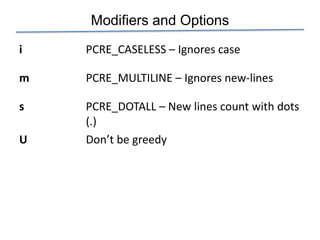
Modifiers and Options
i   PCRE_CASELESS – Ignores case

m   PCRE_MULTILINE – Ignores new-lines

s   PCRE_DOTALL – New lines count with dots
    (.)
U   Don’t be greedy
Performance Killers

Slow-downs in performance generally come from:

• Alternation, the pipe/OR operator (|)
  Use [abcd] when possible over (a|b|c|d)
• Multi-line (PCRE_DOTALL or /s)
• Recursion: (d+)d*
  Use lengths when possible

It’s not that slow!
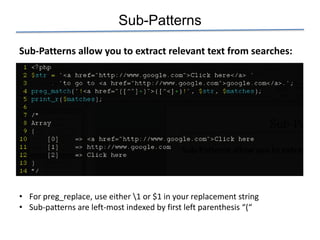
Sub-Patterns

Sub-Patterns allow you to extract relevant text from searches:


• For preg_replace, use either 1 or $1 in your replacement string
• Sub-patterns are left-most indexed by first left parenthesis “(“
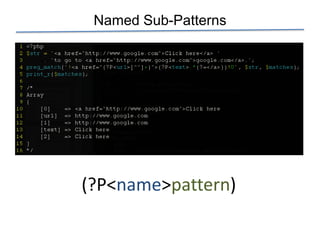
Named Sub-Patterns


(?P<name>pattern)
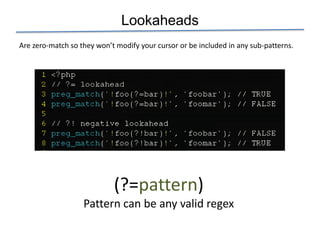
Lookaheads
Are zero-match so they won’t modify your cursor or be included in any sub-patterns.


                            (?=pattern)
                   Pattern can be any valid regex
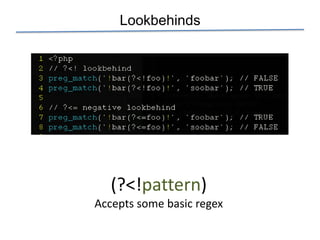
Lookbehinds


   (?<!pattern)
Accepts some basic regex
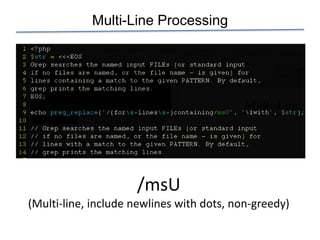
Multi-Line Processing


                     /msU
(Multi-line, include newlines with dots, non-greedy)
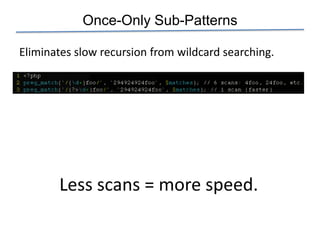
Once-Only Sub-Patterns

Eliminates slow recursion from wildcard searching.


       Less scans = more speed.
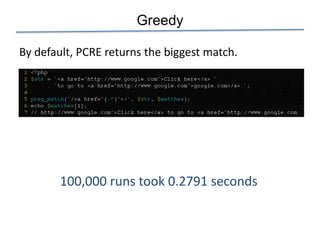
Greedy

By default, PCRE returns the biggest match.


        100,000 runs took 0.2791 seconds
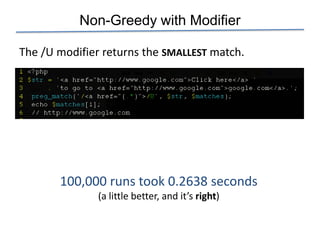
Non-Greedy with Modifier

The /U modifier returns the SMALLEST match.


       100,000 runs took 0.2638 seconds
               (a little better, and it’s right)
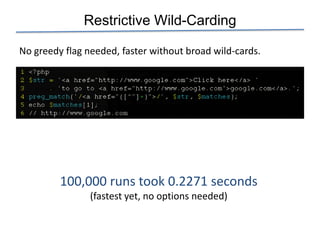
Restrictive Wild-Carding

No greedy flag needed, faster without broad wild-cards.


         100,000 runs took 0.2271 seconds
                (fastest yet, no options needed)
grep

Use grep –E or egrep for extended regular expressions (+, ?, |)
and advanced functionality.

-A n         Print the next n lines after each match.
-B n         Print the previous n lines before each match.
-i           Ignore case
-m n         Stop after n matches
-r           Recursively search the file system
-n           Show line numbers
-v           Only show lines that don’t match
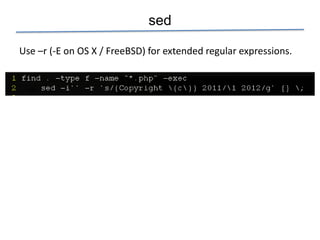
sed

Use –r (-E on OS X / FreeBSD) for extended regular expressions.
The End

  Web: http://andrewkandels.com

  Mail: mailto:akandels@gmail.com

Twitter: @andrewkandels

Regular Expressions in PHP

  • 1.
    Regular Expressions forthe Web Application Developer By Andrew Kandels
  • 2.
    Regular Expressions Regular expressionsprovide a concise, flexible means for matching strings of text, such as words or patterns of characters. POSIX PCRE Portable Operating System Interface Perl Compatible Regular Expressions • Traditional Unix regular • Perl 5 Extended Features expression syntax • Native C Extension • Generally Faster • PHP’s ereg_ functions • Optimization Qualifiers • Basic and extended versions Used by: • Programming languages • Apache and other servers
  • 3.
    Why Use Them? • Input Validation • Input Filtering • Search and Replace • Parsing and Data Extraction • Dynamic Recursion • Automation
  • 4.
    In PHP, POSIX= Deprecated ereg_* functions are now deprecated in newer versions of PHP. Switching to preg_* is generally pain free. Pain points: • Different matching criteria (greed) • preg_* requires delimiters • Different characters require escape sequences • preg favors option modifiers over functions
  • 5.
    Anatomy of aPHP Regular Expression /foo/i • Delimiters • Pattern to match • Options/modifiers preg_replace( „/(href|src)=„([^‟])*‟/i‟, „1=“2”‟, $str );
  • 6.
    PHP Regular Expressions •Must use a delimiter: ! @ # / • Use PHP’s single quotes (no escaping ’s) preg_match Match against a pattern and extract text preg_replace Like str_replace with a pattern (and sub-patterns) preg_match_all Like preg_match, but an array and count for every match preg_split Like explode() but with a pattern preg_quote Escapes text for use in a regular expression
  • 7.
    Modifiers and Options i PCRE_CASELESS – Ignores case m PCRE_MULTILINE – Ignores new-lines s PCRE_DOTALL – New lines count with dots (.) U Don’t be greedy
  • 8.
    Performance Killers Slow-downs inperformance generally come from: • Alternation, the pipe/OR operator (|) Use [abcd] when possible over (a|b|c|d) • Multi-line (PCRE_DOTALL or /s) • Recursion: (d+)d* Use lengths when possible It’s not that slow!
  • 9.
    Sub-Patterns Sub-Patterns allow youto extract relevant text from searches: • For preg_replace, use either 1 or $1 in your replacement string • Sub-patterns are left-most indexed by first left parenthesis “(“
  • 10.
  • 11.
    Lookaheads Are zero-match sothey won’t modify your cursor or be included in any sub-patterns. (?=pattern) Pattern can be any valid regex
  • 12.
    Lookbehinds (?<!pattern) Accepts some basic regex
  • 13.
    Multi-Line Processing /msU (Multi-line, include newlines with dots, non-greedy)
  • 14.
    Once-Only Sub-Patterns Eliminates slowrecursion from wildcard searching. Less scans = more speed.
  • 15.
    Greedy By default, PCREreturns the biggest match. 100,000 runs took 0.2791 seconds
  • 16.
    Non-Greedy with Modifier The/U modifier returns the SMALLEST match. 100,000 runs took 0.2638 seconds (a little better, and it’s right)
  • 17.
    Restrictive Wild-Carding No greedyflag needed, faster without broad wild-cards. 100,000 runs took 0.2271 seconds (fastest yet, no options needed)
  • 18.
    grep Use grep –Eor egrep for extended regular expressions (+, ?, |) and advanced functionality. -A n Print the next n lines after each match. -B n Print the previous n lines before each match. -i Ignore case -m n Stop after n matches -r Recursively search the file system -n Show line numbers -v Only show lines that don’t match
  • 19.
    sed Use –r (-Eon OS X / FreeBSD) for extended regular expressions.
  • 20.
    The End Web: http://andrewkandels.com Mail: mailto:akandels@gmail.com Twitter: @andrewkandels