Chapter 3
Introduction to Regular Expressions
1
Dr. Hadeel Alazzam
Scripting Programming
1
2
 Regular Expression
 Commands in use
 grep and egrep
 Regular Expression Metacharacters
 Grouping
 Brackets and Character Classes
 Back References
 Quantifiers
 Anchors and Word Boundaries
 Practical Examples
Outline
3
RegularExpression
 Regular expressions (regex) are a powerful method for
describing a text pattern to be matched by various tools.
 There is only one place in bash where regular
expressions are valid, using the =~ comparison in the [[
compound command, as in an if statement.
 Regular expressions are a crucial part of the larger toolkit
for commands like grep, awk, and sed in particular.
4
RegularExpressionvs. PatternMatching
 Pattern matching is used by the shell commands such
as the ls command.
 Regular expressions are used to search for strings of
text in a file by using commands, such as the grep
command.
 The use of regular expressions is generally associated
with text processing.
5
CommandsinUse
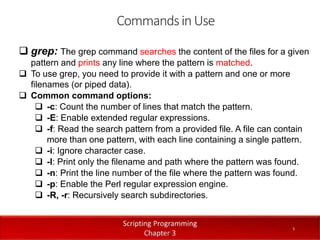
 grep: The grep command searches the content of the files for a given
pattern and prints any line where the pattern is matched.
 To use grep, you need to provide it with a pattern and one or more
filenames (or piped data).
 Common command options:
 -c: Count the number of lines that match the pattern.
 -E: Enable extended regular expressions.
 -f: Read the search pattern from a provided file. A file can contain
more than one pattern, with each line containing a single pattern.
 -i: Ignore character case.
 -l: Print only the filename and path where the pattern was found.
 -n: Print the line number of the file where the pattern was found.
 -p: Enable the Perl regular expression engine.
 -R, -r: Recursively search subdirectories.
6
CommandsinUse
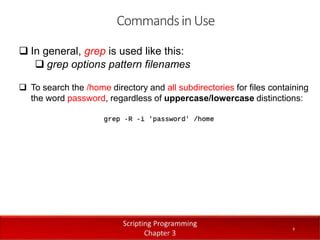
 In general, grep is used like this:
 grep options pattern filenames
 To search the /home directory and all subdirectories for files containing
the word password, regardless of uppercase/lowercase distinctions:
7
grepandegrep
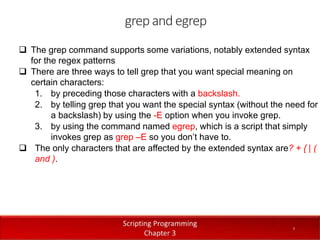
 The grep command supports some variations, notably extended syntax
for the regex patterns
 There are three ways to tell grep that you want special meaning on
certain characters:
1. by preceding those characters with a backslash.
2. by telling grep that you want the special syntax (without the need for
a backslash) by using the -E option when you invoke grep.
3. by using the command named egrep, which is a script that simply
invokes grep as grep –E so you don’t have to.
 The only characters that are affected by the extended syntax are? + { | (
and ).
Regular Expression Metacharacters
 Regular expressions are patterns that are created
using a series of characters and metacharacters.
 Metacharacters such as the questions mark (?) and
asterisk (*) have special meaning beyond their literal
meanings in regex.
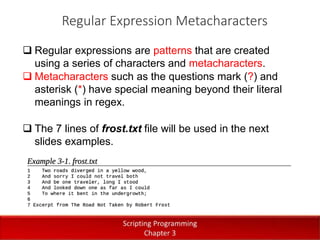
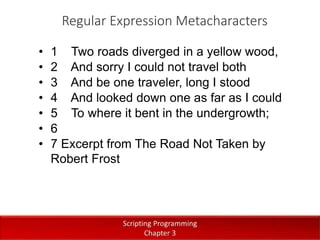
 The 7 lines of frost.txt file will be used in the next
slides examples.
Regular Expression Metacharacters
• 1 Two roads diverged in a yellow wood,
• 2 And sorry I could not travel both
• 3 And be one traveler, long I stood
• 4 And looked down one as far as I could
• 5 To where it bent in the undergrowth;
• 6
• 7 Excerpt from The Road Not Taken by
Robert Frost
10
Regular Expression Metacharacters
 The “.” Metacharacter:
• The period (.) represents a single wildcard character.
• It will match on any single character except for a newline.
• If you want to treat this metacharacter as a period character rather
than a wildcard, precede it with a backslash (.) to escape its special
meaning.
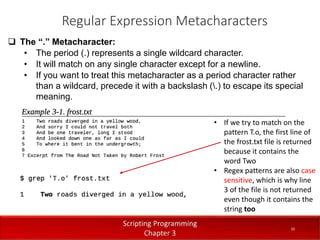
• If we try to match on the
pattern T.o, the first line of
the frost.txt file is returned
because it contains the
word Two
• Regex patterns are also case
sensitive, which is why line
3 of the file is not returned
even though it contains the
string too
11
Regular Expression Metacharacters
 The “?” Metacharacter:
• The question mark (?) character makes any item that precedes it
optional.
• It matches it zero or one time.
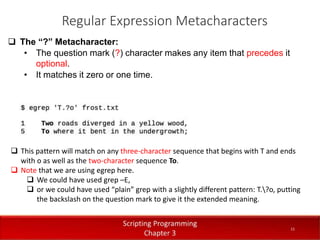
 This pattern will match on any three-character sequence that begins with T and ends
with o as well as the two-character sequence To.
 Note that we are using egrep here.
 We could have used grep –E,
 or we could have used “plain” grep with a slightly different pattern: T.?o, putting
the backslash on the question mark to give it the extended meaning.
12
Regular Expression Metacharacters
 The “*” Metacharacter:
• The asterisk (*) is a special character that matches the preceding item
zero or more times.
• It is similar to ?, the main difference being that the previous item may
appear more than once.
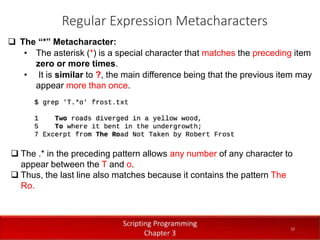
 The .* in the preceding pattern allows any number of any character to
appear between the T and o.
 Thus, the last line also matches because it contains the pattern The
Ro.
13
Regular Expression Metacharacters
 The “+” Metacharacter:
• The plus sign (+) metacharacter is the same as the * except it requires
the preceding item to appear at least once.
 The preceding pattern specifies one or more of any character to
appear in between the T and o.
 The first line of text matches because of Two — the w is one character
between the T and the o.
 The second line doesn’t match the To, as in the previous example;
rather, the pattern matches a much larger string — all the way to the o
in undergrowth.
 The last line also matches because it contains the pattern The Ro.
14
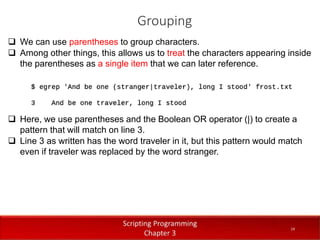
Grouping
 We can use parentheses to group characters.
 Among other things, this allows us to treat the characters appearing inside
the parentheses as a single item that we can later reference.
 Here, we use parentheses and the Boolean OR operator (|) to create a
pattern that will match on line 3.
 Line 3 as written has the word traveler in it, but this pattern would match
even if traveler was replaced by the word stranger.
15
Brackets and Character Classes
 The square brackets, [ ] , are used to define character classes and lists of
acceptable characters.
 Using this construct, you can list exactly which characters are matched at
this position in the pattern.
 This is particularly useful when trying to perform user-input validation.
 As shorthand, you can specify ranges with a dash, such as [a-j].
 These ranges are in your locale’s collating sequence and alphabet.
 The pattern [a-j] will match one of the letters a through j.
16
Brackets and Character Classes
 Table 3-1 provides a list of common examples when using character
classes and ranges.
 Be careful when defining a range for digits; the range can at most go from 0 to 9.
For example, the pattern [1-475] does not match on numbers between 1 and 475;
it matches on any one of the digits (characters) in the range 1–4 or the character 7
or the character 5.
17
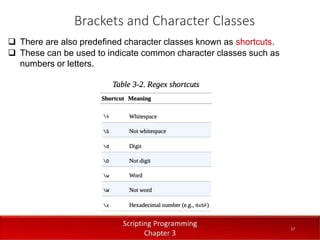
Brackets and Character Classes
 There are also predefined character classes known as shortcuts.
 These can be used to indicate common character classes such as
numbers or letters.
18
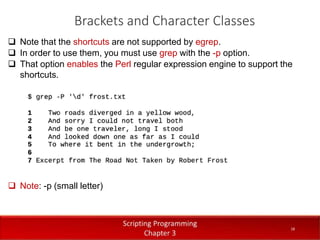
Brackets and Character Classes
 Note that the shortcuts are not supported by egrep.
 In order to use them, you must use grep with the -p option.
 That option enables the Perl regular expression engine to support the
shortcuts.
 Note: -p (small letter)
19
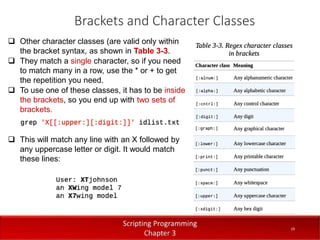
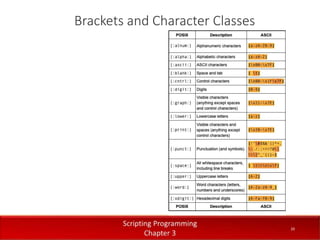
Brackets and Character Classes
 Other character classes (are valid only within
the bracket syntax, as shown in Table 3-3.
 They match a single character, so if you need
to match many in a row, use the * or + to get
the repetition you need.
 To use one of these classes, it has to be inside
the brackets, so you end up with two sets of
brackets.
 This will match any line with an X followed by
any uppercase letter or digit. It would match
these lines:
20
Brackets and Character Classes
21
Back References
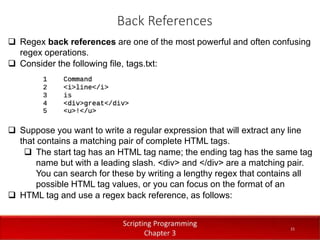
 Regex back references are one of the most powerful and often confusing
regex operations.
 Consider the following file, tags.txt:
 Suppose you want to write a regular expression that will extract any line
that contains a matching pair of complete HTML tags.
 The start tag has an HTML tag name; the ending tag has the same tag
name but with a leading slash. <div> and </div> are a matching pair.
You can search for these by writing a lengthy regex that contains all
possible HTML tag values, or you can focus on the format of an
 HTML tag and use a regex back reference, as follows:
22
Back References
 In this example, the back reference is the 1 appearing in the latter part of
the regular expression.
 It is referring back to the expression enclosed in the first set of
parentheses, [A-Za-z]*, which has two parts.
 The letter range in brackets denotes a choice of any letter, uppercase or
lowercase.
 The * that follows it means to repeat that zero or more times.
 Therefore, the 1 refers to whatever was matched by that pattern in
parentheses.
 If [A-Za-z]* matches div, then the 1 also refers to the pattern div.
23
Back References
 You can have more than one back reference in an expression and refer
to each with a 1 or 2 or 3 depending on its order in the regular
expression
 A 1 refers to the first set of parentheses, 2 to the second, and so on
 Note that the parentheses are metacharacters; they have a special
meaning.
 If you just want to match a literal parenthesis, you need to escape its
special meaning by preceding it with a backslash, as in sin([0-9.]*) to
match expressions like sin(6.2) or sin(3.14159).
24
Quantifiers
 Quantifiers specify the number of times an item must appear in a string.
 Quantifiers are defined by curly braces { }.
 For example, the pattern T{5} means that the letter T must appear
consecutively exactly five times.
 The pattern T{3,6} means that the letter T must appear consecutively
three to six times.
 The pattern T{5,} means that the letter T must appear five or more times.
25
Anchors and Word Boundaries
 You can use anchors to specify that a pattern must exist at the beginning
or the end of a string.
 The caret (^) character is used to anchor a pattern to the beginning of a
string.
 For example, ^[1-5] means that a matching string must start with one of
the digits 1 through 5, as the first character on the line.
 The $ character is used to anchor a pattern to the end of a string or line.
 For example, [1-5]$ means that a string must end with one of the digits 1
through 5.
 In addition, you can use b to identify a word boundary (i.e., a space).
 The pattern b[1-5]b will match on any of the digits 1 through 5, where
the digit appears as its own word.
26
Practical Examples
End
27
Dr. Aryaf Al-adwan, Autonomous Systems Dept 27

Chapter 3: Introduction to Regular Expression

  • 1.
    Chapter 3 Introduction toRegular Expressions 1 Dr. Hadeel Alazzam Scripting Programming 1
  • 2.
    2  Regular Expression Commands in use  grep and egrep  Regular Expression Metacharacters  Grouping  Brackets and Character Classes  Back References  Quantifiers  Anchors and Word Boundaries  Practical Examples Outline
  • 3.
    3 RegularExpression  Regular expressions(regex) are a powerful method for describing a text pattern to be matched by various tools.  There is only one place in bash where regular expressions are valid, using the =~ comparison in the [[ compound command, as in an if statement.  Regular expressions are a crucial part of the larger toolkit for commands like grep, awk, and sed in particular.
  • 4.
    4 RegularExpressionvs. PatternMatching  Patternmatching is used by the shell commands such as the ls command.  Regular expressions are used to search for strings of text in a file by using commands, such as the grep command.  The use of regular expressions is generally associated with text processing.
  • 5.
    5 CommandsinUse  grep: Thegrep command searches the content of the files for a given pattern and prints any line where the pattern is matched.  To use grep, you need to provide it with a pattern and one or more filenames (or piped data).  Common command options:  -c: Count the number of lines that match the pattern.  -E: Enable extended regular expressions.  -f: Read the search pattern from a provided file. A file can contain more than one pattern, with each line containing a single pattern.  -i: Ignore character case.  -l: Print only the filename and path where the pattern was found.  -n: Print the line number of the file where the pattern was found.  -p: Enable the Perl regular expression engine.  -R, -r: Recursively search subdirectories.
  • 6.
    6 CommandsinUse  In general,grep is used like this:  grep options pattern filenames  To search the /home directory and all subdirectories for files containing the word password, regardless of uppercase/lowercase distinctions:
  • 7.
    7 grepandegrep  The grepcommand supports some variations, notably extended syntax for the regex patterns  There are three ways to tell grep that you want special meaning on certain characters: 1. by preceding those characters with a backslash. 2. by telling grep that you want the special syntax (without the need for a backslash) by using the -E option when you invoke grep. 3. by using the command named egrep, which is a script that simply invokes grep as grep –E so you don’t have to.  The only characters that are affected by the extended syntax are? + { | ( and ).
  • 8.
    Regular Expression Metacharacters Regular expressions are patterns that are created using a series of characters and metacharacters.  Metacharacters such as the questions mark (?) and asterisk (*) have special meaning beyond their literal meanings in regex.  The 7 lines of frost.txt file will be used in the next slides examples.
  • 9.
    Regular Expression Metacharacters •1 Two roads diverged in a yellow wood, • 2 And sorry I could not travel both • 3 And be one traveler, long I stood • 4 And looked down one as far as I could • 5 To where it bent in the undergrowth; • 6 • 7 Excerpt from The Road Not Taken by Robert Frost
  • 10.
    10 Regular Expression Metacharacters The “.” Metacharacter: • The period (.) represents a single wildcard character. • It will match on any single character except for a newline. • If you want to treat this metacharacter as a period character rather than a wildcard, precede it with a backslash (.) to escape its special meaning. • If we try to match on the pattern T.o, the first line of the frost.txt file is returned because it contains the word Two • Regex patterns are also case sensitive, which is why line 3 of the file is not returned even though it contains the string too
  • 11.
    11 Regular Expression Metacharacters The “?” Metacharacter: • The question mark (?) character makes any item that precedes it optional. • It matches it zero or one time.  This pattern will match on any three-character sequence that begins with T and ends with o as well as the two-character sequence To.  Note that we are using egrep here.  We could have used grep –E,  or we could have used “plain” grep with a slightly different pattern: T.?o, putting the backslash on the question mark to give it the extended meaning.
  • 12.
    12 Regular Expression Metacharacters The “*” Metacharacter: • The asterisk (*) is a special character that matches the preceding item zero or more times. • It is similar to ?, the main difference being that the previous item may appear more than once.  The .* in the preceding pattern allows any number of any character to appear between the T and o.  Thus, the last line also matches because it contains the pattern The Ro.
  • 13.
    13 Regular Expression Metacharacters The “+” Metacharacter: • The plus sign (+) metacharacter is the same as the * except it requires the preceding item to appear at least once.  The preceding pattern specifies one or more of any character to appear in between the T and o.  The first line of text matches because of Two — the w is one character between the T and the o.  The second line doesn’t match the To, as in the previous example; rather, the pattern matches a much larger string — all the way to the o in undergrowth.  The last line also matches because it contains the pattern The Ro.
  • 14.
    14 Grouping  We canuse parentheses to group characters.  Among other things, this allows us to treat the characters appearing inside the parentheses as a single item that we can later reference.  Here, we use parentheses and the Boolean OR operator (|) to create a pattern that will match on line 3.  Line 3 as written has the word traveler in it, but this pattern would match even if traveler was replaced by the word stranger.
  • 15.
    15 Brackets and CharacterClasses  The square brackets, [ ] , are used to define character classes and lists of acceptable characters.  Using this construct, you can list exactly which characters are matched at this position in the pattern.  This is particularly useful when trying to perform user-input validation.  As shorthand, you can specify ranges with a dash, such as [a-j].  These ranges are in your locale’s collating sequence and alphabet.  The pattern [a-j] will match one of the letters a through j.
  • 16.
    16 Brackets and CharacterClasses  Table 3-1 provides a list of common examples when using character classes and ranges.  Be careful when defining a range for digits; the range can at most go from 0 to 9. For example, the pattern [1-475] does not match on numbers between 1 and 475; it matches on any one of the digits (characters) in the range 1–4 or the character 7 or the character 5.
  • 17.
    17 Brackets and CharacterClasses  There are also predefined character classes known as shortcuts.  These can be used to indicate common character classes such as numbers or letters.
  • 18.
    18 Brackets and CharacterClasses  Note that the shortcuts are not supported by egrep.  In order to use them, you must use grep with the -p option.  That option enables the Perl regular expression engine to support the shortcuts.  Note: -p (small letter)
  • 19.
    19 Brackets and CharacterClasses  Other character classes (are valid only within the bracket syntax, as shown in Table 3-3.  They match a single character, so if you need to match many in a row, use the * or + to get the repetition you need.  To use one of these classes, it has to be inside the brackets, so you end up with two sets of brackets.  This will match any line with an X followed by any uppercase letter or digit. It would match these lines:
  • 20.
  • 21.
    21 Back References  Regexback references are one of the most powerful and often confusing regex operations.  Consider the following file, tags.txt:  Suppose you want to write a regular expression that will extract any line that contains a matching pair of complete HTML tags.  The start tag has an HTML tag name; the ending tag has the same tag name but with a leading slash. <div> and </div> are a matching pair. You can search for these by writing a lengthy regex that contains all possible HTML tag values, or you can focus on the format of an  HTML tag and use a regex back reference, as follows:
  • 22.
    22 Back References  Inthis example, the back reference is the 1 appearing in the latter part of the regular expression.  It is referring back to the expression enclosed in the first set of parentheses, [A-Za-z]*, which has two parts.  The letter range in brackets denotes a choice of any letter, uppercase or lowercase.  The * that follows it means to repeat that zero or more times.  Therefore, the 1 refers to whatever was matched by that pattern in parentheses.  If [A-Za-z]* matches div, then the 1 also refers to the pattern div.
  • 23.
    23 Back References  Youcan have more than one back reference in an expression and refer to each with a 1 or 2 or 3 depending on its order in the regular expression  A 1 refers to the first set of parentheses, 2 to the second, and so on  Note that the parentheses are metacharacters; they have a special meaning.  If you just want to match a literal parenthesis, you need to escape its special meaning by preceding it with a backslash, as in sin([0-9.]*) to match expressions like sin(6.2) or sin(3.14159).
  • 24.
    24 Quantifiers  Quantifiers specifythe number of times an item must appear in a string.  Quantifiers are defined by curly braces { }.  For example, the pattern T{5} means that the letter T must appear consecutively exactly five times.  The pattern T{3,6} means that the letter T must appear consecutively three to six times.  The pattern T{5,} means that the letter T must appear five or more times.
  • 25.
    25 Anchors and WordBoundaries  You can use anchors to specify that a pattern must exist at the beginning or the end of a string.  The caret (^) character is used to anchor a pattern to the beginning of a string.  For example, ^[1-5] means that a matching string must start with one of the digits 1 through 5, as the first character on the line.  The $ character is used to anchor a pattern to the end of a string or line.  For example, [1-5]$ means that a string must end with one of the digits 1 through 5.  In addition, you can use b to identify a word boundary (i.e., a space).  The pattern b[1-5]b will match on any of the digits 1 through 5, where the digit appears as its own word.
  • 26.
  • 27.
    End 27 Dr. Aryaf Al-adwan,Autonomous Systems Dept 27

Editor's Notes

  • #4 Awk Aho, Weinberger and Kernighan The awk command is a Linux tool and programming language that allows users to process and manipulate data and produce formatted reports SED is a text stream editor used on Unix systems to edit files quickly and efficiently. The tool searches through, replaces, adds, and deletes lines in a text file without opening the file in a text editor.
  • #18 \w  [A-Za-z0-9_] \s matches a space, a tab, a carriage return, a line feed, or a form feed. [ \t\r\n\f]. \f page separator \D is the same as [^\d]