Savitribai Phule Pune University
B.Ed. 2015-17
BED111A : Critical Understanding of ICT :
Intel Teach to the Future Program for Pre-Service
Teachers
at,
Vidya Pratishthan’s
College of Education, Baramati
by,
Suresh G. Isave
Associate Professor,
Tilak College of Education, Pune
BED111A : Critical Understanding of ICT -
Intel Teach to the Future Program
• Credits – One
• Hours - 16
• Marks – 25
• Based on Intel Teach to the Future program
10.1 version- for Pre-Service Teachers.
12/29/2015 2sgisave@gmail.com
Guidelines
• It should be done in pair or alone.
• Two student-teachers will work together
collaboratively and contribute in all end
products of the practical.
• The topic selected for the practical
should belongs to method subjects or
life skills, values and core elements.
12/29/2015 3sgisave@gmail.com
Guidelines
• One standard should assume for the
topic.
• Project Based Learning approach should
be adapted for the practical.
12/29/2015 4sgisave@gmail.com
Guidelines
• Student-teachers will assume both role
while preparing documents. i.e. as a
student and teacher as well.
• All the documents in the practical are
related with each other.
• On each document, names of students
and Prof. in-charge should be
mentioned.
12/29/2015 5sgisave@gmail.com
Guidelines
• All documents should be saved in proper
folder.
• Microsoft software should preferred to
prepare all documents.
• Soft and Hard copy of the practical
should be preserved.
12/29/2015 6sgisave@gmail.com
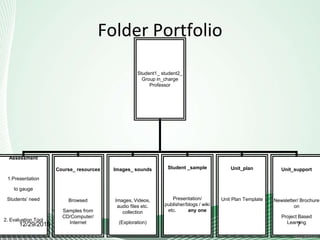
Folder Portfolio
Student1_ student2_
Group in_charge
Professor
Assessment
1.Presentation
to gauge
Students’ need
2. Evaluation Tool
Course_ resources
Browsed
Samples from
CD/Computer/
Internet
Images_ sounds
Images, Videos,
audio files etc.
collection
(Exploration)
Student _sample
Presentation/
publisher/blogs / wiki
etc. any one
Unit_plan
Unit Plan Template
Unit_support
Newsletter/ Brochure
on
Project Based
Learning12/29/2015 7
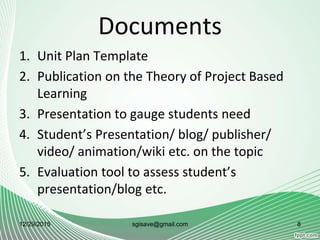
Documents
1. Unit Plan Template
2. Publication on the Theory of Project Based
Learning
3. Presentation to gauge students need
4. Student’s Presentation/ blog/ publisher/
video/ animation/wiki etc. on the topic
5. Evaluation tool to assess student’s
presentation/blog etc.
12/29/2015 sgisave@gmail.com 8
Documents
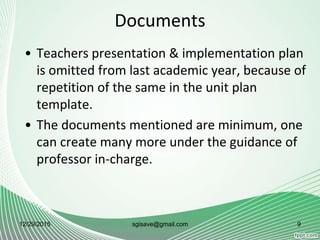
• Teachers presentation & implementation plan
is omitted from last academic year, because of
repetition of the same in the unit plan
template.
• The documents mentioned are minimum, one
can create many more under the guidance of
professor in-charge.
12/29/2015 sgisave@gmail.com 9
Evaluation Scheme
12/29/2015 10sgisave@gmail.com
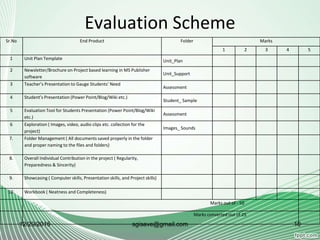
Sr.No End Product Folder Marks
1 2 3 4 5
1 Unit Plan Template Unit_Plan
2 Newsletter/Brochure on Project based learning in MS Publisher
software
Unit_Support
3 Teacher’s Presentation to Gauge Students’ Need
Assessment
4 Student’s Presentation (Power Point/Blog/Wiki etc.)
Student_ Sample
5 Evaluation Tool for Students Presentation (Power Point/Blog/Wiki
etc.)
Assessment
6 Exploration ( Images, video, audio clips etc. collection for the
project)
Images_ Sounds
7. Folder Management ( All documents saved properly in the folder
and proper naming to the files and folders)
8. Overall Individual Contribution in the project ( Regularity,
Preparedness & Sincerity)
9. Showcasing ( Computer skills, Presentation skills, and Project skills)
10. Workbook ( Neatness and Completeness)
Marks out of - 50
Marks converted out of 25
1.Unit Plan Template
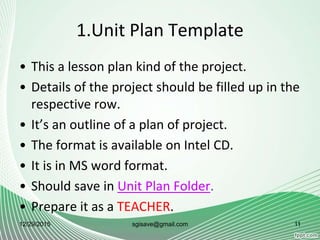
• This a lesson plan kind of the project.
• Details of the project should be filled up in the
respective row.
• It’s an outline of a plan of project.
• The format is available on Intel CD.
• It is in MS word format.
• Should save in Unit Plan Folder.
• Prepare it as a TEACHER.
12/29/2015 11sgisave@gmail.com
2.Newsletter / Brochure ( Publisher )
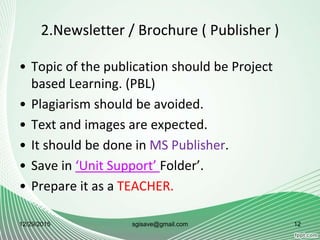
• Topic of the publication should be Project
based Learning. (PBL)
• Plagiarism should be avoided.
• Text and images are expected.
• It should be done in MS Publisher.
• Save in ‘Unit Support’ Folder’.
• Prepare it as a TEACHER.
12/29/2015 12sgisave@gmail.com
3. Teacher’s Presentation to Gauge
Students Need
• Teacher’s presentation to gauge students
need is an orientation presentation, which
would given by a teacher to the students
when she is giving project to them.
• Give a brief information about a topic selected
for project.
• Share tentative work distribution and time
schedule.
12/29/2015 13sgisave@gmail.com
3. Teacher’s Presentation to Gauge
Students Need
• References for more reading.
• Prepare it as a TEACHER.
• Save in ‘Assessment’ folder.
• It should be in MS power point.
12/29/2015 sgisave@gmail.com 14
4.Student’s Presentation
• Prepare it as a STUDENT.
• Save in ‘students sample’ folder.
• Put all the content of the selected topic.
• Add images, graphs, diagrams, maps, audio-
video etc.
• Prepare it in MS Power Point Presentation or
Publisher or Blog or wiki etc. any other
presentation software
12/29/2015 15sgisave@gmail.com
5. Evaluation Tool
• Prepare it as a Teacher.
• Save in ‘Assessment’ folder.
• Prepare an tools to evaluate the students
presentation, rating scale is preferable.
• It could be an evaluation tool for presentation
or publisher or blog etc.
• Include at least two aspects in tool i.e.
technology and content.
12/29/2015 16sgisave@gmail.com
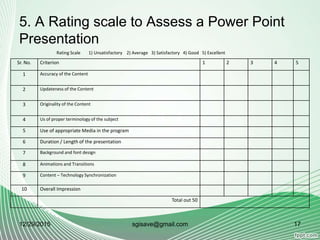
5. A Rating scale to Assess a Power Point
Presentation
12/29/2015 sgisave@gmail.com 17
Sr. No. Criterion 1 2 3 4 5
1 Accuracy of the Content
2 Updateness of the Content
3 Originality of the Content
4 Us of proper terminology of the subject
5 Use of appropriate Media in the program
6 Duration / Length of the presentation
7 Background and font design
8 Animations and Transitions
9 Content – Technology Synchronization
10 Overall Impression
Total out 50
Rating Scale 1) Unsatisfactory 2) Average 3) Satisfactory 4) Good 5) Excellent
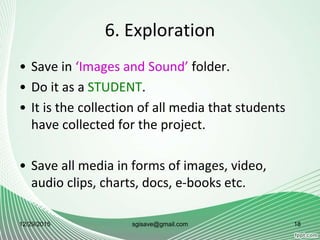
6. Exploration
• Save in ‘Images and Sound’ folder.
• Do it as a STUDENT.
• It is the collection of all media that students
have collected for the project.
• Save all media in forms of images, video,
audio clips, charts, docs, e-books etc.
12/29/2015 18sgisave@gmail.com
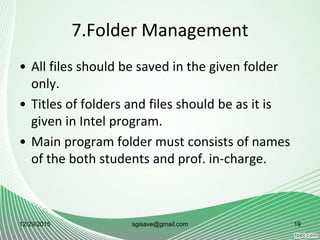
7.Folder Management
• All files should be saved in the given folder
only.
• Titles of folders and files should be as it is
given in Intel program.
• Main program folder must consists of names
of the both students and prof. in-charge.
12/29/2015 sgisave@gmail.com 19
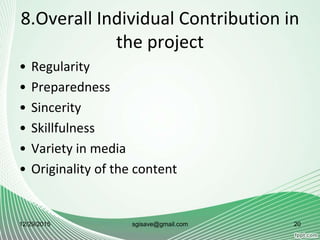
8.Overall Individual Contribution in
the project
• Regularity
• Preparedness
• Sincerity
• Skillfulness
• Variety in media
• Originality of the content
12/29/2015 sgisave@gmail.com 20
9. Showcasing
• It is an activity of the presentation of the
project in the group.
• There should be pedagogical discussion on the
project e.g. challenges, weakness and
advantages of the progress and judicious use
of the technology in PBL.
• All documents should be presented by both
students in the presence of Prof. in-charge.
12/29/2015 21sgisave@gmail.com
10. Workbook
• As per curriculum, hard copy should be
maintained of the activity.
• The workbook would be treated as a hard
copy of the project.
• The workbook should be signed by Prof. in-
charge of the group.
12/29/2015 22sgisave@gmail.com
10.Workbook
• A workbook should be a planner for the
project.
• Prints of all the documents should be
included in a workbook.
• A workbook should be provided to students
by the college in proper format.
12/29/2015 sgisave@gmail.com 23
For details
• Refer B.Ed. 2015-17 Curriculum.
• Refer Intel Teach to the Future 10.1 version
study printed book and a CD.
• Log on to www.intel.in/education site for
philosophical foundations of the program and
samples
12/29/2015 24sgisave@gmail.com
Thank You Very Much !
This is a personal document not official one
12/29/2015 sgisave@gmail.com 25

BED111A Intel Practical

  • 1.
    Savitribai Phule PuneUniversity B.Ed. 2015-17 BED111A : Critical Understanding of ICT : Intel Teach to the Future Program for Pre-Service Teachers at, Vidya Pratishthan’s College of Education, Baramati by, Suresh G. Isave Associate Professor, Tilak College of Education, Pune
  • 2.
    BED111A : CriticalUnderstanding of ICT - Intel Teach to the Future Program • Credits – One • Hours - 16 • Marks – 25 • Based on Intel Teach to the Future program 10.1 version- for Pre-Service Teachers. 12/29/2015 2sgisave@gmail.com
  • 3.
    Guidelines • It shouldbe done in pair or alone. • Two student-teachers will work together collaboratively and contribute in all end products of the practical. • The topic selected for the practical should belongs to method subjects or life skills, values and core elements. 12/29/2015 3sgisave@gmail.com
  • 4.
    Guidelines • One standardshould assume for the topic. • Project Based Learning approach should be adapted for the practical. 12/29/2015 4sgisave@gmail.com
  • 5.
    Guidelines • Student-teachers willassume both role while preparing documents. i.e. as a student and teacher as well. • All the documents in the practical are related with each other. • On each document, names of students and Prof. in-charge should be mentioned. 12/29/2015 5sgisave@gmail.com
  • 6.
    Guidelines • All documentsshould be saved in proper folder. • Microsoft software should preferred to prepare all documents. • Soft and Hard copy of the practical should be preserved. 12/29/2015 6sgisave@gmail.com
  • 7.
    Folder Portfolio Student1_ student2_ Groupin_charge Professor Assessment 1.Presentation to gauge Students’ need 2. Evaluation Tool Course_ resources Browsed Samples from CD/Computer/ Internet Images_ sounds Images, Videos, audio files etc. collection (Exploration) Student _sample Presentation/ publisher/blogs / wiki etc. any one Unit_plan Unit Plan Template Unit_support Newsletter/ Brochure on Project Based Learning12/29/2015 7
  • 8.
    Documents 1. Unit PlanTemplate 2. Publication on the Theory of Project Based Learning 3. Presentation to gauge students need 4. Student’s Presentation/ blog/ publisher/ video/ animation/wiki etc. on the topic 5. Evaluation tool to assess student’s presentation/blog etc. 12/29/2015 sgisave@gmail.com 8
  • 9.
    Documents • Teachers presentation& implementation plan is omitted from last academic year, because of repetition of the same in the unit plan template. • The documents mentioned are minimum, one can create many more under the guidance of professor in-charge. 12/29/2015 sgisave@gmail.com 9
  • 10.
    Evaluation Scheme 12/29/2015 10sgisave@gmail.com Sr.NoEnd Product Folder Marks 1 2 3 4 5 1 Unit Plan Template Unit_Plan 2 Newsletter/Brochure on Project based learning in MS Publisher software Unit_Support 3 Teacher’s Presentation to Gauge Students’ Need Assessment 4 Student’s Presentation (Power Point/Blog/Wiki etc.) Student_ Sample 5 Evaluation Tool for Students Presentation (Power Point/Blog/Wiki etc.) Assessment 6 Exploration ( Images, video, audio clips etc. collection for the project) Images_ Sounds 7. Folder Management ( All documents saved properly in the folder and proper naming to the files and folders) 8. Overall Individual Contribution in the project ( Regularity, Preparedness & Sincerity) 9. Showcasing ( Computer skills, Presentation skills, and Project skills) 10. Workbook ( Neatness and Completeness) Marks out of - 50 Marks converted out of 25
  • 11.
    1.Unit Plan Template •This a lesson plan kind of the project. • Details of the project should be filled up in the respective row. • It’s an outline of a plan of project. • The format is available on Intel CD. • It is in MS word format. • Should save in Unit Plan Folder. • Prepare it as a TEACHER. 12/29/2015 11sgisave@gmail.com
  • 12.
    2.Newsletter / Brochure( Publisher ) • Topic of the publication should be Project based Learning. (PBL) • Plagiarism should be avoided. • Text and images are expected. • It should be done in MS Publisher. • Save in ‘Unit Support’ Folder’. • Prepare it as a TEACHER. 12/29/2015 12sgisave@gmail.com
  • 13.
    3. Teacher’s Presentationto Gauge Students Need • Teacher’s presentation to gauge students need is an orientation presentation, which would given by a teacher to the students when she is giving project to them. • Give a brief information about a topic selected for project. • Share tentative work distribution and time schedule. 12/29/2015 13sgisave@gmail.com
  • 14.
    3. Teacher’s Presentationto Gauge Students Need • References for more reading. • Prepare it as a TEACHER. • Save in ‘Assessment’ folder. • It should be in MS power point. 12/29/2015 sgisave@gmail.com 14
  • 15.
    4.Student’s Presentation • Prepareit as a STUDENT. • Save in ‘students sample’ folder. • Put all the content of the selected topic. • Add images, graphs, diagrams, maps, audio- video etc. • Prepare it in MS Power Point Presentation or Publisher or Blog or wiki etc. any other presentation software 12/29/2015 15sgisave@gmail.com
  • 16.
    5. Evaluation Tool •Prepare it as a Teacher. • Save in ‘Assessment’ folder. • Prepare an tools to evaluate the students presentation, rating scale is preferable. • It could be an evaluation tool for presentation or publisher or blog etc. • Include at least two aspects in tool i.e. technology and content. 12/29/2015 16sgisave@gmail.com
  • 17.
    5. A Ratingscale to Assess a Power Point Presentation 12/29/2015 sgisave@gmail.com 17 Sr. No. Criterion 1 2 3 4 5 1 Accuracy of the Content 2 Updateness of the Content 3 Originality of the Content 4 Us of proper terminology of the subject 5 Use of appropriate Media in the program 6 Duration / Length of the presentation 7 Background and font design 8 Animations and Transitions 9 Content – Technology Synchronization 10 Overall Impression Total out 50 Rating Scale 1) Unsatisfactory 2) Average 3) Satisfactory 4) Good 5) Excellent
  • 18.
    6. Exploration • Savein ‘Images and Sound’ folder. • Do it as a STUDENT. • It is the collection of all media that students have collected for the project. • Save all media in forms of images, video, audio clips, charts, docs, e-books etc. 12/29/2015 18sgisave@gmail.com
  • 19.
    7.Folder Management • Allfiles should be saved in the given folder only. • Titles of folders and files should be as it is given in Intel program. • Main program folder must consists of names of the both students and prof. in-charge. 12/29/2015 sgisave@gmail.com 19
  • 20.
    8.Overall Individual Contributionin the project • Regularity • Preparedness • Sincerity • Skillfulness • Variety in media • Originality of the content 12/29/2015 sgisave@gmail.com 20
  • 21.
    9. Showcasing • Itis an activity of the presentation of the project in the group. • There should be pedagogical discussion on the project e.g. challenges, weakness and advantages of the progress and judicious use of the technology in PBL. • All documents should be presented by both students in the presence of Prof. in-charge. 12/29/2015 21sgisave@gmail.com
  • 22.
    10. Workbook • Asper curriculum, hard copy should be maintained of the activity. • The workbook would be treated as a hard copy of the project. • The workbook should be signed by Prof. in- charge of the group. 12/29/2015 22sgisave@gmail.com
  • 23.
    10.Workbook • A workbookshould be a planner for the project. • Prints of all the documents should be included in a workbook. • A workbook should be provided to students by the college in proper format. 12/29/2015 sgisave@gmail.com 23
  • 24.
    For details • ReferB.Ed. 2015-17 Curriculum. • Refer Intel Teach to the Future 10.1 version study printed book and a CD. • Log on to www.intel.in/education site for philosophical foundations of the program and samples 12/29/2015 24sgisave@gmail.com
  • 25.
    Thank You VeryMuch ! This is a personal document not official one 12/29/2015 sgisave@gmail.com 25