Using the Project-based Learning
Multimedia as a Teaching-
Learning Strategy
•Project-based multimedia learning is a
method of teaching in which students
acquire new knowledge and skills in the
course of designing, planning, and
producing a multimediaproduct.
The effective use of multimedia
learning project requires:
• Clarifying goals and objectives
• Determining how much time is
needed
• Extent of students’
involvement in decision making
• Setting up forms of
collaboration
• Identifying and determining
To trim down time devoted to a
multi-media project, Simkins et al
(2002) suggest the following:
◘ Use technology students
already know.
◘ Use time outside of class
wherever possible.
◘ Assign skills, practice, as
homework.
◘ Use “special” classes as extra
time.
◘ Let students compose text and
VARIOUS
PHASES OF THE
PROJECT
☺BEFORE THE PROJECT STARTS
Create project description and
milestones.
• Identify what isyour project all about
and describeit in aforty (40) wordsor less.
• Includetheproject componentsstudents
will beresponsiblefor and their duedate.
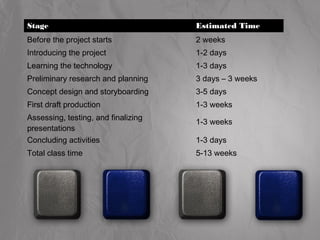
Stage Estimated Time
Before the project starts 2 weeks
Introducing the project 1-2 days
Learning the technology 1-3 days
Preliminary research and planning 3 days – 3 weeks
Concept design and storyboarding 3-5 days
First draft production 1-3 weeks
Assessing, testing, and finalizing
presentations
1-3 weeks
Concluding activities 1-3 days
Total class time 5-13 weeks
Work with Real
If you havepeopleoutsidethe
classroom involved asevaluatorswork
with them to makean appropriate
scheduleand includetheir ideasfor
activities.
Prepare Resources
Seek theassistanceof your librarian or school
mediaspecialist.
Prepare software and peripherals
such as microphones
Ask thehelp of technical people.
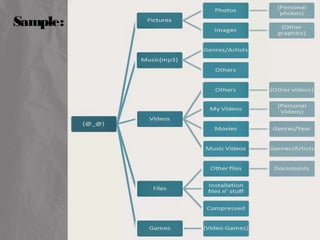
Organize Computer Files
Finding fileseatsmost of your timeif you
arenot organized. Naming filesand
foldersafter their filetypeand section title
helpsto keep thingsorganized and makes
it easier to mergeelementslater on.
Sample:
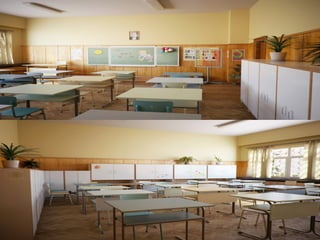
Prepare the Classroom
Organizebooks, printed papersand any
other resourcesso studentscan accessthem
independently.
Makebulletin boardsin theroom for
hanging printoutsof student work, schedules,
and organizational charts.
☺ introducing the project
Help thestudentsdevelop a“big picture” to
understand thework ahead. Makesurewhat they
will bemaking, who their audiencewill beand
what you expect them to learn and demonstratein
termsof theRBEC.
1. Review project documents
You can ask studentsto work with the
project documentsyou haveproduced.
Encourageyour studentsto ask questionsabout
theproject to clarify what you havewritten.
2. Perform pre-assessments
Your studentscan writepre-assessment
questionsbased on your learning goalsto further
clarify expectations.
3. Perform relevant activities
You can show studentsanything you can find
that issimilar to what they will beproducing such
asWebsiteor your own mini-project you did to
learn thetechnology. You can also brainstorm for
topics, organizational ideas, and design ideas.
4. Group students
Form small student groups from three to
five students pergroup. Here are some
grouping strategies:
• By topic interest
• By student talents and expertise
• By student choice
• Randomly
5. Organize materials
Give each group a folderthat stays
in the classroom. All theirgroup work
such as storyboards, group journals, and
research notes goes in that folder.
☺Learning the technoLogy
Giveachancefor thestudentsto work with
whatever softwareand technology they will beusing. If
somestudentsarealready familiar with thetoolsand
processes, ask them to help you train theothers. If
studentsarenew to multimedia, then begin with lesson
that involveusing thedifferent mediatypes. Remember,
you and your studentsarecolearnersand you both learn
asyou go.
☺ PreLiminary research and
PLanning
At thisstage, studentsshould immerse
themselvesin thecontent or subject matter they need to
understand to createtheir presentations.
☺ ConCept design and storyboarding
Processof organizing apresentation that is
useful to theaudience.
Storyboard: isapaper-and-pencil sketch of the
entirepresentation, screen by screen, or in the
caseof video, shot by shot.
Hereareafew design tipsto keep in mind
throughout storyboarding and production:
• Usescanned, handmadeartwork to makea
project look personal and to managescary
technology resources.
• Keep navigation
• Organizeinformation similarity throughout so
userscan find what they arelooking for.
• Carefor collaboration
• Organizemanageablesteps
• Check and assessoften
☻assessing, testing, and finalizing
presentations
Two kinds of testing:
• Functional Testing
• User testing
Assessment:
Assessment means critical evaluation
of yourpresentation.
☻ ConCluding aCtivities
Way of presenting theproject to the
audiences.

Using the project-based_learning_multimedia_as_a_teaching-learning_strategy

  • 1.
    Using the Project-basedLearning Multimedia as a Teaching- Learning Strategy •Project-based multimedia learning is a method of teaching in which students acquire new knowledge and skills in the course of designing, planning, and producing a multimediaproduct.
  • 2.
    The effective useof multimedia learning project requires: • Clarifying goals and objectives • Determining how much time is needed • Extent of students’ involvement in decision making • Setting up forms of collaboration • Identifying and determining
  • 3.
    To trim downtime devoted to a multi-media project, Simkins et al (2002) suggest the following: ◘ Use technology students already know. ◘ Use time outside of class wherever possible. ◘ Assign skills, practice, as homework. ◘ Use “special” classes as extra time. ◘ Let students compose text and
  • 4.
  • 5.
    ☺BEFORE THE PROJECTSTARTS Create project description and milestones. • Identify what isyour project all about and describeit in aforty (40) wordsor less. • Includetheproject componentsstudents will beresponsiblefor and their duedate.
  • 6.
    Stage Estimated Time Beforethe project starts 2 weeks Introducing the project 1-2 days Learning the technology 1-3 days Preliminary research and planning 3 days – 3 weeks Concept design and storyboarding 3-5 days First draft production 1-3 weeks Assessing, testing, and finalizing presentations 1-3 weeks Concluding activities 1-3 days Total class time 5-13 weeks
  • 7.
    Work with Real Ifyou havepeopleoutsidethe classroom involved asevaluatorswork with them to makean appropriate scheduleand includetheir ideasfor activities.
  • 8.
    Prepare Resources Seek theassistanceofyour librarian or school mediaspecialist.
  • 9.
    Prepare software andperipherals such as microphones Ask thehelp of technical people.
  • 10.
    Organize Computer Files Findingfileseatsmost of your timeif you arenot organized. Naming filesand foldersafter their filetypeand section title helpsto keep thingsorganized and makes it easier to mergeelementslater on.
  • 11.
  • 12.
    Prepare the Classroom Organizebooks,printed papersand any other resourcesso studentscan accessthem independently. Makebulletin boardsin theroom for hanging printoutsof student work, schedules, and organizational charts.
  • 14.
    ☺ introducing theproject Help thestudentsdevelop a“big picture” to understand thework ahead. Makesurewhat they will bemaking, who their audiencewill beand what you expect them to learn and demonstratein termsof theRBEC.
  • 15.
    1. Review projectdocuments You can ask studentsto work with the project documentsyou haveproduced. Encourageyour studentsto ask questionsabout theproject to clarify what you havewritten.
  • 16.
    2. Perform pre-assessments Yourstudentscan writepre-assessment questionsbased on your learning goalsto further clarify expectations.
  • 17.
    3. Perform relevantactivities You can show studentsanything you can find that issimilar to what they will beproducing such asWebsiteor your own mini-project you did to learn thetechnology. You can also brainstorm for topics, organizational ideas, and design ideas.
  • 18.
    4. Group students Formsmall student groups from three to five students pergroup. Here are some grouping strategies: • By topic interest • By student talents and expertise • By student choice • Randomly
  • 19.
    5. Organize materials Giveeach group a folderthat stays in the classroom. All theirgroup work such as storyboards, group journals, and research notes goes in that folder.
  • 20.
    ☺Learning the technoLogy Giveachanceforthestudentsto work with whatever softwareand technology they will beusing. If somestudentsarealready familiar with thetoolsand processes, ask them to help you train theothers. If studentsarenew to multimedia, then begin with lesson that involveusing thedifferent mediatypes. Remember, you and your studentsarecolearnersand you both learn asyou go.
  • 21.
    ☺ PreLiminary researchand PLanning At thisstage, studentsshould immerse themselvesin thecontent or subject matter they need to understand to createtheir presentations.
  • 22.
    ☺ ConCept designand storyboarding Processof organizing apresentation that is useful to theaudience. Storyboard: isapaper-and-pencil sketch of the entirepresentation, screen by screen, or in the caseof video, shot by shot.
  • 23.
    Hereareafew design tipstokeep in mind throughout storyboarding and production: • Usescanned, handmadeartwork to makea project look personal and to managescary technology resources. • Keep navigation • Organizeinformation similarity throughout so userscan find what they arelooking for. • Carefor collaboration • Organizemanageablesteps • Check and assessoften
  • 24.
    ☻assessing, testing, andfinalizing presentations Two kinds of testing: • Functional Testing • User testing Assessment: Assessment means critical evaluation of yourpresentation.
  • 25.
    ☻ ConCluding aCtivities Wayof presenting theproject to the audiences.