AutomationwithAnsibleandContainers
PyCon SK
11 March 2017
Rodolfo Carvalho
Software Engineer, Red Hat
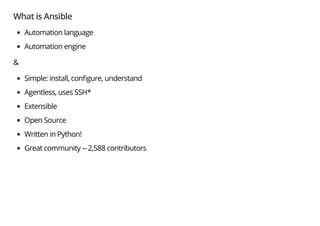
What is Ansible
Automation language
Automation engine
&
Simple: install, con gure, understand
Agentless, uses SSH*
Extensible
Open Source
Written in Python!
Great community -- 2,588 contributors
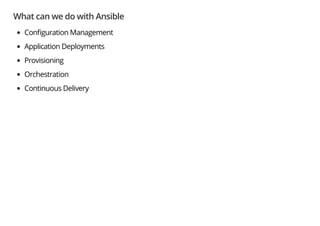
What can we do with Ansible
Con guration Management
Application Deployments
Provisioning
Orchestration
Continuous Delivery
My story with Ansible
openshift-ansible
Ansible from a programmer's perspective
Learning curve
Beyond the basics
The basics
Inventory
Task
Play
Playbook
The basics
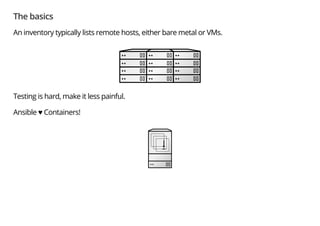
An inventory typically lists remote hosts, either bare metal or VMs.
Testing is hard, make it less painful.
Ansible ♥ Containers!
Inventory
[masters]
master-container
[nodes]
node-container-1
node-container-2
[etcd]
[lb]
[nfs]
[OSEv3:children]
masters
nodes
etcd
lb
nfs
[OSEv3:vars]
deployment_type=origin
ansible_connection=docker
Playbooks
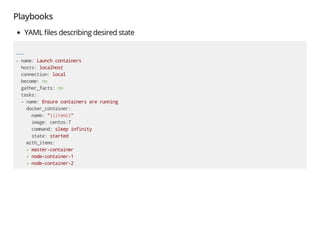
YAML les describing desired state
---
- name: Launch containers
hosts: localhost
connection: local
become: no
gather_facts: no
tasks:
- name: Ensure containers are running
docker_container:
name: "{{item}}"
image: centos:7
command: sleep infinity
state: started
with_items:
- master-container
- node-container-1
- node-container-2
Running the playbook
$ ansible-playbook -i hosts playbooks/start-containers.yml
PLAY [Launch containers] *******************************************************
TASK [Ensure containers are running] *******************************************
changed: [localhost] => (item=master-container)
changed: [localhost] => (item=node-container-1)
changed: [localhost] => (item=node-container-2)
PLAY RECAP *********************************************************************
localhost : ok=1 changed=1 unreachable=0 failed=0
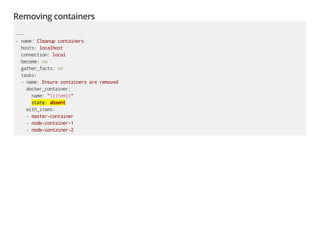
Removing containers
---
- name: Cleanup containers
hosts: localhost
connection: local
become: no
gather_facts: no
tasks:
- name: Ensure containers are removed
docker_container:
name: "{{item}}"
state: absent
with_items:
- master-container
- node-container-1
- node-container-2
Removing containers
$ ansible-playbook -i hosts playbooks/remove-containers.yml
PLAY [Cleanup containers] ******************************************************
TASK [Ensure containers are removed] *******************************************
changed: [localhost] => (item=master-container)
changed: [localhost] => (item=node-container-1)
changed: [localhost] => (item=node-container-2)
PLAY RECAP *********************************************************************
localhost : ok=1 changed=1 unreachable=0 failed=0
More concepts
Modules
Roles
Ansible Galaxy
Ansible ships with more than 700 modules.
Roles is a standard way to organize playbooks.
Galaxy is a free site for nding, downloading, and sharing community developed roles.
Ansible Modules ♥ Python!
# ansible/modules/core/system/ping.py
from ansible.module_utils.basic import AnsibleModule
def main():
module = AnsibleModule(
argument_spec=dict(
data=dict(required=False, default=None),
),
supports_check_mode=True
)
result = dict(ping='pong')
if module.params['data']:
if module.params['data'] == 'crash':
raise Exception("boom")
result['ping'] = module.params['data']
module.exit_json(**result)
if __name__ == '__main__':
main()
Modules
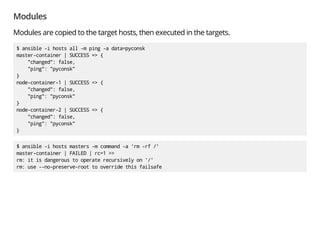
Modules are copied to the target hosts, then executed in the targets.
$ ansible -i hosts all -m ping -a data=pyconsk
master-container | SUCCESS => {
"changed": false,
"ping": "pyconsk"
}
node-container-1 | SUCCESS => {
"changed": false,
"ping": "pyconsk"
}
node-container-2 | SUCCESS => {
"changed": false,
"ping": "pyconsk"
}
$ ansible -i hosts masters -m command -a 'rm -rf /'
master-container | FAILED | rc=1 >>
rm: it is dangerous to operate recursively on '/'
rm: use --no-preserve-root to override this failsafe
To in nity… and beyond!
Plugins
www.ansible.com/blog/how-to-extend-ansible-through-plugins
Action
Callback
Connection
Others...
Action Plugins
# ansible/plugins/action/fail.py
from ansible.plugins.action import ActionBase
class ActionModule(ActionBase):
''' Fail with custom message '''
TRANSFERS_FILES = False
def run(self, tmp=None, task_vars=None):
if task_vars is None:
task_vars = dict()
result = super(ActionModule, self).run(tmp, task_vars)
msg = 'Failed as requested from task'
if self._task.args and 'msg' in self._task.args:
msg = self._task.args.get('msg')
result['failed'] = True
result['msg'] = msg
return result
Action Plugins
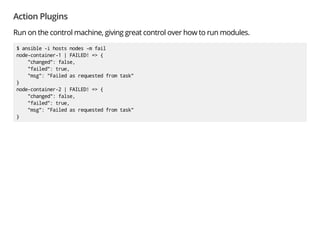
Run on the control machine, giving great control over how to run modules.
$ ansible -i hosts nodes -m fail
node-container-1 | FAILED! => {
"changed": false,
"failed": true,
"msg": "Failed as requested from task"
}
node-container-2 | FAILED! => {
"changed": false,
"failed": true,
"msg": "Failed as requested from task"
}
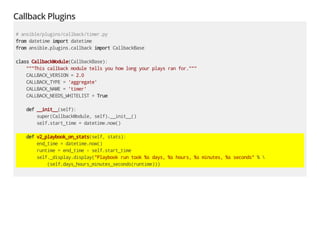
Callback Plugins
# ansible/plugins/callback/timer.py
from datetime import datetime
from ansible.plugins.callback import CallbackBase
class CallbackModule(CallbackBase):
"""This callback module tells you how long your plays ran for."""
CALLBACK_VERSION = 2.0
CALLBACK_TYPE = 'aggregate'
CALLBACK_NAME = 'timer'
CALLBACK_NEEDS_WHITELIST = True
def __init__(self):
super(CallbackModule, self).__init__()
self.start_time = datetime.now()
def v2_playbook_on_stats(self, stats):
end_time = datetime.now()
runtime = end_time - self.start_time
self._display.display("Playbook run took %s days, %s hours, %s minutes, %s seconds" % 
(self.days_hours_minutes_seconds(runtime)))
Callback Plugins
React to events which occur during the execution of playbooks.
Use it to customize output.
$ ANSIBLE_CALLBACK_WHITELIST=timer ansible-playbook -i hosts playbooks/start-containers.yml
PLAY [Launch containers] *******************************************************
TASK [Ensure containers are running] *******************************************
ok: [localhost] => (item=master-container)
ok: [localhost] => (item=node-container-1)
ok: [localhost] => (item=node-container-2)
PLAY RECAP *********************************************************************
localhost : ok=1 changed=0 unreachable=0 failed=0
Playbook run took 0 days, 0 hours, 0 minutes, 1 seconds
Conclusion
It's 2017, go learn Ansible!
Automate
Programming the infrastructure
Testing is hard, but don't give up
Python is a fundamental tool in your toolbox
Red Hat Czech
Brno - the biggest engineering hub globally
1100 employees (including 85 interns) in 3 buildings
Software Development, QE, Technical Writing, Technical Support, BI
Small engineering o ce in Prague
We're hiring!
Python is one of the most used programming language
Open positions in RHEL Platform Team, QE, Release Engineering, Containers, DevOps
(both Development and SysAdmin), OpenStack
Thank you
Rodolfo Carvalho
Software Engineer, Red Hat
rhcarvalho@redhat.com
http://rodolfocarvalho.net

Automation with Ansible and Containers

  • 1.
    AutomationwithAnsibleandContainers PyCon SK 11 March2017 Rodolfo Carvalho Software Engineer, Red Hat
  • 2.
    What is Ansible Automationlanguage Automation engine & Simple: install, con gure, understand Agentless, uses SSH* Extensible Open Source Written in Python! Great community -- 2,588 contributors
  • 3.
    What can wedo with Ansible Con guration Management Application Deployments Provisioning Orchestration Continuous Delivery
  • 4.
    My story withAnsible openshift-ansible Ansible from a programmer's perspective Learning curve Beyond the basics
  • 5.
  • 6.
    The basics An inventorytypically lists remote hosts, either bare metal or VMs. Testing is hard, make it less painful. Ansible ♥ Containers!
  • 7.
  • 8.
    Playbooks YAML les describingdesired state --- - name: Launch containers hosts: localhost connection: local become: no gather_facts: no tasks: - name: Ensure containers are running docker_container: name: "{{item}}" image: centos:7 command: sleep infinity state: started with_items: - master-container - node-container-1 - node-container-2
  • 9.
    Running the playbook $ansible-playbook -i hosts playbooks/start-containers.yml PLAY [Launch containers] ******************************************************* TASK [Ensure containers are running] ******************************************* changed: [localhost] => (item=master-container) changed: [localhost] => (item=node-container-1) changed: [localhost] => (item=node-container-2) PLAY RECAP ********************************************************************* localhost : ok=1 changed=1 unreachable=0 failed=0
  • 10.
    Removing containers --- - name:Cleanup containers hosts: localhost connection: local become: no gather_facts: no tasks: - name: Ensure containers are removed docker_container: name: "{{item}}" state: absent with_items: - master-container - node-container-1 - node-container-2
  • 11.
    Removing containers $ ansible-playbook-i hosts playbooks/remove-containers.yml PLAY [Cleanup containers] ****************************************************** TASK [Ensure containers are removed] ******************************************* changed: [localhost] => (item=master-container) changed: [localhost] => (item=node-container-1) changed: [localhost] => (item=node-container-2) PLAY RECAP ********************************************************************* localhost : ok=1 changed=1 unreachable=0 failed=0
  • 12.
    More concepts Modules Roles Ansible Galaxy Ansibleships with more than 700 modules. Roles is a standard way to organize playbooks. Galaxy is a free site for nding, downloading, and sharing community developed roles.
  • 13.
    Ansible Modules ♥Python! # ansible/modules/core/system/ping.py from ansible.module_utils.basic import AnsibleModule def main(): module = AnsibleModule( argument_spec=dict( data=dict(required=False, default=None), ), supports_check_mode=True ) result = dict(ping='pong') if module.params['data']: if module.params['data'] == 'crash': raise Exception("boom") result['ping'] = module.params['data'] module.exit_json(**result) if __name__ == '__main__': main()
  • 14.
    Modules Modules are copiedto the target hosts, then executed in the targets. $ ansible -i hosts all -m ping -a data=pyconsk master-container | SUCCESS => { "changed": false, "ping": "pyconsk" } node-container-1 | SUCCESS => { "changed": false, "ping": "pyconsk" } node-container-2 | SUCCESS => { "changed": false, "ping": "pyconsk" } $ ansible -i hosts masters -m command -a 'rm -rf /' master-container | FAILED | rc=1 >> rm: it is dangerous to operate recursively on '/' rm: use --no-preserve-root to override this failsafe
  • 15.
    To in nity…and beyond!
  • 16.
  • 17.
    Action Plugins # ansible/plugins/action/fail.py fromansible.plugins.action import ActionBase class ActionModule(ActionBase): ''' Fail with custom message ''' TRANSFERS_FILES = False def run(self, tmp=None, task_vars=None): if task_vars is None: task_vars = dict() result = super(ActionModule, self).run(tmp, task_vars) msg = 'Failed as requested from task' if self._task.args and 'msg' in self._task.args: msg = self._task.args.get('msg') result['failed'] = True result['msg'] = msg return result
  • 18.
    Action Plugins Run onthe control machine, giving great control over how to run modules. $ ansible -i hosts nodes -m fail node-container-1 | FAILED! => { "changed": false, "failed": true, "msg": "Failed as requested from task" } node-container-2 | FAILED! => { "changed": false, "failed": true, "msg": "Failed as requested from task" }
  • 19.
    Callback Plugins # ansible/plugins/callback/timer.py fromdatetime import datetime from ansible.plugins.callback import CallbackBase class CallbackModule(CallbackBase): """This callback module tells you how long your plays ran for.""" CALLBACK_VERSION = 2.0 CALLBACK_TYPE = 'aggregate' CALLBACK_NAME = 'timer' CALLBACK_NEEDS_WHITELIST = True def __init__(self): super(CallbackModule, self).__init__() self.start_time = datetime.now() def v2_playbook_on_stats(self, stats): end_time = datetime.now() runtime = end_time - self.start_time self._display.display("Playbook run took %s days, %s hours, %s minutes, %s seconds" % (self.days_hours_minutes_seconds(runtime)))
  • 20.
    Callback Plugins React toevents which occur during the execution of playbooks. Use it to customize output. $ ANSIBLE_CALLBACK_WHITELIST=timer ansible-playbook -i hosts playbooks/start-containers.yml PLAY [Launch containers] ******************************************************* TASK [Ensure containers are running] ******************************************* ok: [localhost] => (item=master-container) ok: [localhost] => (item=node-container-1) ok: [localhost] => (item=node-container-2) PLAY RECAP ********************************************************************* localhost : ok=1 changed=0 unreachable=0 failed=0 Playbook run took 0 days, 0 hours, 0 minutes, 1 seconds
  • 21.
    Conclusion It's 2017, golearn Ansible! Automate Programming the infrastructure Testing is hard, but don't give up Python is a fundamental tool in your toolbox
  • 22.
    Red Hat Czech Brno- the biggest engineering hub globally 1100 employees (including 85 interns) in 3 buildings Software Development, QE, Technical Writing, Technical Support, BI Small engineering o ce in Prague We're hiring! Python is one of the most used programming language Open positions in RHEL Platform Team, QE, Release Engineering, Containers, DevOps (both Development and SysAdmin), OpenStack
  • 23.
    Thank you Rodolfo Carvalho SoftwareEngineer, Red Hat rhcarvalho@redhat.com http://rodolfocarvalho.net