IT Automation with
Rayed Alrashed
About Me
• 1993 - 1997 KSU
• 1997 - 1999 ISU KACST
• 1999 - 2001 GWU
• 2001 - 2007 SAUDI NET
• 2008 - 2011 CITC
• 2011 - Now WireFilter
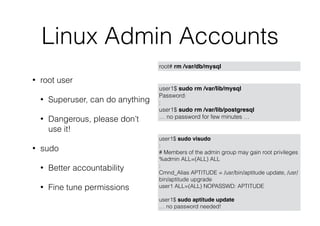
Linux Admin Accounts
• root user
• Superuser, can do anything
• Dangerous, please don’t
use it!
• sudo
• Better accountability
• Fine tune permissions
root# rm /var/db/mysql
user1$ sudo visudo
:
# Members of the admin group may gain root privileges
%admin ALL=(ALL) ALL
:
Cmnd_Alias APTITUDE = /usr/bin/aptitude update, /usr/
bin/aptitude upgrade
user1 ALL=(ALL) NOPASSWD: APTITUDE
user1$ sudo aptitude update
… no password needed!
user1$ sudo rm /var/lib/mysql
Password:
:
user1$ sudo rm /var/lib/postgresql
… no password for few minutes …
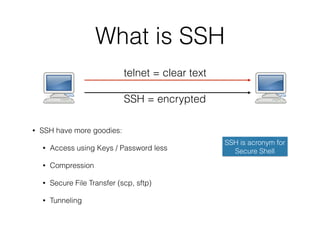
What is SSH
• SSH have more goodies:
• Access using Keys / Password less
• Compression
• Secure File Transfer (scp, sftp)
• Tunneling
SSH is acronym for
Secure Shell
telnet = clear text
SSH = encrypted
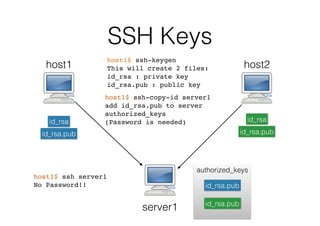
SSH Keys
authorized_keys
server1
host1
id_rsa
id_rsa.pub
id_rsa.pub
host2
id_rsa
id_rsa.pub
host1$ ssh-keygen
This will create 2 files:
id_rsa : private key
id_rsa.pub : public key
id_rsa.pub
host1$ ssh-copy-id server1
add id_rsa.pub to server
authorized_keys
(Password is needed)
host1$ ssh server1
No Password!!
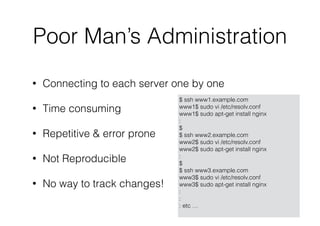
Poor Man’s Administration
$ ssh www1.example.com
www1$ sudo vi /etc/resolv.conf
www1$ sudo apt-get install nginx
:
$
$ ssh www2.example.com
www2$ sudo vi /etc/resolv.conf
www2$ sudo apt-get install nginx
:
$
$ ssh www3.example.com
www3$ sudo vi /etc/resolv.conf
www3$ sudo apt-get install nginx
:
:
: etc …
• Connecting to each server one by one
• Time consuming
• Repetitive & error prone
• Not Reproducible
• No way to track changes!
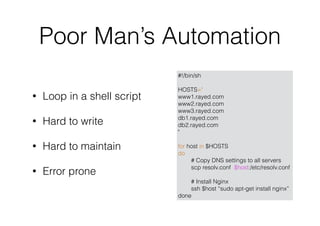
Poor Man’s Automation
#!/bin/sh
HOSTS="
www1.rayed.com
www2.rayed.com
www3.rayed.com
db1.rayed.com
db2.rayed.com
"
for host in $HOSTS
do
# Copy DNS settings to all servers
scp resolv.conf $host:/etc/resolv.conf
# Install Nginx
ssh $host “sudo apt-get install nginx”
done
• Loop in a shell script
• Hard to write
• Hard to maintain
• Error prone
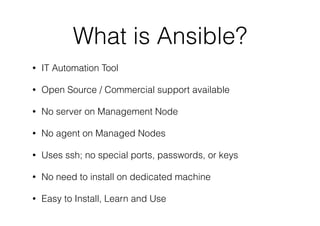
What is Ansible?
• IT Automation Tool
• Open Source / Commercial support available
• No server on Management Node
• No agent on Managed Nodes
• Uses ssh; no special ports, passwords, or keys
• No need to install on dedicated machine
• Easy to Install, Learn and Use
Installation
• Linux:

$ sudo easy_install pip

$ sudo pip install ansible
• OSX:

$ brew update

$ brew install ansible
Inventory
• List of machine you want to manage
• Location:
• Default: /etc/ansible/host
• export ANSIBLE_HOST=my_hosts
• Use -i option: ansible -i my_hosts
• Defined in ansible.cfg
• Dynamic Inventory: Ask AWS, Linode, DigitalOcean, your own
script!
# file: ansible_hosts
mail.example.com
[webservers]
www[1:5].example.com
[dbservers]
db-[a:d].example.com
# file: ansible.cfg
[defaults]
hostfile = ./ansible_hosts
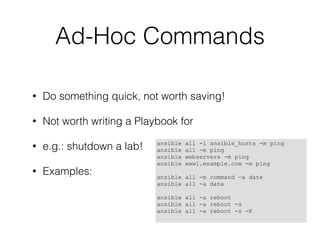
Ad-Hoc Commands
Ad-Hoc Commands
• Do something quick, not worth saving!
• Not worth writing a Playbook for
• e.g.: shutdown a lab!
• Examples:
ansible all -i ansible_hosts -m ping
ansible all -m ping
ansible webservers -m ping
ansible www1.example.com -m ping
ansible all -m command —a date
ansible all -a date
ansible all -a reboot
ansible all -a reboot -s
ansible all -a reboot -s -K
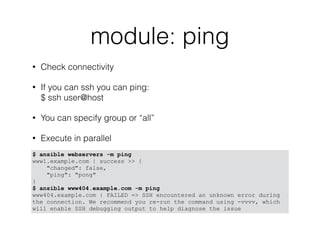
module: ping
• Check connectivity
• If you can ssh you can ping:

$ ssh user@host
• You can specify group or “all”
• Execute in parallel
$ ansible webservers -m ping
www1.example.com | success >> {
"changed": false,
"ping": "pong"
}
$ ansible www404.example.com -m ping
www404.example.com | FAILED => SSH encountered an unknown error during
the connection. We recommend you re-run the command using -vvvv, which
will enable SSH debugging output to help diagnose the issue
module: setup
• Get tons of information about the machine
• Name, Disks, IP, OS version, etc …
• Can be used for conditional operations
$ ansible www1.example.com -m setup
www1.example.com | success >> {
"ansible_facts": {
"ansible_all_ipv4_addresses": [
"178.79.182.89"
],
"ansible_all_ipv6_addresses": [
"2a01:7e00::f03c:91ff:fe70:5c6a",
"fe80::f03c:91ff:fe70:5c6a"
],
"ansible_architecture": "x86_64",
"ansible_bios_date": "NA",
"ansible_bios_version": "NA",
:
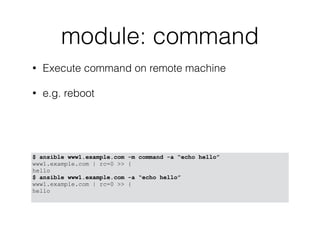
module: command
• Execute command on remote machine
• e.g. reboot
$ ansible www1.example.com -m command -a “echo hello”
www1.example.com | rc=0 >> {
hello
$ ansible www1.example.com -a “echo hello”
www1.example.com | rc=0 >> {
hello
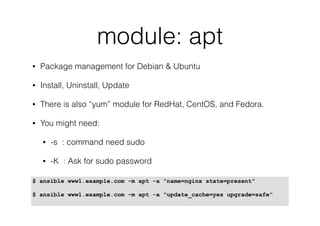
module: apt
• Package management for Debian & Ubuntu
• Install, Uninstall, Update
• There is also “yum” module for RedHat, CentOS, and Fedora.
• You might need:
• -s : command need sudo
• -K : Ask for sudo password
$ ansible www1.example.com -m apt -a “name=nginx state=present”
$ ansible www1.example.com -m apt -a “update_cache=yes upgrade=safe”
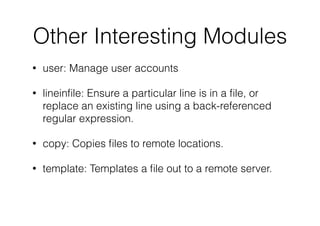
Other Interesting Modules
• user: Manage user accounts
• lineinfile: Ensure a particular line is in a file, or
replace an existing line using a back-referenced
regular expression.
• copy: Copies files to remote locations.
• template: Templates a file out to a remote server.
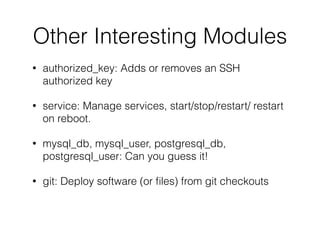
Other Interesting Modules
• authorized_key: Adds or removes an SSH
authorized key
• service: Manage services, start/stop/restart/ restart
on reboot.
• mysql_db, mysql_user, postgresql_db,
postgresql_user: Can you guess it!
• git: Deploy software (or files) from git checkouts
Playbooks
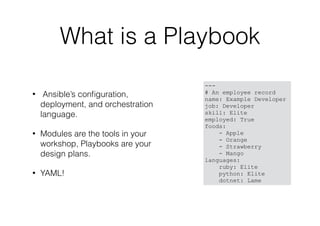
What is a Playbook
• Ansible’s configuration,
deployment, and orchestration
language.
• Modules are the tools in your
workshop, Playbooks are your
design plans.
• YAML!
---
# An employee record
name: Example Developer
job: Developer
skill: Elite
employed: True
foods:
- Apple
- Orange
- Strawberry
- Mango
languages:
ruby: Elite
python: Elite
dotnet: Lame
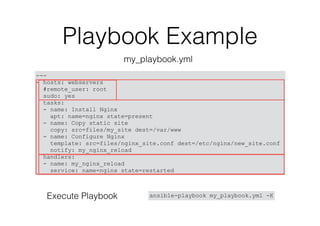
Playbook Example
---
- hosts: webservers
#remote_user: root
sudo: yes
tasks:
- name: Install Nginx
apt: name=nginx state=present
- name: Copy static site
copy: src=files/my_site dest=/var/www
- name: Configure Nginx
template: src=files/nginx_site.conf dest=/etc/nginx/new_site.conf
notify: my_nginx_reload
handlers:
- name: my_nginx_reload
service: name=nginx state=restarted
my_playbook.yml
ansible-playbook my_playbook.yml -KExecute Playbook
Variables
• Defined
• Inventory
• Playbook
• Discovered (Facts)
• Use
# playbook
- hosts: webservers
vars:
http_port: 80
# inventory file
host1 http_port=80
[webservers:vars]
http_port=80
# facts
:
"ansible_distribution": "Ubuntu",
"ansible_distribution_release": "precise",
"ansible_distribution_version": “12.04",
:
# in playbook
template: src=foo.cfg.j2 dest={{ remote_install_path }}/foo.cfg
# in template files
server {
listen 80;
root /var/www/my_site;
index index.html index.htm;
server_name {{ ansible_default_ipv4.address }};
}
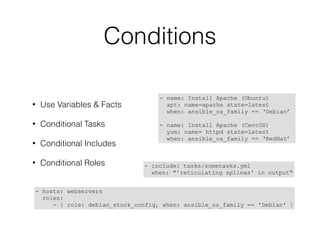
Conditions
• Use Variables & Facts
• Conditional Tasks
• Conditional Includes
• Conditional Roles
- name: Install Apache (Ubuntu)
apt: name=apache state=latest
when: ansible_os_family == ‘Debian’
- name: Install Apache (CentOS)
yum: name= httpd state=latest
when: ansible_os_family == ‘RedHat’
- include: tasks/sometasks.yml
when: "'reticulating splines' in output"
- hosts: webservers
roles:
- { role: debian_stock_config, when: ansible_os_family == 'Debian' }
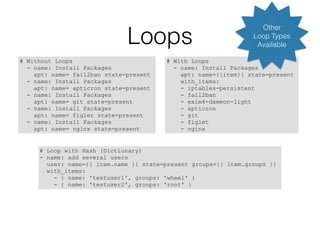
Loops
# With Loops
- name: Install Packages
apt: name={{item}} state=present
with_items:
- iptables-persistent
- fail2ban
- exim4-daemon-light
- apticron
- git
- figlet
- nginx
# Without Loops
- name: Install Packages
apt: name= fail2ban state=present
- name: Install Packages
apt: name= apticron state=present
- name: Install Packages
apt: name= git state=present
- name: Install Packages
apt: name= figlet state=present
- name: Install Packages
apt: name= nginx state=present
# Loop with Hash (Dictionary)
- name: add several users
user: name={{ item.name }} state=present groups={{ item.groups }}
with_items:
- { name: 'testuser1', groups: 'wheel' }
- { name: 'testuser2', groups: 'root' }
Other
Loop Types
Available
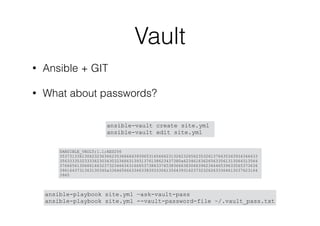
Vault
• Ansible + GIT
• What about passwords?
ansible-playbook site.yml —ask-vault-pass
ansible-playbook site.yml --vault-password-file ~/.vault_pass.txt
$ANSIBLE_VAULT;1.1;AES256
35373133613062323636623536666439396531656662313262326562353261376435343934346433
3563333532333362303430323666313931376138623437380a623461636265633561313064313564
37666561306661663237323466343166653738633765383666383066396234646539633565373636
3961643731363130340a336465666334633839333061356439316237323262633364613037623164
3965
ansible-vault create site.yml
ansible-vault edit site.yml
–Anonymous
“A lazy sysadmin is the best admin”
More
• http://www.ansible.com/
• http://docs.ansible.com/
• https://galaxy.ansible.com/
• http://docs.ansible.com/list_of_all_modules.html

IT Automation with Ansible

  • 1.
  • 2.
    About Me • 1993- 1997 KSU • 1997 - 1999 ISU KACST • 1999 - 2001 GWU • 2001 - 2007 SAUDI NET • 2008 - 2011 CITC • 2011 - Now WireFilter
  • 3.
    Linux Admin Accounts •root user • Superuser, can do anything • Dangerous, please don’t use it! • sudo • Better accountability • Fine tune permissions root# rm /var/db/mysql user1$ sudo visudo : # Members of the admin group may gain root privileges %admin ALL=(ALL) ALL : Cmnd_Alias APTITUDE = /usr/bin/aptitude update, /usr/ bin/aptitude upgrade user1 ALL=(ALL) NOPASSWD: APTITUDE user1$ sudo aptitude update … no password needed! user1$ sudo rm /var/lib/mysql Password: : user1$ sudo rm /var/lib/postgresql … no password for few minutes …
  • 4.
    What is SSH •SSH have more goodies: • Access using Keys / Password less • Compression • Secure File Transfer (scp, sftp) • Tunneling SSH is acronym for Secure Shell telnet = clear text SSH = encrypted
  • 5.
    SSH Keys authorized_keys server1 host1 id_rsa id_rsa.pub id_rsa.pub host2 id_rsa id_rsa.pub host1$ ssh-keygen Thiswill create 2 files: id_rsa : private key id_rsa.pub : public key id_rsa.pub host1$ ssh-copy-id server1 add id_rsa.pub to server authorized_keys (Password is needed) host1$ ssh server1 No Password!!
  • 6.
    Poor Man’s Administration $ssh www1.example.com www1$ sudo vi /etc/resolv.conf www1$ sudo apt-get install nginx : $ $ ssh www2.example.com www2$ sudo vi /etc/resolv.conf www2$ sudo apt-get install nginx : $ $ ssh www3.example.com www3$ sudo vi /etc/resolv.conf www3$ sudo apt-get install nginx : : : etc … • Connecting to each server one by one • Time consuming • Repetitive & error prone • Not Reproducible • No way to track changes!
  • 7.
    Poor Man’s Automation #!/bin/sh HOSTS=" www1.rayed.com www2.rayed.com www3.rayed.com db1.rayed.com db2.rayed.com " forhost in $HOSTS do # Copy DNS settings to all servers scp resolv.conf $host:/etc/resolv.conf # Install Nginx ssh $host “sudo apt-get install nginx” done • Loop in a shell script • Hard to write • Hard to maintain • Error prone
  • 8.
    What is Ansible? •IT Automation Tool • Open Source / Commercial support available • No server on Management Node • No agent on Managed Nodes • Uses ssh; no special ports, passwords, or keys • No need to install on dedicated machine • Easy to Install, Learn and Use
  • 9.
    Installation • Linux:
 $ sudoeasy_install pip
 $ sudo pip install ansible • OSX:
 $ brew update
 $ brew install ansible
  • 10.
    Inventory • List ofmachine you want to manage • Location: • Default: /etc/ansible/host • export ANSIBLE_HOST=my_hosts • Use -i option: ansible -i my_hosts • Defined in ansible.cfg • Dynamic Inventory: Ask AWS, Linode, DigitalOcean, your own script! # file: ansible_hosts mail.example.com [webservers] www[1:5].example.com [dbservers] db-[a:d].example.com # file: ansible.cfg [defaults] hostfile = ./ansible_hosts
  • 11.
  • 12.
    Ad-Hoc Commands • Dosomething quick, not worth saving! • Not worth writing a Playbook for • e.g.: shutdown a lab! • Examples: ansible all -i ansible_hosts -m ping ansible all -m ping ansible webservers -m ping ansible www1.example.com -m ping ansible all -m command —a date ansible all -a date ansible all -a reboot ansible all -a reboot -s ansible all -a reboot -s -K
  • 13.
    module: ping • Checkconnectivity • If you can ssh you can ping:
 $ ssh user@host • You can specify group or “all” • Execute in parallel $ ansible webservers -m ping www1.example.com | success >> { "changed": false, "ping": "pong" } $ ansible www404.example.com -m ping www404.example.com | FAILED => SSH encountered an unknown error during the connection. We recommend you re-run the command using -vvvv, which will enable SSH debugging output to help diagnose the issue
  • 14.
    module: setup • Gettons of information about the machine • Name, Disks, IP, OS version, etc … • Can be used for conditional operations $ ansible www1.example.com -m setup www1.example.com | success >> { "ansible_facts": { "ansible_all_ipv4_addresses": [ "178.79.182.89" ], "ansible_all_ipv6_addresses": [ "2a01:7e00::f03c:91ff:fe70:5c6a", "fe80::f03c:91ff:fe70:5c6a" ], "ansible_architecture": "x86_64", "ansible_bios_date": "NA", "ansible_bios_version": "NA", :
  • 15.
    module: command • Executecommand on remote machine • e.g. reboot $ ansible www1.example.com -m command -a “echo hello” www1.example.com | rc=0 >> { hello $ ansible www1.example.com -a “echo hello” www1.example.com | rc=0 >> { hello
  • 16.
    module: apt • Packagemanagement for Debian & Ubuntu • Install, Uninstall, Update • There is also “yum” module for RedHat, CentOS, and Fedora. • You might need: • -s : command need sudo • -K : Ask for sudo password $ ansible www1.example.com -m apt -a “name=nginx state=present” $ ansible www1.example.com -m apt -a “update_cache=yes upgrade=safe”
  • 17.
    Other Interesting Modules •user: Manage user accounts • lineinfile: Ensure a particular line is in a file, or replace an existing line using a back-referenced regular expression. • copy: Copies files to remote locations. • template: Templates a file out to a remote server.
  • 18.
    Other Interesting Modules •authorized_key: Adds or removes an SSH authorized key • service: Manage services, start/stop/restart/ restart on reboot. • mysql_db, mysql_user, postgresql_db, postgresql_user: Can you guess it! • git: Deploy software (or files) from git checkouts
  • 19.
  • 20.
    What is aPlaybook • Ansible’s configuration, deployment, and orchestration language. • Modules are the tools in your workshop, Playbooks are your design plans. • YAML! --- # An employee record name: Example Developer job: Developer skill: Elite employed: True foods: - Apple - Orange - Strawberry - Mango languages: ruby: Elite python: Elite dotnet: Lame
  • 21.
    Playbook Example --- - hosts:webservers #remote_user: root sudo: yes tasks: - name: Install Nginx apt: name=nginx state=present - name: Copy static site copy: src=files/my_site dest=/var/www - name: Configure Nginx template: src=files/nginx_site.conf dest=/etc/nginx/new_site.conf notify: my_nginx_reload handlers: - name: my_nginx_reload service: name=nginx state=restarted my_playbook.yml ansible-playbook my_playbook.yml -KExecute Playbook
  • 22.
    Variables • Defined • Inventory •Playbook • Discovered (Facts) • Use # playbook - hosts: webservers vars: http_port: 80 # inventory file host1 http_port=80 [webservers:vars] http_port=80 # facts : "ansible_distribution": "Ubuntu", "ansible_distribution_release": "precise", "ansible_distribution_version": “12.04", : # in playbook template: src=foo.cfg.j2 dest={{ remote_install_path }}/foo.cfg # in template files server { listen 80; root /var/www/my_site; index index.html index.htm; server_name {{ ansible_default_ipv4.address }}; }
  • 23.
    Conditions • Use Variables& Facts • Conditional Tasks • Conditional Includes • Conditional Roles - name: Install Apache (Ubuntu) apt: name=apache state=latest when: ansible_os_family == ‘Debian’ - name: Install Apache (CentOS) yum: name= httpd state=latest when: ansible_os_family == ‘RedHat’ - include: tasks/sometasks.yml when: "'reticulating splines' in output" - hosts: webservers roles: - { role: debian_stock_config, when: ansible_os_family == 'Debian' }
  • 24.
    Loops # With Loops -name: Install Packages apt: name={{item}} state=present with_items: - iptables-persistent - fail2ban - exim4-daemon-light - apticron - git - figlet - nginx # Without Loops - name: Install Packages apt: name= fail2ban state=present - name: Install Packages apt: name= apticron state=present - name: Install Packages apt: name= git state=present - name: Install Packages apt: name= figlet state=present - name: Install Packages apt: name= nginx state=present # Loop with Hash (Dictionary) - name: add several users user: name={{ item.name }} state=present groups={{ item.groups }} with_items: - { name: 'testuser1', groups: 'wheel' } - { name: 'testuser2', groups: 'root' } Other Loop Types Available
  • 25.
    Vault • Ansible +GIT • What about passwords? ansible-playbook site.yml —ask-vault-pass ansible-playbook site.yml --vault-password-file ~/.vault_pass.txt $ANSIBLE_VAULT;1.1;AES256 35373133613062323636623536666439396531656662313262326562353261376435343934346433 3563333532333362303430323666313931376138623437380a623461636265633561313064313564 37666561306661663237323466343166653738633765383666383066396234646539633565373636 3961643731363130340a336465666334633839333061356439316237323262633364613037623164 3965 ansible-vault create site.yml ansible-vault edit site.yml
  • 26.
    –Anonymous “A lazy sysadminis the best admin”
  • 27.
    More • http://www.ansible.com/ • http://docs.ansible.com/ •https://galaxy.ansible.com/ • http://docs.ansible.com/list_of_all_modules.html