OpenShift SDN
How OpenShift Networking helps to automate
Ilkka Tengvall (ikke@redhat.com)
Solution Architect, Red Hat
April, 2016
Understand what OpenShift network benefits and how to use it
● What problem are we trying to solve?
● What are the advantages of the solution?
Agenda
2
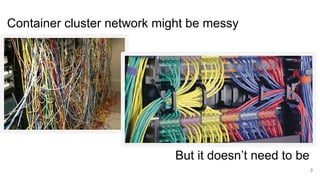
Container cluster network might be messy
3
But it doesn’t need to be
How do we do that with SDN?
Add a layer of confusion abstraction!
4
DEMO to answer the big WHY :)
* the OpenShift itself is production ready!
Author of demo: Tero Ahonen, Cybercom Finland
5
*
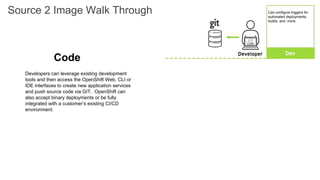
Developers can leverage existing development
tools and then access the OpenShift Web, CLI or
IDE interfaces to create new application services
and push source code via GIT. OpenShift can
also accept binary deployments or be fully
integrated with a customer’s existing CI/CD
environment.
Code
Source 2 Image Walk Through Can configure triggers for
automated deployments,
builds, and more.
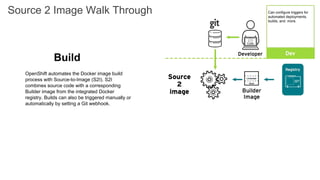
OpenShift automates the Docker image build
process with Source-to-Image (S2I). S2I
combines source code with a corresponding
Builder image from the integrated Docker
registry. Builds can also be triggered manually or
automatically by setting a Git webhook.
Build
Source 2 Image Walk Through Can configure triggers for
automated deployments,
builds, and more.
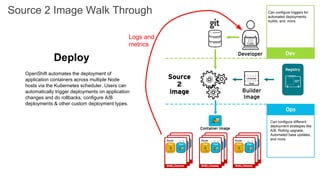
Deploy
OpenShift automates the deployment of
application containers across multiple Node
hosts via the Kubernetes scheduler. Users can
automatically trigger deployments on application
changes and do rollbacks, configure A/B
deployments & other custom deployment types.
Source 2 Image Walk Through
Can configure different
deployment strategies like
A/B, Rolling upgrade,
Automated base updates,
and more.
Can configure triggers for
automated deployments,
builds, and more.
Logs and
metrics
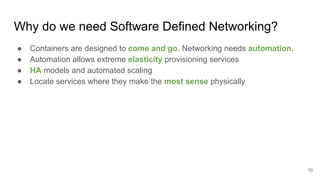
Why do we need Software Defined Networking?
● Containers are designed to come and go. Networking needs automation.
● Automation allows extreme elasticity provisioning services
● HA models and automated scaling
● Locate services where they make the most sense physically
10
DMZ
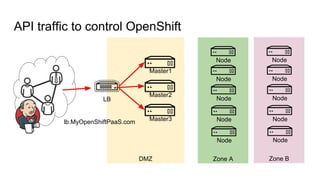
API traffic to control OpenShift
Master1
Master2
Master3
Node
Zone A
Node
Node
Node
Node
Node
Zone B
Node
Node
Node
Node
LB
lb.MyOpenShiftPaaS.com
DMZ
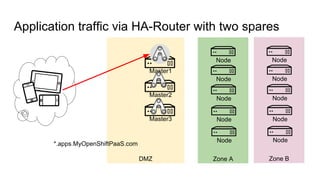
Application traffic via HA-Router with two spares
Master1
Master2
Master3
Node
Zone A
Node
Node
Node
Node
Node
Zone B
Node
Node
Node
Node
*.apps.MyOpenShiftPaaS.com
DMZ
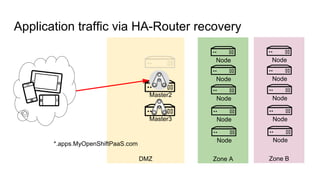
Application traffic via HA-Router recovery
Master2
Master3
Node
Zone A
Node
Node
Node
Node
Node
Zone B
Node
Node
Node
Node
*.apps.MyOpenShiftPaaS.com
DMZ
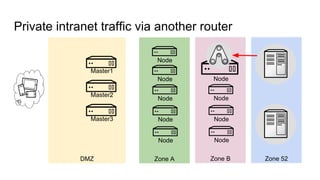
Private intranet traffic via another router
Master1
Master2
Master3
Node
Zone A
Node
Node
Node
Node
Zone B
Node
Node
Node
Node
Zone 52
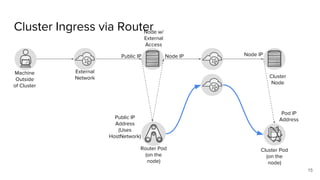
Cluster Ingress via Router
15
Machine
Outside
of Cluster
External
Network
Public IP Node IP
Router Pod
(on the
node)
Node w/
External
Access
Public IP
Address
(Uses
HostNetwork)
Cluster
Node
Node IP
Cluster Pod
(on the
node)
Pod IP
Address
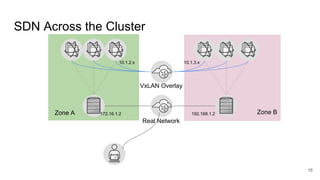
SDN Across the Cluster
16
VxLAN Overlay
Real Network
172.16.1.2 192.168.1.2
10.1.2.x 10.1.3.x
Zone A Zone B
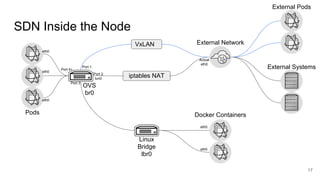
SDN Inside the Node
17
iptables NAT
VxLAN
Linux
Bridge
lbr0
OVS
br0
Pods Docker Containers
External Network
External Pods
External Systems
eth0
eth0
eth0
Port 4+
Port 2
tun0
Port 1
Port 3
eth0
eth0
Actual
eth0
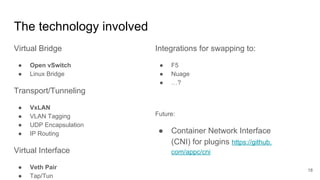
The technology involved
Virtual Bridge
● Open vSwitch
● Linux Bridge
Transport/Tunneling
● VxLAN
● VLAN Tagging
● UDP Encapsulation
● IP Routing
Virtual Interface
● Veth Pair
● Tap/Tun
18
Integrations for swapping to:
● F5
● Nuage
● …?
Future:
● Container Network Interface
(CNI) for plugins https://github.
com/appc/cni
Traffic Inside the Cluster
● Discoverability via Services
● Services available as
○ Environment Variables
○ Automatic DNS entries
● Simple round-robin-ish load balancing
● Leading the community to define flexible access control policy
19
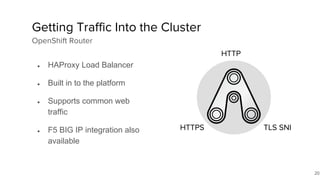
20
● HAProxy Load Balancer
● Built in to the platform
● Supports common web
traffic
● F5 BIG IP integration also
available
Getting Traffic Into the Cluster
OpenShift Router
HTTP
HTTPS TLS SNI
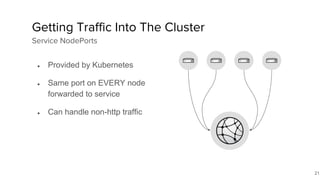
21
● Provided by Kubernetes
● Same port on EVERY node
forwarded to service
● Can handle non-http traffic
Getting Traffic Into The Cluster
Service NodePorts
22
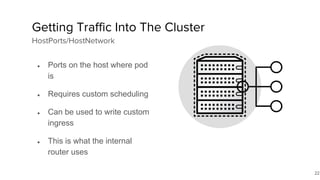
● Ports on the host where pod
is
● Requires custom scheduling
● Can be used to write custom
ingress
● This is what the internal
router uses
Getting Traffic Into The Cluster
HostPorts/HostNetwork
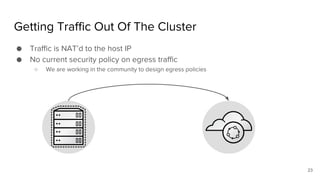
Getting Traffic Out Of The Cluster
● Traffic is NAT’d to the host IP
● No current security policy on egress traffic
○ We are working in the community to design egress policies
23
OpenShift Router
● Stable (configurable) DNS name
○ We often suggest a wildcard DNS to the router
○ You can configure DNS by hand route by route
● Application scalability and mobility inside the cluster
● Protocols
○ HTTP
○ HTTPS (with SNI)
○ WebSockets
○ TLS with SNI
24
Troubleshooting
● Try the troubleshooting guide: https://docs.openshift.com/enterprise/3.
1/admin_guide/sdn_troubleshooting.html
● Use plotnetcfg (dnf install plotnetcfg; or clone https://github.com/jbenc/plotnetcfg) to draw
a diagram of the networking inside a machine
● Use the same tools as with a physical cluster (except with fewer physical
cables to check)
○ ping, tcpdump, wireshark, etc.
25
Future directions
● We will use the the Container Network Interface (CNI) for plugins
○ https://github.com/appc/cni
○ OpenShift SDN will be reimplemented as a CNI plugin
○ Why? More feature complete plugin interface
○ Hopefully there will be more networking plugins available
● Check out the OpenShift Networking board:
○ https://trello.com/b/TV5P9gKe/networking
26
OpenStack integrations (future)
● LDAP unified user management (Keystone + OSE)
● Floating IP and Firewall to help with public traffic
● HEAT + ansible installer
● Cinder Block Storage as persistent storage *
● VLAN aware VLANS will possibly help unifying networks*
Infortaining Youtube flicks to watch:
● OpenShift on OpenStack: https://youtu.be/8Hjk-EImZLk
● Case Santander global SDN using Nuage: https://youtu.be/cmr3UZCkL5A
● Tenths of excellent tutorials to OpenShift at OpenShift channel: https://www.
youtube.com/channel/UCZKMj3YI0wP-kq4QYpaKdEA
27
Conclusion
● Don’t be afraid of SDN
● It’s the same concepts as a physical network
● Virtualizing the components bring many benefits
● There are some costs, but most can be worked around, if needed
28
THANK YOU
plus.google.com/+RedHat
linkedin.com/company/red-hat
youtube.com/user/RedHatVideos
facebook.com/redhatinc
twitter.com/RedHatNews
twitter.com/RedHatAtomic

How OpenShift SDN helps to automate

  • 1.
    OpenShift SDN How OpenShiftNetworking helps to automate Ilkka Tengvall (ikke@redhat.com) Solution Architect, Red Hat April, 2016
  • 2.
    Understand what OpenShiftnetwork benefits and how to use it ● What problem are we trying to solve? ● What are the advantages of the solution? Agenda 2
  • 3.
    Container cluster networkmight be messy 3 But it doesn’t need to be
  • 4.
    How do wedo that with SDN? Add a layer of confusion abstraction! 4
  • 5.
    DEMO to answerthe big WHY :) * the OpenShift itself is production ready! Author of demo: Tero Ahonen, Cybercom Finland 5 *
  • 6.
    Developers can leverageexisting development tools and then access the OpenShift Web, CLI or IDE interfaces to create new application services and push source code via GIT. OpenShift can also accept binary deployments or be fully integrated with a customer’s existing CI/CD environment. Code Source 2 Image Walk Through Can configure triggers for automated deployments, builds, and more.
  • 7.
    OpenShift automates theDocker image build process with Source-to-Image (S2I). S2I combines source code with a corresponding Builder image from the integrated Docker registry. Builds can also be triggered manually or automatically by setting a Git webhook. Build Source 2 Image Walk Through Can configure triggers for automated deployments, builds, and more.
  • 8.
    Deploy OpenShift automates thedeployment of application containers across multiple Node hosts via the Kubernetes scheduler. Users can automatically trigger deployments on application changes and do rollbacks, configure A/B deployments & other custom deployment types. Source 2 Image Walk Through Can configure different deployment strategies like A/B, Rolling upgrade, Automated base updates, and more. Can configure triggers for automated deployments, builds, and more. Logs and metrics
  • 10.
    Why do weneed Software Defined Networking? ● Containers are designed to come and go. Networking needs automation. ● Automation allows extreme elasticity provisioning services ● HA models and automated scaling ● Locate services where they make the most sense physically 10
  • 11.
    DMZ API traffic tocontrol OpenShift Master1 Master2 Master3 Node Zone A Node Node Node Node Node Zone B Node Node Node Node LB lb.MyOpenShiftPaaS.com
  • 12.
    DMZ Application traffic viaHA-Router with two spares Master1 Master2 Master3 Node Zone A Node Node Node Node Node Zone B Node Node Node Node *.apps.MyOpenShiftPaaS.com
  • 13.
    DMZ Application traffic viaHA-Router recovery Master2 Master3 Node Zone A Node Node Node Node Node Zone B Node Node Node Node *.apps.MyOpenShiftPaaS.com
  • 14.
    DMZ Private intranet trafficvia another router Master1 Master2 Master3 Node Zone A Node Node Node Node Zone B Node Node Node Node Zone 52
  • 15.
    Cluster Ingress viaRouter 15 Machine Outside of Cluster External Network Public IP Node IP Router Pod (on the node) Node w/ External Access Public IP Address (Uses HostNetwork) Cluster Node Node IP Cluster Pod (on the node) Pod IP Address
  • 16.
    SDN Across theCluster 16 VxLAN Overlay Real Network 172.16.1.2 192.168.1.2 10.1.2.x 10.1.3.x Zone A Zone B
  • 17.
    SDN Inside theNode 17 iptables NAT VxLAN Linux Bridge lbr0 OVS br0 Pods Docker Containers External Network External Pods External Systems eth0 eth0 eth0 Port 4+ Port 2 tun0 Port 1 Port 3 eth0 eth0 Actual eth0
  • 18.
    The technology involved VirtualBridge ● Open vSwitch ● Linux Bridge Transport/Tunneling ● VxLAN ● VLAN Tagging ● UDP Encapsulation ● IP Routing Virtual Interface ● Veth Pair ● Tap/Tun 18 Integrations for swapping to: ● F5 ● Nuage ● …? Future: ● Container Network Interface (CNI) for plugins https://github. com/appc/cni
  • 19.
    Traffic Inside theCluster ● Discoverability via Services ● Services available as ○ Environment Variables ○ Automatic DNS entries ● Simple round-robin-ish load balancing ● Leading the community to define flexible access control policy 19
  • 20.
    20 ● HAProxy LoadBalancer ● Built in to the platform ● Supports common web traffic ● F5 BIG IP integration also available Getting Traffic Into the Cluster OpenShift Router HTTP HTTPS TLS SNI
  • 21.
    21 ● Provided byKubernetes ● Same port on EVERY node forwarded to service ● Can handle non-http traffic Getting Traffic Into The Cluster Service NodePorts
  • 22.
    22 ● Ports onthe host where pod is ● Requires custom scheduling ● Can be used to write custom ingress ● This is what the internal router uses Getting Traffic Into The Cluster HostPorts/HostNetwork
  • 23.
    Getting Traffic OutOf The Cluster ● Traffic is NAT’d to the host IP ● No current security policy on egress traffic ○ We are working in the community to design egress policies 23
  • 24.
    OpenShift Router ● Stable(configurable) DNS name ○ We often suggest a wildcard DNS to the router ○ You can configure DNS by hand route by route ● Application scalability and mobility inside the cluster ● Protocols ○ HTTP ○ HTTPS (with SNI) ○ WebSockets ○ TLS with SNI 24
  • 25.
    Troubleshooting ● Try thetroubleshooting guide: https://docs.openshift.com/enterprise/3. 1/admin_guide/sdn_troubleshooting.html ● Use plotnetcfg (dnf install plotnetcfg; or clone https://github.com/jbenc/plotnetcfg) to draw a diagram of the networking inside a machine ● Use the same tools as with a physical cluster (except with fewer physical cables to check) ○ ping, tcpdump, wireshark, etc. 25
  • 26.
    Future directions ● Wewill use the the Container Network Interface (CNI) for plugins ○ https://github.com/appc/cni ○ OpenShift SDN will be reimplemented as a CNI plugin ○ Why? More feature complete plugin interface ○ Hopefully there will be more networking plugins available ● Check out the OpenShift Networking board: ○ https://trello.com/b/TV5P9gKe/networking 26
  • 27.
    OpenStack integrations (future) ●LDAP unified user management (Keystone + OSE) ● Floating IP and Firewall to help with public traffic ● HEAT + ansible installer ● Cinder Block Storage as persistent storage * ● VLAN aware VLANS will possibly help unifying networks* Infortaining Youtube flicks to watch: ● OpenShift on OpenStack: https://youtu.be/8Hjk-EImZLk ● Case Santander global SDN using Nuage: https://youtu.be/cmr3UZCkL5A ● Tenths of excellent tutorials to OpenShift at OpenShift channel: https://www. youtube.com/channel/UCZKMj3YI0wP-kq4QYpaKdEA 27
  • 28.
    Conclusion ● Don’t beafraid of SDN ● It’s the same concepts as a physical network ● Virtualizing the components bring many benefits ● There are some costs, but most can be worked around, if needed 28
  • 29.