Globus Connect Server
Deep Dive
Rachana Ananthakrishnan
Vas Vasiliadis
1
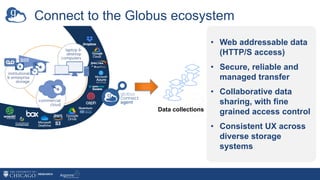
Connect to the Globus ecosystem
Globus Connect Agent
Data collections
• Web addressable data
(HTTP/S access)
• Secure, reliable and
managed transfer
• Collaborative data
sharing, with fine
grained access control
• Consistent UX across
diverse storage
systems
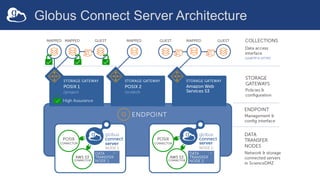
Globus Connect Server Architecture
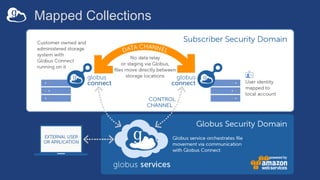
Mapped Collections
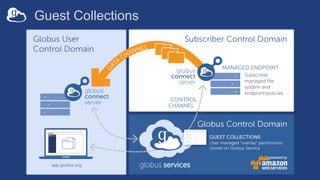
Guest Collections
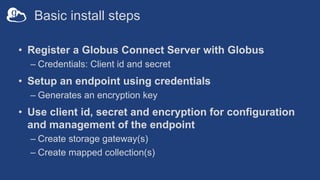
Basic install steps
• Register a Globus Connect Server with Globus
– Credentials: Client id and secret
• Setup an endpoint using credentials
– Generates an encryption key
• Use client id, secret and encryption for configuration
and management of the endpoint
– Create storage gateway(s)
– Create mapped collection(s)
Managing multi-DTN
endpoints
8
Multi-node DTN behavior
• Transfer tasks sent to nodes in round-robin fashion
• Active nodes can receive transfer tasks
• Tasks on inactive node will pause until active again
• GCS manager assistant service
– Stores encrypted configuration values in Globus service
– Synchronizes configuration among nodes in the endpoint
9
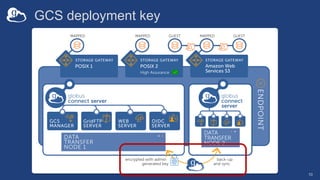
GCS deployment key
10
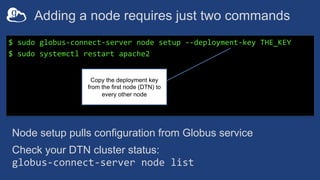
Adding a node requires just two commands
$ sudo globus-connect-server node setup --deployment-key THE_KEY
$ sudo systemctl restart apache2
Copy the deployment key
from the first node (DTN) to
every other node
Node setup pulls configuration from Globus service
Check your DTN cluster status:
globus-connect-server node list
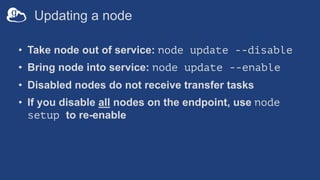
Updating a node
• Take node out of service: node update --disable
• Bring node into service: node update --enable
• Disabled nodes do not receive transfer tasks
• If you disable all nodes on the endpoint, use node
setup to re-enable
Migrating an endpoint to a new host (DTN)
• An endpoints is a logical construct è replace host
system without disrupting the endpoint
– Avoid replicating configuration data (esp. for guest collections!)
– Maintain continuity for custom apps, automation scripts, etc., that
use the endpoint UUID
• Useful when IP address of node is changing
• Again, deployment key is required
– Export ]configuration with node setup --export-node CONFIG
– Import on new DTN using node setup --import-node CONFIG
Customizing/extending
identity mapping
14
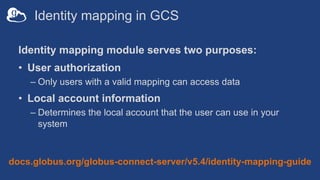
Identity mapping in GCS
Identity mapping module serves two purposes:
• User authorization
– Only users with a valid mapping can access data
• Local account information
– Determines the local account that the user can use in your
system
docs.globus.org/globus-connect-server/v5.4/identity-mapping-guide
Mapping identities to local accounts
• Recall: Default strips username from identity domain
(everything after “@”)
– e.g., userX@globusdemo.org maps to local account userX
• Use --identity-mapping option on storage gateway
– Specify expression in a JSON document
– Execute a custom script
• Required if accepting identities from multiple IdPs
docs.globus.org/globus-connect-server/v5.4/identity-mapping-guide
Simple custom mapping example
Note: Assumes the storage
gateway accepts identities
from two domains
{
"DATA_TYPE":
"expression_identity_mapping#1.0.0",
"mappings": [
{
"source": "{username}",
"match": "42032579@wassamottau.edu",
"output": "vas",
"ignore_case": false,
"literal": false
},
{
"source": "{username}",
"match": "(.*)@uchicago.edu",
"output": "{0}",
"ignore_case": false,
"literal": false
}
]
}
Otherwise, default behavior
local user à domain username
Map
42032579@wossamottau.edu
to local user vas
Leveraging identity mapping for autoprovisioning
• Useful in large user communities; esp. where other
automated account management processes exist
1: Get username from input identity
2: If no local user with username, create user
3: Add local user to map file
• Use sample script in docs as a starting point
18
Implementing sharing
policies
19
Managing guest collections
• Mapped collection admins can enable/disable guest
collections, and define…
– Who can share (local accounts allowed to create guest
collections)
– Whom they can share with (using domain-based policies)
– Paths that can be shared, per user
– Level of access (read, read/write, public, anonymous)
– Maximum lifetime of permissions on guest collections (HA only)
20
Enable sharing
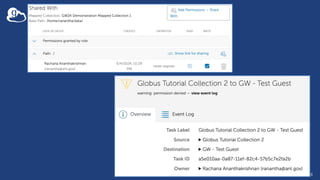
• Allows users to create guest collections
• Guest collections have the same data access interface as
mapped collection:
– HTTP/S
– Transfer service for bulk data
• In addition:
– Permissions can be set on guest collections for collaborators to
access data
– Roles can be set for delegated management of permissions and
activity
Allow sharing on mapped collection
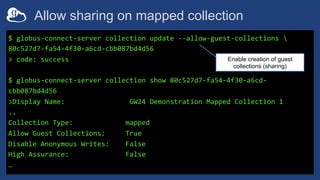
$ globus-connect-server collection update --allow-guest-collections 
80c527d7-fa54-4f30-a6cd-cbb087bd4d56
> code: success
$ globus-connect-server collection show 80c527d7-fa54-4f30-a6cd-
cbb087bd4d56
>Display Name: GW24 Demonstration Mapped Collection 1
..
Collection Type: mapped
Allow Guest Collections: True
Disable Anonymous Writes: False
High Assurance: False
…
Enable creation of guest
collections (sharing)
Sharing restrictions
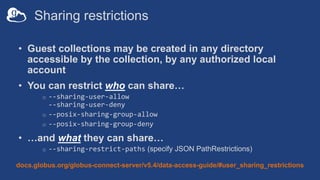
• Guest collections may be created in any directory
accessible by the collection, by any authorized local
account
• You can restrict who can share…
o --sharing-user-allow
--sharing-user-deny
o --posix-sharing-group-allow
o --posix-sharing-group-deny
• …and what they can share…
o --sharing-restrict-paths (specify JSON PathRestrictions)
docs.globus.org/globus-connect-server/v5.4/data-access-guide/#user_sharing_restrictions
Restricting path that can be shared
$ more share-restrict.json
{
"DATA_TYPE": "path_restrictions#1.0.0",
"read": [
"/”
]
}
$ globus-connect-server collection update 
80c527d7-fa54-4f30-a6cd-cbb087bd4d56 
--sharing-restrict-paths file:share-restrict.json
code: success
Only read permissions on
guest collections
Set restrict paths
Restricting path that can be shared
$ globus-connect-server collection show 
--include-private-policies 
80c527d7-fa54-4f30-a6cd-cbb087bd4d56
> Display Name: GW24 Demonstration Mapped Collection 1
>…
>…
Created: 2024-05-03
>Last Access: 2024-05-05
>Root Path: /
> Sharing Path Restrictions: {"DATA_TYPE": "path_restrictions#1.0.0", "none":
[], "read": ["/"], "read_write": []}
To see the restrict path policies,
include private policy option
Updated policy
• The policy is NOT enforced when permissions are set,
but is enforced when the guest collection is accessed
26
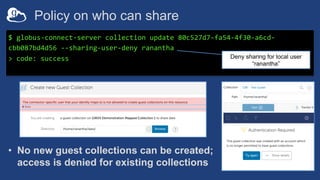
Policy on who can share
$ globus-connect-server collection update 80c527d7-fa54-4f30-a6cd-
cbb087bd4d56 --sharing-user-deny ranantha
> code: success Deny sharing for local user
“ranantha”
• No new guest collections can be created;
access is denied for existing collections
Restrictive/specific sharing policies
• Setting policies for specific user/path combinations
$ globus-connect-server sharing-policy create 
--user myuser –user youruser 
--read /reference --read-write /cui/mysecrets
• Sharing policies cannot override restrictions on the
underlying storage gateway
{
"DATA_TYPE": "path_restrictions#1.0.0”,
"read_write": ["/home/"],
"none": ["/cui"]
}
#FAIL
Due to storage gateway
--restrict-paths policy
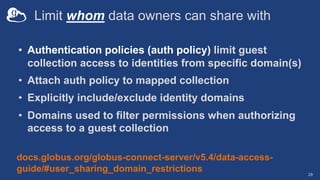
Limit whom data owners can share with
• Authentication policies (auth policy) limit guest
collection access to identities from specific domain(s)
• Attach auth policy to mapped collection
• Explicitly include/exclude identity domains
• Domains used to filter permissions when authorizing
access to a guest collection
29
docs.globus.org/globus-connect-server/v5.4/data-access-
guide/#user_sharing_domain_restrictions
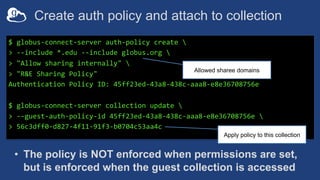
Create auth policy and attach to collection
$ globus-connect-server auth-policy create 
> --include *.edu --include globus.org 
> "Allow sharing internally" 
> "R&E Sharing Policy"
Authentication Policy ID: 45ff23ed-43a8-438c-aaa8-e8e36708756e
$ globus-connect-server collection update 
> --guest-auth-policy-id 45ff23ed-43a8-438c-aaa8-e8e36708756e 
> 56c3dff0-d827-4f11-91f3-b0704c53aa4c
Allowed sharee domains
Apply policy to this collection
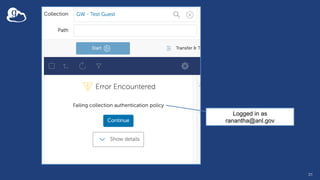
• The policy is NOT enforced when permissions are set,
but is enforced when the guest collection is accessed
31
Logged in as
ranantha@anl.gov
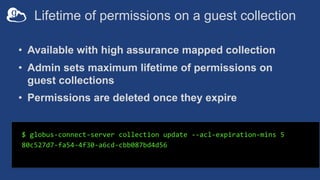
Lifetime of permissions on a guest collection
• Available with high assurance mapped collection
• Admin sets maximum lifetime of permissions on
guest collections
• Permissions are deleted once they expire
$ globus-connect-server collection update --acl-expiration-mins 5
80c527d7-fa54-4f30-a6cd-cbb087bd4d56
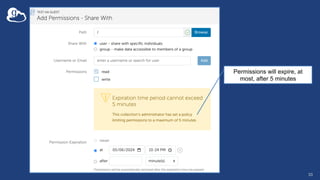
33
Permissions will expire, at
most, after 5 minutes
Customizing GCS
data access domains
34
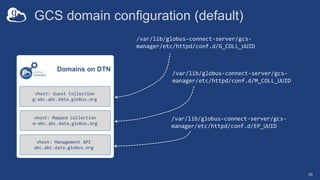
GCS domain configuration (default)
35
/var/lib/globus-connect-server/gcs-
manager/etc/httpd/conf.d/G_COLL_UUID
Domains on DTN
vhost: Management API
abc.abc.data.globus.org
vhost: Mapped Collection
m-abc.abc.data.globus.org
vhost: Guest Collection
g-abc.abc.data.globus.org
/var/lib/globus-connect-server/gcs-
manager/etc/httpd/conf.d/M_COLL_UUID
/var/lib/globus-connect-server/gcs-
manager/etc/httpd/conf.d/EP_UUID
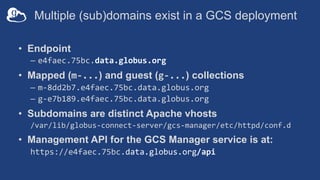
Multiple (sub)domains exist in a GCS deployment
• Endpoint
– e4faec.75bc.data.globus.org
• Mapped (m-...) and guest (g-...) collections
– m-8dd2b7.e4faec.75bc.data.globus.org
– g-e7b189.e4faec.75bc.data.globus.org
• Subdomains are distinct Apache vhosts
/var/lib/globus-connect-server/gcs-manager/etc/httpd/conf.d
• Management API for the GCS Manager service is at:
https://e4faec.75bc.data.globus.org/api
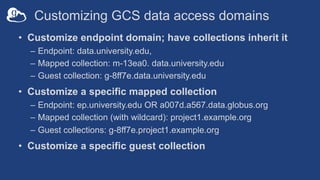
Customizing GCS data access domains
• Customize endpoint domain; have collections inherit it
– Endpoint: data.university.edu,
– Mapped collection: m-13ea0. data.university.edu
– Guest collection: g-8ff7e.data.university.edu
• Customize a specific mapped collection
– Endpoint: ep.university.edu OR a007d.a567.data.globus.org
– Mapped collection (with wildcard): project1.example.org
– Guest collections: g-8ff7e.project1.example.org
• Customize a specific guest collection
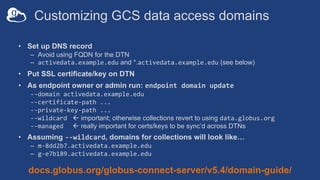
Customizing GCS data access domains
• Set up DNS record
– Avoid using FQDN for the DTN
– activedata.example.edu and *.activedata.example.edu (see below)
• Put SSL certificate/key on DTN
• As endpoint owner or admin run: endpoint domain update
--domain activedata.example.edu
--certificate-path ...
--private-key-path ...
--wildcard ß important; otherwise collections revert to using data.globus.org
--managed ß really important for certs/keys to be sync’d across DTNs
• Assuming --wildcard, domains for collections will look like…
– m-8dd2b7.activedata.example.edu
– g-e7b189.activedata.example.edu
docs.globus.org/globus-connect-server/v5.4/domain-guide/
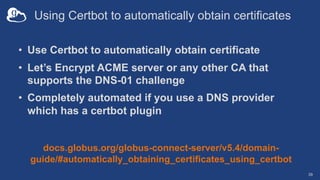
Using Certbot to automatically obtain certificates
• Use Certbot to automatically obtain certificate
• Let’s Encrypt ACME server or any other CA that
supports the DNS-01 challenge
• Completely automated if you use a DNS provider
which has a certbot plugin
39
docs.globus.org/globus-connect-server/v5.4/domain-
guide/#automatically_obtaining_certificates_using_certbot
Accessing non-
POSIX systems
40
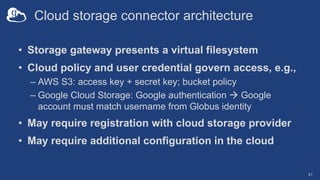
Cloud storage connector architecture
• Storage gateway presents a virtual filesystem
• Cloud policy and user credential govern access, e.g.,
– AWS S3: access key + secret key; bucket policy
– Google Cloud Storage: Google authentication à Google
account must match username from Globus identity
• May require registration with cloud storage provider
• May require additional configuration in the cloud
41
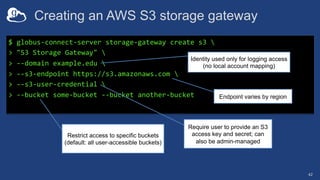
Creating an AWS S3 storage gateway
42
$ globus-connect-server storage-gateway create s3 
> "S3 Storage Gateway" 
> --domain example.edu 
> --s3-endpoint https://s3.amazonaws.com 
> --s3-user-credential 
> --bucket some-bucket --bucket another-bucket
Require user to provide an S3
access key and secret; can
also be admin-managed
Restrict access to specific buckets
(default: all user-accessible buckets)
Endpoint varies by region
Identity used only for logging access
(no local account mapping)
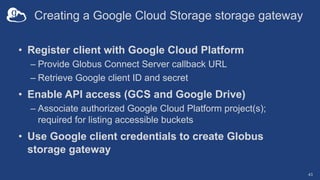
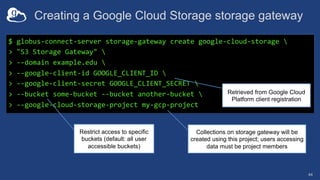
Creating a Google Cloud Storage storage gateway
• Register client with Google Cloud Platform
– Provide Globus Connect Server callback URL
– Retrieve Google client ID and secret
• Enable API access (GCS and Google Drive)
– Associate authorized Google Cloud Platform project(s);
required for listing accessible buckets
• Use Google client credentials to create Globus
storage gateway
43
Creating a Google Cloud Storage storage gateway
44
$ globus-connect-server storage-gateway create google-cloud-storage 
> "S3 Storage Gateway" 
> --domain example.edu 
> --google-client-id GOOGLE_CLIENT_ID 
> --google-client-secret GOOGLE_CLIENT_SECRET 
> --bucket some-bucket --bucket another-bucket 
> --google-cloud-storage-project my-gcp-project
Retrieved from Google Cloud
Platform client registration
Restrict access to specific
buckets (default: all user
accessible buckets)
Collections on storage gateway will be
created using this project; users accessing
data must be project members
Globus Connect Server
logging and audit trails
45
Globus Connect Server logs
• Globus Connect Server application log; logs GCS system
API calls
/var/log/globus-connect-server/gcs-manager/gcs.log
• GridFTP log; logs Globus transfer events
/var/log/gridftp.log
• Apache access and error logs; log HTTPS transfers
/var/log/apache2/[access*,error*]
• High Assurance audit logs; log all collection events
/var/log/gridftp-audit*
46
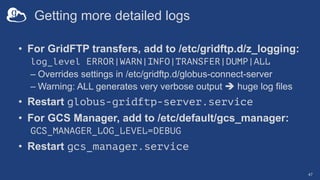
Getting more detailed logs
• For GridFTP transfers, add to /etc/gridftp.d/z_logging:
log_level ERROR|WARN|INFO|TRANSFER|DUMP|ALL
– Overrides settings in /etc/gridftp.d/globus-connect-server
– Warning: ALL generates very verbose output è huge log files
• Restart globus-gridftp-server.service
• For GCS Manager, add to /etc/default/gcs_manager:
GCS_MANAGER_LOG_LEVEL=DEBUG
• Restart gcs_manager.service
47
Troubleshooting
Globus Connect Server
49
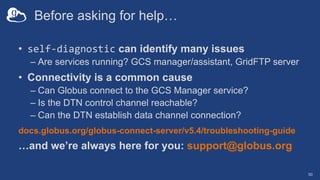
Before asking for help…
• self-diagnostic can identify many issues
– Are services running? GCS manager/assistant, GridFTP server
• Connectivity is a common cause
– Can Globus connect to the GCS Manager service?
– Is the DTN control channel reachable?
– Can the DTN establish data channel connection?
docs.globus.org/globus-connect-server/v5.4/troubleshooting-guide
…and we’re always here for you: support@globus.org
50
Additional storage
gateway options
51
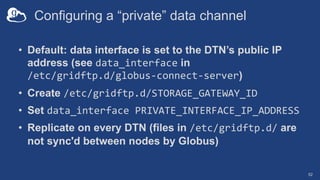
Configuring a “private” data channel
• Default: data interface is set to the DTN’s public IP
address (see data_interface in
/etc/gridftp.d/globus-connect-server)
• Create /etc/gridftp.d/STORAGE_GATEWAY_ID
• Set data_interface PRIVATE_INTERFACE_IP_ADDRESS
• Replicate on every DTN (files in /etc/gridftp.d/ are
not sync'd between nodes by Globus)
52
On performance…
53
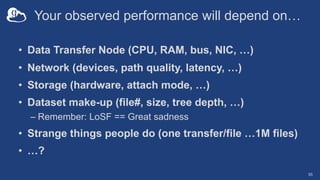
Your observed performance will depend on…
• Data Transfer Node (CPU, RAM, bus, NIC, …)
• Network (devices, path quality, latency, …)
• Storage (hardware, attach mode, …)
• Dataset make-up (file#, size, tree depth, …)
– Remember: LoSF == Great sadness
• Strange things people do (one transfer/file …1M files)
• …?
55
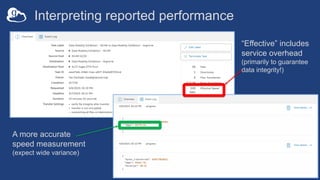
Interpreting reported performance
56
A more accurate
speed measurement
(expect wide variance)
“Effective” includes
service overhead
(primarily to guarantee
data integrity!)
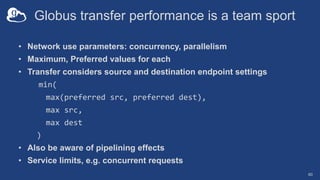
Globus transfer performance is a team sport
• Network use parameters: concurrency, parallelism
• Maximum, Preferred values for each
• Transfer considers source and destination endpoint settings
min(
max(preferred src, preferred dest),
max src,
max dest
)
• Also be aware of pipelining effects
• Service limits, e.g. concurrent requests
60
Globus network use parameters
• May only be changed on subscribed endpoints
• Modify via the web app: Console à Endpoints tab
• Modify via Globus Connect Server CLI
– Run globus-connect-server endpoint modify
• Strong recommendation: Do not change network use
parameters before establishing baseline performance
61
The ESnet experts
will tell us more….
62

Globus Connect Server Deep Dive - GlobusWorld 2024

  • 1.
    Globus Connect Server DeepDive Rachana Ananthakrishnan Vas Vasiliadis 1
  • 2.
    Connect to theGlobus ecosystem Globus Connect Agent Data collections • Web addressable data (HTTP/S access) • Secure, reliable and managed transfer • Collaborative data sharing, with fine grained access control • Consistent UX across diverse storage systems
  • 3.
  • 4.
  • 5.
  • 6.
    Basic install steps •Register a Globus Connect Server with Globus – Credentials: Client id and secret • Setup an endpoint using credentials – Generates an encryption key • Use client id, secret and encryption for configuration and management of the endpoint – Create storage gateway(s) – Create mapped collection(s)
  • 7.
  • 8.
    Multi-node DTN behavior •Transfer tasks sent to nodes in round-robin fashion • Active nodes can receive transfer tasks • Tasks on inactive node will pause until active again • GCS manager assistant service – Stores encrypted configuration values in Globus service – Synchronizes configuration among nodes in the endpoint 9
  • 9.
  • 10.
    Adding a noderequires just two commands $ sudo globus-connect-server node setup --deployment-key THE_KEY $ sudo systemctl restart apache2 Copy the deployment key from the first node (DTN) to every other node Node setup pulls configuration from Globus service Check your DTN cluster status: globus-connect-server node list
  • 11.
    Updating a node •Take node out of service: node update --disable • Bring node into service: node update --enable • Disabled nodes do not receive transfer tasks • If you disable all nodes on the endpoint, use node setup to re-enable
  • 12.
    Migrating an endpointto a new host (DTN) • An endpoints is a logical construct è replace host system without disrupting the endpoint – Avoid replicating configuration data (esp. for guest collections!) – Maintain continuity for custom apps, automation scripts, etc., that use the endpoint UUID • Useful when IP address of node is changing • Again, deployment key is required – Export ]configuration with node setup --export-node CONFIG – Import on new DTN using node setup --import-node CONFIG
  • 13.
  • 14.
    Identity mapping inGCS Identity mapping module serves two purposes: • User authorization – Only users with a valid mapping can access data • Local account information – Determines the local account that the user can use in your system docs.globus.org/globus-connect-server/v5.4/identity-mapping-guide
  • 15.
    Mapping identities tolocal accounts • Recall: Default strips username from identity domain (everything after “@”) – e.g., userX@globusdemo.org maps to local account userX • Use --identity-mapping option on storage gateway – Specify expression in a JSON document – Execute a custom script • Required if accepting identities from multiple IdPs docs.globus.org/globus-connect-server/v5.4/identity-mapping-guide
  • 16.
    Simple custom mappingexample Note: Assumes the storage gateway accepts identities from two domains { "DATA_TYPE": "expression_identity_mapping#1.0.0", "mappings": [ { "source": "{username}", "match": "42032579@wassamottau.edu", "output": "vas", "ignore_case": false, "literal": false }, { "source": "{username}", "match": "(.*)@uchicago.edu", "output": "{0}", "ignore_case": false, "literal": false } ] } Otherwise, default behavior local user à domain username Map 42032579@wossamottau.edu to local user vas
  • 17.
    Leveraging identity mappingfor autoprovisioning • Useful in large user communities; esp. where other automated account management processes exist 1: Get username from input identity 2: If no local user with username, create user 3: Add local user to map file • Use sample script in docs as a starting point 18
  • 18.
  • 19.
    Managing guest collections •Mapped collection admins can enable/disable guest collections, and define… – Who can share (local accounts allowed to create guest collections) – Whom they can share with (using domain-based policies) – Paths that can be shared, per user – Level of access (read, read/write, public, anonymous) – Maximum lifetime of permissions on guest collections (HA only) 20
  • 20.
    Enable sharing • Allowsusers to create guest collections • Guest collections have the same data access interface as mapped collection: – HTTP/S – Transfer service for bulk data • In addition: – Permissions can be set on guest collections for collaborators to access data – Roles can be set for delegated management of permissions and activity
  • 21.
    Allow sharing onmapped collection $ globus-connect-server collection update --allow-guest-collections 80c527d7-fa54-4f30-a6cd-cbb087bd4d56 > code: success $ globus-connect-server collection show 80c527d7-fa54-4f30-a6cd- cbb087bd4d56 >Display Name: GW24 Demonstration Mapped Collection 1 .. Collection Type: mapped Allow Guest Collections: True Disable Anonymous Writes: False High Assurance: False … Enable creation of guest collections (sharing)
  • 22.
    Sharing restrictions • Guestcollections may be created in any directory accessible by the collection, by any authorized local account • You can restrict who can share… o --sharing-user-allow --sharing-user-deny o --posix-sharing-group-allow o --posix-sharing-group-deny • …and what they can share… o --sharing-restrict-paths (specify JSON PathRestrictions) docs.globus.org/globus-connect-server/v5.4/data-access-guide/#user_sharing_restrictions
  • 23.
    Restricting path thatcan be shared $ more share-restrict.json { "DATA_TYPE": "path_restrictions#1.0.0", "read": [ "/” ] } $ globus-connect-server collection update 80c527d7-fa54-4f30-a6cd-cbb087bd4d56 --sharing-restrict-paths file:share-restrict.json code: success Only read permissions on guest collections Set restrict paths
  • 24.
    Restricting path thatcan be shared $ globus-connect-server collection show --include-private-policies 80c527d7-fa54-4f30-a6cd-cbb087bd4d56 > Display Name: GW24 Demonstration Mapped Collection 1 >… >… Created: 2024-05-03 >Last Access: 2024-05-05 >Root Path: / > Sharing Path Restrictions: {"DATA_TYPE": "path_restrictions#1.0.0", "none": [], "read": ["/"], "read_write": []} To see the restrict path policies, include private policy option Updated policy • The policy is NOT enforced when permissions are set, but is enforced when the guest collection is accessed
  • 25.
  • 26.
    Policy on whocan share $ globus-connect-server collection update 80c527d7-fa54-4f30-a6cd- cbb087bd4d56 --sharing-user-deny ranantha > code: success Deny sharing for local user “ranantha” • No new guest collections can be created; access is denied for existing collections
  • 27.
    Restrictive/specific sharing policies •Setting policies for specific user/path combinations $ globus-connect-server sharing-policy create --user myuser –user youruser --read /reference --read-write /cui/mysecrets • Sharing policies cannot override restrictions on the underlying storage gateway { "DATA_TYPE": "path_restrictions#1.0.0”, "read_write": ["/home/"], "none": ["/cui"] } #FAIL Due to storage gateway --restrict-paths policy
  • 28.
    Limit whom dataowners can share with • Authentication policies (auth policy) limit guest collection access to identities from specific domain(s) • Attach auth policy to mapped collection • Explicitly include/exclude identity domains • Domains used to filter permissions when authorizing access to a guest collection 29 docs.globus.org/globus-connect-server/v5.4/data-access- guide/#user_sharing_domain_restrictions
  • 29.
    Create auth policyand attach to collection $ globus-connect-server auth-policy create > --include *.edu --include globus.org > "Allow sharing internally" > "R&E Sharing Policy" Authentication Policy ID: 45ff23ed-43a8-438c-aaa8-e8e36708756e $ globus-connect-server collection update > --guest-auth-policy-id 45ff23ed-43a8-438c-aaa8-e8e36708756e > 56c3dff0-d827-4f11-91f3-b0704c53aa4c Allowed sharee domains Apply policy to this collection • The policy is NOT enforced when permissions are set, but is enforced when the guest collection is accessed
  • 30.
  • 31.
    Lifetime of permissionson a guest collection • Available with high assurance mapped collection • Admin sets maximum lifetime of permissions on guest collections • Permissions are deleted once they expire $ globus-connect-server collection update --acl-expiration-mins 5 80c527d7-fa54-4f30-a6cd-cbb087bd4d56
  • 32.
    33 Permissions will expire,at most, after 5 minutes
  • 33.
  • 34.
    GCS domain configuration(default) 35 /var/lib/globus-connect-server/gcs- manager/etc/httpd/conf.d/G_COLL_UUID Domains on DTN vhost: Management API abc.abc.data.globus.org vhost: Mapped Collection m-abc.abc.data.globus.org vhost: Guest Collection g-abc.abc.data.globus.org /var/lib/globus-connect-server/gcs- manager/etc/httpd/conf.d/M_COLL_UUID /var/lib/globus-connect-server/gcs- manager/etc/httpd/conf.d/EP_UUID
  • 35.
    Multiple (sub)domains existin a GCS deployment • Endpoint – e4faec.75bc.data.globus.org • Mapped (m-...) and guest (g-...) collections – m-8dd2b7.e4faec.75bc.data.globus.org – g-e7b189.e4faec.75bc.data.globus.org • Subdomains are distinct Apache vhosts /var/lib/globus-connect-server/gcs-manager/etc/httpd/conf.d • Management API for the GCS Manager service is at: https://e4faec.75bc.data.globus.org/api
  • 36.
    Customizing GCS dataaccess domains • Customize endpoint domain; have collections inherit it – Endpoint: data.university.edu, – Mapped collection: m-13ea0. data.university.edu – Guest collection: g-8ff7e.data.university.edu • Customize a specific mapped collection – Endpoint: ep.university.edu OR a007d.a567.data.globus.org – Mapped collection (with wildcard): project1.example.org – Guest collections: g-8ff7e.project1.example.org • Customize a specific guest collection
  • 37.
    Customizing GCS dataaccess domains • Set up DNS record – Avoid using FQDN for the DTN – activedata.example.edu and *.activedata.example.edu (see below) • Put SSL certificate/key on DTN • As endpoint owner or admin run: endpoint domain update --domain activedata.example.edu --certificate-path ... --private-key-path ... --wildcard ß important; otherwise collections revert to using data.globus.org --managed ß really important for certs/keys to be sync’d across DTNs • Assuming --wildcard, domains for collections will look like… – m-8dd2b7.activedata.example.edu – g-e7b189.activedata.example.edu docs.globus.org/globus-connect-server/v5.4/domain-guide/
  • 38.
    Using Certbot toautomatically obtain certificates • Use Certbot to automatically obtain certificate • Let’s Encrypt ACME server or any other CA that supports the DNS-01 challenge • Completely automated if you use a DNS provider which has a certbot plugin 39 docs.globus.org/globus-connect-server/v5.4/domain- guide/#automatically_obtaining_certificates_using_certbot
  • 39.
  • 40.
    Cloud storage connectorarchitecture • Storage gateway presents a virtual filesystem • Cloud policy and user credential govern access, e.g., – AWS S3: access key + secret key; bucket policy – Google Cloud Storage: Google authentication à Google account must match username from Globus identity • May require registration with cloud storage provider • May require additional configuration in the cloud 41
  • 41.
    Creating an AWSS3 storage gateway 42 $ globus-connect-server storage-gateway create s3 > "S3 Storage Gateway" > --domain example.edu > --s3-endpoint https://s3.amazonaws.com > --s3-user-credential > --bucket some-bucket --bucket another-bucket Require user to provide an S3 access key and secret; can also be admin-managed Restrict access to specific buckets (default: all user-accessible buckets) Endpoint varies by region Identity used only for logging access (no local account mapping)
  • 42.
    Creating a GoogleCloud Storage storage gateway • Register client with Google Cloud Platform – Provide Globus Connect Server callback URL – Retrieve Google client ID and secret • Enable API access (GCS and Google Drive) – Associate authorized Google Cloud Platform project(s); required for listing accessible buckets • Use Google client credentials to create Globus storage gateway 43
  • 43.
    Creating a GoogleCloud Storage storage gateway 44 $ globus-connect-server storage-gateway create google-cloud-storage > "S3 Storage Gateway" > --domain example.edu > --google-client-id GOOGLE_CLIENT_ID > --google-client-secret GOOGLE_CLIENT_SECRET > --bucket some-bucket --bucket another-bucket > --google-cloud-storage-project my-gcp-project Retrieved from Google Cloud Platform client registration Restrict access to specific buckets (default: all user accessible buckets) Collections on storage gateway will be created using this project; users accessing data must be project members
  • 44.
    Globus Connect Server loggingand audit trails 45
  • 45.
    Globus Connect Serverlogs • Globus Connect Server application log; logs GCS system API calls /var/log/globus-connect-server/gcs-manager/gcs.log • GridFTP log; logs Globus transfer events /var/log/gridftp.log • Apache access and error logs; log HTTPS transfers /var/log/apache2/[access*,error*] • High Assurance audit logs; log all collection events /var/log/gridftp-audit* 46
  • 46.
    Getting more detailedlogs • For GridFTP transfers, add to /etc/gridftp.d/z_logging: log_level ERROR|WARN|INFO|TRANSFER|DUMP|ALL – Overrides settings in /etc/gridftp.d/globus-connect-server – Warning: ALL generates very verbose output è huge log files • Restart globus-gridftp-server.service • For GCS Manager, add to /etc/default/gcs_manager: GCS_MANAGER_LOG_LEVEL=DEBUG • Restart gcs_manager.service 47
  • 47.
  • 48.
    Before asking forhelp… • self-diagnostic can identify many issues – Are services running? GCS manager/assistant, GridFTP server • Connectivity is a common cause – Can Globus connect to the GCS Manager service? – Is the DTN control channel reachable? – Can the DTN establish data channel connection? docs.globus.org/globus-connect-server/v5.4/troubleshooting-guide …and we’re always here for you: support@globus.org 50
  • 49.
  • 50.
    Configuring a “private”data channel • Default: data interface is set to the DTN’s public IP address (see data_interface in /etc/gridftp.d/globus-connect-server) • Create /etc/gridftp.d/STORAGE_GATEWAY_ID • Set data_interface PRIVATE_INTERFACE_IP_ADDRESS • Replicate on every DTN (files in /etc/gridftp.d/ are not sync'd between nodes by Globus) 52
  • 51.
  • 52.
    Your observed performancewill depend on… • Data Transfer Node (CPU, RAM, bus, NIC, …) • Network (devices, path quality, latency, …) • Storage (hardware, attach mode, …) • Dataset make-up (file#, size, tree depth, …) – Remember: LoSF == Great sadness • Strange things people do (one transfer/file …1M files) • …? 55
  • 53.
    Interpreting reported performance 56 Amore accurate speed measurement (expect wide variance) “Effective” includes service overhead (primarily to guarantee data integrity!)
  • 54.
    Globus transfer performanceis a team sport • Network use parameters: concurrency, parallelism • Maximum, Preferred values for each • Transfer considers source and destination endpoint settings min( max(preferred src, preferred dest), max src, max dest ) • Also be aware of pipelining effects • Service limits, e.g. concurrent requests 60
  • 55.
    Globus network useparameters • May only be changed on subscribed endpoints • Modify via the web app: Console à Endpoints tab • Modify via Globus Connect Server CLI – Run globus-connect-server endpoint modify • Strong recommendation: Do not change network use parameters before establishing baseline performance 61
  • 56.
    The ESnet experts willtell us more…. 62