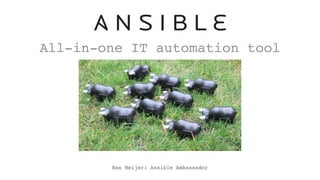
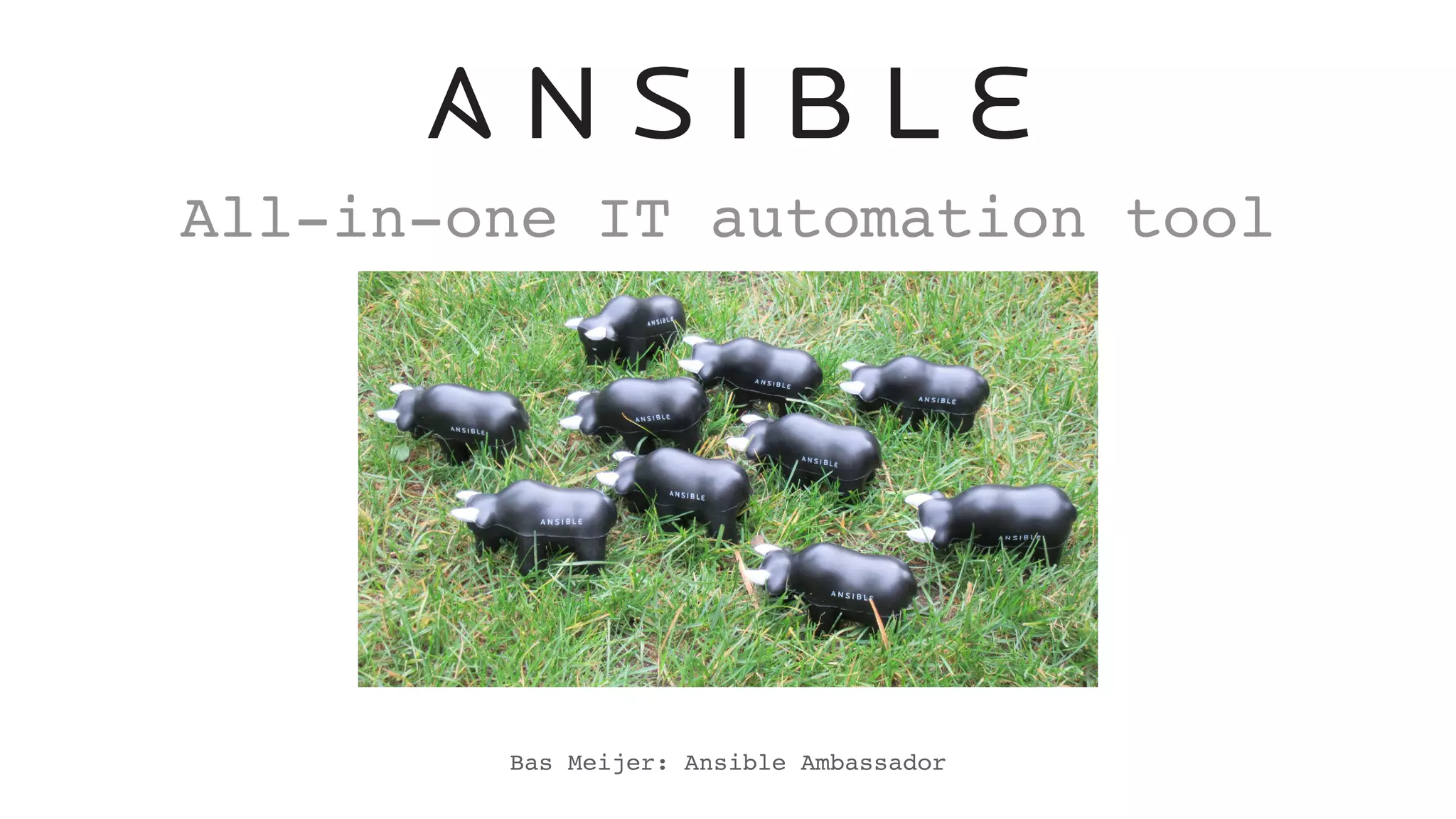
All-in-one IT automation tool
Bas Meijer: Ansible Ambassador
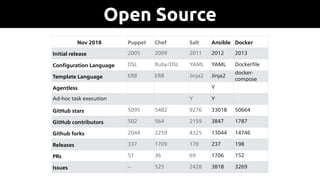
Open Source
Puppet Chef Salt Ansible
Ini2al release 2005 2009 2011 2012
Configura2on
Language
DSL Ruby/DSL YAML YAML
Template
Language
ERB ERB Jinja2 Jinja2
Agentless V
Ad-hoc task execu2on V V
GitHub stars 5095 5482 9276 33018
GitHub
contributors
502 563 2159 3847
Github forks 2044 2259 4325 13044
Releases 337 1709 170 237
PRs 51 36 69 1706
Nov 2018 Puppet Chef Salt Ansible Docker
Initial release 2005 2009 2011 2012 2013
Configuration Language DSL Ruby/DSL YAML YAML Dockerfile
Template Language ERB ERB Jinja2 Jinja2
docker-
compose
Agentless Y
Ad-hoc task execution Y Y
GitHub stars 5095 5482 9276 33018 50664
GitHub contributors 502 564 2159 3847 1787
Github forks 2044 2259 4325 13044 14746
Releases 337 1709 170 237 198
PRs 51 36 69 1706 152
Issues -- 525 2428 3818 3269
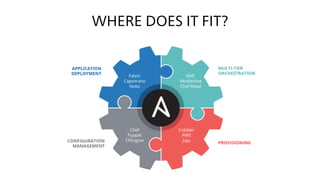
WHERE DOES IT FIT?
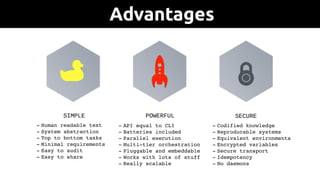
- Human readable text
- System abstraction
- Top to bottom tasks
- Minimal requirements
- Easy to audit
- Easy to share
SIMPLE
- API equal to CLI
- Batteries included
- Parallel execution
- Multi-tier orchestration
- Pluggable and embeddable
- Works with lots of stuff
- Really scalable
POWERFUL
- Codified knowledge
- Reproducable systems
- Equivalent environments
- Encrypted variables
- Secure transport
- Idempotency
- No daemons
SECURE
Advantages
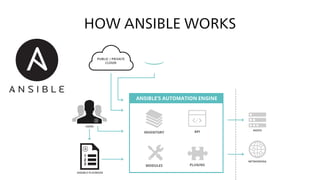
HOW ANSIBLE WORKS
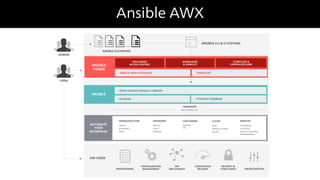
Ansible AWX
•https://github.com/ansible/lightbulb
•https://github.com/ansible/ansible-examples
•http://galaxy.ansible.com
•https://ansible.com/community
•@ansible
•ansible-project@googlegroups.com
Resources
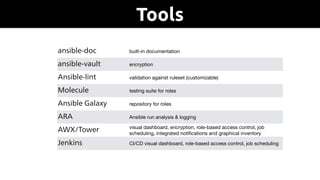
Tools
ansible-doc built-in documentation
ansible-vault encryption
Ansible-lint validation against ruleset (customizable)
Molecule testing suite for roles
Ansible Galaxy repository for roles
ARA Ansible run analysis & logging
AWX/Tower visual dashboard, encryption, role-based access control, job
scheduling, integrated notifications and graphical inventory
management
Jenkins CI/CD visual dashboard, role-based access control, job scheduling
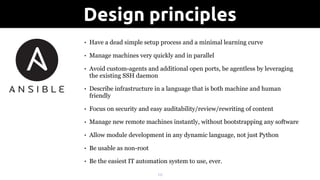
• Have a dead simple setup process and a minimal learning curve
• Manage machines very quickly and in parallel
• Avoid custom-agents and additional open ports, be agentless by leveraging
the existing SSH daemon
• Describe infrastructure in a language that is both machine and human
friendly
• Focus on security and easy auditability/review/rewriting of content
• Manage new remote machines instantly, without bootstrapping any software
• Allow module development in any dynamic language, not just Python
• Be usable as non-root
• Be the easiest IT automation system to use, ever.
!10
Design principles
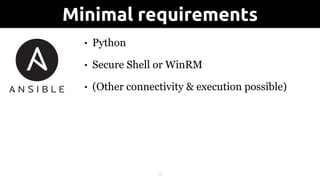
• Python
• Secure Shell or WinRM
• (Other connectivity & execution possible)
!11
Minimal requirements
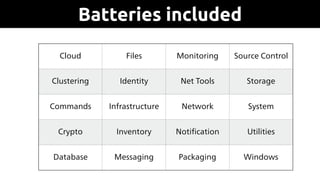
Cloud Files Monitoring Source Control
Clustering Identity Net Tools Storage
Commands Infrastructure Network System
Crypto Inventory Notification Utilities
Database Messaging Packaging Windows
Batteries included
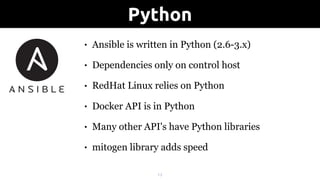
• Ansible is written in Python (2.6-3.x)
• Dependencies only on control host
• RedHat Linux relies on Python
• Docker API is in Python
• Many other API's have Python libraries
• mitogen library adds speed
!13
Python
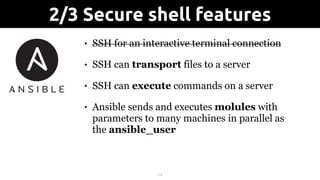
• SSH for an interactive terminal connection
• SSH can transport files to a server
• SSH can execute commands on a server
• Ansible sends and executes molules with
parameters to many machines in parallel as
the ansible_user
!14
2/3 Secure shell features
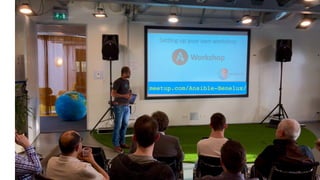
meetup.com/Ansible-Benelux/
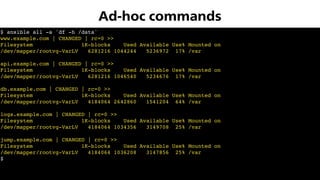
$ ansible all -a 'df -h /data'

www.example.com | CHANGED | rc=0 >>
Filesystem 1K-blocks Used Available Use% Mounted on
/dev/mapper/rootvg-VarLV 6281216 1044244 5236972 17% /var
api.example.com | CHANGED | rc=0 >>
Filesystem 1K-blocks Used Available Use% Mounted on
/dev/mapper/rootvg-VarLV 6281216 1046540 5234676 17% /var
db.example.com | CHANGED | rc=0 >>
Filesystem 1K-blocks Used Available Use% Mounted on
/dev/mapper/rootvg-VarLV 4184064 2642860 1541204 64% /var
logs.example.com | CHANGED | rc=0 >>
Filesystem 1K-blocks Used Available Use% Mounted on
/dev/mapper/rootvg-VarLV 4184064 1034356 3149708 25% /var
jump.example.com | CHANGED | rc=0 >>
Filesystem 1K-blocks Used Available Use% Mounted on
/dev/mapper/rootvg-VarLV 4184064 1036208 3147856 25% /var
$
Ad-hoc commands
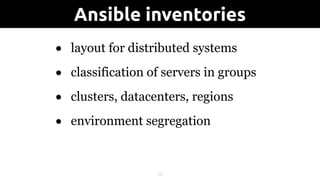
• layout for distributed systems
• classification of servers in groups
• clusters, datacenters, regions
• environment segregation
!17
Ansible inventories
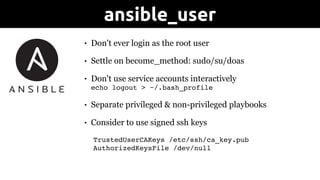
• Don't ever login as the root user
• Settle on become_method: sudo/su/doas
• Don't use service accounts interactively

echo logout > ~/.bash_profile
• Separate privileged & non-privileged playbooks
• Consider to use signed ssh keys
TrustedUserCAKeys /etc/ssh/ca_key.pub

AuthorizedKeysFile /dev/null
ansible_user
[test:children]
docker
frontend
backend
[test:vars]
ENV=test
ansible_user=ansible
[docker]
www-t.example.com
db-t.example.com
api-t.example.com
[frontend]
www-t.example.com
[backend]
db-t.example.com
api-t.example.com
Inventory of 'test'
!20
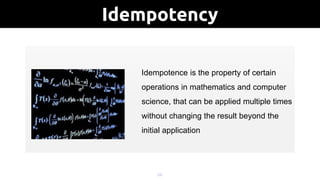
Idempotency
What is idempotence?
Idempotence is the property of certain
operations in mathematics and computer
science, that can be applied multiple times
without changing the result beyond the
initial application
• Config Management that lacks idempotency introduces doubt!
• Ensure no changes unless things actually change
• Some idempotency issues can be big issues (> versus >>)
• Hides the real changes in a cloud of doubt
• Reduction in speed if changes are consistently made
• Testing becomes increasingly difficult
!21
Importance of idempotency
$ ansible-playbook motd.yml
PLAY [server]
******************************************************************************
TASK [motd : create /etc/motd]
******************************************************************************
changed: [server]
PLAY RECAP
******************************************************************************
server : ok=1 changed=1 unreachable=0 failed=0
Idempotency
$ ansible-playbook motd.yml
PLAY [server]
******************************************************************************
TASK [motd : create /etc/motd]
******************************************************************************
ok: [server]
PLAY RECAP
******************************************************************************
server : ok=1 changed=0 unreachable=0 failed=0
Idempotency
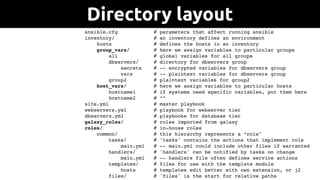
ansible.cfg # parameters that affect running ansible
inventory/ # an inventory defines an environment
hosts # defines the hosts in an inventory
group_vars/ # here we assign variables to particular groups
all # global variables for all groups
dbservers/ # directory for dbservers group
secrets # -- encrypted variables for dbservers group
vars # -- plaintext variables for dbservers group
group2 # plaintext variables for group2
host_vars/ # here we assign variables to particular hosts
hostname1 # if systems need specific variables, put them here
hostname2 # “”
site.yml # master playbook
webservers.yml # playbook for webserver tier
dbservers.yml # playbooke for database tier
galaxy_roles/ # roles imported from galaxy
roles/ # in-house roles
common/ # this hierarchy represents a “role"
tasks/ # 'tasks' contains the actions that implement role
main.yml # -- main.yml could include other files if warranted
handlers/ # 'handlers' can be notified by tasks on change
main.yml # -- handlers file often defines service actions
templates/ # files for use with the template module
hosts # templates edit better with own extension, or j2
files/ # 'files' is the start for relative paths
Directory layout
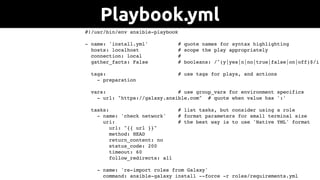
#!/usr/bin/env ansible-playbook
- name: 'install.yml' # quote names for syntax highlighting
hosts: localhost # scope the play appropriately
connection: local #
gather_facts: False # booleans: /^(y|yes|n|no|true|false|on|off)$/i
tags: # use tags for plays, and actions
- preparation
vars: # use group_vars for environment specifics
- url: "https://galaxy.ansible.com" # quote when value has ':'
tasks: # list tasks, but consider using a role
- name: 'check network' # format parameters for small terminal size
uri: # the best way is to use 'Native YML' format
url: "{{ url }}"
method: HEAD
return_content: no
status_code: 200
timeout: 60
follow_redirects: all
- name: 're-import roles from Galaxy'
command: ansible-galaxy install --force -r roles/requirements.yml
Playbook.yml
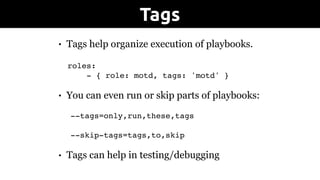
• Tags help organize execution of playbooks.

roles:
- { role: motd, tags: 'motd' }
• You can even run or skip parts of playbooks:
--tags=only,run,these,tags
--skip-tags=tags,to,skip
• Tags can help in testing/debugging
Tags
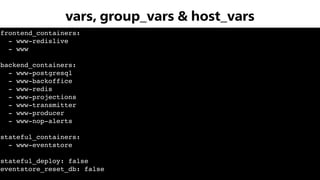
frontend_containers:
- www-redislive
- www
backend_containers:
- www-postgresql
- www-backoffice
- www-redis
- www-projections
- www-transmitter
- www-producer
- www-nop-alerts
stateful_containers:
- www-eventstore
stateful_deploy: false
eventstore_reset_db: false
vars, group_vars & host_vars
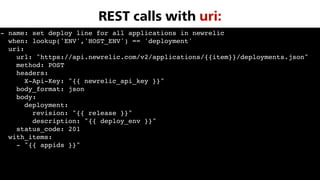
- name: set deploy line for all applications in newrelic
when: lookup('ENV','HOST_ENV') == 'deployment'
uri:
url: "https://api.newrelic.com/v2/applications/{{item}}/deployments.json"
method: POST
headers:
X-Api-Key: "{{ newrelic_api_key }}"
body_format: json
body:
deployment:
revision: "{{ release }}"
description: "{{ deploy_env }}"
status_code: 201
with_items:
- "{{ appids }}"
REST calls with uri:
!29
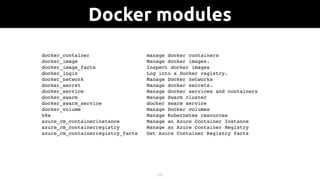
Docker modules
docker_container manage docker containers
docker_image Manage docker images.
docker_image_facts Inspect docker images
docker_login Log into a Docker registry.
docker_network Manage Docker networks
docker_secret Manage docker secrets.
docker_service Manage docker services and containers
docker_swarm Manage Swarm cluster
docker_swarm_service docker swarm service
docker_volume Manage Docker volumes
k8s Manage Kubernetes resources
azure_rm_containerinstance Manage an Azure Container Instance
azure_rm_containerregistry Manage an Azure Container Registry
azure_rm_containerregistry_facts Get Azure Container Registry facts
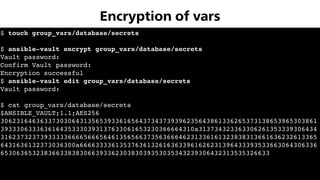
$ touch group_vars/database/secrets
$ ansible-vault encrypt group_vars/database/secrets
Vault password:
Confirm Vault password:
Encryption successful
$ ansible-vault edit group_vars/database/secrets
Vault password:
$ cat group_vars/database/secrets
$ANSIBLE_VAULT;1.1;AES256
30623164636337303064313565393361656437343739396235643861336265373138653965303861
3933306333636164353330393137633061653230366664310a313734323363306261353339306434
31623732373933333666656665646135656637356366646231336161323838313661636232613365
6431636132373036300a666633336135376361326163633961626231396433393533663064306336
65306365323836633838306639336230383039353035343239306432313535326633
Encryption of vars
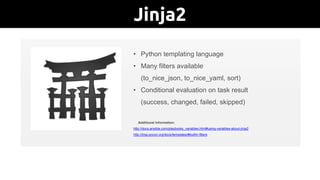
Jinja2Jinja2 – An Introduction
• Python templating language
• Many filters available
(to_nice_json, to_nice_yaml, sort)
• Conditional evaluation on task result
(success, changed, failed, skipped)
Additional Information:
http://docs.ansible.com/playbooks_variables.html#using-variables-about-jinja2
http://jinja.pocoo.org/docs/templates/#builtin-filters
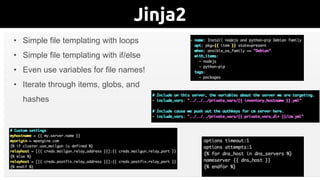
Jinja2More with Jinja2
• Simple file templating with loops
• Simple file templating with if/else
• Even use variables for file names!
• Iterate through items, globs, and
hashes
BUILD_DIR=../build
SRC_DIR=../src
declare -A APP_DEPENDENCIES=
([“SRC"]=vendor ["DEST"]=vendor) 
(["SRC"]=node_modules/app.js ["DEST"]=js)
# Clean old build(s)
clean:
rm -rf $(BUILD_DIR)
# Copy all app files
copy-app:
cp -R $(SRC_DIR) $(BUILD_DIR)
# Create local.xml symlink
symlink-localxml:
ln -fs /path/to/local.xml 
$(BUILD_DIR)/local.xml
# Copy app dependencies (PHP & JS)
copy-dependencies:
for item in "$${!APP_DEPENDENCIES[@]}" ; do 
cp -rT --preserve=mode,timestamp,links 
”./$${item['SRC']}" 
“${BUILD_DIR}/$${item['DEST']}" ; 
done
vars:
- build_dir: ../build
- src_dir: ../src
- app_dependencies:
- { src: vendor, dest: vendor }
- { src: node_modules/app.js, dest: js }
tasks:
- name: Clean old build(s)
file:
path: "{{ build_dir }}"
state: absent
- name: Copy all app files
copy:
src: "{{ src_dir }}"
dest: "{{ build_dir }}"
- name: Create local.xml symlink
file:
src: /path/to/local.xml
dest: "{{ build_dir }}/local.xml”
state: link
- name: Copy app dependencies (PHP & JS)
copy:
src: "./{{ item.src }}"
dest: "{{ build_dir }}{{ item.dest }}"
follow: yes
with_items: app_dependencies
Makefile Ansible
Application Construction
FROM centos:centos7
MAINTAINER Bas Meijer <bas.meijer@me.com>
LABEL running="docker run -d -p 8080:8080 dockpack/tomcat:7"
ADD ansible /tmp/ansible
RUN yum update -y && 
yum install -y epel-release && 
yum install -y ansible tar && 
yum clean all && 
cd /tmp/ansible && 
ansible-galaxy install --force -r requirements.yml && 
ansible-playbook playbook.yml
ADD app /var/app
ENV DATABASE postgres
ENV PATH $APP_HOME/bin:$PATH
WORKDIR $APP_HOME
EXPOSE 8080
ENTRYPOINT ["/opt/apache-tomcat/bin/catalina.sh","run"]
Dockerfile?


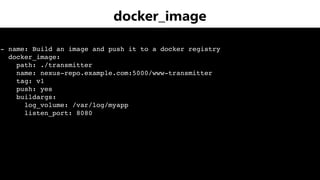
- name: Build an image and push it to a docker registry
docker_image:
path: ./transmitter
name: nexus-repo.example.com:5000/www-transmitter
tag: v1
push: yes
buildargs:
log_volume: /var/log/myapp
listen_port: 8080
docker_image
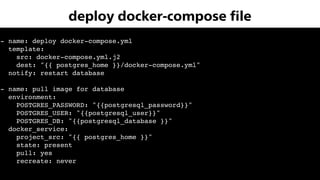
- name: deploy docker-compose.yml
template:
src: docker-compose.yml.j2
dest: "{{ postgres_home }}/docker-compose.yml"
notify: restart database
- name: pull image for database
environment:
POSTGRES_PASSWORD: "{{postgresql_password}}"
POSTGRES_USER: "{{postgresql_user}}"
POSTGRES_DB: "{{postgresql_database }}"
docker_service:
project_src: "{{ postgres_home }}"
state: present
pull: yes
recreate: never
deploy docker-compose file
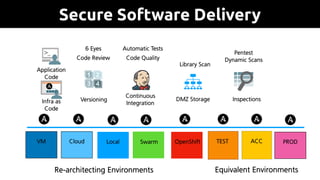
Secure Software Delivery
TEST ACCOpenShift
Application

Code
Infra as

Code
Versioning
Continuous

Integration
DMZ Storage Inspections
6 Eyes
Code Review Code Quality
Library Scan
Equivalent Environments
Pentest

Dynamic Scans
Automatic Tests
SwarmLocal PROD
Re-architecting Environments
CloudVM

Ansible at work

  • 1.
    All-in-one IT automationtool Bas Meijer: Ansible Ambassador
  • 2.
    Open Source Puppet ChefSalt Ansible Ini2al release 2005 2009 2011 2012 Configura2on Language DSL Ruby/DSL YAML YAML Template Language ERB ERB Jinja2 Jinja2 Agentless V Ad-hoc task execu2on V V GitHub stars 5095 5482 9276 33018 GitHub contributors 502 563 2159 3847 Github forks 2044 2259 4325 13044 Releases 337 1709 170 237 PRs 51 36 69 1706 Nov 2018 Puppet Chef Salt Ansible Docker Initial release 2005 2009 2011 2012 2013 Configuration Language DSL Ruby/DSL YAML YAML Dockerfile Template Language ERB ERB Jinja2 Jinja2 docker- compose Agentless Y Ad-hoc task execution Y Y GitHub stars 5095 5482 9276 33018 50664 GitHub contributors 502 564 2159 3847 1787 Github forks 2044 2259 4325 13044 14746 Releases 337 1709 170 237 198 PRs 51 36 69 1706 152 Issues -- 525 2428 3818 3269
  • 3.
  • 4.
    - Human readabletext - System abstraction - Top to bottom tasks - Minimal requirements - Easy to audit - Easy to share SIMPLE - API equal to CLI - Batteries included - Parallel execution - Multi-tier orchestration - Pluggable and embeddable - Works with lots of stuff - Really scalable POWERFUL - Codified knowledge - Reproducable systems - Equivalent environments - Encrypted variables - Secure transport - Idempotency - No daemons SECURE Advantages
  • 5.
  • 6.
  • 8.
  • 9.
    Tools ansible-doc built-in documentation ansible-vaultencryption Ansible-lint validation against ruleset (customizable) Molecule testing suite for roles Ansible Galaxy repository for roles ARA Ansible run analysis & logging AWX/Tower visual dashboard, encryption, role-based access control, job scheduling, integrated notifications and graphical inventory management Jenkins CI/CD visual dashboard, role-based access control, job scheduling
  • 10.
    • Have adead simple setup process and a minimal learning curve • Manage machines very quickly and in parallel • Avoid custom-agents and additional open ports, be agentless by leveraging the existing SSH daemon • Describe infrastructure in a language that is both machine and human friendly • Focus on security and easy auditability/review/rewriting of content • Manage new remote machines instantly, without bootstrapping any software • Allow module development in any dynamic language, not just Python • Be usable as non-root • Be the easiest IT automation system to use, ever. !10 Design principles
  • 11.
    • Python • SecureShell or WinRM • (Other connectivity & execution possible) !11 Minimal requirements
  • 12.
    Cloud Files MonitoringSource Control Clustering Identity Net Tools Storage Commands Infrastructure Network System Crypto Inventory Notification Utilities Database Messaging Packaging Windows Batteries included
  • 13.
    • Ansible iswritten in Python (2.6-3.x) • Dependencies only on control host • RedHat Linux relies on Python • Docker API is in Python • Many other API's have Python libraries • mitogen library adds speed !13 Python
  • 14.
    • SSH foran interactive terminal connection • SSH can transport files to a server • SSH can execute commands on a server • Ansible sends and executes molules with parameters to many machines in parallel as the ansible_user !14 2/3 Secure shell features
  • 15.
  • 16.
    $ ansible all-a 'df -h /data'
 www.example.com | CHANGED | rc=0 >> Filesystem 1K-blocks Used Available Use% Mounted on /dev/mapper/rootvg-VarLV 6281216 1044244 5236972 17% /var api.example.com | CHANGED | rc=0 >> Filesystem 1K-blocks Used Available Use% Mounted on /dev/mapper/rootvg-VarLV 6281216 1046540 5234676 17% /var db.example.com | CHANGED | rc=0 >> Filesystem 1K-blocks Used Available Use% Mounted on /dev/mapper/rootvg-VarLV 4184064 2642860 1541204 64% /var logs.example.com | CHANGED | rc=0 >> Filesystem 1K-blocks Used Available Use% Mounted on /dev/mapper/rootvg-VarLV 4184064 1034356 3149708 25% /var jump.example.com | CHANGED | rc=0 >> Filesystem 1K-blocks Used Available Use% Mounted on /dev/mapper/rootvg-VarLV 4184064 1036208 3147856 25% /var $ Ad-hoc commands
  • 17.
    • layout fordistributed systems • classification of servers in groups • clusters, datacenters, regions • environment segregation !17 Ansible inventories
  • 18.
    • Don't everlogin as the root user • Settle on become_method: sudo/su/doas • Don't use service accounts interactively
 echo logout > ~/.bash_profile • Separate privileged & non-privileged playbooks • Consider to use signed ssh keys TrustedUserCAKeys /etc/ssh/ca_key.pub
 AuthorizedKeysFile /dev/null ansible_user
  • 19.
  • 20.
    !20 Idempotency What is idempotence? Idempotenceis the property of certain operations in mathematics and computer science, that can be applied multiple times without changing the result beyond the initial application
  • 21.
    • Config Managementthat lacks idempotency introduces doubt! • Ensure no changes unless things actually change • Some idempotency issues can be big issues (> versus >>) • Hides the real changes in a cloud of doubt • Reduction in speed if changes are consistently made • Testing becomes increasingly difficult !21 Importance of idempotency
  • 22.
    $ ansible-playbook motd.yml PLAY[server] ****************************************************************************** TASK [motd : create /etc/motd] ****************************************************************************** changed: [server] PLAY RECAP ****************************************************************************** server : ok=1 changed=1 unreachable=0 failed=0 Idempotency
  • 23.
    $ ansible-playbook motd.yml PLAY[server] ****************************************************************************** TASK [motd : create /etc/motd] ****************************************************************************** ok: [server] PLAY RECAP ****************************************************************************** server : ok=1 changed=0 unreachable=0 failed=0 Idempotency
  • 24.
    ansible.cfg # parametersthat affect running ansible inventory/ # an inventory defines an environment hosts # defines the hosts in an inventory group_vars/ # here we assign variables to particular groups all # global variables for all groups dbservers/ # directory for dbservers group secrets # -- encrypted variables for dbservers group vars # -- plaintext variables for dbservers group group2 # plaintext variables for group2 host_vars/ # here we assign variables to particular hosts hostname1 # if systems need specific variables, put them here hostname2 # “” site.yml # master playbook webservers.yml # playbook for webserver tier dbservers.yml # playbooke for database tier galaxy_roles/ # roles imported from galaxy roles/ # in-house roles common/ # this hierarchy represents a “role" tasks/ # 'tasks' contains the actions that implement role main.yml # -- main.yml could include other files if warranted handlers/ # 'handlers' can be notified by tasks on change main.yml # -- handlers file often defines service actions templates/ # files for use with the template module hosts # templates edit better with own extension, or j2 files/ # 'files' is the start for relative paths Directory layout
  • 25.
    #!/usr/bin/env ansible-playbook - name:'install.yml' # quote names for syntax highlighting hosts: localhost # scope the play appropriately connection: local # gather_facts: False # booleans: /^(y|yes|n|no|true|false|on|off)$/i tags: # use tags for plays, and actions - preparation vars: # use group_vars for environment specifics - url: "https://galaxy.ansible.com" # quote when value has ':' tasks: # list tasks, but consider using a role - name: 'check network' # format parameters for small terminal size uri: # the best way is to use 'Native YML' format url: "{{ url }}" method: HEAD return_content: no status_code: 200 timeout: 60 follow_redirects: all - name: 're-import roles from Galaxy' command: ansible-galaxy install --force -r roles/requirements.yml Playbook.yml
  • 26.
    • Tags helporganize execution of playbooks.
 roles: - { role: motd, tags: 'motd' } • You can even run or skip parts of playbooks: --tags=only,run,these,tags --skip-tags=tags,to,skip • Tags can help in testing/debugging Tags
  • 27.
    frontend_containers: - www-redislive - www backend_containers: -www-postgresql - www-backoffice - www-redis - www-projections - www-transmitter - www-producer - www-nop-alerts stateful_containers: - www-eventstore stateful_deploy: false eventstore_reset_db: false vars, group_vars & host_vars
  • 28.
    - name: setdeploy line for all applications in newrelic when: lookup('ENV','HOST_ENV') == 'deployment' uri: url: "https://api.newrelic.com/v2/applications/{{item}}/deployments.json" method: POST headers: X-Api-Key: "{{ newrelic_api_key }}" body_format: json body: deployment: revision: "{{ release }}" description: "{{ deploy_env }}" status_code: 201 with_items: - "{{ appids }}" REST calls with uri:
  • 29.
    !29 Docker modules docker_container managedocker containers docker_image Manage docker images. docker_image_facts Inspect docker images docker_login Log into a Docker registry. docker_network Manage Docker networks docker_secret Manage docker secrets. docker_service Manage docker services and containers docker_swarm Manage Swarm cluster docker_swarm_service docker swarm service docker_volume Manage Docker volumes k8s Manage Kubernetes resources azure_rm_containerinstance Manage an Azure Container Instance azure_rm_containerregistry Manage an Azure Container Registry azure_rm_containerregistry_facts Get Azure Container Registry facts
  • 30.
    $ touch group_vars/database/secrets $ansible-vault encrypt group_vars/database/secrets Vault password: Confirm Vault password: Encryption successful $ ansible-vault edit group_vars/database/secrets Vault password: $ cat group_vars/database/secrets $ANSIBLE_VAULT;1.1;AES256 30623164636337303064313565393361656437343739396235643861336265373138653965303861 3933306333636164353330393137633061653230366664310a313734323363306261353339306434 31623732373933333666656665646135656637356366646231336161323838313661636232613365 6431636132373036300a666633336135376361326163633961626231396433393533663064306336 65306365323836633838306639336230383039353035343239306432313535326633 Encryption of vars
  • 31.
    Jinja2Jinja2 – AnIntroduction • Python templating language • Many filters available (to_nice_json, to_nice_yaml, sort) • Conditional evaluation on task result (success, changed, failed, skipped) Additional Information: http://docs.ansible.com/playbooks_variables.html#using-variables-about-jinja2 http://jinja.pocoo.org/docs/templates/#builtin-filters
  • 32.
    Jinja2More with Jinja2 •Simple file templating with loops • Simple file templating with if/else • Even use variables for file names! • Iterate through items, globs, and hashes
  • 33.
    BUILD_DIR=../build SRC_DIR=../src declare -A APP_DEPENDENCIES= ([“SRC"]=vendor["DEST"]=vendor) (["SRC"]=node_modules/app.js ["DEST"]=js) # Clean old build(s) clean: rm -rf $(BUILD_DIR) # Copy all app files copy-app: cp -R $(SRC_DIR) $(BUILD_DIR) # Create local.xml symlink symlink-localxml: ln -fs /path/to/local.xml $(BUILD_DIR)/local.xml # Copy app dependencies (PHP & JS) copy-dependencies: for item in "$${!APP_DEPENDENCIES[@]}" ; do cp -rT --preserve=mode,timestamp,links ”./$${item['SRC']}" “${BUILD_DIR}/$${item['DEST']}" ; done vars: - build_dir: ../build - src_dir: ../src - app_dependencies: - { src: vendor, dest: vendor } - { src: node_modules/app.js, dest: js } tasks: - name: Clean old build(s) file: path: "{{ build_dir }}" state: absent - name: Copy all app files copy: src: "{{ src_dir }}" dest: "{{ build_dir }}" - name: Create local.xml symlink file: src: /path/to/local.xml dest: "{{ build_dir }}/local.xml” state: link - name: Copy app dependencies (PHP & JS) copy: src: "./{{ item.src }}" dest: "{{ build_dir }}{{ item.dest }}" follow: yes with_items: app_dependencies Makefile Ansible Application Construction
  • 34.
    FROM centos:centos7 MAINTAINER BasMeijer <bas.meijer@me.com> LABEL running="docker run -d -p 8080:8080 dockpack/tomcat:7" ADD ansible /tmp/ansible RUN yum update -y && yum install -y epel-release && yum install -y ansible tar && yum clean all && cd /tmp/ansible && ansible-galaxy install --force -r requirements.yml && ansible-playbook playbook.yml ADD app /var/app ENV DATABASE postgres ENV PATH $APP_HOME/bin:$PATH WORKDIR $APP_HOME EXPOSE 8080 ENTRYPOINT ["/opt/apache-tomcat/bin/catalina.sh","run"] Dockerfile?
  • 35.
    
 
 - name: Buildan image and push it to a docker registry docker_image: path: ./transmitter name: nexus-repo.example.com:5000/www-transmitter tag: v1 push: yes buildargs: log_volume: /var/log/myapp listen_port: 8080 docker_image
  • 36.
    - name: deploydocker-compose.yml template: src: docker-compose.yml.j2 dest: "{{ postgres_home }}/docker-compose.yml" notify: restart database - name: pull image for database environment: POSTGRES_PASSWORD: "{{postgresql_password}}" POSTGRES_USER: "{{postgresql_user}}" POSTGRES_DB: "{{postgresql_database }}" docker_service: project_src: "{{ postgres_home }}" state: present pull: yes recreate: never deploy docker-compose file
  • 37.
    Secure Software Delivery TESTACCOpenShift Application
 Code Infra as
 Code Versioning Continuous
 Integration DMZ Storage Inspections 6 Eyes Code Review Code Quality Library Scan Equivalent Environments Pentest
 Dynamic Scans Automatic Tests SwarmLocal PROD Re-architecting Environments CloudVM