node.js basics
about me
Ben Lin
A full time entrepreneur
Fall in love with node.js on Jun 2011


                                                dreamerslab.com
                                          ben@dreamerslab.com
                                        twitter.com/dreamerslab
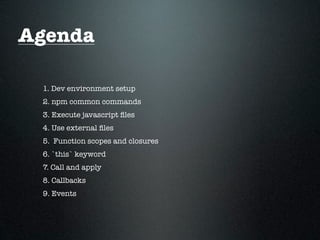
Agenda

 1. Dev environment setup
 2. npm common commands
 3. Execute javascript files
 4. Use external files
 5. Function scopes and closures
 6. `this` keyword
 7. Call and apply
 8. Callbacks
 9. Events
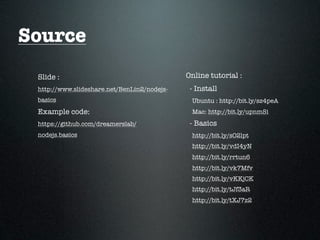
Source
 Slide :                                     Online tutorial :
 http://www.slideshare.net/BenLin2/nodejs-    - Install
 basics                                       Ubuntu : http://bit.ly/sz4peA
 Example code:                                Mac: http://bit.ly/upnmSi
 https://github.com/dreamerslab/              - Basics
 nodejs.basics                                http://bit.ly/sO2lpt
                                              http://bit.ly/vdI4yN
                                              http://bit.ly/rrtun6
                                              http://bit.ly/vk7Mfv
                                              http://bit.ly/vKKjCK
                                              http://bit.ly/tJf3aR
                                              http://bit.ly/tXJ7z2
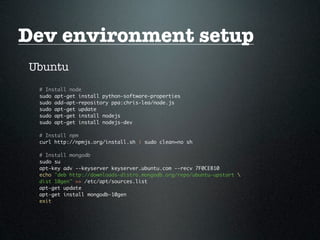
Dev environment setup
Ubuntu
 # Install node
 sudo apt-get install python-software-properties
 sudo add-apt-repository ppa:chris-lea/node.js
 sudo apt-get update
 sudo apt-get install nodejs
 sudo apt-get install nodejs-dev

 # Install npm
 curl http://npmjs.org/install.sh | sudo clean=no sh

 # Install mongodb
 sudo su
 apt-key adv --keyserver keyserver.ubuntu.com --recv 7F0CEB10
 echo "deb http://downloads-distro.mongodb.org/repo/ubuntu-upstart 
 dist 10gen" >> /etc/apt/sources.list
 apt-get update
 apt-get install mongodb-10gen
 exit
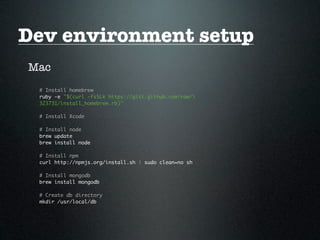
Dev environment setup
Mac
 # Install homebrew
 ruby -e "$(curl -fsSLk https://gist.github.com/raw/
 323731/install_homebrew.rb)"

 # Install Xcode

 # Install node
 brew update
 brew install node

 # Install npm
 curl http://npmjs.org/install.sh | sudo clean=no sh

 # Install mongodb
 brew install mongodb

 # Create db directory
 mkdir /usr/local/db
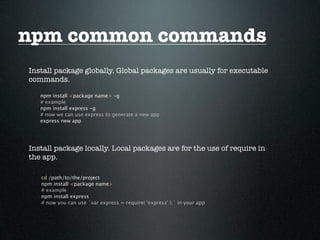
npm common commands
Install package globally. Global packages are usually for executable
commands.

   npm install <package name> -g
   # example
   npm install express -g
   # now we can use express to generate a new app
   express new app


Install package locally. Local packages are for the use of require in
the app.

   cd /path/to/the/project
   npm install <package name>
   # example
   npm install express
   # now you can use `var express = require( 'express' );` in your app
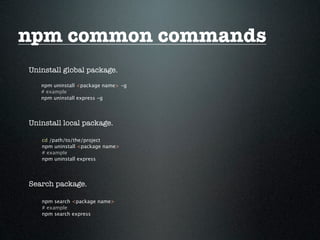
npm common commands
Uninstall global package.
   npm uninstall <package name> -g
   # example
   npm uninstall express -g


Uninstall local package.

   cd /path/to/the/project
   npm uninstall <package name>
   # example
   npm uninstall express


Search package.

   npm search <package name>
   # example
   npm search express
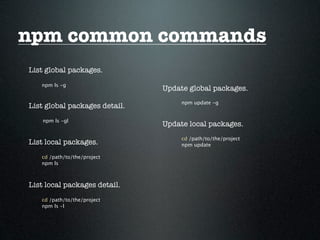
npm common commands
List global packages.
   npm ls -g
                               Update global packages.
                                    npm update -g
List global packages detail.
    npm ls -gl
                               Update local packages.
                                    cd /path/to/the/project
List local packages.                npm update

   cd /path/to/the/project
   npm ls


List local packages detail.
   cd /path/to/the/project
   npm ls -l
npm common commands
Using package.json to manage your app packages

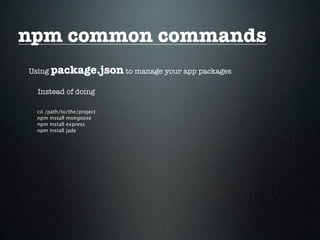
  Instead of doing

 cd /path/to/the/project
 npm install mongoose
 npm install express
 npm install jade
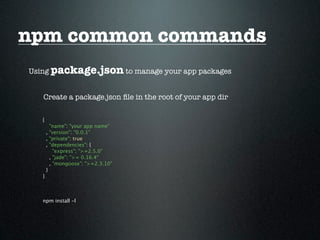
npm common commands
Using package.json to manage your app packages


   Create a package.json file in the root of your app dir

   {
         "name": "your app name"
       , "version": "0.0.1"
       , "private": true
       , "dependencies": {
           "express": ">=2.5.0"
         , "jade": ">= 0.16.4"
         , "mongoose": ">=2.3.10"
       }
   }


   npm install -l
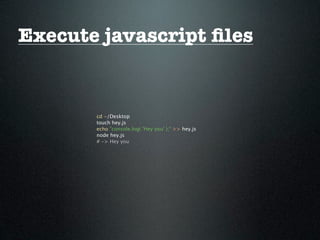
Execute javascript files


       cd ~/Desktop
       touch hey.js
       echo "console.log( 'Hey you' );" >> hey.js
       node hey.js
       # -> Hey you
Use external files


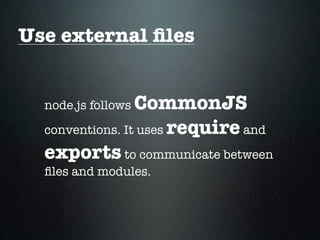
  node.js followsCommonJS
  conventions. It uses require and
  exports to communicate between
  files and modules.
Use external files
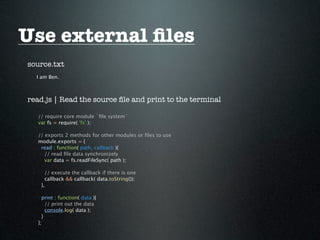
source.txt
  I am Ben.


read.js | Read the source file and print to the terminal

   // require core module `file system`
   var fs = require( 'fs' );

   // exports 2 methods for other modules or files to use
   module.exports = {
    read : function( path, callback ){
      // read file data synchronizely
      var data = fs.readFileSync( path );

      // execute the callback if there is one
      callback && callback( data.toString());
    },

     print : function( data ){
       // print out the data
       console.log( data );
     }
   };
Use external files
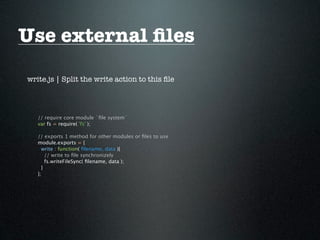
write.js | Split the write action to this file


   // require core module `file system`
   var fs = require( 'fs' );

   // exports 1 method for other modules or files to use
   module.exports = {
     write : function( filename, data ){
       // write to file synchronizely
       fs.writeFileSync( filename, data );
     }
   };
Use external files
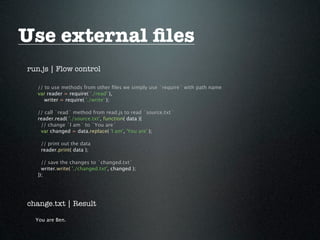
run.js | Flow control

   // to use methods from other files we simply use `require` with path name
   var reader = require( './read' ),
      writer = require( './write' );

   // call `read` method from read.js to read `source.txt`
   reader.read( './source.txt', function( data ){
    // change `I am` to `You are`
    var changed = data.replace( 'I am', 'You are' );

    // print out the data
    reader.print( data );

     // save the changes to `changed.txt`
     writer.write( './changed.txt', changed );
   });


change.txt | Result

  You are Ben.
Use external files

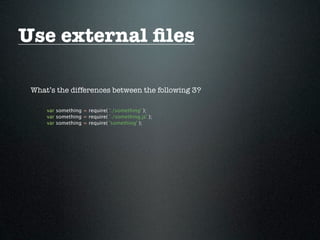
 What’s the differences between the following 3?

     var something = require( './something' );
     var something = require( './something.js' );
     var something = require( 'something' );
Use external files
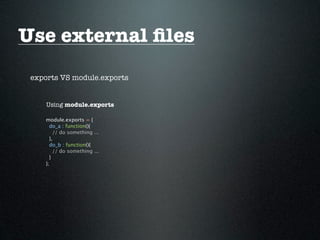
 exports VS module.exports


     Using module.exports

    module.exports = {
      do_a : function(){
        // do something ...
      },
      do_b : function(){
        // do something ...
      }
    };
Use external files
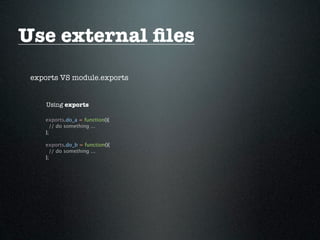
 exports VS module.exports


     Using exports

    exports.do_a = function(){
      // do something ...
    };

    exports.do_b = function(){
      // do something ...
    };
Use external files
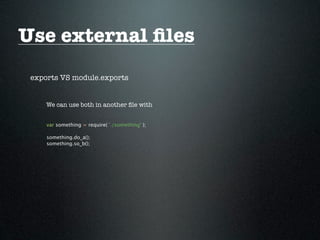
 exports VS module.exports


     We can use both in another file with


     var something = require( './something' );

     something.do_a();
     something.so_b();
Use external files
 exports VS module.exports


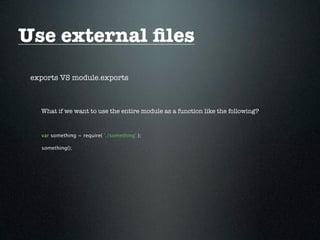
   What if we want to use the entire module as a function like the following?


   var something = require( './something' );

   something();
Use external files
 exports VS module.exports


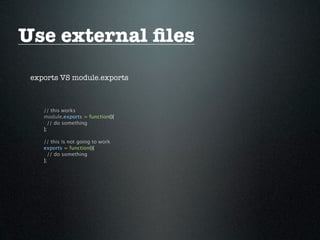
    // this works
    module.exports = function(){
      // do something
    };

    // this is not going to work
    exports = function(){
      // do something
    };
Use external files


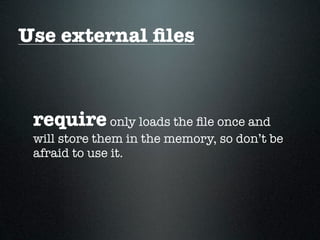
 require only loads the file once and
 will store them in the memory, so don’t be
 afraid to use it.
Function scope


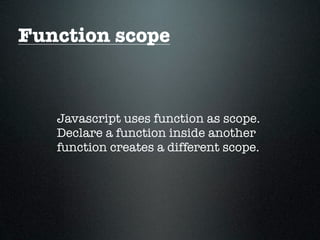
   Javascript uses function as scope.
   Declare a function inside another
   function creates a different scope.
Function scope
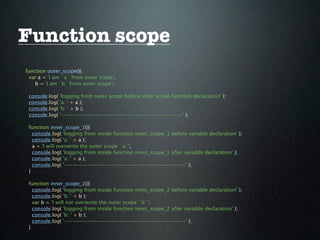
function outer_scope(){
 var a = 'I am `a` from outer scope',
    b = 'I am `b` from outer scope';

 console.log(   'logging from outer scope before inner scope function declaration' );
 console.log(   'a: ' + a );
 console.log(   'b: ' + b );
 console.log(   '------------------------------------------' );

 function inner_scope_1(){
   console.log( 'logging from inside function inner_scope_1 before variable declaration' );
   console.log( 'a: ' + a );
   a = 'I will overwrite the outer scope `a`';
   console.log( 'logging from inside function inner_scope_1 after variable declaration' );
   console.log( 'a: ' + a );
   console.log( '------------------------------------------' );
 }

 function inner_scope_2(){
   console.log( 'logging from inside function inner_scope_2 before variable declaration' );
   console.log( 'b: ' + b );
   var b = 'I will not overwrite the outer scope `b`';
   console.log( 'logging from inside function inner_scope_2 after variable declaration' );
   console.log( 'b: ' + b );
   console.log( '------------------------------------------' );
 }
Function scope
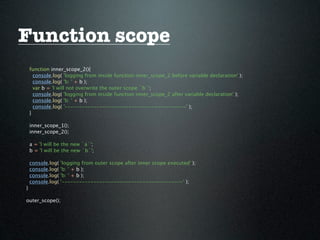
    function inner_scope_2(){
      console.log( 'logging from inside function inner_scope_2 before variable declaration' );
      console.log( 'b: ' + b );
      var b = 'I will not overwrite the outer scope `b`';
      console.log( 'logging from inside function inner_scope_2 after variable declaration' );
      console.log( 'b: ' + b );
      console.log( '------------------------------------------' );
    }

    inner_scope_1();
    inner_scope_2();

    a = 'I will be the new `a`';
    b = 'I will be the new `b`';

    console.log(   'logging from outer scope after inner scope executed' );
    console.log(   'b: ' + b );
    console.log(   'b: ' + b );
    console.log(   '------------------------------------------' );
}

outer_scope();
Function scope

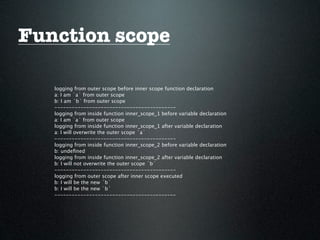
   logging from outer scope before inner scope function declaration
   a: I am `a` from outer scope
   b: I am `b` from outer scope
   ------------------------------------------
   logging from inside function inner_scope_1 before variable declaration
   a: I am `a` from outer scope
   logging from inside function inner_scope_1 after variable declaration
   a: I will overwrite the outer scope `a`
   ------------------------------------------
   logging from inside function inner_scope_2 before variable declaration
   b: undefined
   logging from inside function inner_scope_2 after variable declaration
   b: I will not overwrite the outer scope `b`
   ------------------------------------------
   logging from outer scope after inner scope executed
   b: I will be the new `b`
   b: I will be the new `b`
   ------------------------------------------
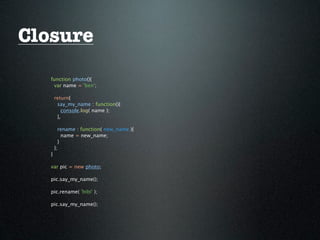
Closure


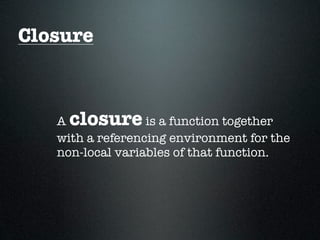
   A closure      is a function together
   with a referencing environment for the
   non-local variables of that function.
Closure
   function photo(){
    var name = 'ben';

       return{
        say_my_name : function(){
          console.log( name );
        },

         rename : function( new_name ){
           name = new_name;
         }
       };
   }

   var pic = new photo;

   pic.say_my_name();

   pic.rename( 'bibi' );

   pic.say_my_name();
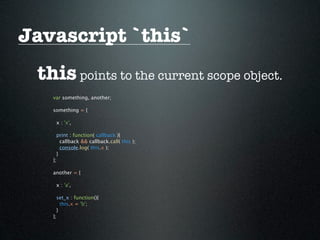
Javascript `this`
 this points to the current scope object.
   var something, another;

   something = {

    x : 'x',

     print : function( callback ){
       callback && callback.call( this );
       console.log( this.x );
     }
   };

   another = {

    x : 'a',

     set_x : function(){
       this.x = 'b';
     }
   };
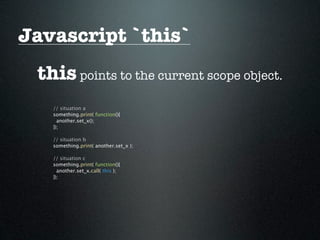
Javascript `this`
 this points to the current scope object.
   // situation a
   something.print( function(){
     another.set_x();
   });

   // situation b
   something.print( another.set_x );

   // situation c
   something.print( function(){
     another.set_x.call( this );
   });
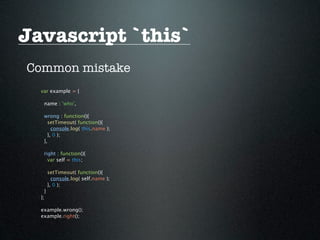
Javascript `this`
Common mistake
  var example = {

   name : 'who',

   wrong : function(){
     setTimeout( function(){
       console.log( this.name );
     }, 0 );
   },

   right : function(){
     var self = this;

        setTimeout( function(){
          console.log( self.name );
        }, 0 );
    }
  };

  example.wrong();
  example.right();
call and apply
call and apply invoke the function and switch the
function context with the first argument


  function fn( arg1, arg2,... ){
    // do something
  }

  fn( arg1, arg2,... );

  fn.call( context, arg1, arg2,... );

  fn.apply( context, [ arg1, arg2,... ]);
call and apply
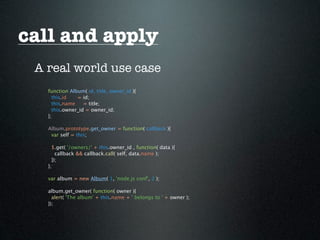
 A real world use case
   function Album( id, title, owner_id ){
     this.id   = id;
     this.name    = title;
     this.owner_id = owner_id;
   };

   Album.prototype.get_owner = function( callback ){
    var self = this;

     $.get( '/owners/' + this.owner_id , function( data ){
       callback && callback.call( self, data.name );
     });
   };

   var album = new Album( 1, 'node.js conf', 2 );

   album.get_owner( function( owner ){
     alert( 'The album' + this.name + ' belongs to ' + owner );
   });
call and apply

Speed
 Function invoke with call is slightly faster than with apply. But
 don’t worry, you really can’t tell the difference, use whatever suits
 you.
Callbacks


   A callback      is a function to be
   executed after another function is
   executed.
Callbacks

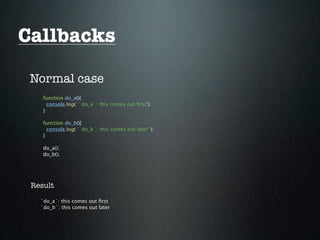
 Normal case
    function do_a(){
      console.log( '`do_a`: this comes out first');
    }

    function do_b(){
      console.log( '`do_b`: this comes out later' );
    }

    do_a();
    do_b();


 Result

   `do_a`: this comes out first
   `do_b`: this comes out later
Callbacks
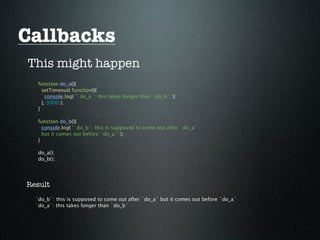
This might happen
   function do_a(){
     setTimeout( function(){
       console.log( '`do_a`: this takes longer than `do_b` ');
     }, 3000 );
   }

   function do_b(){
     console.log( '`do_b`: this is supposed to come out after `do_a`
     but it comes out before `do_a`' );
   }

   do_a();
   do_b();


Result
  `do_b`: this is supposed to come out after `do_a` but it comes out before `do_a`
  `do_a`: this takes longer than `do_b`
Callbacks
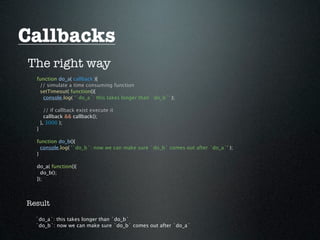
The right way
  function do_a( callback ){
   // simulate a time consuming function
   setTimeout( function(){
    console.log( '`do_a`: this takes longer than `do_b`' );

        // if callback exist execute it
        callback && callback();
      }, 3000 );
  }

  function do_b(){
    console.log( '`do_b`: now we can make sure `do_b` comes out after `do_a`' );
  }

  do_a( function(){
    do_b();
  });


Result

  `do_a`: this takes longer than `do_b`
  `do_b`: now we can make sure `do_b` comes out after `do_a`
Callbacks
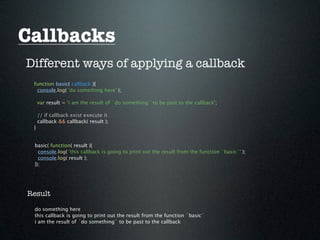
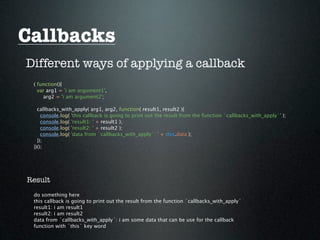
Different ways of applying a callback
 function basic( callback ){
  console.log( 'do something here' );

     var result = 'i am the result of `do something` to be past to the callback';

     // if callback exist execute it
     callback && callback( result );
 }


 basic( function( result ){
   console.log( 'this callback is going to print out the result from the function `basic`' );
   console.log( result );
 });


Result

 do something here
 this callback is going to print out the result from the function `basic`
 i am the result of `do something` to be past to the callback
Callbacks
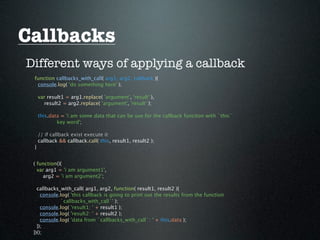
Different ways of applying a callback
 function callbacks_with_call( arg1, arg2, callback ){
  console.log( 'do something here' );

     var result1 = arg1.replace( 'argument', 'result' ),
       result2 = arg2.replace( 'argument', 'result' );

     this.data = 'i am some data that can be use for the callback funciton with `this`
             key word';

     // if callback exist execute it
     callback && callback.call( this, result1, result2 );
 }


 ( function(){
   var arg1 = 'i am argument1',
     arg2 = 'i am argument2';

   callbacks_with_call( arg1, arg2, function( result1, result2 ){
     console.log( 'this callback is going to print out the results from the function
             `callbacks_with_call`' );
     console.log( 'result1: ' + result1 );
     console.log( 'result2: ' + result2 );
     console.log( 'data from `callbacks_with_call`: ' + this.data );
   });
 })();
Callbacks
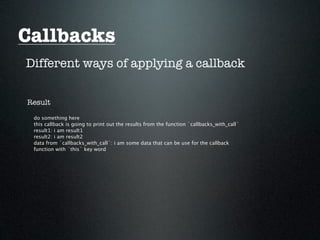
Different ways of applying a callback


Result

 do something here
 this callback is going to print out the results from the function `callbacks_with_call`
 result1: i am result1
 result2: i am result2
 data from `callbacks_with_call`: i am some data that can be use for the callback
 function with `this` key word
Callbacks
Different ways of applying a callback

 // this is similar to `callbacks_with_call`
 // the only difference is we use `apply` instead of `call`
 // so we need to pass arguments as an array
 function callbacks_with_apply( arg1, arg2, callback ){
  console.log( 'do something here' );

     var result1 = arg1.replace( 'argument', 'result' ),
       result2 = arg2.replace( 'argument', 'result' );

     this.data = 'i am some data that can be use for the callback function with
             `this` key word';

     // if callback exist execute it
     callback && callback.apply( this, [ result1, result2 ]);
 }
Callbacks
Different ways of applying a callback
 ( function(){
   var arg1 = 'i am argument1',
     arg2 = 'i am argument2';

   callbacks_with_apply( arg1, arg2, function( result1, result2 ){
     console.log( 'this callback is going to print out the result from the function `callbacks_with_apply`' );
     console.log( 'result1: ' + result1 );
     console.log( 'result2: ' + result2 );
     console.log( 'data from `callbacks_with_apply`: ' + this.data );
   });
 })();


Result
 do something here
 this callback is going to print out the result from the function `callbacks_with_apply`
 result1: i am result1
 result2: i am result2
 data from `callbacks_with_apply`: i am some data that can be use for the callback
 function with `this` key word
Events

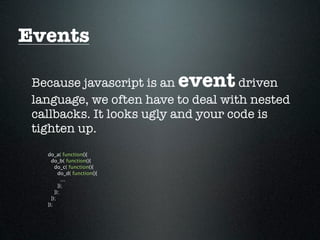
 Because javascript is an    event   driven
 language, we often have to deal with nested
 callbacks. It looks ugly and your code is
 tighten up.
   do_a( function(){
     do_b( function(){
       do_c( function(){
         do_d( function(){
           ...
         });
       });
     });
   });
Events

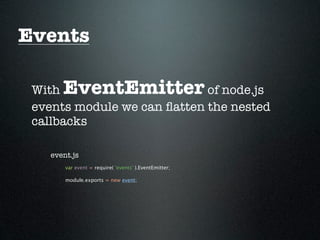
 With  EventEmitter          of node.js
 events module we can flatten the nested
 callbacks

    event.js
        var event = require( 'events' ).EventEmitter;

        module.exports = new event;
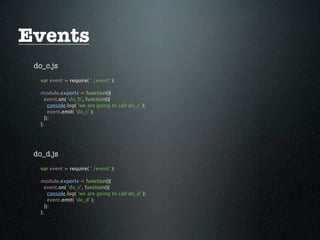
Events
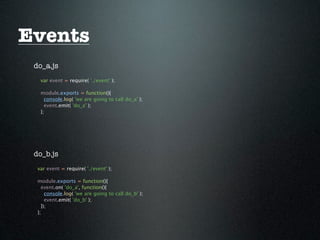
 do_a.js
   var event = require( './event' );

   module.exports = function(){
     console.log( 'we are going to call do_a' );
     event.emit( 'do_a' );
   };


 do_b.js
  var event = require( './event' );

  module.exports = function(){
    event.on( 'do_a', function(){
      console.log( 'we are going to call do_b' );
      event.emit( 'do_b' );
    });
  };
Events
 do_c.js
   var event = require( './event' );

   module.exports = function(){
     event.on( 'do_b', function(){
       console.log( 'we are going to call do_c' );
       event.emit( 'do_c' );
     });
   };


 do_d.js
   var event = require( './event' );

   module.exports = function(){
     event.on( 'do_c', function(){
       console.log( 'we are going to call do_d' );
       event.emit( 'do_d' );
     });
   };
Events
 run.js
   var event, todos;

   event = require( './event' );
   todos = [ './do_d', './do_c', './do_b', './do_a' ];

   event.on( 'do_a', function(){
     console.log( 'i can do something to do_a out side of do_a' );
   });

   event.on( 'do_b', function(){
     console.log( 'i can do something to do_b out side of do_b' );
   });

   event.on( 'do_c', function(){
     console.log( 'i can do something to do_c out side of do_c' );
   });

   event.on( 'do_d', function(){
     console.log( 'i can do something to do_d out side of do_d' );
   });

   todos.forEach( function( name ){
     require( name )();
   });
Fin
Thanks
Questions?

Node.js basics

  • 1.
  • 2.
    about me Ben Lin Afull time entrepreneur Fall in love with node.js on Jun 2011 dreamerslab.com ben@dreamerslab.com twitter.com/dreamerslab
  • 3.
    Agenda 1. Devenvironment setup 2. npm common commands 3. Execute javascript files 4. Use external files 5. Function scopes and closures 6. `this` keyword 7. Call and apply 8. Callbacks 9. Events
  • 4.
    Source Slide : Online tutorial : http://www.slideshare.net/BenLin2/nodejs- - Install basics Ubuntu : http://bit.ly/sz4peA Example code: Mac: http://bit.ly/upnmSi https://github.com/dreamerslab/ - Basics nodejs.basics http://bit.ly/sO2lpt http://bit.ly/vdI4yN http://bit.ly/rrtun6 http://bit.ly/vk7Mfv http://bit.ly/vKKjCK http://bit.ly/tJf3aR http://bit.ly/tXJ7z2
  • 5.
    Dev environment setup Ubuntu # Install node sudo apt-get install python-software-properties sudo add-apt-repository ppa:chris-lea/node.js sudo apt-get update sudo apt-get install nodejs sudo apt-get install nodejs-dev # Install npm curl http://npmjs.org/install.sh | sudo clean=no sh # Install mongodb sudo su apt-key adv --keyserver keyserver.ubuntu.com --recv 7F0CEB10 echo "deb http://downloads-distro.mongodb.org/repo/ubuntu-upstart dist 10gen" >> /etc/apt/sources.list apt-get update apt-get install mongodb-10gen exit
  • 6.
    Dev environment setup Mac # Install homebrew ruby -e "$(curl -fsSLk https://gist.github.com/raw/ 323731/install_homebrew.rb)" # Install Xcode # Install node brew update brew install node # Install npm curl http://npmjs.org/install.sh | sudo clean=no sh # Install mongodb brew install mongodb # Create db directory mkdir /usr/local/db
  • 7.
    npm common commands Installpackage globally. Global packages are usually for executable commands. npm install <package name> -g # example npm install express -g # now we can use express to generate a new app express new app Install package locally. Local packages are for the use of require in the app. cd /path/to/the/project npm install <package name> # example npm install express # now you can use `var express = require( 'express' );` in your app
  • 8.
    npm common commands Uninstallglobal package. npm uninstall <package name> -g # example npm uninstall express -g Uninstall local package. cd /path/to/the/project npm uninstall <package name> # example npm uninstall express Search package. npm search <package name> # example npm search express
  • 9.
    npm common commands Listglobal packages. npm ls -g Update global packages. npm update -g List global packages detail. npm ls -gl Update local packages. cd /path/to/the/project List local packages. npm update cd /path/to/the/project npm ls List local packages detail. cd /path/to/the/project npm ls -l
  • 10.
    npm common commands Usingpackage.json to manage your app packages Instead of doing cd /path/to/the/project npm install mongoose npm install express npm install jade
  • 11.
    npm common commands Usingpackage.json to manage your app packages Create a package.json file in the root of your app dir { "name": "your app name" , "version": "0.0.1" , "private": true , "dependencies": { "express": ">=2.5.0" , "jade": ">= 0.16.4" , "mongoose": ">=2.3.10" } } npm install -l
  • 12.
    Execute javascript files cd ~/Desktop touch hey.js echo "console.log( 'Hey you' );" >> hey.js node hey.js # -> Hey you
  • 13.
    Use external files node.js followsCommonJS conventions. It uses require and exports to communicate between files and modules.
  • 14.
    Use external files source.txt I am Ben. read.js | Read the source file and print to the terminal // require core module `file system` var fs = require( 'fs' ); // exports 2 methods for other modules or files to use module.exports = { read : function( path, callback ){ // read file data synchronizely var data = fs.readFileSync( path ); // execute the callback if there is one callback && callback( data.toString()); }, print : function( data ){ // print out the data console.log( data ); } };
  • 15.
    Use external files write.js| Split the write action to this file // require core module `file system` var fs = require( 'fs' ); // exports 1 method for other modules or files to use module.exports = { write : function( filename, data ){ // write to file synchronizely fs.writeFileSync( filename, data ); } };
  • 16.
    Use external files run.js| Flow control // to use methods from other files we simply use `require` with path name var reader = require( './read' ), writer = require( './write' ); // call `read` method from read.js to read `source.txt` reader.read( './source.txt', function( data ){ // change `I am` to `You are` var changed = data.replace( 'I am', 'You are' ); // print out the data reader.print( data ); // save the changes to `changed.txt` writer.write( './changed.txt', changed ); }); change.txt | Result You are Ben.
  • 17.
    Use external files What’s the differences between the following 3? var something = require( './something' ); var something = require( './something.js' ); var something = require( 'something' );
  • 18.
    Use external files exports VS module.exports Using module.exports module.exports = { do_a : function(){ // do something ... }, do_b : function(){ // do something ... } };
  • 19.
    Use external files exports VS module.exports Using exports exports.do_a = function(){ // do something ... }; exports.do_b = function(){ // do something ... };
  • 20.
    Use external files exports VS module.exports We can use both in another file with var something = require( './something' ); something.do_a(); something.so_b();
  • 21.
    Use external files exports VS module.exports What if we want to use the entire module as a function like the following? var something = require( './something' ); something();
  • 22.
    Use external files exports VS module.exports // this works module.exports = function(){ // do something }; // this is not going to work exports = function(){ // do something };
  • 23.
    Use external files require only loads the file once and will store them in the memory, so don’t be afraid to use it.
  • 24.
    Function scope Javascript uses function as scope. Declare a function inside another function creates a different scope.
  • 25.
    Function scope function outer_scope(){ var a = 'I am `a` from outer scope', b = 'I am `b` from outer scope'; console.log( 'logging from outer scope before inner scope function declaration' ); console.log( 'a: ' + a ); console.log( 'b: ' + b ); console.log( '------------------------------------------' ); function inner_scope_1(){ console.log( 'logging from inside function inner_scope_1 before variable declaration' ); console.log( 'a: ' + a ); a = 'I will overwrite the outer scope `a`'; console.log( 'logging from inside function inner_scope_1 after variable declaration' ); console.log( 'a: ' + a ); console.log( '------------------------------------------' ); } function inner_scope_2(){ console.log( 'logging from inside function inner_scope_2 before variable declaration' ); console.log( 'b: ' + b ); var b = 'I will not overwrite the outer scope `b`'; console.log( 'logging from inside function inner_scope_2 after variable declaration' ); console.log( 'b: ' + b ); console.log( '------------------------------------------' ); }
  • 26.
    Function scope function inner_scope_2(){ console.log( 'logging from inside function inner_scope_2 before variable declaration' ); console.log( 'b: ' + b ); var b = 'I will not overwrite the outer scope `b`'; console.log( 'logging from inside function inner_scope_2 after variable declaration' ); console.log( 'b: ' + b ); console.log( '------------------------------------------' ); } inner_scope_1(); inner_scope_2(); a = 'I will be the new `a`'; b = 'I will be the new `b`'; console.log( 'logging from outer scope after inner scope executed' ); console.log( 'b: ' + b ); console.log( 'b: ' + b ); console.log( '------------------------------------------' ); } outer_scope();
  • 27.
    Function scope logging from outer scope before inner scope function declaration a: I am `a` from outer scope b: I am `b` from outer scope ------------------------------------------ logging from inside function inner_scope_1 before variable declaration a: I am `a` from outer scope logging from inside function inner_scope_1 after variable declaration a: I will overwrite the outer scope `a` ------------------------------------------ logging from inside function inner_scope_2 before variable declaration b: undefined logging from inside function inner_scope_2 after variable declaration b: I will not overwrite the outer scope `b` ------------------------------------------ logging from outer scope after inner scope executed b: I will be the new `b` b: I will be the new `b` ------------------------------------------
  • 28.
    Closure A closure is a function together with a referencing environment for the non-local variables of that function.
  • 29.
    Closure function photo(){ var name = 'ben'; return{ say_my_name : function(){ console.log( name ); }, rename : function( new_name ){ name = new_name; } }; } var pic = new photo; pic.say_my_name(); pic.rename( 'bibi' ); pic.say_my_name();
  • 30.
    Javascript `this` thispoints to the current scope object. var something, another; something = { x : 'x', print : function( callback ){ callback && callback.call( this ); console.log( this.x ); } }; another = { x : 'a', set_x : function(){ this.x = 'b'; } };
  • 31.
    Javascript `this` thispoints to the current scope object. // situation a something.print( function(){ another.set_x(); }); // situation b something.print( another.set_x ); // situation c something.print( function(){ another.set_x.call( this ); });
  • 32.
    Javascript `this` Common mistake var example = { name : 'who', wrong : function(){ setTimeout( function(){ console.log( this.name ); }, 0 ); }, right : function(){ var self = this; setTimeout( function(){ console.log( self.name ); }, 0 ); } }; example.wrong(); example.right();
  • 33.
    call and apply calland apply invoke the function and switch the function context with the first argument function fn( arg1, arg2,... ){ // do something } fn( arg1, arg2,... ); fn.call( context, arg1, arg2,... ); fn.apply( context, [ arg1, arg2,... ]);
  • 34.
    call and apply A real world use case function Album( id, title, owner_id ){ this.id = id; this.name = title; this.owner_id = owner_id; }; Album.prototype.get_owner = function( callback ){ var self = this; $.get( '/owners/' + this.owner_id , function( data ){ callback && callback.call( self, data.name ); }); }; var album = new Album( 1, 'node.js conf', 2 ); album.get_owner( function( owner ){ alert( 'The album' + this.name + ' belongs to ' + owner ); });
  • 35.
    call and apply Speed Function invoke with call is slightly faster than with apply. But don’t worry, you really can’t tell the difference, use whatever suits you.
  • 36.
    Callbacks A callback is a function to be executed after another function is executed.
  • 37.
    Callbacks Normal case function do_a(){ console.log( '`do_a`: this comes out first'); } function do_b(){ console.log( '`do_b`: this comes out later' ); } do_a(); do_b(); Result `do_a`: this comes out first `do_b`: this comes out later
  • 38.
    Callbacks This might happen function do_a(){ setTimeout( function(){ console.log( '`do_a`: this takes longer than `do_b` '); }, 3000 ); } function do_b(){ console.log( '`do_b`: this is supposed to come out after `do_a` but it comes out before `do_a`' ); } do_a(); do_b(); Result `do_b`: this is supposed to come out after `do_a` but it comes out before `do_a` `do_a`: this takes longer than `do_b`
  • 39.
    Callbacks The right way function do_a( callback ){ // simulate a time consuming function setTimeout( function(){ console.log( '`do_a`: this takes longer than `do_b`' ); // if callback exist execute it callback && callback(); }, 3000 ); } function do_b(){ console.log( '`do_b`: now we can make sure `do_b` comes out after `do_a`' ); } do_a( function(){ do_b(); }); Result `do_a`: this takes longer than `do_b` `do_b`: now we can make sure `do_b` comes out after `do_a`
  • 40.
    Callbacks Different ways ofapplying a callback function basic( callback ){ console.log( 'do something here' ); var result = 'i am the result of `do something` to be past to the callback'; // if callback exist execute it callback && callback( result ); } basic( function( result ){ console.log( 'this callback is going to print out the result from the function `basic`' ); console.log( result ); }); Result do something here this callback is going to print out the result from the function `basic` i am the result of `do something` to be past to the callback
  • 41.
    Callbacks Different ways ofapplying a callback function callbacks_with_call( arg1, arg2, callback ){ console.log( 'do something here' ); var result1 = arg1.replace( 'argument', 'result' ), result2 = arg2.replace( 'argument', 'result' ); this.data = 'i am some data that can be use for the callback funciton with `this` key word'; // if callback exist execute it callback && callback.call( this, result1, result2 ); } ( function(){ var arg1 = 'i am argument1', arg2 = 'i am argument2'; callbacks_with_call( arg1, arg2, function( result1, result2 ){ console.log( 'this callback is going to print out the results from the function `callbacks_with_call`' ); console.log( 'result1: ' + result1 ); console.log( 'result2: ' + result2 ); console.log( 'data from `callbacks_with_call`: ' + this.data ); }); })();
  • 42.
    Callbacks Different ways ofapplying a callback Result do something here this callback is going to print out the results from the function `callbacks_with_call` result1: i am result1 result2: i am result2 data from `callbacks_with_call`: i am some data that can be use for the callback function with `this` key word
  • 43.
    Callbacks Different ways ofapplying a callback // this is similar to `callbacks_with_call` // the only difference is we use `apply` instead of `call` // so we need to pass arguments as an array function callbacks_with_apply( arg1, arg2, callback ){ console.log( 'do something here' ); var result1 = arg1.replace( 'argument', 'result' ), result2 = arg2.replace( 'argument', 'result' ); this.data = 'i am some data that can be use for the callback function with `this` key word'; // if callback exist execute it callback && callback.apply( this, [ result1, result2 ]); }
  • 44.
    Callbacks Different ways ofapplying a callback ( function(){ var arg1 = 'i am argument1', arg2 = 'i am argument2'; callbacks_with_apply( arg1, arg2, function( result1, result2 ){ console.log( 'this callback is going to print out the result from the function `callbacks_with_apply`' ); console.log( 'result1: ' + result1 ); console.log( 'result2: ' + result2 ); console.log( 'data from `callbacks_with_apply`: ' + this.data ); }); })(); Result do something here this callback is going to print out the result from the function `callbacks_with_apply` result1: i am result1 result2: i am result2 data from `callbacks_with_apply`: i am some data that can be use for the callback function with `this` key word
  • 45.
    Events Because javascriptis an event driven language, we often have to deal with nested callbacks. It looks ugly and your code is tighten up. do_a( function(){ do_b( function(){ do_c( function(){ do_d( function(){ ... }); }); }); });
  • 46.
    Events With EventEmitter of node.js events module we can flatten the nested callbacks event.js var event = require( 'events' ).EventEmitter; module.exports = new event;
  • 47.
    Events do_a.js var event = require( './event' ); module.exports = function(){ console.log( 'we are going to call do_a' ); event.emit( 'do_a' ); }; do_b.js var event = require( './event' ); module.exports = function(){ event.on( 'do_a', function(){ console.log( 'we are going to call do_b' ); event.emit( 'do_b' ); }); };
  • 48.
    Events do_c.js var event = require( './event' ); module.exports = function(){ event.on( 'do_b', function(){ console.log( 'we are going to call do_c' ); event.emit( 'do_c' ); }); }; do_d.js var event = require( './event' ); module.exports = function(){ event.on( 'do_c', function(){ console.log( 'we are going to call do_d' ); event.emit( 'do_d' ); }); };
  • 49.
    Events run.js var event, todos; event = require( './event' ); todos = [ './do_d', './do_c', './do_b', './do_a' ]; event.on( 'do_a', function(){ console.log( 'i can do something to do_a out side of do_a' ); }); event.on( 'do_b', function(){ console.log( 'i can do something to do_b out side of do_b' ); }); event.on( 'do_c', function(){ console.log( 'i can do something to do_c out side of do_c' ); }); event.on( 'do_d', function(){ console.log( 'i can do something to do_d out side of do_d' ); }); todos.forEach( function( name ){ require( name )(); });
  • 50.
  • 51.