Repetitive Jobs [Problem]
• Building VM templates
• ISO install and configuration
• Network setup
• Set up users/group, security,
authentication/authorization
• Software install and
configuration
• Building out clusters
• Cloning N number of VMs from
X number of templates
• Hostname/network configuration
• Firewalling
• Software deployments
• Turn off monitoring/alerting
• Pull nodes out of Load
Balanced Group
• Run DB migrations
• Deploy application code
• Restart web server
• Put nodes back in/turn
monitoring back on
• Server maintenance
• SSH in to every server and
restart a service
• Write complex scripts to log in
to every server and update
openssl
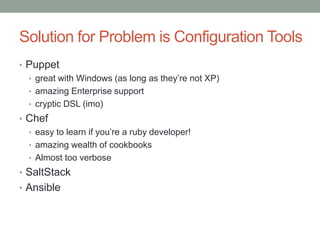
Solution for Problem is Configuration Tools
• Puppet
• great with Windows (as long as they’re not XP)
• amazing Enterprise support
• cryptic DSL (imo)
• Chef
• easy to learn if you’re a ruby developer!
• amazing wealth of cookbooks
• Almost too verbose
• SaltStack
• Ansible
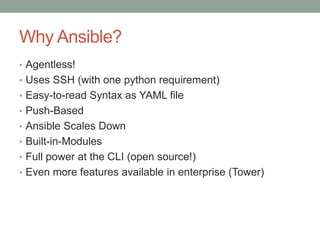
Why Ansible?
• Agentless!
• Uses SSH (with one python requirement)
• Easy-to-read Syntax as YAML file
• Push-Based
• Ansible Scales Down
• Built-in-Modules
• Full power at the CLI (open source!)
• Even more features available in enterprise (Tower)
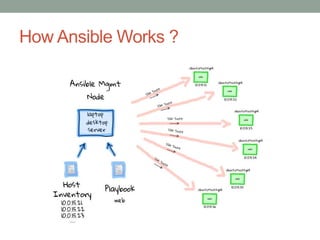
How Ansible Works ?
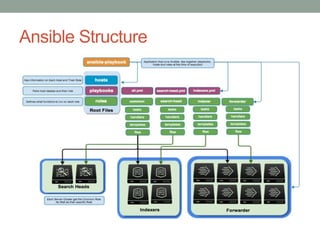
Ansible Structure
Inventory: Example
[production:children]
webservers
dbservers
proxies
[webservers]
foo.example.com http_port=80
bar.example.com http_port=8080
[dbservers]
db[01:03].example.com
[dbservers:vars]
pgsql_bind_nic=eth1
[proxies]
192.168.1.1
$ ansible production –a “echo hello” –u joe –k
$ ansible dbservers –a “service postgresl restart” –u joe –U root –k -K
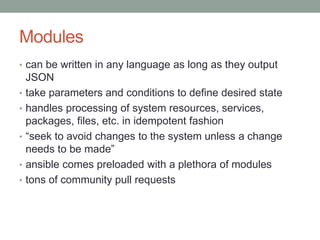
Modules
• can be written in any language as long as they output
JSON
• take parameters and conditions to define desired state
• handles processing of system resources, services,
packages, files, etc. in idempotent fashion
• “seek to avoid changes to the system unless a change
needs to be made”
• ansible comes preloaded with a plethora of modules
• tons of community pull requests
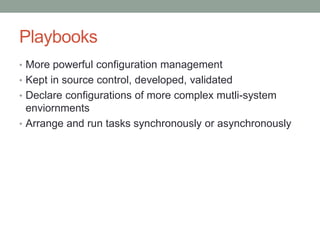
Playbooks
• More powerful configuration management
• Kept in source control, developed, validated
• Declare configurations of more complex mutli-system
enviornments
• Arrange and run tasks synchronously or asynchronously
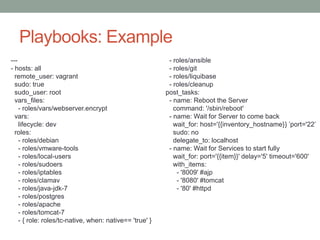
Playbooks: Example
---
- hosts: all
remote_user: vagrant
sudo: true
sudo_user: root
vars_files:
- roles/vars/webserver.encrypt
vars:
lifecycle: dev
roles:
- roles/debian
- roles/vmware-tools
- roles/local-users
- roles/sudoers
- roles/iptables
- roles/clamav
- roles/java-jdk-7
- roles/postgres
- roles/apache
- roles/tomcat-7
- { role: roles/tc-native, when: native== 'true' }
- roles/ansible
- roles/git
- roles/liquibase
- roles/cleanup
post_tasks:
- name: Reboot the Server
command: '/sbin/reboot'
- name: Wait for Server to come back
wait_for: host='{{inventory_hostname}} ’port='22’
sudo: no
delegate_to: localhost
- name: Wait for Services to start fully
wait_for: port='{{item}}' delay='5' timeout='600'
with_items:
- '8009' #ajp
- '8080' #tomcat
- '80' #httpd
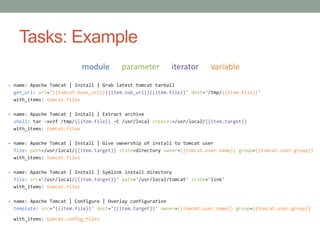
Tasks: Example
module parameter iterator variable
- name: Apache Tomcat | Install | Grab latest tomcat tarball
get_url: url='{{tomcat.base_url}}{{item.sub_url}}{{item.file}}' dest='/tmp/{{item.file}}'
with_items: tomcat.files
- name: Apache Tomcat | Install | Extract archive
shell: tar -xvzf /tmp/{{item.file}} -C /usr/local creates=/usr/local/{{item.target}}
with_items: tomcat.files
- name: Apache Tomcat | Install | Give ownership of install to tomcat user
file: path=/usr/local/{{item.target}} state=directory owner={{tomcat.user.name}} group={{tomcat.user.group}}
with_items: tomcat.files
- name: Apache Tomcat | Install | Symlink install directory
file: src='/usr/local/{{item.target}}' path='/usr/local/tomcat' state='link'
with_items: tomcat.files
- name: Apache Tomcat | Configure | Overlay configuration
template: src=‘{{item.file}}' dest='{{item.target}}' owner={{tomcat.user.name}} group={{tomcat.user.group}}
with_items: tomcat.config_files
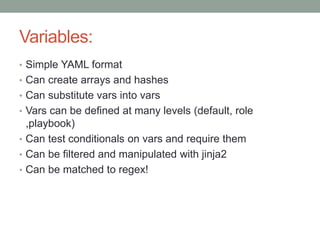
Variables:
• Simple YAML format
• Can create arrays and hashes
• Can substitute vars into vars
• Vars can be defined at many levels (default, role
,playbook)
• Can test conditionals on vars and require them
• Can be filtered and manipulated with jinja2
• Can be matched to regex!
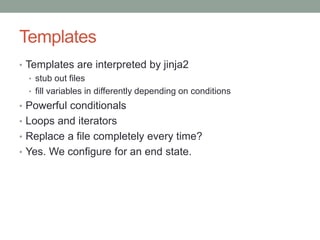
Templates
• Templates are interpreted by jinja2
• stub out files
• fill variables in differently depending on conditions
• Powerful conditionals
• Loops and iterators
• Replace a file completely every time?
• Yes. We configure for an end state.
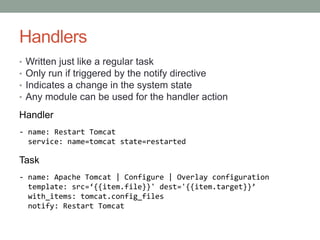
Handlers
• Written just like a regular task
• Only run if triggered by the notify directive
• Indicates a change in the system state
• Any module can be used for the handler action
Handler
- name: Restart Tomcat
service: name=tomcat state=restarted
Task
- name: Apache Tomcat | Configure | Overlay configuration
template: src=‘{{item.file}}' dest='{{item.target}}’
with_items: tomcat.config_files
notify: Restart Tomcat
Roles
• Break up configuration into repeatable chunks
• Reduce, reuse, recycle
• Clean, understandable structure
• Stack on top of each other
• Ansible Galaxy
Docker and Ansible
Docker Application Life Cycle with Ansible
1. Write Ansible playbooks for creating Docker images.
2. Run the playbooks to create Docker images on your
local machine.
3. Push Docker images up from your local machine to the
registry.
4. Write Ansible playbooks to pull Docker images down to
remote hosts and start up Docker containers.
5. Run Ansible playbooks to start containers.
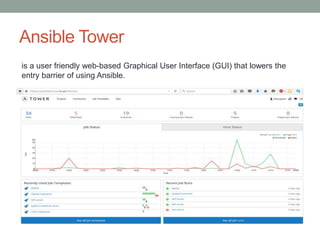
Ansible Tower
is a user friendly web-based Graphical User Interface (GUI) that lowers the
entry barrier of using Ansible.
Ansible Tower useful features
• Easy to use GUI with push button execution
• Centralized job runs, playbook storage, logs...
• Schedule jobs
• Use playbooks from the server or from source control
• Graphical real time output and log history
• LDAP integration
• Role based access control
• Extensible with a fully documented REST API
Where do I go from here?
• Stop doing everything by hand!
• If you find yourself logging in to more than one VM to do
the same task...
• If you have been meaning to get around to patching or
updating a bunch of VMs...
• If you know all of the prompts of the OS installer by
heart...
• If scp and vi are your favorite tools...
• If you dread the next release of your application
• If you wince every time your phone rings
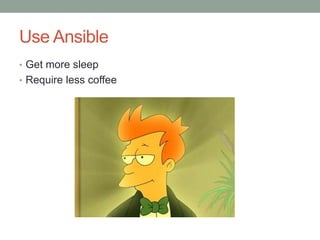
Use Ansible
• Get more sleep
• Require less coffee

Ansible presentation

  • 2.
    Repetitive Jobs [Problem] •Building VM templates • ISO install and configuration • Network setup • Set up users/group, security, authentication/authorization • Software install and configuration • Building out clusters • Cloning N number of VMs from X number of templates • Hostname/network configuration • Firewalling • Software deployments • Turn off monitoring/alerting • Pull nodes out of Load Balanced Group • Run DB migrations • Deploy application code • Restart web server • Put nodes back in/turn monitoring back on • Server maintenance • SSH in to every server and restart a service • Write complex scripts to log in to every server and update openssl
  • 3.
    Solution for Problemis Configuration Tools • Puppet • great with Windows (as long as they’re not XP) • amazing Enterprise support • cryptic DSL (imo) • Chef • easy to learn if you’re a ruby developer! • amazing wealth of cookbooks • Almost too verbose • SaltStack • Ansible
  • 4.
    Why Ansible? • Agentless! •Uses SSH (with one python requirement) • Easy-to-read Syntax as YAML file • Push-Based • Ansible Scales Down • Built-in-Modules • Full power at the CLI (open source!) • Even more features available in enterprise (Tower)
  • 5.
  • 6.
  • 7.
    Inventory: Example [production:children] webservers dbservers proxies [webservers] foo.example.com http_port=80 bar.example.comhttp_port=8080 [dbservers] db[01:03].example.com [dbservers:vars] pgsql_bind_nic=eth1 [proxies] 192.168.1.1 $ ansible production –a “echo hello” –u joe –k $ ansible dbservers –a “service postgresl restart” –u joe –U root –k -K
  • 8.
    Modules • can bewritten in any language as long as they output JSON • take parameters and conditions to define desired state • handles processing of system resources, services, packages, files, etc. in idempotent fashion • “seek to avoid changes to the system unless a change needs to be made” • ansible comes preloaded with a plethora of modules • tons of community pull requests
  • 9.
    Playbooks • More powerfulconfiguration management • Kept in source control, developed, validated • Declare configurations of more complex mutli-system enviornments • Arrange and run tasks synchronously or asynchronously
  • 10.
    Playbooks: Example --- - hosts:all remote_user: vagrant sudo: true sudo_user: root vars_files: - roles/vars/webserver.encrypt vars: lifecycle: dev roles: - roles/debian - roles/vmware-tools - roles/local-users - roles/sudoers - roles/iptables - roles/clamav - roles/java-jdk-7 - roles/postgres - roles/apache - roles/tomcat-7 - { role: roles/tc-native, when: native== 'true' } - roles/ansible - roles/git - roles/liquibase - roles/cleanup post_tasks: - name: Reboot the Server command: '/sbin/reboot' - name: Wait for Server to come back wait_for: host='{{inventory_hostname}} ’port='22’ sudo: no delegate_to: localhost - name: Wait for Services to start fully wait_for: port='{{item}}' delay='5' timeout='600' with_items: - '8009' #ajp - '8080' #tomcat - '80' #httpd
  • 11.
    Tasks: Example module parameteriterator variable - name: Apache Tomcat | Install | Grab latest tomcat tarball get_url: url='{{tomcat.base_url}}{{item.sub_url}}{{item.file}}' dest='/tmp/{{item.file}}' with_items: tomcat.files - name: Apache Tomcat | Install | Extract archive shell: tar -xvzf /tmp/{{item.file}} -C /usr/local creates=/usr/local/{{item.target}} with_items: tomcat.files - name: Apache Tomcat | Install | Give ownership of install to tomcat user file: path=/usr/local/{{item.target}} state=directory owner={{tomcat.user.name}} group={{tomcat.user.group}} with_items: tomcat.files - name: Apache Tomcat | Install | Symlink install directory file: src='/usr/local/{{item.target}}' path='/usr/local/tomcat' state='link' with_items: tomcat.files - name: Apache Tomcat | Configure | Overlay configuration template: src=‘{{item.file}}' dest='{{item.target}}' owner={{tomcat.user.name}} group={{tomcat.user.group}} with_items: tomcat.config_files
  • 12.
    Variables: • Simple YAMLformat • Can create arrays and hashes • Can substitute vars into vars • Vars can be defined at many levels (default, role ,playbook) • Can test conditionals on vars and require them • Can be filtered and manipulated with jinja2 • Can be matched to regex!
  • 13.
    Templates • Templates areinterpreted by jinja2 • stub out files • fill variables in differently depending on conditions • Powerful conditionals • Loops and iterators • Replace a file completely every time? • Yes. We configure for an end state.
  • 14.
    Handlers • Written justlike a regular task • Only run if triggered by the notify directive • Indicates a change in the system state • Any module can be used for the handler action Handler - name: Restart Tomcat service: name=tomcat state=restarted Task - name: Apache Tomcat | Configure | Overlay configuration template: src=‘{{item.file}}' dest='{{item.target}}’ with_items: tomcat.config_files notify: Restart Tomcat
  • 15.
    Roles • Break upconfiguration into repeatable chunks • Reduce, reuse, recycle • Clean, understandable structure • Stack on top of each other • Ansible Galaxy
  • 16.
  • 17.
    Docker Application LifeCycle with Ansible 1. Write Ansible playbooks for creating Docker images. 2. Run the playbooks to create Docker images on your local machine. 3. Push Docker images up from your local machine to the registry. 4. Write Ansible playbooks to pull Docker images down to remote hosts and start up Docker containers. 5. Run Ansible playbooks to start containers.
  • 18.
    Ansible Tower is auser friendly web-based Graphical User Interface (GUI) that lowers the entry barrier of using Ansible.
  • 19.
    Ansible Tower usefulfeatures • Easy to use GUI with push button execution • Centralized job runs, playbook storage, logs... • Schedule jobs • Use playbooks from the server or from source control • Graphical real time output and log history • LDAP integration • Role based access control • Extensible with a fully documented REST API
  • 20.
    Where do Igo from here? • Stop doing everything by hand! • If you find yourself logging in to more than one VM to do the same task... • If you have been meaning to get around to patching or updating a bunch of VMs... • If you know all of the prompts of the OS installer by heart... • If scp and vi are your favorite tools... • If you dread the next release of your application • If you wince every time your phone rings
  • 21.
    Use Ansible • Getmore sleep • Require less coffee

Editor's Notes

  • #3 Cluster ssh Bash scripts Building templates by hand Yo dawg, I heard you like snapshots of your snapshots
  • #12 structure
  • #21 Phillip fry