OpenShift v3
Internal networking details
Etsuji Nakai
Senior Solution Architect
and Cloud Evangelist
Red Hat K.K.
v1.2 2015/03/14
2
Disclaimer
 The contents of this document is based on OpenShift Enterprise V3 Beta. Details may
change in GA version.
 Red Hat accepts no liability for the content of this document, or for the consequences
of any actions taken on the basis of the information provided. Any views or opinions
presented in this document are solely those of the author and do not necessarily
represent those of Red Hat.
3
Inter-pod network
OVS:br0
vxlan0
eth0
vovsbr
LinuxBridge:lbr0
vlinuxbr
veth pair
vethXXX
pod
eth0
vethXXX
pod
eth0
10.1.x.0/24
VXLAN
Tunnel
OVS:br0
vxlan0
eth0
vovsbr
LinuxBridge:lbr0
vlinuxbr
veth pair
vethXXX
pod
eth0
vethXXX
pod
eth0
10.1.y.0/24
VXLAN
Tunnel
10.1.x.1
10.1.0.0/16
VXLAN
Tunnel
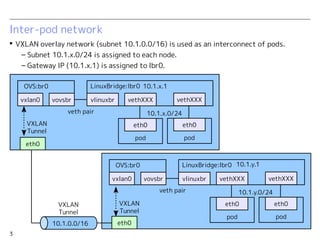
 VXLAN overlay network (subnet 10.1.0.0/16) is used as an interconnect of pods.
– Subnet 10.1.x.0/24 is assigned to each node.
– Gateway IP (10.1.x.1) is assigned to lbr0.
10.1.y.1
4
Service connection
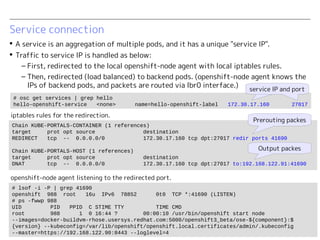
 A service is an aggregation of multiple pods, and it has a unique "service IP".
 Traffic to service IP is handled as below:
– First, redirected to the local openshift-node agent with local iptables rules.
– Then, redirected (load balanced) to backend pods. (openshift-node agent knows the
IPs of backend pods, and packets are routed via lbr0 interface.)
Chain KUBE-PORTALS-CONTAINER (1 references)
target prot opt source destination
REDIRECT tcp -- 0.0.0.0/0 172.30.17.160 tcp dpt:27017 redir ports 41690
Chain KUBE-PORTALS-HOST (1 references)
target prot opt source destination
DNAT tcp -- 0.0.0.0/0 172.30.17.160 tcp dpt:27017 to:192.168.122.91:41690
Prerouting packes
Output packes
# lsof -i -P | grep 41690
openshift 988 root 16u IPv6 78852 0t0 TCP *:41690 (LISTEN)
# ps -fwwp 988
UID PID PPID C STIME TTY TIME CMD
root 988 1 0 16:44 ? 00:00:10 /usr/bin/openshift start node
--images=docker-buildvm-rhose.usersys.redhat.com:5000/openshift3_beta/ose-${component}:$
{version} --kubeconfig=/var/lib/openshift/openshift.local.certificates/admin/.kubeconfig
--master=https://192.168.122.90:8443 --loglevel=4
iptables rules for the redirection.
openshift-node agent listening to the redirected port.
# osc get services | grep hello
hello-openshift-service <none> name=hello-openshift-label 172.30.17.160 27017
service IP and portservice IP and port
5
External connection
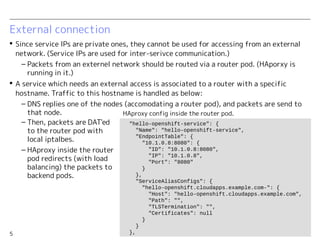
 Since service IPs are private ones, they cannot be used for accessing from an external
network. (Service IPs are used for inter-serivce communication.)
– Packets from an externel network should be routed via a router pod. (HAporxy is
running in it.)
 A service which needs an external access is associated to a router with a specific
hostname. Traffic to this hostname is handled as below:
– DNS replies one of the nodes (accomodating a router pod), and packets are sent to
that node.
"hello-openshift-service": {
"Name": "hello-openshift-service",
"EndpointTable": {
"10.1.0.8:8080": {
"ID": "10.1.0.8:8080",
"IP": "10.1.0.8",
"Port": "8080"
}
},
"ServiceAliasConfigs": {
"hello-openshift.cloudapps.example.com-": {
"Host": "hello-openshift.cloudapps.example.com",
"Path": "",
"TLSTermination": "",
"Certificates": null
}
}
},
– Then, packets are DAT'ed
to the router pod with
local iptalbes.
– HAproxy inside the router
pod redirects (with load
balancing) the packets to
backend pods.
HAproxy config inside the router pod.
6
In a nutshell...
 Pods are directly interconnected via an overlay network.
– Linux bridge lbr0 works as a gateway to the overlay network.
 Openshift-node agents work as a proxy for service IPs.
 Router pods work as a front-end LB for external access.
openshift-node agent
10.1.0.0/16
VXLAN Tunnel
lbr0
pod pod
router
pod
iptables
iptables
openshift-node agent
lbr0
pod pod
router
pod
iptables
iptables
DNS
round robin
round
robin
least
connection
Inter-service access
External access
round
robin
least
connection
7
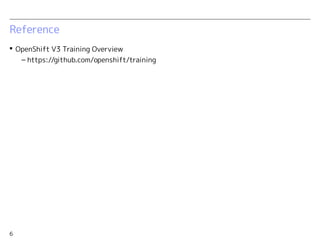
Reference
 Architecture Overview: Kubernetes with Red Hat Enterprise Linux 7.1
– http://www.slideshare.net/enakai/architecture-overview-kubernetes-with-red-hat-
enterprise-linux-71
 OpenShift V3 Training Overview
– https://github.com/openshift/training
Thank you

OpenShift v3 Internal networking details

  • 1.
    OpenShift v3 Internal networkingdetails Etsuji Nakai Senior Solution Architect and Cloud Evangelist Red Hat K.K. v1.2 2015/03/14
  • 2.
    2 Disclaimer  The contentsof this document is based on OpenShift Enterprise V3 Beta. Details may change in GA version.  Red Hat accepts no liability for the content of this document, or for the consequences of any actions taken on the basis of the information provided. Any views or opinions presented in this document are solely those of the author and do not necessarily represent those of Red Hat.
  • 3.
    3 Inter-pod network OVS:br0 vxlan0 eth0 vovsbr LinuxBridge:lbr0 vlinuxbr veth pair vethXXX pod eth0 vethXXX pod eth0 10.1.x.0/24 VXLAN Tunnel OVS:br0 vxlan0 eth0 vovsbr LinuxBridge:lbr0 vlinuxbr vethpair vethXXX pod eth0 vethXXX pod eth0 10.1.y.0/24 VXLAN Tunnel 10.1.x.1 10.1.0.0/16 VXLAN Tunnel  VXLAN overlay network (subnet 10.1.0.0/16) is used as an interconnect of pods. – Subnet 10.1.x.0/24 is assigned to each node. – Gateway IP (10.1.x.1) is assigned to lbr0. 10.1.y.1
  • 4.
    4 Service connection  Aservice is an aggregation of multiple pods, and it has a unique "service IP".  Traffic to service IP is handled as below: – First, redirected to the local openshift-node agent with local iptables rules. – Then, redirected (load balanced) to backend pods. (openshift-node agent knows the IPs of backend pods, and packets are routed via lbr0 interface.) Chain KUBE-PORTALS-CONTAINER (1 references) target prot opt source destination REDIRECT tcp -- 0.0.0.0/0 172.30.17.160 tcp dpt:27017 redir ports 41690 Chain KUBE-PORTALS-HOST (1 references) target prot opt source destination DNAT tcp -- 0.0.0.0/0 172.30.17.160 tcp dpt:27017 to:192.168.122.91:41690 Prerouting packes Output packes # lsof -i -P | grep 41690 openshift 988 root 16u IPv6 78852 0t0 TCP *:41690 (LISTEN) # ps -fwwp 988 UID PID PPID C STIME TTY TIME CMD root 988 1 0 16:44 ? 00:00:10 /usr/bin/openshift start node --images=docker-buildvm-rhose.usersys.redhat.com:5000/openshift3_beta/ose-${component}:$ {version} --kubeconfig=/var/lib/openshift/openshift.local.certificates/admin/.kubeconfig --master=https://192.168.122.90:8443 --loglevel=4 iptables rules for the redirection. openshift-node agent listening to the redirected port. # osc get services | grep hello hello-openshift-service <none> name=hello-openshift-label 172.30.17.160 27017 service IP and portservice IP and port
  • 5.
    5 External connection  Sinceservice IPs are private ones, they cannot be used for accessing from an external network. (Service IPs are used for inter-serivce communication.) – Packets from an externel network should be routed via a router pod. (HAporxy is running in it.)  A service which needs an external access is associated to a router with a specific hostname. Traffic to this hostname is handled as below: – DNS replies one of the nodes (accomodating a router pod), and packets are sent to that node. "hello-openshift-service": { "Name": "hello-openshift-service", "EndpointTable": { "10.1.0.8:8080": { "ID": "10.1.0.8:8080", "IP": "10.1.0.8", "Port": "8080" } }, "ServiceAliasConfigs": { "hello-openshift.cloudapps.example.com-": { "Host": "hello-openshift.cloudapps.example.com", "Path": "", "TLSTermination": "", "Certificates": null } } }, – Then, packets are DAT'ed to the router pod with local iptalbes. – HAproxy inside the router pod redirects (with load balancing) the packets to backend pods. HAproxy config inside the router pod.
  • 6.
    6 In a nutshell... Pods are directly interconnected via an overlay network. – Linux bridge lbr0 works as a gateway to the overlay network.  Openshift-node agents work as a proxy for service IPs.  Router pods work as a front-end LB for external access. openshift-node agent 10.1.0.0/16 VXLAN Tunnel lbr0 pod pod router pod iptables iptables openshift-node agent lbr0 pod pod router pod iptables iptables DNS round robin round robin least connection Inter-service access External access round robin least connection
  • 7.
    7 Reference  Architecture Overview:Kubernetes with Red Hat Enterprise Linux 7.1 – http://www.slideshare.net/enakai/architecture-overview-kubernetes-with-red-hat- enterprise-linux-71  OpenShift V3 Training Overview – https://github.com/openshift/training
  • 8.