SBE 306: Computer Graphics
Projection
Dr. Ayman Eldeib
Systems & Biomedical
Engineering Department
Spring 2019
Computer Graphics Projection
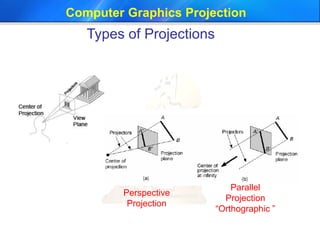
Types of Projections
Perspective
Projection
Parallel
Projection
“Orthographic ”
Computer Graphics Projection
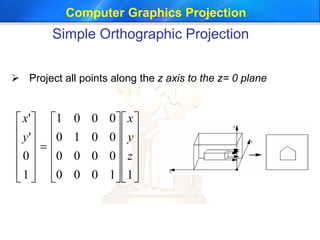
Simple Orthographic Projection
 Project all points along the z axis to the z= 0 plane





































11000
0000
0010
0001
1
0
'
'
z
y
x
y
x
Computer Graphics Projection
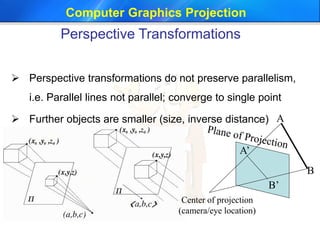
Perspective Transformations
 Perspective transformations do not preserve parallelism,
i.e. Parallel lines not parallel; converge to single point
 Further objects are smaller (size, inverse distance)
B
A’
B’
Center of projection
(camera/eye location)
A
Computer Graphics Projection
Perspective Projection
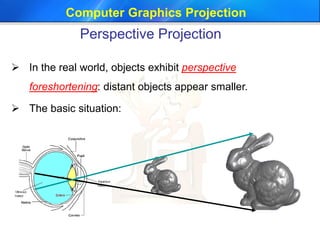
 In the real world, objects exhibit perspective
foreshortening: distant objects appear smaller.
 The basic situation:
Computer Graphics Projection
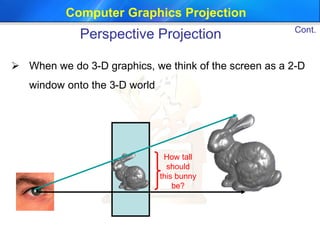
 When we do 3-D graphics, we think of the screen as a 2-D
window onto the 3-D world
How tall
should
this bunny
be?
Cont.
Perspective Projection
Computer Graphics Projection
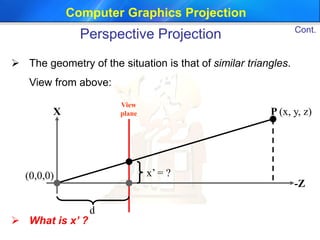
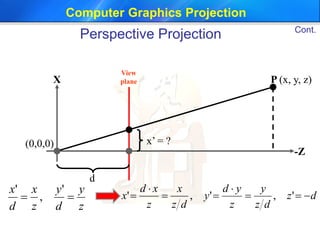
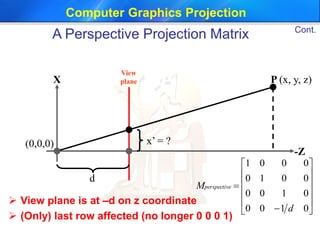
 The geometry of the situation is that of similar triangles.
View from above:
P (x, y, z)X
-Z
View
plane
d
(0,0,0) x’ = ?
 What is x’ ?
Cont.
Perspective Projection
Computer Graphics Projection
P (x, y, z)X
-Z
View
plane
d
(0,0,0) x’ = ?
z
y
d
y
z
x
d
x

'
,
'
dz
dz
y
z
yd
y
dz
x
z
xd
x 



 ',','
Cont.
Perspective Projection
Computer Graphics Projection
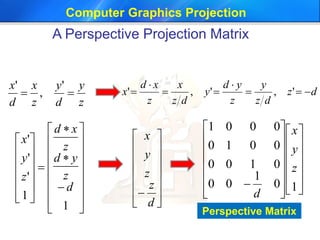
A Perspective Projection Matrix
z
y
d
y
z
x
d
x

'
,
'
dz
dz
y
z
yd
y
dz
x
z
xd
x 



 ',','















d
z
z
y
x
































1
1
'
'
'
d
z
yd
z
xd
z
y
x


























 10
1
00
0100
0010
0001
z
y
x
d
Perspective Matrix
Computer Graphics Projection
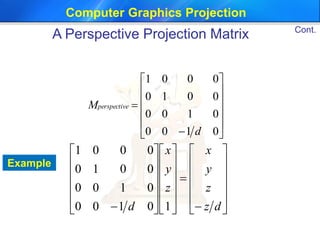
Example














0100
0100
0010
0001
d
M eperspectiv






































 dz
z
y
x
z
y
x
d 10100
0100
0010
0001
Cont.
A Perspective Projection Matrix
Computer Graphics Projection
P (x, y, z)X
-Z
View
plane
d
(0,0,0) x’ = ?














0100
0100
0010
0001
d
M eperspectiv
 View plane is at –d on z coordinate
 (Only) last row affected (no longer 0 0 0 1)
Cont.
A Perspective Projection Matrix
Computer Graphics Projection
 Now that we can express perspective
foreshortening as a matrix, we can composite it
onto our other matrices with the usual matrix
multiplication
 End result: can create a single matrix
encapsulating modeling, viewing, and projection
transforms
Though you recall that in practice OpenGL
separates the modelview from projection
matrix (why?)
Cont.
A Perspective Projection Matrix
Computer Graphics Projection
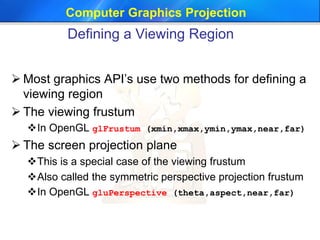
Defining a Viewing Region
 Most graphics API’s use two methods for defining a
viewing region
 The viewing frustum
In OpenGL glFrustum (xmin,xmax,ymin,ymax,near,far)
 The screen projection plane
This is a special case of the viewing frustum
Also called the symmetric perspective projection frustum
In OpenGL gluPerspective (theta,aspect,near,far)
Computer Graphics Projection
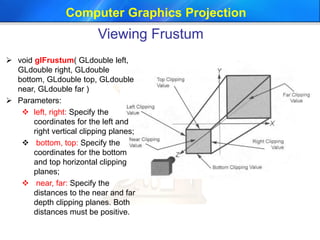
Viewing Frustum
 void glFrustum( GLdouble left,
GLdouble right, GLdouble
bottom, GLdouble top, GLdouble
near, GLdouble far )
 Parameters:
 left, right: Specify the
coordinates for the left and
right vertical clipping planes;
 bottom, top: Specify the
coordinates for the bottom
and top horizontal clipping
planes;
 near, far: Specify the
distances to the near and far
depth clipping planes. Both
distances must be positive.
Computer Graphics Projection
 void gluPerspective( GLdouble fovy,
GLdouble aspect, GLdouble zNear,
GLdouble zFar )
 Parameters:
 Fovy: Specifies the field of view
angle, in degrees, in the y
direction;
 Aspect: Specifies the aspect ratio
that determines the field of view in
the x direction. The aspect ratio is
the ratio of x (width) to y (height);
 ZNear: Specifies the distance from
the viewer to the near clipping
plane (always positive);
 ZFar: Specifies the distance from
the viewer to the far clipping plane
(always positive)
Cont.
Viewing Frustum
Computer Graphics Projection
 The viewing frustum defines a region of 3D space
assuming that the eye is located at (0, 0, 0).
 A 4x4 perspective transformation maps the
viewing frustum to a canonical cube
 Once a canonical cube is obtained 3D points are
projected to 2D by dropping the z component
 Note perspective projection is obtained by using
a perspective transformation followed by
orthographic projection
Cont.
Viewing Frustum
Computer Graphics Projection
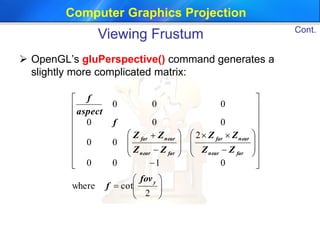
 OpenGL’s gluPerspective() command generates a
slightly more complicated matrix:














































2
cotwhere
0100
2
00
000
000
y
farnear
nearfar
farnear
nearfar
fov
f
ZZ
ZZ
ZZ
ZΖ
f
aspect
f
Cont.
Viewing Frustum
Thank You

3 projection computer graphics

  • 1.
    SBE 306: ComputerGraphics Projection Dr. Ayman Eldeib Systems & Biomedical Engineering Department Spring 2019
  • 2.
    Computer Graphics Projection Typesof Projections Perspective Projection Parallel Projection “Orthographic ”
  • 3.
    Computer Graphics Projection SimpleOrthographic Projection  Project all points along the z axis to the z= 0 plane                                      11000 0000 0010 0001 1 0 ' ' z y x y x
  • 4.
    Computer Graphics Projection PerspectiveTransformations  Perspective transformations do not preserve parallelism, i.e. Parallel lines not parallel; converge to single point  Further objects are smaller (size, inverse distance) B A’ B’ Center of projection (camera/eye location) A
  • 5.
    Computer Graphics Projection PerspectiveProjection  In the real world, objects exhibit perspective foreshortening: distant objects appear smaller.  The basic situation:
  • 6.
    Computer Graphics Projection When we do 3-D graphics, we think of the screen as a 2-D window onto the 3-D world How tall should this bunny be? Cont. Perspective Projection
  • 7.
    Computer Graphics Projection The geometry of the situation is that of similar triangles. View from above: P (x, y, z)X -Z View plane d (0,0,0) x’ = ?  What is x’ ? Cont. Perspective Projection
  • 8.
    Computer Graphics Projection P(x, y, z)X -Z View plane d (0,0,0) x’ = ? z y d y z x d x  ' , ' dz dz y z yd y dz x z xd x      ',',' Cont. Perspective Projection
  • 9.
    Computer Graphics Projection APerspective Projection Matrix z y d y z x d x  ' , ' dz dz y z yd y dz x z xd x      ',','                d z z y x                                 1 1 ' ' ' d z yd z xd z y x                            10 1 00 0100 0010 0001 z y x d Perspective Matrix
  • 10.
    Computer Graphics Projection Example               0100 0100 0010 0001 d Meperspectiv                                        dz z y x z y x d 10100 0100 0010 0001 Cont. A Perspective Projection Matrix
  • 11.
    Computer Graphics Projection P(x, y, z)X -Z View plane d (0,0,0) x’ = ?               0100 0100 0010 0001 d M eperspectiv  View plane is at –d on z coordinate  (Only) last row affected (no longer 0 0 0 1) Cont. A Perspective Projection Matrix
  • 12.
    Computer Graphics Projection Now that we can express perspective foreshortening as a matrix, we can composite it onto our other matrices with the usual matrix multiplication  End result: can create a single matrix encapsulating modeling, viewing, and projection transforms Though you recall that in practice OpenGL separates the modelview from projection matrix (why?) Cont. A Perspective Projection Matrix
  • 13.
    Computer Graphics Projection Defininga Viewing Region  Most graphics API’s use two methods for defining a viewing region  The viewing frustum In OpenGL glFrustum (xmin,xmax,ymin,ymax,near,far)  The screen projection plane This is a special case of the viewing frustum Also called the symmetric perspective projection frustum In OpenGL gluPerspective (theta,aspect,near,far)
  • 14.
    Computer Graphics Projection ViewingFrustum  void glFrustum( GLdouble left, GLdouble right, GLdouble bottom, GLdouble top, GLdouble near, GLdouble far )  Parameters:  left, right: Specify the coordinates for the left and right vertical clipping planes;  bottom, top: Specify the coordinates for the bottom and top horizontal clipping planes;  near, far: Specify the distances to the near and far depth clipping planes. Both distances must be positive.
  • 15.
    Computer Graphics Projection void gluPerspective( GLdouble fovy, GLdouble aspect, GLdouble zNear, GLdouble zFar )  Parameters:  Fovy: Specifies the field of view angle, in degrees, in the y direction;  Aspect: Specifies the aspect ratio that determines the field of view in the x direction. The aspect ratio is the ratio of x (width) to y (height);  ZNear: Specifies the distance from the viewer to the near clipping plane (always positive);  ZFar: Specifies the distance from the viewer to the far clipping plane (always positive) Cont. Viewing Frustum
  • 16.
    Computer Graphics Projection The viewing frustum defines a region of 3D space assuming that the eye is located at (0, 0, 0).  A 4x4 perspective transformation maps the viewing frustum to a canonical cube  Once a canonical cube is obtained 3D points are projected to 2D by dropping the z component  Note perspective projection is obtained by using a perspective transformation followed by orthographic projection Cont. Viewing Frustum
  • 17.
    Computer Graphics Projection OpenGL’s gluPerspective() command generates a slightly more complicated matrix:                                               2 cotwhere 0100 2 00 000 000 y farnear nearfar farnear nearfar fov f ZZ ZZ ZZ ZΖ f aspect f Cont. Viewing Frustum
  • 18.