6. Perspective
Projection
COL781: Computer Graphics
Blender manual
Luciano Testoni
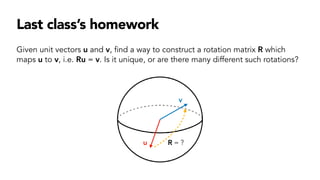
Last class’s homework
Given unit vectors u and v, find a way to construct a rotation matrix R which
maps u to v, i.e. Ru = v. Is it unique, or are there many different such rotations?
u
v
R = ?
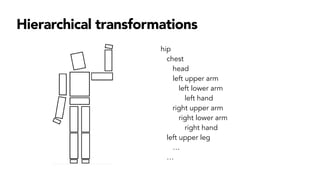
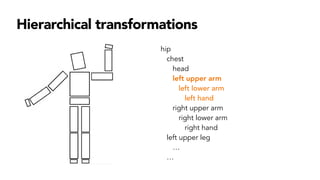
Hierarchical transformations
hip
chest
head
left upper arm
left lower arm
left hand
right upper arm
right lower arm
right hand
left upper leg
…
…
Hierarchical transformations
hip
chest
head
left upper arm
left lower arm
left hand
right upper arm
right lower arm
right hand
left upper leg
…
…
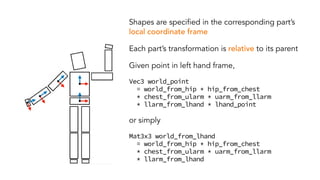
Shapes are specified in the corresponding part’s
local coordinate frame
Each part’s transformation is relative to its parent
Given point in left hand frame,
Vec3 world_point
= world_from_hip * hip_from_chest
* chest_from_ularm * uarm_from_llarm
* llarm_from_lhand * lhand_point
or simply
Mat3x3 world_from_lhand
= world_from_hip * hip_from_chest
* chest_from_ularm * uarm_from_llarm
* llarm_from_lhand
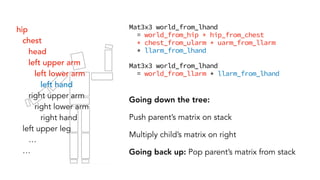
Mat3x3 world_from_lhand
= world_from_hip * hip_from_chest
* chest_from_ularm * uarm_from_llarm
* llarm_from_lhand
Mat3x3 world_from_lhand
= world_from_llarm * llarm_from_lhand
Going down the tree:
Push parent’s matrix on stack
Multiply child’s matrix on right
Going back up: Pop parent’s matrix from stack
hip
chest
head
left upper arm
left lower arm
left hand
right upper arm
right lower arm
right hand
left upper leg
…
…
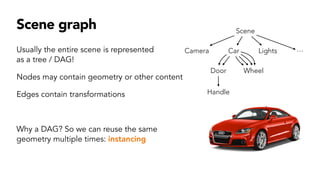
Scene graph
Usually the entire scene is represented
as a tree / DAG!
Nodes may contain geometry or other content
Edges contain transformations
Why a DAG? So we can reuse the same
geometry multiple times: instancing
Scene
Camera Lights
Car ⋯
Door Wheel
Handle
So far we know:
• How to draw 2D shapes
• How to transform 2D and 3D shapes
Today: How to draw 3D shapes on a 2D screen?
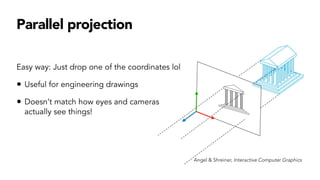
Parallel projection
Easy way: Just drop one of the coordinates lol
• Useful for engineering drawings
• Doesn’t match how eyes and cameras
actually see things!
Angel & Shreiner, Interactive Computer Graphics
Perspective
Jeff Lynch
Algorithmic drawing
in the 1500s
Albrecht Dürer
A point is drawn where the ray from
the viewpoint meets the image plane.
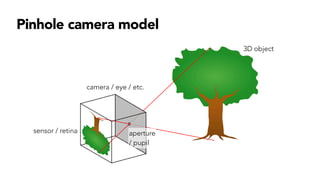
Pinhole camera model
3D object
camera / eye / etc.
sensor / retina aperture
/ pupil
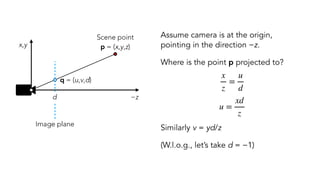
Assume camera is at the origin,
pointing in the direction −z.
Where is the point p projected to?
Similarly v = yd/z
(W.l.o.g., let’s take d = −1)
x
z
=
u
d
u =
xd
z
−z
x,y
d
q = (u,v,d)
Scene point
p = (x,y,z)
Image plane
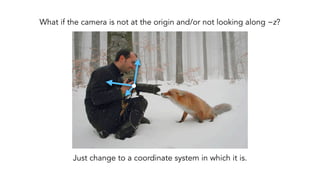
What if the camera is not at the origin and/or not looking along −z?
Just change to a coordinate system in which it is.
Viewing transformation
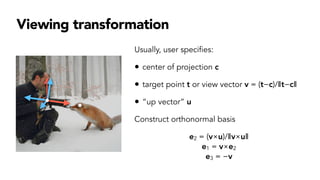
Usually, user specifies:
• center of projection c
• target point t or view vector v = (t−c)/‖t−c‖
• “up vector” u
Construct orthonormal basis
e2 = (v×u)/‖v×u‖
e1 = v×e2
e3 = −v
Camera → world: M = [e1 e2 e3 c]
World → camera: M−1
Once point is in camera space, projected point =
[
xd/z
yd/z]
Model space
World space
Camera space
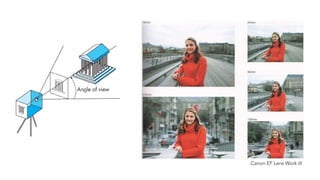
Canon EF Lens Work III
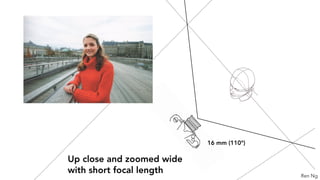
16 mm (110°)
Up close and zoomed wide
with short focal length Ren Ng
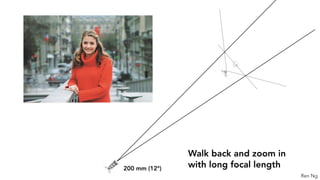
200 mm (12°)
Walk back and zoom in
with long focal length
Ren Ng
Choose transformation so that points in field of view fall inside [−1,1] × [−1,1]
(ℓ,b)
(r,b)
(ℓ,t)
(r,t)
−1
−1
1
1
“Normalized
device coordinates”
Coordinates after
perspective division
(Actually there’s a bit more in NDC… Will correct later!)
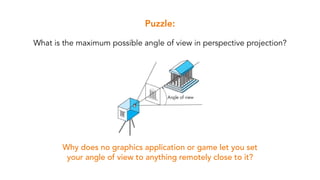
Puzzle:
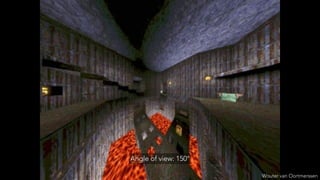
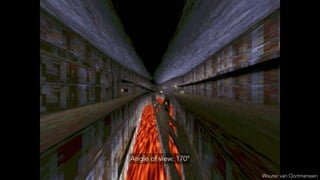
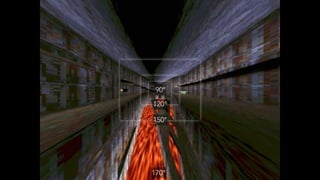
What is the maximum possible angle of view in perspective projection?
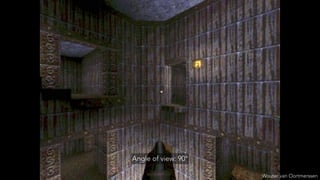
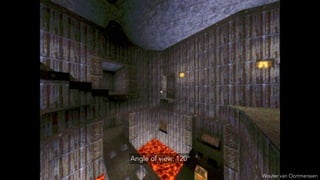
Why does no graphics application or game let you set
your angle of view to anything remotely close to it?
Wouter van Oortmerssen
Angle of view: 90°
Wouter van Oortmerssen
Angle of view: 120°
Wouter van Oortmerssen
Angle of view: 150°
Wouter van Oortmerssen
Angle of view: 170°
90°
120°
150°
170°
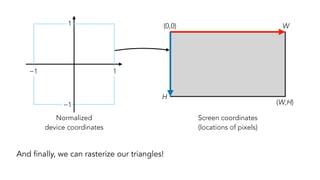
And finally, we can rasterize our triangles!
−1
−1
1
1 (0,0) W
H
(W,H)
Normalized
device coordinates
Screen coordinates
(locations of pixels)
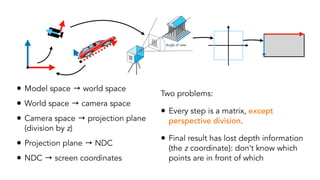
• Model space → world space
• World space → camera space
• Camera space → projection plane
(division by z)
• Projection plane → NDC
• NDC → screen coordinates
Two problems:
• Every step is a matrix, except
perspective division.
• Final result has lost depth information
(the z coordinate): don’t know which
points are in front of which
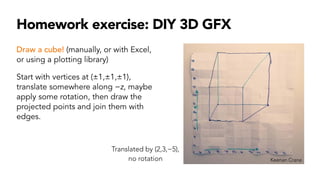
Homework exercise: DIY 3D GFX
Draw a cube! (manually, or with Excel,
or using a plotting library)
Start with vertices at (±1,±1,±1),
translate somewhere along −z, maybe
apply some rotation, then draw the
projected points and join them with
edges.
Keenan Crane
Translated by (2,3,−5),
no rotation

6. Perspective Projection .pdf

  • 1.
    6. Perspective Projection COL781: ComputerGraphics Blender manual Luciano Testoni
  • 2.
    Last class’s homework Givenunit vectors u and v, find a way to construct a rotation matrix R which maps u to v, i.e. Ru = v. Is it unique, or are there many different such rotations? u v R = ?
  • 3.
    Hierarchical transformations hip chest head left upperarm left lower arm left hand right upper arm right lower arm right hand left upper leg … …
  • 4.
    Hierarchical transformations hip chest head left upperarm left lower arm left hand right upper arm right lower arm right hand left upper leg … …
  • 5.
    Shapes are specifiedin the corresponding part’s local coordinate frame Each part’s transformation is relative to its parent Given point in left hand frame, Vec3 world_point = world_from_hip * hip_from_chest * chest_from_ularm * uarm_from_llarm * llarm_from_lhand * lhand_point or simply Mat3x3 world_from_lhand = world_from_hip * hip_from_chest * chest_from_ularm * uarm_from_llarm * llarm_from_lhand
  • 6.
    Mat3x3 world_from_lhand = world_from_hip* hip_from_chest * chest_from_ularm * uarm_from_llarm * llarm_from_lhand Mat3x3 world_from_lhand = world_from_llarm * llarm_from_lhand Going down the tree: Push parent’s matrix on stack Multiply child’s matrix on right Going back up: Pop parent’s matrix from stack hip chest head left upper arm left lower arm left hand right upper arm right lower arm right hand left upper leg … …
  • 7.
    Scene graph Usually theentire scene is represented as a tree / DAG! Nodes may contain geometry or other content Edges contain transformations Why a DAG? So we can reuse the same geometry multiple times: instancing Scene Camera Lights Car ⋯ Door Wheel Handle
  • 8.
    So far weknow: • How to draw 2D shapes • How to transform 2D and 3D shapes Today: How to draw 3D shapes on a 2D screen?
  • 9.
    Parallel projection Easy way:Just drop one of the coordinates lol • Useful for engineering drawings • Doesn’t match how eyes and cameras actually see things! Angel & Shreiner, Interactive Computer Graphics
  • 10.
  • 11.
    Algorithmic drawing in the1500s Albrecht Dürer A point is drawn where the ray from the viewpoint meets the image plane.
  • 12.
    Pinhole camera model 3Dobject camera / eye / etc. sensor / retina aperture / pupil
  • 13.
    Assume camera isat the origin, pointing in the direction −z. Where is the point p projected to? Similarly v = yd/z (W.l.o.g., let’s take d = −1) x z = u d u = xd z −z x,y d q = (u,v,d) Scene point p = (x,y,z) Image plane
  • 14.
    What if thecamera is not at the origin and/or not looking along −z? Just change to a coordinate system in which it is.
  • 15.
    Viewing transformation Usually, userspecifies: • center of projection c • target point t or view vector v = (t−c)/‖t−c‖ • “up vector” u Construct orthonormal basis e2 = (v×u)/‖v×u‖ e1 = v×e2 e3 = −v
  • 16.
    Camera → world:M = [e1 e2 e3 c] World → camera: M−1 Once point is in camera space, projected point = [ xd/z yd/z] Model space World space Camera space
  • 17.
    Canon EF LensWork III
  • 18.
    16 mm (110°) Upclose and zoomed wide with short focal length Ren Ng
  • 19.
    200 mm (12°) Walkback and zoom in with long focal length Ren Ng
  • 20.
    Choose transformation sothat points in field of view fall inside [−1,1] × [−1,1] (ℓ,b) (r,b) (ℓ,t) (r,t) −1 −1 1 1 “Normalized device coordinates” Coordinates after perspective division (Actually there’s a bit more in NDC… Will correct later!)
  • 21.
    Puzzle: What is themaximum possible angle of view in perspective projection? Why does no graphics application or game let you set your angle of view to anything remotely close to it?
  • 22.
  • 23.
  • 24.
  • 25.
  • 26.
  • 27.
    And finally, wecan rasterize our triangles! −1 −1 1 1 (0,0) W H (W,H) Normalized device coordinates Screen coordinates (locations of pixels)
  • 28.
    • Model space→ world space • World space → camera space • Camera space → projection plane (division by z) • Projection plane → NDC • NDC → screen coordinates Two problems: • Every step is a matrix, except perspective division. • Final result has lost depth information (the z coordinate): don’t know which points are in front of which
  • 29.
    Homework exercise: DIY3D GFX Draw a cube! (manually, or with Excel, or using a plotting library) Start with vertices at (±1,±1,±1), translate somewhere along −z, maybe apply some rotation, then draw the projected points and join them with edges. Keenan Crane Translated by (2,3,−5), no rotation