CONTROL SYSTEMS
12-Apr-17
1
Eng. Mahmoud Hussein
RTECS
Control Objectives3
Regulatory Control /
Load Disturbance Rejection4
 Maintains a parameter at or near a set-point despite
disturbance
 Is hence called
“Load Disturbance rejection problem”
 Example
 Cruise control
 Siphon Water Level Control
Regulatory Control
Siphon Water Level Control5
 Principle of Operation
 OPEN
 If water level becomes low in the reservoir, the lever comes
down by the weight of floating ball and the ball of valve-
room rotating by the lever opens the flow way.
 CLOSE
 If water level becomes high in the reservoir, the lever comes
up by the buoyancy of floating ball and the ball of valve-
room rotating by the lever inside of valve closes the flow
way.
Regulatory Control
Siphon Water Level Control6
 Set point
 Normalizing the scale, the set point can be taken as a reference
 Desired signal = 0
 Output signal @ steady state = 0
 Control signal @ steady state = 0
 Disturbance
 Flushing the toilet
Servo Control / Setpoint Tracking Control /
Trajectory Control7
 Cause the plant output to follow the changing input command
as closely as possible
 Examples
 Remote control car
 Automatic parking control
Servo Control / Tracking Control Automatic
Parking Control8
Control Structures9
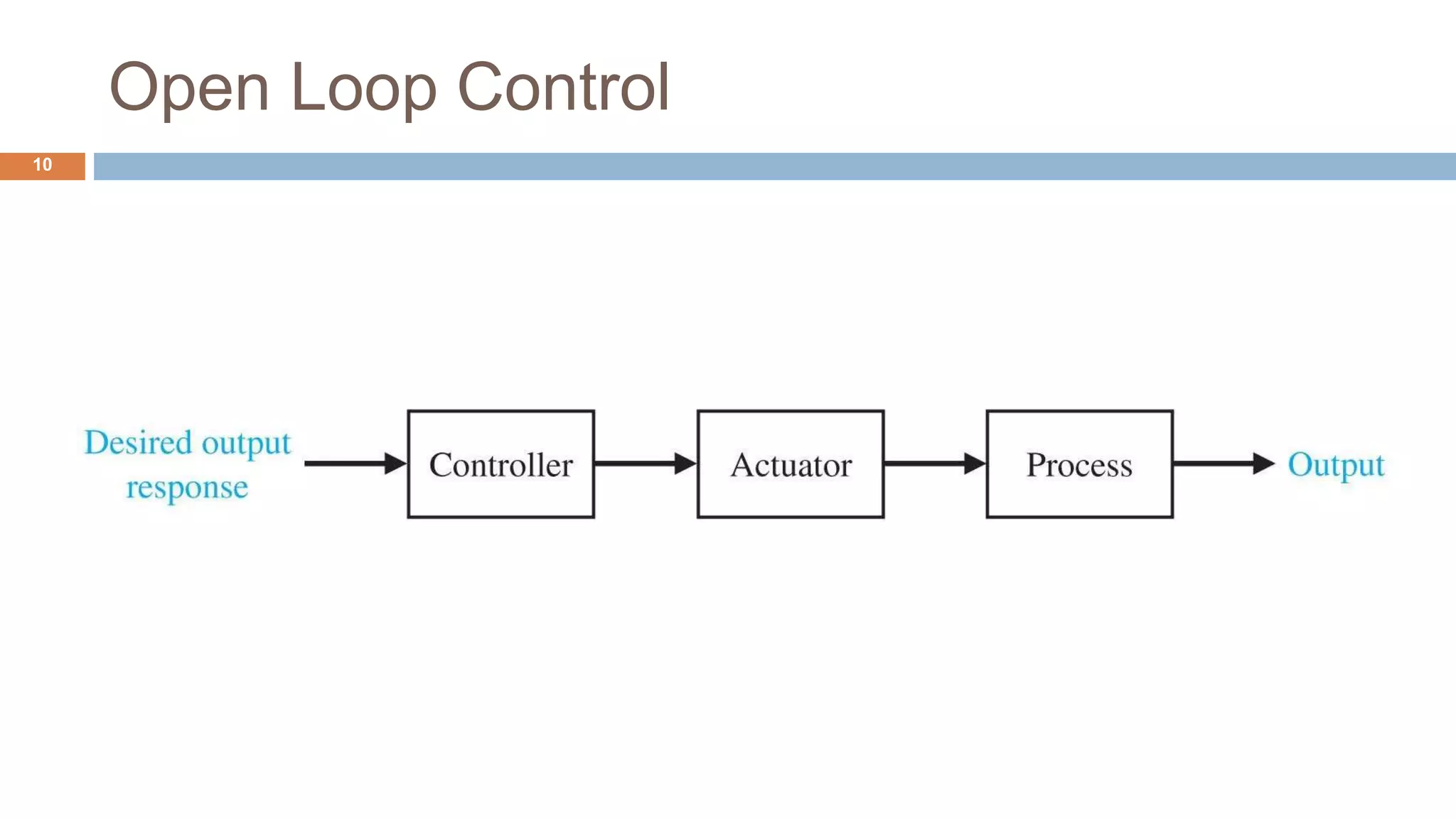
Open Loop Control
10
Open Loop Control
11
 Characteristics
 Highly sensitive to extraneous disturbances
 Highly sensitive to parametrical variation in the process
 TypicalApplications
 Stepper motor
 Motor with a worm gear (very high reduction ratio)
 Electric toaster
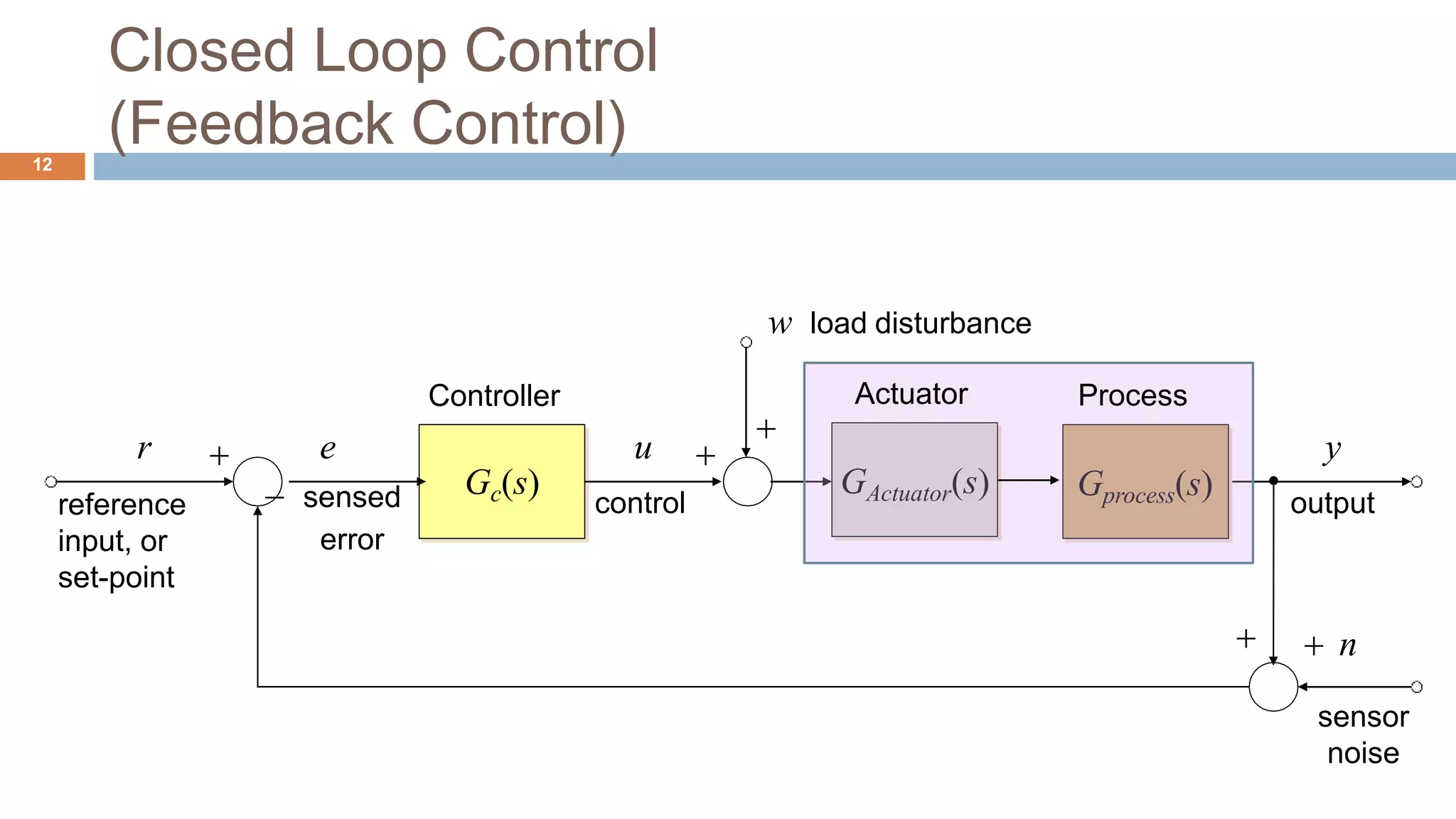
Closed Loop Control
(Feedback Control)12
Gc(s)
Controller
  n
sensor
noise

w load disturbance

Gprocess(s)
u
control
y
output
r
reference
input, or
set-point
e
 sensed
error
GActuator(s)
Actuator Process
Closed Loop Control
(Feedback Control)13
 Closed loop control strategy involves
 Measurement of the actual output,
 Comparison with the required reference value and
 Employing a suitable correction compensating for any deviation
Gc(s)
Controller
  n
sensor
noise

w load disturbance

u
control
y
output


r
reference
input, or
set-point
e
sensed
error
GActuator(s) Gprocess(s)
Actuator Process
Five Signals of Feedback Control Loop
14
 Set Point
 Desired output to be performed by the system
 constant for regulation control and
 variable for trajectory control
 Error signal
 The deviation between the desired behaviour and the system sensed output.
 Command/Control signal
 The signal generated from the controller
Gc(s)
Controller
  n
sensor
noise

w load disturbance
u
control
y
output

reference
input, or
set-point
r e
sensed
error
GActuator(s Gprocess(s))
Actuator Process
Five Signals of Feedback Control Loop
15
Gc(s)
  n
sensor
noise

 Disturbance
 A temporary change in environmental conditions that causes a
pronounced change in the system behaviour
 Low frequency deterministic measurable change
 Noise
 Random change of the signal at a high frequency
 Only statistically measurable
w load disturbance

Gprocess(s)
Process
u
control
y
output

reference
input, or
set-point
r e
sensed
error
GActuator(s)
Controller Actuator
Advantages of Feedback Control
16
 Speeds up the response
 Reduces steady-state error
 Reduces the sensitivity of a system to
 External disturbances
 Variations in its individual elements & components
 Improves stability
The Cost of Feedback
17
 Increased number of components and complexity
 Possibility of instability
 Whereas the open-loop system is stable, the closed-loop system
may not be always stable.
One DOF Feedback Controller18
One DOF Feedback Controller Block Diagram
19
Gc(s)
Controller
  n
sensor
noise

w load disturbance

Gp(s)
Plant
u
control
y
output
r
reference
input, or
set-point
e
 sensed
error
W(s)
Gp (s)
1GcGp (s)
N(s) 
GcGp (s)
1GcGp (s)
R(s) 
GcGp (s)
1GcGp (s)
Y (s)
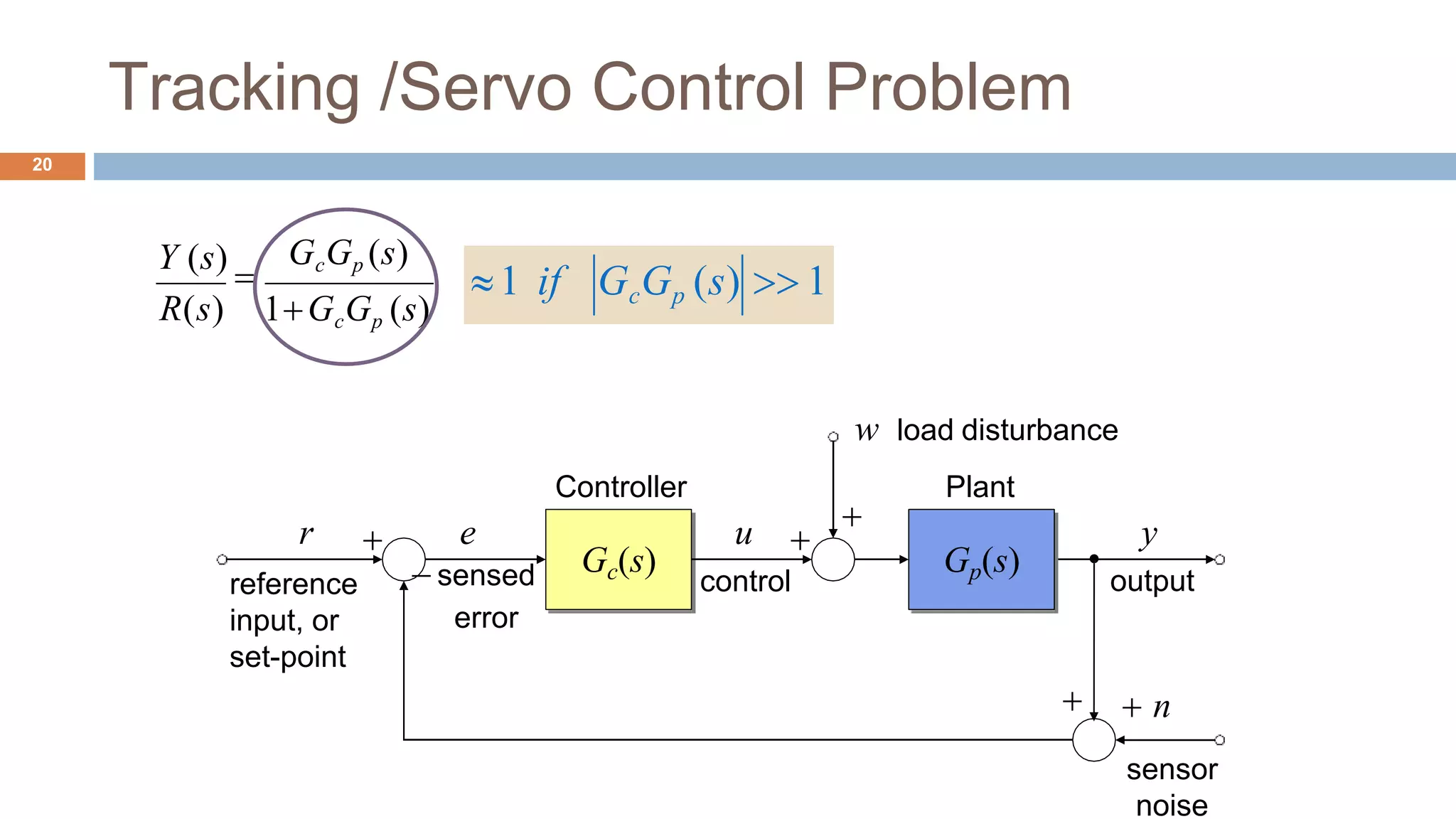
Tracking /Servo Control Problem
20
R(s)
GcGp (s)
1GcGp (s)
Y (s)

Gc(s)
Controller
  n
sensor
noise

w load disturbance

Gp(s)
Plant
u
control
y
output
r
reference
input, or
set-point
e
 sensed
error
1 if GcGp (s)  1
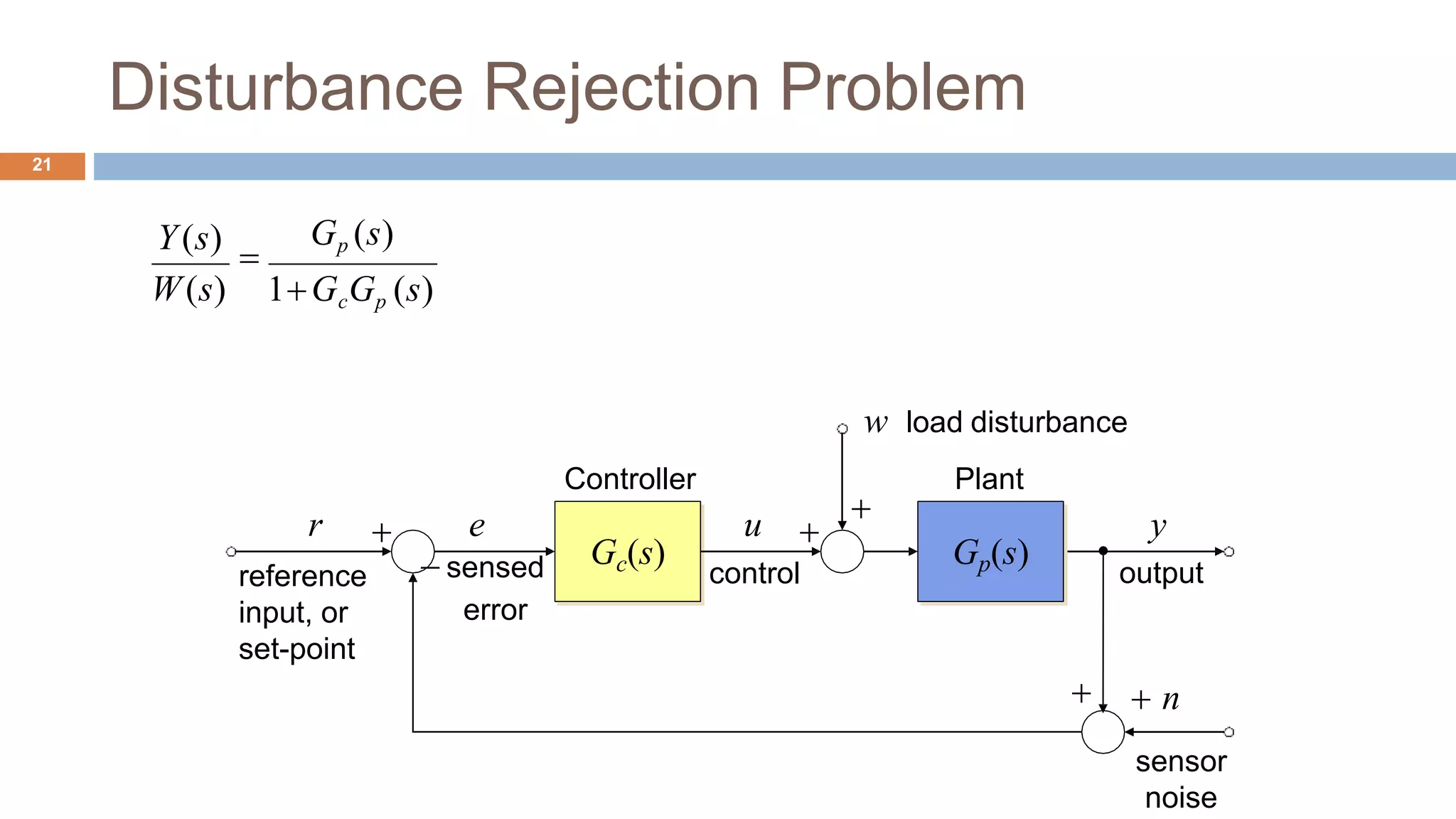
Disturbance Rejection Problem
21
Gc(s)
Controller
  n
sensor
noise

w load disturbance

Gp(s)
Plant
u
control
y
output
r
reference
input, or
set-point
e
 sensed
error
W(s)
Gp (s)
1GcGp (s)
Y(s)

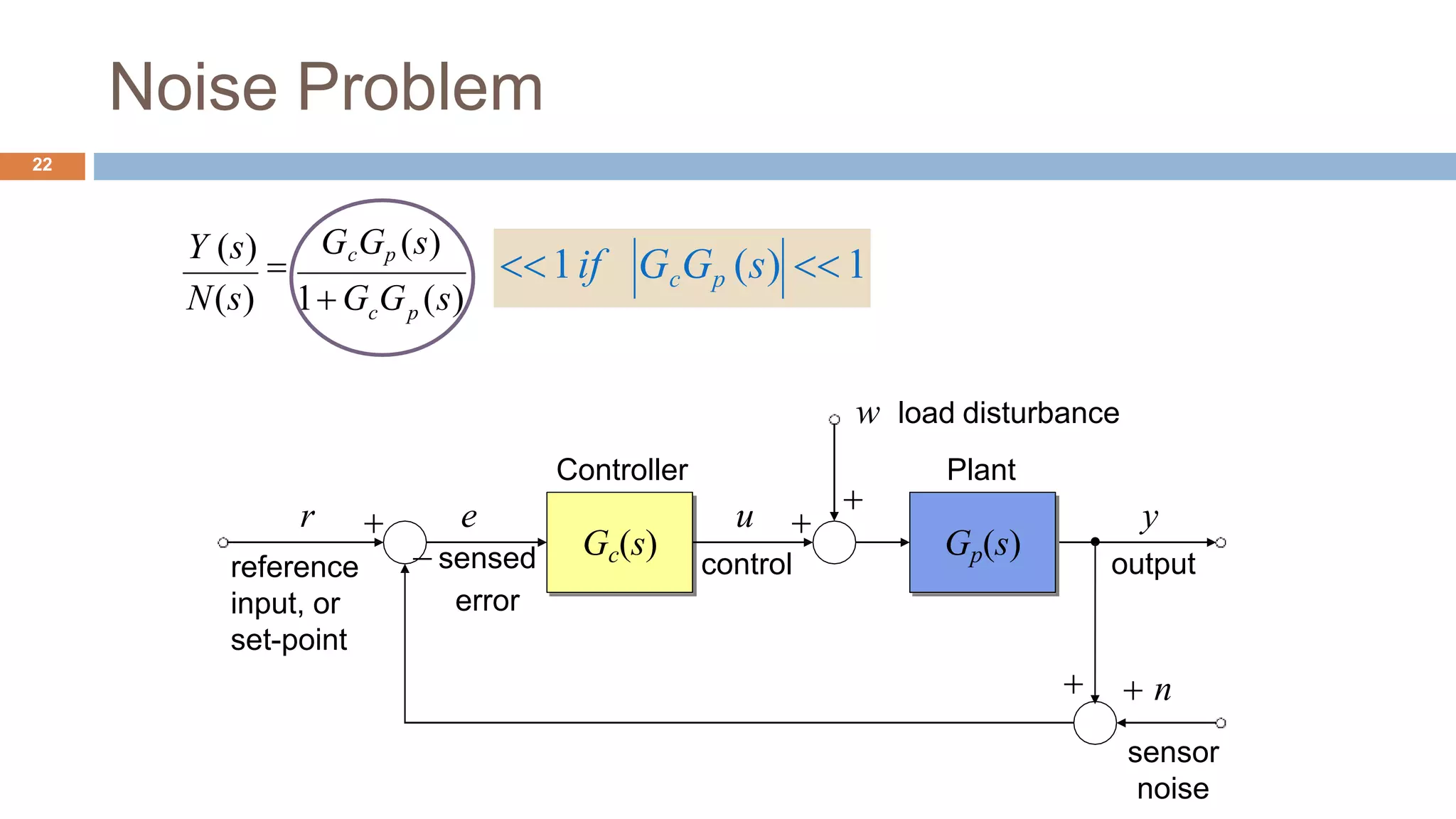
Noise Problem
22
Gc(s)
Controller
  n
sensor
noise

w load disturbance

Gp(s)
Plant
u
control
y
output
r
reference
input, or
set-point
e
 sensed
error
N(s) c p
GcGp (s)
1 G G (s)
Y (s)
 1if GcGp (s)  1
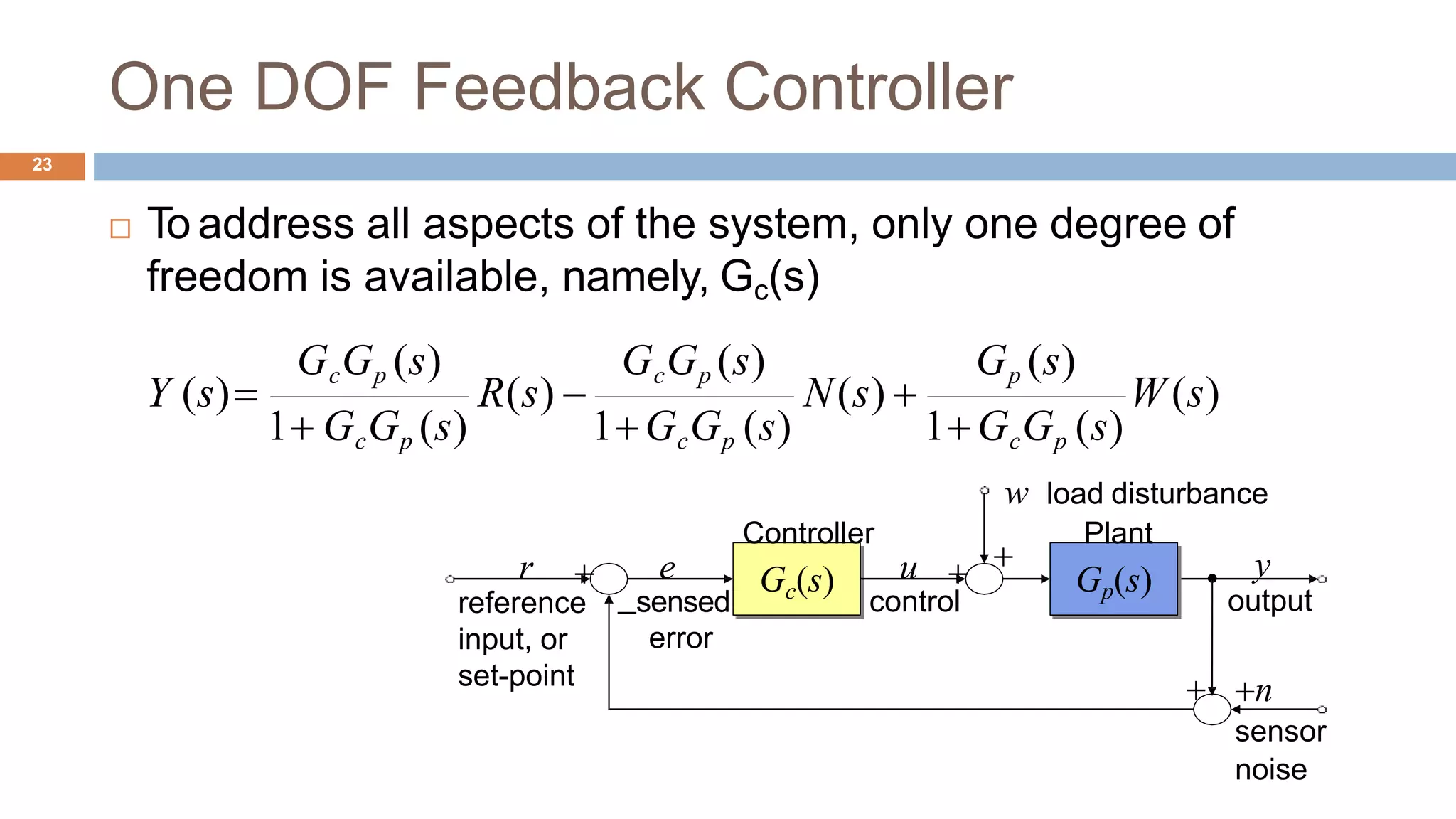
One DOF Feedback Controller
23
 To address all aspects of the system, only one degree of
freedom is available, namely, Gc(s)
W(s)
Gp (s)GcGp (s) GcGp (s)
1GcGp (s)
R(s)  N(s) 
1 GcGp (s) 1GcGp (s)
Y (s)
Gc(s)
Controller
 n
sensor
noise

w load disturbance

Gp(s)
Plant
u
control
y
output
r
reference
input, or
set-point
e
sensed
error
 Series Connection
 G=G2*G1
 where G1 and G2 are LTI objects (tf, ss, or zpk)
 Parallel Connection
 G=G1+G2
 where G1 and G2 are LTI objects (tf, ss, or zpk)
 Feedback Connection
 G=feedback(G,H,Sign)
 If Sign=-1, the negative feedback structure is indicated; negative feedbackis
the default
Modeling of Interconnected Block Diagrams in
Matlab24
Modeling of Interconnected Block Diagrams in
Matlab Example
 Where H(s) is a feeedback
block representing a first order
low pass filter with the aim of
sensor noise cancellation
 tf
 Create transfer function model, convert
to transfer function model
 feedback
 Feedback connection of two models
 Gp = tf( [1 7 24 24], [1 10 35 50 24] )
 Gc = tf( [10 5], [1 0] )
 H = tf( 1, [0.01, 1] )
 G_cl_loop = feedback( Gp*Gc, H, -1)
25
0.01s1
H (s)
s
1
10s 5
s3
 7s2
 24s 24
10s3
 35s2
 50s 24
Gc (s) 
Gp (s) 
s4
Time Domain Analysis in Matlab26
Step response evaluations with MATLAB
27
 step(G)
 %automatic draw of step response curves
 [y,t]=step(G)
 %evaluate the responses, but not drawn
 [y,t]=step(G,t_f)
 % final simulation time t_f setting
 y=step(G,t)
 %simulation on user defined time vector t
Unit Step Response in MATLAB
28
 OL_Sys = zpk([],[0 -6],25)
 CL_Sys = feedback(OL_Sys,1)
 figure
 step(CL_Sys);
 grid on
 stepinfo(CL_Sys)
R(s) + Y(s)25
s(s 6)
Unit Step Response in MATLAB
29
 RiseTime: 0.3711
 SettlingTime: 1.1887
 SettlingMin: 0.9083
 SettlingMax: 1.0948
 Overshoot: 9.4773
 Undershoot: 0
 Peak: 1.0948
 PeakTime: 0.7829
Step Response
Amplitude
0.2 0.4 0.6 0.8
Time(sec)
1 1.2 1.4 1.6
0
0
0.2
0.4
0.6
0.8
1
1.2
1.4
System: CL_Sys
Rise Time(sec ): 0.372
System: CL_Sys
Peak amplitude: 1.09
Overshoot (%): 9.47
At time (sec): 0.777 System: CL_Sys
Settling Time (sec): 1.19
Biological Feedback Control Example
30
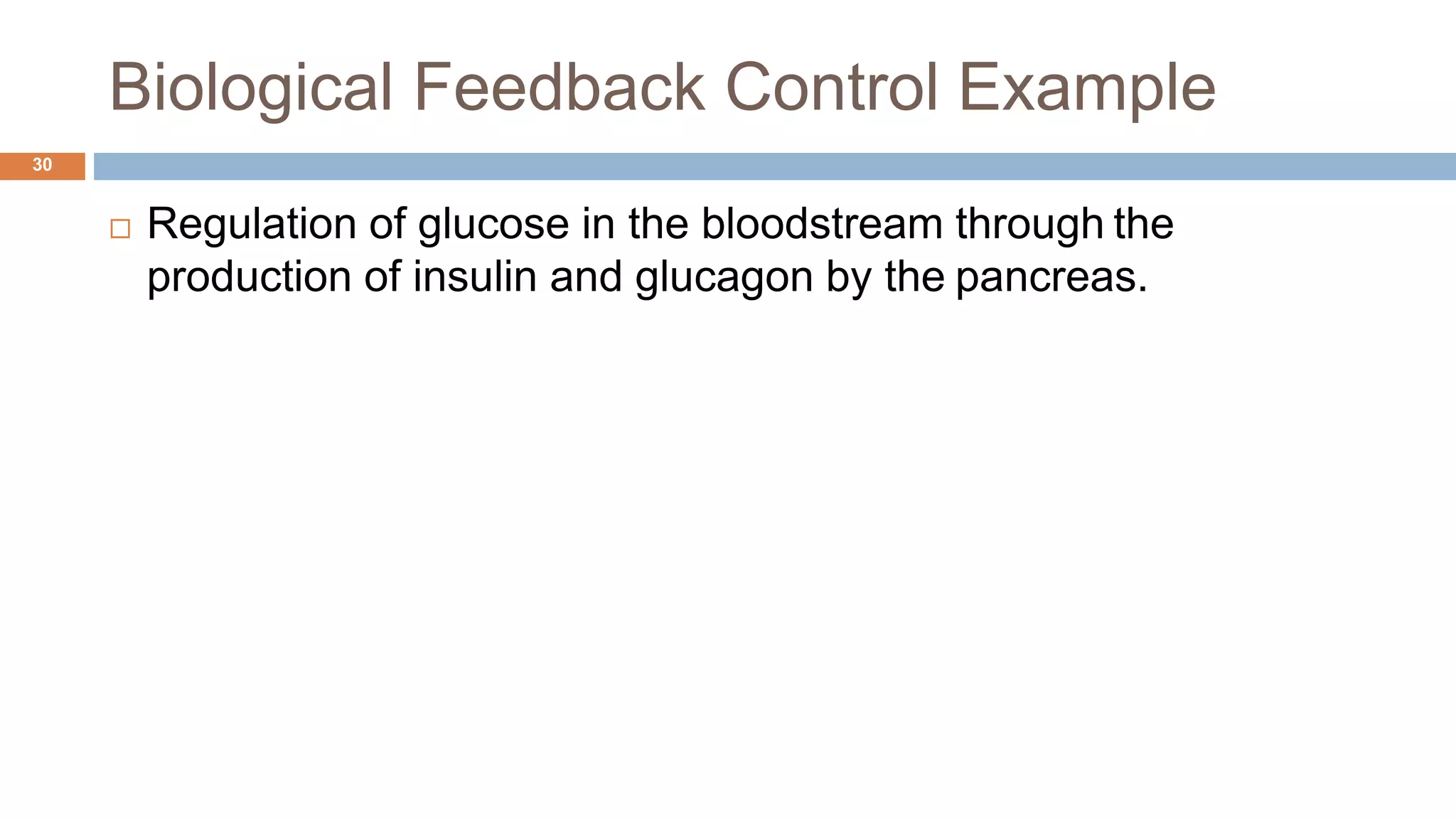
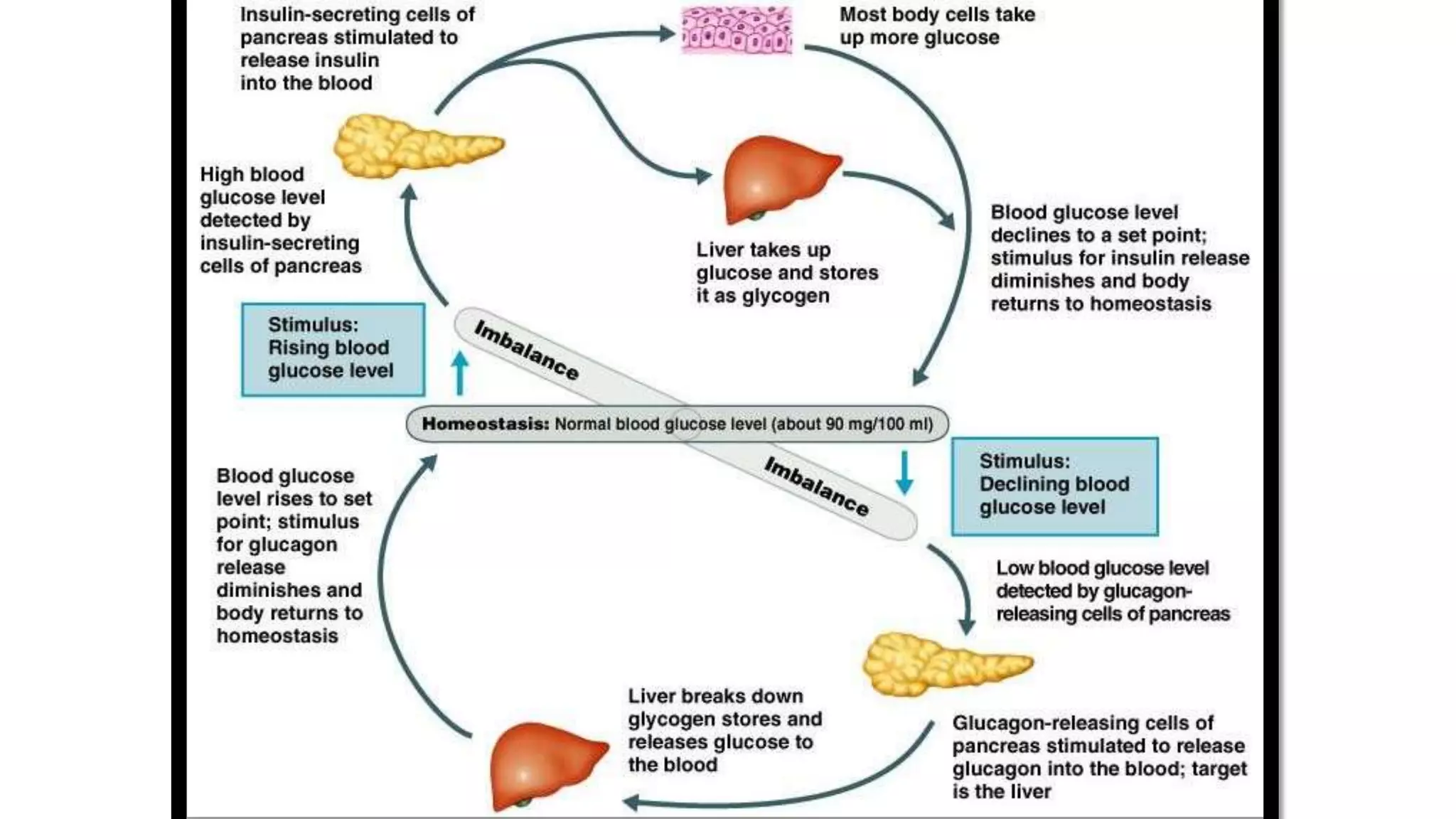
 Regulation of glucose in the bloodstream through the
production of insulin and glucagon by the pancreas.
RTECS 2015 12-Apr-17
Biological Feedback Control Example
32
 Can you find out the components of the feedback control loop?
Control Device
Pancreas
Actuator
Insulin OR
Glucagon
Process
Liver
Actual Blood
Glucose Conc.
error
Sensor
Glucoreceptors
In Pancreas
+
-
Measured Blood
Glucose
Desired Blood
GlucoseConc.
(90 mg per100 mL ofblood)
Stability33
RTECS 2015
Simple Real Pole p = -
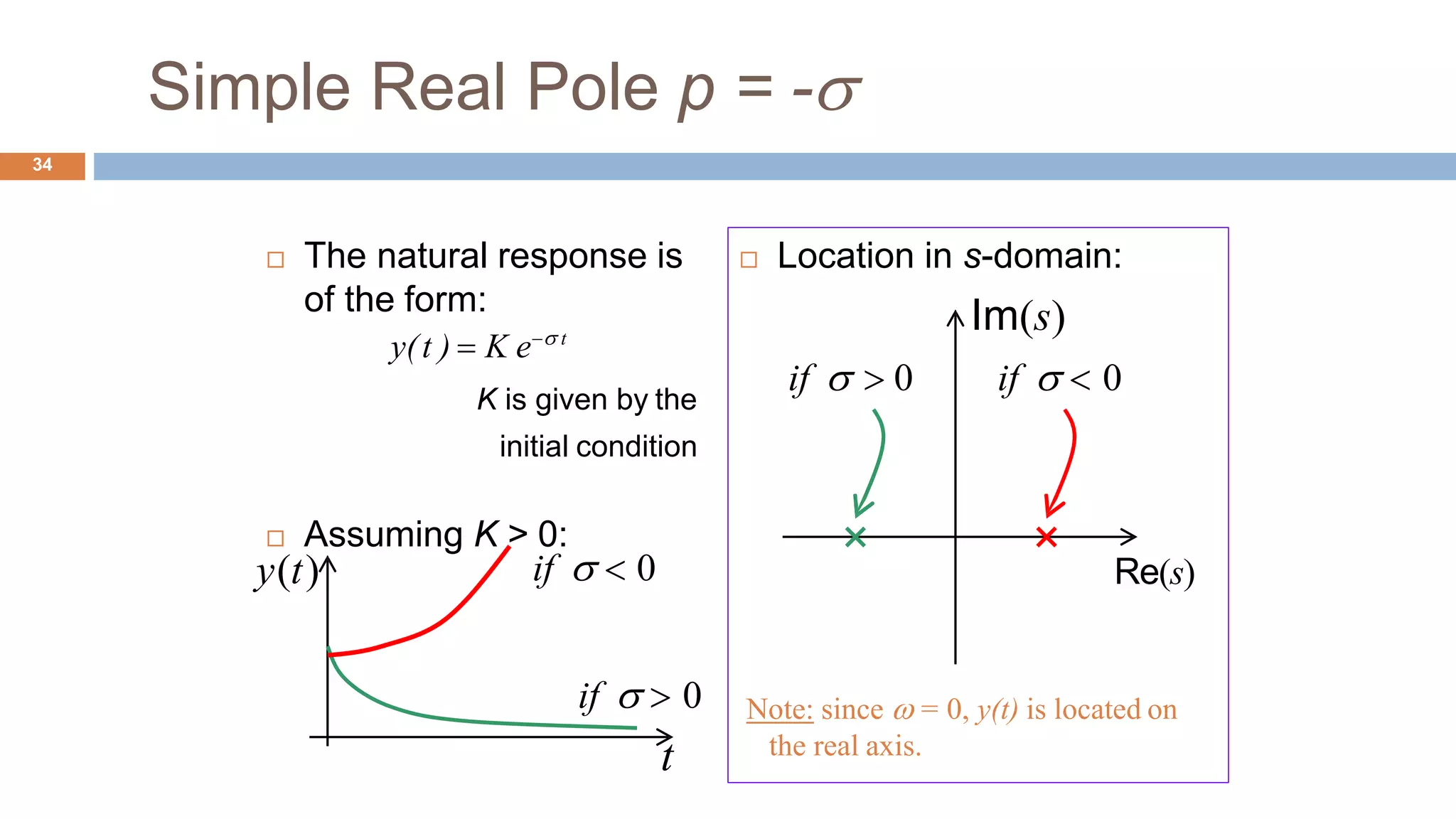
 The natural response is
of the form:
y(t )  K e t
K is given by the
initial condition
 Assuming K > 0:
34
if   0y(t)
if   0
t
 Location in s-domain:
Im(s)
if   0 if   0
Re(s)
Note: since  = 0, y(t) is located on
the real axis.
Simple Real Pole y(t )  Ke t
35
Note: Since  = 0, y(t) are located
on the real axis.
 Location in s-domain:
Im(s)
t
stable
Re(s)
stable
 Assuming K >0, if  >0:
y(t)
y(t) decays
t
• Effect of the value of  >0:
y(t) y(t) decay

Simple Real Pole y(t )  Ke t
 Assuming K >0, if  <0:
36
Note: Since  = 0, y(t) are located
on the real axis.
 Location in s-domain:
Im(s)
t
y(t)
unstable unstable
Re(s)
y(t) grows
t
• Effect of the value of  <0:
y(t) y(t) grow

Simple Real Pole p = 0
37
RTECS 2015
 The natural response is
of the form:
y(t)  B
B is given by the
initial condition
 Assuming B > 0:
y(t)
t
Note: since  = 0 and  = 0, y(t) is
located on the origin.
 Location in s-domain:
Im(s)
unstable
Re(s)
Simple Pair of Imaginary Poles
p = ± jd38
RTECS 2015
Re(s)
 The natural response is
of the form:
y(t )  Acos(d t ) Bsin( dt )
A and B are given by
the initial conditions
 Assuming A > 0, B > 0:
y(t)
t Note: since  = 0, y(t) is located on
the imaginary axis.
 Location in s-domain:
Im(s)
  0
 Assuming A > 0, B >0:
39
Re(s)
t
y(t)

y(t) oscillates
forever
t
Simple Pair of Imaginary Poles
y(t )  Acos(d t ) Bsin(dt )
• Effect of the value of  < 0:
y(t) y(t) oscillate
 Location in s-domain:
Im(s)
unstable
unstable
2

unstable
unstable
Note: In the case  = 0, the systemis
said unstable or critically stable.
RTECS 2015
Simple Pair of Complex Poles
p = - ±jd
d dAcos( t ) Bsin(  t )y(t )  et
 The natural response is
of the form:
A and B are given by
the initial conditions
40
RTECS 2015
if   0
 Location in s-domain:
Im(s)
if   0
if   0
 Assuming A >0, B > 0:
y(t)
if   0
t
stable unstable
Re(s)
stable unstable
Effects of Zeros
41
 A zero in the left half-plane
 Increases the overshoot if the zero is within a factor of 4 of the real
part of the complex poles. whereas it has very little influence on the
settling time.
 A zero in the right half-plane
 Depress the overshoot (and may causes an initial undershoot (=the
step response starts out in the wrong direction).
Effects of Additional Poles
42
 An additional pole in the left half plane
 increases the rise time significantly (=slows down the response) if
the extra pole is within a factor 4 of the real part of the complex
poles.
 If the extra real pole  is more than 6 times Re{p}, the effect is
negligible.
RTECS 201543
Well Behaved Signals44
How To Specify Controller Requirements ?
45
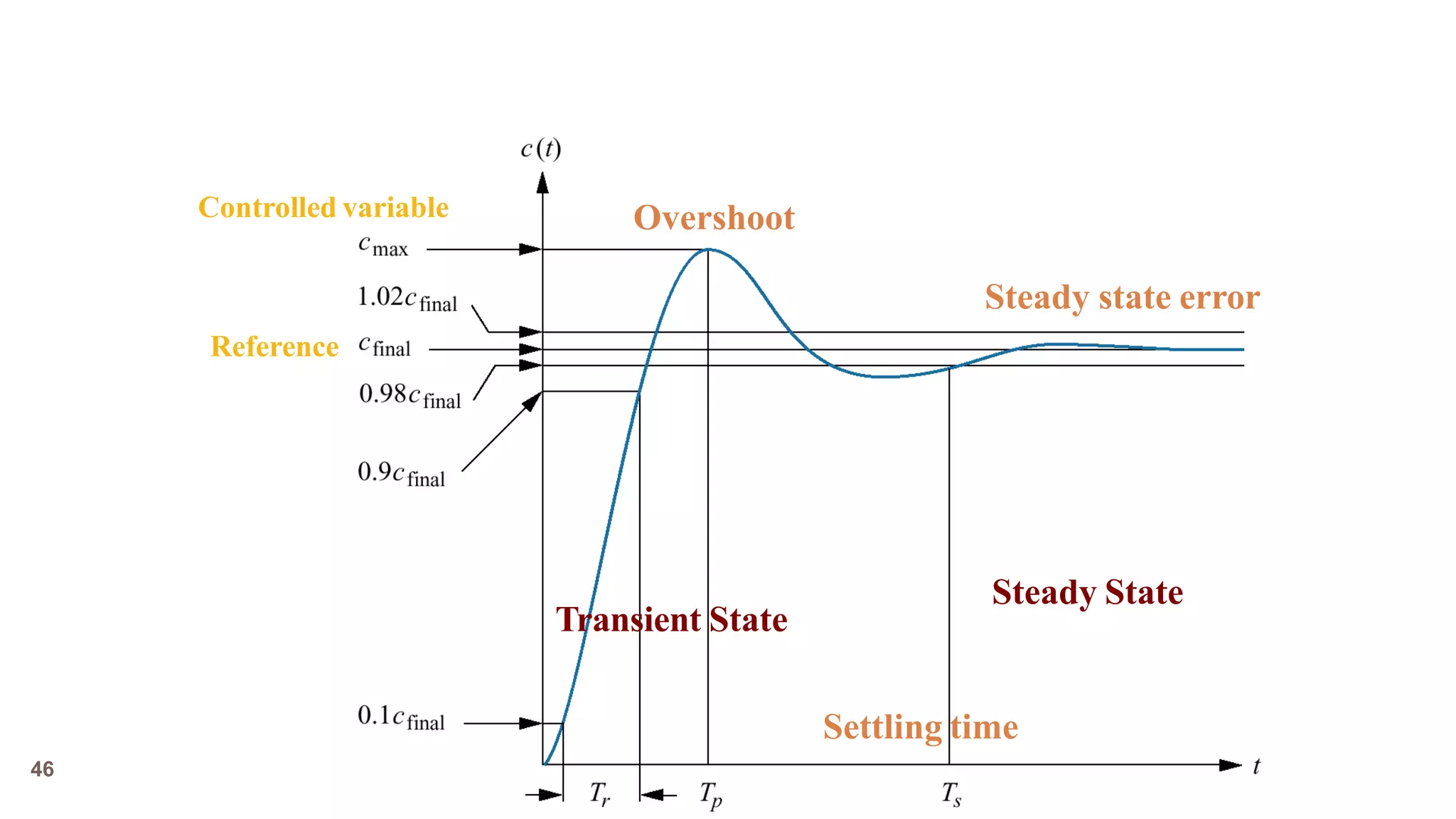
 Step Input
 Specify the requirements on the response to a step reference signal
 Transient Response
 First part of system response when the output is still changing
 Steady State Response
 The final state for the system output
RTECS 201546
Settling time
OvershootControlled variable
Reference
Steady State
Transient State
Steady state error
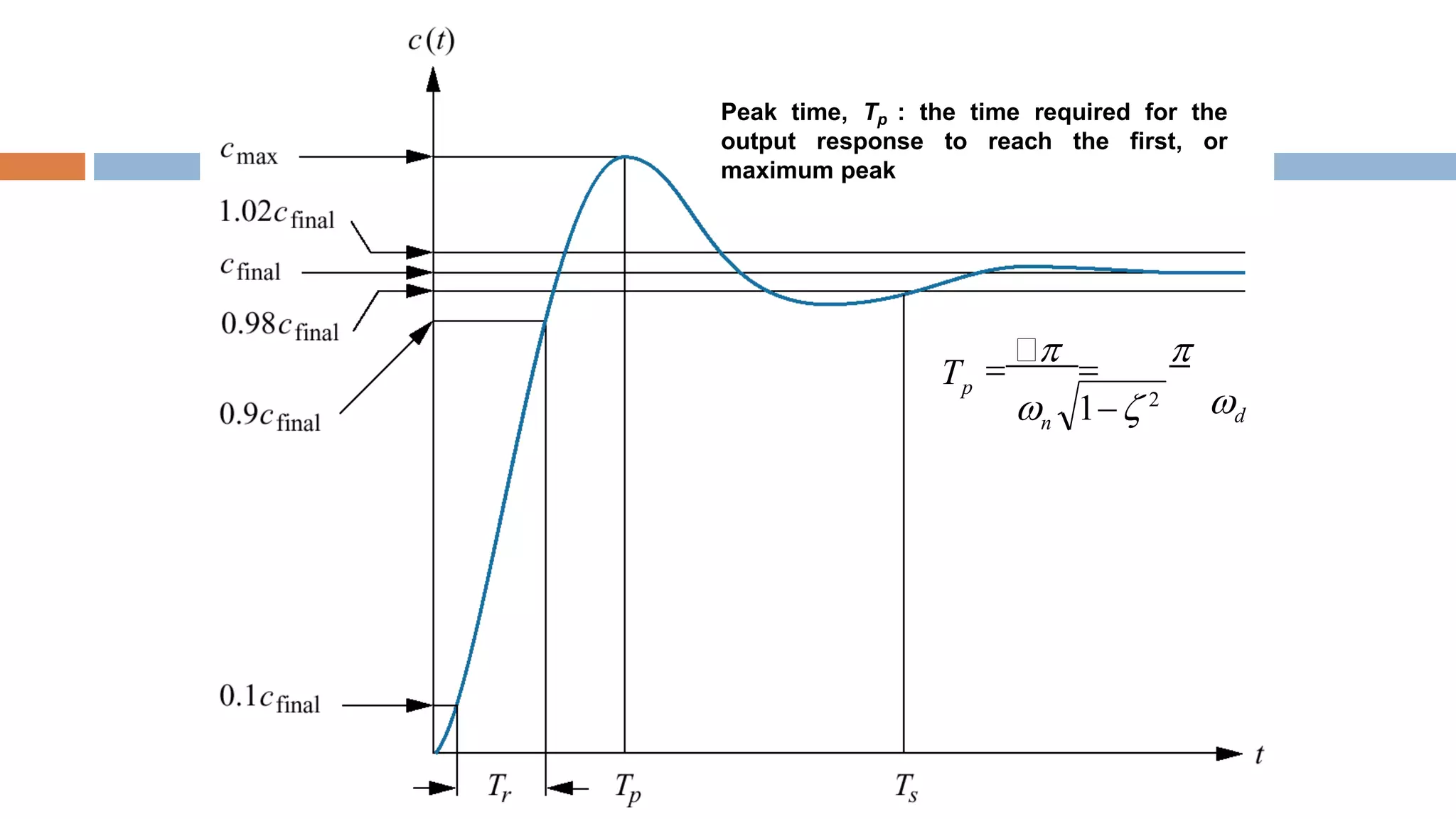
Delay time, Td : the time needed for the
output response to reach 50% of its final
value.
Rise time, Tr : the time taken for the output
response to go from 10% to 90% of its final
value.
Settling time, Ts : the time taken for the
output response to reach, and stay within
2% of its final output value
dn
s
 
4

4
T 
Peak time, Tp : the time required for the
output response to reach the first, or
maximum peak
dn
pT


 

 1 2
Percentage overshoot, %OS : the amount
of the output response overshoots the final
value at the peak time, expressed in
percentage of steady-state value
cfinal
c final
100%%OS 
cmax
1 2
%OS  e 100%
1 2
)
cmax
( /
 c(tp ) 1 e

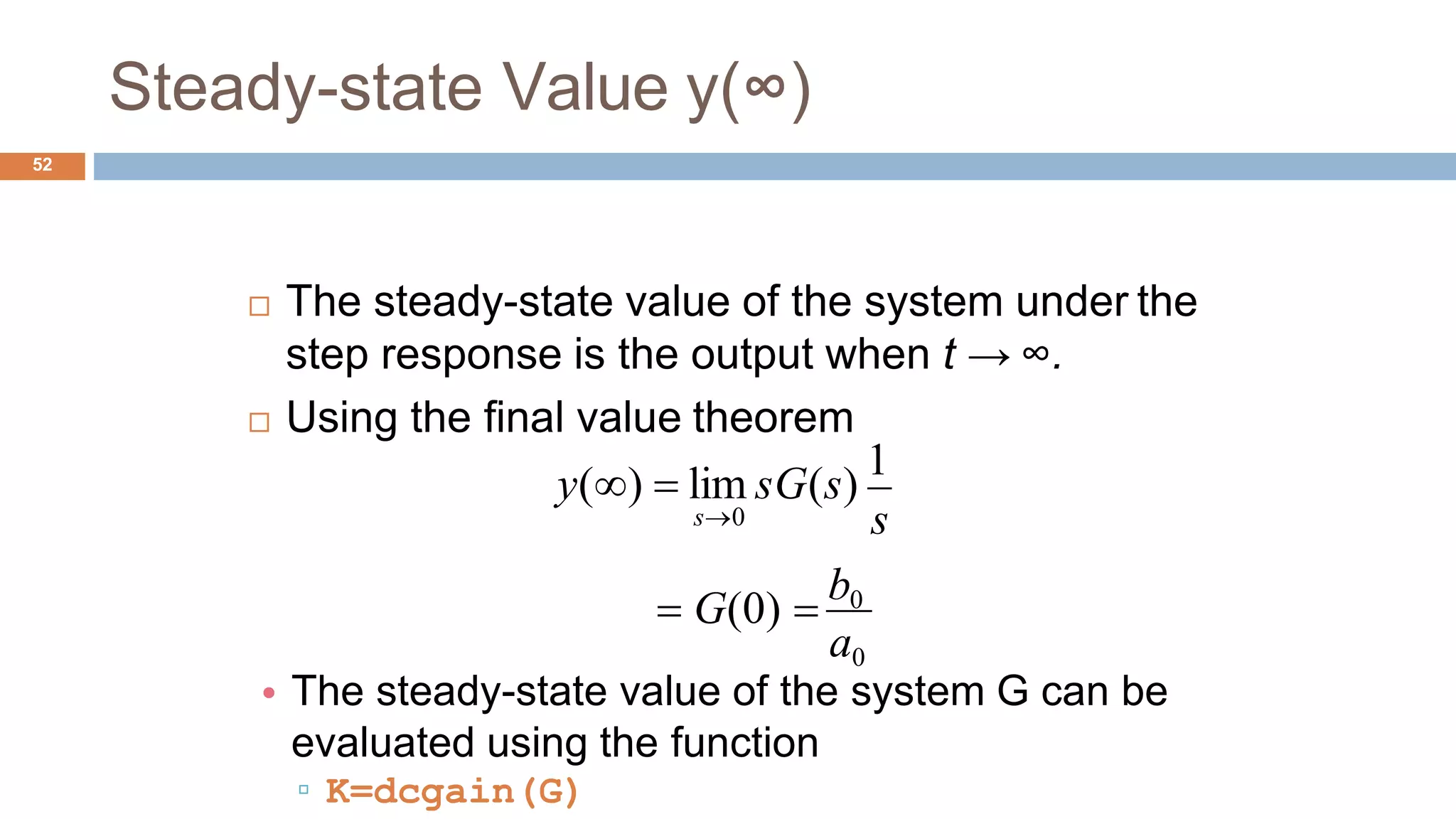
• The steady-state value of the system G can be
evaluated using the function
▫ K=dcgain(G)
Steady-state Value y(∞)
52
 The steady-state value of the system under the
step response is the output when t → ∞.
 Using the final value theorem
a0
s
y()  lim sG(s)
1
s0
 G(0) 
b0
Laplace Transform Method
53
 Inverse Laplace transformation is used to obtain the output
signal in the time domain
 Symbolic Toolbox of MATLAB
Laplace Transform Method Example
54
s4
u(t)  2 2e3t
sin(2t)
 For the transfer function G(s) and the input u(t),
obtain the output y(t)
 Hint
 Laplace command: laplace
 Inverse Laplace command: i laplace
 7s3
17s2
17s 6
s3
 7s2
3s  4
G(s) 
RTECS

06 control.systems

  • 1.
  • 2.
  • 3.
    Regulatory Control / LoadDisturbance Rejection4  Maintains a parameter at or near a set-point despite disturbance  Is hence called “Load Disturbance rejection problem”  Example  Cruise control  Siphon Water Level Control
  • 4.
    Regulatory Control Siphon WaterLevel Control5  Principle of Operation  OPEN  If water level becomes low in the reservoir, the lever comes down by the weight of floating ball and the ball of valve- room rotating by the lever opens the flow way.  CLOSE  If water level becomes high in the reservoir, the lever comes up by the buoyancy of floating ball and the ball of valve- room rotating by the lever inside of valve closes the flow way.
  • 5.
    Regulatory Control Siphon WaterLevel Control6  Set point  Normalizing the scale, the set point can be taken as a reference  Desired signal = 0  Output signal @ steady state = 0  Control signal @ steady state = 0  Disturbance  Flushing the toilet
  • 6.
    Servo Control /Setpoint Tracking Control / Trajectory Control7  Cause the plant output to follow the changing input command as closely as possible  Examples  Remote control car  Automatic parking control
  • 7.
    Servo Control /Tracking Control Automatic Parking Control8
  • 8.
  • 9.
  • 10.
    Open Loop Control 11 Characteristics  Highly sensitive to extraneous disturbances  Highly sensitive to parametrical variation in the process  TypicalApplications  Stepper motor  Motor with a worm gear (very high reduction ratio)  Electric toaster
  • 11.
    Closed Loop Control (FeedbackControl)12 Gc(s) Controller   n sensor noise  w load disturbance  Gprocess(s) u control y output r reference input, or set-point e  sensed error GActuator(s) Actuator Process
  • 12.
    Closed Loop Control (FeedbackControl)13  Closed loop control strategy involves  Measurement of the actual output,  Comparison with the required reference value and  Employing a suitable correction compensating for any deviation Gc(s) Controller   n sensor noise  w load disturbance  u control y output   r reference input, or set-point e sensed error GActuator(s) Gprocess(s) Actuator Process
  • 13.
    Five Signals ofFeedback Control Loop 14  Set Point  Desired output to be performed by the system  constant for regulation control and  variable for trajectory control  Error signal  The deviation between the desired behaviour and the system sensed output.  Command/Control signal  The signal generated from the controller Gc(s) Controller   n sensor noise  w load disturbance u control y output  reference input, or set-point r e sensed error GActuator(s Gprocess(s)) Actuator Process
  • 14.
    Five Signals ofFeedback Control Loop 15 Gc(s)   n sensor noise   Disturbance  A temporary change in environmental conditions that causes a pronounced change in the system behaviour  Low frequency deterministic measurable change  Noise  Random change of the signal at a high frequency  Only statistically measurable w load disturbance  Gprocess(s) Process u control y output  reference input, or set-point r e sensed error GActuator(s) Controller Actuator
  • 15.
    Advantages of FeedbackControl 16  Speeds up the response  Reduces steady-state error  Reduces the sensitivity of a system to  External disturbances  Variations in its individual elements & components  Improves stability
  • 16.
    The Cost ofFeedback 17  Increased number of components and complexity  Possibility of instability  Whereas the open-loop system is stable, the closed-loop system may not be always stable.
  • 17.
    One DOF FeedbackController18
  • 18.
    One DOF FeedbackController Block Diagram 19 Gc(s) Controller   n sensor noise  w load disturbance  Gp(s) Plant u control y output r reference input, or set-point e  sensed error W(s) Gp (s) 1GcGp (s) N(s)  GcGp (s) 1GcGp (s) R(s)  GcGp (s) 1GcGp (s) Y (s)
  • 19.
    Tracking /Servo ControlProblem 20 R(s) GcGp (s) 1GcGp (s) Y (s)  Gc(s) Controller   n sensor noise  w load disturbance  Gp(s) Plant u control y output r reference input, or set-point e  sensed error 1 if GcGp (s)  1
  • 20.
    Disturbance Rejection Problem 21 Gc(s) Controller  n sensor noise  w load disturbance  Gp(s) Plant u control y output r reference input, or set-point e  sensed error W(s) Gp (s) 1GcGp (s) Y(s) 
  • 21.
    Noise Problem 22 Gc(s) Controller  n sensor noise  w load disturbance  Gp(s) Plant u control y output r reference input, or set-point e  sensed error N(s) c p GcGp (s) 1 G G (s) Y (s)  1if GcGp (s)  1
  • 22.
    One DOF FeedbackController 23  To address all aspects of the system, only one degree of freedom is available, namely, Gc(s) W(s) Gp (s)GcGp (s) GcGp (s) 1GcGp (s) R(s)  N(s)  1 GcGp (s) 1GcGp (s) Y (s) Gc(s) Controller  n sensor noise  w load disturbance  Gp(s) Plant u control y output r reference input, or set-point e sensed error
  • 23.
     Series Connection G=G2*G1  where G1 and G2 are LTI objects (tf, ss, or zpk)  Parallel Connection  G=G1+G2  where G1 and G2 are LTI objects (tf, ss, or zpk)  Feedback Connection  G=feedback(G,H,Sign)  If Sign=-1, the negative feedback structure is indicated; negative feedbackis the default Modeling of Interconnected Block Diagrams in Matlab24
  • 24.
    Modeling of InterconnectedBlock Diagrams in Matlab Example  Where H(s) is a feeedback block representing a first order low pass filter with the aim of sensor noise cancellation  tf  Create transfer function model, convert to transfer function model  feedback  Feedback connection of two models  Gp = tf( [1 7 24 24], [1 10 35 50 24] )  Gc = tf( [10 5], [1 0] )  H = tf( 1, [0.01, 1] )  G_cl_loop = feedback( Gp*Gc, H, -1) 25 0.01s1 H (s) s 1 10s 5 s3  7s2  24s 24 10s3  35s2  50s 24 Gc (s)  Gp (s)  s4
  • 25.
  • 26.
    Step response evaluationswith MATLAB 27  step(G)  %automatic draw of step response curves  [y,t]=step(G)  %evaluate the responses, but not drawn  [y,t]=step(G,t_f)  % final simulation time t_f setting  y=step(G,t)  %simulation on user defined time vector t
  • 27.
    Unit Step Responsein MATLAB 28  OL_Sys = zpk([],[0 -6],25)  CL_Sys = feedback(OL_Sys,1)  figure  step(CL_Sys);  grid on  stepinfo(CL_Sys) R(s) + Y(s)25 s(s 6)
  • 28.
    Unit Step Responsein MATLAB 29  RiseTime: 0.3711  SettlingTime: 1.1887  SettlingMin: 0.9083  SettlingMax: 1.0948  Overshoot: 9.4773  Undershoot: 0  Peak: 1.0948  PeakTime: 0.7829 Step Response Amplitude 0.2 0.4 0.6 0.8 Time(sec) 1 1.2 1.4 1.6 0 0 0.2 0.4 0.6 0.8 1 1.2 1.4 System: CL_Sys Rise Time(sec ): 0.372 System: CL_Sys Peak amplitude: 1.09 Overshoot (%): 9.47 At time (sec): 0.777 System: CL_Sys Settling Time (sec): 1.19
  • 29.
    Biological Feedback ControlExample 30  Regulation of glucose in the bloodstream through the production of insulin and glucagon by the pancreas.
  • 30.
  • 31.
    Biological Feedback ControlExample 32  Can you find out the components of the feedback control loop? Control Device Pancreas Actuator Insulin OR Glucagon Process Liver Actual Blood Glucose Conc. error Sensor Glucoreceptors In Pancreas + - Measured Blood Glucose Desired Blood GlucoseConc. (90 mg per100 mL ofblood)
  • 32.
  • 33.
    Simple Real Polep = -  The natural response is of the form: y(t )  K e t K is given by the initial condition  Assuming K > 0: 34 if   0y(t) if   0 t  Location in s-domain: Im(s) if   0 if   0 Re(s) Note: since  = 0, y(t) is located on the real axis.
  • 34.
    Simple Real Poley(t )  Ke t 35 Note: Since  = 0, y(t) are located on the real axis.  Location in s-domain: Im(s) t stable Re(s) stable  Assuming K >0, if  >0: y(t) y(t) decays t • Effect of the value of  >0: y(t) y(t) decay 
  • 35.
    Simple Real Poley(t )  Ke t  Assuming K >0, if  <0: 36 Note: Since  = 0, y(t) are located on the real axis.  Location in s-domain: Im(s) t y(t) unstable unstable Re(s) y(t) grows t • Effect of the value of  <0: y(t) y(t) grow 
  • 36.
    Simple Real Polep = 0 37 RTECS 2015  The natural response is of the form: y(t)  B B is given by the initial condition  Assuming B > 0: y(t) t Note: since  = 0 and  = 0, y(t) is located on the origin.  Location in s-domain: Im(s) unstable Re(s)
  • 37.
    Simple Pair ofImaginary Poles p = ± jd38 RTECS 2015 Re(s)  The natural response is of the form: y(t )  Acos(d t ) Bsin( dt ) A and B are given by the initial conditions  Assuming A > 0, B > 0: y(t) t Note: since  = 0, y(t) is located on the imaginary axis.  Location in s-domain: Im(s)   0
  • 38.
     Assuming A> 0, B >0: 39 Re(s) t y(t)  y(t) oscillates forever t Simple Pair of Imaginary Poles y(t )  Acos(d t ) Bsin(dt ) • Effect of the value of  < 0: y(t) y(t) oscillate  Location in s-domain: Im(s) unstable unstable 2  unstable unstable Note: In the case  = 0, the systemis said unstable or critically stable. RTECS 2015
  • 39.
    Simple Pair ofComplex Poles p = - ±jd d dAcos( t ) Bsin(  t )y(t )  et  The natural response is of the form: A and B are given by the initial conditions 40 RTECS 2015 if   0  Location in s-domain: Im(s) if   0 if   0  Assuming A >0, B > 0: y(t) if   0 t stable unstable Re(s) stable unstable
  • 40.
    Effects of Zeros 41 A zero in the left half-plane  Increases the overshoot if the zero is within a factor of 4 of the real part of the complex poles. whereas it has very little influence on the settling time.  A zero in the right half-plane  Depress the overshoot (and may causes an initial undershoot (=the step response starts out in the wrong direction).
  • 41.
    Effects of AdditionalPoles 42  An additional pole in the left half plane  increases the rise time significantly (=slows down the response) if the extra pole is within a factor 4 of the real part of the complex poles.  If the extra real pole  is more than 6 times Re{p}, the effect is negligible.
  • 42.
  • 43.
  • 44.
    How To SpecifyController Requirements ? 45  Step Input  Specify the requirements on the response to a step reference signal  Transient Response  First part of system response when the output is still changing  Steady State Response  The final state for the system output
  • 45.
    RTECS 201546 Settling time OvershootControlledvariable Reference Steady State Transient State Steady state error
  • 46.
    Delay time, Td: the time needed for the output response to reach 50% of its final value.
  • 47.
    Rise time, Tr: the time taken for the output response to go from 10% to 90% of its final value.
  • 48.
    Settling time, Ts: the time taken for the output response to reach, and stay within 2% of its final output value dn s   4  4 T 
  • 49.
    Peak time, Tp: the time required for the output response to reach the first, or maximum peak dn pT       1 2
  • 50.
    Percentage overshoot, %OS: the amount of the output response overshoots the final value at the peak time, expressed in percentage of steady-state value cfinal c final 100%%OS  cmax 1 2 %OS  e 100% 1 2 ) cmax ( /  c(tp ) 1 e 
  • 51.
    • The steady-statevalue of the system G can be evaluated using the function ▫ K=dcgain(G) Steady-state Value y(∞) 52  The steady-state value of the system under the step response is the output when t → ∞.  Using the final value theorem a0 s y()  lim sG(s) 1 s0  G(0)  b0
  • 52.
    Laplace Transform Method 53 Inverse Laplace transformation is used to obtain the output signal in the time domain  Symbolic Toolbox of MATLAB
  • 53.
    Laplace Transform MethodExample 54 s4 u(t)  2 2e3t sin(2t)  For the transfer function G(s) and the input u(t), obtain the output y(t)  Hint  Laplace command: laplace  Inverse Laplace command: i laplace  7s3 17s2 17s 6 s3  7s2 3s  4 G(s) 
  • 54.