September 28, 2018SIMATIC S7
SIEMENS LTD EGYPT
1/14
DATA BLOCKDATA BLOCK
SIEMENS
SIEMENS
September 28, 2018SIMATIC S7
SIEMENS LTD EGYPT
2/14
SIEMENS
Objectives
- Know The Elementary & Complex DB.
- How To Create DB.
- Familiar With Addressing & Accessing Data Element.
September 28, 2018SIMATIC S7
SIEMENS LTD EGYPT
3/14
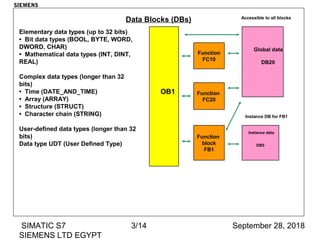
Data Blocks (DBs)
Function
FC10
Function
FC20
Function
block
FB1
OB1
Global data
DB20
Accessible to all blocks
Instance data
DB5
Instance DB for FB1
Elementary data types (up to 32 bits)
• Bit data types (BOOL, BYTE, WORD,
DWORD, CHAR)
• Mathematical data types (INT, DINT,
REAL)
Complex data types (longer than 32
bits)
• Time (DATE_AND_TIME)
• Array (ARRAY)
• Structure (STRUCT)
• Character chain (STRING)
User-defined data types (longer than 32
bits)
Data type UDT (User Defined Type)
SIEMENS
September 28, 2018SIMATIC S7
SIEMENS LTD EGYPT
4/14
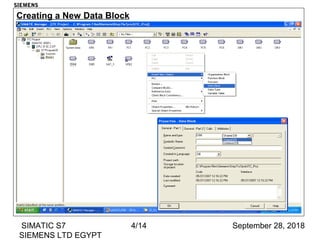
Creating a New Data Block
SIEMENS
September 28, 2018SIMATIC S7
SIEMENS LTD EGYPT
5/14
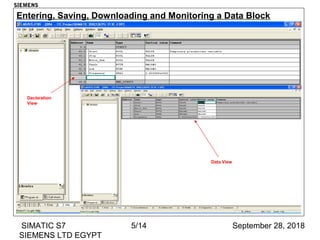
Entering, Saving, Downloading and Monitoring a Data Block
Declaration
View
Data View
SIEMENS
September 28, 2018SIMATIC S7
SIEMENS LTD EGYPT
6/14
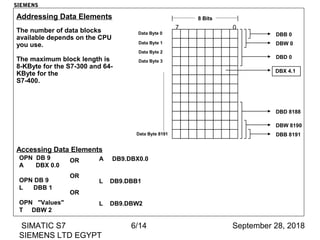
Addressing Data Elements
The number of data blocks
available depends on the CPU
you use.
The maximum block length is
8-KByte for the S7-300 and 64-
KByte for the
S7-400.
07
8 Bits
Data Byte 0 DBB 0
Data Byte 1 DBW 0
Data Byte 8191
DBD 8188
DBW 8190
DBB 8191
Data Byte 2
DBD 0
Data Byte 3
DBX 4.1
Accessing Data Elements
OPN DB 9
A DBX 0.0
OPN DB 9
L DBB 1
OPN "Values"
T DBW 2
A DB9.DBX0.0
L DB9.DBB1
L DB9.DBW2
OR
OR
OR
SIEMENS
September 28, 2018SIMATIC S7
SIEMENS LTD EGYPT
7/14
Exercise:
1- In FC6, Write a PLC program, using DB6 to calculate the following equation:
K = 4X + 18XZ + 2Z/2 + 2(2Y+3)
Then find the value of K at: X=2, Y=1 and Z=2
SIEMENS
September 28, 2018SIMATIC S7
SIEMENS LTD EGYPT
8/14
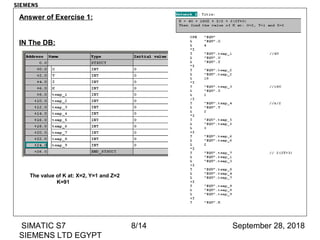
Answer of Exercise 1:
IN The DB:
The value of K at: X=2, Y=1 and Z=2
K=91
SIEMENS

Data Block

  • 1.
    September 28, 2018SIMATICS7 SIEMENS LTD EGYPT 1/14 DATA BLOCKDATA BLOCK SIEMENS SIEMENS
  • 2.
    September 28, 2018SIMATICS7 SIEMENS LTD EGYPT 2/14 SIEMENS Objectives - Know The Elementary & Complex DB. - How To Create DB. - Familiar With Addressing & Accessing Data Element.
  • 3.
    September 28, 2018SIMATICS7 SIEMENS LTD EGYPT 3/14 Data Blocks (DBs) Function FC10 Function FC20 Function block FB1 OB1 Global data DB20 Accessible to all blocks Instance data DB5 Instance DB for FB1 Elementary data types (up to 32 bits) • Bit data types (BOOL, BYTE, WORD, DWORD, CHAR) • Mathematical data types (INT, DINT, REAL) Complex data types (longer than 32 bits) • Time (DATE_AND_TIME) • Array (ARRAY) • Structure (STRUCT) • Character chain (STRING) User-defined data types (longer than 32 bits) Data type UDT (User Defined Type) SIEMENS
  • 4.
    September 28, 2018SIMATICS7 SIEMENS LTD EGYPT 4/14 Creating a New Data Block SIEMENS
  • 5.
    September 28, 2018SIMATICS7 SIEMENS LTD EGYPT 5/14 Entering, Saving, Downloading and Monitoring a Data Block Declaration View Data View SIEMENS
  • 6.
    September 28, 2018SIMATICS7 SIEMENS LTD EGYPT 6/14 Addressing Data Elements The number of data blocks available depends on the CPU you use. The maximum block length is 8-KByte for the S7-300 and 64- KByte for the S7-400. 07 8 Bits Data Byte 0 DBB 0 Data Byte 1 DBW 0 Data Byte 8191 DBD 8188 DBW 8190 DBB 8191 Data Byte 2 DBD 0 Data Byte 3 DBX 4.1 Accessing Data Elements OPN DB 9 A DBX 0.0 OPN DB 9 L DBB 1 OPN "Values" T DBW 2 A DB9.DBX0.0 L DB9.DBB1 L DB9.DBW2 OR OR OR SIEMENS
  • 7.
    September 28, 2018SIMATICS7 SIEMENS LTD EGYPT 7/14 Exercise: 1- In FC6, Write a PLC program, using DB6 to calculate the following equation: K = 4X + 18XZ + 2Z/2 + 2(2Y+3) Then find the value of K at: X=2, Y=1 and Z=2 SIEMENS
  • 8.
    September 28, 2018SIMATICS7 SIEMENS LTD EGYPT 8/14 Answer of Exercise 1: IN The DB: The value of K at: X=2, Y=1 and Z=2 K=91 SIEMENS

Editor's Notes

  • #5 Shared DB Shared data blocks are used to store global data. That is, for storing general data that can be accessed by every logic block (OB, FC, FB). Instance DB Instance data blocks are used as the "private memory area" or as the "memory" for a function block (FB). The parameters and the static variables of an FB are managed in its instance DB.
  • #6 Declaration View Data blocks are edited in the "declaration view", that is, the user declares the variables needed for storing the data here. The variables are created in a table, organized in lines and columns. Save You save the data block on the hard disk of the programming device using the "Diskette" icon. Download You have to download data blocks to the CPU, just as you do with logic blocks. Data View You can monitor online the current variable values in the data block (values of the variables in the CPU). To do so, you must first go into the "View" menu and switch to the "Data View". You can then activate the function using the "Glasses" icon. Initialize DB When you initialize a data block you overwrite the variable‘s current values with the initial values. This is also necessary when initial values that have been changed later on have to be accepted as actual values.View -> Data View -> Edit -> Initialize Data Block