Module 3: Implement a secure
environment
Introduction to database authentication, understand encryption solutions,
understand data sensitivity and monitor database threats
DP-300 Administering Microsoft
Azure SQL Solutions
Module objectives
After completing this module you will be able to:
Understand the differences between Windows, SQL Server and Azure Active Directory
Authentication
Describe and configure both data-at-rest encryption solutions as well as data-in-transit
encryption solutions
Implement a data sensitivity solution
Lesson 1: Configure database authentication and authorization
Lesson 1
objectives
Authentication options for Azure SQL Database
Security principals
Roles in Azure SQL Database
Understand permissions within Azure SQL
Understand the concept of least privilege
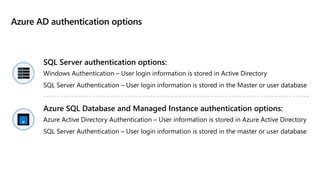
Azure AD authentication options
SQL Server authentication options:
Windows Authentication – User login information is stored in Active Directory
SQL Server Authentication – User login information is stored in the Master or user database
Azure SQL Database and Managed Instance authentication options:
Azure Active Directory Authentication – User information is stored in Azure Active Directory
SQL Server Authentication – User login information is stored in the master or user database
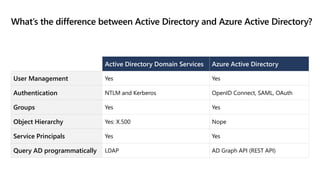
What’s the difference between Active Directory and Azure Active Directory?
Active Directory Domain Services Azure Active Directory
User Management Yes Yes
Authentication NTLM and Kerberos OpenID Connect, SAML, OAuth
Groups Yes Yes
Object Hierarchy Yes: X.500 Nope
Service Principals Yes Yes
Query AD programmatically LDAP AD Graph API (REST API)
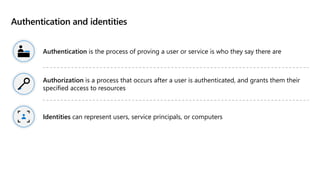
Authentication and identities
Authentication is the process of proving a user or service is who they say there are
Authorization is a process that occurs after a user is authenticated, and grants them their
specified access to resources
Identities can represent users, service principals, or computers
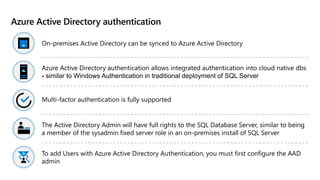
Azure Active Directory authentication
On-premises Active Directory can be synced to Azure Active Directory
Azure Active Directory authentication allows integrated authentication into cloud native dbs
- similar to Windows Authentication in traditional deployment of SQL Server
Multi-factor authentication is fully supported
The Active Directory Admin will have full rights to the SQL Database Server, similar to being
a member of the sysadmin fixed server role in an on-premises install of SQL Server
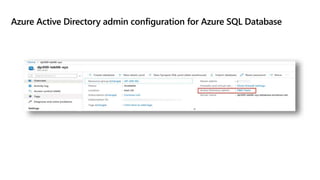
To add Users with Azure Active Directory Authentication, you must first configure the AAD
admin
Azure Active Directory admin configuration for Azure SQL Database
Demo: Configure Azure AD admin
Configure an Active Directory admin for an
Azure SQL Database
Security principals
Security principals
are any login, user,
group, or role within
the server or
database
Users within the
databases are either
mapped to a login,
or contained users
within the database
Contained users can
be based on SQL
Authentication or
Azure Active
Directory
Users can then be
mapped to roles in
order to give users
centrally managed
rights, or rights can
be granted directly
to a user
SQL Server Security overview
Securables: Object to which access must be secured
Principals: Security identities (users, service principals, or computers) that access
securables to perform actions
Permissions: Actions principals can perform on securables
Security Hierarchies: Securables can contain other securables, and principals can contain
other principals (roles)
Schemas and securables
Securables are resources within databases like tables, views, procedures that access is
granted to
Securable scopes: <server>.<database>.<schema>.<object>
Securables in Azure SQL Database only have the database and schema scopes
A schema is a collection of objects which allows objects to be grouped into separate
namespaces
Logins and users
Logins are created in the master database and are used for server access
Instance level permissions are applied to logins
Database level permissions are applied to users
Contained users are authenticated at the database
A user has access only to the database in which they are created
Built-in database roles
SQL Server and Azure SQL Database include several fixed roles within each database
Users may be added as members of one or more roles (including custom roles)
The Master database in Azure SQL Database has a couple of unique roles since the
sysadmin role does not exist
Server roles cannot be granted access to objects within a database directly and are
only available in SQL Server and Azure SQL Managed Instance, but not in Azure SQL
Database
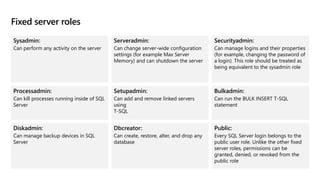
Fixed server roles
Sysadmin:
Can perform any activity on the server
Serveradmin:
Can change server-wide configuration
settings (for example Max Server
Memory) and can shutdown the server
Securityadmin:
Can manage logins and their properties
(for example, changing the password of
a login). This role should be treated as
being equivalent to the sysadmin role
Processadmin:
Can kill processes running inside of SQL
Server
Setupadmin:
Can add and remove linked servers
using
T-SQL
Bulkadmin:
Can run the BULK INSERT T-SQL
statement
Diskadmin:
Can manage backup devices in SQL
Server
Dbcreator:
Can create, restore, alter, and drop any
database
Public:
Every SQL Server login belongs to the
public user role. Unlike the other fixed
server roles, permissions can be
granted, denied, or revoked from the
public role
Database roles in SQL Server vs. Azure SQL Database
Roles are used to simplify the process of managing privileges in the database
In SQL Server and Managed Instance the scope of the role may be the database or
the server
In Azure SQL Database roles are scoped to the individual database
Both SQL Server and Azure SQL Database include built-in database roles, and allow for the
creation of custom roles
Special Roles for Azure SQL Database
Database level roles available in the virtual master database only
dbmanager – this role can create and delete databases. Equivalent to dbcreator fixed server
role.
loginmanager – this role can create and delete logins in the virtual master database.
Equivalent to securityadmin fixed server role.
Built-in Database Roles
Database role Description
db_owner Can perform all configuration and maintenance activities on the database, and can
also drop the database in SQL Server. (In SQL Database and Azure Synapse, some
maintenance activities require server-level permissions and cannot be performed
by db_owners.)
db_securityadmin Can modify role membership for custom roles only and manage permissions.
Members of this role can potentially elevate their privileges and their actions
should be monitored.
db_accessadmin Can add or remove access to the database for Windows logins, Windows groups,
and SQL Server logins.
db_backupoperator Can back up the database.
db_ddladmin Can run any Data Definition Language (DDL) command in a database.
db_datawriter Can add, delete, or change data in all user tables.
db_datareader Can read all data from all user tables.
db_denydatawriter Cannot add, modify, or delete any data in the user tables within a database.
db_denydatareader Cannot read any data in the user tables within a database.
Database and object permissions explained
There are four DML permissions on tables and views – SELECT, INSERT UPDATE and DELETE
Stored Procedures and Functions have their own permissions – ALTER, CONTROL, EXECUTE,
and VIEW DEFINITION
DCL permissions – GRANT, DENY, REVOKE
DDL permissions – CREATE, ALTER, DROP
Permissions which are REVOKED, remove any existing GRANT or DENY permission from the
object
Database and object permissions explained
Permissions can be assigned to users or roles within a database
Users may then be assigned to roles
Permissions are additive, with permissions from multiple role memberships applied
together
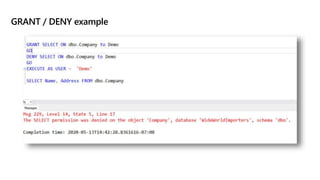
Preventing access through a DENY will override any GRANT to that object
GRANT / DENY example
EXECUTE AS USER / EXECUTE AS LOGIN definition
EXECUTE AS USER and EXECUTE AS LOGIN allows a statement to be executed in the security
context of another user or login
This capability allows for testing during the development process to ensure permissions are
correctly implemented
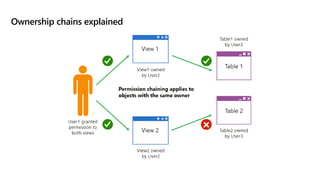
Ownership chains explained
Used when access to an object is needed to complete a task against another object
Allows a user to execute a stored procedure without the user needing right to the tables
which the stored procedure uses
Permission chaining only applies to objects with the same owner
If the user has the right to run the stored procedure, the user can access the tables for the
duration of the execution of the stored procedure, and only within the context of the stored
procedure
Ownership chains explained
Demo: Permission chaining
Execute a stored procedure as a lower
privileged user
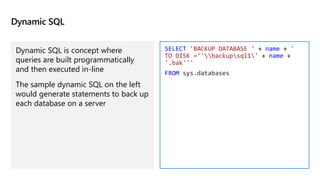
Dynamic SQL
Dynamic SQL is concept where
queries are built programmatically
and then executed in-line
The sample dynamic SQL on the left
would generate statements to back up
each database on a server
SELECT 'BACKUP DATABASE ' + name + '
TO DISK =''backupsql1' + name +
'.bak'''
FROM sys.databases
Least privilege
The concept of “Least Privilege” means that users never have more
permissions than they need to get the task done
If the user runs an application and the user only needs to use stored
procedures, then the user should have the EXECUTE permission for
the stored procedure, and they should have no permissions on the
underlying tables
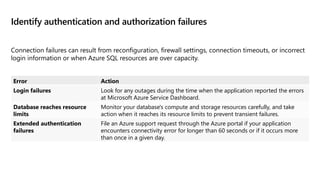
Identify authentication and authorization failures
Connection failures can result from reconfiguration, firewall settings, connection timeouts, or incorrect
login information or when Azure SQL resources are over capacity.
Error Action
Login failures Look for any outages during the time when the application reported the errors
at Microsoft Azure Service Dashboard.
Database reaches resource
limits
Monitor your database's compute and storage resources carefully, and take
action when it reaches its resource limits to prevent transient failures.
Extended authentication
failures
File an Azure support request through the Azure portal if your application
encounters connectivity error for longer than 60 seconds or if it occurs more
than once in a given day.
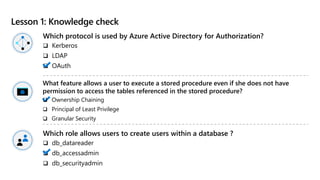
Lesson 1: Knowledge check
Which protocol is used by Azure Active Directory for Authorization?
 Kerberos
 LDAP
 OAuth
Which role allows users to create users within a database ?
 db_datareader
 db_accessadmin
 db_securityadmin
What feature allows a user to execute a stored procedure even if she does not have
permission to access the tables referenced in the stored procedure?
 Ownership Chaining
 Principal of Least Privilege
 Granular Security
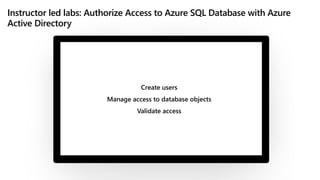
Instructor led labs: Authorize Access to Azure SQL Database with Azure
Active Directory
Create users
Manage access to database objects
Validate access
Lesson 2: Protect data in-transit and at rest
Lesson 2
objectives
Understand the data encryption
options available in the various
platforms
Understand how to configure
data at rest encryption for
Microsoft SQL Server
Understand what Dynamic Data
Encryption is used for and how to
configure it
Understand how to configure SQL
Server to use Azure Key Vault
Understand the difference between
database and instance firewalls in
Azure SQL Database
What is encryption at rest?
Encryption at rest protects data files, transaction log files, and backup files by requiring a
certificate to bring them online
SQL Server and Azure SQL Database implement this through a feature called Transparent
Data Encryption
You can also encrypt your Azure VM disks to provide an additional level of protection
beyond TDE for your SQL Servers
Encryption at rest
Data at rest is the data that has been stored on a physical medium. Data is unreadable
without the keys and secrets
Azure Disk Encryption uses Windows BitLocker, Linux dm-crypt
Azure Storage (Azure Storage Service Encryption) and Azure SQL Database (TDE) encrypt
data at rest by default​
Use Azure Key Vault to maintain control of keys
Encrypt drives before you write sensitive data​
Data at rest vs. Data in transit
Data at rest –encrypts data while it's on file storage.
Data in transit –encrypts data while it travels through private or public
network communication channels.
Transparent Data Encryption
Transparent Data Encryption (TDE) works by encrypting data in SQL Server and Azure SQL
Database on a page level as the page is written to the disk. TDE is enabled by default
As data is read from the disk to the buffer pool, it is decrypted before being written to the
buffer pool
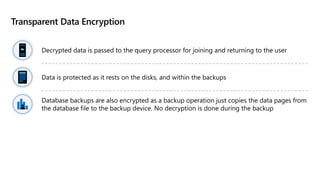
Decrypted data is passed to the query processor for joining and returning to the user
Data is protected as it rests on the disks, and within the backups. Uses symmetric key called
the database encryption key
TDE can be configured using the default Azure provided key, or bring-your-own-key (BYOK)
Transparent Data Encryption
Decrypted data is passed to the query processor for joining and returning to the user​
Data is protected as it rests on the disks, and within the backups​
Database backups are also encrypted as a backup operation just copies the data pages from
the database file to the backup device. No decryption is done during the backup​
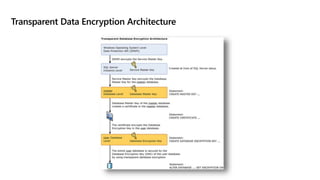
Transparent Data Encryption Architecture
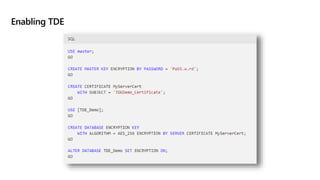
Enabling TDE
Managing TDE
Always backup the certificate that is created in the master database
You will not be able to restore this database to this, or another server without first restoring
the certificate
Without a certificate, you will not be able to restore or read the database from backup or
attach the data or log files
When setting up a database within an Availability Group, restore this certificate to each
server within the Availability Group
Configure server and database firewall rules
Each Azure SQL Database maps to a public IP address which is hosted by Microsoft Firewalls
are designed to prevent people from accessing resources that they should not be accessing
By default all access should be blocked with access opened as needed
In Azure SQL Database there are firewalls at the server level as well as at the database level
When access through a firewall is opened, anyone at the source IP address has access
through to the databases on the Azure SQL server
Firewall rules should be modified carefully
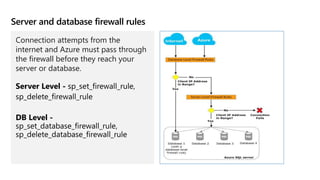
Server and database firewall rules
Connection attempts from the
internet and Azure must pass through
the firewall before they reach your
server or database.
Virtual network endpoints
Network Peering allows connectivity from within a Virtual Network to Azure PaaS services
including Azure SQL Database
Network Endpoint peering is limited to one Azure region
Network Endpoint peering allows only server level connections, not a database one
Requires outbound access to Azure SQL Database Public IP addresses
Private link
Private link allows you to connect various Azure services (including Azure SQL DB) to a
private endpoint
A private endpoint is a private IP address within a specific virtual network subnet
This allows for you to use network rules to prevent data exfiltration
Can route directly to Azure SQL DB over ExpressRoute or Point to Point VPN without
traversing the public internet
Object level encryption
While TDE encrypts the data files and the backup files, it does not encrypt the data
within tables
SQL Server uses Always Encrypted to encrypt table data, so that only the application with
the correct column key can decrypt the data
This protects data from being exfiltrated (unauthorized data transfer) by a malicious
administrator
Always Encrypted benefits
Encrypts data within tables, protects the data both as it rests on the disk, and as it is in
flight between the SQL Server and the client
Allows for data within the database to be encrypted without the database engine ever
seeing plain text data, and is also supported by Azure SQL Database
Data is encrypted with certificates created by the database, but stored in the application
Even administrators cannot decrypt the encrypted data
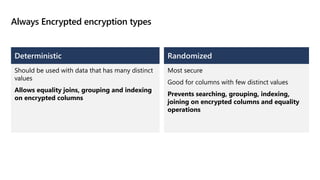
Always Encrypted encryption types
Deterministic
Should be used with data that has many distinct
values​
Allows equality joins, grouping and indexing
on encrypted columns
Randomized
Most secure
Good for columns with few distinct values​
Prevents searching, grouping, indexing,
joining on encrypted columns and equality
operations
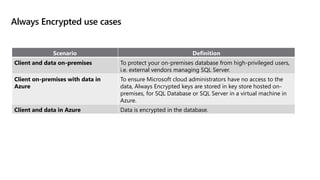
Always Encrypted use cases
Scenario Definition
Client and data on-premises To protect your on-premises database from high-privileged users,
i.e. external vendors managing SQL Server.
Client on-premises with data in
Azure
To ensure Microsoft cloud administrators have no access to the
data, Always Encrypted keys are stored in key store hosted on-
premises, for SQL Database or SQL Server in a virtual machine in
Azure.
Client and data in Azure Data is encrypted in the database.
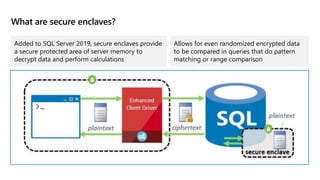
What are secure enclaves?
Added to SQL Server 2019, secure enclaves provide
a secure protected area of server memory to
decrypt data and perform calculations
Allows for even randomized encrypted data
to be compared in queries that do pattern
matching or range comparison
Demo: Always Encrypted
Encrypting data
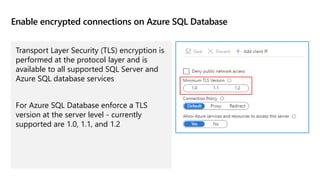
Enable encrypted connections on Azure SQL Database
Transport Layer Security (TLS) encryption is
performed at the protocol layer and is
available to all supported SQL Server and
Azure SQL database services
For Azure SQL Database enforce a TLS
version at the server level - currently
supported are 1.0, 1.1, and 1.2
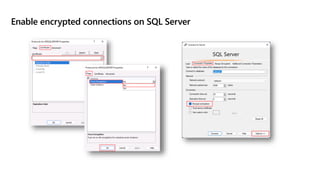
Enable encrypted connections on SQL Server
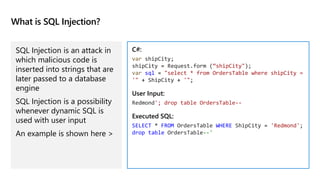
What is SQL Injection?
SQL Injection is an attack in
which malicious code is
inserted into strings that are
later passed to a database
engine
SQL Injection is a possibility
whenever dynamic SQL is
used with user input
An example is shown here >
C#:
var shipCity;
shipCity = Request.form (“shipCity");
var sql = "select * from OrdersTable where shipCity =
'" + ShipCity + '";
User Input:
Redmond'; drop table OrdersTable--
Executed SQL:
SELECT * FROM OrdersTable WHERE ShipCity = 'Redmond';
drop table OrdersTable--'
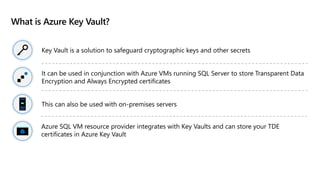
What is Azure Key Vault?
Key Vault is a solution to safeguard cryptographic keys and other secrets
It can be used in conjunction with Azure VMs running SQL Server to store Transparent Data
Encryption and Always Encrypted certificates
This can also be used with on-premises servers
Azure SQL VM resource provider integrates with Key Vaults and can store your TDE
certificates in Azure Key Vault
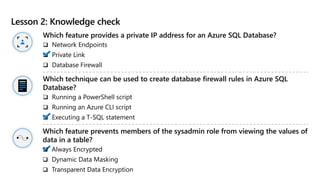
Lesson 2: Knowledge check
Which feature provides a private IP address for an Azure SQL Database?
 Network Endpoints
 Private Link
 Database Firewall
Which technique can be used to create database firewall rules in Azure SQL
Database?
 Running a PowerShell script
 Running an Azure CLI script
 Executing a T-SQL statement
Which feature prevents members of the sysadmin role from viewing the values of
data in a table?
 Always Encrypted
 Dynamic Data Masking
 Transparent Data Encryption
Instructor led labs: Configure a server-based firewall rule using the Azure
portal
Configure Azure SQL Database firewall rules
Validate access
Lesson 3: Implement compliance controls for sensitive data
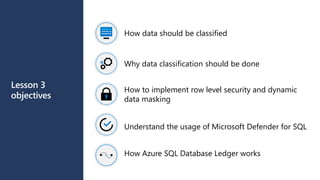
Lesson 3
objectives
How data should be classified
Why data classification should be done
How to implement row level security and dynamic
data masking
Understand the usage of Microsoft Defender for SQL
How Azure SQL Database Ledger works
Data classification
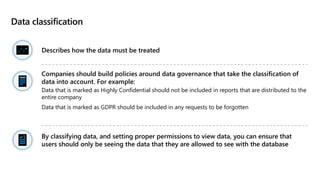
Describes how the data must be treated
Companies should build policies around data governance that take the classification of
data into account. For example:
Data that is marked as Highly Confidential should not be included in reports that are distributed to the
entire company
Data that is marked as GDPR should be included in any requests to be forgotten
By classifying data, and setting proper permissions to view data, you can ensure that
users should only be seeing the data that they are allowed to see with the database
How your data should be classified
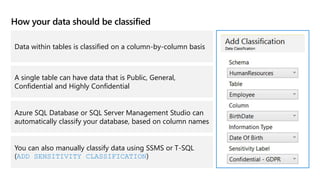
Data within tables is classified on a column-by-column basis
A single table can have data that is Public, General,
Confidential and Highly Confidential
Azure SQL Database or SQL Server Management Studio can
automatically classify your database, based on column names
You can also manually classify data using SSMS or T-SQL
(ADD SENSITIVITY CLASSIFICATION)
Explore server and database audit
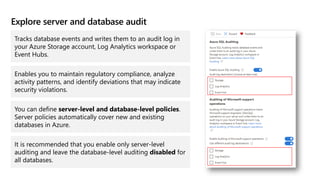
Tracks database events and writes them to an audit log in
your Azure Storage account, Log Analytics workspace or
Event Hubs.
Enables you to maintain regulatory compliance, analyze
activity patterns, and identify deviations that may indicate
security violations.
You can define server-level and database-level policies.
Server policies automatically cover new and existing
databases in Azure.
It is recommended that you enable only server-level
auditing and leave the database-level auditing disabled for
all databases.
Explore server and database audit cont’d
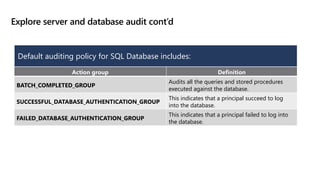
Action group Definition
BATCH_COMPLETED_GROUP
Audits all the queries and stored procedures
executed against the database.
SUCCESSFUL_DATABASE_AUTHENTICATION_GROUP
This indicates that a principal succeed to log
into the database.
FAILED_DATABASE_AUTHENTICATION_GROUP
This indicates that a principal failed to log into
the database.
Default auditing policy for SQL Database includes:
Explore server and database audit cont’d
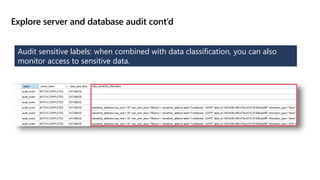
Audit sensitive labels: when combined with data classification, you can also
monitor access to sensitive data.
Dynamic Data Masking
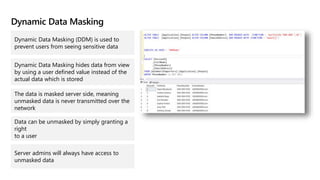
Dynamic Data Masking (DDM) is used to
prevent users from seeing sensitive data
Dynamic Data Masking hides data from view
by using a user defined value instead of the
actual data which is stored
The data is masked server side, meaning
unmasked data is never transmitted over the
network
Data can be unmasked by simply granting a
right
to a user
Server admins will always have access to
unmasked data
Dynamic Data Masking implementation
Data can be masked in different ways – the engine provides several built-in masks
Default:
Full Masking based
on data types of
the field (no data
exposed)
Credit card:
Shows the last four
digits of a credit
card number
Social Security
number:
Shows the last
4 digits
XXX-XX-1234
Random
number:
Generates random
numbers according
to the boundaries
Custom text:
Exposes first and
last characters and
adds custom string
in the middle
Dynamic Data Masking use cases
Mask data from
application users
who have no direct
access to the
database.
Restricting private
information for a
group of users.
Provide masked data
to external vendors,
where you need to
protect sensitive
information while
still preserving the
relationships among
items in the data.
Export a copy of your
production database
to a lower
environment for
development
purposes with a user
who doesn’t have
UNMASK permission.
The export of the
data will be in a
masked format.
Row level security
Operates at the database level to restrict access to a table by using a security
policy – equivalent to a WHERE clause
Filter predicate - restrict data access that violate predicate (SELECT, UPDATE, DELETE,
INSERT)
Block predicate - restrict data changes that violate predicate (AFTER INSERT, AFTER
UPDATE, BEFORE UPDATE, BEFORE DELETE)
Depending on the attribute of a user, the predicate determines if the user has
access
Row level security use cases and best practices
Use cases:
• To isolate departmental access at the row level.
• To restrict customers' data access to only the data relevant to their company.
• To restrict access for compliance purposes.
Best practices:
• Create a separate schema for predicate functions and security policies.
• Avoid type conversions in predicate functions.
• Avoid using excessive table joins and recursion in predicate functions.
Microsoft Defender for SQL
Advanced SQL security features, including SQL vulnerability assessment and
Advanced Threat Protection
Advanced Threat Protection watches for:
Suspicious database activities
Potential database vulnerabilities
SQL Injection Attacks
Anomalous database access and query patterns
You should enable auditing in conjunction with Azure SQL Database
Microsoft Defender for SQL
Offers a suite of protections for Azure SQL Database and Azure SQL Managed
Instance as part of the advanced SQL security features
Advanced Threat Protection watches for:
Suspicious database activities
Potential database vulnerabilities
SQL Injection Attacks
Anomalous database access and query patterns
SQL vulnerability assessment is a service that uses a knowledge base of security
rules to flag items that do not comply when they are scanned.
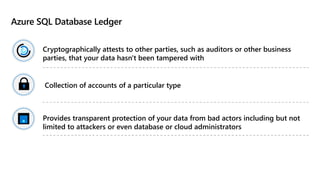
Azure SQL Database Ledger
Cryptographically attests to other parties, such as auditors or other business
parties, that your data hasn't been tampered with
Collection of accounts of a particular type
Provides transparent protection of your data from bad actors including but not
limited to attackers or even database or cloud administrators
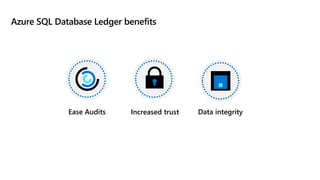
Azure SQL Database Ledger benefits
Ease Audits Increased trust Data integrity
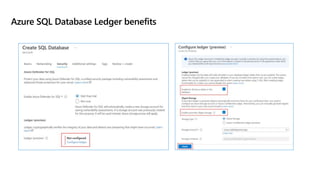
Azure SQL Database Ledger benefits
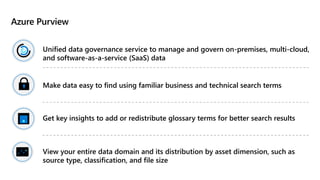
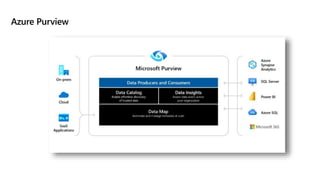
Azure Purview
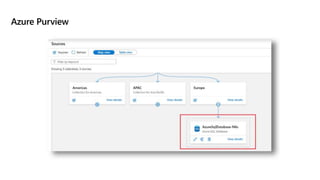
Unified data governance service to manage and govern on-premises, multi-cloud,
and software-as-a-service (SaaS) data
Make data easy to find using familiar business and technical search terms
Get key insights to add or redistribute glossary terms for better search results
View your entire data domain and its distribution by asset dimension, such as
source type, classification, and file size
Azure Purview
Azure Purview
How to check for vulnerabilities in Azure SQL Database
Issues that Advanced Threat Protection identifies can be found in the “Microsoft Defender
for Cloud” under “Security” section
Click on the View additional findings in Vulnerability Assessment in order to see the current
vulnerability assessment for the database
Vulnerability assessment is available when scanning results are stored in a storage account
Lesson 5: Knowledge check
Where is the data from data classification stored in SQL Server 2019?
 In the extended properties for each object
 In the sys.sensitivity_classifications catalog view
 In the sys.all_columns catalog view
Which is NOT an option to store vulnerability assessment data?
 Storage Account
 Physical disk
 Log Analytics
Which of the following features automate data discovery through the provision
of data scanning and classification as a service?
 Database auditing
 Dynamic Data Masking
 Azure Purview
Instructor led labs: Enable Microsoft Defender for SQL and Data
Classification
Enable Microsoft Defender for Azure SQL Database
Configure Data Classification for Azure SQL Database
Module summary
You have learned how to do the following:
Configure database authentication and
authorization:
Understand Authentication Options for Azure SQL
Database
Learn what Security Principals are
Understand Roles in Azure SQL Database and SQL
Server
Protect data in-transit and at-rest:
Implement Transparent Data Encryption
Implement Always Encrypted
Use Dynamic Data Masking to protect data
How to manage firewalls in Azure SQL Database
Implement compliance controls for
sensitive data:
Understand data classification and Dynamic Data
Masking
Learn the benefits of Advanced Threat Detection
Explore Azure SQL Database Ledger
Understand Azure Purview
References
Always Encrypted:
https://docs.microsoft.com/sql/relational-databases/security/encryption/always-encrypted-
database-engine?view=sql-server-ver15
What is Azure Key Vault?
https://docs.microsoft.com/azure/key-vault/general/basic-concepts
Advanced Threat Protection for Azure SQL Database:
https://docs.microsoft.com/azure/sql-database/sql-database-threat-detection-overview

03_DP_300T00A_Secure_Environment.pptx

  • 1.
    Module 3: Implementa secure environment Introduction to database authentication, understand encryption solutions, understand data sensitivity and monitor database threats DP-300 Administering Microsoft Azure SQL Solutions
  • 2.
    Module objectives After completingthis module you will be able to: Understand the differences between Windows, SQL Server and Azure Active Directory Authentication Describe and configure both data-at-rest encryption solutions as well as data-in-transit encryption solutions Implement a data sensitivity solution
  • 3.
    Lesson 1: Configuredatabase authentication and authorization
  • 4.
    Lesson 1 objectives Authentication optionsfor Azure SQL Database Security principals Roles in Azure SQL Database Understand permissions within Azure SQL Understand the concept of least privilege
  • 5.
    Azure AD authenticationoptions SQL Server authentication options: Windows Authentication – User login information is stored in Active Directory SQL Server Authentication – User login information is stored in the Master or user database Azure SQL Database and Managed Instance authentication options: Azure Active Directory Authentication – User information is stored in Azure Active Directory SQL Server Authentication – User login information is stored in the master or user database
  • 6.
    What’s the differencebetween Active Directory and Azure Active Directory? Active Directory Domain Services Azure Active Directory User Management Yes Yes Authentication NTLM and Kerberos OpenID Connect, SAML, OAuth Groups Yes Yes Object Hierarchy Yes: X.500 Nope Service Principals Yes Yes Query AD programmatically LDAP AD Graph API (REST API)
  • 7.
    Authentication and identities Authenticationis the process of proving a user or service is who they say there are Authorization is a process that occurs after a user is authenticated, and grants them their specified access to resources Identities can represent users, service principals, or computers
  • 8.
    Azure Active Directoryauthentication On-premises Active Directory can be synced to Azure Active Directory Azure Active Directory authentication allows integrated authentication into cloud native dbs - similar to Windows Authentication in traditional deployment of SQL Server Multi-factor authentication is fully supported The Active Directory Admin will have full rights to the SQL Database Server, similar to being a member of the sysadmin fixed server role in an on-premises install of SQL Server To add Users with Azure Active Directory Authentication, you must first configure the AAD admin
  • 9.
    Azure Active Directoryadmin configuration for Azure SQL Database
  • 10.
    Demo: Configure AzureAD admin Configure an Active Directory admin for an Azure SQL Database
  • 11.
    Security principals Security principals areany login, user, group, or role within the server or database Users within the databases are either mapped to a login, or contained users within the database Contained users can be based on SQL Authentication or Azure Active Directory Users can then be mapped to roles in order to give users centrally managed rights, or rights can be granted directly to a user
  • 12.
    SQL Server Securityoverview Securables: Object to which access must be secured Principals: Security identities (users, service principals, or computers) that access securables to perform actions Permissions: Actions principals can perform on securables Security Hierarchies: Securables can contain other securables, and principals can contain other principals (roles)
  • 13.
    Schemas and securables Securablesare resources within databases like tables, views, procedures that access is granted to Securable scopes: <server>.<database>.<schema>.<object> Securables in Azure SQL Database only have the database and schema scopes A schema is a collection of objects which allows objects to be grouped into separate namespaces
  • 14.
    Logins and users Loginsare created in the master database and are used for server access Instance level permissions are applied to logins Database level permissions are applied to users Contained users are authenticated at the database A user has access only to the database in which they are created
  • 15.
    Built-in database roles SQLServer and Azure SQL Database include several fixed roles within each database Users may be added as members of one or more roles (including custom roles) The Master database in Azure SQL Database has a couple of unique roles since the sysadmin role does not exist Server roles cannot be granted access to objects within a database directly and are only available in SQL Server and Azure SQL Managed Instance, but not in Azure SQL Database
  • 16.
    Fixed server roles Sysadmin: Canperform any activity on the server Serveradmin: Can change server-wide configuration settings (for example Max Server Memory) and can shutdown the server Securityadmin: Can manage logins and their properties (for example, changing the password of a login). This role should be treated as being equivalent to the sysadmin role Processadmin: Can kill processes running inside of SQL Server Setupadmin: Can add and remove linked servers using T-SQL Bulkadmin: Can run the BULK INSERT T-SQL statement Diskadmin: Can manage backup devices in SQL Server Dbcreator: Can create, restore, alter, and drop any database Public: Every SQL Server login belongs to the public user role. Unlike the other fixed server roles, permissions can be granted, denied, or revoked from the public role
  • 17.
    Database roles inSQL Server vs. Azure SQL Database Roles are used to simplify the process of managing privileges in the database In SQL Server and Managed Instance the scope of the role may be the database or the server In Azure SQL Database roles are scoped to the individual database Both SQL Server and Azure SQL Database include built-in database roles, and allow for the creation of custom roles
  • 18.
    Special Roles forAzure SQL Database Database level roles available in the virtual master database only dbmanager – this role can create and delete databases. Equivalent to dbcreator fixed server role. loginmanager – this role can create and delete logins in the virtual master database. Equivalent to securityadmin fixed server role.
  • 19.
    Built-in Database Roles Databaserole Description db_owner Can perform all configuration and maintenance activities on the database, and can also drop the database in SQL Server. (In SQL Database and Azure Synapse, some maintenance activities require server-level permissions and cannot be performed by db_owners.) db_securityadmin Can modify role membership for custom roles only and manage permissions. Members of this role can potentially elevate their privileges and their actions should be monitored. db_accessadmin Can add or remove access to the database for Windows logins, Windows groups, and SQL Server logins. db_backupoperator Can back up the database. db_ddladmin Can run any Data Definition Language (DDL) command in a database. db_datawriter Can add, delete, or change data in all user tables. db_datareader Can read all data from all user tables. db_denydatawriter Cannot add, modify, or delete any data in the user tables within a database. db_denydatareader Cannot read any data in the user tables within a database.
  • 20.
    Database and objectpermissions explained There are four DML permissions on tables and views – SELECT, INSERT UPDATE and DELETE Stored Procedures and Functions have their own permissions – ALTER, CONTROL, EXECUTE, and VIEW DEFINITION DCL permissions – GRANT, DENY, REVOKE DDL permissions – CREATE, ALTER, DROP Permissions which are REVOKED, remove any existing GRANT or DENY permission from the object
  • 21.
    Database and objectpermissions explained Permissions can be assigned to users or roles within a database Users may then be assigned to roles Permissions are additive, with permissions from multiple role memberships applied together Preventing access through a DENY will override any GRANT to that object
  • 22.
    GRANT / DENYexample
  • 23.
    EXECUTE AS USER/ EXECUTE AS LOGIN definition EXECUTE AS USER and EXECUTE AS LOGIN allows a statement to be executed in the security context of another user or login This capability allows for testing during the development process to ensure permissions are correctly implemented
  • 24.
    Ownership chains explained Usedwhen access to an object is needed to complete a task against another object Allows a user to execute a stored procedure without the user needing right to the tables which the stored procedure uses Permission chaining only applies to objects with the same owner If the user has the right to run the stored procedure, the user can access the tables for the duration of the execution of the stored procedure, and only within the context of the stored procedure
  • 25.
  • 26.
    Demo: Permission chaining Executea stored procedure as a lower privileged user
  • 27.
    Dynamic SQL Dynamic SQLis concept where queries are built programmatically and then executed in-line The sample dynamic SQL on the left would generate statements to back up each database on a server SELECT 'BACKUP DATABASE ' + name + ' TO DISK =''backupsql1' + name + '.bak''' FROM sys.databases
  • 28.
    Least privilege The conceptof “Least Privilege” means that users never have more permissions than they need to get the task done If the user runs an application and the user only needs to use stored procedures, then the user should have the EXECUTE permission for the stored procedure, and they should have no permissions on the underlying tables
  • 29.
    Identify authentication andauthorization failures Connection failures can result from reconfiguration, firewall settings, connection timeouts, or incorrect login information or when Azure SQL resources are over capacity. Error Action Login failures Look for any outages during the time when the application reported the errors at Microsoft Azure Service Dashboard. Database reaches resource limits Monitor your database's compute and storage resources carefully, and take action when it reaches its resource limits to prevent transient failures. Extended authentication failures File an Azure support request through the Azure portal if your application encounters connectivity error for longer than 60 seconds or if it occurs more than once in a given day.
  • 30.
    Lesson 1: Knowledgecheck Which protocol is used by Azure Active Directory for Authorization?  Kerberos  LDAP  OAuth Which role allows users to create users within a database ?  db_datareader  db_accessadmin  db_securityadmin What feature allows a user to execute a stored procedure even if she does not have permission to access the tables referenced in the stored procedure?  Ownership Chaining  Principal of Least Privilege  Granular Security
  • 31.
    Instructor led labs:Authorize Access to Azure SQL Database with Azure Active Directory Create users Manage access to database objects Validate access
  • 32.
    Lesson 2: Protectdata in-transit and at rest
  • 33.
    Lesson 2 objectives Understand thedata encryption options available in the various platforms Understand how to configure data at rest encryption for Microsoft SQL Server Understand what Dynamic Data Encryption is used for and how to configure it Understand how to configure SQL Server to use Azure Key Vault Understand the difference between database and instance firewalls in Azure SQL Database
  • 34.
    What is encryptionat rest? Encryption at rest protects data files, transaction log files, and backup files by requiring a certificate to bring them online SQL Server and Azure SQL Database implement this through a feature called Transparent Data Encryption You can also encrypt your Azure VM disks to provide an additional level of protection beyond TDE for your SQL Servers
  • 35.
    Encryption at rest Dataat rest is the data that has been stored on a physical medium. Data is unreadable without the keys and secrets Azure Disk Encryption uses Windows BitLocker, Linux dm-crypt Azure Storage (Azure Storage Service Encryption) and Azure SQL Database (TDE) encrypt data at rest by default​ Use Azure Key Vault to maintain control of keys Encrypt drives before you write sensitive data​
  • 36.
    Data at restvs. Data in transit Data at rest –encrypts data while it's on file storage. Data in transit –encrypts data while it travels through private or public network communication channels.
  • 37.
    Transparent Data Encryption TransparentData Encryption (TDE) works by encrypting data in SQL Server and Azure SQL Database on a page level as the page is written to the disk. TDE is enabled by default As data is read from the disk to the buffer pool, it is decrypted before being written to the buffer pool Decrypted data is passed to the query processor for joining and returning to the user Data is protected as it rests on the disks, and within the backups. Uses symmetric key called the database encryption key TDE can be configured using the default Azure provided key, or bring-your-own-key (BYOK)
  • 38.
    Transparent Data Encryption Decrypteddata is passed to the query processor for joining and returning to the user​ Data is protected as it rests on the disks, and within the backups​ Database backups are also encrypted as a backup operation just copies the data pages from the database file to the backup device. No decryption is done during the backup​
  • 39.
  • 40.
  • 41.
    Managing TDE Always backupthe certificate that is created in the master database You will not be able to restore this database to this, or another server without first restoring the certificate Without a certificate, you will not be able to restore or read the database from backup or attach the data or log files When setting up a database within an Availability Group, restore this certificate to each server within the Availability Group
  • 42.
    Configure server anddatabase firewall rules Each Azure SQL Database maps to a public IP address which is hosted by Microsoft Firewalls are designed to prevent people from accessing resources that they should not be accessing By default all access should be blocked with access opened as needed In Azure SQL Database there are firewalls at the server level as well as at the database level When access through a firewall is opened, anyone at the source IP address has access through to the databases on the Azure SQL server Firewall rules should be modified carefully
  • 43.
    Server and databasefirewall rules Connection attempts from the internet and Azure must pass through the firewall before they reach your server or database.
  • 44.
    Virtual network endpoints NetworkPeering allows connectivity from within a Virtual Network to Azure PaaS services including Azure SQL Database Network Endpoint peering is limited to one Azure region Network Endpoint peering allows only server level connections, not a database one Requires outbound access to Azure SQL Database Public IP addresses
  • 45.
    Private link Private linkallows you to connect various Azure services (including Azure SQL DB) to a private endpoint A private endpoint is a private IP address within a specific virtual network subnet This allows for you to use network rules to prevent data exfiltration Can route directly to Azure SQL DB over ExpressRoute or Point to Point VPN without traversing the public internet
  • 46.
    Object level encryption WhileTDE encrypts the data files and the backup files, it does not encrypt the data within tables SQL Server uses Always Encrypted to encrypt table data, so that only the application with the correct column key can decrypt the data This protects data from being exfiltrated (unauthorized data transfer) by a malicious administrator
  • 47.
    Always Encrypted benefits Encryptsdata within tables, protects the data both as it rests on the disk, and as it is in flight between the SQL Server and the client Allows for data within the database to be encrypted without the database engine ever seeing plain text data, and is also supported by Azure SQL Database Data is encrypted with certificates created by the database, but stored in the application Even administrators cannot decrypt the encrypted data
  • 48.
    Always Encrypted encryptiontypes Deterministic Should be used with data that has many distinct values​ Allows equality joins, grouping and indexing on encrypted columns Randomized Most secure Good for columns with few distinct values​ Prevents searching, grouping, indexing, joining on encrypted columns and equality operations
  • 49.
    Always Encrypted usecases Scenario Definition Client and data on-premises To protect your on-premises database from high-privileged users, i.e. external vendors managing SQL Server. Client on-premises with data in Azure To ensure Microsoft cloud administrators have no access to the data, Always Encrypted keys are stored in key store hosted on- premises, for SQL Database or SQL Server in a virtual machine in Azure. Client and data in Azure Data is encrypted in the database.
  • 50.
    What are secureenclaves? Added to SQL Server 2019, secure enclaves provide a secure protected area of server memory to decrypt data and perform calculations Allows for even randomized encrypted data to be compared in queries that do pattern matching or range comparison
  • 51.
  • 52.
    Enable encrypted connectionson Azure SQL Database Transport Layer Security (TLS) encryption is performed at the protocol layer and is available to all supported SQL Server and Azure SQL database services For Azure SQL Database enforce a TLS version at the server level - currently supported are 1.0, 1.1, and 1.2
  • 53.
  • 54.
    What is SQLInjection? SQL Injection is an attack in which malicious code is inserted into strings that are later passed to a database engine SQL Injection is a possibility whenever dynamic SQL is used with user input An example is shown here > C#: var shipCity; shipCity = Request.form (“shipCity"); var sql = "select * from OrdersTable where shipCity = '" + ShipCity + '"; User Input: Redmond'; drop table OrdersTable-- Executed SQL: SELECT * FROM OrdersTable WHERE ShipCity = 'Redmond'; drop table OrdersTable--'
  • 55.
    What is AzureKey Vault? Key Vault is a solution to safeguard cryptographic keys and other secrets It can be used in conjunction with Azure VMs running SQL Server to store Transparent Data Encryption and Always Encrypted certificates This can also be used with on-premises servers Azure SQL VM resource provider integrates with Key Vaults and can store your TDE certificates in Azure Key Vault
  • 56.
    Lesson 2: Knowledgecheck Which feature provides a private IP address for an Azure SQL Database?  Network Endpoints  Private Link  Database Firewall Which technique can be used to create database firewall rules in Azure SQL Database?  Running a PowerShell script  Running an Azure CLI script  Executing a T-SQL statement Which feature prevents members of the sysadmin role from viewing the values of data in a table?  Always Encrypted  Dynamic Data Masking  Transparent Data Encryption
  • 57.
    Instructor led labs:Configure a server-based firewall rule using the Azure portal Configure Azure SQL Database firewall rules Validate access
  • 58.
    Lesson 3: Implementcompliance controls for sensitive data
  • 59.
    Lesson 3 objectives How datashould be classified Why data classification should be done How to implement row level security and dynamic data masking Understand the usage of Microsoft Defender for SQL How Azure SQL Database Ledger works
  • 60.
    Data classification Describes howthe data must be treated Companies should build policies around data governance that take the classification of data into account. For example: Data that is marked as Highly Confidential should not be included in reports that are distributed to the entire company Data that is marked as GDPR should be included in any requests to be forgotten By classifying data, and setting proper permissions to view data, you can ensure that users should only be seeing the data that they are allowed to see with the database
  • 61.
    How your datashould be classified Data within tables is classified on a column-by-column basis A single table can have data that is Public, General, Confidential and Highly Confidential Azure SQL Database or SQL Server Management Studio can automatically classify your database, based on column names You can also manually classify data using SSMS or T-SQL (ADD SENSITIVITY CLASSIFICATION)
  • 62.
    Explore server anddatabase audit Tracks database events and writes them to an audit log in your Azure Storage account, Log Analytics workspace or Event Hubs. Enables you to maintain regulatory compliance, analyze activity patterns, and identify deviations that may indicate security violations. You can define server-level and database-level policies. Server policies automatically cover new and existing databases in Azure. It is recommended that you enable only server-level auditing and leave the database-level auditing disabled for all databases.
  • 63.
    Explore server anddatabase audit cont’d Action group Definition BATCH_COMPLETED_GROUP Audits all the queries and stored procedures executed against the database. SUCCESSFUL_DATABASE_AUTHENTICATION_GROUP This indicates that a principal succeed to log into the database. FAILED_DATABASE_AUTHENTICATION_GROUP This indicates that a principal failed to log into the database. Default auditing policy for SQL Database includes:
  • 64.
    Explore server anddatabase audit cont’d Audit sensitive labels: when combined with data classification, you can also monitor access to sensitive data.
  • 65.
    Dynamic Data Masking DynamicData Masking (DDM) is used to prevent users from seeing sensitive data Dynamic Data Masking hides data from view by using a user defined value instead of the actual data which is stored The data is masked server side, meaning unmasked data is never transmitted over the network Data can be unmasked by simply granting a right to a user Server admins will always have access to unmasked data
  • 66.
    Dynamic Data Maskingimplementation Data can be masked in different ways – the engine provides several built-in masks Default: Full Masking based on data types of the field (no data exposed) Credit card: Shows the last four digits of a credit card number Social Security number: Shows the last 4 digits XXX-XX-1234 Random number: Generates random numbers according to the boundaries Custom text: Exposes first and last characters and adds custom string in the middle
  • 67.
    Dynamic Data Maskinguse cases Mask data from application users who have no direct access to the database. Restricting private information for a group of users. Provide masked data to external vendors, where you need to protect sensitive information while still preserving the relationships among items in the data. Export a copy of your production database to a lower environment for development purposes with a user who doesn’t have UNMASK permission. The export of the data will be in a masked format.
  • 68.
    Row level security Operatesat the database level to restrict access to a table by using a security policy – equivalent to a WHERE clause Filter predicate - restrict data access that violate predicate (SELECT, UPDATE, DELETE, INSERT) Block predicate - restrict data changes that violate predicate (AFTER INSERT, AFTER UPDATE, BEFORE UPDATE, BEFORE DELETE) Depending on the attribute of a user, the predicate determines if the user has access
  • 69.
    Row level securityuse cases and best practices Use cases: • To isolate departmental access at the row level. • To restrict customers' data access to only the data relevant to their company. • To restrict access for compliance purposes. Best practices: • Create a separate schema for predicate functions and security policies. • Avoid type conversions in predicate functions. • Avoid using excessive table joins and recursion in predicate functions.
  • 70.
    Microsoft Defender forSQL Advanced SQL security features, including SQL vulnerability assessment and Advanced Threat Protection Advanced Threat Protection watches for: Suspicious database activities Potential database vulnerabilities SQL Injection Attacks Anomalous database access and query patterns You should enable auditing in conjunction with Azure SQL Database
  • 71.
    Microsoft Defender forSQL Offers a suite of protections for Azure SQL Database and Azure SQL Managed Instance as part of the advanced SQL security features Advanced Threat Protection watches for: Suspicious database activities Potential database vulnerabilities SQL Injection Attacks Anomalous database access and query patterns SQL vulnerability assessment is a service that uses a knowledge base of security rules to flag items that do not comply when they are scanned.
  • 72.
    Azure SQL DatabaseLedger Cryptographically attests to other parties, such as auditors or other business parties, that your data hasn't been tampered with Collection of accounts of a particular type Provides transparent protection of your data from bad actors including but not limited to attackers or even database or cloud administrators
  • 73.
    Azure SQL DatabaseLedger benefits Ease Audits Increased trust Data integrity
  • 74.
    Azure SQL DatabaseLedger benefits
  • 75.
    Azure Purview Unified datagovernance service to manage and govern on-premises, multi-cloud, and software-as-a-service (SaaS) data Make data easy to find using familiar business and technical search terms Get key insights to add or redistribute glossary terms for better search results View your entire data domain and its distribution by asset dimension, such as source type, classification, and file size
  • 76.
  • 77.
  • 78.
    How to checkfor vulnerabilities in Azure SQL Database Issues that Advanced Threat Protection identifies can be found in the “Microsoft Defender for Cloud” under “Security” section Click on the View additional findings in Vulnerability Assessment in order to see the current vulnerability assessment for the database Vulnerability assessment is available when scanning results are stored in a storage account
  • 79.
    Lesson 5: Knowledgecheck Where is the data from data classification stored in SQL Server 2019?  In the extended properties for each object  In the sys.sensitivity_classifications catalog view  In the sys.all_columns catalog view Which is NOT an option to store vulnerability assessment data?  Storage Account  Physical disk  Log Analytics Which of the following features automate data discovery through the provision of data scanning and classification as a service?  Database auditing  Dynamic Data Masking  Azure Purview
  • 80.
    Instructor led labs:Enable Microsoft Defender for SQL and Data Classification Enable Microsoft Defender for Azure SQL Database Configure Data Classification for Azure SQL Database
  • 81.
    Module summary You havelearned how to do the following: Configure database authentication and authorization: Understand Authentication Options for Azure SQL Database Learn what Security Principals are Understand Roles in Azure SQL Database and SQL Server Protect data in-transit and at-rest: Implement Transparent Data Encryption Implement Always Encrypted Use Dynamic Data Masking to protect data How to manage firewalls in Azure SQL Database Implement compliance controls for sensitive data: Understand data classification and Dynamic Data Masking Learn the benefits of Advanced Threat Detection Explore Azure SQL Database Ledger Understand Azure Purview
  • 82.
    References Always Encrypted: https://docs.microsoft.com/sql/relational-databases/security/encryption/always-encrypted- database-engine?view=sql-server-ver15 What isAzure Key Vault? https://docs.microsoft.com/azure/key-vault/general/basic-concepts Advanced Threat Protection for Azure SQL Database: https://docs.microsoft.com/azure/sql-database/sql-database-threat-detection-overview