Your SQL Man (I) Pvt Ltd. 1
Azure Data Factory
Your SQL Man (I) Pvt Ltd. 2
Overview
•Data Integration Service
•Data movement
•Transformation
•Both On-Premises & Cloud
Your SQL Man (I) Pvt Ltd. 3
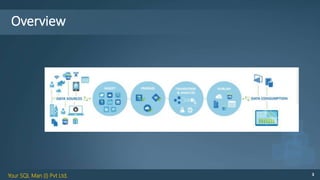
Overview
Your SQL Man (I) Pvt Ltd. 4
Key Concepts
Your SQL Man (I) Pvt Ltd. 5
Key Concepts
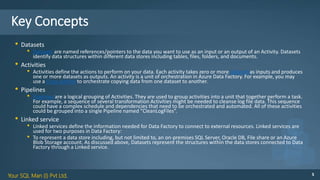
• Datasets
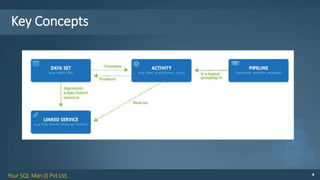
• Datasets are named references/pointers to the data you want to use as an input or an output of an Activity. Datasets
identify data structures within different data stores including tables, files, folders, and documents.
• Activities
• Activities define the actions to perform on your data. Each activity takes zero or more datasetsas inputs and produces
one or more datasets as outputs. An activity is a unit of orchestration in Azure Data Factory. For example, you may
use a Copy activity to orchestrate copying data from one dataset to another.
• Pipelines
• Pipelines are a logical grouping of Activities. They are used to group activities into a unit that together perform a task.
For example, a sequence of several transformation Activities might be needed to cleanse log file data. This sequence
could have a complex schedule and dependencies that need to be orchestrated and automated. All of these activities
could be grouped into a single Pipeline named “CleanLogFiles”.
• Linked service
• Linked services define the information needed for Data Factory to connect to external resources. Linked services are
used for two purposes in Data Factory:
• To represent a data store including, but not limited to, an on-premises SQL Server, Oracle DB, File share or an Azure
Blob Storage account. As discussed above, Datasets represent the structures within the data stores connected to Data
Factory through a Linked service.
Your SQL Man (I) Pvt Ltd. 6
Supported Regions
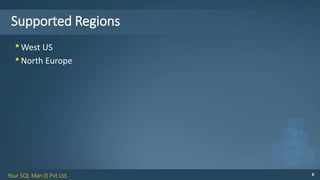
•West US
•North Europe
Your SQL Man (I) Pvt Ltd. 7
Pricing
Your SQL Man (I) Pvt Ltd. 8
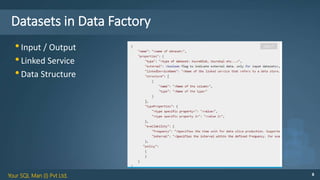
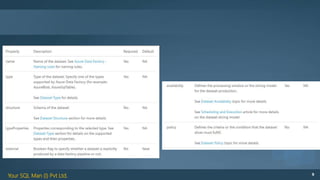
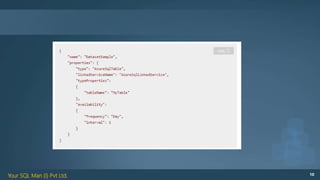
Datasets in Data Factory
•Input / Output
•Linked Service
•Data Structure
Your SQL Man (I) Pvt Ltd. 9
Your SQL Man (I) Pvt Ltd. 10
Your SQL Man (I) Pvt Ltd. 11
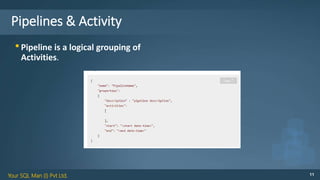
Pipelines & Activity
•Pipeline is a logical grouping of
Activities.
Your SQL Man (I) Pvt Ltd. 12
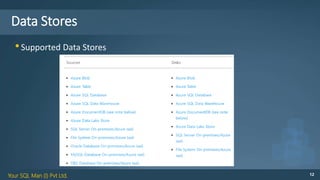
Data Stores
•Supported Data Stores
Your SQL Man (I) Pvt Ltd. 13
Gateway for On-Premises
•Install on your local
•Register using key
•Linked Service using Gateway
Your SQL Man (I) Pvt Ltd. 14
Copy Activity
•GUI Based
•Create all stuff in wizard
Your SQL Man (I) Pvt Ltd. 15
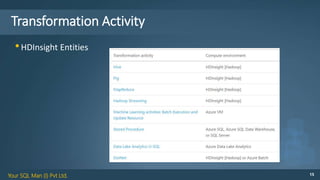
Transformation Activity
•HDInsight Entities
Your SQL Man (I) Pvt Ltd. 16
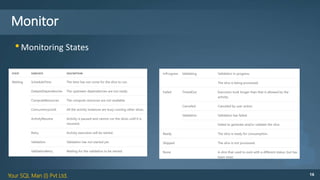
Monitor
•Monitoring States
Your SQL Man (I) Pvt Ltd. 17
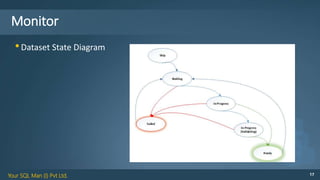
Monitor
•Dataset State Diagram
Your SQL Man (I) Pvt Ltd. 18
Demo
Data factory

Azure Data Factory

  • 1.
    Your SQL Man(I) Pvt Ltd. 1 Azure Data Factory
  • 2.
    Your SQL Man(I) Pvt Ltd. 2 Overview •Data Integration Service •Data movement •Transformation •Both On-Premises & Cloud
  • 3.
    Your SQL Man(I) Pvt Ltd. 3 Overview
  • 4.
    Your SQL Man(I) Pvt Ltd. 4 Key Concepts
  • 5.
    Your SQL Man(I) Pvt Ltd. 5 Key Concepts • Datasets • Datasets are named references/pointers to the data you want to use as an input or an output of an Activity. Datasets identify data structures within different data stores including tables, files, folders, and documents. • Activities • Activities define the actions to perform on your data. Each activity takes zero or more datasetsas inputs and produces one or more datasets as outputs. An activity is a unit of orchestration in Azure Data Factory. For example, you may use a Copy activity to orchestrate copying data from one dataset to another. • Pipelines • Pipelines are a logical grouping of Activities. They are used to group activities into a unit that together perform a task. For example, a sequence of several transformation Activities might be needed to cleanse log file data. This sequence could have a complex schedule and dependencies that need to be orchestrated and automated. All of these activities could be grouped into a single Pipeline named “CleanLogFiles”. • Linked service • Linked services define the information needed for Data Factory to connect to external resources. Linked services are used for two purposes in Data Factory: • To represent a data store including, but not limited to, an on-premises SQL Server, Oracle DB, File share or an Azure Blob Storage account. As discussed above, Datasets represent the structures within the data stores connected to Data Factory through a Linked service.
  • 6.
    Your SQL Man(I) Pvt Ltd. 6 Supported Regions •West US •North Europe
  • 7.
    Your SQL Man(I) Pvt Ltd. 7 Pricing
  • 8.
    Your SQL Man(I) Pvt Ltd. 8 Datasets in Data Factory •Input / Output •Linked Service •Data Structure
  • 9.
    Your SQL Man(I) Pvt Ltd. 9
  • 10.
    Your SQL Man(I) Pvt Ltd. 10
  • 11.
    Your SQL Man(I) Pvt Ltd. 11 Pipelines & Activity •Pipeline is a logical grouping of Activities.
  • 12.
    Your SQL Man(I) Pvt Ltd. 12 Data Stores •Supported Data Stores
  • 13.
    Your SQL Man(I) Pvt Ltd. 13 Gateway for On-Premises •Install on your local •Register using key •Linked Service using Gateway
  • 14.
    Your SQL Man(I) Pvt Ltd. 14 Copy Activity •GUI Based •Create all stuff in wizard
  • 15.
    Your SQL Man(I) Pvt Ltd. 15 Transformation Activity •HDInsight Entities
  • 16.
    Your SQL Man(I) Pvt Ltd. 16 Monitor •Monitoring States
  • 17.
    Your SQL Man(I) Pvt Ltd. 17 Monitor •Dataset State Diagram
  • 18.
    Your SQL Man(I) Pvt Ltd. 18 Demo Data factory