Security & Auditing
on SQL Server 2008 R2
Antonios Chatzipavlis
Software Architect Evangelist, IT Consultant
MCT, MCITP, MCPD, MCSD, MCDBA, MCSA, MCTS, MCAD, MCP, OCA
MVP on SQL SERVER
2
• Overview of SQL Server Security
• Protecting the Server Scope
• Protecting the Database Scope
• Managing Keys and Certificates
• Auditing Security
Objectives
3
Overview of SQL Server Security
Security & Auditing on SQL Server 2008 R2
4
• SQL Server Security Framework
• What Are Principals?
• What Are Securables?
• SQL Server Permissions
Overview of SQL Server Security
5
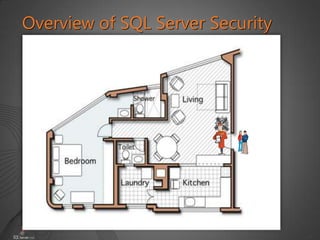
Overview of SQL Server Security
6
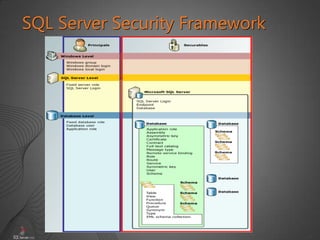
SQL Server Security Framework
7
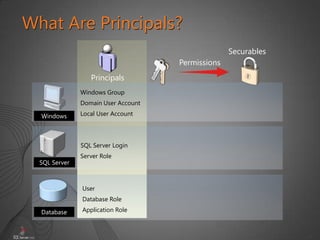
What Are Principals?
Server Role
SQL Server Login
Windows Group
Domain User Account
Local User Account
SQL Server
Database
Windows
Securables
Permissions
Principals
User
Database Role
Application Role
8
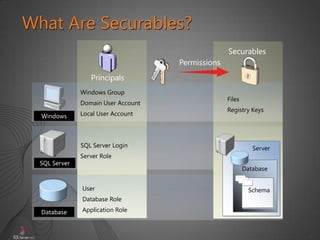
What Are Securables?
Server Role
SQL Server Login
Windows Group
Domain User Account
Local User Account
SQL Server
Database
Windows
Files
Registry Keys
Server
Schema
Database
Securables
Permissions
Principals
User
Database Role
Application Role
9
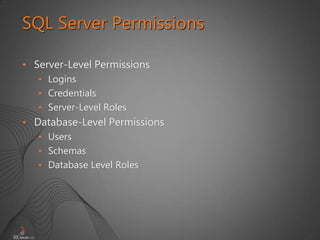
• Server-Level Permissions
• Logins
• Credentials
• Server-Level Roles
• Database-Level Permissions
• Users
• Schemas
• Database Level Roles
SQL Server Permissions
10
Protecting the Server Scope
Security & Auditing on SQL Server 2008 R2
12
• What Are SQL Server Authentication Methods?
• Password Policies
• Server-Level Roles
• Managing SQL Server Logins
• Server-Scope Permissions
Protecting the Server Scope
13
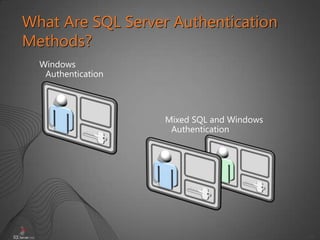
What Are SQL Server Authentication
Methods?
Windows
Authentication
Mixed SQL and Windows
Authentication
14
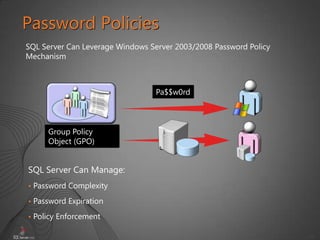
Password Policies
Group Policy
Object (GPO)
Pa$$w0rd
SQL Server Can Leverage Windows Server 2003/2008 Password Policy
Mechanism
SQL Server Can Manage:
• Password Complexity
• Password Expiration
• Policy Enforcement
15
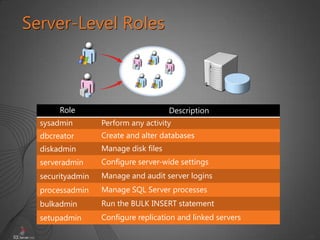
Server-Level Roles
Role Description
sysadmin Perform any activity
dbcreator Create and alter databases
diskadmin Manage disk files
serveradmin Configure server-wide settings
securityadmin Manage and audit server logins
processadmin Manage SQL Server processes
bulkadmin Run the BULK INSERT statement
setupadmin Configure replication and linked servers
16
Managing SQL Server Logins
CREATE LOGIN [SERVERXSalesDBUsers]
FROM WINDOWS
WITH DEFAULT_DATABASE = AdventureWorks2008
CREATE LOGIN Alice
WITH Password = 'Pa$$w0rd'
CREATE LOGIN login_name
{ WITH SQL_login_options
| FROM WINDOWS [ WITH
windows_login_options ] }
19
Server-Scope Permissions
Server permissions
Server-scope securable permissions
USE master
GRANT ALTER ANY DATABASE
TO [AdventureWorks2008Holly]
USE master
GRANT ALTER
ON LOGIN :: AWWebApp
TO [AdventureWorks2008Holly]
21
Protecting the Database Scope
Security & Auditing on SQL Server 2008 R2
22
• What Are Database Roles?
• What Are Application Roles?
• Managing Users
• Special Users
• Database-Scope Permissions
• Schema-Scope Permissions
Protecting the Database Scope
24
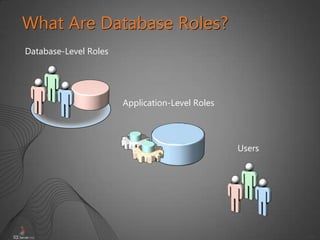
What Are Database Roles?
Database-Level Roles
Application-Level Roles
Users
25
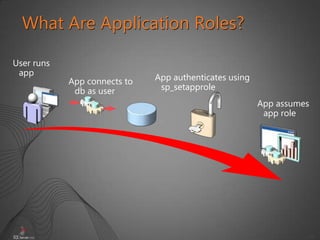
What Are Application Roles?
User runs
app
App connects to
db as user
App authenticates using
sp_setapprole
App assumes
app role
26
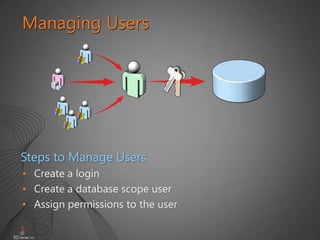
• Create a login
• Create a database scope user
• Assign permissions to the user
Managing Users
Steps to Manage Users
27
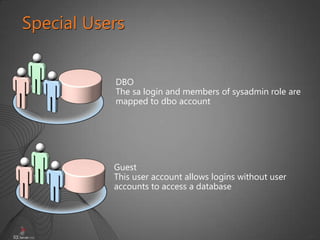
Special Users
DBO
The sa login and members of sysadmin role are
mapped to dbo account
Guest
This user account allows logins without user
accounts to access a database
28
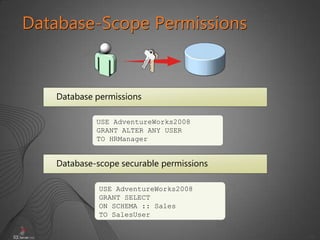
Database-Scope Permissions
Database permissions
Database-scope securable permissions
USE AdventureWorks2008
GRANT ALTER ANY USER
TO HRManager
USE AdventureWorks2008
GRANT SELECT
ON SCHEMA :: Sales
TO SalesUser
29
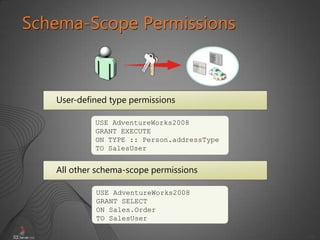
Schema-Scope Permissions
User-defined type permissions
All other schema-scope permissions
USE AdventureWorks2008
GRANT EXECUTE
ON TYPE :: Person.addressType
TO SalesUser
USE AdventureWorks2008
GRANT SELECT
ON Sales.Order
TO SalesUser
33
Managing Keys and Certificates
Security & Auditing on SQL Server 2008 R2
34
• What Are Keys?
• What Are Certificates?
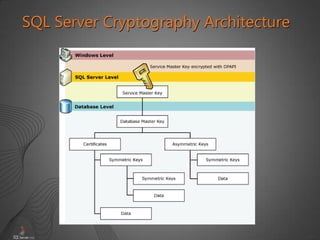
• SQL Server Cryptography Architecture
• When to Use Keys and Certificates
• Transparent Data Encryption
Managing Keys and Certificates
35
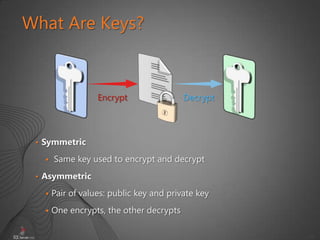
What Are Keys?
• Symmetric
 Same key used to encrypt and decrypt
• Asymmetric
 Pair of values: public key and private key
 One encrypts, the other decrypts
Encrypt Decrypt
36
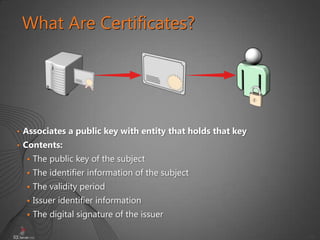
What Are Certificates?
• Associates a public key with entity that holds that key
• Contents:
 The public key of the subject
 The identifier information of the subject
 The validity period
 Issuer identifier information
 The digital signature of the issuer
37
SQL Server Cryptography Architecture
38
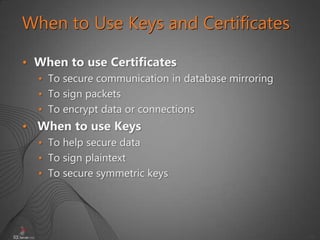
When to Use Keys and Certificates
• When to use Certificates
• To secure communication in database mirroring
• To sign packets
• To encrypt data or connections
• When to use Keys
• To help secure data
• To sign plaintext
• To secure symmetric keys
39
Transparent Data Encryption
Transparent data encryption performs real-time I/O
encryption and decryption of the data and log files
• Create a master key
• Create or obtain a certificate protected by the master
key
• Create a database encryption key and protect it by the
Certificate
• Set the database to use encryption
Steps to use Transparent Data Encryption
40
Transparent data encryption
41
• Entire database is protected
• Applications do not need to explicitly encrypt/decrypt
data!
• No restrictions with indexes or data types (except
FILESTREAM)
• Performance cost is small
• Backups are unusable without key
• Can be used with Extensible Key Management
Transparent Database Encryption:
More Benefits
42
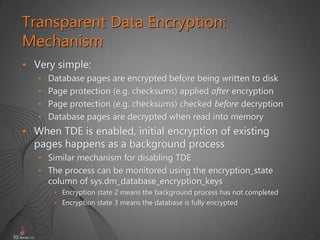
• Very simple:
• Database pages are encrypted before being written to disk
• Page protection (e.g. checksums) applied after encryption
• Page protection (e.g. checksums) checked before decryption
• Database pages are decrypted when read into memory
• When TDE is enabled, initial encryption of existing
pages happens as a background process
• Similar mechanism for disabling TDE
• The process can be monitored using the encryption_state
column of sys.dm_database_encryption_keys
• Encryption state 2 means the background process has not completed
• Encryption state 3 means the database is fully encrypted
Transparent Data Encryption:
Mechanism
43
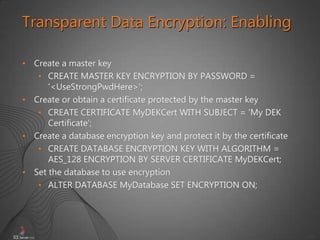
• Create a master key
• CREATE MASTER KEY ENCRYPTION BY PASSWORD =
'<UseStrongPwdHere>';
• Create or obtain a certificate protected by the master key
• CREATE CERTIFICATE MyDEKCert WITH SUBJECT = 'My DEK
Certificate';
• Create a database encryption key and protect it by the certificate
• CREATE DATABASE ENCRYPTION KEY WITH ALGORITHM =
AES_128 ENCRYPTION BY SERVER CERTIFICATE MyDEKCert;
• Set the database to use encryption
• ALTER DATABASE MyDatabase SET ENCRYPTION ON;
Transparent Data Encryption: Enabling
44
• A backup of a TDE encrypted database is also
encrypted using the database encryption key
• To restore the backup OR attach the database, the DEK
must be available!
• There is no way around this – if you lose the DEK, you lose the
ability to restore the backup (that’s the point!)
• Maintain backups of server certificates too
Transparent Data Encryption: Backups
45
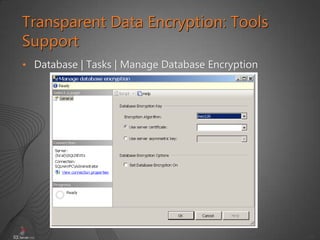
• Database | Tasks | Manage Database Encryption
Transparent Data Encryption: Tools
Support
46
Auditing Security
Security & Auditing on SQL Server 2008 R2
47
• What Is Auditing?
• Security Auditing with Profiler
• Auditing with DDL Triggers
• Introducing SQL Server Audit
• SQL Server Audit Action Groups and Actions
Auditing Security
48
• What is Auditing?
• What auditing options are available in SQL Server?
• Have you ever had to audit SQL Server?
• If so, how did you do it?
• If not, what do you think is the best use of auditing?
What Is Auditing?
49
Security Auditing with Profiler
• Using SQL Server Profiler, you can do the following:
• Create a trace that is based on a reusable template
• Watch the trace results as the trace runs
• Store the trace results in a table
• Start, stop, pause and modify the trace results
• Replay the trace results
50
Auditing with DDL Triggers
• Use DDL triggers when you want to do the following:
• Prevent certain changes in your database schema
• You want something to occur in the database in
response to a change in your database schema
• You want to record changes or events in the
database schema
• Start, stop, pause and modify the trace results
• Replay the trace results
51
Introducing SQL Server Audit
• SQL Server Auditing
• Tracks and logs events that occur on the system
• Can track changes on the server or database level
• Can be managed with Transact-SQL
52
Using SQL Server Audit
53
Thank you!
54
Q & A
55
• For SQL Server and Databases
• www.autoexec.gr/blogs/antonch
• For .NET & Visual Studio
• www.dotnetzone.gr/cs/blogs/antonch
My Blogs
56

Isaca sql server 2008 r2 security & auditing

  • 1.
    Security & Auditing onSQL Server 2008 R2 Antonios Chatzipavlis Software Architect Evangelist, IT Consultant MCT, MCITP, MCPD, MCSD, MCDBA, MCSA, MCTS, MCAD, MCP, OCA MVP on SQL SERVER
  • 2.
    2 • Overview ofSQL Server Security • Protecting the Server Scope • Protecting the Database Scope • Managing Keys and Certificates • Auditing Security Objectives
  • 3.
    3 Overview of SQLServer Security Security & Auditing on SQL Server 2008 R2
  • 4.
    4 • SQL ServerSecurity Framework • What Are Principals? • What Are Securables? • SQL Server Permissions Overview of SQL Server Security
  • 5.
    5 Overview of SQLServer Security
  • 6.
  • 7.
    7 What Are Principals? ServerRole SQL Server Login Windows Group Domain User Account Local User Account SQL Server Database Windows Securables Permissions Principals User Database Role Application Role
  • 8.
    8 What Are Securables? ServerRole SQL Server Login Windows Group Domain User Account Local User Account SQL Server Database Windows Files Registry Keys Server Schema Database Securables Permissions Principals User Database Role Application Role
  • 9.
    9 • Server-Level Permissions •Logins • Credentials • Server-Level Roles • Database-Level Permissions • Users • Schemas • Database Level Roles SQL Server Permissions
  • 10.
    10 Protecting the ServerScope Security & Auditing on SQL Server 2008 R2
  • 11.
    12 • What AreSQL Server Authentication Methods? • Password Policies • Server-Level Roles • Managing SQL Server Logins • Server-Scope Permissions Protecting the Server Scope
  • 12.
    13 What Are SQLServer Authentication Methods? Windows Authentication Mixed SQL and Windows Authentication
  • 13.
    14 Password Policies Group Policy Object(GPO) Pa$$w0rd SQL Server Can Leverage Windows Server 2003/2008 Password Policy Mechanism SQL Server Can Manage: • Password Complexity • Password Expiration • Policy Enforcement
  • 14.
    15 Server-Level Roles Role Description sysadminPerform any activity dbcreator Create and alter databases diskadmin Manage disk files serveradmin Configure server-wide settings securityadmin Manage and audit server logins processadmin Manage SQL Server processes bulkadmin Run the BULK INSERT statement setupadmin Configure replication and linked servers
  • 15.
    16 Managing SQL ServerLogins CREATE LOGIN [SERVERXSalesDBUsers] FROM WINDOWS WITH DEFAULT_DATABASE = AdventureWorks2008 CREATE LOGIN Alice WITH Password = 'Pa$$w0rd' CREATE LOGIN login_name { WITH SQL_login_options | FROM WINDOWS [ WITH windows_login_options ] }
  • 16.
    19 Server-Scope Permissions Server permissions Server-scopesecurable permissions USE master GRANT ALTER ANY DATABASE TO [AdventureWorks2008Holly] USE master GRANT ALTER ON LOGIN :: AWWebApp TO [AdventureWorks2008Holly]
  • 17.
    21 Protecting the DatabaseScope Security & Auditing on SQL Server 2008 R2
  • 18.
    22 • What AreDatabase Roles? • What Are Application Roles? • Managing Users • Special Users • Database-Scope Permissions • Schema-Scope Permissions Protecting the Database Scope
  • 19.
    24 What Are DatabaseRoles? Database-Level Roles Application-Level Roles Users
  • 20.
    25 What Are ApplicationRoles? User runs app App connects to db as user App authenticates using sp_setapprole App assumes app role
  • 21.
    26 • Create alogin • Create a database scope user • Assign permissions to the user Managing Users Steps to Manage Users
  • 22.
    27 Special Users DBO The salogin and members of sysadmin role are mapped to dbo account Guest This user account allows logins without user accounts to access a database
  • 23.
    28 Database-Scope Permissions Database permissions Database-scopesecurable permissions USE AdventureWorks2008 GRANT ALTER ANY USER TO HRManager USE AdventureWorks2008 GRANT SELECT ON SCHEMA :: Sales TO SalesUser
  • 24.
    29 Schema-Scope Permissions User-defined typepermissions All other schema-scope permissions USE AdventureWorks2008 GRANT EXECUTE ON TYPE :: Person.addressType TO SalesUser USE AdventureWorks2008 GRANT SELECT ON Sales.Order TO SalesUser
  • 25.
    33 Managing Keys andCertificates Security & Auditing on SQL Server 2008 R2
  • 26.
    34 • What AreKeys? • What Are Certificates? • SQL Server Cryptography Architecture • When to Use Keys and Certificates • Transparent Data Encryption Managing Keys and Certificates
  • 27.
    35 What Are Keys? •Symmetric  Same key used to encrypt and decrypt • Asymmetric  Pair of values: public key and private key  One encrypts, the other decrypts Encrypt Decrypt
  • 28.
    36 What Are Certificates? •Associates a public key with entity that holds that key • Contents:  The public key of the subject  The identifier information of the subject  The validity period  Issuer identifier information  The digital signature of the issuer
  • 29.
  • 30.
    38 When to UseKeys and Certificates • When to use Certificates • To secure communication in database mirroring • To sign packets • To encrypt data or connections • When to use Keys • To help secure data • To sign plaintext • To secure symmetric keys
  • 31.
    39 Transparent Data Encryption Transparentdata encryption performs real-time I/O encryption and decryption of the data and log files • Create a master key • Create or obtain a certificate protected by the master key • Create a database encryption key and protect it by the Certificate • Set the database to use encryption Steps to use Transparent Data Encryption
  • 32.
  • 33.
    41 • Entire databaseis protected • Applications do not need to explicitly encrypt/decrypt data! • No restrictions with indexes or data types (except FILESTREAM) • Performance cost is small • Backups are unusable without key • Can be used with Extensible Key Management Transparent Database Encryption: More Benefits
  • 34.
    42 • Very simple: •Database pages are encrypted before being written to disk • Page protection (e.g. checksums) applied after encryption • Page protection (e.g. checksums) checked before decryption • Database pages are decrypted when read into memory • When TDE is enabled, initial encryption of existing pages happens as a background process • Similar mechanism for disabling TDE • The process can be monitored using the encryption_state column of sys.dm_database_encryption_keys • Encryption state 2 means the background process has not completed • Encryption state 3 means the database is fully encrypted Transparent Data Encryption: Mechanism
  • 35.
    43 • Create amaster key • CREATE MASTER KEY ENCRYPTION BY PASSWORD = '<UseStrongPwdHere>'; • Create or obtain a certificate protected by the master key • CREATE CERTIFICATE MyDEKCert WITH SUBJECT = 'My DEK Certificate'; • Create a database encryption key and protect it by the certificate • CREATE DATABASE ENCRYPTION KEY WITH ALGORITHM = AES_128 ENCRYPTION BY SERVER CERTIFICATE MyDEKCert; • Set the database to use encryption • ALTER DATABASE MyDatabase SET ENCRYPTION ON; Transparent Data Encryption: Enabling
  • 36.
    44 • A backupof a TDE encrypted database is also encrypted using the database encryption key • To restore the backup OR attach the database, the DEK must be available! • There is no way around this – if you lose the DEK, you lose the ability to restore the backup (that’s the point!) • Maintain backups of server certificates too Transparent Data Encryption: Backups
  • 37.
    45 • Database |Tasks | Manage Database Encryption Transparent Data Encryption: Tools Support
  • 38.
    46 Auditing Security Security &Auditing on SQL Server 2008 R2
  • 39.
    47 • What IsAuditing? • Security Auditing with Profiler • Auditing with DDL Triggers • Introducing SQL Server Audit • SQL Server Audit Action Groups and Actions Auditing Security
  • 40.
    48 • What isAuditing? • What auditing options are available in SQL Server? • Have you ever had to audit SQL Server? • If so, how did you do it? • If not, what do you think is the best use of auditing? What Is Auditing?
  • 41.
    49 Security Auditing withProfiler • Using SQL Server Profiler, you can do the following: • Create a trace that is based on a reusable template • Watch the trace results as the trace runs • Store the trace results in a table • Start, stop, pause and modify the trace results • Replay the trace results
  • 42.
    50 Auditing with DDLTriggers • Use DDL triggers when you want to do the following: • Prevent certain changes in your database schema • You want something to occur in the database in response to a change in your database schema • You want to record changes or events in the database schema • Start, stop, pause and modify the trace results • Replay the trace results
  • 43.
    51 Introducing SQL ServerAudit • SQL Server Auditing • Tracks and logs events that occur on the system • Can track changes on the server or database level • Can be managed with Transact-SQL
  • 44.
  • 45.
  • 46.
  • 47.
    55 • For SQLServer and Databases • www.autoexec.gr/blogs/antonch • For .NET & Visual Studio • www.dotnetzone.gr/cs/blogs/antonch My Blogs
  • 48.

Editor's Notes

  • #19 Contain windows authentication informationAllow SQL Accounts to connect to non-SQL resourcesSQL Logins can only map to one credentialCreated automatically. Associated with specific endpoints