Oracle Backup and Recovery
Created By: Saurabh Kulkarni
www.yogijicreations.com
Index
 Backup and Need of it
 Different types of backup
 Hot vs cold
 Full vs incremental
 Physical vs logical
 User Managed backup
 RMAN
 Database recovery
 User managed
 RMAN based
 Flashback Recovery
www.yogijicreations.com
Backup
 What do we mean by database
backup ?
 The process of periodically taking a copy of the database and
log file (and possibly programs) onto offline storage media.
A backup is a copy of data.
www.yogijicreations.com
Need of taking backup
 Instance Failures
 instance shuts down without synchronizing all the
database files to the same system change number (SCN)
 A few causes for instance failure:
 A power outage
 A server hardware failure
 Failure of an Oracle background process
 Emergency shutdown procedures (intentional power outage
or SHUTDOWN ABORT)
 Solution :STARTUP Database and let
Oracle automatically perform instance
recovery using the online redo logs and
undo data in the undo tablespace.
www.yogijicreations.com
Need of taking backup
 User Error Failures
 Inadvertently delete or modify data in
tables or drop an index.
 the DROP TABLE command worked fine,
but you really didn’t want to drop that
table!
www.yogijicreations.com
 Media Failures
 The loss of one or more database files
(Datafiles, Control files, redo log files)
 The database file can be lost or
corrupted for a number of reasons:
 Failure of a disk drive
 Failure of a disk controller
 Inadvertent deletion or corruption of a
database file
www.yogijicreations.com
Different types of backup
techniques
 Hot or On-line Backups
 backup of one or more database files
while the database is open
 Inconsistent !!!
 Mismatch in SCN
SCN ( System change Number):
A stamp that defines a committed version of a database at a point
in time.
Oracle assigns every committed transaction a unique SCN.
www.yogijicreations.com
Different types of backup
techniques
 In 24 X 7 environment
 Database should be in ARCHIVELOG
mode
www.yogijicreations.com
Different types of backup
techniques
 Cold /offline Backup
 Backing up the database when it is
closed (shutdown state).
 Consistent
 No need of recovery because the data is
already consistent.
www.yogijicreations.com
Different types of backup
techniques
 Whole database backups
 Tablespace Backups
 Datafile Backups
www.yogijicreations.com
Different types of backup
techniques
 Full Backup
 Incremental Backup
 Differential Incremental Backup
 Cumulative Incremental Backup
www.yogijicreations.com
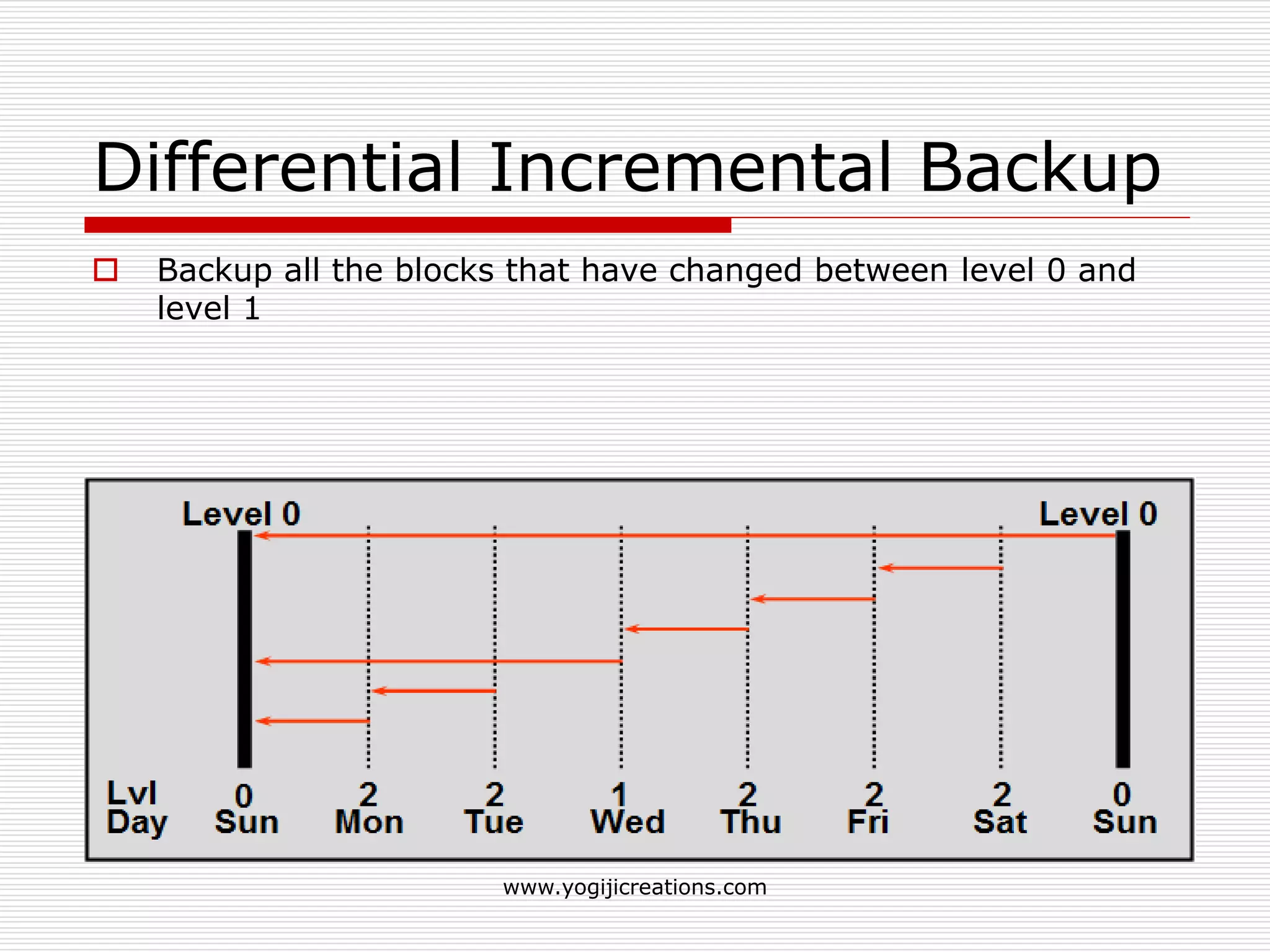
Differential Incremental Backup
 Backup all the blocks that have changed between level 0 and
level 1
www.yogijicreations.com
Cumulative Incremental Backup
 Backup all the blocks till the level 1.
www.yogijicreations.com
User-Managed Backups
 The basic user-managed backup strategy is to make periodic
backups of datafiles and archived logs with operating system
commands.
 Logical or physical.
 Physical: Backup of physical file structure (datafiles, control
files..)
 Logical: backups of logical objects such as tables, views…
 Export / Import utility is used to take logical backup and
restore it back.
www.yogijicreations.com
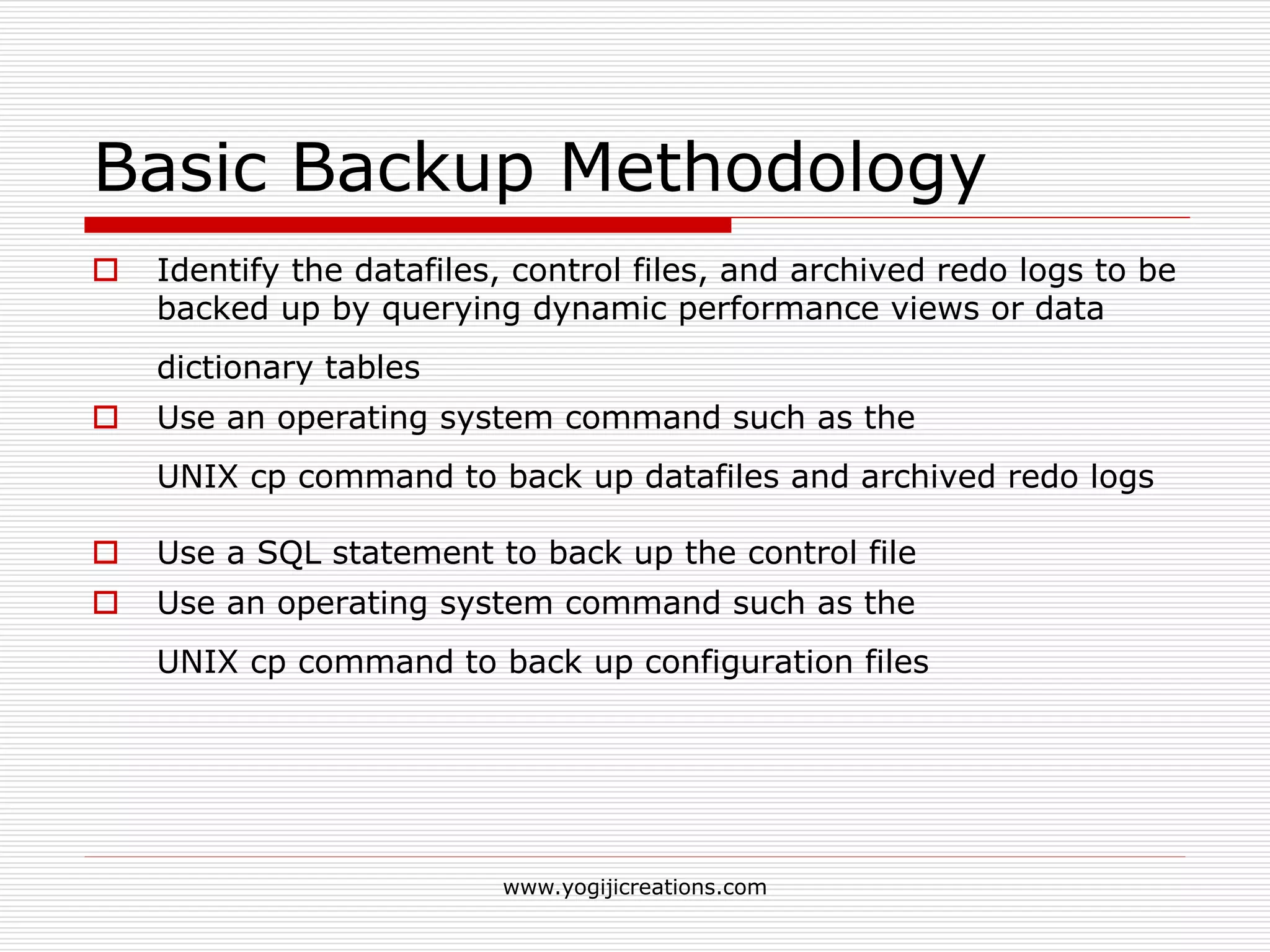
Basic Backup Methodology
 Identify the datafiles, control files, and archived redo logs to be
backed up by querying dynamic performance views or data
dictionary tables
 Use an operating system command such as the
UNIX cp command to back up datafiles and archived redo logs
 Use a SQL statement to back up the control file
 Use an operating system command such as the
UNIX cp command to back up configuration files
www.yogijicreations.com
Basic Backup Methodology
www.yogijicreations.com
The RMAN
 Oracle provided utility for backing-up,
restoring and recovering Oracle Databases
 Doesn't require a separate installation.
 Off-line and on-line database backups.
 Can not write directly to tape.
 3rd-party tools (like Veritas, Omiback) can
integrate with RMAN to handle tape library
management.
 Only compatible with Oracle release 8.0 or
higher
www.yogijicreations.com
RMAN features
 Compress backups of datafiles so that only those data
blocks that have been written to are included in a
backup
 Store frequently executed backup and recovery
operations in scripts.
 Perform incremental backups
 Create a duplicate production database for testing
purpose
 printable message log of all backup and recovery
operations.
 Recovery catalog automates both restore and
recovery operations
 Perform crosschecks
www.yogijicreations.com
RMAN Backup Concepts
 Server-managed backup
 Can back up entire database, all
datafiles in a tablespace, selected
datafiles, control files, archived redo
log files
www.yogijicreations.com
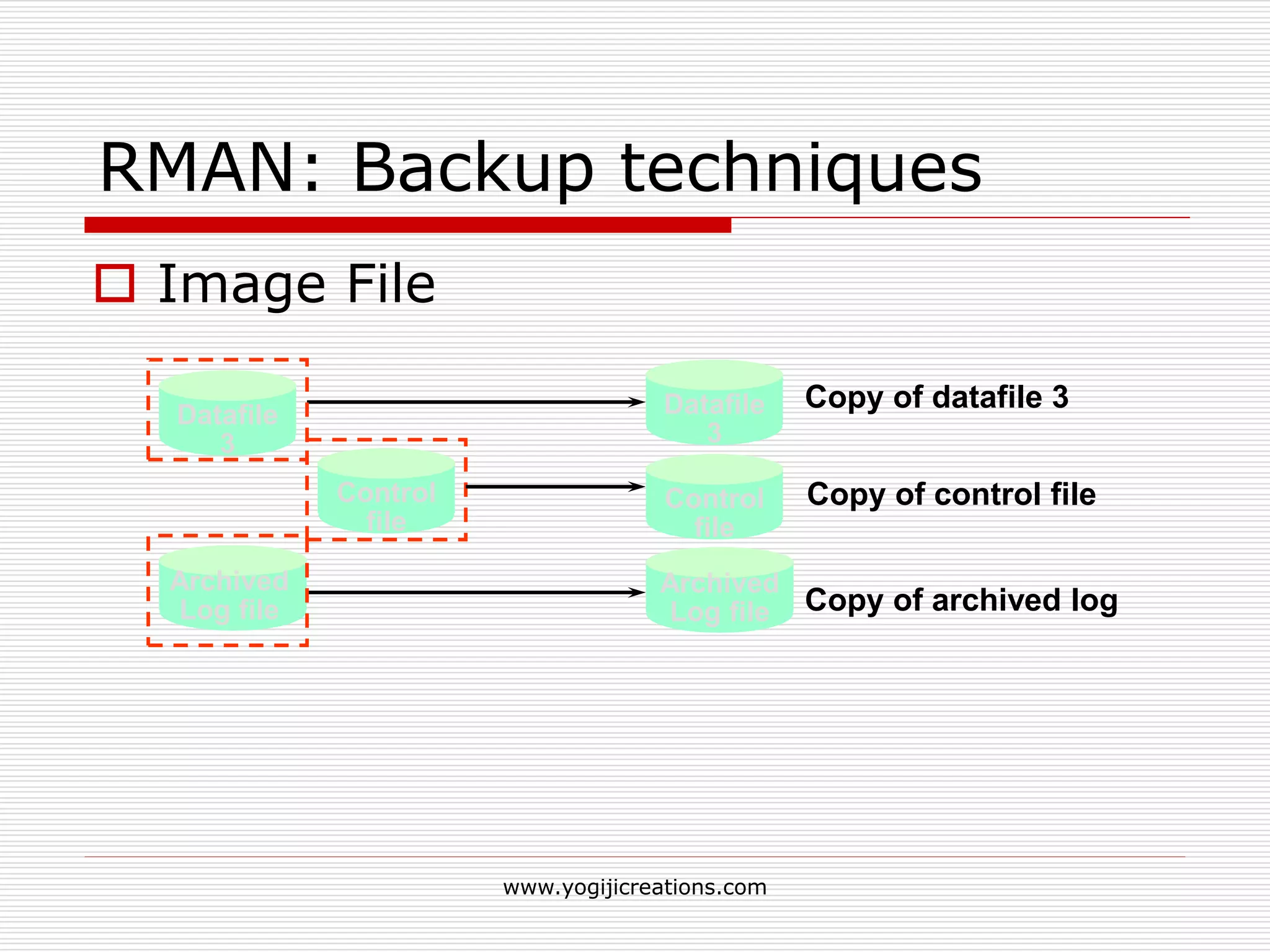
RMAN: Backup techniques
 Image File
Archived
Log file
Datafile
3
Copy of datafile 3
Copy of archived log
Datafile
3
Archived
Log file
Control
file
Control
file
Copy of control file
www.yogijicreations.com
RMAN: Backup techniques
 Backup Set
Backup
set 1
Backup
set 2
Backup
set 3
Datafile
1
Datafile
2
Datafile
3
Datafile
4
Control
file
Datafile
4
Control
file
Datafile
1
Datafile
2
Datafile
3
www.yogijicreations.com
Backup Set
 Usually contain more than one file.
 Can be written to a disk or tape.
 Required to extract files for restoration
 Can be incremental or full.
 Do not include never-used blocks.
www.yogijicreations.com
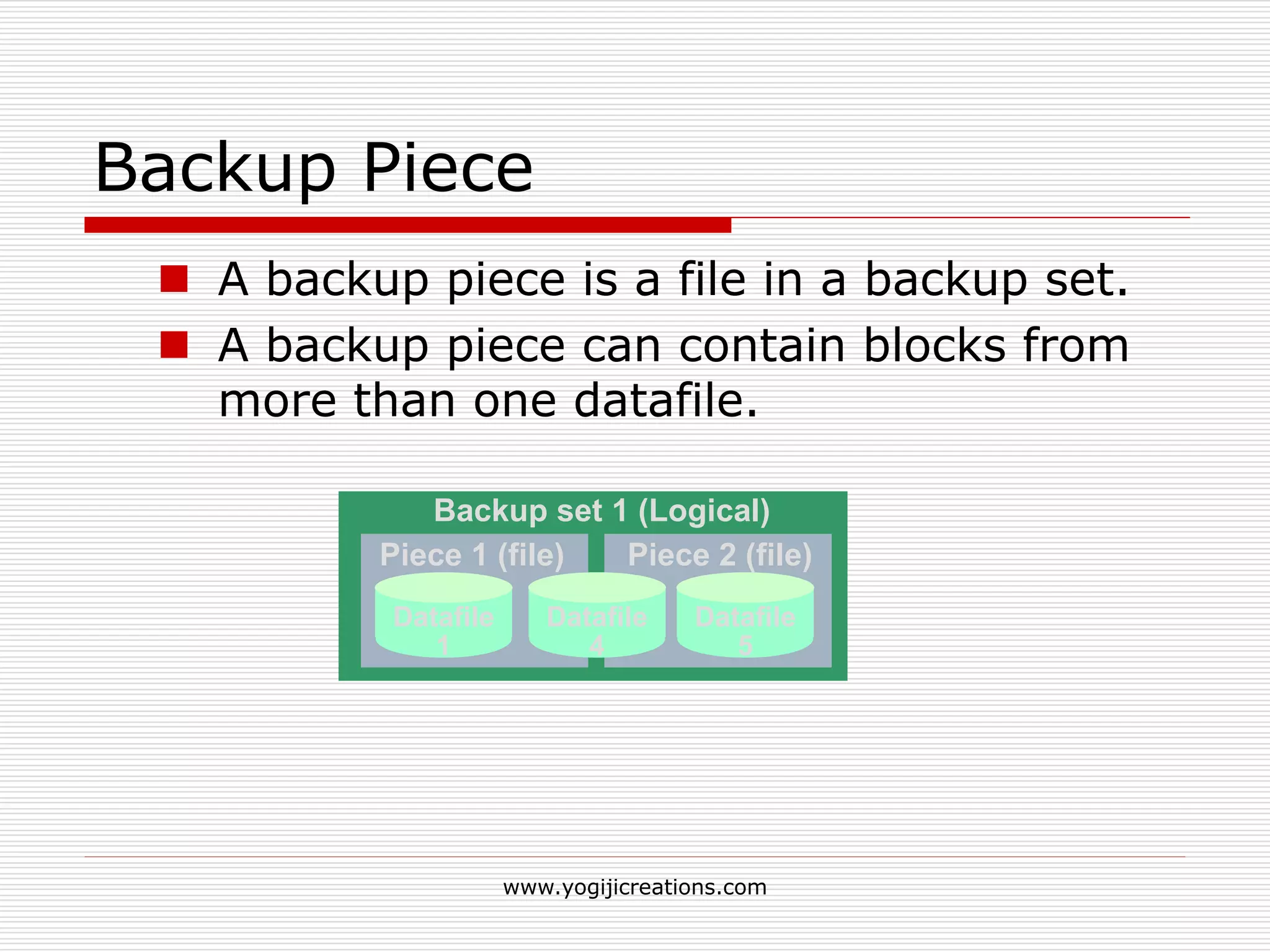
Backup Piece
 A backup piece is a file in a backup set.
 A backup piece can contain blocks from
more than one datafile.
Backup set 1 (Logical)
Piece 2 (file)Piece 1 (file)
Datafile
1
Datafile
4
Datafile
5
www.yogijicreations.com
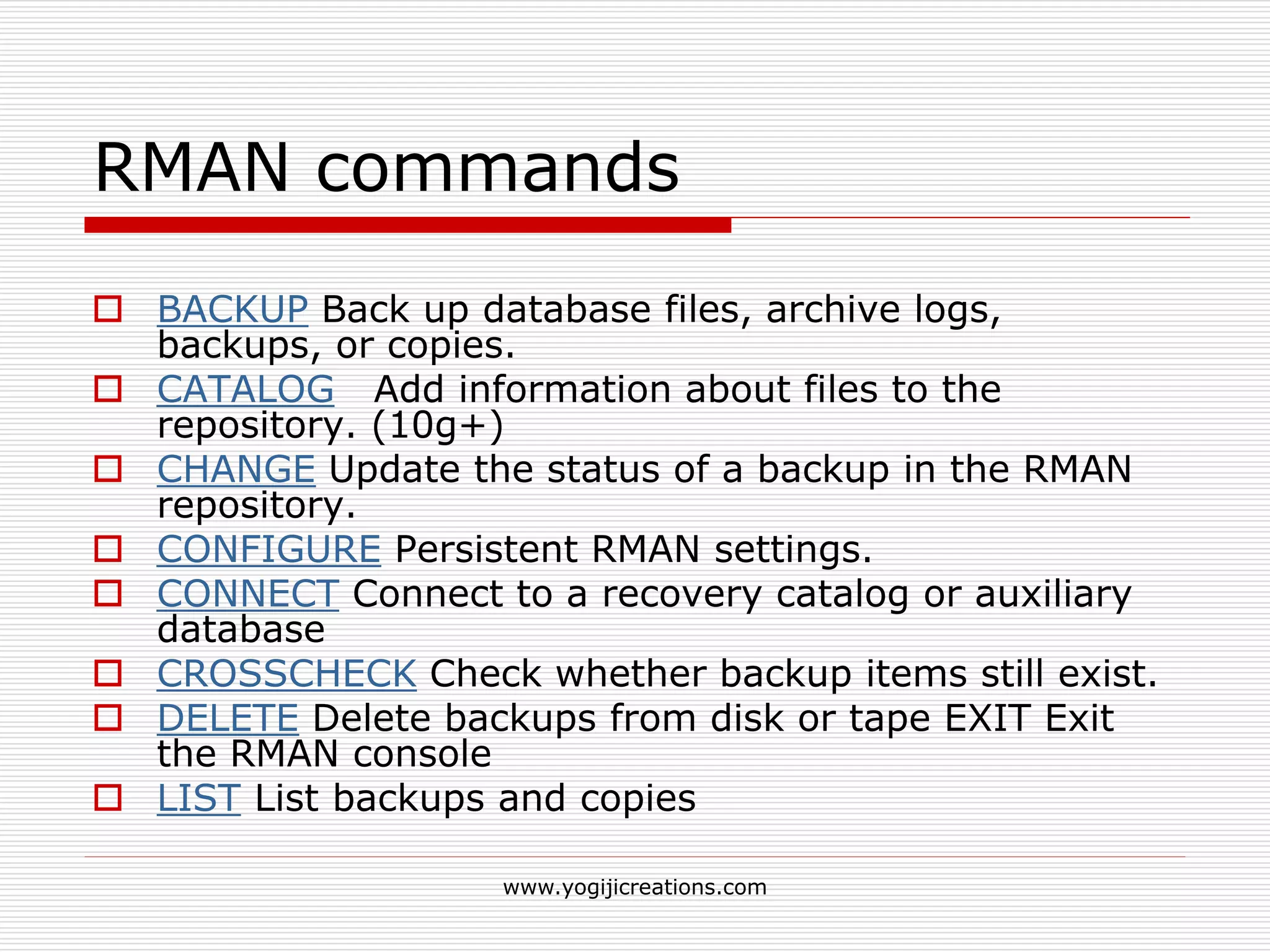
RMAN commands
 BACKUP Back up database files, archive logs,
backups, or copies.
 CATALOG Add information about files to the
repository. (10g+)
 CHANGE Update the status of a backup in the RMAN
repository.
 CONFIGURE Persistent RMAN settings.
 CONNECT Connect to a recovery catalog or auxiliary
database
 CROSSCHECK Check whether backup items still exist.
 DELETE Delete backups from disk or tape EXIT Exit
the RMAN console
 LIST List backups and copies
www.yogijicreations.com
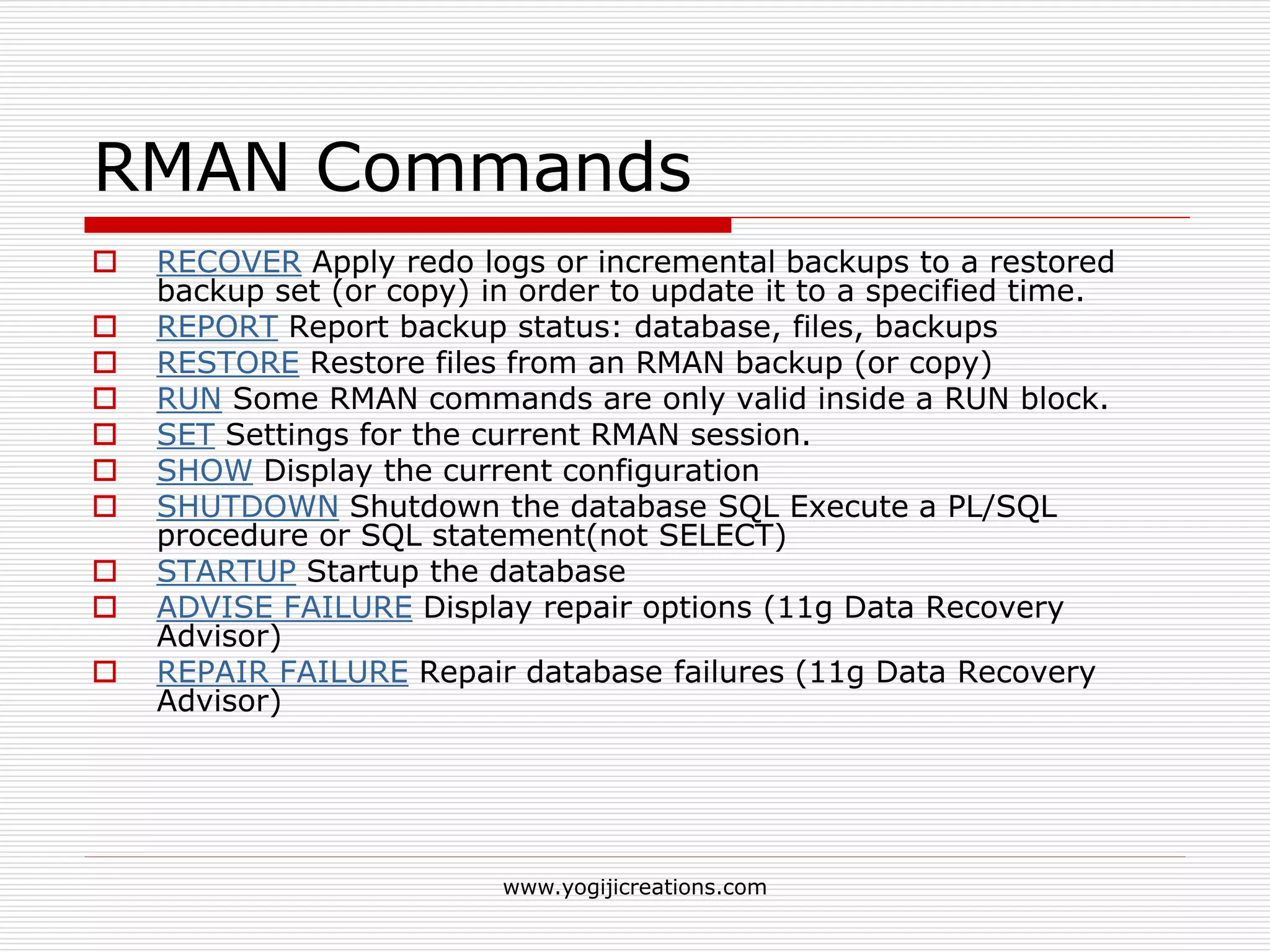
RMAN Commands
 RECOVER Apply redo logs or incremental backups to a restored
backup set (or copy) in order to update it to a specified time.
 REPORT Report backup status: database, files, backups
 RESTORE Restore files from an RMAN backup (or copy)
 RUN Some RMAN commands are only valid inside a RUN block.
 SET Settings for the current RMAN session.
 SHOW Display the current configuration
 SHUTDOWN Shutdown the database SQL Execute a PL/SQL
procedure or SQL statement(not SELECT)
 STARTUP Startup the database
 ADVISE FAILURE Display repair options (11g Data Recovery
Advisor)
 REPAIR FAILURE Repair database failures (11g Data Recovery
Advisor)
www.yogijicreations.com
Backing up database using RMAN
 Command: Backup
 During an RMAN backup, the Oracle
database server reads the datafiles, not an
operating system utility.
 The server reads each block and
determines whether the block is
inconsistent.
 If the block is inconsistent, then Oracle re-
reads the block until it gets a consistent
picture of the data.
www.yogijicreations.com
Backing up database using RMAN
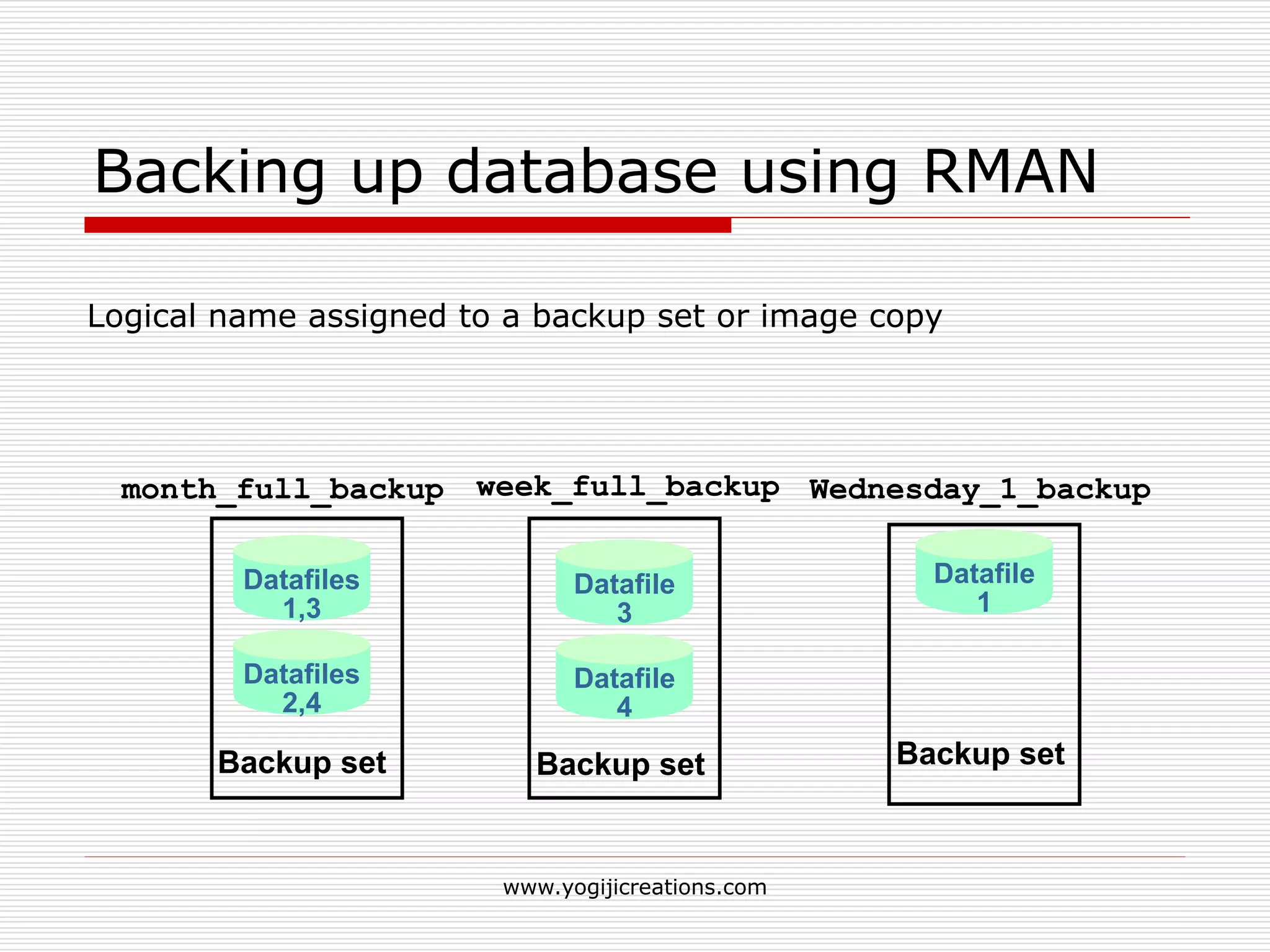
Logical name assigned to a backup set or image copy
month_full_backup week_full_backup Wednesday_1_backup
Datafile
3
Datafile
4
Backup set
Datafiles
1,3
Datafiles
2,4
Backup set
Datafile
1
Backup set
www.yogijicreations.com
RMAN Control File Autobackups
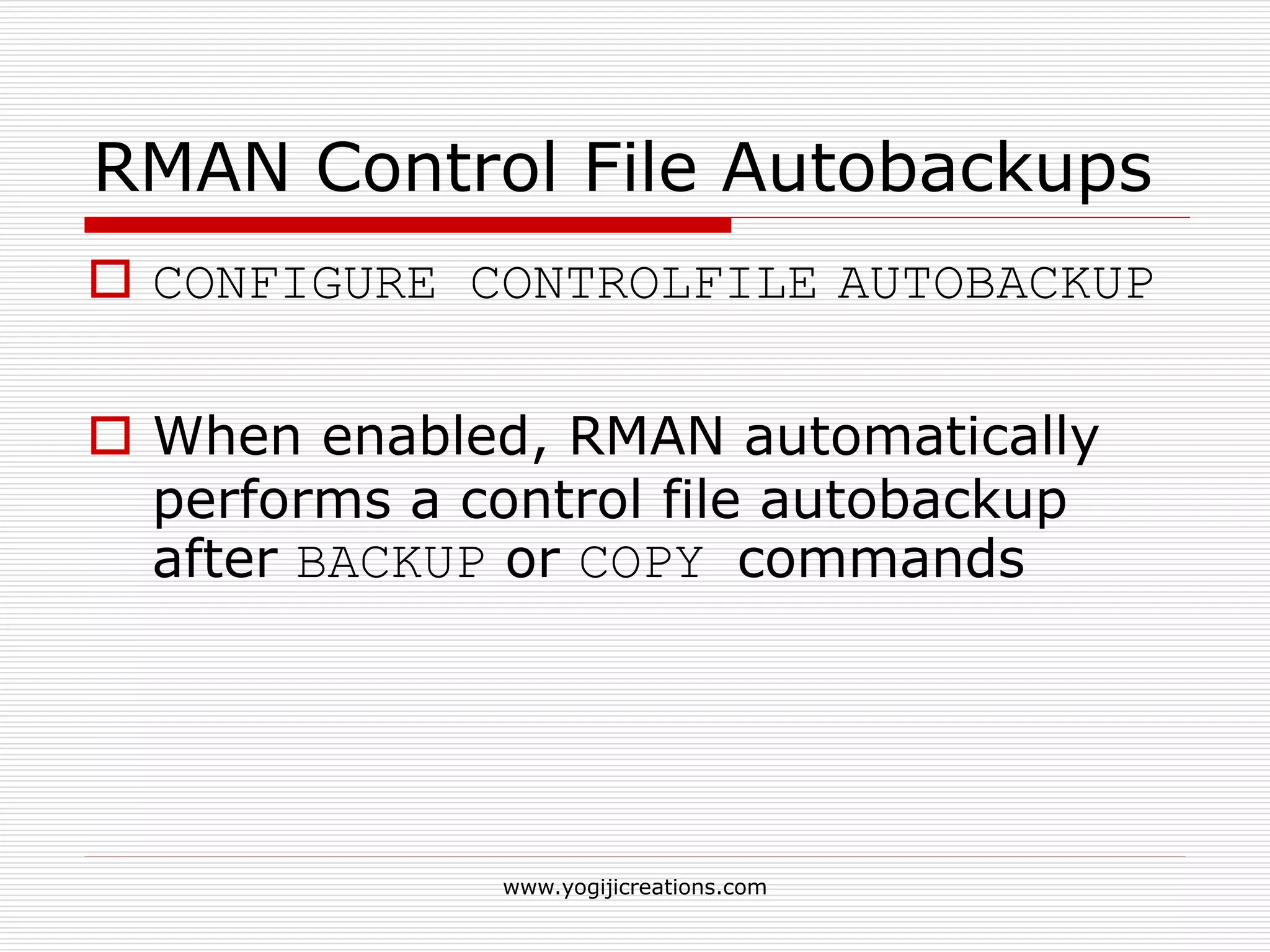
 CONFIGURE CONTROLFILE AUTOBACKUP
 When enabled, RMAN automatically
performs a control file autobackup
after BACKUP or COPY commands
www.yogijicreations.com
Archived Redo Log Backups
 Archived redo logs are essential for
recovering an inconsistent backup.
 BACKUP ARCHIVELOG
www.yogijicreations.com
RMAN Dynamic Views
 V$ARCHIVED_LOG
 V$BACKUP_CORRUPTION
 V$COPY_CORRUPTION
 V$BACKUP_DATAFILE
 V$BACKUP_REDOLOG
 V$BACKUP_SET
 V$BACKUP_PIECE
www.yogijicreations.com
Database Recovery
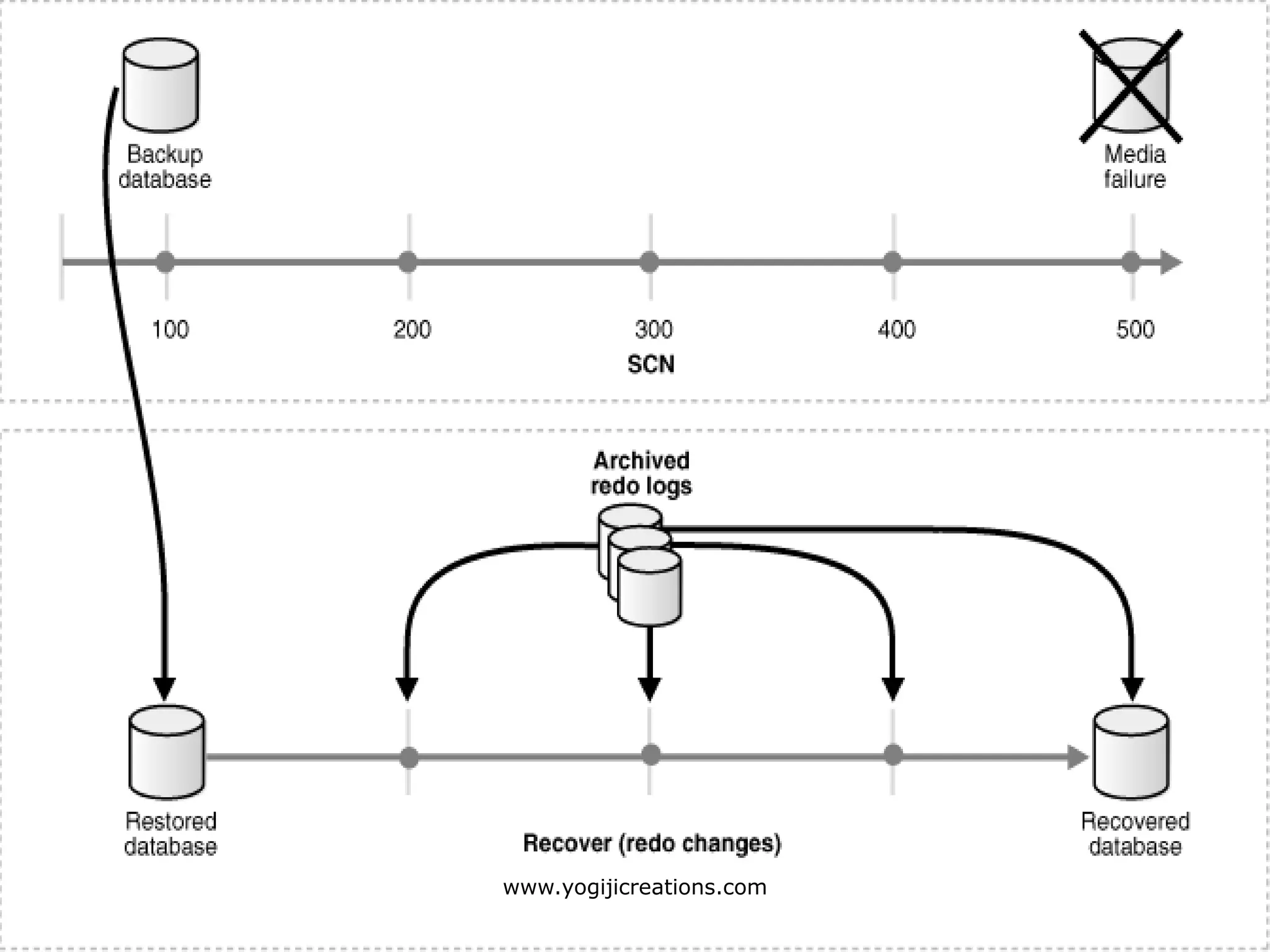
 Difference between restoring and
recovering?
 Restoring: copying backup files from
secondary storage (backup media) to
disk.
 Recovering: process of applying redo
logs to the database to roll it forward.
www.yogijicreations.com
Preparing to recover (user
managed recovery)
 Remain calm and do not panic
 Restore database files to their
respective locations
 Recover the database to the point of
failure using Online redo log files.
(Roll forward)
 Roll back to the last consistent state.
www.yogijicreations.com
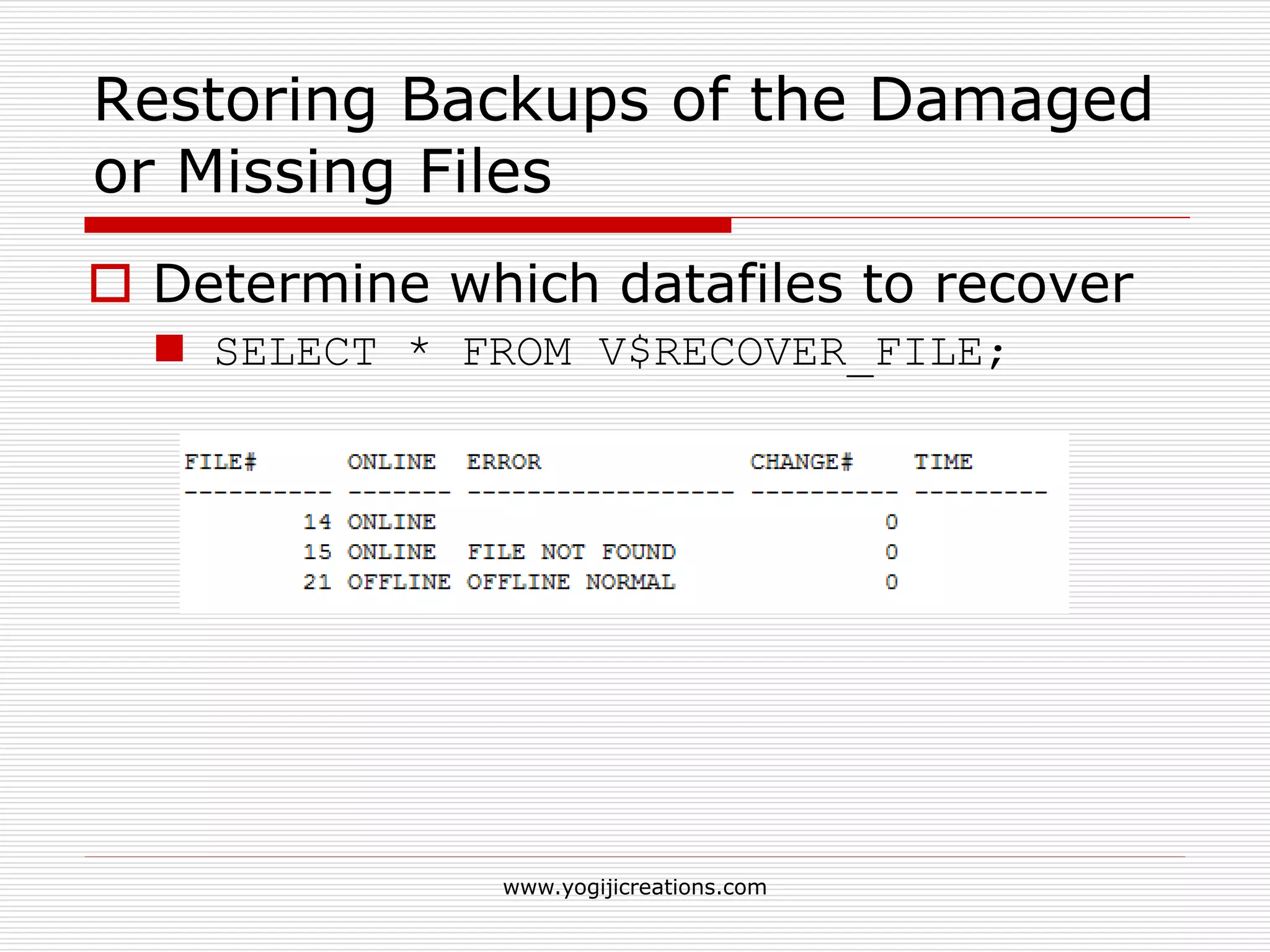
Restoring Backups of the Damaged
or Missing Files
 Determine which datafiles to recover
 SELECT * FROM V$RECOVER_FILE;
www.yogijicreations.com
Restoring Backups of the Damaged
or Missing Files
 Query V$DATAFILE and V$TABLESPACE to obtain filenames
and tablespace names for datafiles requiring recovery.
 Incase of media failure, indicate the new locations of datafiles
files to the control file.
 If the database is open, then take the tablespaces containing
the inaccessible datafiles offline.
 ALTER TABLESPACE users OFFLINE IMMEDIATE;
 Copy backups of the damaged datafiles to their default location
 % cp /disk2/backup/tbs_24.bak /disk1/oracle/dbs/tbs_24.f
 Recover the affected tablespace.
 RECOVER TABLESPACE users
 Bring the recovered tablespace online
 ALTER TABLESPACE users ONLINE
www.yogijicreations.com
Re-Creating Datafiles When
Backups Are Unavailable
 All archived log files written after the creation of the original
datafile must be available
 The control file contains the name of the damaged file
 Create a new, empty datafile to replace a damaged
datafile that has no corresponding backup.
 ALTER DATABASE CREATE DATAFILE '/disk1/users1.f' AS
'/disk2/users1.f';
 Perform media recovery on the empty datafile.
 ALTER DATABASE CREATE DATAFILE '/disk1/users1.f' AS
'/disk2/users1.f';
www.yogijicreations.com
Recovery of Database when Control
files are lost
 Find the location of the datafiles and log
files.
 Create a new control file based on above
information
 CREATE CONTROLFILE REUSE DATABASE "ORCL10G" RESETLOGS
LOGFILE
GROUP 1 'K:ORCL10GLOGREDO01.LOG' SIZE 50M,
GROUP 2 'K:ORCL10GLOGREDO02.LOG' SIZE 50M,
DATAFILE
'K:ORCL10GDATASYSTEM01.DBF',
'K:ORCL10GDATAUNDOTBS01.DBF',
'K:ORCL10GDATASYSAUX01.DBF‘;
 Open the database with resetlogs option.
 alter database open resetlogs;
www.yogijicreations.com
RMAN Recovery Techniques
 Enhanced RMAN Features
 Automated File Creation During Recovery
 Simplified Recovery Through Resetlogs
 Change-Aware Incremental Backups
 Automated Disk-Based Backup and
Recovery
 RMAN Database Dropping and
Deregistration
www.yogijicreations.com
Automated File Creation During
Recovery
 This feature enhances RMAN recovery
by automatically creating and
recovering datafiles that have never
been backed up.
 Archive log files are still required
www.yogijicreations.com
Automated File Creation During
Recovery
data file
#1
data file
#2
Missing
data file
#3
Control fle
RMAN
Archive log files
www.yogijicreations.com
Importance of Redo log files
 The online redo logs are a set of two or more files that record
all changes made to Oracle datafiles and control files.
 Whenever a change is made to the database, the Oracle
database server writes the data and generates a redo record in
the redo buffer.
www.yogijicreations.com
Recovery using Flashback Functions
 Flashback is an Oracle
database facility to quickly move an
entire database or a table back to a
prior state for recovery purposes.
 Flashback was first introduced
with Oracle 9i with Oracle's Flashback
Query feature.
www.yogijicreations.com
FRA ( Flashback Recovery area)
 storage area (directory on disk
or ASM diskgroup) that enables
database Flash Backup and Recovery
operations.
 first introduced with Oracle 10g.
 Related parameters:
 db_recovery_file_dest
 db_recovery_file_dest_size
 db_flashback_retention_target
www.yogijicreations.com
Flashback Query ( 9i Feature)
 Allows users to see a consistent view
of the database as it was at a point in
the past.
 In Oracle 10g, we can now retrieve all versions of the rows
that exist or ever existed between the time the query was
issued and a point back in time.
www.yogijicreations.com
Flashback Database
 Faster than traditional point-in-time recovery.
 Traditional recovery method: Backups and Redo logs
 Flashback Database is implemented using a new type
of log file called the Flashback Database log.
 Oracle database server periodically logs before
images of data blocks in the Flashback Database logs.
 The data block images are used to quickly back out
changes to the database during Flashback Database.
 RVWR: similar to the LGWR (log writer) process.
 writes Flashback Database data to the Flashback
Database logs.
www.yogijicreations.com
Enabling Flashback Database
 Make sure the database is in archive mode.
 Configure the recovery area by setting the two
parameters:
 DB_RECOVERY_FILE_DEST
 DB_RECOVERY_FILE_DEST_SIZE
 Open the database in MOUNT EXCLUSIVE mode and
turn on the flashback feature:
SQL> STARTUP MOUNT EXCLUSIVE;
SQL> ALTER DATABASE FLASHBACK ON;
 Set the Flashback Database retention target:
 DB_FLASHBACK_RETENTION_TARGET
www.yogijicreations.com
Flashback Drop
 DROP command permanently
removed objects from the database…
 In Oracle 10g, a DROP command
places the object in the recycle bin.
 You can restore the object from the
recycle bin at any time.
 Flashback table emp to before drop;
 drop table emp PURGE;
www.yogijicreations.com
Recycle Bin
 A recycle bin contains all the dropped
database objects until,
 Permanently drop them with the PURGE
command.
 Recover the dropped objects with the
FLASHBACK TABLE command.
 There is no room in the tablespace for
new rows or updates to existing rows.
 The tablespace needs to be extended.
www.yogijicreations.com
Flashback Table
 Flashback Table allows you to recover a
table or tables to a specific point in time
without restoring a backup.
 When you use the Flashback Table feature
to restore a table to a specific point in time,
all associated objects, such as, indexes,
constraints, and triggers will be restored.
 FLASHBACK TABLE emp TO SCN 76230;
www.yogijicreations.com
Flashback Transaction Query
 It provides a way for you to view
changes made to the database at the
transaction level.
 It allows you to diagnose problems in
your database and perform analysis
and audit transactions
www.yogijicreations.com
Questions ?
www.yogijicreations.com
For queries: info@yogijicreations.com

Oracle backup and recovery

  • 1.
    Oracle Backup andRecovery Created By: Saurabh Kulkarni www.yogijicreations.com
  • 2.
    Index  Backup andNeed of it  Different types of backup  Hot vs cold  Full vs incremental  Physical vs logical  User Managed backup  RMAN  Database recovery  User managed  RMAN based  Flashback Recovery www.yogijicreations.com
  • 3.
    Backup  What dowe mean by database backup ?  The process of periodically taking a copy of the database and log file (and possibly programs) onto offline storage media. A backup is a copy of data. www.yogijicreations.com
  • 4.
    Need of takingbackup  Instance Failures  instance shuts down without synchronizing all the database files to the same system change number (SCN)  A few causes for instance failure:  A power outage  A server hardware failure  Failure of an Oracle background process  Emergency shutdown procedures (intentional power outage or SHUTDOWN ABORT)  Solution :STARTUP Database and let Oracle automatically perform instance recovery using the online redo logs and undo data in the undo tablespace. www.yogijicreations.com
  • 5.
    Need of takingbackup  User Error Failures  Inadvertently delete or modify data in tables or drop an index.  the DROP TABLE command worked fine, but you really didn’t want to drop that table! www.yogijicreations.com
  • 6.
     Media Failures The loss of one or more database files (Datafiles, Control files, redo log files)  The database file can be lost or corrupted for a number of reasons:  Failure of a disk drive  Failure of a disk controller  Inadvertent deletion or corruption of a database file www.yogijicreations.com
  • 7.
    Different types ofbackup techniques  Hot or On-line Backups  backup of one or more database files while the database is open  Inconsistent !!!  Mismatch in SCN SCN ( System change Number): A stamp that defines a committed version of a database at a point in time. Oracle assigns every committed transaction a unique SCN. www.yogijicreations.com
  • 8.
    Different types ofbackup techniques  In 24 X 7 environment  Database should be in ARCHIVELOG mode www.yogijicreations.com
  • 9.
    Different types ofbackup techniques  Cold /offline Backup  Backing up the database when it is closed (shutdown state).  Consistent  No need of recovery because the data is already consistent. www.yogijicreations.com
  • 10.
    Different types ofbackup techniques  Whole database backups  Tablespace Backups  Datafile Backups www.yogijicreations.com
  • 11.
    Different types ofbackup techniques  Full Backup  Incremental Backup  Differential Incremental Backup  Cumulative Incremental Backup www.yogijicreations.com
  • 12.
    Differential Incremental Backup Backup all the blocks that have changed between level 0 and level 1 www.yogijicreations.com
  • 13.
    Cumulative Incremental Backup Backup all the blocks till the level 1. www.yogijicreations.com
  • 14.
    User-Managed Backups  Thebasic user-managed backup strategy is to make periodic backups of datafiles and archived logs with operating system commands.  Logical or physical.  Physical: Backup of physical file structure (datafiles, control files..)  Logical: backups of logical objects such as tables, views…  Export / Import utility is used to take logical backup and restore it back. www.yogijicreations.com
  • 15.
    Basic Backup Methodology Identify the datafiles, control files, and archived redo logs to be backed up by querying dynamic performance views or data dictionary tables  Use an operating system command such as the UNIX cp command to back up datafiles and archived redo logs  Use a SQL statement to back up the control file  Use an operating system command such as the UNIX cp command to back up configuration files www.yogijicreations.com
  • 16.
  • 17.
  • 18.
    The RMAN  Oracleprovided utility for backing-up, restoring and recovering Oracle Databases  Doesn't require a separate installation.  Off-line and on-line database backups.  Can not write directly to tape.  3rd-party tools (like Veritas, Omiback) can integrate with RMAN to handle tape library management.  Only compatible with Oracle release 8.0 or higher www.yogijicreations.com
  • 19.
  • 20.
    RMAN features  Compressbackups of datafiles so that only those data blocks that have been written to are included in a backup  Store frequently executed backup and recovery operations in scripts.  Perform incremental backups  Create a duplicate production database for testing purpose  printable message log of all backup and recovery operations.  Recovery catalog automates both restore and recovery operations  Perform crosschecks www.yogijicreations.com
  • 21.
    RMAN Backup Concepts Server-managed backup  Can back up entire database, all datafiles in a tablespace, selected datafiles, control files, archived redo log files www.yogijicreations.com
  • 22.
  • 23.
    RMAN: Backup techniques Image File Archived Log file Datafile 3 Copy of datafile 3 Copy of archived log Datafile 3 Archived Log file Control file Control file Copy of control file www.yogijicreations.com
  • 24.
    RMAN: Backup techniques Backup Set Backup set 1 Backup set 2 Backup set 3 Datafile 1 Datafile 2 Datafile 3 Datafile 4 Control file Datafile 4 Control file Datafile 1 Datafile 2 Datafile 3 www.yogijicreations.com
  • 25.
    Backup Set  Usuallycontain more than one file.  Can be written to a disk or tape.  Required to extract files for restoration  Can be incremental or full.  Do not include never-used blocks. www.yogijicreations.com
  • 26.
    Backup Piece  Abackup piece is a file in a backup set.  A backup piece can contain blocks from more than one datafile. Backup set 1 (Logical) Piece 2 (file)Piece 1 (file) Datafile 1 Datafile 4 Datafile 5 www.yogijicreations.com
  • 27.
    RMAN commands  BACKUPBack up database files, archive logs, backups, or copies.  CATALOG Add information about files to the repository. (10g+)  CHANGE Update the status of a backup in the RMAN repository.  CONFIGURE Persistent RMAN settings.  CONNECT Connect to a recovery catalog or auxiliary database  CROSSCHECK Check whether backup items still exist.  DELETE Delete backups from disk or tape EXIT Exit the RMAN console  LIST List backups and copies www.yogijicreations.com
  • 28.
    RMAN Commands  RECOVERApply redo logs or incremental backups to a restored backup set (or copy) in order to update it to a specified time.  REPORT Report backup status: database, files, backups  RESTORE Restore files from an RMAN backup (or copy)  RUN Some RMAN commands are only valid inside a RUN block.  SET Settings for the current RMAN session.  SHOW Display the current configuration  SHUTDOWN Shutdown the database SQL Execute a PL/SQL procedure or SQL statement(not SELECT)  STARTUP Startup the database  ADVISE FAILURE Display repair options (11g Data Recovery Advisor)  REPAIR FAILURE Repair database failures (11g Data Recovery Advisor) www.yogijicreations.com
  • 29.
    Backing up databaseusing RMAN  Command: Backup  During an RMAN backup, the Oracle database server reads the datafiles, not an operating system utility.  The server reads each block and determines whether the block is inconsistent.  If the block is inconsistent, then Oracle re- reads the block until it gets a consistent picture of the data. www.yogijicreations.com
  • 30.
    Backing up databaseusing RMAN Logical name assigned to a backup set or image copy month_full_backup week_full_backup Wednesday_1_backup Datafile 3 Datafile 4 Backup set Datafiles 1,3 Datafiles 2,4 Backup set Datafile 1 Backup set www.yogijicreations.com
  • 31.
    RMAN Control FileAutobackups  CONFIGURE CONTROLFILE AUTOBACKUP  When enabled, RMAN automatically performs a control file autobackup after BACKUP or COPY commands www.yogijicreations.com
  • 32.
    Archived Redo LogBackups  Archived redo logs are essential for recovering an inconsistent backup.  BACKUP ARCHIVELOG www.yogijicreations.com
  • 33.
    RMAN Dynamic Views V$ARCHIVED_LOG  V$BACKUP_CORRUPTION  V$COPY_CORRUPTION  V$BACKUP_DATAFILE  V$BACKUP_REDOLOG  V$BACKUP_SET  V$BACKUP_PIECE www.yogijicreations.com
  • 34.
    Database Recovery  Differencebetween restoring and recovering?  Restoring: copying backup files from secondary storage (backup media) to disk.  Recovering: process of applying redo logs to the database to roll it forward. www.yogijicreations.com
  • 35.
  • 36.
    Preparing to recover(user managed recovery)  Remain calm and do not panic  Restore database files to their respective locations  Recover the database to the point of failure using Online redo log files. (Roll forward)  Roll back to the last consistent state. www.yogijicreations.com
  • 37.
    Restoring Backups ofthe Damaged or Missing Files  Determine which datafiles to recover  SELECT * FROM V$RECOVER_FILE; www.yogijicreations.com
  • 38.
    Restoring Backups ofthe Damaged or Missing Files  Query V$DATAFILE and V$TABLESPACE to obtain filenames and tablespace names for datafiles requiring recovery.  Incase of media failure, indicate the new locations of datafiles files to the control file.  If the database is open, then take the tablespaces containing the inaccessible datafiles offline.  ALTER TABLESPACE users OFFLINE IMMEDIATE;  Copy backups of the damaged datafiles to their default location  % cp /disk2/backup/tbs_24.bak /disk1/oracle/dbs/tbs_24.f  Recover the affected tablespace.  RECOVER TABLESPACE users  Bring the recovered tablespace online  ALTER TABLESPACE users ONLINE www.yogijicreations.com
  • 39.
    Re-Creating Datafiles When BackupsAre Unavailable  All archived log files written after the creation of the original datafile must be available  The control file contains the name of the damaged file  Create a new, empty datafile to replace a damaged datafile that has no corresponding backup.  ALTER DATABASE CREATE DATAFILE '/disk1/users1.f' AS '/disk2/users1.f';  Perform media recovery on the empty datafile.  ALTER DATABASE CREATE DATAFILE '/disk1/users1.f' AS '/disk2/users1.f'; www.yogijicreations.com
  • 40.
    Recovery of Databasewhen Control files are lost  Find the location of the datafiles and log files.  Create a new control file based on above information  CREATE CONTROLFILE REUSE DATABASE "ORCL10G" RESETLOGS LOGFILE GROUP 1 'K:ORCL10GLOGREDO01.LOG' SIZE 50M, GROUP 2 'K:ORCL10GLOGREDO02.LOG' SIZE 50M, DATAFILE 'K:ORCL10GDATASYSTEM01.DBF', 'K:ORCL10GDATAUNDOTBS01.DBF', 'K:ORCL10GDATASYSAUX01.DBF‘;  Open the database with resetlogs option.  alter database open resetlogs; www.yogijicreations.com
  • 41.
    RMAN Recovery Techniques Enhanced RMAN Features  Automated File Creation During Recovery  Simplified Recovery Through Resetlogs  Change-Aware Incremental Backups  Automated Disk-Based Backup and Recovery  RMAN Database Dropping and Deregistration www.yogijicreations.com
  • 42.
    Automated File CreationDuring Recovery  This feature enhances RMAN recovery by automatically creating and recovering datafiles that have never been backed up.  Archive log files are still required www.yogijicreations.com
  • 43.
    Automated File CreationDuring Recovery data file #1 data file #2 Missing data file #3 Control fle RMAN Archive log files www.yogijicreations.com
  • 44.
    Importance of Redolog files  The online redo logs are a set of two or more files that record all changes made to Oracle datafiles and control files.  Whenever a change is made to the database, the Oracle database server writes the data and generates a redo record in the redo buffer. www.yogijicreations.com
  • 45.
    Recovery using FlashbackFunctions  Flashback is an Oracle database facility to quickly move an entire database or a table back to a prior state for recovery purposes.  Flashback was first introduced with Oracle 9i with Oracle's Flashback Query feature. www.yogijicreations.com
  • 46.
    FRA ( FlashbackRecovery area)  storage area (directory on disk or ASM diskgroup) that enables database Flash Backup and Recovery operations.  first introduced with Oracle 10g.  Related parameters:  db_recovery_file_dest  db_recovery_file_dest_size  db_flashback_retention_target www.yogijicreations.com
  • 47.
    Flashback Query (9i Feature)  Allows users to see a consistent view of the database as it was at a point in the past.  In Oracle 10g, we can now retrieve all versions of the rows that exist or ever existed between the time the query was issued and a point back in time. www.yogijicreations.com
  • 48.
    Flashback Database  Fasterthan traditional point-in-time recovery.  Traditional recovery method: Backups and Redo logs  Flashback Database is implemented using a new type of log file called the Flashback Database log.  Oracle database server periodically logs before images of data blocks in the Flashback Database logs.  The data block images are used to quickly back out changes to the database during Flashback Database.  RVWR: similar to the LGWR (log writer) process.  writes Flashback Database data to the Flashback Database logs. www.yogijicreations.com
  • 49.
  • 50.
    Enabling Flashback Database Make sure the database is in archive mode.  Configure the recovery area by setting the two parameters:  DB_RECOVERY_FILE_DEST  DB_RECOVERY_FILE_DEST_SIZE  Open the database in MOUNT EXCLUSIVE mode and turn on the flashback feature: SQL> STARTUP MOUNT EXCLUSIVE; SQL> ALTER DATABASE FLASHBACK ON;  Set the Flashback Database retention target:  DB_FLASHBACK_RETENTION_TARGET www.yogijicreations.com
  • 51.
    Flashback Drop  DROPcommand permanently removed objects from the database…  In Oracle 10g, a DROP command places the object in the recycle bin.  You can restore the object from the recycle bin at any time.  Flashback table emp to before drop;  drop table emp PURGE; www.yogijicreations.com
  • 52.
    Recycle Bin  Arecycle bin contains all the dropped database objects until,  Permanently drop them with the PURGE command.  Recover the dropped objects with the FLASHBACK TABLE command.  There is no room in the tablespace for new rows or updates to existing rows.  The tablespace needs to be extended. www.yogijicreations.com
  • 53.
    Flashback Table  FlashbackTable allows you to recover a table or tables to a specific point in time without restoring a backup.  When you use the Flashback Table feature to restore a table to a specific point in time, all associated objects, such as, indexes, constraints, and triggers will be restored.  FLASHBACK TABLE emp TO SCN 76230; www.yogijicreations.com
  • 54.
    Flashback Transaction Query It provides a way for you to view changes made to the database at the transaction level.  It allows you to diagnose problems in your database and perform analysis and audit transactions www.yogijicreations.com
  • 55.