Managing Security - Logins and Server Roles 
Ram Kedem
Copyright 2014 © Ram Kedem. All rights reserved. Not to be reproduced without written consent 
Principals 
•Principals are entities that can request SQL Server resources. 
•Like other components of the SQL Server authorization model, principals can be arranged in a hierarchy. 
•The scope of influence of a principal depends on the scope of the definition of the principal: 
•Windows 
•Server 
•Database
Copyright 2014 © Ram Kedem. All rights reserved. Not to be reproduced without written consent 
Principals 
•Windows-level principals 
•Windows Domain Login 
•Windows Local Login 
•SQL Server-levelprincipals 
•SQL Server Login 
•Server Role 
•Database-level principals 
•Database User 
•Database Role 
•Application Role
Copyright 2014 © Ram Kedem. All rights reserved. Not to be reproduced without written consent 
Securables 
•Securablesare the resources to which the SQL Server Database Engine authorization system regulates access. 
•The securable scopes are server, database, and schema.
Copyright 2014 © Ram Kedem. All rights reserved. Not to be reproduced without written consent 
Securables 
•Server Level 
•Endpoint 
•Database 
•Database Level 
•User 
•Database role 
•Application role 
•Schema 
•Schema Level 
•Function 
•Procedure 
•Table 
•View
Copyright 2014 © Ram Kedem. All rights reserved. Not to be reproduced without written consent 
SQL Logins 
•Logins are the credentials that authenticate connections to an instance. 
•You can differentiate SQL Server logins based on the type of authentication method used: 
•Windows-authenticated login 
•SQL Server–authenticated login 
•Certificate 
•Asymmetric key
Copyright 2014 © Ram Kedem. All rights reserved. Not to be reproduced without written consent 
Windows-Authenticated SQL Server Logins 
•Windows-authenticated SQL Server logins are instance logins in which the operating system handles authentication. 
•You can map a Windows-authenticated SQL Server login to a local user account, a local security group, a domain user account, or a domain security group. 
•The type of authentication you use depends on your organization’s needs. Controlling access by using local computer-based or domain-based groups can reduce the number of SQL logins required but requires giving database administrators the ability to manage membership of these groups.
Copyright 2014 © Ram Kedem. All rights reserved. Not to be reproduced without written consent 
SQL Server–Authenticated Logins 
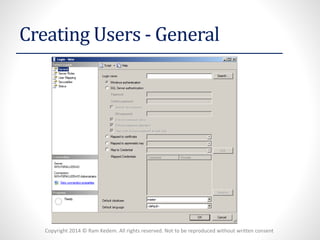
•SQL Server–authenticated logins are authenticated by the Database Engine instance rather than through the host operating system or a domain controller. 
•SQL Server–authenticated login passwords are stored within the master database. 
•If the SQL Server authentication option button is disabled, you must configure the instance to support mixed-mode authentication. 
•You can create a SQL Server–authenticated login to use the password expiration and complexity policies that apply to the host operating system. 
•Windows Server 2008 -Start -Administrative Tools -Local Security Policy.
Copyright 2014 © Ram Kedem. All rights reserved. Not to be reproduced without written consent 
Creating Users -General
Copyright 2014 © Ram Kedem. All rights reserved. Not to be reproduced without written consent 
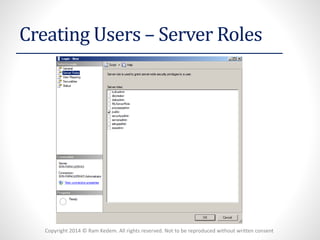
Creating Users –Server Roles
Copyright 2014 © Ram Kedem. All rights reserved. Not to be reproduced without written consent 
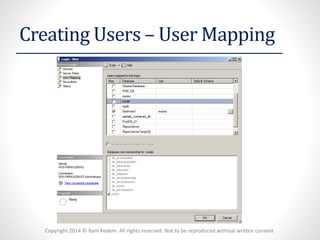
Creating Users –User Mapping
Copyright 2014 © Ram Kedem. All rights reserved. Not to be reproduced without written consent 
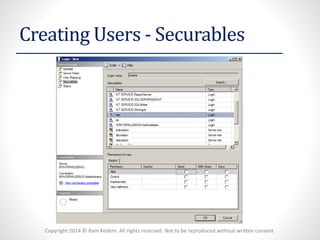
Creating Users -Securables
Copyright 2014 © Ram Kedem. All rights reserved. Not to be reproduced without written consent 
Fixed Server-Level Roles 
•sysadminRole -members can perform all activities possible on the Database Engine instance. You specify initial membership of this role when performing installation of the Database Engine feature. 
•serveradmin-Members of the serveradminfixed server role can change server-wide configuration options and shut down the server (creation of new logins for example is not possible) 
•securityadmin-Members of the securityadminfixed server role manage logins and their properties. They can GRANT, DENY, and REVOKE server-level permissions. They can also GRANT, DENY, and REVOKE database-level permissions if they have access to a database. Additionally, they can reset passwords for SQL Server logins. 
•processadmin-Members of the processadminfixed server role can end processes that are running in an instance of SQL Server. 
•setupadmin-Members of the setupadminfixed server role can add and remove linked servers. 
•bulkadmin-Members of the bulkadminfixed server role can run the BULK INSERT statement.
Copyright 2014 © Ram Kedem. All rights reserved. Not to be reproduced without written consent 
Fixed Server-Level Roles 
•diskadmin-The diskadminfixed server role is used for managing disk files. 
•dbcreator-Members of the dbcreatorfixed server role can create, alter, drop, and restore any database. 
•public-Every SQL Serverlogin belongs to the public server role. When a server principal has not been granted or denied specific permissions on a securable object, the user inherits the permissions granted to public on that object.Only assign public permissions on any object when you want the object to be available to all users. You cannot change membership in public.
Copyright 2014 © Ram Kedem. All rights reserved. Not to be reproduced without written consent 
Altering Existing Logins 
•You can alter existing logins using SQL Server Management Studio to edit the properties of the login. You can also alter existing logins by using the ALTER LOGIN Transact-SQL statement.
Copyright 2014 © Ram Kedem. All rights reserved. Not to be reproduced without written consent 
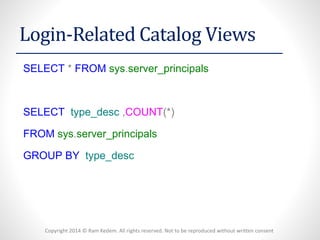
Login-Related Catalog Views 
SELECT*FROMsys.server_principals 
SELECTtype_desc,COUNT(*) 
FROMsys.server_principals 
GROUPBYtype_desc
Copyright 2014 © Ram Kedem. All rights reserved. Not to be reproduced without written consent 
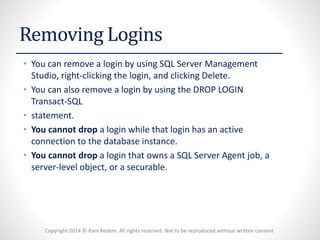
Removing Logins 
•You can remove a login by using SQL Server Management Studio, right-clicking the login, and clicking Delete. 
•You can also remove a login by using the DROP LOGIN Transact-SQL 
•statement. 
•You cannot dropa login while that login has an active connection to the database instance. 
•You cannot dropa login that owns a SQL Server Agent job, a server-level object, or a securable.
Copyright 2014 © Ram Kedem. All rights reserved. Not to be reproduced without written consent 
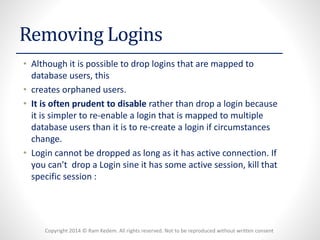
Removing Logins 
•Although it is possible to drop logins that are mapped to database users, this 
•creates orphaned users. 
•It is often prudent to disablerather than drop a login because it is simpler to re-enable a login that is mapped to multiple database users than it is to re-create a login if circumstances change. 
•Login cannot be dropped as long as it has active connection. If you can't drop a Login sine it has some active session, kill that specific session :
Copyright 2014 © Ram Kedem. All rights reserved. Not to be reproduced without written consent 
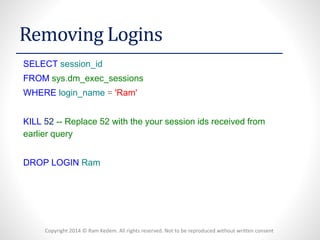
Removing Logins 
SELECTsession_id 
FROMsys.dm_exec_sessions 
WHERElogin_name='Ram' 
KILL52--Replace 52 with the your session ids received from earlier query 
DROPLOGINRam
Copyright 2014 © Ram Kedem. All rights reserved. Not to be reproduced without written consent 
Server Roles 
•Server roles enable you to simplify the assignment of permissions at the database instance level. 
•Although it is possible to assign permissions to SQL logins, this can be difficult to manage. 
•SQL Server 2012 ships with nine built-in server roles, These built-in server roles 
•are fixed and, other than the public role, it is not possible to modify the permissions assigned to these roles.
Copyright 2014 © Ram Kedem. All rights reserved. Not to be reproduced without written consent 
User-Defined Server Roles 
•User-defined server roles are a new SQL Server 2012 feature. You can use user-defined server roles to create custom server roles when using one of the existing server roles does not suit your specific requirements. Creating a user-defined server role involves performing the following steps: 
•Creating the user-defined server role 
•Granting server-level permissions to the role 
•Adding SQL Server logins to the role
Copyright 2014 © Ram Kedem. All rights reserved. Not to be reproduced without written consent 
Credentials 
•Authentication information needed to access a resource outside of SQL Server. 
•Usually consists of a Windows login and password. 
•Enables users connecting using SQL Authentication, to access Windows or other resources outside of SQL Server 
•A Credential can be used by many SQL Server Logins. (Credential -< Logins) 
•A Login can be mapped to only one Credential. (Through "Login properties") 
•Relevant only with Mixed Authentication. (Server Properties => Security)
Copyright 2014 © Ram Kedem. All rights reserved. Not to be reproduced without written consent 
Database Users 
•USERS -Database level principals, which define the permissions on the DB. 
•We can map a Server Login to a DB User. (1-1 relationship per DB) 
•Each DB has two Special users: 
•DBO 
•DB Owner -Most privileged user. 
•Members of SysAdminrole are mapped to it. 
•GUEST 
•Used for Logins who are not mapped to any DB user. 
•Disabled by defualt. 
•We can enable him and give him permissions for Public.
Copyright 2014 © Ram Kedem. All rights reserved. Not to be reproduced without written consent 
Database Roles 
•Three kinds of roles at DB level: 
•1.Fixed DB Roles - 
•Set of permissions for specific tasks (User admin, DDLs, Selects etc) 
•Can add new members, but the permissions are fixed. 
•2. User-defined DB Roles 
•For grouping users with similar permissions. 
•3. The Public Role 
•Fixed role which is assigned to all users. 
•Inherits the permissions of the Guest user.
Copyright 2014 © Ram Kedem. All rights reserved. Not to be reproduced without written consent 
Application Roles 
•Setting a Security Context for a specific application 
•If a program is linked to an app. role, it executes under its permissions,insteadof under the invoker's permissions. 
•Enables users to perform certain actions only via the application.(More secure and less permissions administration overhead) 
•There are no members for App. role (Activated during the program execution) 
•Activation requires a password. 
•The role remains active until running sp_unsetapprole(Or disconnecting)
Copyright 2014 © Ram Kedem. All rights reserved. Not to be reproduced without written consent 
Data Encryption -Keys 
•1. Symetric 
•A certain key that is used for encryption and decryption. 
•This one key is used for both encryption and decryption, therefore both the encryptorand decryptorshould share it. 
•Symetrickeys are relatively fast and are usually most suitable for use. 
•2. A-Symetric 
•Contains two different keys -a Private Key and a Public key. 
•Data is encrypted by the Public-key, and can only be decrypted by its corresponding Private-Key. 
•The Private-key is kept secret, and the public one can be distributed freely,toall who need to send encrypted data to the owner of the private key. 
•Relatively resource-intensive and much slower than Symetrickeys, but provide a higher level of security. (As the Secret key does not have to be shared between target and source) 
•Usually used for the initial transfer of the Symmetric Keys... 
•We can choose from many different algorithms for the encrypting key. 
•ms-help://MS.SQLCC.v9/MS.SQLSVR.v9.en/udb9/html/96c276d5-1bba-4e95- b678-10f059f1fbcf.htm

Lesson 5 security

  • 1.
    Managing Security -Logins and Server Roles Ram Kedem
  • 2.
    Copyright 2014 ©Ram Kedem. All rights reserved. Not to be reproduced without written consent Principals •Principals are entities that can request SQL Server resources. •Like other components of the SQL Server authorization model, principals can be arranged in a hierarchy. •The scope of influence of a principal depends on the scope of the definition of the principal: •Windows •Server •Database
  • 3.
    Copyright 2014 ©Ram Kedem. All rights reserved. Not to be reproduced without written consent Principals •Windows-level principals •Windows Domain Login •Windows Local Login •SQL Server-levelprincipals •SQL Server Login •Server Role •Database-level principals •Database User •Database Role •Application Role
  • 4.
    Copyright 2014 ©Ram Kedem. All rights reserved. Not to be reproduced without written consent Securables •Securablesare the resources to which the SQL Server Database Engine authorization system regulates access. •The securable scopes are server, database, and schema.
  • 5.
    Copyright 2014 ©Ram Kedem. All rights reserved. Not to be reproduced without written consent Securables •Server Level •Endpoint •Database •Database Level •User •Database role •Application role •Schema •Schema Level •Function •Procedure •Table •View
  • 6.
    Copyright 2014 ©Ram Kedem. All rights reserved. Not to be reproduced without written consent SQL Logins •Logins are the credentials that authenticate connections to an instance. •You can differentiate SQL Server logins based on the type of authentication method used: •Windows-authenticated login •SQL Server–authenticated login •Certificate •Asymmetric key
  • 7.
    Copyright 2014 ©Ram Kedem. All rights reserved. Not to be reproduced without written consent Windows-Authenticated SQL Server Logins •Windows-authenticated SQL Server logins are instance logins in which the operating system handles authentication. •You can map a Windows-authenticated SQL Server login to a local user account, a local security group, a domain user account, or a domain security group. •The type of authentication you use depends on your organization’s needs. Controlling access by using local computer-based or domain-based groups can reduce the number of SQL logins required but requires giving database administrators the ability to manage membership of these groups.
  • 8.
    Copyright 2014 ©Ram Kedem. All rights reserved. Not to be reproduced without written consent SQL Server–Authenticated Logins •SQL Server–authenticated logins are authenticated by the Database Engine instance rather than through the host operating system or a domain controller. •SQL Server–authenticated login passwords are stored within the master database. •If the SQL Server authentication option button is disabled, you must configure the instance to support mixed-mode authentication. •You can create a SQL Server–authenticated login to use the password expiration and complexity policies that apply to the host operating system. •Windows Server 2008 -Start -Administrative Tools -Local Security Policy.
  • 9.
    Copyright 2014 ©Ram Kedem. All rights reserved. Not to be reproduced without written consent Creating Users -General
  • 10.
    Copyright 2014 ©Ram Kedem. All rights reserved. Not to be reproduced without written consent Creating Users –Server Roles
  • 11.
    Copyright 2014 ©Ram Kedem. All rights reserved. Not to be reproduced without written consent Creating Users –User Mapping
  • 12.
    Copyright 2014 ©Ram Kedem. All rights reserved. Not to be reproduced without written consent Creating Users -Securables
  • 13.
    Copyright 2014 ©Ram Kedem. All rights reserved. Not to be reproduced without written consent Fixed Server-Level Roles •sysadminRole -members can perform all activities possible on the Database Engine instance. You specify initial membership of this role when performing installation of the Database Engine feature. •serveradmin-Members of the serveradminfixed server role can change server-wide configuration options and shut down the server (creation of new logins for example is not possible) •securityadmin-Members of the securityadminfixed server role manage logins and their properties. They can GRANT, DENY, and REVOKE server-level permissions. They can also GRANT, DENY, and REVOKE database-level permissions if they have access to a database. Additionally, they can reset passwords for SQL Server logins. •processadmin-Members of the processadminfixed server role can end processes that are running in an instance of SQL Server. •setupadmin-Members of the setupadminfixed server role can add and remove linked servers. •bulkadmin-Members of the bulkadminfixed server role can run the BULK INSERT statement.
  • 14.
    Copyright 2014 ©Ram Kedem. All rights reserved. Not to be reproduced without written consent Fixed Server-Level Roles •diskadmin-The diskadminfixed server role is used for managing disk files. •dbcreator-Members of the dbcreatorfixed server role can create, alter, drop, and restore any database. •public-Every SQL Serverlogin belongs to the public server role. When a server principal has not been granted or denied specific permissions on a securable object, the user inherits the permissions granted to public on that object.Only assign public permissions on any object when you want the object to be available to all users. You cannot change membership in public.
  • 15.
    Copyright 2014 ©Ram Kedem. All rights reserved. Not to be reproduced without written consent Altering Existing Logins •You can alter existing logins using SQL Server Management Studio to edit the properties of the login. You can also alter existing logins by using the ALTER LOGIN Transact-SQL statement.
  • 16.
    Copyright 2014 ©Ram Kedem. All rights reserved. Not to be reproduced without written consent Login-Related Catalog Views SELECT*FROMsys.server_principals SELECTtype_desc,COUNT(*) FROMsys.server_principals GROUPBYtype_desc
  • 17.
    Copyright 2014 ©Ram Kedem. All rights reserved. Not to be reproduced without written consent Removing Logins •You can remove a login by using SQL Server Management Studio, right-clicking the login, and clicking Delete. •You can also remove a login by using the DROP LOGIN Transact-SQL •statement. •You cannot dropa login while that login has an active connection to the database instance. •You cannot dropa login that owns a SQL Server Agent job, a server-level object, or a securable.
  • 18.
    Copyright 2014 ©Ram Kedem. All rights reserved. Not to be reproduced without written consent Removing Logins •Although it is possible to drop logins that are mapped to database users, this •creates orphaned users. •It is often prudent to disablerather than drop a login because it is simpler to re-enable a login that is mapped to multiple database users than it is to re-create a login if circumstances change. •Login cannot be dropped as long as it has active connection. If you can't drop a Login sine it has some active session, kill that specific session :
  • 19.
    Copyright 2014 ©Ram Kedem. All rights reserved. Not to be reproduced without written consent Removing Logins SELECTsession_id FROMsys.dm_exec_sessions WHERElogin_name='Ram' KILL52--Replace 52 with the your session ids received from earlier query DROPLOGINRam
  • 20.
    Copyright 2014 ©Ram Kedem. All rights reserved. Not to be reproduced without written consent Server Roles •Server roles enable you to simplify the assignment of permissions at the database instance level. •Although it is possible to assign permissions to SQL logins, this can be difficult to manage. •SQL Server 2012 ships with nine built-in server roles, These built-in server roles •are fixed and, other than the public role, it is not possible to modify the permissions assigned to these roles.
  • 21.
    Copyright 2014 ©Ram Kedem. All rights reserved. Not to be reproduced without written consent User-Defined Server Roles •User-defined server roles are a new SQL Server 2012 feature. You can use user-defined server roles to create custom server roles when using one of the existing server roles does not suit your specific requirements. Creating a user-defined server role involves performing the following steps: •Creating the user-defined server role •Granting server-level permissions to the role •Adding SQL Server logins to the role
  • 22.
    Copyright 2014 ©Ram Kedem. All rights reserved. Not to be reproduced without written consent Credentials •Authentication information needed to access a resource outside of SQL Server. •Usually consists of a Windows login and password. •Enables users connecting using SQL Authentication, to access Windows or other resources outside of SQL Server •A Credential can be used by many SQL Server Logins. (Credential -< Logins) •A Login can be mapped to only one Credential. (Through "Login properties") •Relevant only with Mixed Authentication. (Server Properties => Security)
  • 23.
    Copyright 2014 ©Ram Kedem. All rights reserved. Not to be reproduced without written consent Database Users •USERS -Database level principals, which define the permissions on the DB. •We can map a Server Login to a DB User. (1-1 relationship per DB) •Each DB has two Special users: •DBO •DB Owner -Most privileged user. •Members of SysAdminrole are mapped to it. •GUEST •Used for Logins who are not mapped to any DB user. •Disabled by defualt. •We can enable him and give him permissions for Public.
  • 24.
    Copyright 2014 ©Ram Kedem. All rights reserved. Not to be reproduced without written consent Database Roles •Three kinds of roles at DB level: •1.Fixed DB Roles - •Set of permissions for specific tasks (User admin, DDLs, Selects etc) •Can add new members, but the permissions are fixed. •2. User-defined DB Roles •For grouping users with similar permissions. •3. The Public Role •Fixed role which is assigned to all users. •Inherits the permissions of the Guest user.
  • 25.
    Copyright 2014 ©Ram Kedem. All rights reserved. Not to be reproduced without written consent Application Roles •Setting a Security Context for a specific application •If a program is linked to an app. role, it executes under its permissions,insteadof under the invoker's permissions. •Enables users to perform certain actions only via the application.(More secure and less permissions administration overhead) •There are no members for App. role (Activated during the program execution) •Activation requires a password. •The role remains active until running sp_unsetapprole(Or disconnecting)
  • 26.
    Copyright 2014 ©Ram Kedem. All rights reserved. Not to be reproduced without written consent Data Encryption -Keys •1. Symetric •A certain key that is used for encryption and decryption. •This one key is used for both encryption and decryption, therefore both the encryptorand decryptorshould share it. •Symetrickeys are relatively fast and are usually most suitable for use. •2. A-Symetric •Contains two different keys -a Private Key and a Public key. •Data is encrypted by the Public-key, and can only be decrypted by its corresponding Private-Key. •The Private-key is kept secret, and the public one can be distributed freely,toall who need to send encrypted data to the owner of the private key. •Relatively resource-intensive and much slower than Symetrickeys, but provide a higher level of security. (As the Secret key does not have to be shared between target and source) •Usually used for the initial transfer of the Symmetric Keys... •We can choose from many different algorithms for the encrypting key. •ms-help://MS.SQLCC.v9/MS.SQLSVR.v9.en/udb9/html/96c276d5-1bba-4e95- b678-10f059f1fbcf.htm