Naveen Kumar
Contents
 Introduction
 Need of Wi-Fi Technology
 Purpose
 History
 Wi-Fi Technology
 How a Wi-Fi Network Works
 Topologies & Configurations
 Applications
 Wi-Fi Security
 Advantages & Limitations
 Innovations
2
Wi-Fi Technology
Introduction
Wireless Technology is an alternative to Wired
Technology, which is commonly used, for connecting
devices in wireless mode.
Wi-Fi is a generic term that refers to the IEEE 802.11
communications standard for Wireless Local Area
Networks (WLANs).
Wi-Fi Network connect computers to each other, to the
internet and to the wired network.
Wi-Fi works on physical and data link layer.
3
Wi-Fi Technology
Naming secret
 The term Wi-Fi suggests Wireless Fidelity, resembling the
long-established audio-equipment classification term high
fidelity (in use since the 1930s ) or Hi-Fi (used since 1950).
 Phil Belanger who is the founding member of the Wi-Fi
Alliance states that term Wi-Fi was never supposed to mean
anything at all.
 The “yin-yang” logo indicates the certification of a product for
interoperability.
4
Wi-Fi Technology
Need of Wi-Fi Technology5
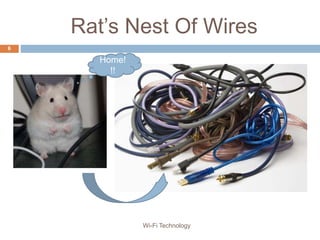
Rat’s Nest Of Wires
6
Home!
!!
Wi-Fi Technology
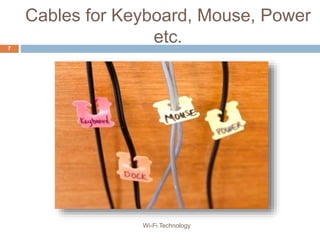
Cables for Keyboard, Mouse, Power
etc.7
Wi-Fi Technology
Freedom from wires!!
8
Wi-Fi Technology
Purpose
 The purpose of Wi-Fi is to hide complexity by enabling
wireless access to applications and data, media and streams.
 The main aims of Wi-Fi are:
 make access to information easier
 ensure compatibility and co-existence of devices
 eliminate complex cabling
 eliminate switches, adapters, plugs, pins and connectors
9
Wi-Fi Technology
History10
Wi-Fi Alliance
 Wi-Fi technology builds on IEEE 802.11 standards. The IEEE
develops and publishes these standards, but does not test
equipment for compliance with them. The non-profit Wi-Fi
Alliance formed in 1999 to fill this void.
 The Wi-Fi Alliance, a global association of companies.
 As of 2009 the Wi-Fi Alliance consisted of more than 300
companies from around the world.
 Manufacturers with membership in the Wi-Fi Alliance, whose
products pass the certification process, gain the right to mark
those products with the Wi-Fi logo.
11
Wi-Fi Technology
Wireless Landscape
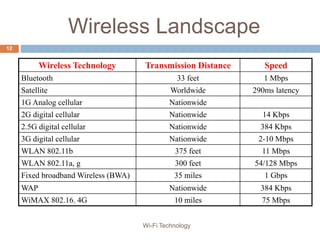
Wireless Technology Transmission Distance Speed
Bluetooth 33 feet 1 Mbps
Satellite Worldwide 290ms latency
1G Analog cellular Nationwide
2G digital cellular Nationwide 14 Kbps
2.5G digital cellular Nationwide 384 Kbps
3G digital cellular Nationwide 2-10 Mbps
WLAN 802.11b 375 feet 11 Mbps
WLAN 802.11a, g 300 feet 54/128 Mbps
Fixed broadband Wireless (BWA) 35 miles 1 Gbps
WAP Nationwide 384 Kbps
WiMAX 802.16, 4G 10 miles 75 Mbps
12
Wi-Fi Technology
2.5 GHz
Service
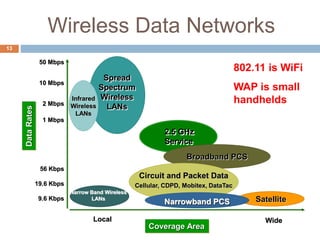
Wireless Data Networks
Local Wide
Coverage Area
Satellite
DataRates
9.6 Kbps
19.6 Kbps
56 Kbps
1 Mbps
2 Mbps
10 Mbps
50 Mbps
Broadband PCS
Spread
Spectrum
Wireless
LANs
Infrared
Wireless
LANs
Narrow Band Wireless
LANs
Circuit and Packet Data
Cellular, CDPD, Mobitex, DataTac
Narrowband PCS
802.11 is WiFi
WAP is small
handhelds
13
Wi-Fi Technology14
The Wi-Fi Technology
 The technology used in Wi-Fi is easiest to understand in terms of
radio. It is quite similar to walkie-talkies, the only difference being in
the strength of signals.
 An ordinary walkie-talkie can handle only limited data in the range of
1000 bps, and operate at 49 MHz. In the case of Wi-Fi radios, the
signal strength is much more, so they can handle much higher data
rates.
 There are three versions of Wi-Fi radios currently available- the ones
that work with,
 802.11b
 802.11a
 802.11g
15
Wi-Fi Technology
IEEE 802.11b
 Appeared in late 1999
 Operates at 2.4GHz radio spectrum
 11 Mbps (theoretical speed) - within 30 m Range
 4-6 Mbps (actual speed)
 100 -150 feet range
 Most popular, Least Expensive
 Interference from mobile phones and Bluetooth devices which
can reduce the transmission speed.
16
Wi-Fi Technology
IEEE 802.11a
 Introduced in 2001
 Operates at 5 GHz (less popular)
 54 Mbps (theoretical speed)
 15-20 Mbps (Actual speed)
 50-75 feet range
 More expensive
 Not compatible with 802.11b
17
Wi-Fi Technology
IEEE 802.11g
 Introduced in 2003
 Combine the feature of both standards (a,b)
 100-150 feet range
 54 Mbps Speed
 2.4 GHz radio frequencies
 Compatible with ‘b’
18
Wi-Fi Technology
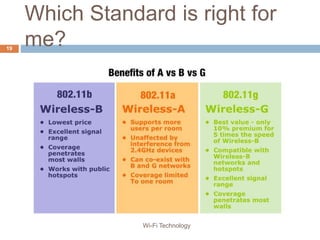
Which Standard is right for
me?19
Wi-Fi Technology
Standards
• IEEE 802.11 - The original 1 Mbit/s and 2 Mbit/s, 2.4 GHz RF and IR standard
• IEEE 802.11a - 54 Mbit/s, 5 GHz standard (1999, shipping products in 2001)
• IEEE 802.11b - Enhancements to 802.11 to support 5.5 and 11 Mbit/s (1999)
• IEEE 802.11d - International (country-to-country) roaming extensions
• IEEE 802.11e - Enhancements: QoS, including packet bursting
• IEEE 802.11f - Inter-Access Point Protocol (IAPP)
• IEEE 802.11g - 54 Mbit/s, 2.4 GHz standard (backwards compatible with b) (2003)
• IEEE 802.11h - 5 GHz spectrum
• IEEE 802.11n - Higher throughput improvements
• IEEE 802.11p - Wireless Access for the Vehicular Environment
• IEEE 802.11r - Fast roaming
• IEEE 802.11s - Wireless mesh networking
• IEEE 802.11T - Wireless Performance Prediction (WPP) - test methods and metrics
• IEEE 802.11u - Interworking with non-802 networks (e.g., cellular)
• IEEE 802.11v - Wireless network management
• IEEE 802.11w - Protected Management Frames
20
Wi-Fi Technology
Elements of a WI-FI Network
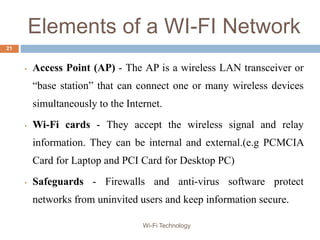
• Access Point (AP) - The AP is a wireless LAN transceiver or
“base station” that can connect one or many wireless devices

simultaneously to the Internet.
• Wi-Fi cards - They accept the wireless signal and relay
information. They can be internal and external.(e.g PCMCIA
Card for Laptop and PCI Card for Desktop PC)
• Safeguards - Firewalls and anti-virus software protect
networks from uninvited users and keep information secure.
21
Wi-Fi Technology
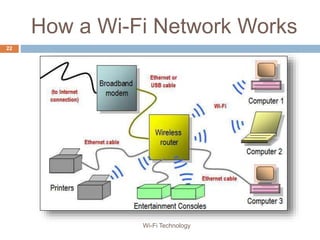
How a Wi-Fi Network Works
22
Wi-Fi Technology
Topologies & Configurations23
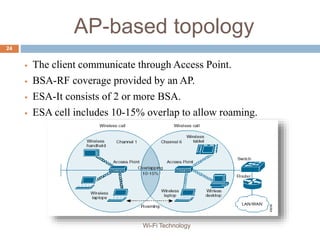
AP-based topology
 The client communicate through Access Point.
 BSA-RF coverage provided by an AP.
 ESA-It consists of 2 or more BSA.
 ESA cell includes 10-15% overlap to allow roaming.
24
Wi-Fi Technology
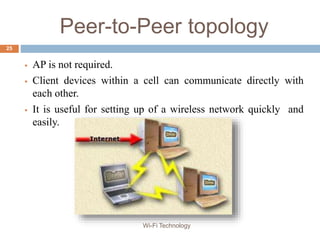
Peer-to-Peer topology
 AP is not required.
 Client devices within a cell can communicate directly with
each other.
 It is useful for setting up of a wireless network quickly and
easily.
25
Wi-Fi Technology
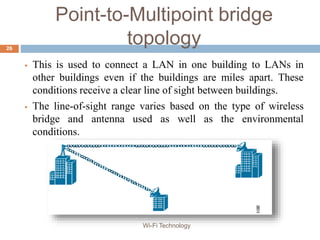
Point-to-Multipoint bridge
topology
 This is used to connect a LAN in one building to LANs in
other buildings even if the buildings are miles apart. These
conditions receive a clear line of sight between buildings.
 The line-of-sight range varies based on the type of wireless
bridge and antenna used as well as the environmental
conditions.
26
Wi-Fi Technology
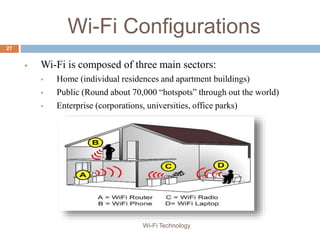
Wi-Fi Configurations
 Wi-Fi is composed of three main sectors:
 Home (individual residences and apartment buildings)
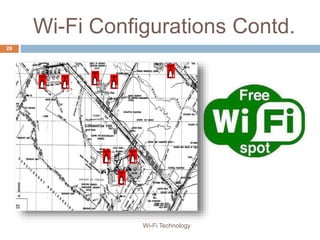
 Public (Round about 70,000 “hotspots” through out the world)
 Enterprise (corporations, universities, office parks)
27
Wi-Fi Technology
Wi-Fi Configurations Contd.
28
Wi-Fi Technology
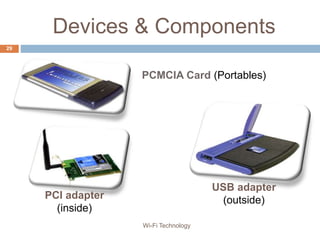
Devices & Components
29
PCI adapter
(inside)
USB adapter
(outside)
PCMCIA Card (Portables)
Wi-Fi Technology
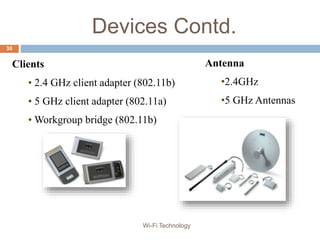
Devices Contd.
Antenna
•2.4GHz
•5 GHz Antennas
Clients
• 2.4 GHz client adapter (802.11b)
• 5 GHz client adapter (802.11a)
• Workgroup bridge (802.11b)
30
Wi-Fi Technology
Challenges and Issues31
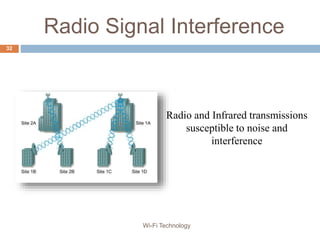
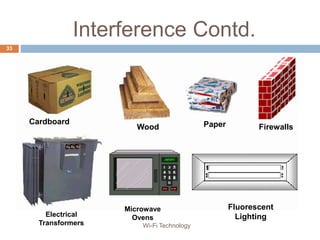
Radio Signal Interference
Radio and Infrared transmissions
susceptible to noise and
interference
32
Wi-Fi Technology
Interference Contd.
Cardboard
Wood Paper
Electrical
Transformers
Microwave
Ovens
Fluorescent
Lighting
Firewalls
33
Wi-Fi Technology
Applications34
35 Wi-Fi Technology
Wi-Fi Security
 Service Set Identifier (SSID)
 Wired Equivalent Privacy (WEP)
 Wireless Protected Access (WPA)
 IEEE 802.11i
 WEP and WPA are encryption protocols that you can choose
from in your router's firmware.
 Wi-Fi Protected Access (WPA), a subset of the upcoming
802.11i security standard, will replace the flawed Wired
Equivalent Privacy (WEP).
 Without your SSID, people will not be able to join your Wi-Fi
hotspot.
36
Wi-Fi Technology
Advantages & Limitations37
Advantages
 Mobility
 Ease of Installation
 Flexibility
 Cost
 Reliability
 Security
 Use unlicensed part of the radio spectrum
 Roaming
 Speed
38
Wi-Fi Technology
Limitations
 Interference
 Degradation in performance
 High power consumption
 Limited range
39
Wi-Fi Technology
Innovations40
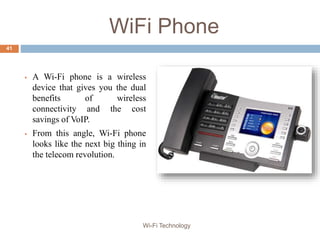
WiFi Phone
 A Wi-Fi phone is a wireless
device that gives you the dual
benefits of wireless
connectivity and the cost
savings of VoIP.
 From this angle, Wi-Fi phone
looks like the next big thing in
the telecom revolution.
41
Wi-Fi Technology
Wi-Fi Camera
42
Wi-Fi Technology
Mobile Energy Management
43
Wi-Fi Technology
Where to find me..
44
Wi-Fi Technology
@ chd.naveen@gmail.com
/chd.naveen
@saini_naveen87
/NaveenKumar11
www.elixir-india.com
Thank
YouWi-Fi Technology

Wi-Fi Technology

  • 1.
  • 2.
    Contents  Introduction  Needof Wi-Fi Technology  Purpose  History  Wi-Fi Technology  How a Wi-Fi Network Works  Topologies & Configurations  Applications  Wi-Fi Security  Advantages & Limitations  Innovations 2 Wi-Fi Technology
  • 3.
    Introduction Wireless Technology isan alternative to Wired Technology, which is commonly used, for connecting devices in wireless mode. Wi-Fi is a generic term that refers to the IEEE 802.11 communications standard for Wireless Local Area Networks (WLANs). Wi-Fi Network connect computers to each other, to the internet and to the wired network. Wi-Fi works on physical and data link layer. 3 Wi-Fi Technology
  • 4.
    Naming secret  Theterm Wi-Fi suggests Wireless Fidelity, resembling the long-established audio-equipment classification term high fidelity (in use since the 1930s ) or Hi-Fi (used since 1950).  Phil Belanger who is the founding member of the Wi-Fi Alliance states that term Wi-Fi was never supposed to mean anything at all.  The “yin-yang” logo indicates the certification of a product for interoperability. 4 Wi-Fi Technology
  • 5.
    Need of Wi-FiTechnology5
  • 6.
    Rat’s Nest OfWires 6 Home! !! Wi-Fi Technology
  • 7.
    Cables for Keyboard,Mouse, Power etc.7 Wi-Fi Technology
  • 8.
  • 9.
    Purpose  The purposeof Wi-Fi is to hide complexity by enabling wireless access to applications and data, media and streams.  The main aims of Wi-Fi are:  make access to information easier  ensure compatibility and co-existence of devices  eliminate complex cabling  eliminate switches, adapters, plugs, pins and connectors 9 Wi-Fi Technology
  • 10.
  • 11.
    Wi-Fi Alliance  Wi-Fitechnology builds on IEEE 802.11 standards. The IEEE develops and publishes these standards, but does not test equipment for compliance with them. The non-profit Wi-Fi Alliance formed in 1999 to fill this void.  The Wi-Fi Alliance, a global association of companies.  As of 2009 the Wi-Fi Alliance consisted of more than 300 companies from around the world.  Manufacturers with membership in the Wi-Fi Alliance, whose products pass the certification process, gain the right to mark those products with the Wi-Fi logo. 11 Wi-Fi Technology
  • 12.
    Wireless Landscape Wireless TechnologyTransmission Distance Speed Bluetooth 33 feet 1 Mbps Satellite Worldwide 290ms latency 1G Analog cellular Nationwide 2G digital cellular Nationwide 14 Kbps 2.5G digital cellular Nationwide 384 Kbps 3G digital cellular Nationwide 2-10 Mbps WLAN 802.11b 375 feet 11 Mbps WLAN 802.11a, g 300 feet 54/128 Mbps Fixed broadband Wireless (BWA) 35 miles 1 Gbps WAP Nationwide 384 Kbps WiMAX 802.16, 4G 10 miles 75 Mbps 12 Wi-Fi Technology
  • 13.
    2.5 GHz Service Wireless DataNetworks Local Wide Coverage Area Satellite DataRates 9.6 Kbps 19.6 Kbps 56 Kbps 1 Mbps 2 Mbps 10 Mbps 50 Mbps Broadband PCS Spread Spectrum Wireless LANs Infrared Wireless LANs Narrow Band Wireless LANs Circuit and Packet Data Cellular, CDPD, Mobitex, DataTac Narrowband PCS 802.11 is WiFi WAP is small handhelds 13
  • 14.
  • 15.
    The Wi-Fi Technology The technology used in Wi-Fi is easiest to understand in terms of radio. It is quite similar to walkie-talkies, the only difference being in the strength of signals.  An ordinary walkie-talkie can handle only limited data in the range of 1000 bps, and operate at 49 MHz. In the case of Wi-Fi radios, the signal strength is much more, so they can handle much higher data rates.  There are three versions of Wi-Fi radios currently available- the ones that work with,  802.11b  802.11a  802.11g 15 Wi-Fi Technology
  • 16.
    IEEE 802.11b  Appearedin late 1999  Operates at 2.4GHz radio spectrum  11 Mbps (theoretical speed) - within 30 m Range  4-6 Mbps (actual speed)  100 -150 feet range  Most popular, Least Expensive  Interference from mobile phones and Bluetooth devices which can reduce the transmission speed. 16 Wi-Fi Technology
  • 17.
    IEEE 802.11a  Introducedin 2001  Operates at 5 GHz (less popular)  54 Mbps (theoretical speed)  15-20 Mbps (Actual speed)  50-75 feet range  More expensive  Not compatible with 802.11b 17 Wi-Fi Technology
  • 18.
    IEEE 802.11g  Introducedin 2003  Combine the feature of both standards (a,b)  100-150 feet range  54 Mbps Speed  2.4 GHz radio frequencies  Compatible with ‘b’ 18 Wi-Fi Technology
  • 19.
    Which Standard isright for me?19 Wi-Fi Technology
  • 20.
    Standards • IEEE 802.11- The original 1 Mbit/s and 2 Mbit/s, 2.4 GHz RF and IR standard • IEEE 802.11a - 54 Mbit/s, 5 GHz standard (1999, shipping products in 2001) • IEEE 802.11b - Enhancements to 802.11 to support 5.5 and 11 Mbit/s (1999) • IEEE 802.11d - International (country-to-country) roaming extensions • IEEE 802.11e - Enhancements: QoS, including packet bursting • IEEE 802.11f - Inter-Access Point Protocol (IAPP) • IEEE 802.11g - 54 Mbit/s, 2.4 GHz standard (backwards compatible with b) (2003) • IEEE 802.11h - 5 GHz spectrum • IEEE 802.11n - Higher throughput improvements • IEEE 802.11p - Wireless Access for the Vehicular Environment • IEEE 802.11r - Fast roaming • IEEE 802.11s - Wireless mesh networking • IEEE 802.11T - Wireless Performance Prediction (WPP) - test methods and metrics • IEEE 802.11u - Interworking with non-802 networks (e.g., cellular) • IEEE 802.11v - Wireless network management • IEEE 802.11w - Protected Management Frames 20 Wi-Fi Technology
  • 21.
    Elements of aWI-FI Network • Access Point (AP) - The AP is a wireless LAN transceiver or “base station” that can connect one or many wireless devices simultaneously to the Internet. • Wi-Fi cards - They accept the wireless signal and relay information. They can be internal and external.(e.g PCMCIA Card for Laptop and PCI Card for Desktop PC) • Safeguards - Firewalls and anti-virus software protect networks from uninvited users and keep information secure. 21 Wi-Fi Technology
  • 22.
    How a Wi-FiNetwork Works 22 Wi-Fi Technology
  • 23.
  • 24.
    AP-based topology  Theclient communicate through Access Point.  BSA-RF coverage provided by an AP.  ESA-It consists of 2 or more BSA.  ESA cell includes 10-15% overlap to allow roaming. 24 Wi-Fi Technology
  • 25.
    Peer-to-Peer topology  APis not required.  Client devices within a cell can communicate directly with each other.  It is useful for setting up of a wireless network quickly and easily. 25 Wi-Fi Technology
  • 26.
    Point-to-Multipoint bridge topology  Thisis used to connect a LAN in one building to LANs in other buildings even if the buildings are miles apart. These conditions receive a clear line of sight between buildings.  The line-of-sight range varies based on the type of wireless bridge and antenna used as well as the environmental conditions. 26 Wi-Fi Technology
  • 27.
    Wi-Fi Configurations  Wi-Fiis composed of three main sectors:  Home (individual residences and apartment buildings)  Public (Round about 70,000 “hotspots” through out the world)  Enterprise (corporations, universities, office parks) 27 Wi-Fi Technology
  • 28.
  • 29.
    Devices & Components 29 PCIadapter (inside) USB adapter (outside) PCMCIA Card (Portables) Wi-Fi Technology
  • 30.
    Devices Contd. Antenna •2.4GHz •5 GHzAntennas Clients • 2.4 GHz client adapter (802.11b) • 5 GHz client adapter (802.11a) • Workgroup bridge (802.11b) 30 Wi-Fi Technology
  • 31.
  • 32.
    Radio Signal Interference Radioand Infrared transmissions susceptible to noise and interference 32 Wi-Fi Technology
  • 33.
  • 34.
  • 35.
  • 36.
    Wi-Fi Security  ServiceSet Identifier (SSID)  Wired Equivalent Privacy (WEP)  Wireless Protected Access (WPA)  IEEE 802.11i  WEP and WPA are encryption protocols that you can choose from in your router's firmware.  Wi-Fi Protected Access (WPA), a subset of the upcoming 802.11i security standard, will replace the flawed Wired Equivalent Privacy (WEP).  Without your SSID, people will not be able to join your Wi-Fi hotspot. 36 Wi-Fi Technology
  • 37.
  • 38.
    Advantages  Mobility  Easeof Installation  Flexibility  Cost  Reliability  Security  Use unlicensed part of the radio spectrum  Roaming  Speed 38 Wi-Fi Technology
  • 39.
    Limitations  Interference  Degradationin performance  High power consumption  Limited range 39 Wi-Fi Technology
  • 40.
  • 41.
    WiFi Phone  AWi-Fi phone is a wireless device that gives you the dual benefits of wireless connectivity and the cost savings of VoIP.  From this angle, Wi-Fi phone looks like the next big thing in the telecom revolution. 41 Wi-Fi Technology
  • 42.
  • 43.
  • 44.
    Where to findme.. 44 Wi-Fi Technology @ chd.naveen@gmail.com /chd.naveen @saini_naveen87 /NaveenKumar11 www.elixir-india.com
  • 45.