Wi-Fi
• Introduction
• Needs of Wi-Fi
• Purpose
• History
• Technology
• Topology
• System Architecture
• Configurations
• Applications
• Advantages & Disadvantages
• Wireless Technology is an alternative of Wired technology, which is
commonly used, for connecting devices in wireless mode.
• Wi-Fi is a generic term that refers to the IEEE 802.11 communications
standard for Wireless Local Area Networks (WLANs)
• Wi-Fi network connect computers to each other, to the internet and to
the wired network.
• Wi-Fi works on Physical and Data Link layer.
• The term Wi-Fi suggests Wireless fidelity, resembling the long-
established audio-equipment classification term high fidelity (in use since
1930s) or Hi-Fi (used since 1950)
• Phil Belanger who is the founding member of the Wi-Fi Alliance states
that term Wi-Fi was never supposed to mean anything to all.
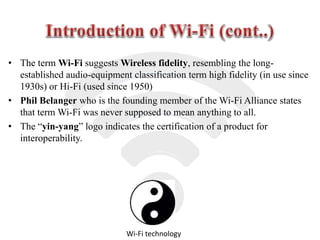
• The “yin-yang” logo indicates the certification of a product for
interoperability.
Wi-Fi technology
• One can move around freely within the area of the network with their
laptops, other hand-held devices connected to the internet.
• Users can also be able to share file and other resources with other
devices that are connected to the network without having to be cabled
to a port.
• Not having to lay lots of cables and put them through walls.
• If a person has a business such as a café, having a wireless network
that is accessible to customers can bring extra business.
• Wireless LANs can sometimes handle a larger amount of users
because they are not limited by a specific number of connection ports.
• Instant transfer of information to social media is made much more
easier.
• The purpose of Wi-Fi is to hide complexity by enabling wireless
access to applications and data, media and streams.
• The main aim of Wi-Fi are :
- Make access to information easier.
- Ensure compatibility and co-existence of devices.
- Eliminate complex cabling.
- Eliminate switches, adapters, plugs, pins and connectors.
Freedom from wires..!!
Wi-Fi Alliance
• Wi-Fi technology builds on IEEE 802.11 standards. The
IEEE develops and publishes these standards, but does
not test equipment for compliance with them. The non-
profit Wi-Fi Alliance formed in 1999 to fill this void.
• The Wi-Fi Alliance, a global association of companies.
• As of 2009 the Wi-Fi Alliance consisted of more than 300
companies from around the world.
• Manufacturers with membership in the Wi-Fi Alliance,
whose products pass the certification process, gain the
right to mark those products with the Wi-Fi logo.
 The technology used in Wi-Fi is easiest to understand in terms of
“radio” as it provides wireless access to applications and data across
using radio waves.
 In Wi-Fi radios, the signal strength is much more, so they can handle
much higher data rates.
 There are three versions of Wi-Fi radios currently available- the ones
that work with,
 802.11b
 802.11a
 802.11g
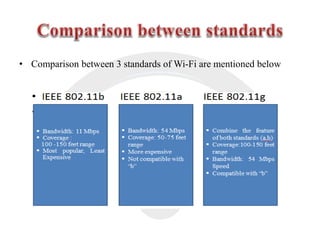
• Comparison between 3 standards of Wi-Fi are mentioned below
• AP Based Topology
• Peer to peer Topology
• Point to multi-point bridge Topology
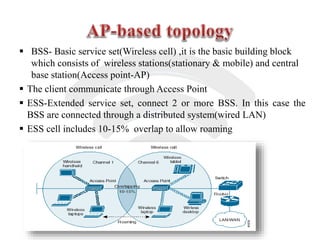
 BSS- Basic service set(Wireless cell) ,it is the basic building block
which consists of wireless stations(stationary & mobile) and central
base station(Access point-AP)
 The client communicate through Access Point
 ESS-Extended service set, connect 2 or more BSS. In this case the
BSS are connected through a distributed system(wired LAN)
 ESS cell includes 10-15% overlap to allow roaming
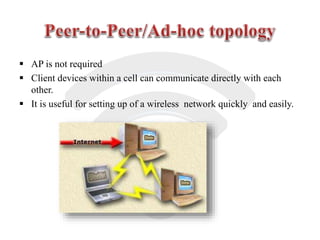
 AP is not required
 Client devices within a cell can communicate directly with each
other.
 It is useful for setting up of a wireless network quickly and easily.
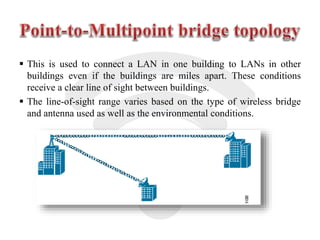
 This is used to connect a LAN in one building to LANs in other
buildings even if the buildings are miles apart. These conditions
receive a clear line of sight between buildings.
 The line-of-sight range varies based on the type of wireless bridge
and antenna used as well as the environmental conditions.
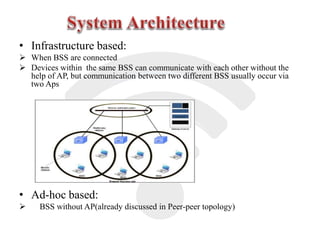
• Infrastructure based:
 When BSS are connected
 Devices within the same BSS can communicate with each other without the
help of AP, but communication between two different BSS usually occur via
two Aps
• Ad-hoc based:
 BSS without AP(already discussed in Peer-peer topology)
 Wi-Fi is composed of three main sectors:
 Home (individual residences and apartment buildings)
 Public (Round about 70,000 “hotspots” through out the world)
 Enterprise (corporations, universities, office parks)
• Building-to-building connections
• Video, audio conferencing/streaming video,
and audio
• Large file transfers.
• Faster Web access and browsing.
• Freedom – You can work from any location that you can get a
signal.
• Setup Cost – No cabling required.
• Flexibility – Quick and easy to setup in temp or permanent space.
• Scalable – Can be expanded with growth.
• Mobile Access – Can access the network on the move.
• Speed – Slower than cable.
• Range – Affected by various medium.
• Travels best through open space.
• Reduced by walls, glass, water, etc
• Security – Greater exposure to risks.
• Unauthorized access.
• Compromising data.
• Denial of service.
Wi fi presentation

Wi fi presentation

  • 1.
  • 2.
    • Introduction • Needsof Wi-Fi • Purpose • History • Technology • Topology • System Architecture • Configurations • Applications • Advantages & Disadvantages
  • 3.
    • Wireless Technologyis an alternative of Wired technology, which is commonly used, for connecting devices in wireless mode. • Wi-Fi is a generic term that refers to the IEEE 802.11 communications standard for Wireless Local Area Networks (WLANs) • Wi-Fi network connect computers to each other, to the internet and to the wired network. • Wi-Fi works on Physical and Data Link layer.
  • 4.
    • The termWi-Fi suggests Wireless fidelity, resembling the long- established audio-equipment classification term high fidelity (in use since 1930s) or Hi-Fi (used since 1950) • Phil Belanger who is the founding member of the Wi-Fi Alliance states that term Wi-Fi was never supposed to mean anything to all. • The “yin-yang” logo indicates the certification of a product for interoperability. Wi-Fi technology
  • 5.
    • One canmove around freely within the area of the network with their laptops, other hand-held devices connected to the internet. • Users can also be able to share file and other resources with other devices that are connected to the network without having to be cabled to a port. • Not having to lay lots of cables and put them through walls. • If a person has a business such as a café, having a wireless network that is accessible to customers can bring extra business. • Wireless LANs can sometimes handle a larger amount of users because they are not limited by a specific number of connection ports. • Instant transfer of information to social media is made much more easier.
  • 6.
    • The purposeof Wi-Fi is to hide complexity by enabling wireless access to applications and data, media and streams. • The main aim of Wi-Fi are : - Make access to information easier. - Ensure compatibility and co-existence of devices. - Eliminate complex cabling. - Eliminate switches, adapters, plugs, pins and connectors. Freedom from wires..!!
  • 7.
    Wi-Fi Alliance • Wi-Fitechnology builds on IEEE 802.11 standards. The IEEE develops and publishes these standards, but does not test equipment for compliance with them. The non- profit Wi-Fi Alliance formed in 1999 to fill this void. • The Wi-Fi Alliance, a global association of companies. • As of 2009 the Wi-Fi Alliance consisted of more than 300 companies from around the world. • Manufacturers with membership in the Wi-Fi Alliance, whose products pass the certification process, gain the right to mark those products with the Wi-Fi logo.
  • 8.
     The technologyused in Wi-Fi is easiest to understand in terms of “radio” as it provides wireless access to applications and data across using radio waves.  In Wi-Fi radios, the signal strength is much more, so they can handle much higher data rates.  There are three versions of Wi-Fi radios currently available- the ones that work with,  802.11b  802.11a  802.11g
  • 9.
    • Comparison between3 standards of Wi-Fi are mentioned below
  • 10.
    • AP BasedTopology • Peer to peer Topology • Point to multi-point bridge Topology
  • 11.
     BSS- Basicservice set(Wireless cell) ,it is the basic building block which consists of wireless stations(stationary & mobile) and central base station(Access point-AP)  The client communicate through Access Point  ESS-Extended service set, connect 2 or more BSS. In this case the BSS are connected through a distributed system(wired LAN)  ESS cell includes 10-15% overlap to allow roaming
  • 12.
     AP isnot required  Client devices within a cell can communicate directly with each other.  It is useful for setting up of a wireless network quickly and easily.
  • 13.
     This isused to connect a LAN in one building to LANs in other buildings even if the buildings are miles apart. These conditions receive a clear line of sight between buildings.  The line-of-sight range varies based on the type of wireless bridge and antenna used as well as the environmental conditions.
  • 14.
    • Infrastructure based: When BSS are connected  Devices within the same BSS can communicate with each other without the help of AP, but communication between two different BSS usually occur via two Aps • Ad-hoc based:  BSS without AP(already discussed in Peer-peer topology)
  • 15.
     Wi-Fi iscomposed of three main sectors:  Home (individual residences and apartment buildings)  Public (Round about 70,000 “hotspots” through out the world)  Enterprise (corporations, universities, office parks)
  • 16.
    • Building-to-building connections •Video, audio conferencing/streaming video, and audio • Large file transfers. • Faster Web access and browsing.
  • 17.
    • Freedom –You can work from any location that you can get a signal. • Setup Cost – No cabling required. • Flexibility – Quick and easy to setup in temp or permanent space. • Scalable – Can be expanded with growth. • Mobile Access – Can access the network on the move.
  • 18.
    • Speed –Slower than cable. • Range – Affected by various medium. • Travels best through open space. • Reduced by walls, glass, water, etc • Security – Greater exposure to risks. • Unauthorized access. • Compromising data. • Denial of service.