Wi-Fi Technology
PRESENTED
By
V.VIJAYKUMAR
N.NIKHIL REDDDY
P.PRAVEEN REDDY
GUIDENCE
Jagapathi goud
CONTENTS
 Introduction
 Wi-Fi Architecture
 Simulation
 IEEE Wireless standard
 Components Required for Wi-Fi
 Wi-Fi Configuration
 How a Wi-Fi Network works
 Applications of Wi-Fi
 Advantages/ Disadvantages of Wi-Fi
 Limitations of Wi-Fi
 Conclusion
AIM OF THE WI-FI
INTRODUCTION
 Wireless Technology is an alternative to Wired Technology ,
which is commonly used, for connecting devices in wireless
mode.
 Wi-Fi (Wireless Fidelity) is a generic term that refers to the
IEEE 802.11 communications standard for Wireless Local
Area Networks (WLANs).
 Wi-Fi Network connect computers to each other, to the
internet and to the wired network.
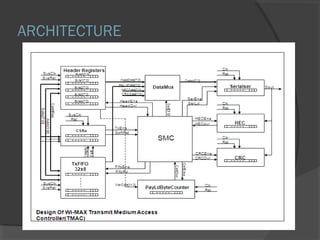
ARCHITECTURE
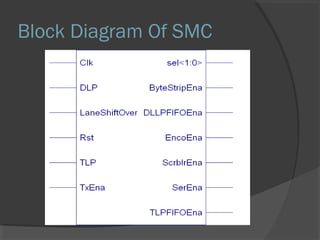
Block Diagram Of SMC
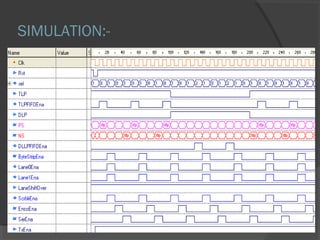
SIMULATION:-
software
Active-HDL (ALDEC):
 Active-HDL is an integrated environment EDA
tool designed for development of VHDL,
Verilog, EDIF, state, block diagram, Simulation
(wave form) models and design of
Synthesizable IP-Cores.
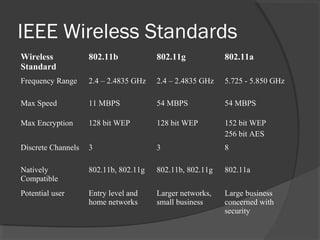
IEEE Wireless Standards
Wireless
Standard
802.11b 802.11g 802.11a
Frequency Range 2.4 – 2.4835 GHz 2.4 – 2.4835 GHz 5.725 - 5.850 GHz
Max Speed 11 MBPS 54 MBPS 54 MBPS
Max Encryption 128 bit WEP 128 bit WEP 152 bit WEP
256 bit AES
Discrete Channels 3 3 8
Natively
Compatible
802.11b, 802.11g 802.11b, 802.11g 802.11a
Potential user Entry level and
home networks
Larger networks,
small business
Large business
concerned with
security
Components required for Wi-Fi
 A PC, laptop , running Windows 98 or above.
 A wireless PCMCIA card, or a wireless
adapter. Now a days all the latest LAPTOPS
are coming with in built CENTRINO
 A Network Interface Card (optional) - Only if a
LAN connection is required
 An Access Point - essentially a compact radio
transmitter with an antenna that connects to a
wired connection, such as an Ethernet, DSL,
or Cable Network.
 A valid internet connection.
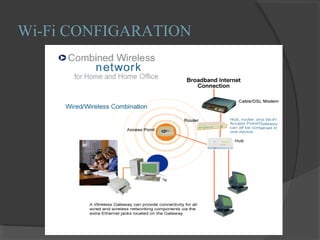
Wi-Fi CONFIGARATION
How a Wi-Fi Network Works
 Basic concept is same as Walkie talkies.
 A Wi-Fi hotspot is created by installing an access
point to an internet connection.
 An access point acts as a base station.
 When Wi-Fi enabled device encounters a hotspot
the device can then connect to that network
wirelessly.
 A single access point can support up to 30 users
and can function within a range of 100 – 150 feet
indoors and up to 300 feet outdoors.
Wi-Fi APPLICATION
 Home
 Small Businesses or SOHO
 Large Corporations & Campuses
 Health Care
 Wireless ISP (WISP)
 Travellers
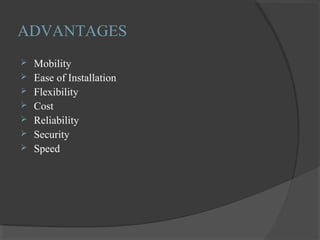
ADVANTAGES
 Mobility
 Ease of Installation
 Flexibility
 Cost
 Reliability
 Security
 Speed
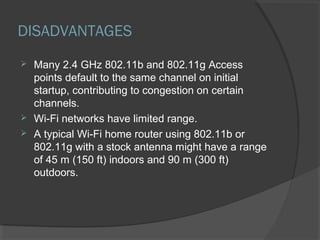
DISADVANTAGES
 Many 2.4 GHz 802.11b and 802.11g Access
points default to the same channel on initial
startup, contributing to congestion on certain
channels.
 Wi-Fi networks have limited range.
 A typical Wi-Fi home router using 802.11b or
802.11g with a stock antenna might have a range
of 45 m (150 ft) indoors and 90 m (300 ft)
outdoors.
LIMITATION
 Interference
 Degradation in performance
 High power consumption
 Limited range
CONCLUSION
 For now Wi-Fi provides broad band internet access to
specially outfitted PCs and Laptops. But in future may
be hotspots be wireless.
 By Wi-Fi our time and money are saved.
 The technologies have help Wi-Fi “Hotspots are
becoming more popular throught urban environment.”
REFERENCE
 www.Wi-Fitechnology.com
 www.webopedia.com
 www.wavewireless.com
wi-fi ppt

wi-fi ppt

  • 1.
  • 2.
    CONTENTS  Introduction  Wi-FiArchitecture  Simulation  IEEE Wireless standard  Components Required for Wi-Fi  Wi-Fi Configuration  How a Wi-Fi Network works  Applications of Wi-Fi  Advantages/ Disadvantages of Wi-Fi  Limitations of Wi-Fi  Conclusion
  • 3.
  • 4.
    INTRODUCTION  Wireless Technologyis an alternative to Wired Technology , which is commonly used, for connecting devices in wireless mode.  Wi-Fi (Wireless Fidelity) is a generic term that refers to the IEEE 802.11 communications standard for Wireless Local Area Networks (WLANs).  Wi-Fi Network connect computers to each other, to the internet and to the wired network.
  • 5.
  • 6.
  • 7.
  • 8.
    software Active-HDL (ALDEC):  Active-HDLis an integrated environment EDA tool designed for development of VHDL, Verilog, EDIF, state, block diagram, Simulation (wave form) models and design of Synthesizable IP-Cores.
  • 9.
    IEEE Wireless Standards Wireless Standard 802.11b802.11g 802.11a Frequency Range 2.4 – 2.4835 GHz 2.4 – 2.4835 GHz 5.725 - 5.850 GHz Max Speed 11 MBPS 54 MBPS 54 MBPS Max Encryption 128 bit WEP 128 bit WEP 152 bit WEP 256 bit AES Discrete Channels 3 3 8 Natively Compatible 802.11b, 802.11g 802.11b, 802.11g 802.11a Potential user Entry level and home networks Larger networks, small business Large business concerned with security
  • 10.
    Components required forWi-Fi  A PC, laptop , running Windows 98 or above.  A wireless PCMCIA card, or a wireless adapter. Now a days all the latest LAPTOPS are coming with in built CENTRINO  A Network Interface Card (optional) - Only if a LAN connection is required  An Access Point - essentially a compact radio transmitter with an antenna that connects to a wired connection, such as an Ethernet, DSL, or Cable Network.  A valid internet connection.
  • 11.
  • 12.
    How a Wi-FiNetwork Works  Basic concept is same as Walkie talkies.  A Wi-Fi hotspot is created by installing an access point to an internet connection.  An access point acts as a base station.  When Wi-Fi enabled device encounters a hotspot the device can then connect to that network wirelessly.  A single access point can support up to 30 users and can function within a range of 100 – 150 feet indoors and up to 300 feet outdoors.
  • 13.
    Wi-Fi APPLICATION  Home Small Businesses or SOHO  Large Corporations & Campuses  Health Care  Wireless ISP (WISP)  Travellers
  • 14.
    ADVANTAGES  Mobility  Easeof Installation  Flexibility  Cost  Reliability  Security  Speed
  • 15.
    DISADVANTAGES  Many 2.4GHz 802.11b and 802.11g Access points default to the same channel on initial startup, contributing to congestion on certain channels.  Wi-Fi networks have limited range.  A typical Wi-Fi home router using 802.11b or 802.11g with a stock antenna might have a range of 45 m (150 ft) indoors and 90 m (300 ft) outdoors.
  • 16.
    LIMITATION  Interference  Degradationin performance  High power consumption  Limited range
  • 17.
    CONCLUSION  For nowWi-Fi provides broad band internet access to specially outfitted PCs and Laptops. But in future may be hotspots be wireless.  By Wi-Fi our time and money are saved.  The technologies have help Wi-Fi “Hotspots are becoming more popular throught urban environment.”
  • 18.