

























Decision Support Systems &
 Knowledge Management
         Systems
OBJECTIVES


• Describe different types of decisions and the
  decision-making process


• Evaluate the role of information systems in helping
  people working individually and in a group make
  decisions more efficiently


• Demonstrate how executive support systems can
  help senior managers make better decisions
OBJECTIVES (Continued)


• Assess how systems that support decision making can
  provide value for the firm


• Identify the challenges posed by decision-support
  systems, group decision-support systems, and
  executive support systems and management solutions
DECISION MAKING AND DECISION-SUPPORT SYSTEMS


         Business Intelligence and Decision Support
Business intelligence enables firms to:

•   Amass information


•   Develop knowledge about operations


•   Change decision-making behavior to achieve profitability
    and other business goals
Management Information Systems
        Chapter 13 Enhancing Decision Making for the Digital Firm

       DECISION MAKING AND DECISION-SUPPORT SYSTEMS


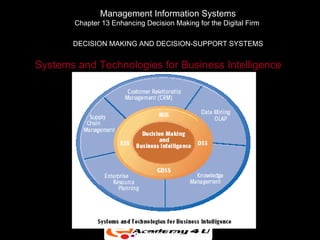
Systems and Technologies for Business Intelligence


                            Figure 7-1
DECISION MAKING AND DECISION-SUPPORT SYSTEMS


Business Decision Making and the Decision-Making Process

  Decision-Making Levels:

  • Senior management

  • Middle management and project teams

  • Operational management and project teams

  • Individual employees
DECISION MAKING AND DECISION-SUPPORT SYSTEMS

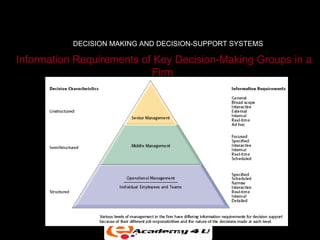
Information Requirements of Key Decision-Making Groups in a
                           Firm


                           Figure 7-2
DECISION MAKING AND DECISION-SUPPORT SYSTEMS


                    Types of Decisions

Unstructured decisions:

• Novel, non-routine decisions requiring judgment and
  insights

• Examples: Approve capital budget; decide corporate
  objectives
DECISION MAKING AND DECISION-SUPPORT SYSTEMS

             Types of Decisions (Continued)
Structured decisions:
 • Routine decisions with definite procedures

 • Examples: Restock inventory; determine special offers
   to customers

Semistructured decisions:
 • Only part of decision has clear-cut answers provided
   by accepted procedures

 • Examples: Allocate resources to managers; develop a
   marketing plan
DECISION MAKING AND DECISION-SUPPORT SYSTEMS


               Systems for Decision Support
There are four kinds of systems that support the different
levels and types of decisions:

 • Management Information Systems (MIS)

 • Decision-Support Systems (DSS)

 • Executive Support Systems (ESS)

 • Group Decision-Support Systems (GDSS)
DECISION MAKING AND DECISION-SUPPORT SYSTEMS


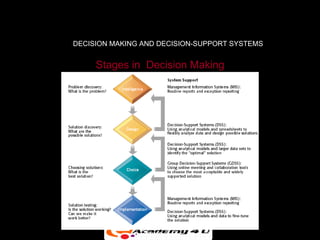
     Stages in Decision Making


               Figure 7-3
DECISION MAKING AND DECISION-SUPPORT SYSTEMS


           Decision Making in the Real World

In the real world, investments in decision-support systems
do not always work because of

• Information quality: Accuracy, integrity, consistency,
  completeness, validity, timeliness, accessibility
• Management filters: Biases and bad decisions of
  managers
• Organizational inertia: Strong forces within
  organization that resist change
DECISION MAKING AND DECISION-SUPPORT SYSTEMS


   Trends in Decision Support and Business Intelligence

The rise of client/server computing, the Internet, and Web
technologies made a major impact on systems that support
decision making.
Six Major Trends:

• Detailed enterprise-wide data

• Broadening decision rights and responsibilities
DECISION MAKING AND DECISION-SUPPORT SYSTEMS


 Trends in Decision Support and Business Intelligence
                     (Continued)
• Intranets and portals

• Personalization and customization of information

• Extranets and collaborative commerce

• Team support tools
SYSTEMS FOR DECISION SUPPORT


         The Difference between MIS and DSS

Management Information Systems:

• Primarily address structured problems


• Provides typically fixed, scheduled reports based on
  routine flows of data and assists in the general control
  of the business
SYSTEMS FOR DECISION SUPPORT


Decision Support Systems:
• Support semistructured and unstructured problems

• Greater emphasis on models, assumptions, ad-hoc
  queries, display graphics

• Emphasizes change, flexibility, and a rapid response
SYSTEMS FOR DECISION SUPPORT


           Types of Decision-Support Systems

Model-driven DSS:

• Primarily stand-alone systems

• Use a strong theory or model to perform “what-if” and
  similar analyses
SYSTEMS FOR DECISION SUPPORT


Data-driven DSS:

• Integrated with large pools of data in major enterprise
  systems and Web sites

• Support decision making by enabling user to extract
  useful information

• Data mining: Can obtain types of information such as
  associations, sequences, classifications, clusters, and
  forecasts
SYSTEMS FOR DECISION SUPPORT


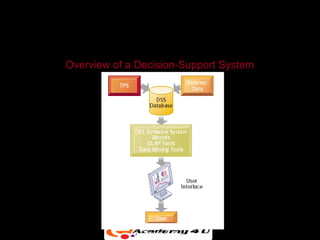
                  Components of DSS

• DSS database: A collection of current or historical data
  from a number of applications or groups

• DSS software system: Contains the software tools for
  data analysis, with models, data mining, and other
  analytical tools

• DSS user interface: Graphical, flexible interaction
  between users of the system and the DSS software
  tools
SYSTEMS FOR DECISION SUPPORT


Model: An abstract representation that illustrates the
components or relationships of a phenomenon
      • Statistical models

      • Optimization models

      • Forecasting models

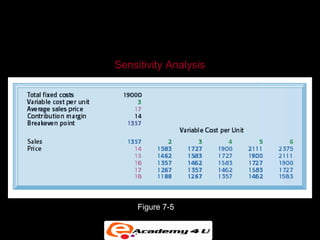
      • Sensitivity analysis (“what-if” models)
SYSTEMS FOR DECISION SUPPORT


Overview of a Decision-Support System


               Figure 7-4
SYSTEMS FOR DECISION SUPPORT


   Sensitivity Analysis


        Figure 7-5
SYSTEMS FOR DECISION SUPPORT


                  Business Value of DSS
• Providing fine-grained information for decisions that
  enable the firm to coordinate both internal and external
  business processes much more precisely

• Helping with decisions in

      • Supply chain management

      • Customer relationship management
SYSTEMS FOR DECISION SUPPORT


           Business Value of DSS (Continued)
• Pricing Decisions

• Asset Utilization

• Data Visualization: Presentation of data in graphical
  forms, to help users see patterns and relationships

• Geographic Information Systems (GIS): Special category
  of DSS that display geographically referenced data in
  digitized maps
SYSTEMS FOR DECISION SUPPORT


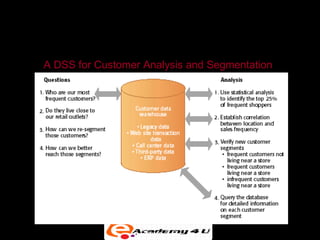
A DSS for Customer Analysis and Segmentation


                   Figure 7-6
SYSTEMS FOR DECISION SUPPORT


     Web-Based Customer Decision-Support Systems

• DSS based on the Web and the Internet can support
  decision making by providing online access to various
  databases and information pools along with software for
  data analysis


• Some of these DSS are targeted toward management,
  but many have been developed to attract customers.
SYSTEMS FOR DECISION SUPPORT

      Web-based Customer Decision-Support Systems
                          (Continued)
• Customer decision making has become increasingly
  information intensive, with Internet search engines,
  intelligent agents, online catalogs, Web directories, e-
  mail, and other tools used to help make purchasing
  decisions.


• Customer decision-support systems (CDSS) support
  the decision-making process of an existing or potential
  customer.
GROUP DECISION-SUPPORT SYSTEMS


What Is a GDSS?

• Group Decision-Support System (GDSS) is an interactive
  computer-based system used to facilitate the solution of
  unstructured problems by a set of decision makers
  working together as a group.
GROUP DECISION-SUPPORT SYSTEMS


Three Main Components of GDSS:

  • Hardware (conference facility, audiovisual
    equipment, etc.)

  • Software tools (Electronic questionnaires,
    brainstorming tools, voting tools, etc.)

  • People (Participants, trained facilitator, support staff)
GROUP DECISION-SUPPORT SYSTEMS


              Overview of a GDSS Meeting
• In a GDSS electronic meeting, each attendee has a
  workstation.

• The workstations are networked and are connected to the
  facilitator’s console, which serves as the facilitator’s
  workstation and control panel, and to the meeting’s file
  server.

• All data that the attendees forward from their
  workstations to the group are collected and saved on the
  file server.
GROUP DECISION-SUPPORT SYSTEMS

    Overview of a GDSS Meeting (Continued)
• The facilitator is able to project computer images onto the
  projection screen at the front of the room.


• Many electronic meeting rooms have seating
  arrangements in semicircles and are tiered in legislative
  style to accommodate a large number of attendees.


• The facilitator controls the use of tools during the
  meeting.
GROUP DECISION-SUPPORT SYSTEMS


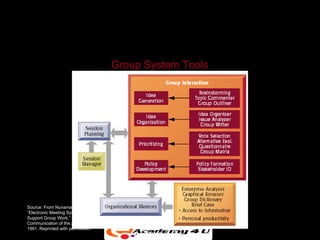
                                      Group System Tools


Source: From Nunamaker et al.,
“Electronic Meeting Systems to
Support Group Work,”
Communication of the ACM, July
1991. Reprinted with permission.
                                            Figure 7-7
GROUP DECISION-SUPPORT SYSTEMS


                Business Value of GDSS

• Traditional decision-making meetings support an optimal
  size of three to five attendees. GDSS allows a greater
  number of attendees.

• Enable collaborative atmosphere by guaranteeing
  contributor’s anonymity.

• Enable nonattendees to locate organized information
  after the meeting.
GROUP DECISION-SUPPORT SYSTEMS


           Business Value of GDSS (Continued)

• Can increase the number of ideas generated and the
  quality of decisions while producing the desired results in
  fewer meetings


• Can lead to more participative and democratic decision
  making
EXECUTIVE SUPPORT IN THE ENTERPRISE


 The Role of Executive Support Systems in the Firm

• ESS can bring together data from all parts of the firm
  and enable managers to select, access, and tailor
  them as needed.


• It tries to avoid the problem of data overload so
  common in paper reports.
EXECUTIVE SUPPORT IN THE ENTERPRISE

  The Role of Executive Support Systems in the Firm
                        (Continued)
• The ability to drill down is useful not only to senior
   executives but also to employees at lower levels of
   the firm who need to analyze data.


• Can integrate comprehensive firmwide information
  and external data in timely manner


• Inclusion of modeling and analysis tools usable with a
  minimum of training
EXECUTIVE SUPPORT IN THE ENTERPRISE


    Business Value of Executive Support Systems
• Ability to analyze, compare, and highlight trends

• Graphical interface enables users to review data
  more quickly and with more insight, speeding
  decision making.


• Timeliness and availability of data enables more
  timely decision making, helping businesses move
  toward a “sense-and-respond” strategy.
EXECUTIVE SUPPORT IN THE ENTERPRISE


   Business Value of Executive Support Systems
                   (Continued)
• Increases upper management span of control, better
  monitoring


• ESS based on enterprise-wide data can be used for
  decentralization of decision making or increase
  management centralization.
MANAGEMENT OPPORTUNITIES, CHALLENGES AND DECISIONS


Management Opportunities:

 • Decision-support systems provide opportunities for
    increasing precision, accuracy, and rapidity of
    decisions and thereby contributing directly to
    profitability
MANAGEMENT OPPORTUNITIES, CHALLENGES AND DECISIONS


Management Challenges:

 • Building systems that can actually fulfill Executive
   Information Requirements


 • Changing management thinking to make better use
   of systems for decision support


 • Organizational resistance
Building a Knowledge-Creating
Company
   A knowledge-creating company or learning
    organization…
     Consistently   creates new business knowledge
     Disseminates    it throughout the company
     Builds   it into its products and services
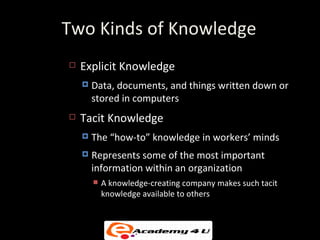
Two Kinds of Knowledge
   Explicit Knowledge
       Data, documents, and things written down or
        stored in computers
   Tacit Knowledge
       The “how-to” knowledge in workers’ minds
       Represents some of the most important
        information within an organization
           A knowledge-creating company makes such tacit
            knowledge available to others
Knowledge Management
   Successful knowledge management
     Creates
            techniques, technologies, systems,
     and rewards for getting employees to share
     what they know
     Makesbetter use of accumulated workplace
     and enterprise knowledge
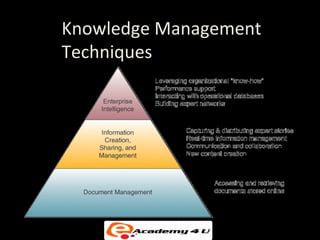
Knowledge Management
Techniques
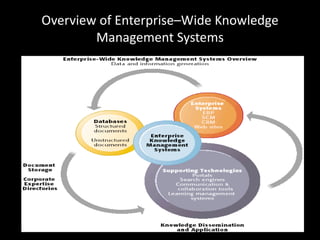
Overview of Enterprise–Wide Knowledge
        Management Systems
Knowledge Management
    Systems (KMS)
   Knowledge management systems
     A major strategic use of IT
     Manages organizational learning and know-how

     Helps knowledge workers create, organize, and make
      available important knowledge
     Makes this knowledge available wherever and
      whenever it is needed
   Knowledge includes
       Processes, procedures, patents, reference works,
        formulas, best practices, forecasts, and fixes
Technologies Used to Support Knowledge
              Management.
• data warehousing and data marts
• databases (such as marketing databases
• data mining using case-based reasoning or
  neural computing.
• Web-based search and retrieval tools
• data visualization, intranets and the Web

Decision support systems & knowledge management systems

  • 1.
    Decision Support Systems& Knowledge Management Systems
  • 2.
    OBJECTIVES • Describe differenttypes of decisions and the decision-making process • Evaluate the role of information systems in helping people working individually and in a group make decisions more efficiently • Demonstrate how executive support systems can help senior managers make better decisions
  • 3.
    OBJECTIVES (Continued) • Assesshow systems that support decision making can provide value for the firm • Identify the challenges posed by decision-support systems, group decision-support systems, and executive support systems and management solutions
  • 4.
    DECISION MAKING ANDDECISION-SUPPORT SYSTEMS Business Intelligence and Decision Support Business intelligence enables firms to: • Amass information • Develop knowledge about operations • Change decision-making behavior to achieve profitability and other business goals
  • 5.
    Management Information Systems Chapter 13 Enhancing Decision Making for the Digital Firm DECISION MAKING AND DECISION-SUPPORT SYSTEMS Systems and Technologies for Business Intelligence Figure 7-1
  • 6.
    DECISION MAKING ANDDECISION-SUPPORT SYSTEMS Business Decision Making and the Decision-Making Process Decision-Making Levels: • Senior management • Middle management and project teams • Operational management and project teams • Individual employees
  • 7.
    DECISION MAKING ANDDECISION-SUPPORT SYSTEMS Information Requirements of Key Decision-Making Groups in a Firm Figure 7-2
  • 8.
    DECISION MAKING ANDDECISION-SUPPORT SYSTEMS Types of Decisions Unstructured decisions: • Novel, non-routine decisions requiring judgment and insights • Examples: Approve capital budget; decide corporate objectives
  • 9.
    DECISION MAKING ANDDECISION-SUPPORT SYSTEMS Types of Decisions (Continued) Structured decisions: • Routine decisions with definite procedures • Examples: Restock inventory; determine special offers to customers Semistructured decisions: • Only part of decision has clear-cut answers provided by accepted procedures • Examples: Allocate resources to managers; develop a marketing plan
  • 10.
    DECISION MAKING ANDDECISION-SUPPORT SYSTEMS Systems for Decision Support There are four kinds of systems that support the different levels and types of decisions: • Management Information Systems (MIS) • Decision-Support Systems (DSS) • Executive Support Systems (ESS) • Group Decision-Support Systems (GDSS)
  • 11.
    DECISION MAKING ANDDECISION-SUPPORT SYSTEMS Stages in Decision Making Figure 7-3
  • 12.
    DECISION MAKING ANDDECISION-SUPPORT SYSTEMS Decision Making in the Real World In the real world, investments in decision-support systems do not always work because of • Information quality: Accuracy, integrity, consistency, completeness, validity, timeliness, accessibility • Management filters: Biases and bad decisions of managers • Organizational inertia: Strong forces within organization that resist change
  • 13.
    DECISION MAKING ANDDECISION-SUPPORT SYSTEMS Trends in Decision Support and Business Intelligence The rise of client/server computing, the Internet, and Web technologies made a major impact on systems that support decision making. Six Major Trends: • Detailed enterprise-wide data • Broadening decision rights and responsibilities
  • 14.
    DECISION MAKING ANDDECISION-SUPPORT SYSTEMS Trends in Decision Support and Business Intelligence (Continued) • Intranets and portals • Personalization and customization of information • Extranets and collaborative commerce • Team support tools
  • 15.
    SYSTEMS FOR DECISIONSUPPORT The Difference between MIS and DSS Management Information Systems: • Primarily address structured problems • Provides typically fixed, scheduled reports based on routine flows of data and assists in the general control of the business
  • 16.
    SYSTEMS FOR DECISIONSUPPORT Decision Support Systems: • Support semistructured and unstructured problems • Greater emphasis on models, assumptions, ad-hoc queries, display graphics • Emphasizes change, flexibility, and a rapid response
  • 17.
    SYSTEMS FOR DECISIONSUPPORT Types of Decision-Support Systems Model-driven DSS: • Primarily stand-alone systems • Use a strong theory or model to perform “what-if” and similar analyses
  • 18.
    SYSTEMS FOR DECISIONSUPPORT Data-driven DSS: • Integrated with large pools of data in major enterprise systems and Web sites • Support decision making by enabling user to extract useful information • Data mining: Can obtain types of information such as associations, sequences, classifications, clusters, and forecasts
  • 19.
    SYSTEMS FOR DECISIONSUPPORT Components of DSS • DSS database: A collection of current or historical data from a number of applications or groups • DSS software system: Contains the software tools for data analysis, with models, data mining, and other analytical tools • DSS user interface: Graphical, flexible interaction between users of the system and the DSS software tools
  • 20.
    SYSTEMS FOR DECISIONSUPPORT Model: An abstract representation that illustrates the components or relationships of a phenomenon • Statistical models • Optimization models • Forecasting models • Sensitivity analysis (“what-if” models)
  • 21.
    SYSTEMS FOR DECISIONSUPPORT Overview of a Decision-Support System Figure 7-4
  • 22.
    SYSTEMS FOR DECISIONSUPPORT Sensitivity Analysis Figure 7-5
  • 23.
    SYSTEMS FOR DECISIONSUPPORT Business Value of DSS • Providing fine-grained information for decisions that enable the firm to coordinate both internal and external business processes much more precisely • Helping with decisions in • Supply chain management • Customer relationship management
  • 24.
    SYSTEMS FOR DECISIONSUPPORT Business Value of DSS (Continued) • Pricing Decisions • Asset Utilization • Data Visualization: Presentation of data in graphical forms, to help users see patterns and relationships • Geographic Information Systems (GIS): Special category of DSS that display geographically referenced data in digitized maps
  • 25.
    SYSTEMS FOR DECISIONSUPPORT A DSS for Customer Analysis and Segmentation Figure 7-6
  • 26.
    SYSTEMS FOR DECISIONSUPPORT Web-Based Customer Decision-Support Systems • DSS based on the Web and the Internet can support decision making by providing online access to various databases and information pools along with software for data analysis • Some of these DSS are targeted toward management, but many have been developed to attract customers.
  • 27.
    SYSTEMS FOR DECISIONSUPPORT Web-based Customer Decision-Support Systems (Continued) • Customer decision making has become increasingly information intensive, with Internet search engines, intelligent agents, online catalogs, Web directories, e- mail, and other tools used to help make purchasing decisions. • Customer decision-support systems (CDSS) support the decision-making process of an existing or potential customer.
  • 28.
    GROUP DECISION-SUPPORT SYSTEMS WhatIs a GDSS? • Group Decision-Support System (GDSS) is an interactive computer-based system used to facilitate the solution of unstructured problems by a set of decision makers working together as a group.
  • 29.
    GROUP DECISION-SUPPORT SYSTEMS ThreeMain Components of GDSS: • Hardware (conference facility, audiovisual equipment, etc.) • Software tools (Electronic questionnaires, brainstorming tools, voting tools, etc.) • People (Participants, trained facilitator, support staff)
  • 30.
    GROUP DECISION-SUPPORT SYSTEMS Overview of a GDSS Meeting • In a GDSS electronic meeting, each attendee has a workstation. • The workstations are networked and are connected to the facilitator’s console, which serves as the facilitator’s workstation and control panel, and to the meeting’s file server. • All data that the attendees forward from their workstations to the group are collected and saved on the file server.
  • 31.
    GROUP DECISION-SUPPORT SYSTEMS Overview of a GDSS Meeting (Continued) • The facilitator is able to project computer images onto the projection screen at the front of the room. • Many electronic meeting rooms have seating arrangements in semicircles and are tiered in legislative style to accommodate a large number of attendees. • The facilitator controls the use of tools during the meeting.
  • 32.
    GROUP DECISION-SUPPORT SYSTEMS Group System Tools Source: From Nunamaker et al., “Electronic Meeting Systems to Support Group Work,” Communication of the ACM, July 1991. Reprinted with permission. Figure 7-7
  • 33.
    GROUP DECISION-SUPPORT SYSTEMS Business Value of GDSS • Traditional decision-making meetings support an optimal size of three to five attendees. GDSS allows a greater number of attendees. • Enable collaborative atmosphere by guaranteeing contributor’s anonymity. • Enable nonattendees to locate organized information after the meeting.
  • 34.
    GROUP DECISION-SUPPORT SYSTEMS Business Value of GDSS (Continued) • Can increase the number of ideas generated and the quality of decisions while producing the desired results in fewer meetings • Can lead to more participative and democratic decision making
  • 35.
    EXECUTIVE SUPPORT INTHE ENTERPRISE The Role of Executive Support Systems in the Firm • ESS can bring together data from all parts of the firm and enable managers to select, access, and tailor them as needed. • It tries to avoid the problem of data overload so common in paper reports.
  • 36.
    EXECUTIVE SUPPORT INTHE ENTERPRISE The Role of Executive Support Systems in the Firm (Continued) • The ability to drill down is useful not only to senior executives but also to employees at lower levels of the firm who need to analyze data. • Can integrate comprehensive firmwide information and external data in timely manner • Inclusion of modeling and analysis tools usable with a minimum of training
  • 37.
    EXECUTIVE SUPPORT INTHE ENTERPRISE Business Value of Executive Support Systems • Ability to analyze, compare, and highlight trends • Graphical interface enables users to review data more quickly and with more insight, speeding decision making. • Timeliness and availability of data enables more timely decision making, helping businesses move toward a “sense-and-respond” strategy.
  • 38.
    EXECUTIVE SUPPORT INTHE ENTERPRISE Business Value of Executive Support Systems (Continued) • Increases upper management span of control, better monitoring • ESS based on enterprise-wide data can be used for decentralization of decision making or increase management centralization.
  • 39.
    MANAGEMENT OPPORTUNITIES, CHALLENGESAND DECISIONS Management Opportunities: • Decision-support systems provide opportunities for increasing precision, accuracy, and rapidity of decisions and thereby contributing directly to profitability
  • 40.
    MANAGEMENT OPPORTUNITIES, CHALLENGESAND DECISIONS Management Challenges: • Building systems that can actually fulfill Executive Information Requirements • Changing management thinking to make better use of systems for decision support • Organizational resistance
  • 41.
    Building a Knowledge-Creating Company  A knowledge-creating company or learning organization…  Consistently creates new business knowledge  Disseminates it throughout the company  Builds it into its products and services
  • 42.
    Two Kinds ofKnowledge  Explicit Knowledge  Data, documents, and things written down or stored in computers  Tacit Knowledge  The “how-to” knowledge in workers’ minds  Represents some of the most important information within an organization  A knowledge-creating company makes such tacit knowledge available to others
  • 43.
    Knowledge Management  Successful knowledge management  Creates techniques, technologies, systems, and rewards for getting employees to share what they know  Makesbetter use of accumulated workplace and enterprise knowledge
  • 44.
  • 45.
    Overview of Enterprise–WideKnowledge Management Systems
  • 46.
    Knowledge Management Systems (KMS)  Knowledge management systems  A major strategic use of IT  Manages organizational learning and know-how  Helps knowledge workers create, organize, and make available important knowledge  Makes this knowledge available wherever and whenever it is needed  Knowledge includes  Processes, procedures, patents, reference works, formulas, best practices, forecasts, and fixes
  • 47.
    Technologies Used toSupport Knowledge Management. • data warehousing and data marts • databases (such as marketing databases • data mining using case-based reasoning or neural computing. • Web-based search and retrieval tools • data visualization, intranets and the Web