DECISION SUPPORT
SYSTEM
Laiba Ghafoor 007
Choudhary Aitzaz Ahsan 008
What is DSS?
A DSS is a computer-based information system that supports business or
organizational decision-making activities.
A DSS is a collection of integrated software applications and hardware that form
the backbone of an organization’s decision making process and help to make
decisions, which may be rapidly changing and not easily specified in advance.
Decision Making as a Component of Problem Solving
Decision Making and Problem Solving
Every organization needs effective decision making
In most cases, strategic planning and overall goals of the organization set the course for decision
making
Information systems can assist with strategic planning and problem solving
Decision Making as a Component of
Problem Solving
Decision-making phase: first part of problem-solving process
◦ Intelligence stage: potential problems or opportunities are identified and defined
◦ Design stage: alternative solutions to the problem are developed
◦ Choice stage: requires selecting a course of action
Decision Making as a Component of
Problem Solving (continued)
Problem solving: goes beyond decision making to include implementation and monitoring
stages
Implementation stage: a solution is put into effect
Monitoring stage: decision makers evaluate the implementation
Programmed Versus Non programmed
Decisions
Programmed decision
◦ Decision made using a rule, procedure, or quantitative method
◦ Easy to computerize using traditional information systems
Non programmed decision
◦ Decision that deals with unusual or exceptional situations
◦ Not easily quantifiable
An Overview of
Management Information Systems
Management information system (MIS)
◦ Integrated collection of people, procedures, databases, and devices
◦ Provides managers and decision makers with information to help achieve organizational goals
◦ Can give the organization a competitive advantage
◦ Providing the right information to the right people in the right format and at the right time
10
Management Information Systems in
Perspective
 Management information system (MIS) (continued)
 Provides managers with information that supports effective decision making and provides feedback
on daily operations
10
Inputs to a Management Information
System
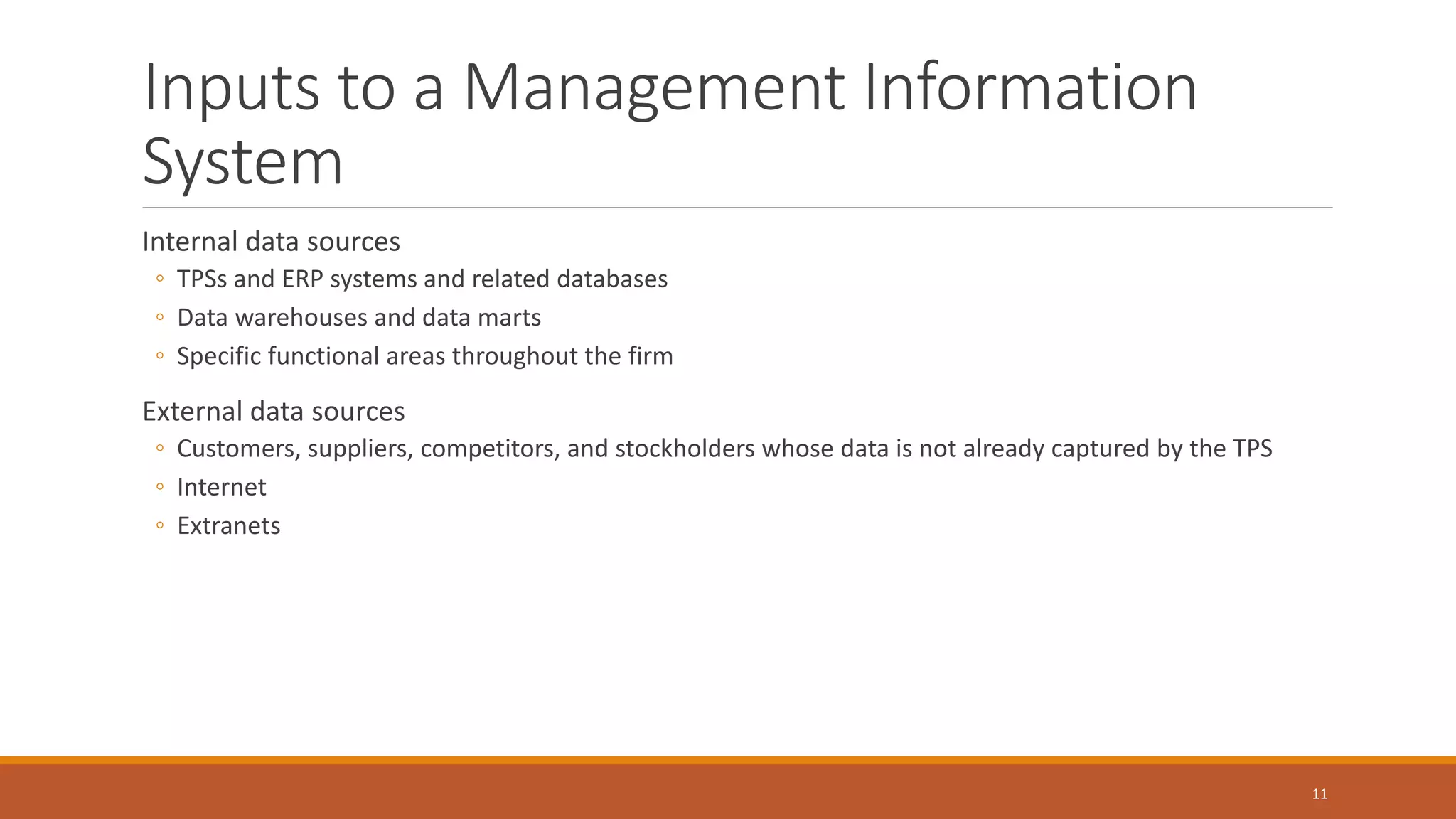
Internal data sources
◦ TPSs and ERP systems and related databases
◦ Data warehouses and data marts
◦ Specific functional areas throughout the firm
External data sources
◦ Customers, suppliers, competitors, and stockholders whose data is not already captured by the TPS
◦ Internet
◦ Extranets
11
Outputs of a Management Information
System (continued)
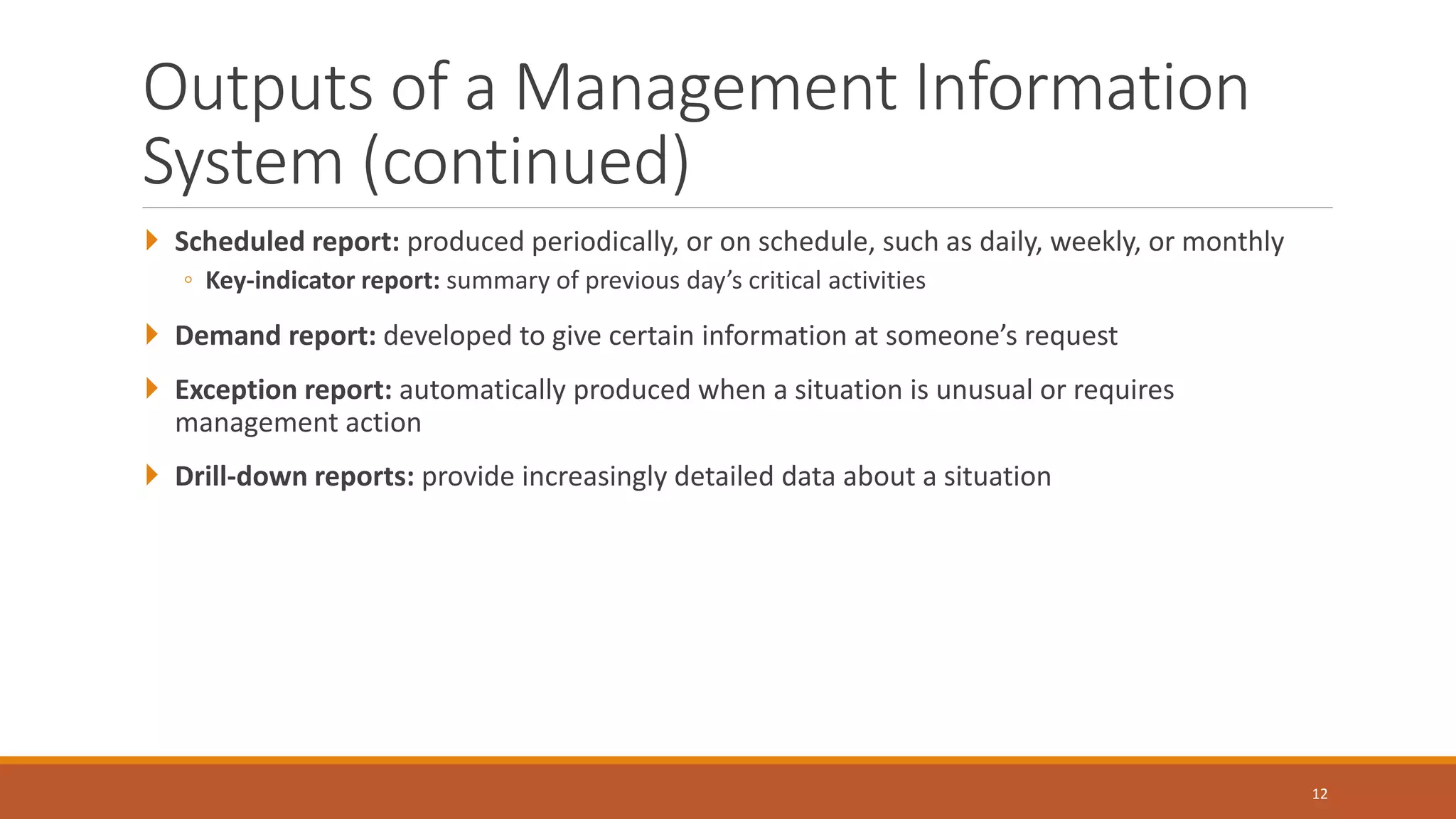
 Scheduled report: produced periodically, or on schedule, such as daily, weekly, or monthly
◦ Key-indicator report: summary of previous day’s critical activities
 Demand report: developed to give certain information at someone’s request
 Exception report: automatically produced when a situation is unusual or requires
management action
 Drill-down reports: provide increasingly detailed data about a situation
12
Characteristics of a Management
Information System
Provide reports with fixed and standard formats
Produce hard-copy and soft-copy reports
Use internal data stored in computer system
Allow users to develop custom reports
Require user requests for reports developed by systems personnel
13
Functional Aspects of the MIS
Most organizations are structured along functional lines or areas
MIS can be divided along functional lines to produce reports tailored to individual functions
14
Financial Management Information
Systems
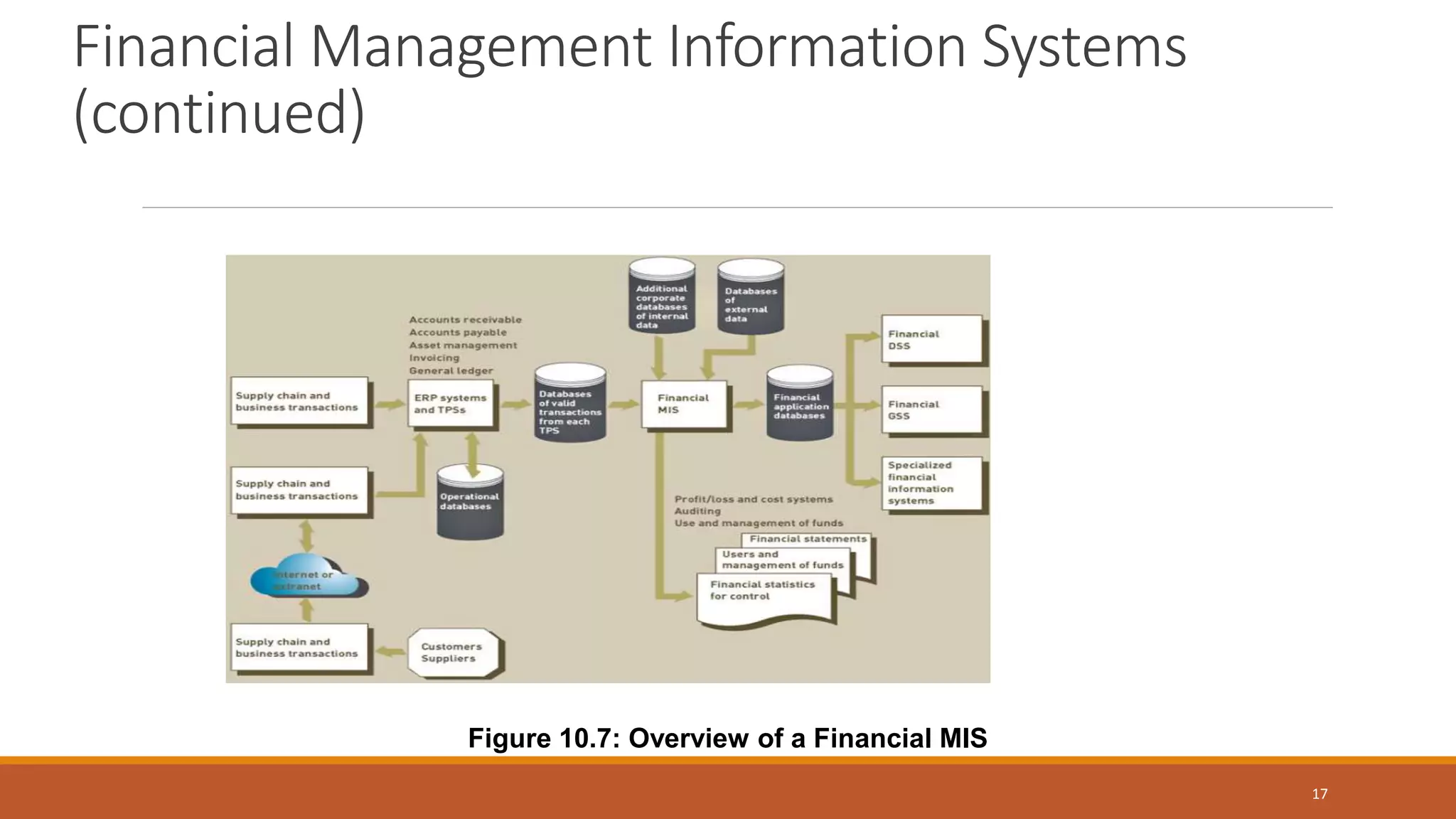
Financial MIS: provides financial information to executives and others
Some financial MIS subsystems and outputs
◦ Profit/loss and cost systems: profit and revenue centers
◦ Auditing: internal and external
◦ Uses and management of funds
15
Profit center: a department within an organization that focuses on generating profits.
Revenue center: a division with in a company that generates sales or revenues.
Auditing: analyzing the financial condition of an organization and determining whether financial
statements and reports produces by the financial MIS are accurate.
Uses and management of funds: internal uses of funds include purchasing additional inventory,
updating plants and equipment etc
16
Financial Management Information Systems
(continued)
17
Figure 10.7: Overview of a Financial MIS
Manufacturing Management Information
Systems
 Manufacturing MIS subsystems and outputs monitor and control the flow of materials,
products, and services through the organization
 Design and engineering: CAD systems
 Master production scheduling and inventory control
◦ Methods: EOQ, MRP, JIT
 Process control
◦ Techniques: CAM, CIM, FMS
 Quality control and testing
18
Manufacturing Management Information Systems
(continued)
19
Figure 10.8: Overview of a Manufacturing MIS
Marketing Management Information
Systems
Marketing MIS: supports managerial activities in product development, distribution, pricing
decisions, and promotional effectiveness
Subsystems
◦ Marketing research
◦ Product development
◦ Promotion and advertising
◦ Product pricing
◦ Sales analysis
20
Human Resource Management
Information Systems
Human resource MIS: concerned with activities related to employees and potential employees
Subsystems
◦ Human resource planning
◦ Personnel selection and recruiting
◦ Training and skills inventory
◦ Scheduling and job placement
◦ Wage and salary administration
◦ Outplacement
21
Human Resource Management Information
Systems (continued)
22
Figure 10.11: Overview of a Human Resource MIS
Other Management Information Systems
Accounting MIS: provides aggregate information on accounts payable, accounts receivable,
payroll, and many other applications
Geographic information system (GIS): capable of assembling, storing, manipulating, and
displaying geographic information
23
An Overview of Decision Support
Systems
DSS: organized collection of people, procedures, software, databases, and devices used to help
make decisions that solve problems
Focus of a DSS is on decision-making effectiveness regarding unstructured or semistructured
business problems
Used by managers at all levels
24
Characteristics of a Decision Support
System
Provide rapid access to information
Handle large amounts of data from different sources
Provide report and presentation flexibility
Offer both textual and graphical orientation
Support drill-down analysis
25
Characteristics of a Decision Support
System (continued)
 Perform complex, sophisticated analysis and comparisons using advanced software packages
 Support optimization, satisficing, and heuristic approaches
26
Capabilities of a Decision Support System
Support problem-solving phases
Support different decision frequencies
◦ Ad hoc DSS
◦ Institutional DSS
Support different problem structures
◦ Highly structured problems (known facts)
◦ Semistructured or unstructured problems (facts are not clear.)
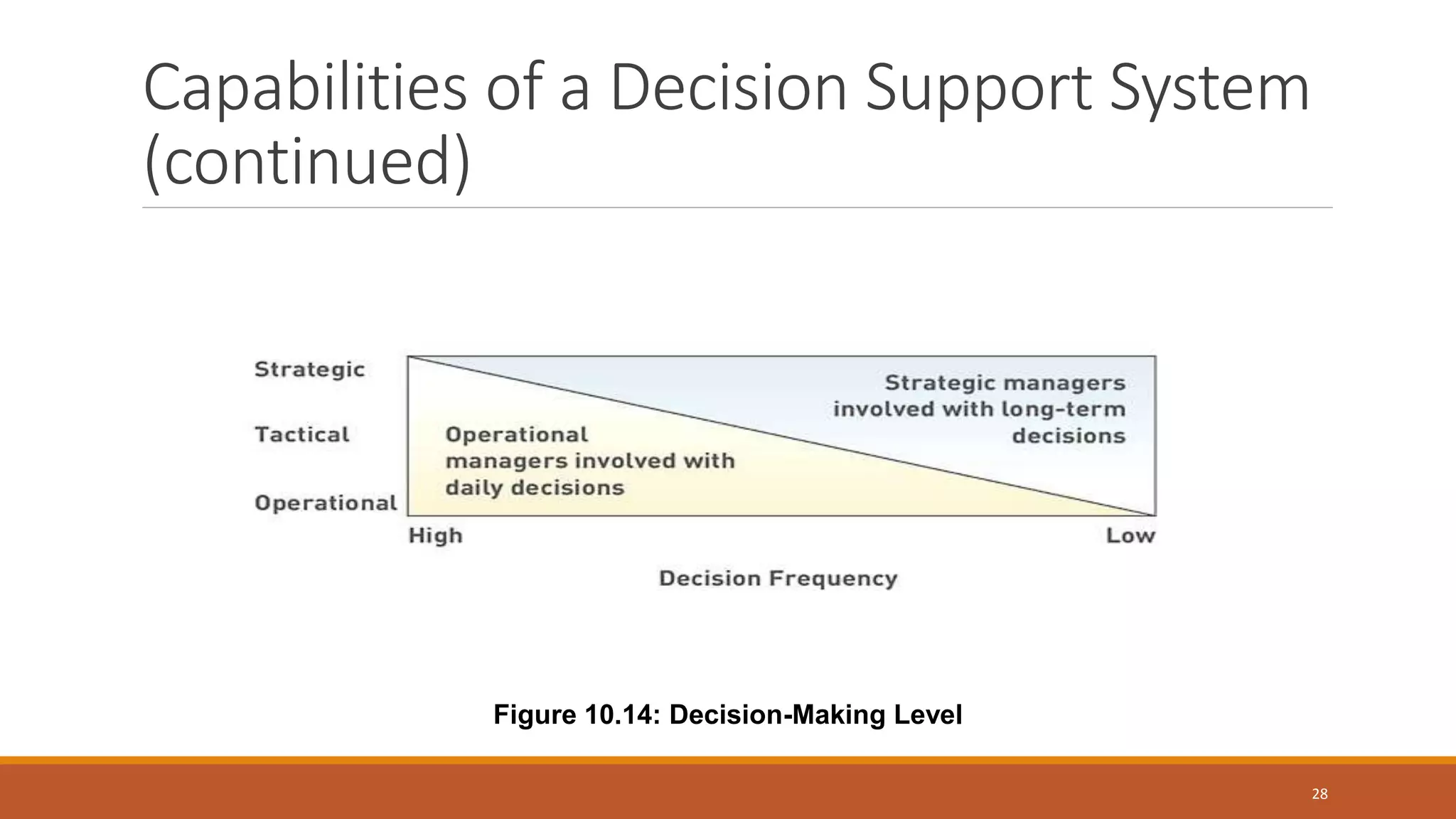
Support various decision-making levels
27
Capabilities of a Decision Support System
(continued)
28
Figure 10.14: Decision-Making Level
A Comparison of DSS and MIS
29
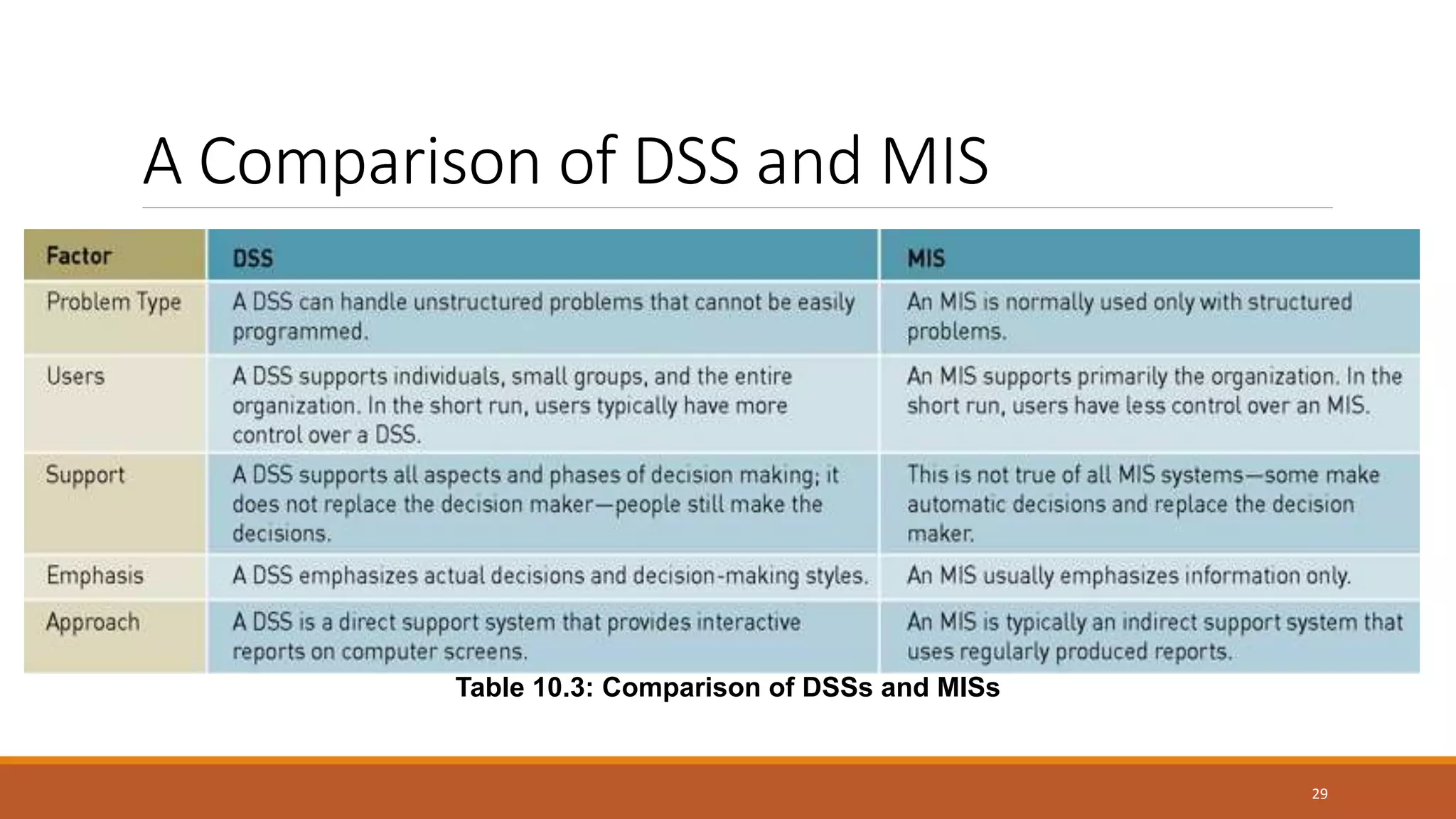
Table 10.3: Comparison of DSSs and MISs
A Comparison of DSS and MIS
(continued)
30
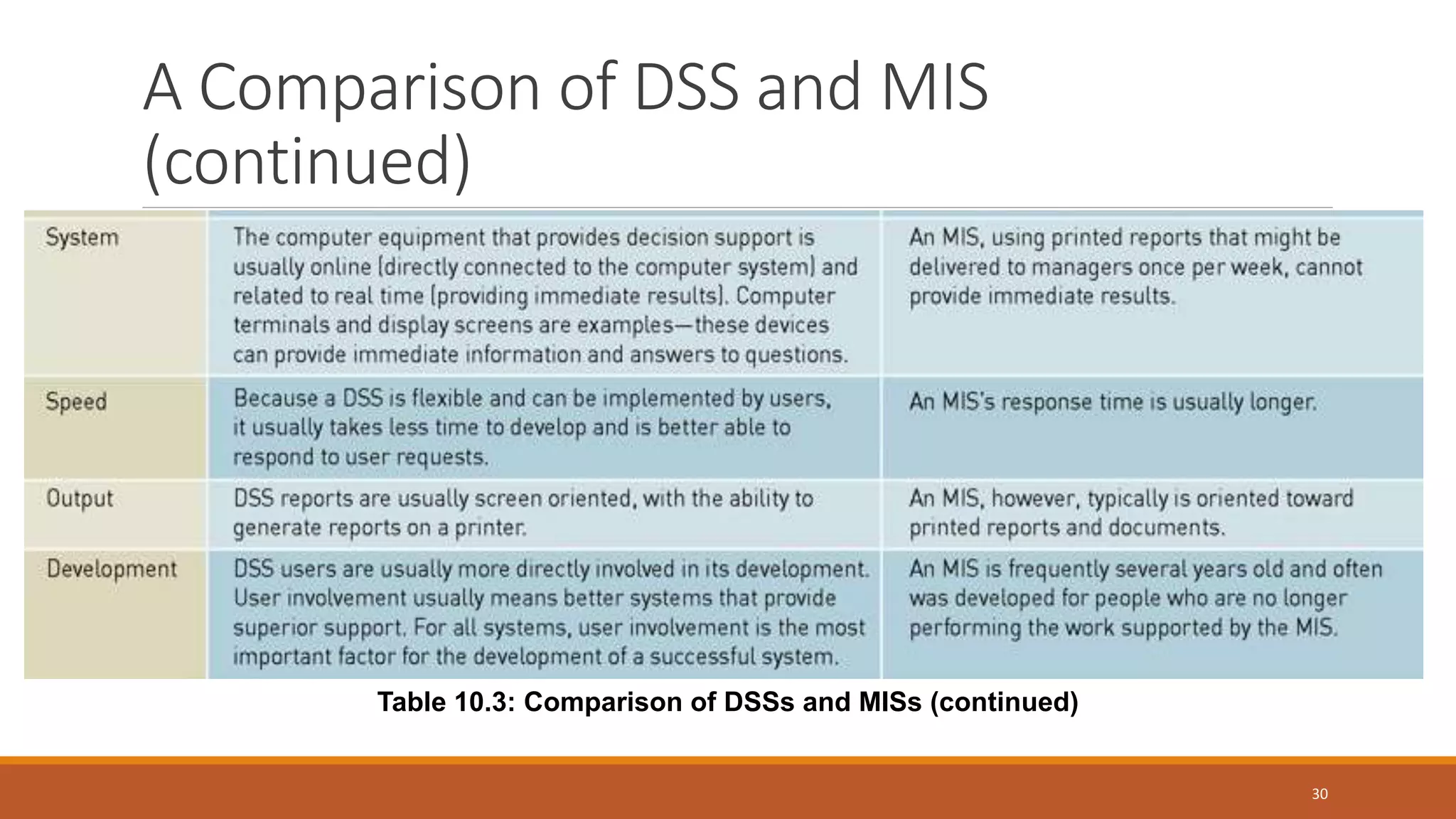
Table 10.3: Comparison of DSSs and MISs (continued)
Components of a Decision Support
System
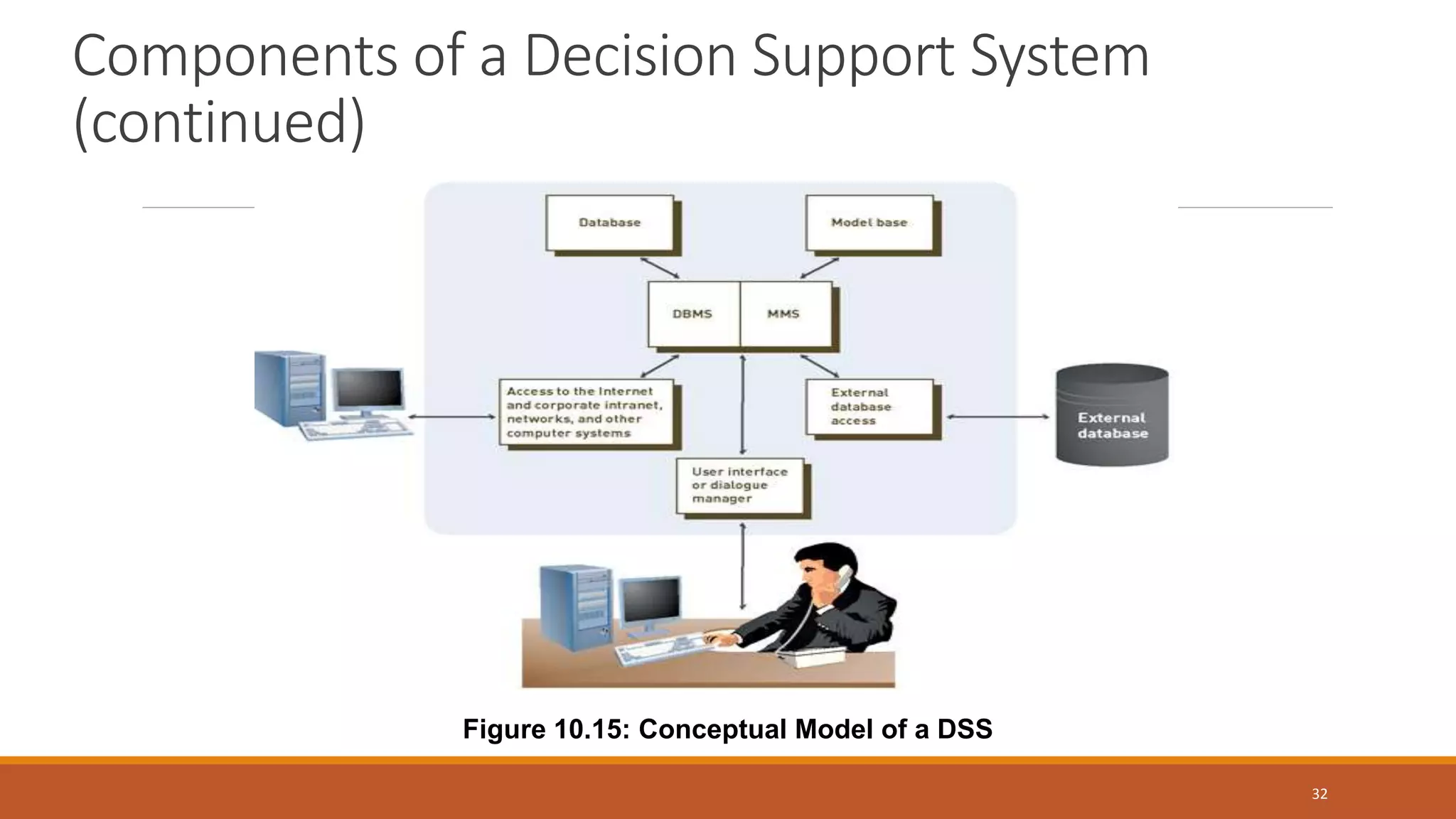
 Database
 Model base
 Dialogue manager: user interface that allows decision makers to:
 Easily access and manipulate the DSS
 Use common business terms
31
Components of a Decision Support System
(continued)
32
Figure 10.15: Conceptual Model of a DSS
The Database
Database management system
◦ Allows managers and decision makers to perform qualitative analysis on data stored in company’s
databases, data warehouses, and data marts
◦ Can also be used to connect to external databases
Data-driven DSS: primarily performs qualitative analysis based on the company’s databases
33
The Model Base
Model base: provides decision makers with access to a variety of models and assists them in
decision making
◦ Allows them to perform quantitative analysis on both internal and external data
Model-driven DSS: primarily performs mathematical or quantitative analysis
Model management software (MMS): software that coordinates the use of models in a DSS
excel
34
The User Interface or Dialogue Manager
Allows users to interact with the DSS to obtain information
Supports with all aspects of communications between user and hardware and software that
establish the DSS
35
Group Support Systems
Group support system (GSS)
◦ Consists of most elements in a DSS, plus software to provide effective support in group decision making
◦ Also called group decision support system or computerized collaborative work system
36
Group Support Systems
Group support system (GSS)
◦ Consists of most elements in a DSS, plus software to provide effective support in group decision making
◦ Also called group decision support system or computerized collaborative work system
37
Group Support Systems (continued)
38
Figure 10.16: Configuration of a GSS
Characteristics of a GSS That Enhance
Decision Making
Special design
Ease of use
Flexibility
39
Characteristics of a GSS That Enhance
Decision Making (continued)
Anonymous input
Reduction of negative group behavior
Parallel communication
Automated record keeping
40
GSS Software
Often called groupware or workgroup software
Helps with joint work group scheduling, communication, and management
Examples
◦ Virtual Office from Groove Networks
◦ Lotus Notes
◦ Office Communicator
◦ IBM’s Workplace
◦ Microsoft’s NetMeeting
41
GSS Software (continued)
Examples of groupware products available on the Web
◦ WebEx, Genesys Meeting Center, GoToMeeting Corporate
42
Executive Support Systems
Executive support system (ESS):
◦ Specialized DSS
◦ Includes hardware, software, data, procedures, and people used to assist senior-level executives
◦ Also called an executive information system (EIS)
43
Executive Support Systems (continued)
44
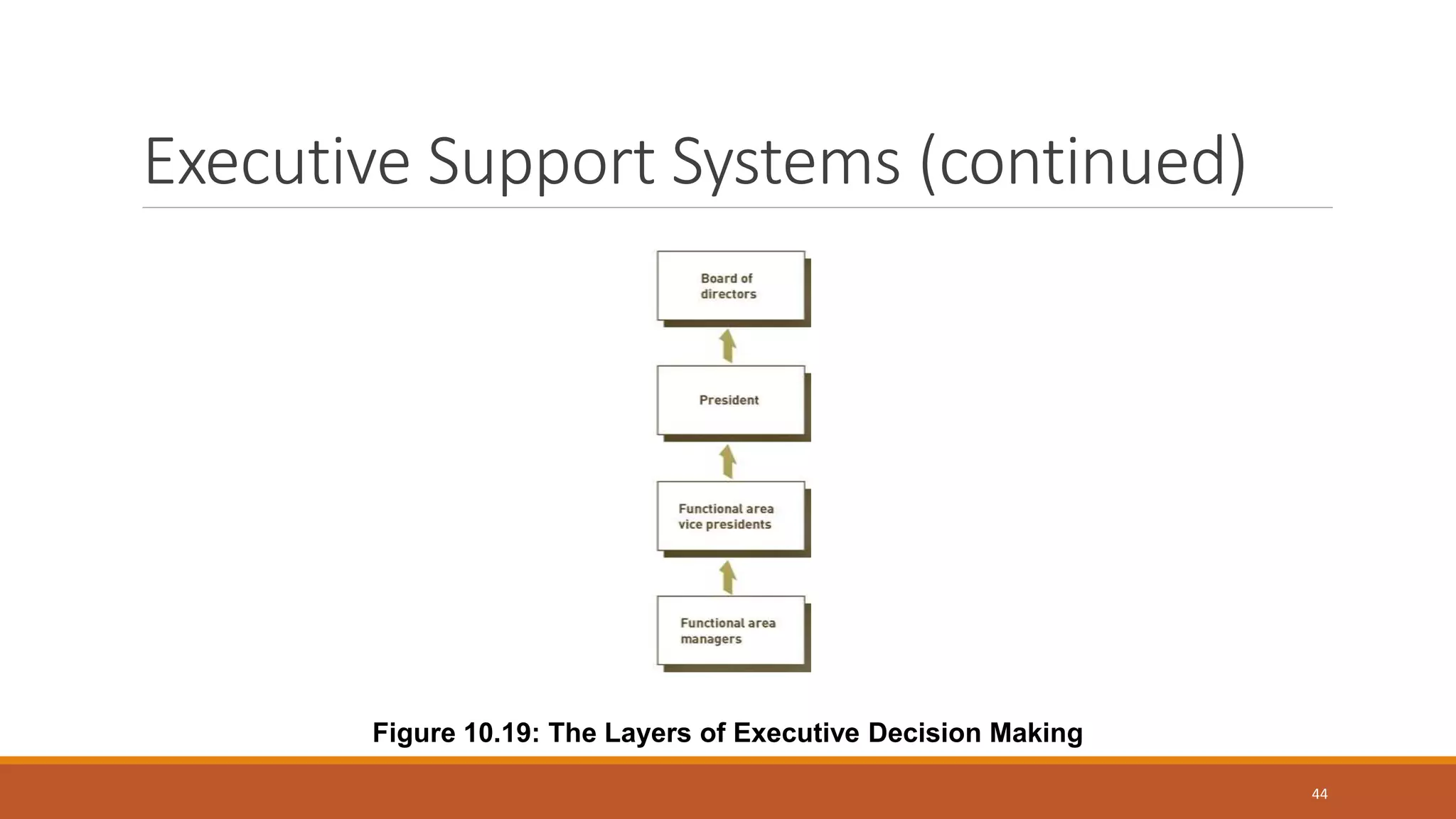
Figure 10.19: The Layers of Executive Decision Making
Executive Support Systems in Perspective
Tailored to individual executives
Easy to use
Drill-down capabilities
Support need for external data
Can help with situations that have a high degree of uncertainty
Future-oriented
45
Capabilities of Executive Support Systems
Support for defining overall vision
Support for strategic planning
◦ Determining long-term objectives through analysis of current organization and prediction of future trends
Support for crisis management
46
DSS Characteristics
Facilitation : DSS facilitate and support specific decisionmaking activities and/or decision
processes.
Interaction : DSS are computer-based systems designed for interactive use by decision makers
or staff users who control the sequence of interaction and the operations performed.
Ancillary : DSS can support decision makers at any level in an organization. They are NOT
intended to replace decision makers.
Repeated Use : DSS are intended for repeated use. A specific DSS may be used routinely or used
as needed for ad hoc decision support tasks.
Identifiable: DSS may be independent systems that collect or replicate data from other
information systems OR subsystems of a larger, more integrated information system.
DSS Characteristics (cont.)
Task-oriented : DSS provide specific capabilities that support one or more tasks related to
decision-making, including: intelligence and data analysis; identification and design of
alternatives; choice among alternatives; and decision implementation.
Decision Impact : DSS are intended to improve the accuracy, timeliness, quality and overall
effectiveness of a specific decision or a set of related decisions.
Supports individual and group decision making : It provides a single platform that allows all users
to access the same information and access the same version of truth, while providing autonomy
to individual users and development groups to design reporting content locally.
Comprehensive Data Access : It allows users to access data from different sources concurrently,
leaving organizations the freedom to choose the data warehouse that best suits their unique
requirements and preferences.
DSS Characteristics (cont.)
Easy to Develop and Deploy : DSS delivers an interactive, scalable platform for rapidly developing
and deploying projects. Multiple projects can be created within a single shared metadata.
Within each project, development teams create a wide variety of re-usable metadata objects.
Integrated software : DSS’s integrated platform enables administrators and IT professionals to
develop data models, perform sophisticated analysis, generate analytical reports, and deliver
these reports to end users via different channels (Web, email, file, print and mobile devices).
Flexibility : DSS features are flexible and can be altered according to need providing a helping
hand in the work process.
DSS Objectives
1. Increase the effectiveness of the manager's decisionmaking process.
2. Supports the manager in the decision-making process but does not replace it.
3. Improve the directors effectiveness of decision making.
DSS Components
DSS components may be classified as:
Inputs : Factors, numbers, and characteristics to analyze.
User Knowledge and Expertise : Inputs requiring manual analysis by the user.
Outputs : Transformed data from which DSS "decisions" are generated.
Decisions : Results generated by the DSS based on user criteria.
DSS Requirements
Data collection from multiple sources (sales data, inventory data, supplier data, market research
data. etc.).
Data formatting and collation.
A suitable database location and format built for decision support -based reporting and analysis
.
Robust tools and applications to report, monitor, and analyze the data.
DSS Advantages
1. Time savings
2. Enhance effectiveness
3. Improve interpersonal communication
4. Competitive advantage
5. Cost reduction
6. Increase decision maker satisfaction
7. Promote learning
8. Improves personal efficiency
DSS Disadvantages
1. Monetary cost.
2. Overemphasize decision making.
3. Assumption of relevance.
4. Transfer of power.
5. Unanticipated effects.
6. Obscuring responsibility.
7. False belief in objectivity.
8. Status reduction.
9. Information overload.
DSS Applications
Medical diagnosis.
Business and Management.
Agricultural production.
Forest management.

Decision support system & Management Information System

  • 2.
    DECISION SUPPORT SYSTEM Laiba Ghafoor007 Choudhary Aitzaz Ahsan 008
  • 3.
    What is DSS? ADSS is a computer-based information system that supports business or organizational decision-making activities. A DSS is a collection of integrated software applications and hardware that form the backbone of an organization’s decision making process and help to make decisions, which may be rapidly changing and not easily specified in advance.
  • 4.
    Decision Making asa Component of Problem Solving
  • 5.
    Decision Making andProblem Solving Every organization needs effective decision making In most cases, strategic planning and overall goals of the organization set the course for decision making Information systems can assist with strategic planning and problem solving
  • 6.
    Decision Making asa Component of Problem Solving Decision-making phase: first part of problem-solving process ◦ Intelligence stage: potential problems or opportunities are identified and defined ◦ Design stage: alternative solutions to the problem are developed ◦ Choice stage: requires selecting a course of action
  • 7.
    Decision Making asa Component of Problem Solving (continued) Problem solving: goes beyond decision making to include implementation and monitoring stages Implementation stage: a solution is put into effect Monitoring stage: decision makers evaluate the implementation
  • 8.
    Programmed Versus Nonprogrammed Decisions Programmed decision ◦ Decision made using a rule, procedure, or quantitative method ◦ Easy to computerize using traditional information systems Non programmed decision ◦ Decision that deals with unusual or exceptional situations ◦ Not easily quantifiable
  • 9.
    An Overview of ManagementInformation Systems Management information system (MIS) ◦ Integrated collection of people, procedures, databases, and devices ◦ Provides managers and decision makers with information to help achieve organizational goals ◦ Can give the organization a competitive advantage ◦ Providing the right information to the right people in the right format and at the right time 10
  • 10.
    Management Information Systemsin Perspective  Management information system (MIS) (continued)  Provides managers with information that supports effective decision making and provides feedback on daily operations 10
  • 11.
    Inputs to aManagement Information System Internal data sources ◦ TPSs and ERP systems and related databases ◦ Data warehouses and data marts ◦ Specific functional areas throughout the firm External data sources ◦ Customers, suppliers, competitors, and stockholders whose data is not already captured by the TPS ◦ Internet ◦ Extranets 11
  • 12.
    Outputs of aManagement Information System (continued)  Scheduled report: produced periodically, or on schedule, such as daily, weekly, or monthly ◦ Key-indicator report: summary of previous day’s critical activities  Demand report: developed to give certain information at someone’s request  Exception report: automatically produced when a situation is unusual or requires management action  Drill-down reports: provide increasingly detailed data about a situation 12
  • 13.
    Characteristics of aManagement Information System Provide reports with fixed and standard formats Produce hard-copy and soft-copy reports Use internal data stored in computer system Allow users to develop custom reports Require user requests for reports developed by systems personnel 13
  • 14.
    Functional Aspects ofthe MIS Most organizations are structured along functional lines or areas MIS can be divided along functional lines to produce reports tailored to individual functions 14
  • 15.
    Financial Management Information Systems FinancialMIS: provides financial information to executives and others Some financial MIS subsystems and outputs ◦ Profit/loss and cost systems: profit and revenue centers ◦ Auditing: internal and external ◦ Uses and management of funds 15
  • 16.
    Profit center: adepartment within an organization that focuses on generating profits. Revenue center: a division with in a company that generates sales or revenues. Auditing: analyzing the financial condition of an organization and determining whether financial statements and reports produces by the financial MIS are accurate. Uses and management of funds: internal uses of funds include purchasing additional inventory, updating plants and equipment etc 16
  • 17.
    Financial Management InformationSystems (continued) 17 Figure 10.7: Overview of a Financial MIS
  • 18.
    Manufacturing Management Information Systems Manufacturing MIS subsystems and outputs monitor and control the flow of materials, products, and services through the organization  Design and engineering: CAD systems  Master production scheduling and inventory control ◦ Methods: EOQ, MRP, JIT  Process control ◦ Techniques: CAM, CIM, FMS  Quality control and testing 18
  • 19.
    Manufacturing Management InformationSystems (continued) 19 Figure 10.8: Overview of a Manufacturing MIS
  • 20.
    Marketing Management Information Systems MarketingMIS: supports managerial activities in product development, distribution, pricing decisions, and promotional effectiveness Subsystems ◦ Marketing research ◦ Product development ◦ Promotion and advertising ◦ Product pricing ◦ Sales analysis 20
  • 21.
    Human Resource Management InformationSystems Human resource MIS: concerned with activities related to employees and potential employees Subsystems ◦ Human resource planning ◦ Personnel selection and recruiting ◦ Training and skills inventory ◦ Scheduling and job placement ◦ Wage and salary administration ◦ Outplacement 21
  • 22.
    Human Resource ManagementInformation Systems (continued) 22 Figure 10.11: Overview of a Human Resource MIS
  • 23.
    Other Management InformationSystems Accounting MIS: provides aggregate information on accounts payable, accounts receivable, payroll, and many other applications Geographic information system (GIS): capable of assembling, storing, manipulating, and displaying geographic information 23
  • 24.
    An Overview ofDecision Support Systems DSS: organized collection of people, procedures, software, databases, and devices used to help make decisions that solve problems Focus of a DSS is on decision-making effectiveness regarding unstructured or semistructured business problems Used by managers at all levels 24
  • 25.
    Characteristics of aDecision Support System Provide rapid access to information Handle large amounts of data from different sources Provide report and presentation flexibility Offer both textual and graphical orientation Support drill-down analysis 25
  • 26.
    Characteristics of aDecision Support System (continued)  Perform complex, sophisticated analysis and comparisons using advanced software packages  Support optimization, satisficing, and heuristic approaches 26
  • 27.
    Capabilities of aDecision Support System Support problem-solving phases Support different decision frequencies ◦ Ad hoc DSS ◦ Institutional DSS Support different problem structures ◦ Highly structured problems (known facts) ◦ Semistructured or unstructured problems (facts are not clear.) Support various decision-making levels 27
  • 28.
    Capabilities of aDecision Support System (continued) 28 Figure 10.14: Decision-Making Level
  • 29.
    A Comparison ofDSS and MIS 29 Table 10.3: Comparison of DSSs and MISs
  • 30.
    A Comparison ofDSS and MIS (continued) 30 Table 10.3: Comparison of DSSs and MISs (continued)
  • 31.
    Components of aDecision Support System  Database  Model base  Dialogue manager: user interface that allows decision makers to:  Easily access and manipulate the DSS  Use common business terms 31
  • 32.
    Components of aDecision Support System (continued) 32 Figure 10.15: Conceptual Model of a DSS
  • 33.
    The Database Database managementsystem ◦ Allows managers and decision makers to perform qualitative analysis on data stored in company’s databases, data warehouses, and data marts ◦ Can also be used to connect to external databases Data-driven DSS: primarily performs qualitative analysis based on the company’s databases 33
  • 34.
    The Model Base Modelbase: provides decision makers with access to a variety of models and assists them in decision making ◦ Allows them to perform quantitative analysis on both internal and external data Model-driven DSS: primarily performs mathematical or quantitative analysis Model management software (MMS): software that coordinates the use of models in a DSS excel 34
  • 35.
    The User Interfaceor Dialogue Manager Allows users to interact with the DSS to obtain information Supports with all aspects of communications between user and hardware and software that establish the DSS 35
  • 36.
    Group Support Systems Groupsupport system (GSS) ◦ Consists of most elements in a DSS, plus software to provide effective support in group decision making ◦ Also called group decision support system or computerized collaborative work system 36
  • 37.
    Group Support Systems Groupsupport system (GSS) ◦ Consists of most elements in a DSS, plus software to provide effective support in group decision making ◦ Also called group decision support system or computerized collaborative work system 37
  • 38.
    Group Support Systems(continued) 38 Figure 10.16: Configuration of a GSS
  • 39.
    Characteristics of aGSS That Enhance Decision Making Special design Ease of use Flexibility 39
  • 40.
    Characteristics of aGSS That Enhance Decision Making (continued) Anonymous input Reduction of negative group behavior Parallel communication Automated record keeping 40
  • 41.
    GSS Software Often calledgroupware or workgroup software Helps with joint work group scheduling, communication, and management Examples ◦ Virtual Office from Groove Networks ◦ Lotus Notes ◦ Office Communicator ◦ IBM’s Workplace ◦ Microsoft’s NetMeeting 41
  • 42.
    GSS Software (continued) Examplesof groupware products available on the Web ◦ WebEx, Genesys Meeting Center, GoToMeeting Corporate 42
  • 43.
    Executive Support Systems Executivesupport system (ESS): ◦ Specialized DSS ◦ Includes hardware, software, data, procedures, and people used to assist senior-level executives ◦ Also called an executive information system (EIS) 43
  • 44.
    Executive Support Systems(continued) 44 Figure 10.19: The Layers of Executive Decision Making
  • 45.
    Executive Support Systemsin Perspective Tailored to individual executives Easy to use Drill-down capabilities Support need for external data Can help with situations that have a high degree of uncertainty Future-oriented 45
  • 46.
    Capabilities of ExecutiveSupport Systems Support for defining overall vision Support for strategic planning ◦ Determining long-term objectives through analysis of current organization and prediction of future trends Support for crisis management 46
  • 47.
    DSS Characteristics Facilitation :DSS facilitate and support specific decisionmaking activities and/or decision processes. Interaction : DSS are computer-based systems designed for interactive use by decision makers or staff users who control the sequence of interaction and the operations performed. Ancillary : DSS can support decision makers at any level in an organization. They are NOT intended to replace decision makers. Repeated Use : DSS are intended for repeated use. A specific DSS may be used routinely or used as needed for ad hoc decision support tasks. Identifiable: DSS may be independent systems that collect or replicate data from other information systems OR subsystems of a larger, more integrated information system.
  • 48.
    DSS Characteristics (cont.) Task-oriented: DSS provide specific capabilities that support one or more tasks related to decision-making, including: intelligence and data analysis; identification and design of alternatives; choice among alternatives; and decision implementation. Decision Impact : DSS are intended to improve the accuracy, timeliness, quality and overall effectiveness of a specific decision or a set of related decisions. Supports individual and group decision making : It provides a single platform that allows all users to access the same information and access the same version of truth, while providing autonomy to individual users and development groups to design reporting content locally. Comprehensive Data Access : It allows users to access data from different sources concurrently, leaving organizations the freedom to choose the data warehouse that best suits their unique requirements and preferences.
  • 49.
    DSS Characteristics (cont.) Easyto Develop and Deploy : DSS delivers an interactive, scalable platform for rapidly developing and deploying projects. Multiple projects can be created within a single shared metadata. Within each project, development teams create a wide variety of re-usable metadata objects. Integrated software : DSS’s integrated platform enables administrators and IT professionals to develop data models, perform sophisticated analysis, generate analytical reports, and deliver these reports to end users via different channels (Web, email, file, print and mobile devices). Flexibility : DSS features are flexible and can be altered according to need providing a helping hand in the work process.
  • 50.
    DSS Objectives 1. Increasethe effectiveness of the manager's decisionmaking process. 2. Supports the manager in the decision-making process but does not replace it. 3. Improve the directors effectiveness of decision making.
  • 51.
    DSS Components DSS componentsmay be classified as: Inputs : Factors, numbers, and characteristics to analyze. User Knowledge and Expertise : Inputs requiring manual analysis by the user. Outputs : Transformed data from which DSS "decisions" are generated. Decisions : Results generated by the DSS based on user criteria.
  • 52.
    DSS Requirements Data collectionfrom multiple sources (sales data, inventory data, supplier data, market research data. etc.). Data formatting and collation. A suitable database location and format built for decision support -based reporting and analysis . Robust tools and applications to report, monitor, and analyze the data.
  • 53.
    DSS Advantages 1. Timesavings 2. Enhance effectiveness 3. Improve interpersonal communication 4. Competitive advantage 5. Cost reduction 6. Increase decision maker satisfaction 7. Promote learning 8. Improves personal efficiency
  • 54.
    DSS Disadvantages 1. Monetarycost. 2. Overemphasize decision making. 3. Assumption of relevance. 4. Transfer of power. 5. Unanticipated effects. 6. Obscuring responsibility. 7. False belief in objectivity. 8. Status reduction. 9. Information overload.
  • 55.
    DSS Applications Medical diagnosis. Businessand Management. Agricultural production. Forest management.