NETWORK PROTOCOL  ANALYZER Raksha.J-IMS07IS078 Sahana.P.Shankar-IMS07IS086 Sai Janaki Tejaswi P-IMS07IS087 Shruthi Raghavan-IMS07IS096
AGENDA What is network protocol analyzer. Uses of network protocol analyzer. Tools available. Protocols used on the network. About the tool Softperfect. Advantages of this tool. Implementation using Softperfect. References. Acknowledgement.
What is Network Protocol Analyzer? The packet analyzer (also known as a network analyzer, protocol analyzer or sniffer) is  computer software  or  computer hardware  that can  intercept  and log traffic passing over a digital  network  or part of a network. Network sniffer is a program and/or device that monitors data travelling over a network. Network sniffers can be used both for legitimate network management functions and for stealing information off a network.
USES Analyze network problems. Detect network intrusion attempts. Gain information for effecting a network intrusion. Monitor network usage. Gather and report network statistics. Filter suspect content from network traffic. Spy on other network users and collect sensitive information such as passwords (depending on any content encryption methods which may be in use) Debug client/server communications. Debug network protocol implementations .
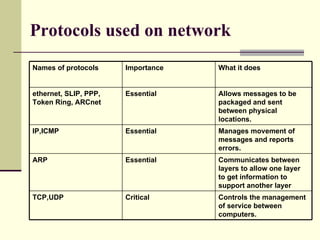
Protocols used on network Critical Essential  Essential  Essential  Importance  TCP,UDP ARP IP,ICMP ethernet, SLIP, PPP, Token Ring, ARCnet  Names of protocols Controls the management of service between computers.  Communicates between layers to allow one layer to get information to support another layer  Manages movement of messages and reports errors. Allows messages to be packaged and sent between physical locations.  What it does
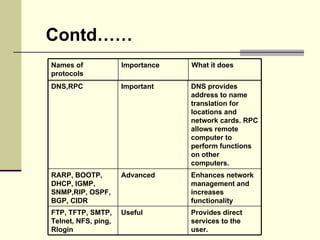
Contd…… Provides direct services to the user.  Enhances network management and increases functionality  DNS provides address to name translation for locations and network cards. RPC allows remote computer to perform functions on other computers.  Useful Advanced Important FTP, TFTP, SMTP, Telnet, NFS, ping, Rlogin  RARP, BOOTP, DHCP, IGMP, SNMP,RIP, OSPF, BGP, CIDR  DNS,RPC Names of protocols What it does Importance
TOOLS Wireshark : Wireshark (formerly known as Ethereal) is a fantastic open  source network protocol analyzer for Unix and Windows.  Snort : This is network intrusion detection and prevention system excels at traffic analysis on IP networks. Netcat : This simple utility reads and writes data across TCP or UDP network connections.   Tcpdump : Tcpdump is the IP sniffer used before Ethereal (Wireshark) came on the scene, and many of us continue to use it frequently.   Netfilter : Netfilter is a powerful packet filter implemented in the standard Linux kernel. Capsa :  Capsa Network Analyzer is an all-in-one & easy-to-use Ethernet network protocol analyzer for Windows platforms.  The other tools available are Carnivore,dSniff,Clarified  Analyzer,SoftPerfect,Snoop,NetScout etc;
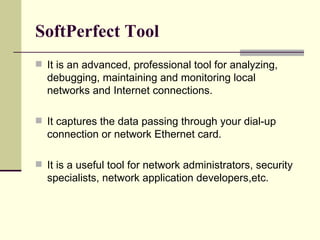
SoftPerfect Tool It is an advanced, professional tool for analyzing, debugging, maintaining and monitoring local networks and Internet connections.  It captures the data passing through your dial-up connection or network Ethernet card. It is a useful tool for network administrators, security specialists, network application developers,etc.
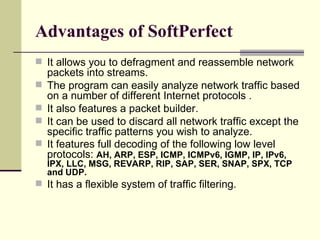
Advantages of SoftPerfect It allows you to defragment and reassemble network packets into streams.  The program can easily analyze network traffic based on a number of different Internet protocols . It also features a packet builder.  It can be used to discard all network traffic except the specific traffic patterns you wish to analyze.  It features full decoding of the following low level protocols:  AH, ARP, ESP, ICMP, ICMPv6, IGMP, IP, IPv6, IPX, LLC, MSG, REVARP, RIP, SAP, SER, SNAP, SPX, TCP and UDP.  It has a flexible system of traffic filtering.
References http://en.wikipedia.org/wiki/Packet_analyzer http://www.javvin.com/sniffer.html http://www.comptechdoc.org/independent/networking/guide/netcategories.html http://www.comptechdoc.org/independent/networking/guide/netcategories.html http://www.softperfect.com/products/networksniffer/
Acknowledgement We would like to thank our faculty Siddesh sir and Manishekhar sir. We would also like to thank our friend Mohammed Reza who helped us out in the project.

Network Protocol Analyzer

  • 1.
    NETWORK PROTOCOL ANALYZER Raksha.J-IMS07IS078 Sahana.P.Shankar-IMS07IS086 Sai Janaki Tejaswi P-IMS07IS087 Shruthi Raghavan-IMS07IS096
  • 2.
    AGENDA What isnetwork protocol analyzer. Uses of network protocol analyzer. Tools available. Protocols used on the network. About the tool Softperfect. Advantages of this tool. Implementation using Softperfect. References. Acknowledgement.
  • 3.
    What is NetworkProtocol Analyzer? The packet analyzer (also known as a network analyzer, protocol analyzer or sniffer) is computer software or computer hardware that can intercept and log traffic passing over a digital network or part of a network. Network sniffer is a program and/or device that monitors data travelling over a network. Network sniffers can be used both for legitimate network management functions and for stealing information off a network.
  • 4.
    USES Analyze networkproblems. Detect network intrusion attempts. Gain information for effecting a network intrusion. Monitor network usage. Gather and report network statistics. Filter suspect content from network traffic. Spy on other network users and collect sensitive information such as passwords (depending on any content encryption methods which may be in use) Debug client/server communications. Debug network protocol implementations .
  • 5.
    Protocols used onnetwork Critical Essential Essential Essential Importance TCP,UDP ARP IP,ICMP ethernet, SLIP, PPP, Token Ring, ARCnet Names of protocols Controls the management of service between computers. Communicates between layers to allow one layer to get information to support another layer Manages movement of messages and reports errors. Allows messages to be packaged and sent between physical locations. What it does
  • 6.
    Contd…… Provides directservices to the user. Enhances network management and increases functionality DNS provides address to name translation for locations and network cards. RPC allows remote computer to perform functions on other computers. Useful Advanced Important FTP, TFTP, SMTP, Telnet, NFS, ping, Rlogin RARP, BOOTP, DHCP, IGMP, SNMP,RIP, OSPF, BGP, CIDR DNS,RPC Names of protocols What it does Importance
  • 7.
    TOOLS Wireshark :Wireshark (formerly known as Ethereal) is a fantastic open source network protocol analyzer for Unix and Windows. Snort : This is network intrusion detection and prevention system excels at traffic analysis on IP networks. Netcat : This simple utility reads and writes data across TCP or UDP network connections. Tcpdump : Tcpdump is the IP sniffer used before Ethereal (Wireshark) came on the scene, and many of us continue to use it frequently. Netfilter : Netfilter is a powerful packet filter implemented in the standard Linux kernel. Capsa : Capsa Network Analyzer is an all-in-one & easy-to-use Ethernet network protocol analyzer for Windows platforms. The other tools available are Carnivore,dSniff,Clarified Analyzer,SoftPerfect,Snoop,NetScout etc;
  • 8.
    SoftPerfect Tool Itis an advanced, professional tool for analyzing, debugging, maintaining and monitoring local networks and Internet connections. It captures the data passing through your dial-up connection or network Ethernet card. It is a useful tool for network administrators, security specialists, network application developers,etc.
  • 9.
    Advantages of SoftPerfectIt allows you to defragment and reassemble network packets into streams. The program can easily analyze network traffic based on a number of different Internet protocols . It also features a packet builder. It can be used to discard all network traffic except the specific traffic patterns you wish to analyze. It features full decoding of the following low level protocols: AH, ARP, ESP, ICMP, ICMPv6, IGMP, IP, IPv6, IPX, LLC, MSG, REVARP, RIP, SAP, SER, SNAP, SPX, TCP and UDP. It has a flexible system of traffic filtering.
  • 10.
    References http://en.wikipedia.org/wiki/Packet_analyzer http://www.javvin.com/sniffer.htmlhttp://www.comptechdoc.org/independent/networking/guide/netcategories.html http://www.comptechdoc.org/independent/networking/guide/netcategories.html http://www.softperfect.com/products/networksniffer/
  • 11.
    Acknowledgement We wouldlike to thank our faculty Siddesh sir and Manishekhar sir. We would also like to thank our friend Mohammed Reza who helped us out in the project.