Network Traffic Analysis
Presented By
Ahmed Elshaer
Security Operation Specialist
Agenda
● Why Traffic Analysis
● TCP/IP Review
● The Protocols
● Tcpdump/Tshark Basics
● Wireshark Foundation
● Hands-On Network Forensics
Why Traffic Analysis ?
● Gain special knowledge about the network.
● Investigate and troubleshoot abnormal behavior
– Abnormal packets.
– Network slow performance.
● Congestion.
● Retransmission.
– Unexpected traffic.
– Broken applications.
– Load balancer issues.
Why Traffic Analysis ?
● Network Forensics
– Collecting evidence.
– Incident Handling.
– Tracing attacks.
– Linking infected hosts.
– Determining patient zero.
● Stealing Sensitive information
● Pen-testing.
● Developing IPS/IDS signatures.
How Packet Sniffer Works
● Collection
– the packet sniffer collects raw binary data from the wire.
● Conversion
– the captured binary data is converted into a readable form
● Analysis
– the actual analysis of the captured and converted data.
– The packet sniffer verifies its protocol based on that
protocol’s specific features.
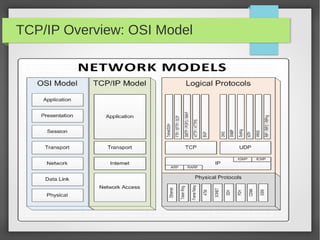
TCP/IP Overview: OSI Model
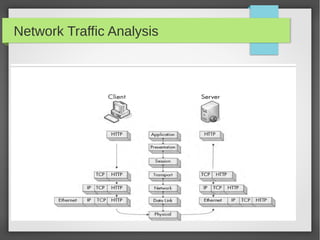
Network Traffic Analysis
● Protocols
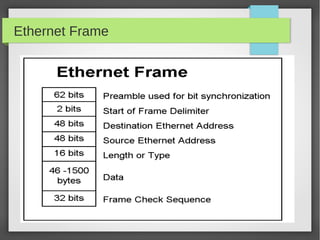
– Ethernet
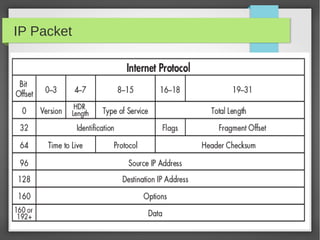
– IP
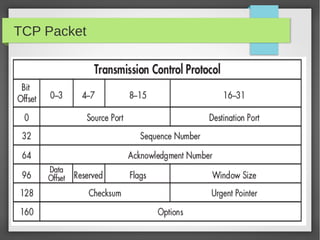
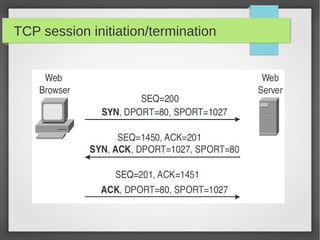
– TCP/UDP
– DNS
– DHCP
– FTP
– Telnet
– HTTP
Ethernet Frame
IP Packet
TCP Packet
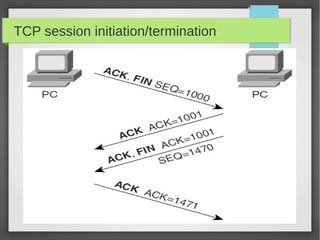
TCP session initiation/termination
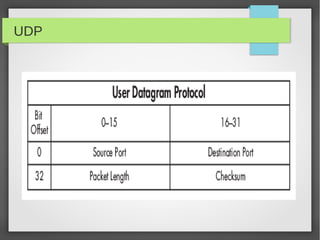
UDP
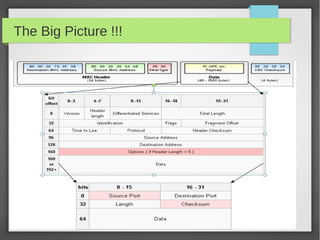
The Big Picture !!!
Network Traffic Analysis
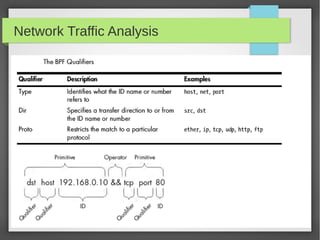
● BPF Filters, what !!!
– Berkley Packet Filter
– A knowledge of BPF syntax is crucial as you dig
deeper into networks at the packet level.
– Allow you to specify exactly which packets you want to
capture.
– Get rid or Packets you don't want to capture
– BPF is how you talk to the Network Drivers :)
Network Traffic Analysis
● Command Line Tools:
– TCPdump
– Tshark
– Dumpcap, why !!!
● Graphical Tools:
– Wireshark
Network Traffic Analysis
● TCPDUMP Basics (1)
Network Traffic Analysis
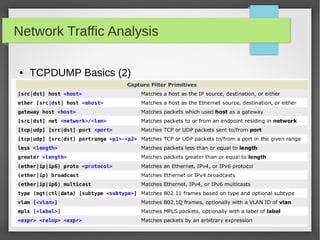
● TCPDUMP Basics (2)
Network Traffic Analysis
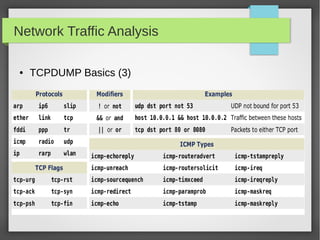
● TCPDUMP Basics (3)
Network Traffic Analysis
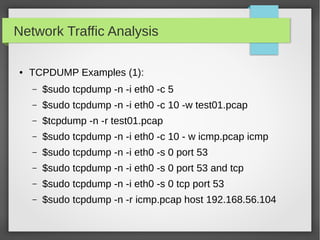
● TCPDUMP Examples (1):
– $sudo tcpdump -n -i eth0 -c 5
– $sudo tcpdump -n -i eth0 -c 10 -w test01.pcap
– $tcpdump -n -r test01.pcap
– $sudo tcpdump -n -i eth0 -c 10 - w icmp.pcap icmp
– $sudo tcpdump -n -i eth0 -s 0 port 53
– $sudo tcpdump -n -i eth0 -s 0 port 53 and tcp
– $sudo tcpdump -n -i eth0 -s 0 tcp port 53
– $sudo tcpdump -n -r icmp.pcap host 192.168.56.104
Network Traffic Analysis
●
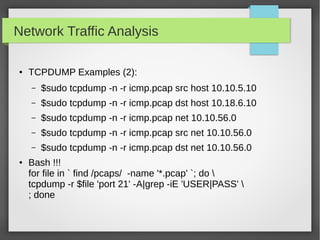
TCPDUMP Examples (2):
– $sudo tcpdump -n -r icmp.pcap src host 10.10.5.10
– $sudo tcpdump -n -r icmp.pcap dst host 10.18.6.10
– $sudo tcpdump -n -r icmp.pcap net 10.10.56.0
– $sudo tcpdump -n -r icmp.pcap src net 10.10.56.0
– $sudo tcpdump -n -r icmp.pcap dst net 10.10.56.0
● Bash !!!
for file in ` find /pcaps/ -name '*.pcap' `; do 
tcpdump -r $file 'port 21' -A|grep -iE 'USER|PASS' 
; done
Network Traffic Analysis
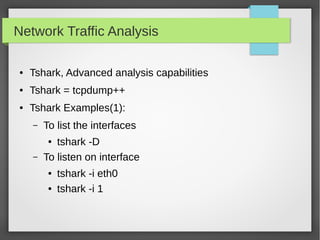
● Tshark, Advanced analysis capabilities
● Tshark = tcpdump++
● Tshark Examples(1):
– To list the interfaces
● tshark -D
– To listen on interface
● tshark -i eth0
● tshark -i 1
Network Traffic Analysis
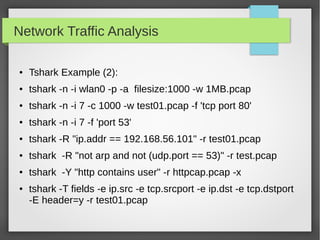
● Tshark Example (2):
● tshark -n -i wlan0 -p -a filesize:1000 -w 1MB.pcap
● tshark -n -i 7 -c 1000 -w test01.pcap -f 'tcp port 80'
● tshark -n -i 7 -f 'port 53'
● tshark -R "ip.addr == 192.168.56.101" -r test01.pcap
● tshark -R "not arp and not (udp.port == 53)" -r test.pcap
● tshark -Y "http contains user" -r httpcap.pcap -x
● tshark -T fields -e ip.src -e tcp.srcport -e ip.dst -e tcp.dstport
-E header=y -r test01.pcap
Network Traffic Analysis
● Dumpcap
– a network traffic dump tool
– It captures packet data from a live network and writes
the packets to a file.
– Why should I use it !!!
Network Traffic Analysis
● Wireshark Basic Operations
– Live Capture
– Open PCAP File
– Basic Filters
– Follow TCP Stream
– Time Stamps
– Expert Info
– Statistics
Network Traffic Analysis
● Wireshark Packet Inspection
– ARP
– IP
– TCP
– HTTP
– FTP
– DNS
– DHCP
Network Traffic Analysis
● Wireshark Advanced Tasks
– SSL Decryption
– Network Forensics and File Carving
● Extract Files from FTP
● Extract Files from HTTP
Network Traffic Analysis
CTF Time
References/more resources
● http://www.chrisbrenton.org/category/security/network/
● http://packetlife.net/library/cheat-sheets/
● Practical Packet Analysis - NoStarchPress
● http://packetlife.net/captures/
● http://wiki.wireshark.org/SampleCaptures
● http://www.netresec.com/?page=PcapFiles
● Network Analysis Sessions By Ahemd Adel

Network traffic analysis course

  • 1.
    Network Traffic Analysis PresentedBy Ahmed Elshaer Security Operation Specialist
  • 2.
    Agenda ● Why TrafficAnalysis ● TCP/IP Review ● The Protocols ● Tcpdump/Tshark Basics ● Wireshark Foundation ● Hands-On Network Forensics
  • 3.
    Why Traffic Analysis? ● Gain special knowledge about the network. ● Investigate and troubleshoot abnormal behavior – Abnormal packets. – Network slow performance. ● Congestion. ● Retransmission. – Unexpected traffic. – Broken applications. – Load balancer issues.
  • 4.
    Why Traffic Analysis? ● Network Forensics – Collecting evidence. – Incident Handling. – Tracing attacks. – Linking infected hosts. – Determining patient zero. ● Stealing Sensitive information ● Pen-testing. ● Developing IPS/IDS signatures.
  • 5.
    How Packet SnifferWorks ● Collection – the packet sniffer collects raw binary data from the wire. ● Conversion – the captured binary data is converted into a readable form ● Analysis – the actual analysis of the captured and converted data. – The packet sniffer verifies its protocol based on that protocol’s specific features.
  • 6.
  • 7.
  • 8.
  • 9.
    Network Traffic Analysis ●Protocols – Ethernet – IP – TCP/UDP – DNS – DHCP – FTP – Telnet – HTTP
  • 10.
  • 11.
  • 12.
  • 13.
  • 14.
  • 15.
  • 16.
  • 17.
    Network Traffic Analysis ●BPF Filters, what !!! – Berkley Packet Filter – A knowledge of BPF syntax is crucial as you dig deeper into networks at the packet level. – Allow you to specify exactly which packets you want to capture. – Get rid or Packets you don't want to capture – BPF is how you talk to the Network Drivers :)
  • 18.
  • 19.
    Network Traffic Analysis ●Command Line Tools: – TCPdump – Tshark – Dumpcap, why !!! ● Graphical Tools: – Wireshark
  • 20.
    Network Traffic Analysis ●TCPDUMP Basics (1)
  • 21.
    Network Traffic Analysis ●TCPDUMP Basics (2)
  • 22.
    Network Traffic Analysis ●TCPDUMP Basics (3)
  • 23.
    Network Traffic Analysis ●TCPDUMP Examples (1): – $sudo tcpdump -n -i eth0 -c 5 – $sudo tcpdump -n -i eth0 -c 10 -w test01.pcap – $tcpdump -n -r test01.pcap – $sudo tcpdump -n -i eth0 -c 10 - w icmp.pcap icmp – $sudo tcpdump -n -i eth0 -s 0 port 53 – $sudo tcpdump -n -i eth0 -s 0 port 53 and tcp – $sudo tcpdump -n -i eth0 -s 0 tcp port 53 – $sudo tcpdump -n -r icmp.pcap host 192.168.56.104
  • 24.
    Network Traffic Analysis ● TCPDUMPExamples (2): – $sudo tcpdump -n -r icmp.pcap src host 10.10.5.10 – $sudo tcpdump -n -r icmp.pcap dst host 10.18.6.10 – $sudo tcpdump -n -r icmp.pcap net 10.10.56.0 – $sudo tcpdump -n -r icmp.pcap src net 10.10.56.0 – $sudo tcpdump -n -r icmp.pcap dst net 10.10.56.0 ● Bash !!! for file in ` find /pcaps/ -name '*.pcap' `; do tcpdump -r $file 'port 21' -A|grep -iE 'USER|PASS' ; done
  • 25.
    Network Traffic Analysis ●Tshark, Advanced analysis capabilities ● Tshark = tcpdump++ ● Tshark Examples(1): – To list the interfaces ● tshark -D – To listen on interface ● tshark -i eth0 ● tshark -i 1
  • 26.
    Network Traffic Analysis ●Tshark Example (2): ● tshark -n -i wlan0 -p -a filesize:1000 -w 1MB.pcap ● tshark -n -i 7 -c 1000 -w test01.pcap -f 'tcp port 80' ● tshark -n -i 7 -f 'port 53' ● tshark -R "ip.addr == 192.168.56.101" -r test01.pcap ● tshark -R "not arp and not (udp.port == 53)" -r test.pcap ● tshark -Y "http contains user" -r httpcap.pcap -x ● tshark -T fields -e ip.src -e tcp.srcport -e ip.dst -e tcp.dstport -E header=y -r test01.pcap
  • 27.
    Network Traffic Analysis ●Dumpcap – a network traffic dump tool – It captures packet data from a live network and writes the packets to a file. – Why should I use it !!!
  • 28.
    Network Traffic Analysis ●Wireshark Basic Operations – Live Capture – Open PCAP File – Basic Filters – Follow TCP Stream – Time Stamps – Expert Info – Statistics
  • 29.
    Network Traffic Analysis ●Wireshark Packet Inspection – ARP – IP – TCP – HTTP – FTP – DNS – DHCP
  • 30.
    Network Traffic Analysis ●Wireshark Advanced Tasks – SSL Decryption – Network Forensics and File Carving ● Extract Files from FTP ● Extract Files from HTTP
  • 31.
  • 32.
    References/more resources ● http://www.chrisbrenton.org/category/security/network/ ●http://packetlife.net/library/cheat-sheets/ ● Practical Packet Analysis - NoStarchPress ● http://packetlife.net/captures/ ● http://wiki.wireshark.org/SampleCaptures ● http://www.netresec.com/?page=PcapFiles ● Network Analysis Sessions By Ahemd Adel