{
WIRESHARK
PRESENTED BY
ANKITA SINGH
MTECH(ISM)
00902052016
 HISTORY
 WHAT IS WIRESHARK
 STEPS TO INSTALL WIRESHARK
 HOMESCREEN
 TABS IN WIRESHARK
 HOW IT CAPTURE PACKETS
 SOME COMMANDS LINE
 PURPOSE
 FEATURES
CONTENT
 In late 1997 Gerald Combs needed a tool for tracking down network
problems called as-Ethereal
 In October, 1998 Guy Harris applied patches and contributing
dissectors to Ethereal.
 In 2006 the project moved house and re-emerged under a new
name: Wireshark.
 In 2008 Wireshark finally arrived at version 1.0.,with the minimum
features implemented. Its release coincided with the first Wireshark
Developer and User Conference, called Sharkfest.
 In 2015 Wireshark 2.0 was released, which featured a new user
interface.
HISTORY
1-Wireshark is a network packet analyzer. A network packet
analyzer will try to capture network packets and tries to
display that packet data as detailed as possible.
2-You could think of a network packet analyzer as a
measuring device used to examine what’s going on inside
a network cable.
WHAT IS WIRESHARK?
STEPS TO INSTALL WIRESHARK
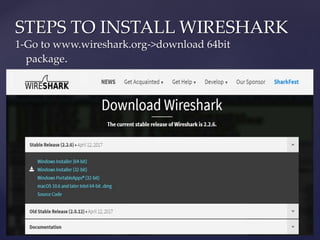
1-Go to www.wireshark.org->download 64bit
package.
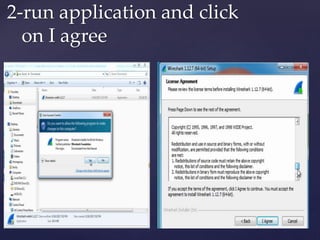
2-run application and click
on I agree
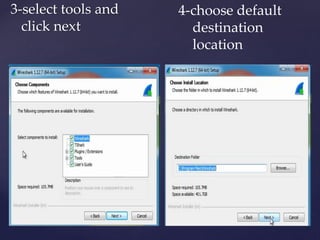
3-select tools and
click next
4-choose default
destination
location
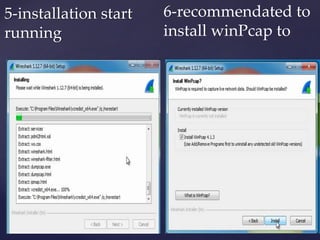
5-installation start
running
6-recommendated to
install winPcap to
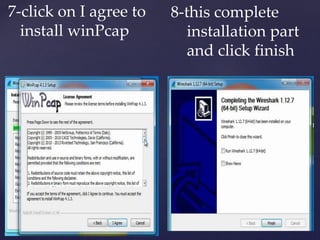
7-click on I agree to
install winPcap
8-this complete
installation part
and click finish
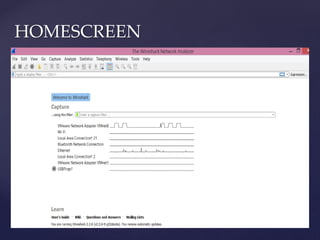
HOMESCREEN
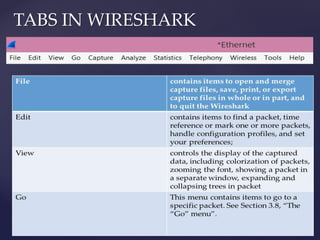
TABS IN WIRESHARK
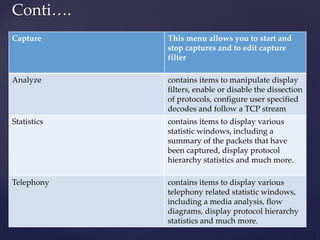
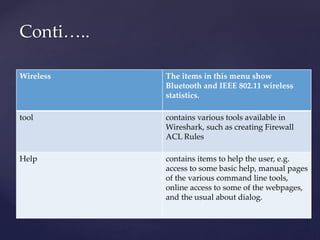
Conti….
Capture This menu allows you to start and
stop captures and to edit capture
filter
Analyze contains items to manipulate display
filters, enable or disable the dissection
of protocols, configure user specified
decodes and follow a TCP stream
Statistics contains items to display various
statistic windows, including a
summary of the packets that have
been captured, display protocol
hierarchy statistics and much more.
Telephony contains items to display various
telephony related statistic windows,
including a media analysis, flow
diagrams, display protocol hierarchy
statistics and much more.
Wireless The items in this menu show
Bluetooth and IEEE 802.11 wireless
statistics.
tool contains various tools available in
Wireshark, such as creating Firewall
ACL Rules
Help contains items to help the user, e.g.
access to some basic help, manual pages
of the various command line tools,
online access to some of the webpages,
and the usual about dialog.
Conti…..
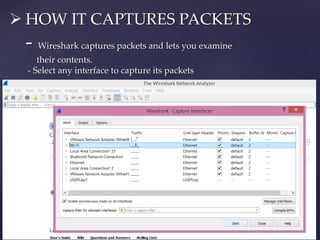
 HOW IT CAPTURES PACKETS
- Wireshark captures packets and lets you examine
their contents.
- Select any interface to capture its packets
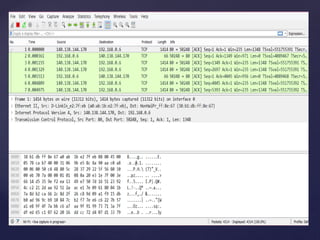
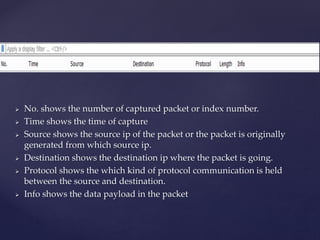
 No. shows the number of captured packet or index number.
 Time shows the time of capture
 Source shows the source ip of the packet or the packet is originally
generated from which source ip.
 Destination shows the destination ip where the packet is going.
 Protocol shows the which kind of protocol communication is held
between the source and destination.
 Info shows the data payload in the packet
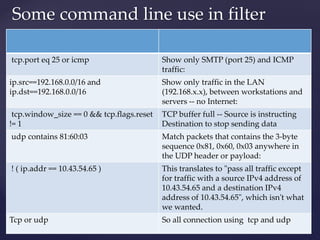
Some command line use in filter
tcp.port eq 25 or icmp Show only SMTP (port 25) and ICMP
traffic:
ip.src==192.168.0.0/16 and
ip.dst==192.168.0.0/16
Show only traffic in the LAN
(192.168.x.x), between workstations and
servers -- no Internet:
tcp.window_size == 0 && tcp.flags.reset
!= 1
TCP buffer full -- Source is instructing
Destination to stop sending data
udp contains 81:60:03 Match packets that contains the 3-byte
sequence 0x81, 0x60, 0x03 anywhere in
the UDP header or payload:
! ( ip.addr == 10.43.54.65 ) This translates to "pass all traffic except
for traffic with a source IPv4 address of
10.43.54.65 and a destination IPv4
address of 10.43.54.65", which isn't what
we wanted.
Tcp or udp So all connection using tcp and udp
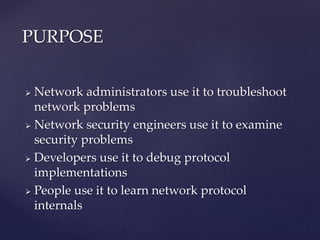
 Network administrators use it to troubleshoot
network problems
 Network security engineers use it to examine
security problems
 Developers use it to debug protocol
implementations
 People use it to learn network protocol
internals
PURPOSE
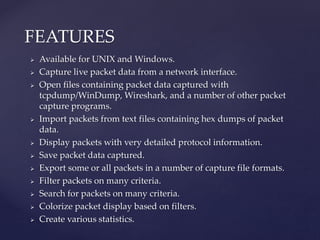
 Available for UNIX and Windows.
 Capture live packet data from a network interface.
 Open files containing packet data captured with
tcpdump/WinDump, Wireshark, and a number of other packet
capture programs.
 Import packets from text files containing hex dumps of packet
data.
 Display packets with very detailed protocol information.
 Save packet data captured.
 Export some or all packets in a number of capture file formats.
 Filter packets on many criteria.
 Search for packets on many criteria.
 Colorize packet display based on filters.
 Create various statistics.
FEATURES
Wireshark

Wireshark

  • 1.
  • 2.
     HISTORY  WHATIS WIRESHARK  STEPS TO INSTALL WIRESHARK  HOMESCREEN  TABS IN WIRESHARK  HOW IT CAPTURE PACKETS  SOME COMMANDS LINE  PURPOSE  FEATURES CONTENT
  • 3.
     In late1997 Gerald Combs needed a tool for tracking down network problems called as-Ethereal  In October, 1998 Guy Harris applied patches and contributing dissectors to Ethereal.  In 2006 the project moved house and re-emerged under a new name: Wireshark.  In 2008 Wireshark finally arrived at version 1.0.,with the minimum features implemented. Its release coincided with the first Wireshark Developer and User Conference, called Sharkfest.  In 2015 Wireshark 2.0 was released, which featured a new user interface. HISTORY
  • 4.
    1-Wireshark is anetwork packet analyzer. A network packet analyzer will try to capture network packets and tries to display that packet data as detailed as possible. 2-You could think of a network packet analyzer as a measuring device used to examine what’s going on inside a network cable. WHAT IS WIRESHARK?
  • 5.
    STEPS TO INSTALLWIRESHARK 1-Go to www.wireshark.org->download 64bit package.
  • 6.
    2-run application andclick on I agree
  • 7.
    3-select tools and clicknext 4-choose default destination location
  • 8.
  • 9.
    7-click on Iagree to install winPcap 8-this complete installation part and click finish
  • 10.
  • 11.
  • 12.
    Conti…. Capture This menuallows you to start and stop captures and to edit capture filter Analyze contains items to manipulate display filters, enable or disable the dissection of protocols, configure user specified decodes and follow a TCP stream Statistics contains items to display various statistic windows, including a summary of the packets that have been captured, display protocol hierarchy statistics and much more. Telephony contains items to display various telephony related statistic windows, including a media analysis, flow diagrams, display protocol hierarchy statistics and much more.
  • 13.
    Wireless The itemsin this menu show Bluetooth and IEEE 802.11 wireless statistics. tool contains various tools available in Wireshark, such as creating Firewall ACL Rules Help contains items to help the user, e.g. access to some basic help, manual pages of the various command line tools, online access to some of the webpages, and the usual about dialog. Conti…..
  • 14.
     HOW ITCAPTURES PACKETS - Wireshark captures packets and lets you examine their contents. - Select any interface to capture its packets
  • 16.
     No. showsthe number of captured packet or index number.  Time shows the time of capture  Source shows the source ip of the packet or the packet is originally generated from which source ip.  Destination shows the destination ip where the packet is going.  Protocol shows the which kind of protocol communication is held between the source and destination.  Info shows the data payload in the packet
  • 17.
    Some command lineuse in filter tcp.port eq 25 or icmp Show only SMTP (port 25) and ICMP traffic: ip.src==192.168.0.0/16 and ip.dst==192.168.0.0/16 Show only traffic in the LAN (192.168.x.x), between workstations and servers -- no Internet: tcp.window_size == 0 && tcp.flags.reset != 1 TCP buffer full -- Source is instructing Destination to stop sending data udp contains 81:60:03 Match packets that contains the 3-byte sequence 0x81, 0x60, 0x03 anywhere in the UDP header or payload: ! ( ip.addr == 10.43.54.65 ) This translates to "pass all traffic except for traffic with a source IPv4 address of 10.43.54.65 and a destination IPv4 address of 10.43.54.65", which isn't what we wanted. Tcp or udp So all connection using tcp and udp
  • 18.
     Network administratorsuse it to troubleshoot network problems  Network security engineers use it to examine security problems  Developers use it to debug protocol implementations  People use it to learn network protocol internals PURPOSE
  • 19.
     Available forUNIX and Windows.  Capture live packet data from a network interface.  Open files containing packet data captured with tcpdump/WinDump, Wireshark, and a number of other packet capture programs.  Import packets from text files containing hex dumps of packet data.  Display packets with very detailed protocol information.  Save packet data captured.  Export some or all packets in a number of capture file formats.  Filter packets on many criteria.  Search for packets on many criteria.  Colorize packet display based on filters.  Create various statistics. FEATURES