PACKET SNIFFER PROGRAM
By,
Prof. Vilas Gaikwad
INTRODUCTION
 Without some form of countermeasures, your data isn't
safe on public networks.
 There are people out there who are capable of stealing
your data.
 The best defense is to know what you can lose, how it
can get lost and how to defend against it.
5/19/2015
2
PacketSnifferProgram
WHAT IS PACKET SNIFFING?
 Packet sniffing, or packet analysis, is the process of
capturing any data passed over the local network and
looking for any information that may be useful.
 Most of the time, system administrators use packet
sniffing to troubleshoot network problems (like finding
out why traffic is so slow in one part of the network) or
to detect intrusions and that is what this type of analysis
originally was designed for.
 packet sniffers are considered security tools instead of
network tools now.
5/19/2015
3
PacketSnifferProgram
HOW DOES IT WORK?
 First, packet sniffing is a passive technique.
 No one actually is attacking your computer and
investigating through all those files that you don't want
anyone to access.
 It's a lot like eavesdropping (overhear something).
 My computer is just listening in on the conversation
that your computer is having with the gateway.
 Typically, when people think of network traffic, they
think that it goes directly from their computers to the
router or switch and up to the gateway and then out to
the Internet, where it routes similarly until it gets to the
specified destination.
5/19/2015
4
PacketSnifferProgram
HOW DOES IT WORK? (CONT.)
 This is mostly true except for one fundamental detail.
 Your computer isn't directly sending the data
anywhere.
 It broadcasts the data in packets that have the
destination in the header.
 Every node on your network (or switch) receives the
packet, determines whether it is the intended recipient
and then either accepts the packet or ignores it.
5/19/2015
5
PacketSnifferProgram
HOW DOES IT WORK? (CONT.)
 For example, let's say you're loading the Web page
http://example.com on your computer "PC".
 Your computer sends the request by basically shouting
"Hey! Somebody get me http://example.com!", which
most nodes simply will ignore.
 Your switch will pass it on to where it eventually will be
received by example.com,
 which will pass back its index page to the router, which
then shouts "Hey! I have http://example.com for PC!",
 which again will be ignored by everyone except you.
 If others were on your switch with a packet sniffer,
they'd receive all that traffic and be able to look at it.
5/19/2015
6
PacketSnifferProgram
WHAT KIND OF INFORMATION CAN BE GATHERED?
 Most of the Internet runs in plain text, which means that
most of the information you look at is viewable by
someone with a packet sniffer.
 You should take note that all of this data is vulnerable only
through an unencrypted connection, so if the site you are
using has some form of encryption like SSL, your data is
less vulnerable.
 The most destructive data, and the stuff most people
are concerned with, is user credentials.
 Your user name and password for any given site are passed
in the clear for anyone to gather.
 This can be especially crippling if you use the same
password for all your accounts on-line.
 It doesn't matter how secure your bank Web site is if you
use the same password for that account and for your Twitter
account.
5/19/2015
7
PacketSnifferProgram
 There is a technique in the security world called session
hijacking where an attacker uses a packet sniffer to gain
access to a victim's session on a particular Web site by
stealing the victim's session cookie for that site.
 For instance, say I was sniffing traffic on the network, and
you logged in to Facebook and left the Remember Me On
This Computer check box checked.
 That signals Facebook to send you a session cookie that
your browser stores.
 I potentially could collect that cookie through packet
sniffing, add it to my browser and then have access to your
Facebook account.
 This is such a trivial task that it can be scripted easily
 And still there aren't many Web sites that encrypt their
traffic to the end user, making it a significant problem when
using the public Internet.
WHAT KIND OF INFORMATION CAN BE GATHERED?
(CONT.)
5/19/2015
8
PacketSnifferProgram
WHICH ACTIVITIES CAN BE MONITORED:
 When you connect to the Internet, you are joining a network
maintained by your Internet service provider (ISP).
 The ISP's network communicates with networks maintained by
other ISPs to form the foundation of the Internet.
 A packet sniffer located at one of the servers of your ISP would
potentially be able to monitor all of your online activities, such as:
 Which Web sites you visit
 What you look at on the site
 Whom you send e-mail to
 What's in the e-mail you send
 What you download from a site
 What streaming events you use, such as audio, video and Internet
telephony
 From this information, employers can determine how much time a
worker is spending online and if that worker is viewing
inappropriate material.
5/19/2015
9
PacketSnifferProgram
SNIFFER PROGRAM
Basic Sniffer
 Sniffers are programs that can capture/sniff/detect
network traffic packet by packet and analyse them
for various reasons.
 Commonly used in the field of network security.
 Wire shark is a very common packet sniffer/protocol
analyzer.
 Packet sniffers can be written in python too.
 In this program we have written a few very simple
sniffers in python for the Linux platform.
5/19/2015
10
PacketSnifferProgram
SNIFFER PROGRAM
Basic Sniffer
 Linux because, although python is a portable, the
programs wont run or give similar results on windows
 This is due to difference in the implementation of the
socket api.
 Sniffers shown here don't use any extra libraries like
libpcap.
 They just use raw sockets.
 Following are the details of actual program…
5/19/2015
11
PacketSnifferProgram
PACKET SNIFFER PROGRAM STEPS
1. Create raw socket
2. Receive a packet and Get packet string from tuple
3. From received packet parse Ethernet header with
the help of unpack method
Then print Destination MAC address, Source
MAC address and Protocol
4. Now parse IP packet for retrieving IP header
Then print Version, IP Header Length, TTL,
Protocol, Source Address and Destination
Address
5/19/2015
12
PacketSnifferProgram
PACKET SNIFFER PROGRAM STEPS
5. Now check which is internal protocol used
 If TCP then, parse TCP packet for retrieving
TCP header and data
Then, print Source Port, Dest Port,
Sequence Number, Acknowledgement and
TCP header length
 If ICMP then, parse ICMP packet for retrieving
ICMP header and data
Then, print Type, Code and Checksum
 If UDP then, parse UDP packet for retrieving
UDP header and data
Then, print Source Port, Dest Port, Length
and Checksum
5/19/2015
13
PacketSnifferProgram
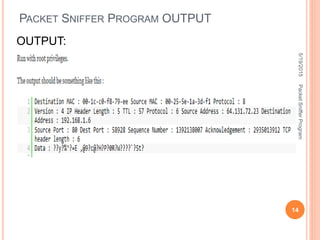
PACKET SNIFFER PROGRAM OUTPUT
OUTPUT:
5/19/2015
14
PacketSnifferProgram
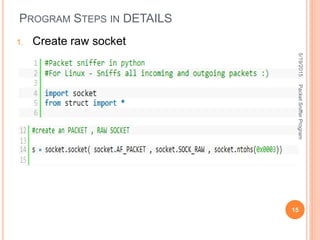
PROGRAM STEPS IN DETAILS
1. Create raw socket
5/19/2015
15
PacketSnifferProgram
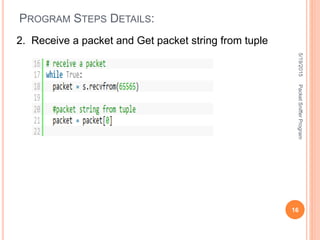
PROGRAM STEPS DETAILS:
2. Receive a packet and Get packet string from tuple
5/19/2015
16
PacketSnifferProgram
PROGRAM STEPS DETAILS:
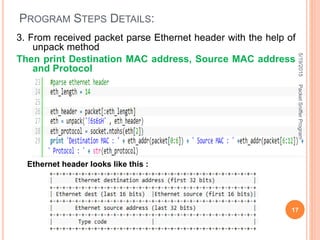
3. From received packet parse Ethernet header with the help of
unpack method
Then print Destination MAC address, Source MAC address
and Protocol
Ethernet header looks like this :
5/19/2015
17
PacketSnifferProgram
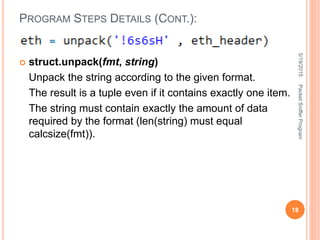
 struct.unpack(fmt, string)
Unpack the string according to the given format.
The result is a tuple even if it contains exactly one item.
The string must contain exactly the amount of data
required by the format (len(string) must equal
calcsize(fmt)).
PROGRAM STEPS DETAILS (CONT.):
5/19/2015
18
PacketSnifferProgram
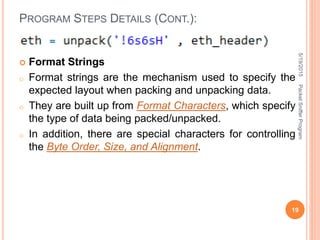
 Format Strings
o Format strings are the mechanism used to specify the
expected layout when packing and unpacking data.
o They are built up from Format Characters, which specify
the type of data being packed/unpacked.
o In addition, there are special characters for controlling
the Byte Order, Size, and Alignment.
PROGRAM STEPS DETAILS (CONT.):
5/19/2015
19
PacketSnifferProgram
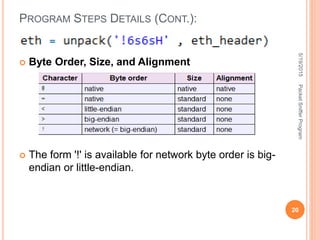
 Byte Order, Size, and Alignment
 The form '!' is available for network byte order is big-
endian or little-endian.
PROGRAM STEPS DETAILS (CONT.):
5/19/2015
20
PacketSnifferProgram
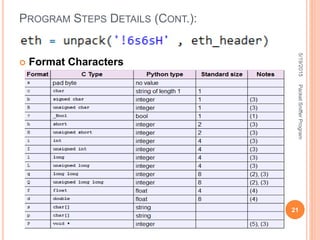
 Format Characters
PROGRAM STEPS DETAILS (CONT.):
5/19/2015
21
PacketSnifferProgram
 Here is the meaning of, ‘6s6sH’
s is char[] of size 6
And H is unsigned short, integer of size 2
Hence total is,
6 char + 6 char + 2 integer = total 8
This format string will take out required fields of header
packet
PROGRAM STEPS DETAILS (CONT.):
5/19/2015
22
PacketSnifferProgram
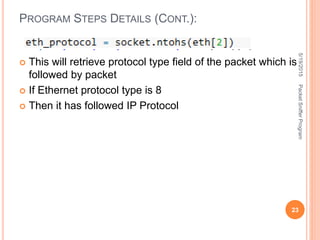
 This will retrieve protocol type field of the packet which is
followed by packet
 If Ethernet protocol type is 8
 Then it has followed IP Protocol
PROGRAM STEPS DETAILS (CONT.):
5/19/2015
23
PacketSnifferProgram
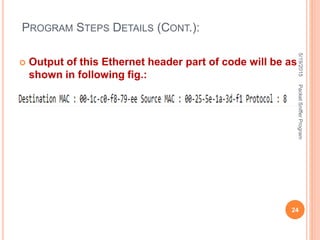
 Output of this Ethernet header part of code will be as
shown in following fig.:
PROGRAM STEPS DETAILS (CONT.):
5/19/2015
24
PacketSnifferProgram
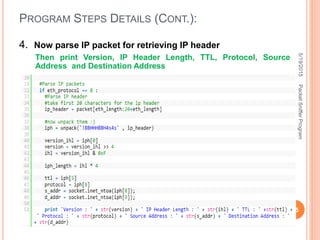
4. Now parse IP packet for retrieving IP header
Then print Version, IP Header Length, TTL, Protocol, Source
Address and Destination Address
PROGRAM STEPS DETAILS (CONT.):
5/19/2015
25
PacketSnifferProgram
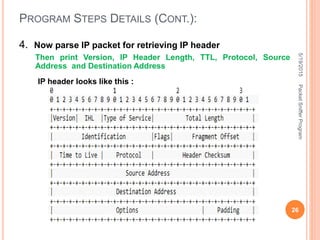
4. Now parse IP packet for retrieving IP header
Then print Version, IP Header Length, TTL, Protocol, Source
Address and Destination Address
PROGRAM STEPS DETAILS (CONT.):
IP header looks like this :
5/19/2015
26
PacketSnifferProgram
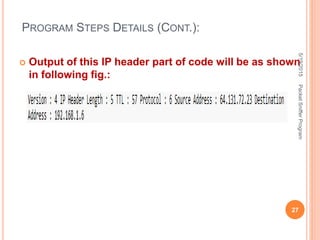
 Output of this IP header part of code will be as shown
in following fig.:
PROGRAM STEPS DETAILS (CONT.):
5/19/2015
27
PacketSnifferProgram
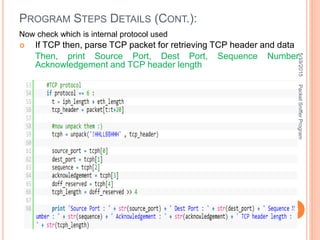
Now check which is internal protocol used
 If TCP then, parse TCP packet for retrieving TCP header and data
Then, print Source Port, Dest Port, Sequence Number,
Acknowledgement and TCP header length
PROGRAM STEPS DETAILS (CONT.):
5/19/2015
28
PacketSnifferProgram
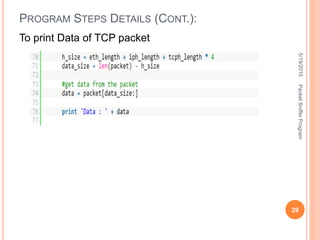
To print Data of TCP packet
PROGRAM STEPS DETAILS (CONT.):
5/19/2015
29
PacketSnifferProgram
PROGRAM STEPS DETAILS (CONT.):
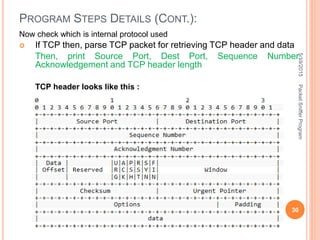
TCP header looks like this :
Now check which is internal protocol used
 If TCP then, parse TCP packet for retrieving TCP header and data
Then, print Source Port, Dest Port, Sequence Number,
Acknowledgement and TCP header length
5/19/2015
30
PacketSnifferProgram
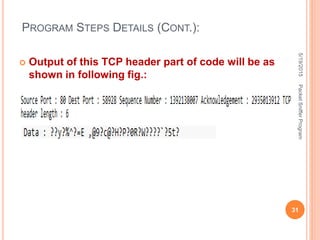
 Output of this TCP header part of code will be as
shown in following fig.:
PROGRAM STEPS DETAILS (CONT.):
5/19/2015
31
PacketSnifferProgram
PROGRAM STEPS IN DETAILS:
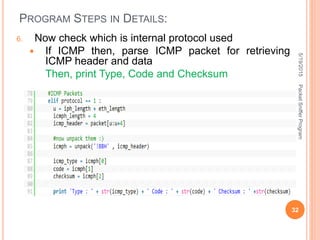
6. Now check which is internal protocol used
 If ICMP then, parse ICMP packet for retrieving
ICMP header and data
Then, print Type, Code and Checksum
5/19/2015
32
PacketSnifferProgram
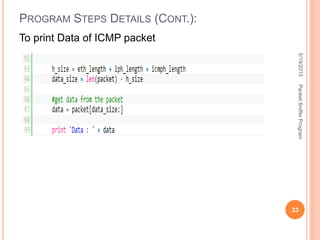
To print Data of ICMP packet
PROGRAM STEPS DETAILS (CONT.):
5/19/2015
33
PacketSnifferProgram
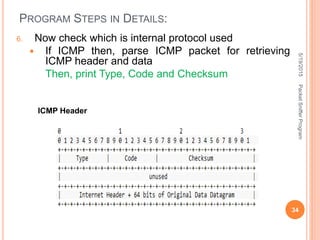
PROGRAM STEPS IN DETAILS:
6. Now check which is internal protocol used
 If ICMP then, parse ICMP packet for retrieving
ICMP header and data
Then, print Type, Code and Checksum
ICMP Header
5/19/2015
34
PacketSnifferProgram
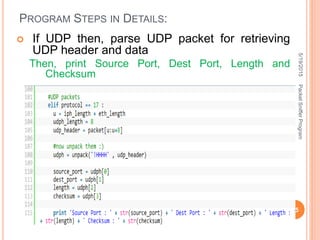
PROGRAM STEPS IN DETAILS:
 If UDP then, parse UDP packet for retrieving
UDP header and data
Then, print Source Port, Dest Port, Length and
Checksum
5/19/2015
35
PacketSnifferProgram
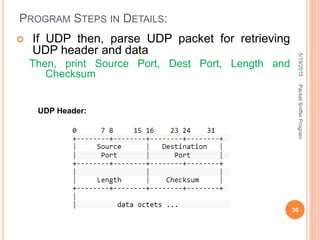
PROGRAM STEPS IN DETAILS:
UDP Header:
 If UDP then, parse UDP packet for retrieving
UDP header and data
Then, print Source Port, Dest Port, Length and
Checksum
5/19/2015
36
PacketSnifferProgram
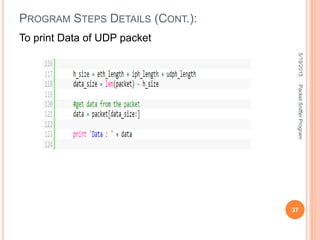
To print Data of UDP packet
PROGRAM STEPS DETAILS (CONT.):
5/19/2015
37
PacketSnifferProgram
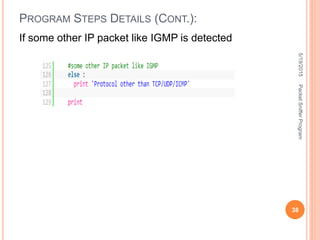
If some other IP packet like IGMP is detected
PROGRAM STEPS DETAILS (CONT.):
5/19/2015
38
PacketSnifferProgram
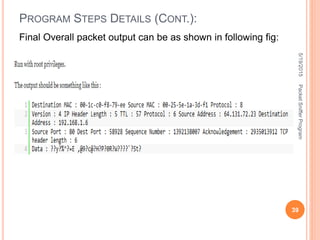
Final Overall packet output can be as shown in following fig:
PROGRAM STEPS DETAILS (CONT.):
5/19/2015
39
PacketSnifferProgram
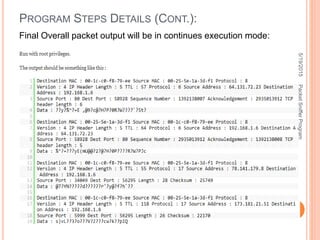
Final Overall packet output will be in continues execution mode:
PROGRAM STEPS DETAILS (CONT.):
5/19/2015
40
PacketSnifferProgram
THANK YOU!
5/19/2015
41
PacketSnifferProgram

Packet Sniffer

  • 1.
  • 2.
    INTRODUCTION  Without someform of countermeasures, your data isn't safe on public networks.  There are people out there who are capable of stealing your data.  The best defense is to know what you can lose, how it can get lost and how to defend against it. 5/19/2015 2 PacketSnifferProgram
  • 3.
    WHAT IS PACKETSNIFFING?  Packet sniffing, or packet analysis, is the process of capturing any data passed over the local network and looking for any information that may be useful.  Most of the time, system administrators use packet sniffing to troubleshoot network problems (like finding out why traffic is so slow in one part of the network) or to detect intrusions and that is what this type of analysis originally was designed for.  packet sniffers are considered security tools instead of network tools now. 5/19/2015 3 PacketSnifferProgram
  • 4.
    HOW DOES ITWORK?  First, packet sniffing is a passive technique.  No one actually is attacking your computer and investigating through all those files that you don't want anyone to access.  It's a lot like eavesdropping (overhear something).  My computer is just listening in on the conversation that your computer is having with the gateway.  Typically, when people think of network traffic, they think that it goes directly from their computers to the router or switch and up to the gateway and then out to the Internet, where it routes similarly until it gets to the specified destination. 5/19/2015 4 PacketSnifferProgram
  • 5.
    HOW DOES ITWORK? (CONT.)  This is mostly true except for one fundamental detail.  Your computer isn't directly sending the data anywhere.  It broadcasts the data in packets that have the destination in the header.  Every node on your network (or switch) receives the packet, determines whether it is the intended recipient and then either accepts the packet or ignores it. 5/19/2015 5 PacketSnifferProgram
  • 6.
    HOW DOES ITWORK? (CONT.)  For example, let's say you're loading the Web page http://example.com on your computer "PC".  Your computer sends the request by basically shouting "Hey! Somebody get me http://example.com!", which most nodes simply will ignore.  Your switch will pass it on to where it eventually will be received by example.com,  which will pass back its index page to the router, which then shouts "Hey! I have http://example.com for PC!",  which again will be ignored by everyone except you.  If others were on your switch with a packet sniffer, they'd receive all that traffic and be able to look at it. 5/19/2015 6 PacketSnifferProgram
  • 7.
    WHAT KIND OFINFORMATION CAN BE GATHERED?  Most of the Internet runs in plain text, which means that most of the information you look at is viewable by someone with a packet sniffer.  You should take note that all of this data is vulnerable only through an unencrypted connection, so if the site you are using has some form of encryption like SSL, your data is less vulnerable.  The most destructive data, and the stuff most people are concerned with, is user credentials.  Your user name and password for any given site are passed in the clear for anyone to gather.  This can be especially crippling if you use the same password for all your accounts on-line.  It doesn't matter how secure your bank Web site is if you use the same password for that account and for your Twitter account. 5/19/2015 7 PacketSnifferProgram
  • 8.
     There isa technique in the security world called session hijacking where an attacker uses a packet sniffer to gain access to a victim's session on a particular Web site by stealing the victim's session cookie for that site.  For instance, say I was sniffing traffic on the network, and you logged in to Facebook and left the Remember Me On This Computer check box checked.  That signals Facebook to send you a session cookie that your browser stores.  I potentially could collect that cookie through packet sniffing, add it to my browser and then have access to your Facebook account.  This is such a trivial task that it can be scripted easily  And still there aren't many Web sites that encrypt their traffic to the end user, making it a significant problem when using the public Internet. WHAT KIND OF INFORMATION CAN BE GATHERED? (CONT.) 5/19/2015 8 PacketSnifferProgram
  • 9.
    WHICH ACTIVITIES CANBE MONITORED:  When you connect to the Internet, you are joining a network maintained by your Internet service provider (ISP).  The ISP's network communicates with networks maintained by other ISPs to form the foundation of the Internet.  A packet sniffer located at one of the servers of your ISP would potentially be able to monitor all of your online activities, such as:  Which Web sites you visit  What you look at on the site  Whom you send e-mail to  What's in the e-mail you send  What you download from a site  What streaming events you use, such as audio, video and Internet telephony  From this information, employers can determine how much time a worker is spending online and if that worker is viewing inappropriate material. 5/19/2015 9 PacketSnifferProgram
  • 10.
    SNIFFER PROGRAM Basic Sniffer Sniffers are programs that can capture/sniff/detect network traffic packet by packet and analyse them for various reasons.  Commonly used in the field of network security.  Wire shark is a very common packet sniffer/protocol analyzer.  Packet sniffers can be written in python too.  In this program we have written a few very simple sniffers in python for the Linux platform. 5/19/2015 10 PacketSnifferProgram
  • 11.
    SNIFFER PROGRAM Basic Sniffer Linux because, although python is a portable, the programs wont run or give similar results on windows  This is due to difference in the implementation of the socket api.  Sniffers shown here don't use any extra libraries like libpcap.  They just use raw sockets.  Following are the details of actual program… 5/19/2015 11 PacketSnifferProgram
  • 12.
    PACKET SNIFFER PROGRAMSTEPS 1. Create raw socket 2. Receive a packet and Get packet string from tuple 3. From received packet parse Ethernet header with the help of unpack method Then print Destination MAC address, Source MAC address and Protocol 4. Now parse IP packet for retrieving IP header Then print Version, IP Header Length, TTL, Protocol, Source Address and Destination Address 5/19/2015 12 PacketSnifferProgram
  • 13.
    PACKET SNIFFER PROGRAMSTEPS 5. Now check which is internal protocol used  If TCP then, parse TCP packet for retrieving TCP header and data Then, print Source Port, Dest Port, Sequence Number, Acknowledgement and TCP header length  If ICMP then, parse ICMP packet for retrieving ICMP header and data Then, print Type, Code and Checksum  If UDP then, parse UDP packet for retrieving UDP header and data Then, print Source Port, Dest Port, Length and Checksum 5/19/2015 13 PacketSnifferProgram
  • 14.
    PACKET SNIFFER PROGRAMOUTPUT OUTPUT: 5/19/2015 14 PacketSnifferProgram
  • 15.
    PROGRAM STEPS INDETAILS 1. Create raw socket 5/19/2015 15 PacketSnifferProgram
  • 16.
    PROGRAM STEPS DETAILS: 2.Receive a packet and Get packet string from tuple 5/19/2015 16 PacketSnifferProgram
  • 17.
    PROGRAM STEPS DETAILS: 3.From received packet parse Ethernet header with the help of unpack method Then print Destination MAC address, Source MAC address and Protocol Ethernet header looks like this : 5/19/2015 17 PacketSnifferProgram
  • 18.
     struct.unpack(fmt, string) Unpackthe string according to the given format. The result is a tuple even if it contains exactly one item. The string must contain exactly the amount of data required by the format (len(string) must equal calcsize(fmt)). PROGRAM STEPS DETAILS (CONT.): 5/19/2015 18 PacketSnifferProgram
  • 19.
     Format Strings oFormat strings are the mechanism used to specify the expected layout when packing and unpacking data. o They are built up from Format Characters, which specify the type of data being packed/unpacked. o In addition, there are special characters for controlling the Byte Order, Size, and Alignment. PROGRAM STEPS DETAILS (CONT.): 5/19/2015 19 PacketSnifferProgram
  • 20.
     Byte Order,Size, and Alignment  The form '!' is available for network byte order is big- endian or little-endian. PROGRAM STEPS DETAILS (CONT.): 5/19/2015 20 PacketSnifferProgram
  • 21.
     Format Characters PROGRAMSTEPS DETAILS (CONT.): 5/19/2015 21 PacketSnifferProgram
  • 22.
     Here isthe meaning of, ‘6s6sH’ s is char[] of size 6 And H is unsigned short, integer of size 2 Hence total is, 6 char + 6 char + 2 integer = total 8 This format string will take out required fields of header packet PROGRAM STEPS DETAILS (CONT.): 5/19/2015 22 PacketSnifferProgram
  • 23.
     This willretrieve protocol type field of the packet which is followed by packet  If Ethernet protocol type is 8  Then it has followed IP Protocol PROGRAM STEPS DETAILS (CONT.): 5/19/2015 23 PacketSnifferProgram
  • 24.
     Output ofthis Ethernet header part of code will be as shown in following fig.: PROGRAM STEPS DETAILS (CONT.): 5/19/2015 24 PacketSnifferProgram
  • 25.
    4. Now parseIP packet for retrieving IP header Then print Version, IP Header Length, TTL, Protocol, Source Address and Destination Address PROGRAM STEPS DETAILS (CONT.): 5/19/2015 25 PacketSnifferProgram
  • 26.
    4. Now parseIP packet for retrieving IP header Then print Version, IP Header Length, TTL, Protocol, Source Address and Destination Address PROGRAM STEPS DETAILS (CONT.): IP header looks like this : 5/19/2015 26 PacketSnifferProgram
  • 27.
     Output ofthis IP header part of code will be as shown in following fig.: PROGRAM STEPS DETAILS (CONT.): 5/19/2015 27 PacketSnifferProgram
  • 28.
    Now check whichis internal protocol used  If TCP then, parse TCP packet for retrieving TCP header and data Then, print Source Port, Dest Port, Sequence Number, Acknowledgement and TCP header length PROGRAM STEPS DETAILS (CONT.): 5/19/2015 28 PacketSnifferProgram
  • 29.
    To print Dataof TCP packet PROGRAM STEPS DETAILS (CONT.): 5/19/2015 29 PacketSnifferProgram
  • 30.
    PROGRAM STEPS DETAILS(CONT.): TCP header looks like this : Now check which is internal protocol used  If TCP then, parse TCP packet for retrieving TCP header and data Then, print Source Port, Dest Port, Sequence Number, Acknowledgement and TCP header length 5/19/2015 30 PacketSnifferProgram
  • 31.
     Output ofthis TCP header part of code will be as shown in following fig.: PROGRAM STEPS DETAILS (CONT.): 5/19/2015 31 PacketSnifferProgram
  • 32.
    PROGRAM STEPS INDETAILS: 6. Now check which is internal protocol used  If ICMP then, parse ICMP packet for retrieving ICMP header and data Then, print Type, Code and Checksum 5/19/2015 32 PacketSnifferProgram
  • 33.
    To print Dataof ICMP packet PROGRAM STEPS DETAILS (CONT.): 5/19/2015 33 PacketSnifferProgram
  • 34.
    PROGRAM STEPS INDETAILS: 6. Now check which is internal protocol used  If ICMP then, parse ICMP packet for retrieving ICMP header and data Then, print Type, Code and Checksum ICMP Header 5/19/2015 34 PacketSnifferProgram
  • 35.
    PROGRAM STEPS INDETAILS:  If UDP then, parse UDP packet for retrieving UDP header and data Then, print Source Port, Dest Port, Length and Checksum 5/19/2015 35 PacketSnifferProgram
  • 36.
    PROGRAM STEPS INDETAILS: UDP Header:  If UDP then, parse UDP packet for retrieving UDP header and data Then, print Source Port, Dest Port, Length and Checksum 5/19/2015 36 PacketSnifferProgram
  • 37.
    To print Dataof UDP packet PROGRAM STEPS DETAILS (CONT.): 5/19/2015 37 PacketSnifferProgram
  • 38.
    If some otherIP packet like IGMP is detected PROGRAM STEPS DETAILS (CONT.): 5/19/2015 38 PacketSnifferProgram
  • 39.
    Final Overall packetoutput can be as shown in following fig: PROGRAM STEPS DETAILS (CONT.): 5/19/2015 39 PacketSnifferProgram
  • 40.
    Final Overall packetoutput will be in continues execution mode: PROGRAM STEPS DETAILS (CONT.): 5/19/2015 40 PacketSnifferProgram
  • 41.