Portable Identity & WS - Trust
Prabath Siriwardena
Director, Security Architecture
Portable Identity
• When a subject identity established and verified in one trust
domain wants to assert its identity and rights in another trust
domain, this is said to be portable.
• An assertion is a claim that may be challenged and proven
before being believed.
• Authentication is an assertion that a subject is who he claims
to be.
• Authorization is an assertion that the subject identity is
allowed to perform a specific action.
Portable Identity & SOAP
• When two entities with different trust models want interact ,
SOAP has no standardized and interoperable way to
communicate their security properties.
• Because SOAP messages are sent from one trust domain to
another, the identity of the requesting subject and its
assertions must travel with the message.
SAML
• SAML is the XML based standard created to enable portable
identities and the assertions these identities want to make.
• SAML not tied in to any transport.
• Defines a standard message exchange protocol.
• Specifies how it is transported.
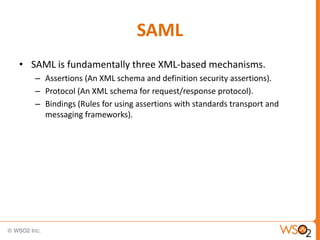
SAML
• SAML is fundamentally three XML-based mechanisms.
– Assertions (An XML schema and definition security assertions).
– Protocol (An XML schema for request/response protocol).
– Bindings (Rules for using assertions with standards transport and
messaging frameworks).
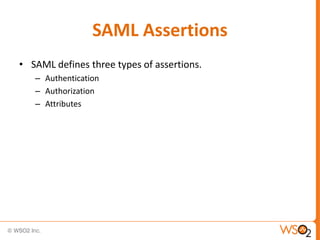
SAML Assertions
• SAML defines three types of assertions.
– Authentication
– Authorization
– Attributes
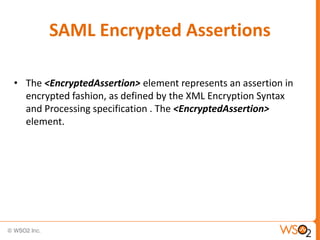
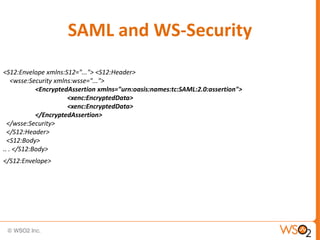
SAML Encrypted Assertions
• The <EncryptedAssertion> element represents an assertion in
encrypted fashion, as defined by the XML Encryption Syntax
and Processing specification . The <EncryptedAssertion>
element.
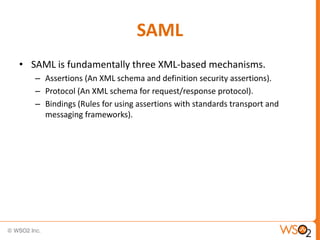
SAML
• SAML is fundamentally three XML-based mechanisms.
– Assertions (An XML schema and definition security assertions).
– Protocol (An XML schema for request/response protocol).
– Bindings (Rules for using assertions with standards transport and
messaging frameworks).
SAML and WS-Security
WS-Security has a security extension to SOAP, specifies
SAML assertions as one of the types of security tokens
it supports in the SOAP header.
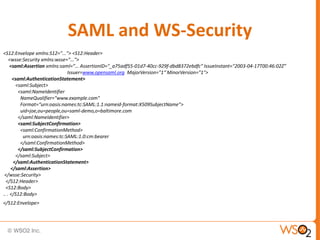
SAML and WS-Security
<S12:Envelope xmlns:S12="..."> <S12:Header>
<wsse:Security xmlns:wsse="...">
<saml:Assertion xmlns:saml=”… AssertionID="_a75adf55-01d7-40cc-929f-dbd8372ebdfc” IssueInstant="2003-04-17T00:46:02Z”
Issuer=www.opensaml.org MajorVersion="1“ MinorVersion="1">
<saml:AuthenticationStatement>
<saml:Subject>
<saml:NameIdentifier
NameQualifier="www.example.com"
Format=“urn:oasis:names:tc:SAML:1.1:nameid-format:X509SubjectName”>
uid=joe,ou=people,ou=saml-demo,o=baltimore.com
</saml:NameIdentifier>
<saml:SubjectConfirmation>
<saml:ConfirmationMethod>
urn:oasis:names:tc:SAML:1.0:cm:bearer
</saml:ConfirmationMethod>
</saml:SubjectConfirmation>
</saml:Subject>
</saml:AuthenticationStatement>
</saml:Assertion>
</wsse:Security>
</S12:Header>
<S12:Body>
.. . </S12:Body>
</S12:Envelope>
SAML and WS-Security
<S12:Envelope xmlns:S12="..."> <S12:Header>
<wsse:Security xmlns:wsse="...">
<EncryptedAssertion xmlns="urn:oasis:names:tc:SAML:2.0:assertion">
<xenc:EncryptedData>
</EncryptedAssertion>
</wsse:Security>
</S12:Header>
<S12:Body>
.. . </S12:Body>
</S12:Envelope>
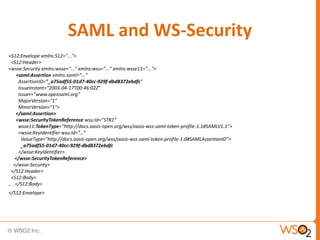
SAML and WS-Security
<S12:Envelope xmlns:S12="...">
<S12:Header>
<wsse:Security xmlns:wsse="..." xmlns:wsu="..." xmlns:wsse11="...">
<saml:Assertion xmlns:saml="..."
AssertionID="_a75adf55-01d7-40cc-929f-dbd8372ebdfc"
IssueInstant="2003-04-17T00:46:02Z"
Issuer=”www.opensaml.org”
MajorVersion="1"
MinorVersion="1">
</saml:Assertion>
<wsse:SecurityTokenReference wsu:Id=”STR1”
wsse11:TokenType=”http://docs.oasis-open.org/wss/oasis-wss-saml-token-profile-1.1#SAMLV1.1”>
<wsse:KeyIdentifier wsu:Id=”...”
ValueType=”http://docs.oasis-open.org/wss/oasis-wss-saml-token-profile-1.0#SAMLAssertionID”>
_a75adf55-01d7-40cc-929f-dbd8372ebdfc
</wsse:KeyIdentifier>
</wsse:SecurityTokenReference>
</wsse:Security>
</S12:Header>
<S12:Body>
.. . </S12:Body>
</S12:Envelope>
SAML and WS-Security

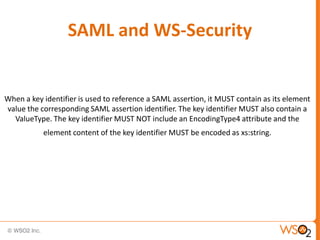
When a key identifier is used to reference a SAML assertion, it MUST contain as its element
value the corresponding SAML assertion identifier. The key identifier MUST also contain a
ValueType. The key identifier MUST NOT include an EncodingType4 attribute and the

element content of the key identifier MUST be encoded as xs:string.
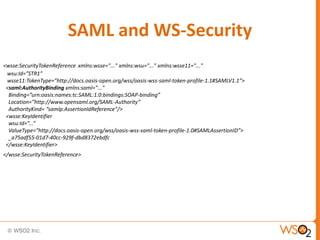
SAML and WS-Security
<wsse:SecurityTokenReference xmlns:wsse="..." xmlns:wsu="..." xmlns:wsse11="..."
wsu:Id=”STR1”
wsse11:TokenType=”http://docs.oasis-open.org/wss/oasis-wss-saml-token-profile-1.1#SAMLV1.1”>
<saml:AuthorityBinding xmlns:saml="..."
Binding=”urn:oasis:names:tc:SAML:1.0:bindings:SOAP-binding”
Location=”http://www.opensaml.org/SAML-Authority”
AuthorityKind= “samlp:AssertionIdReference”/>
<wsse:KeyIdentifier
wsu:Id=”...”
ValueType=”http://docs.oasis-open.org/wss/oasis-wss-saml-token-profile-1.0#SAMLAssertionID”>
_a75adf55-01d7-40cc-929f-dbd8372ebdfc
</wsse:KeyIdentifier>
</wsse:SecurityTokenReference>
SAML and WS-Security
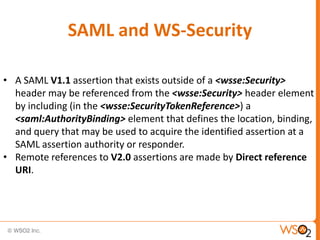
• A SAML V1.1 assertion that exists outside of a <wsse:Security>
header may be referenced from the <wsse:Security> header element
by including (in the <wsse:SecurityTokenReference>) a
<saml:AuthorityBinding> element that defines the location, binding,
and query that may be used to acquire the identified assertion at a
SAML assertion authority or responder.
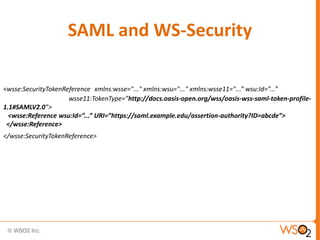
• Remote references to V2.0 assertions are made by Direct reference
URI.
SAML and WS-Security
<wsse:SecurityTokenReference xmlns:wsse="..." xmlns:wsu="..." xmlns:wsse11="...” wsu:Id=”...”
wsse11:TokenType=”http://docs.oasis-open.org/wss/oasis-wss-saml-token-profile1.1#SAMLV2.0”>
<wsse:Reference wsu:Id=”...” URI=”https://saml.example.edu/assertion-authority?ID=abcde”>
</wsse:Reference>
</wsse:SecurityTokenReference>
QUESTION 1

When do we want to reference a SAML token
and when do we not to ?
Subject Confirmation
Allows the subject to be confirmed. If more than one subject
confirmation is provided, then satisfying any one of them is sufficient
to confirm the subject for the purpose of applying the assertion.

• Bearer (defined in SAML core specification)
• Holder-of-Key (defined in SAML token profile for SOAP)
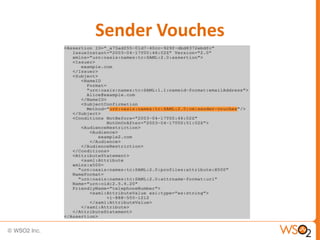
• Sender-vouches (defined in SAML token profile for SOAP)
Bearer
• Anyone who holds the SAML token can use it.
• The sender need to prove the possession of the token.
• If you know OAuth 2.0 – this is just like the OAuth 2.0
Bearer token.
• This does not have a key. So – Bearer SAML tokens cannot
be used to sign on encrypt messages.
• No point if referring Bearer token from a
<SecurityTokenReference>
Holder-of-Key
• Sender (Subject) of the token should prove the possession
of the token.
• This has a key in it and it can be used to sign or encrypt
messages.
• Holder-of-Key SAML tokens can be referred from a
<SecurityTokenReference>
Holder-of-Key
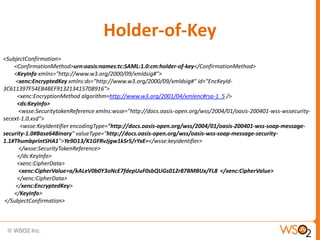
<SubjectConfirmation>
<ConfirmationMethod>urn:oasis:names:tc:SAML:1.0:cm:holder-of-key</ConfirmationMethod>
<KeyInfo xmlns="http://www.w3.org/2000/09/xmldsig#">
<xenc:EncryptedKey xmlns:ds="http://www.w3.org/2000/09/xmldsig#" id="EncKeyId3C611397F54EB4BEF913213415708916">
<xenc:EncryptionMethod algorithm=http://www.w3.org/2001/04/xmlenc#rsa-1_5 />
<ds:KeyInfo>
<wsse:SecuritytokenReference xmlns:wsse="http://docs.oasis-open.org/wss/2004/01/oasis-200401-wss-wssecuritysecext-1.0.xsd">
<wsse:KeyIdentifier encodingType="http://docs.oasis-open.org/wss/2004/01/oasis-200401-wss-soap-messagesecurity-1.0#Base64Binary" valueType="http://docs.oasis-open.org/wss/oasis-wss-soap-message-security1.1#ThumbprintSHA1">Ye9D13/K1GFRvJjgw1kSr5/rYxE=</wsse:keyidentifier>
</wsse:SecurityTokenReference>
</ds:KeyInfo>
<xenc:CipherData>
<xenc:CipherValue>a/kALeV0b0Y3oNcE7fdepUuF0sbQUGs012r87BMBUx/FL8 </xenc:CipherValue>
</xenc:CipherData>
</xenc:EncryptedKey>
</KeyInfo>
</SubjectConfirmation>
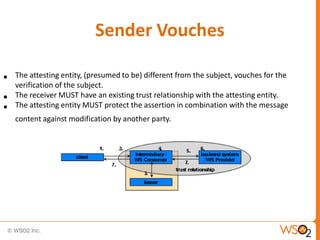
Sender Vouches
•
•
•

The attesting entity, (presumed to be) different from the subject, vouches for the
verification of the subject.
The receiver MUST have an existing trust relationship with the attesting entity.
The attesting entity MUST protect the assertion in combination with the message
content against modification by another party.
Sender Vouches
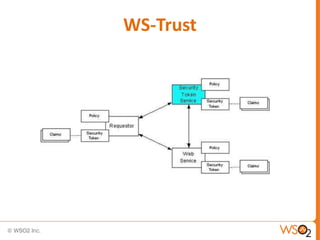
WS-Trust
• Trust – Trust is the characteristic that one entity is willing to rely upon a
second entity to execute a set of actions and/or to make set of assertions
about a set of subjects and/or scopes.
• Direct Trust – Direct trust is when a relying party accepts as true all (or
some subset of) the claims in the token sent by the requestor.
• Direct Brokered Trust – Direct Brokered Trust is when one party trusts a
second party who, in turn, trusts or vouches for, a third party.
• Indirect Brokered Trust – Indirect Brokered Trust is a variation on direct
brokered trust where the second party negotiates with the third party, or
additional parties, to assess the trust of the third party.
WS-Trust
WS-Trust
• A protocol framework
– Supports different exchange patterns
• Builds on WS-Security
• Defines mechanisms for brokering trust
• Provides ways to establish and access the presence of trust
relationship
• Defines a mechanism for issuing and exchanging security
tokens
• Security Token Service
– Anyone can be an STS
Common Patterns
• Issuance
• Defines mechanisms for requesting a new token

• Renewal
• Defines mechanisms for renewing previously issued tokens

• Validation
• Defines mechanisms for verifying validity of tokens

• Cancellation
• Defines mechanisms for cancelling a previously issued token
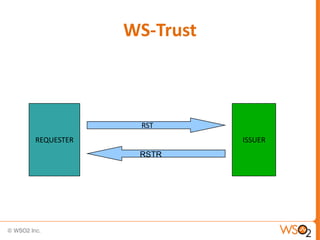
WS-Trust

RST
REQUESTER

ISSUER

RSTR
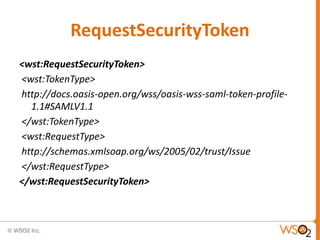
RequestSecurityToken
<wst:RequestSecurityToken>
<wst:TokenType>
http://docs.oasis-open.org/wss/oasis-wss-saml-token-profile1.1#SAMLV1.1
</wst:TokenType>
<wst:RequestType>
http://schemas.xmlsoap.org/ws/2005/02/trust/Issue
</wst:RequestType>
</wst:RequestSecurityToken>
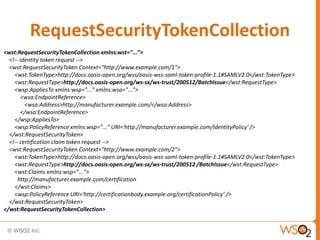
RequestSecurityTokenCollection
<wst:RequestSecurityTokenCollection xmlns:wst="...”>
<!-- identity token request -->
<wst:RequestSecurityToken Context="http://www.example.com/1">
<wst:TokenType>http://docs.oasis-open.org/wss/oasis-wss-saml-token-profile-1.1#SAMLV2.0</wst:TokenType>
<wst:RequestType>http://docs.oasis-open.org/ws-sx/ws-trust/200512/BatchIssue</wst:RequestType>
<wsp:AppliesTo xmlns:wsp="..." xmlns:wsa="...">
<wsa:EndpointReference>
<wsa:Address>http://manufacturer.example.com/</wsa:Address>
</wsa:EndpointReference>
</wsp:AppliesTo>
<wsp:PolicyReference xmlns:wsp="..." URI='http://manufacturer.example.com/IdentityPolicy' />
</wst:RequestSecurityToken>
<!-- certification claim token request -->
<wst:RequestSecurityToken Context="http://www.example.com/2">
<wst:TokenType>http://docs.oasis-open.org/wss/oasis-wss-saml-token-profile-1.1#SAMLV2.0</wst:TokenType>
<wst:RequestType>http://docs.oasis-open.org/ws-sx/ws-trust/200512 /BatchIssue</wst:RequestType>
<wst:Claims xmlns:wsp="...">
http://manufacturer.example.com/certification
</wst:Claims>
<wsp:PolicyReference URI='http://certificationbody.example.org/certificationPolicy’ />
</wst:RequestSecurityToken>
</wst:RequestSecurityTokenCollection>
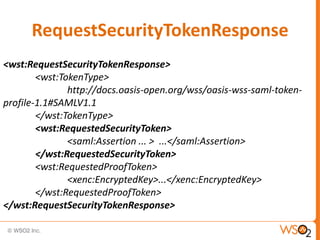
RequestSecurityTokenResponse
<wst:RequestSecurityTokenResponse>
<wst:TokenType>
http://docs.oasis-open.org/wss/oasis-wss-saml-tokenprofile-1.1#SAMLV1.1
</wst:TokenType>
<wst:RequestedSecurityToken>
<saml:Assertion ... > ...</saml:Assertion>
</wst:RequestedSecurityToken>
<wst:RequestedProofToken>
<xenc:EncryptedKey>...</xenc:EncryptedKey>
</wst:RequestedProofToken>
</wst:RequestSecurityTokenResponse>
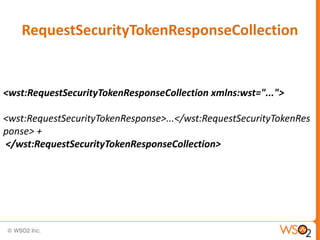
RequestSecurityTokenResponseCollection

<wst:RequestSecurityTokenResponseCollection xmlns:wst="...">
<wst:RequestSecurityTokenResponse>...</wst:RequestSecurityTokenRes
ponse> +
</wst:RequestSecurityTokenResponseCollection>
1

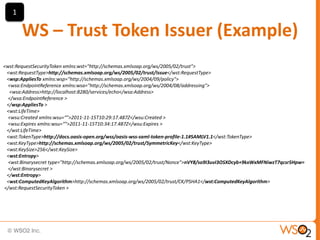
WS – Trust Token Issuer (Example)
<wst:RequestSecurityToken xmlns:wst="http://schemas.xmlsoap.org/ws/2005/02/trust">
<wst:RequestType>http://schemas.xmlsoap.org/ws/2005/02/trust/Issue</wst:RequestType>
<wsp:AppliesTo xmlns:wsp="http://schemas.xmlsoap.org/ws/2004/09/policy">
<wsa:EndpointReference xmlns:wsa="http://schemas.xmlsoap.org/ws/2004/08/addressing">
<wsa:Address>http://localhost:8280/services/echo</wsa:Address>
</wsa:EndpointReference >
</wsp:AppliesTo >
<wst:LifeTime>
<wsu:Created xmlns:wsu=“">2011-11-15T10:29:17.487Z</wsu:Created >
<wsu:Expires xmlns:wsu=“">2011-11-15T10:34:17.487Z</wsu:Expires >
</wst:LifeTime>
<wst:TokenType>http://docs.oasis-open.org/wss/oasis-wss-saml-token-profile-1.1#SAMLV1.1</wst:TokenType>
<wst:KeyType>http://schemas.xmlsoap.org/ws/2005/02/trust/SymmetricKey</wst:KeyType>
<wst:KeySize>256</wst:KeySize>
<wst:Entropy>
<wst:Binarysecret type="http://schemas.xmlsoap.org/ws/2005/02/trust/Nonce">nVY8/so9I3uvI3OSXDcyb+9kxWxMFNiwzT7qcsr5Hpw=
</wst:Binarysecret >
</wst:Entropy>
<wst:ComputedKeyAlgorithm>http://schemas.xmlsoap.org/ws/2005/02/trust/CK/PSHA1</wst:ComputedKeyAlgorithm>
</wst:RequestSecurityToken >
2

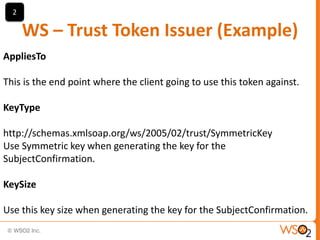
WS – Trust Token Issuer (Example)
AppliesTo

This is the end point where the client going to use this token against.
KeyType

http://schemas.xmlsoap.org/ws/2005/02/trust/SymmetricKey
Use Symmetric key when generating the key for the
SubjectConfirmation.
KeySize
Use this key size when generating the key for the SubjectConfirmation.
3

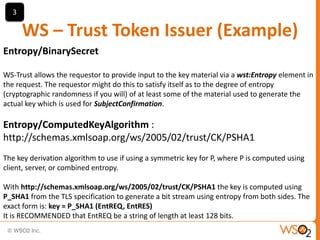
WS – Trust Token Issuer (Example)
Entropy/BinarySecret
WS-Trust allows the requestor to provide input to the key material via a wst:Entropy element in
the request. The requestor might do this to satisfy itself as to the degree of entropy
(cryptographic randomness if you will) of at least some of the material used to generate the
actual key which is used for SubjectConfirmation.

Entropy/ComputedKeyAlgorithm :
http://schemas.xmlsoap.org/ws/2005/02/trust/CK/PSHA1
The key derivation algorithm to use if using a symmetric key for P, where P is computed using
client, server, or combined entropy.
With http://schemas.xmlsoap.org/ws/2005/02/trust/CK/PSHA1 the key is computed using
P_SHA1 from the TLS specification to generate a bit stream using entropy from both sides. The
exact form is: key = P_SHA1 (EntREQ, EntRES)
It is RECOMMENDED that EntREQ be a string of length at least 128 bits.
4

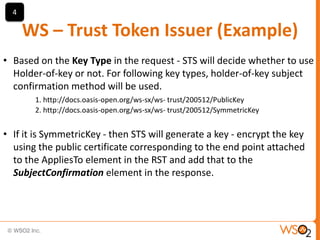
WS – Trust Token Issuer (Example)
• Based on the Key Type in the request - STS will decide whether to use
Holder-of-key or not. For following key types, holder-of-key subject
confirmation method will be used.
1. http://docs.oasis-open.org/ws-sx/ws- trust/200512/PublicKey
2. http://docs.oasis-open.org/ws-sx/ws- trust/200512/SymmetricKey

• If it is SymmetricKey - then STS will generate a key - encrypt the key
using the public certificate corresponding to the end point attached
to the AppliesTo element in the RST and add that to the
SubjectConfirmation element in the response.
5

WS – Trust Token Issuer (Example)
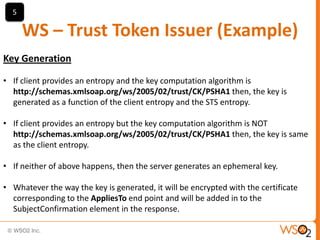
Key Generation
• If client provides an entropy and the key computation algorithm is
http://schemas.xmlsoap.org/ws/2005/02/trust/CK/PSHA1 then, the key is
generated as a function of the client entropy and the STS entropy.
• If client provides an entropy but the key computation algorithm is NOT
http://schemas.xmlsoap.org/ws/2005/02/trust/CK/PSHA1 then, the key is same
as the client entropy.
• If neither of above happens, then the server generates an ephemeral key.
• Whatever the way the key is generated, it will be encrypted with the certificate
corresponding to the AppliesTo end point and will be added in to the
SubjectConfirmation element in the response.
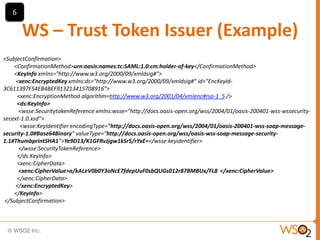
6

WS – Trust Token Issuer (Example)
<SubjectConfirmation>
<ConfirmationMethod>urn:oasis:names:tc:SAML:1.0:cm:holder-of-key</ConfirmationMethod>
<KeyInfo xmlns="http://www.w3.org/2000/09/xmldsig#">
<xenc:EncryptedKey xmlns:ds="http://www.w3.org/2000/09/xmldsig#" id="EncKeyId3C611397F54EB4BEF913213415708916">
<xenc:EncryptionMethod algorithm=http://www.w3.org/2001/04/xmlenc#rsa-1_5 />
<ds:KeyInfo>
<wsse:SecuritytokenReference xmlns:wsse="http://docs.oasis-open.org/wss/2004/01/oasis-200401-wss-wssecuritysecext-1.0.xsd">
<wsse:KeyIdentifier encodingType="http://docs.oasis-open.org/wss/2004/01/oasis-200401-wss-soap-messagesecurity-1.0#Base64Binary" valueType="http://docs.oasis-open.org/wss/oasis-wss-soap-message-security1.1#ThumbprintSHA1">Ye9D13/K1GFRvJjgw1kSr5/rYxE=</wsse:keyidentifier>
</wsse:SecurityTokenReference>
</ds:KeyInfo>
<xenc:CipherData>
<xenc:CipherValue>a/kALeV0b0Y3oNcE7fdepUuF0sbQUGs012r87BMBUx/FL8 </xenc:CipherValue>
</xenc:CipherData>
</xenc:EncryptedKey>
</KeyInfo>
</SubjectConfirmation>
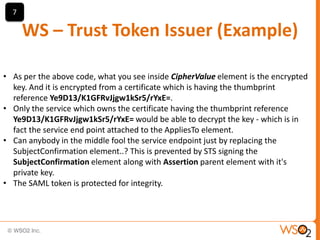
7

WS – Trust Token Issuer (Example)
• As per the above code, what you see inside CipherValue element is the encrypted
key. And it is encrypted from a certificate which is having the thumbprint
reference Ye9D13/K1GFRvJjgw1kSr5/rYxE=.
• Only the service which owns the certificate having the thumbprint reference
Ye9D13/K1GFRvJjgw1kSr5/rYxE= would be able to decrypt the key - which is in
fact the service end point attached to the AppliesTo element.
• Can anybody in the middle fool the service endpoint just by replacing the
SubjectConfirmation element..? This is prevented by STS signing the
SubjectConfirmation element along with Assertion parent element with it's
private key.
• The SAML token is protected for integrity.
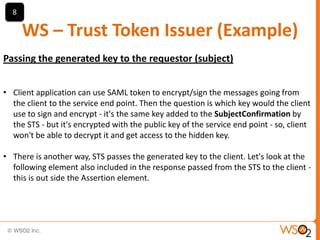
8

WS – Trust Token Issuer (Example)
Passing the generated key to the requestor (subject)
• Client application can use SAML token to encrypt/sign the messages going from
the client to the service end point. Then the question is which key would the client
use to sign and encrypt - it's the same key added to the SubjectConfirmation by
the STS - but it's encrypted with the public key of the service end point - so, client
won't be able to decrypt it and get access to the hidden key.
• There is another way, STS passes the generated key to the client. Let's look at the
following element also included in the response passed from the STS to the client this is out side the Assertion element.
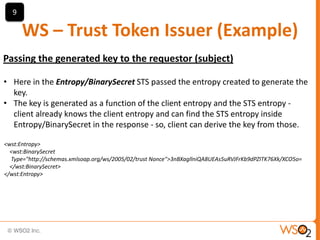
9

WS – Trust Token Issuer (Example)
Passing the generated key to the requestor (subject)
• Here in the Entropy/BinarySecret STS passed the entropy created to generate the
key.
• The key is generated as a function of the client entropy and the STS entropy client already knows the client entropy and can find the STS entropy inside
Entropy/BinarySecret in the response - so, client can derive the key from those.
<wst:Entropy>
<wst:BinarySecret
Type="http://schemas.xmlsoap.org/ws/2005/02/trust Nonce">3nBXagllniQA8UEAs5uRVJFrKb9dPZITK76Xk/XCO5o=
</wst:BinarySecret>
</wst:Entropy>
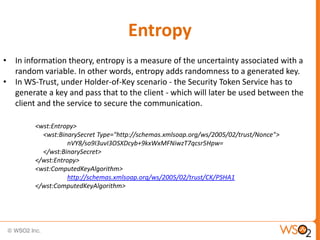
Entropy
• In information theory, entropy is a measure of the uncertainty associated with a
random variable. In other words, entropy adds randomness to a generated key.
• In WS-Trust, under Holder-of-Key scenario - the Security Token Service has to
generate a key and pass that to the client - which will later be used between the
client and the service to secure the communication.
<wst:Entropy>
<wst:BinarySecret Type="http://schemas.xmlsoap.org/ws/2005/02/trust/Nonce">
nVY8/so9I3uvI3OSXDcyb+9kxWxMFNiwzT7qcsr5Hpw=
</wst:BinarySecret>
</wst:Entropy>
<wst:ComputedKeyAlgorithm>
http://schemas.xmlsoap.org/ws/2005/02/trust/CK/PSHA1
</wst:ComputedKeyAlgorithm>
Entropy
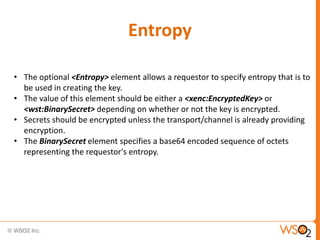
• The optional <Entropy> element allows a requestor to specify entropy that is to
be used in creating the key.
• The value of this element should be either a <xenc:EncryptedKey> or
<wst:BinarySecret> depending on whether or not the key is encrypted.
• Secrets should be encrypted unless the transport/channel is already providing
encryption.
• The BinarySecret element specifies a base64 encoded sequence of octets
representing the requestor's entropy.
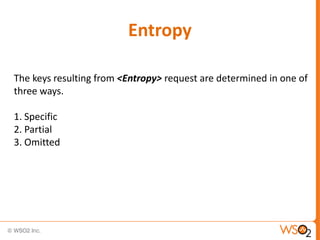
Entropy
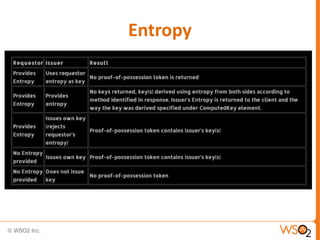
The keys resulting from <Entropy> request are determined in one of
three ways.
1. Specific
2. Partial
3. Omitted
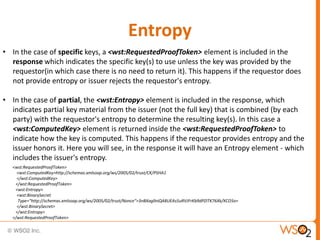
Entropy
• In the case of specific keys, a <wst:RequestedProofToken> element is included in the
response which indicates the specific key(s) to use unless the key was provided by the
requestor(in which case there is no need to return it). This happens if the requestor does
not provide entropy or issuer rejects the requestor's entropy.
• In the case of partial, the <wst:Entropy> element is included in the response, which
indicates partial key material from the issuer (not the full key) that is combined (by each
party) with the requestor's entropy to determine the resulting key(s). In this case a
<wst:ComputedKey> element is returned inside the <wst:RequestedProofToken> to
indicate how the key is computed. This happens if the requestor provides entropy and the
issuer honors it. Here you will see, in the response it will have an Entropy element - which
includes the issuer's entropy.
<wst:RequestedProofToken>
<wst:ComputedKey>http://schemas.xmlsoap.org/ws/2005/02/trust/CK/PSHA1
</wst:ComputedKey>
</wst:RequestedProofToken>
<wst:Entropy>
<wst:BinarySecret
Type="http://schemas.xmlsoap.org/ws/2005/02/trust/Nonce">3nBXagllniQA8UEAs5uRVJFrKb9dPZITK76Xk/XCO5o=
</wst:BinarySecret>
</wst:Entropy>
</wst:RequestedProofToken>
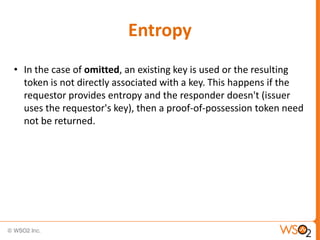
Entropy
• In the case of omitted, an existing key is used or the resulting
token is not directly associated with a key. This happens if the
requestor provides entropy and the responder doesn't (issuer
uses the requestor's key), then a proof-of-possession token need
not be returned.
Entropy
ActAs
ActAs
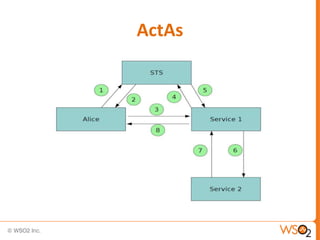
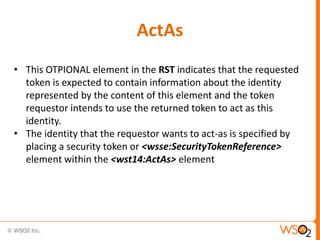
• This OTPIONAL element in the RST indicates that the requested
token is expected to contain information about the identity
represented by the content of this element and the token
requestor intends to use the returned token to act as this
identity.
• The identity that the requestor wants to act-as is specified by
placing a security token or <wsse:SecurityTokenReference>
element within the <wst14:ActAs> element
RequestedAttachedReferences
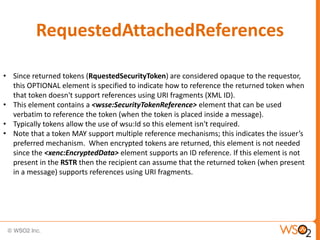
• Since returned tokens (RquestedSecurityToken) are considered opaque to the requestor,
this OPTIONAL element is specified to indicate how to reference the returned token when
that token doesn't support references using URI fragments (XML ID).
• This element contains a <wsse:SecurityTokenReference> element that can be used
verbatim to reference the token (when the token is placed inside a message).
• Typically tokens allow the use of wsu:Id so this element isn't required.
• Note that a token MAY support multiple reference mechanisms; this indicates the issuer’s
preferred mechanism. When encrypted tokens are returned, this element is not needed
since the <xenc:EncryptedData> element supports an ID reference. If this element is not
present in the RSTR then the recipient can assume that the returned token (when present
in a message) supports references using URI fragments.
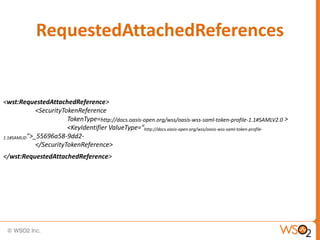
RequestedAttachedReferences

<wst:RequestedAttachedReference>
<SecurityTokenReference
TokenType=http://docs.oasis-open.org/wss/oasis-wss-saml-token-profile-1.1#SAMLV2.0 >
<KeyIdentifier ValueType="http://docs.oasis-open.org/wss/oasis-wss-saml-token-profile1.1#SAMLID">_55696a58-9dd2</SecurityTokenReference>
</wst:RequestedAttachedReference>
RequestedUnAttachedReferences
• In some cases tokens need not be present in the message. This
OPTIONAL element is specified to indicate how to reference the
token when it is not placed inside the message. This element
contains a <wsse:SecurityTokenReference> element that can be
used verbatim to reference the token (when the token is not placed
inside a message) for replies. Note that a token MAY support
multiple external reference mechanisms; this indicates the issuer’s
preferred mechanism.
lean . enterprise . middleware

WS-Trust

  • 1.
    Portable Identity &WS - Trust Prabath Siriwardena Director, Security Architecture
  • 2.
    Portable Identity • Whena subject identity established and verified in one trust domain wants to assert its identity and rights in another trust domain, this is said to be portable. • An assertion is a claim that may be challenged and proven before being believed. • Authentication is an assertion that a subject is who he claims to be. • Authorization is an assertion that the subject identity is allowed to perform a specific action.
  • 3.
    Portable Identity &SOAP • When two entities with different trust models want interact , SOAP has no standardized and interoperable way to communicate their security properties. • Because SOAP messages are sent from one trust domain to another, the identity of the requesting subject and its assertions must travel with the message.
  • 4.
    SAML • SAML isthe XML based standard created to enable portable identities and the assertions these identities want to make. • SAML not tied in to any transport. • Defines a standard message exchange protocol. • Specifies how it is transported.
  • 5.
    SAML • SAML isfundamentally three XML-based mechanisms. – Assertions (An XML schema and definition security assertions). – Protocol (An XML schema for request/response protocol). – Bindings (Rules for using assertions with standards transport and messaging frameworks).
  • 6.
    SAML Assertions • SAMLdefines three types of assertions. – Authentication – Authorization – Attributes
  • 7.
    SAML Encrypted Assertions •The <EncryptedAssertion> element represents an assertion in encrypted fashion, as defined by the XML Encryption Syntax and Processing specification . The <EncryptedAssertion> element.
  • 8.
    SAML • SAML isfundamentally three XML-based mechanisms. – Assertions (An XML schema and definition security assertions). – Protocol (An XML schema for request/response protocol). – Bindings (Rules for using assertions with standards transport and messaging frameworks).
  • 9.
    SAML and WS-Security WS-Securityhas a security extension to SOAP, specifies SAML assertions as one of the types of security tokens it supports in the SOAP header.
  • 10.
    SAML and WS-Security <S12:Envelopexmlns:S12="..."> <S12:Header> <wsse:Security xmlns:wsse="..."> <saml:Assertion xmlns:saml=”… AssertionID="_a75adf55-01d7-40cc-929f-dbd8372ebdfc” IssueInstant="2003-04-17T00:46:02Z” Issuer=www.opensaml.org MajorVersion="1“ MinorVersion="1"> <saml:AuthenticationStatement> <saml:Subject> <saml:NameIdentifier NameQualifier="www.example.com" Format=“urn:oasis:names:tc:SAML:1.1:nameid-format:X509SubjectName”> uid=joe,ou=people,ou=saml-demo,o=baltimore.com </saml:NameIdentifier> <saml:SubjectConfirmation> <saml:ConfirmationMethod> urn:oasis:names:tc:SAML:1.0:cm:bearer </saml:ConfirmationMethod> </saml:SubjectConfirmation> </saml:Subject> </saml:AuthenticationStatement> </saml:Assertion> </wsse:Security> </S12:Header> <S12:Body> .. . </S12:Body> </S12:Envelope>
  • 11.
    SAML and WS-Security <S12:Envelopexmlns:S12="..."> <S12:Header> <wsse:Security xmlns:wsse="..."> <EncryptedAssertion xmlns="urn:oasis:names:tc:SAML:2.0:assertion"> <xenc:EncryptedData> <xenc:EncryptedData> </EncryptedAssertion> </wsse:Security> </S12:Header> <S12:Body> .. . </S12:Body> </S12:Envelope>
  • 12.
    SAML and WS-Security <S12:Envelopexmlns:S12="..."> <S12:Header> <wsse:Security xmlns:wsse="..." xmlns:wsu="..." xmlns:wsse11="..."> <saml:Assertion xmlns:saml="..." AssertionID="_a75adf55-01d7-40cc-929f-dbd8372ebdfc" IssueInstant="2003-04-17T00:46:02Z" Issuer=”www.opensaml.org” MajorVersion="1" MinorVersion="1"> </saml:Assertion> <wsse:SecurityTokenReference wsu:Id=”STR1” wsse11:TokenType=”http://docs.oasis-open.org/wss/oasis-wss-saml-token-profile-1.1#SAMLV1.1”> <wsse:KeyIdentifier wsu:Id=”...” ValueType=”http://docs.oasis-open.org/wss/oasis-wss-saml-token-profile-1.0#SAMLAssertionID”> _a75adf55-01d7-40cc-929f-dbd8372ebdfc </wsse:KeyIdentifier> </wsse:SecurityTokenReference> </wsse:Security> </S12:Header> <S12:Body> .. . </S12:Body> </S12:Envelope>
  • 13.
    SAML and WS-Security Whena key identifier is used to reference a SAML assertion, it MUST contain as its element value the corresponding SAML assertion identifier. The key identifier MUST also contain a ValueType. The key identifier MUST NOT include an EncodingType4 attribute and the element content of the key identifier MUST be encoded as xs:string.
  • 14.
    SAML and WS-Security <wsse:SecurityTokenReferencexmlns:wsse="..." xmlns:wsu="..." xmlns:wsse11="..." wsu:Id=”STR1” wsse11:TokenType=”http://docs.oasis-open.org/wss/oasis-wss-saml-token-profile-1.1#SAMLV1.1”> <saml:AuthorityBinding xmlns:saml="..." Binding=”urn:oasis:names:tc:SAML:1.0:bindings:SOAP-binding” Location=”http://www.opensaml.org/SAML-Authority” AuthorityKind= “samlp:AssertionIdReference”/> <wsse:KeyIdentifier wsu:Id=”...” ValueType=”http://docs.oasis-open.org/wss/oasis-wss-saml-token-profile-1.0#SAMLAssertionID”> _a75adf55-01d7-40cc-929f-dbd8372ebdfc </wsse:KeyIdentifier> </wsse:SecurityTokenReference>
  • 15.
    SAML and WS-Security •A SAML V1.1 assertion that exists outside of a <wsse:Security> header may be referenced from the <wsse:Security> header element by including (in the <wsse:SecurityTokenReference>) a <saml:AuthorityBinding> element that defines the location, binding, and query that may be used to acquire the identified assertion at a SAML assertion authority or responder. • Remote references to V2.0 assertions are made by Direct reference URI.
  • 16.
    SAML and WS-Security <wsse:SecurityTokenReferencexmlns:wsse="..." xmlns:wsu="..." xmlns:wsse11="...” wsu:Id=”...” wsse11:TokenType=”http://docs.oasis-open.org/wss/oasis-wss-saml-token-profile1.1#SAMLV2.0”> <wsse:Reference wsu:Id=”...” URI=”https://saml.example.edu/assertion-authority?ID=abcde”> </wsse:Reference> </wsse:SecurityTokenReference>
  • 17.
    QUESTION 1 When dowe want to reference a SAML token and when do we not to ?
  • 18.
    Subject Confirmation Allows thesubject to be confirmed. If more than one subject confirmation is provided, then satisfying any one of them is sufficient to confirm the subject for the purpose of applying the assertion. • Bearer (defined in SAML core specification) • Holder-of-Key (defined in SAML token profile for SOAP) • Sender-vouches (defined in SAML token profile for SOAP)
  • 19.
    Bearer • Anyone whoholds the SAML token can use it. • The sender need to prove the possession of the token. • If you know OAuth 2.0 – this is just like the OAuth 2.0 Bearer token. • This does not have a key. So – Bearer SAML tokens cannot be used to sign on encrypt messages. • No point if referring Bearer token from a <SecurityTokenReference>
  • 20.
    Holder-of-Key • Sender (Subject)of the token should prove the possession of the token. • This has a key in it and it can be used to sign or encrypt messages. • Holder-of-Key SAML tokens can be referred from a <SecurityTokenReference>
  • 21.
    Holder-of-Key <SubjectConfirmation> <ConfirmationMethod>urn:oasis:names:tc:SAML:1.0:cm:holder-of-key</ConfirmationMethod> <KeyInfo xmlns="http://www.w3.org/2000/09/xmldsig#"> <xenc:EncryptedKey xmlns:ds="http://www.w3.org/2000/09/xmldsig#"id="EncKeyId3C611397F54EB4BEF913213415708916"> <xenc:EncryptionMethod algorithm=http://www.w3.org/2001/04/xmlenc#rsa-1_5 /> <ds:KeyInfo> <wsse:SecuritytokenReference xmlns:wsse="http://docs.oasis-open.org/wss/2004/01/oasis-200401-wss-wssecuritysecext-1.0.xsd"> <wsse:KeyIdentifier encodingType="http://docs.oasis-open.org/wss/2004/01/oasis-200401-wss-soap-messagesecurity-1.0#Base64Binary" valueType="http://docs.oasis-open.org/wss/oasis-wss-soap-message-security1.1#ThumbprintSHA1">Ye9D13/K1GFRvJjgw1kSr5/rYxE=</wsse:keyidentifier> </wsse:SecurityTokenReference> </ds:KeyInfo> <xenc:CipherData> <xenc:CipherValue>a/kALeV0b0Y3oNcE7fdepUuF0sbQUGs012r87BMBUx/FL8 </xenc:CipherValue> </xenc:CipherData> </xenc:EncryptedKey> </KeyInfo> </SubjectConfirmation>
  • 22.
    Sender Vouches • • • The attestingentity, (presumed to be) different from the subject, vouches for the verification of the subject. The receiver MUST have an existing trust relationship with the attesting entity. The attesting entity MUST protect the assertion in combination with the message content against modification by another party.
  • 23.
  • 24.
    WS-Trust • Trust –Trust is the characteristic that one entity is willing to rely upon a second entity to execute a set of actions and/or to make set of assertions about a set of subjects and/or scopes. • Direct Trust – Direct trust is when a relying party accepts as true all (or some subset of) the claims in the token sent by the requestor. • Direct Brokered Trust – Direct Brokered Trust is when one party trusts a second party who, in turn, trusts or vouches for, a third party. • Indirect Brokered Trust – Indirect Brokered Trust is a variation on direct brokered trust where the second party negotiates with the third party, or additional parties, to assess the trust of the third party.
  • 25.
  • 26.
    WS-Trust • A protocolframework – Supports different exchange patterns • Builds on WS-Security • Defines mechanisms for brokering trust • Provides ways to establish and access the presence of trust relationship • Defines a mechanism for issuing and exchanging security tokens • Security Token Service – Anyone can be an STS
  • 27.
    Common Patterns • Issuance •Defines mechanisms for requesting a new token • Renewal • Defines mechanisms for renewing previously issued tokens • Validation • Defines mechanisms for verifying validity of tokens • Cancellation • Defines mechanisms for cancelling a previously issued token
  • 28.
  • 29.
  • 30.
    RequestSecurityTokenCollection <wst:RequestSecurityTokenCollection xmlns:wst="...”> <!-- identitytoken request --> <wst:RequestSecurityToken Context="http://www.example.com/1"> <wst:TokenType>http://docs.oasis-open.org/wss/oasis-wss-saml-token-profile-1.1#SAMLV2.0</wst:TokenType> <wst:RequestType>http://docs.oasis-open.org/ws-sx/ws-trust/200512/BatchIssue</wst:RequestType> <wsp:AppliesTo xmlns:wsp="..." xmlns:wsa="..."> <wsa:EndpointReference> <wsa:Address>http://manufacturer.example.com/</wsa:Address> </wsa:EndpointReference> </wsp:AppliesTo> <wsp:PolicyReference xmlns:wsp="..." URI='http://manufacturer.example.com/IdentityPolicy' /> </wst:RequestSecurityToken> <!-- certification claim token request --> <wst:RequestSecurityToken Context="http://www.example.com/2"> <wst:TokenType>http://docs.oasis-open.org/wss/oasis-wss-saml-token-profile-1.1#SAMLV2.0</wst:TokenType> <wst:RequestType>http://docs.oasis-open.org/ws-sx/ws-trust/200512 /BatchIssue</wst:RequestType> <wst:Claims xmlns:wsp="..."> http://manufacturer.example.com/certification </wst:Claims> <wsp:PolicyReference URI='http://certificationbody.example.org/certificationPolicy’ /> </wst:RequestSecurityToken> </wst:RequestSecurityTokenCollection>
  • 31.
    RequestSecurityTokenResponse <wst:RequestSecurityTokenResponse> <wst:TokenType> http://docs.oasis-open.org/wss/oasis-wss-saml-tokenprofile-1.1#SAMLV1.1 </wst:TokenType> <wst:RequestedSecurityToken> <saml:Assertion ... >...</saml:Assertion> </wst:RequestedSecurityToken> <wst:RequestedProofToken> <xenc:EncryptedKey>...</xenc:EncryptedKey> </wst:RequestedProofToken> </wst:RequestSecurityTokenResponse>
  • 32.
  • 33.
    1 WS – TrustToken Issuer (Example) <wst:RequestSecurityToken xmlns:wst="http://schemas.xmlsoap.org/ws/2005/02/trust"> <wst:RequestType>http://schemas.xmlsoap.org/ws/2005/02/trust/Issue</wst:RequestType> <wsp:AppliesTo xmlns:wsp="http://schemas.xmlsoap.org/ws/2004/09/policy"> <wsa:EndpointReference xmlns:wsa="http://schemas.xmlsoap.org/ws/2004/08/addressing"> <wsa:Address>http://localhost:8280/services/echo</wsa:Address> </wsa:EndpointReference > </wsp:AppliesTo > <wst:LifeTime> <wsu:Created xmlns:wsu=“">2011-11-15T10:29:17.487Z</wsu:Created > <wsu:Expires xmlns:wsu=“">2011-11-15T10:34:17.487Z</wsu:Expires > </wst:LifeTime> <wst:TokenType>http://docs.oasis-open.org/wss/oasis-wss-saml-token-profile-1.1#SAMLV1.1</wst:TokenType> <wst:KeyType>http://schemas.xmlsoap.org/ws/2005/02/trust/SymmetricKey</wst:KeyType> <wst:KeySize>256</wst:KeySize> <wst:Entropy> <wst:Binarysecret type="http://schemas.xmlsoap.org/ws/2005/02/trust/Nonce">nVY8/so9I3uvI3OSXDcyb+9kxWxMFNiwzT7qcsr5Hpw= </wst:Binarysecret > </wst:Entropy> <wst:ComputedKeyAlgorithm>http://schemas.xmlsoap.org/ws/2005/02/trust/CK/PSHA1</wst:ComputedKeyAlgorithm> </wst:RequestSecurityToken >
  • 34.
    2 WS – TrustToken Issuer (Example) AppliesTo This is the end point where the client going to use this token against. KeyType http://schemas.xmlsoap.org/ws/2005/02/trust/SymmetricKey Use Symmetric key when generating the key for the SubjectConfirmation. KeySize Use this key size when generating the key for the SubjectConfirmation.
  • 35.
    3 WS – TrustToken Issuer (Example) Entropy/BinarySecret WS-Trust allows the requestor to provide input to the key material via a wst:Entropy element in the request. The requestor might do this to satisfy itself as to the degree of entropy (cryptographic randomness if you will) of at least some of the material used to generate the actual key which is used for SubjectConfirmation. Entropy/ComputedKeyAlgorithm : http://schemas.xmlsoap.org/ws/2005/02/trust/CK/PSHA1 The key derivation algorithm to use if using a symmetric key for P, where P is computed using client, server, or combined entropy. With http://schemas.xmlsoap.org/ws/2005/02/trust/CK/PSHA1 the key is computed using P_SHA1 from the TLS specification to generate a bit stream using entropy from both sides. The exact form is: key = P_SHA1 (EntREQ, EntRES) It is RECOMMENDED that EntREQ be a string of length at least 128 bits.
  • 36.
    4 WS – TrustToken Issuer (Example) • Based on the Key Type in the request - STS will decide whether to use Holder-of-key or not. For following key types, holder-of-key subject confirmation method will be used. 1. http://docs.oasis-open.org/ws-sx/ws- trust/200512/PublicKey 2. http://docs.oasis-open.org/ws-sx/ws- trust/200512/SymmetricKey • If it is SymmetricKey - then STS will generate a key - encrypt the key using the public certificate corresponding to the end point attached to the AppliesTo element in the RST and add that to the SubjectConfirmation element in the response.
  • 37.
    5 WS – TrustToken Issuer (Example) Key Generation • If client provides an entropy and the key computation algorithm is http://schemas.xmlsoap.org/ws/2005/02/trust/CK/PSHA1 then, the key is generated as a function of the client entropy and the STS entropy. • If client provides an entropy but the key computation algorithm is NOT http://schemas.xmlsoap.org/ws/2005/02/trust/CK/PSHA1 then, the key is same as the client entropy. • If neither of above happens, then the server generates an ephemeral key. • Whatever the way the key is generated, it will be encrypted with the certificate corresponding to the AppliesTo end point and will be added in to the SubjectConfirmation element in the response.
  • 38.
    6 WS – TrustToken Issuer (Example) <SubjectConfirmation> <ConfirmationMethod>urn:oasis:names:tc:SAML:1.0:cm:holder-of-key</ConfirmationMethod> <KeyInfo xmlns="http://www.w3.org/2000/09/xmldsig#"> <xenc:EncryptedKey xmlns:ds="http://www.w3.org/2000/09/xmldsig#" id="EncKeyId3C611397F54EB4BEF913213415708916"> <xenc:EncryptionMethod algorithm=http://www.w3.org/2001/04/xmlenc#rsa-1_5 /> <ds:KeyInfo> <wsse:SecuritytokenReference xmlns:wsse="http://docs.oasis-open.org/wss/2004/01/oasis-200401-wss-wssecuritysecext-1.0.xsd"> <wsse:KeyIdentifier encodingType="http://docs.oasis-open.org/wss/2004/01/oasis-200401-wss-soap-messagesecurity-1.0#Base64Binary" valueType="http://docs.oasis-open.org/wss/oasis-wss-soap-message-security1.1#ThumbprintSHA1">Ye9D13/K1GFRvJjgw1kSr5/rYxE=</wsse:keyidentifier> </wsse:SecurityTokenReference> </ds:KeyInfo> <xenc:CipherData> <xenc:CipherValue>a/kALeV0b0Y3oNcE7fdepUuF0sbQUGs012r87BMBUx/FL8 </xenc:CipherValue> </xenc:CipherData> </xenc:EncryptedKey> </KeyInfo> </SubjectConfirmation>
  • 39.
    7 WS – TrustToken Issuer (Example) • As per the above code, what you see inside CipherValue element is the encrypted key. And it is encrypted from a certificate which is having the thumbprint reference Ye9D13/K1GFRvJjgw1kSr5/rYxE=. • Only the service which owns the certificate having the thumbprint reference Ye9D13/K1GFRvJjgw1kSr5/rYxE= would be able to decrypt the key - which is in fact the service end point attached to the AppliesTo element. • Can anybody in the middle fool the service endpoint just by replacing the SubjectConfirmation element..? This is prevented by STS signing the SubjectConfirmation element along with Assertion parent element with it's private key. • The SAML token is protected for integrity.
  • 40.
    8 WS – TrustToken Issuer (Example) Passing the generated key to the requestor (subject) • Client application can use SAML token to encrypt/sign the messages going from the client to the service end point. Then the question is which key would the client use to sign and encrypt - it's the same key added to the SubjectConfirmation by the STS - but it's encrypted with the public key of the service end point - so, client won't be able to decrypt it and get access to the hidden key. • There is another way, STS passes the generated key to the client. Let's look at the following element also included in the response passed from the STS to the client this is out side the Assertion element.
  • 41.
    9 WS – TrustToken Issuer (Example) Passing the generated key to the requestor (subject) • Here in the Entropy/BinarySecret STS passed the entropy created to generate the key. • The key is generated as a function of the client entropy and the STS entropy client already knows the client entropy and can find the STS entropy inside Entropy/BinarySecret in the response - so, client can derive the key from those. <wst:Entropy> <wst:BinarySecret Type="http://schemas.xmlsoap.org/ws/2005/02/trust Nonce">3nBXagllniQA8UEAs5uRVJFrKb9dPZITK76Xk/XCO5o= </wst:BinarySecret> </wst:Entropy>
  • 42.
    Entropy • In informationtheory, entropy is a measure of the uncertainty associated with a random variable. In other words, entropy adds randomness to a generated key. • In WS-Trust, under Holder-of-Key scenario - the Security Token Service has to generate a key and pass that to the client - which will later be used between the client and the service to secure the communication. <wst:Entropy> <wst:BinarySecret Type="http://schemas.xmlsoap.org/ws/2005/02/trust/Nonce"> nVY8/so9I3uvI3OSXDcyb+9kxWxMFNiwzT7qcsr5Hpw= </wst:BinarySecret> </wst:Entropy> <wst:ComputedKeyAlgorithm> http://schemas.xmlsoap.org/ws/2005/02/trust/CK/PSHA1 </wst:ComputedKeyAlgorithm>
  • 43.
    Entropy • The optional<Entropy> element allows a requestor to specify entropy that is to be used in creating the key. • The value of this element should be either a <xenc:EncryptedKey> or <wst:BinarySecret> depending on whether or not the key is encrypted. • Secrets should be encrypted unless the transport/channel is already providing encryption. • The BinarySecret element specifies a base64 encoded sequence of octets representing the requestor's entropy.
  • 44.
    Entropy The keys resultingfrom <Entropy> request are determined in one of three ways. 1. Specific 2. Partial 3. Omitted
  • 45.
    Entropy • In thecase of specific keys, a <wst:RequestedProofToken> element is included in the response which indicates the specific key(s) to use unless the key was provided by the requestor(in which case there is no need to return it). This happens if the requestor does not provide entropy or issuer rejects the requestor's entropy. • In the case of partial, the <wst:Entropy> element is included in the response, which indicates partial key material from the issuer (not the full key) that is combined (by each party) with the requestor's entropy to determine the resulting key(s). In this case a <wst:ComputedKey> element is returned inside the <wst:RequestedProofToken> to indicate how the key is computed. This happens if the requestor provides entropy and the issuer honors it. Here you will see, in the response it will have an Entropy element - which includes the issuer's entropy. <wst:RequestedProofToken> <wst:ComputedKey>http://schemas.xmlsoap.org/ws/2005/02/trust/CK/PSHA1 </wst:ComputedKey> </wst:RequestedProofToken> <wst:Entropy> <wst:BinarySecret Type="http://schemas.xmlsoap.org/ws/2005/02/trust/Nonce">3nBXagllniQA8UEAs5uRVJFrKb9dPZITK76Xk/XCO5o= </wst:BinarySecret> </wst:Entropy> </wst:RequestedProofToken>
  • 46.
    Entropy • In thecase of omitted, an existing key is used or the resulting token is not directly associated with a key. This happens if the requestor provides entropy and the responder doesn't (issuer uses the requestor's key), then a proof-of-possession token need not be returned.
  • 47.
  • 48.
  • 49.
    ActAs • This OTPIONALelement in the RST indicates that the requested token is expected to contain information about the identity represented by the content of this element and the token requestor intends to use the returned token to act as this identity. • The identity that the requestor wants to act-as is specified by placing a security token or <wsse:SecurityTokenReference> element within the <wst14:ActAs> element
  • 50.
    RequestedAttachedReferences • Since returnedtokens (RquestedSecurityToken) are considered opaque to the requestor, this OPTIONAL element is specified to indicate how to reference the returned token when that token doesn't support references using URI fragments (XML ID). • This element contains a <wsse:SecurityTokenReference> element that can be used verbatim to reference the token (when the token is placed inside a message). • Typically tokens allow the use of wsu:Id so this element isn't required. • Note that a token MAY support multiple reference mechanisms; this indicates the issuer’s preferred mechanism. When encrypted tokens are returned, this element is not needed since the <xenc:EncryptedData> element supports an ID reference. If this element is not present in the RSTR then the recipient can assume that the returned token (when present in a message) supports references using URI fragments.
  • 51.
  • 52.
    RequestedUnAttachedReferences • In somecases tokens need not be present in the message. This OPTIONAL element is specified to indicate how to reference the token when it is not placed inside the message. This element contains a <wsse:SecurityTokenReference> element that can be used verbatim to reference the token (when the token is not placed inside a message) for replies. Note that a token MAY support multiple external reference mechanisms; this indicates the issuer’s preferred mechanism.
  • 53.
    lean . enterprise. middleware