Windows XP Installation
Prepared by Prem Sahu
Ambika Institute of Computer
System requirement for windows XP
installation
Processor 533 MHz
Hard disk 5 GB
RAM 128 MB
Different way to Install Windows XP
Install from bootable CD/DVD
Install from bootable Pen drive/flash memory
Install from LAN through RIP.
Install from System image or ghosting image
Different type of Installation
New or clean installation- Install operating system in
new system or delete previous version of OS and
install OS.
Upgrade Installation- Update existing OS version with
latest version OS
Multiple OS- Keep the old Operating system and
install new OS in system
Windows XP installation Process
Before Installing windows XP make sure you have
bootable media like CD/DVD or Pen drive
Start the system and continue press del/F2 to login
to BIOS
Choose first boot device CD/DVD from BIOS.
Save and exit from BIOS by pressing F10.
Insert the bootable media in CD/DVD ROM.
Follow the below steps
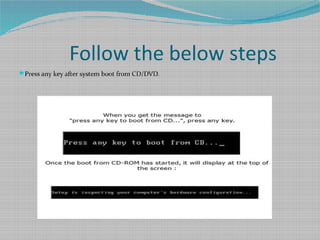
Press any key after system boot from CD/DVD.
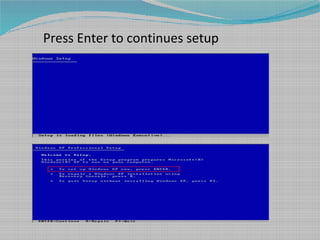
Press Enter to continues setup
Press F8 to accept EULA
Create, Delete partition in Hard disk
Press C to create new partition
Press D to delete existing partition
Select C: drive to install OS and press Enter
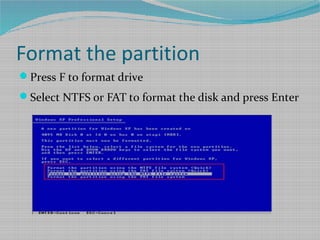
Format the partition
Press F to format drive
Select NTFS or FAT to format the disk and press Enter
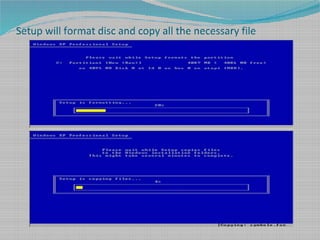
Setup will format disc and copy all the necessary file
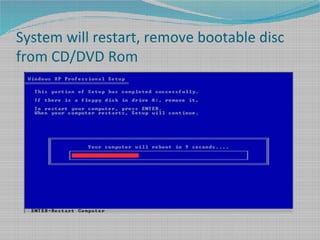
System will restart, remove bootable disc
from CD/DVD Rom
System starts as below and show the time period 39
minute to complete Installation
Press Next in regional and language, Enter name and organization
Enter Product key available in CD/DVD
Enter Computer name and leave blank administrator password
Choose Indian time zone and date settings
Select typical setting for network settings
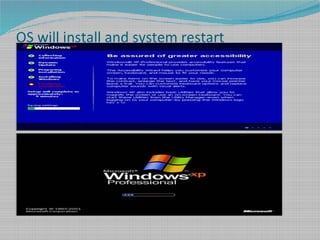
OS will install and system restart
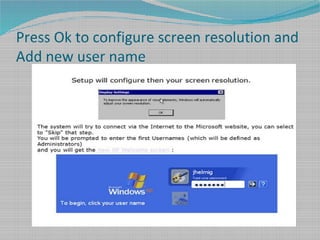
Press Ok to configure screen resolution and
Add new user name

Windows xp installation

  • 1.
    Windows XP Installation Preparedby Prem Sahu Ambika Institute of Computer
  • 2.
    System requirement forwindows XP installation Processor 533 MHz Hard disk 5 GB RAM 128 MB
  • 3.
    Different way toInstall Windows XP Install from bootable CD/DVD Install from bootable Pen drive/flash memory Install from LAN through RIP. Install from System image or ghosting image
  • 4.
    Different type ofInstallation New or clean installation- Install operating system in new system or delete previous version of OS and install OS. Upgrade Installation- Update existing OS version with latest version OS Multiple OS- Keep the old Operating system and install new OS in system
  • 5.
    Windows XP installationProcess Before Installing windows XP make sure you have bootable media like CD/DVD or Pen drive Start the system and continue press del/F2 to login to BIOS Choose first boot device CD/DVD from BIOS. Save and exit from BIOS by pressing F10. Insert the bootable media in CD/DVD ROM.
  • 6.
    Follow the belowsteps Press any key after system boot from CD/DVD.
  • 7.
    Press Enter tocontinues setup
  • 8.
    Press F8 toaccept EULA
  • 9.
    Create, Delete partitionin Hard disk Press C to create new partition Press D to delete existing partition Select C: drive to install OS and press Enter
  • 10.
    Format the partition PressF to format drive Select NTFS or FAT to format the disk and press Enter
  • 11.
    Setup will formatdisc and copy all the necessary file
  • 12.
    System will restart,remove bootable disc from CD/DVD Rom
  • 13.
    System starts asbelow and show the time period 39 minute to complete Installation
  • 14.
    Press Next inregional and language, Enter name and organization
  • 15.
    Enter Product keyavailable in CD/DVD Enter Computer name and leave blank administrator password
  • 16.
    Choose Indian timezone and date settings Select typical setting for network settings
  • 17.
    OS will installand system restart
  • 18.
    Press Ok toconfigure screen resolution and Add new user name

Editor's Notes

  • #2 <number>