Troubleshooting of slow system
Prepared by Prem Sahu
Ambika Institute of Computer Technology
Delete temporary file from system
Type the following command in RUN and delete all files
1. Temp
2. %temp%
3. Prefetch
4. Dllcache( Only in windows XP)
Run other utility to check system performance
5. Chkdsk ( Scan disk Utility)
6. Dfrg.msc( Disk defragmentation)
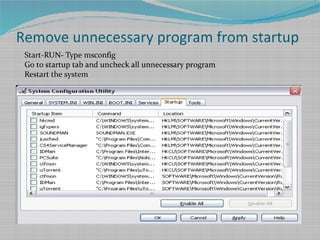
Remove unnecessary program from startup
Start-RUN- Type msconfig
Go to startup tab and uncheck all unnecessary program
Restart the system
Increase Virtual Memory
Virtual Memory use hard disk space as RAM incase the physical RAM is low
and unable to handle the process
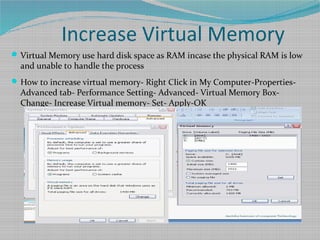
How to increase virtual memory- Right Click in My Computer-Properties-
Advanced tab- Performance Setting- Advanced- Virtual Memory Box-
Change- Increase Virtual memory- Set- Apply-OK
Remove unnecessary Software
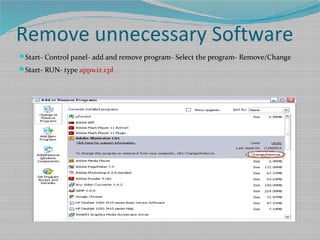
Start- Control panel- add and remove program- Select the program- Remove/Change
Start- RUN- type appwiz.cpl
Remove unnecessary Software
Start- Control panel- add and remove program- Select the program- Remove/Change
Start- RUN- type appwiz.cpl

Slow system troubleshooting

  • 1.
    Troubleshooting of slowsystem Prepared by Prem Sahu Ambika Institute of Computer Technology
  • 2.
    Delete temporary filefrom system Type the following command in RUN and delete all files 1. Temp 2. %temp% 3. Prefetch 4. Dllcache( Only in windows XP) Run other utility to check system performance 5. Chkdsk ( Scan disk Utility) 6. Dfrg.msc( Disk defragmentation)
  • 3.
    Remove unnecessary programfrom startup Start-RUN- Type msconfig Go to startup tab and uncheck all unnecessary program Restart the system
  • 4.
    Increase Virtual Memory VirtualMemory use hard disk space as RAM incase the physical RAM is low and unable to handle the process How to increase virtual memory- Right Click in My Computer-Properties- Advanced tab- Performance Setting- Advanced- Virtual Memory Box- Change- Increase Virtual memory- Set- Apply-OK
  • 5.
    Remove unnecessary Software Start-Control panel- add and remove program- Select the program- Remove/Change Start- RUN- type appwiz.cpl
  • 6.
    Remove unnecessary Software Start-Control panel- add and remove program- Select the program- Remove/Change Start- RUN- type appwiz.cpl