WINDOWS 7 1
Failure of Vista
• High Requirement
• Require more powerful hardware
• Driver problems
• Vista is very slow speed
• Main reason is Windows Xp.
2
Windows 7
• Win 7 is personal computer OS , it’s a version on
Windows NT.
• Development of 7 start with name of
‘Blackcomb’.
• It was released to manufactured in 22 july,2009
and available in Oct,22 .
3
Hardware Requirement
For 32 bit :-
• 1 GHz IA-32 processor
• 1GB RAM
For 64 bit:-
• 1 GHz x86-64 processor
• 2GB RAM
4
Editions
• Windows 7 Starter
• Windows 7 Home Basic
• Windows 7 Home premium
• Windows 7 Professional
• Windows 7 Enterprise
• Windows 7 Ultimate
5
Windows 7 Starter
• In Starter edition in contains fewest features.
• It’s only available in 32-bit version and doesn’t include
the Windows Aero theme.
• This edition is available pre-installed on computers,
especially netbooks.
6
Windows 7 Home Basic
• It’s available in “emerging markets” , in 141 different
countries.
• Some Windows Aero options are excluded along with
several new features.
7
Windows 7 Home
Premium
• This edition contains features aimed at the home market
segment ,such as Windows Media Center ,Windows Aero
and multi-touch supports.
8
Windows 7 Professional
• This edition is targeted towards enthusiasts and small-
business users.
• It includes all the features of Windows 7 Home Premium,
and adds the ability to participate in a Windows Server
Domain.
• Additional features include support for up to 192 GB
of Random-access memory.
9
Windows 7 Enterprise
• Additional features include support for Multilingual User
Interface (MUI) packages, BitLocker Drive Encryption,
and UNIX application support.
• This edition targets the enterprise segment of the market.
10
Windows 7 Ultimate
• Windows 7 Ultimate contains the same features as
Windows 7 Enterprise, but unlike the Enterprise edition,
it is available to home users on an individual license
basis.
• Windows 7 Home Premium and Windows 7 Professional
users are able to upgrade to Windows 7 Ultimate for a fee
using Windows Anytime Upgrade if they wish to do so.
11
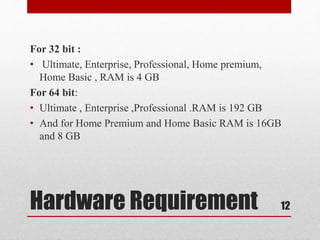
Hardware Requirement
For 32 bit :
• Ultimate, Enterprise, Professional, Home premium,
Home Basic , RAM is 4 GB
For 64 bit:
• Ultimate , Enterprise ,Professional .RAM is 192 GB
• And for Home Premium and Home Basic RAM is 16GB
and 8 GB
12
Features
• BitLocker
• Shadow Copy
• Windows Defender and Firewall
• Action Centre
13
BitLocker
• BitLocker Allows you us to use drive encryption to
protect files.
• This is available only with Windows 7 in the Enterprise
and Ultimate edition.
• For removable Drives, we can use it to help prevent
unauthorized access to the files.
14
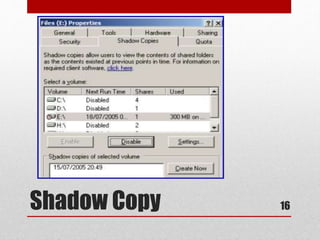
Shadow Copy
• This feature create copies that we can recover from
should a files be accidently deleted or overwritten.
• In Win7 , there is an interface to configure it.
• Continue..
15
Shadow Copy 16
Windows Defender,
Firewall
• Windows Defender can identify spyware and is include
with all versions of Windoes7.
• Start  Control Panel  Windows Defender
• Windows Firewall is used to block access from the
network.
• In Win7 it’s divided into private network and public
network.
• Start  Control Panel  Windows Firewall
17
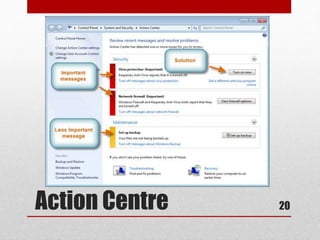
Action Centre
• Security Centre is modified and in Win7 it’s known as
Action Centre.
• It includes security, such maintenance issues and backup
setting.
• Start  Control Panel  Action Centre
• Continue..
18
Action Centre
• Automatically check for solutions (recommended).
• Automatically check for solutions and send additional
data, if needed.
• Each time a problem occurs, ask me before checking for
solutions.
• Never check for solutions (not recommended).
19
Action Centre 20
Control Panel
Utilities
• HomeGroup
• RemoteApp and Desktop Connections
• Troubleshooting
21
Home Group
• The purpose of HomeGroup is to simplify home
networking and the sharing of files and printers.
• Start  Control Panel  HomeGroup
22
Remote App and Desktop
Connection
• It’s used to access remote computers and virtual machines
made available over the network through port 3389.
• Start  Control Panel  RemoteApp and Desktop
Connection.
23
Troubleshooting
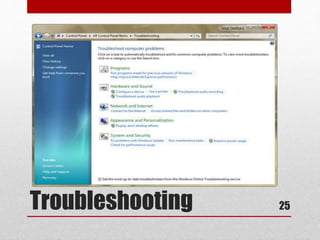
• Start  Control Panel  Troubleshooting
• As the name implies, to provide a simple interface to use
to solve the problems.
• Continue..
24
Troubleshooting 25
Administrative
Tools
• Users and Groups
• Local Security Policy
• Account Policies
26
Users and Groups
• We can use Computer Management to access Users and
Groups.
• We can also configure the users and groups on a system
in the Microsoft Management Console.
• Start  Run  type MMC.
• Then go to File  Add/Remove snap-in and select Local
Users and Groups.
27
Local Security Policy
• Start  RUN type secpol.msc
• Allows to set the default settings for the system.
• This feature is available in Win7 Professional, Ultimate
and Win7 Enterprise.
28
Account Policies
• Account Policies is divided into Password policy and
Account Lockout Policy.
• In Password Policy all settings are for Password.
• Enforce Password History, Maximum Password age,
Minimum Password Length etc.,
29
Account Policies
• In Account Lockout Policy :
• Account Lockout Duration, Account Lockout Threshold,
Reset Account Lockout Counter .
30
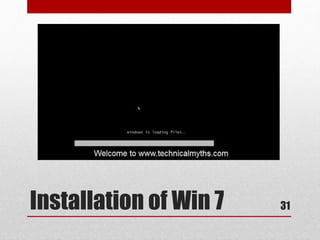
Installation of Win 7 31
Thank You 32

Windows 7

  • 1.
  • 2.
    Failure of Vista •High Requirement • Require more powerful hardware • Driver problems • Vista is very slow speed • Main reason is Windows Xp. 2
  • 3.
    Windows 7 • Win7 is personal computer OS , it’s a version on Windows NT. • Development of 7 start with name of ‘Blackcomb’. • It was released to manufactured in 22 july,2009 and available in Oct,22 . 3
  • 4.
    Hardware Requirement For 32bit :- • 1 GHz IA-32 processor • 1GB RAM For 64 bit:- • 1 GHz x86-64 processor • 2GB RAM 4
  • 5.
    Editions • Windows 7Starter • Windows 7 Home Basic • Windows 7 Home premium • Windows 7 Professional • Windows 7 Enterprise • Windows 7 Ultimate 5
  • 6.
    Windows 7 Starter •In Starter edition in contains fewest features. • It’s only available in 32-bit version and doesn’t include the Windows Aero theme. • This edition is available pre-installed on computers, especially netbooks. 6
  • 7.
    Windows 7 HomeBasic • It’s available in “emerging markets” , in 141 different countries. • Some Windows Aero options are excluded along with several new features. 7
  • 8.
    Windows 7 Home Premium •This edition contains features aimed at the home market segment ,such as Windows Media Center ,Windows Aero and multi-touch supports. 8
  • 9.
    Windows 7 Professional •This edition is targeted towards enthusiasts and small- business users. • It includes all the features of Windows 7 Home Premium, and adds the ability to participate in a Windows Server Domain. • Additional features include support for up to 192 GB of Random-access memory. 9
  • 10.
    Windows 7 Enterprise •Additional features include support for Multilingual User Interface (MUI) packages, BitLocker Drive Encryption, and UNIX application support. • This edition targets the enterprise segment of the market. 10
  • 11.
    Windows 7 Ultimate •Windows 7 Ultimate contains the same features as Windows 7 Enterprise, but unlike the Enterprise edition, it is available to home users on an individual license basis. • Windows 7 Home Premium and Windows 7 Professional users are able to upgrade to Windows 7 Ultimate for a fee using Windows Anytime Upgrade if they wish to do so. 11
  • 12.
    Hardware Requirement For 32bit : • Ultimate, Enterprise, Professional, Home premium, Home Basic , RAM is 4 GB For 64 bit: • Ultimate , Enterprise ,Professional .RAM is 192 GB • And for Home Premium and Home Basic RAM is 16GB and 8 GB 12
  • 13.
    Features • BitLocker • ShadowCopy • Windows Defender and Firewall • Action Centre 13
  • 14.
    BitLocker • BitLocker Allowsyou us to use drive encryption to protect files. • This is available only with Windows 7 in the Enterprise and Ultimate edition. • For removable Drives, we can use it to help prevent unauthorized access to the files. 14
  • 15.
    Shadow Copy • Thisfeature create copies that we can recover from should a files be accidently deleted or overwritten. • In Win7 , there is an interface to configure it. • Continue.. 15
  • 16.
  • 17.
    Windows Defender, Firewall • WindowsDefender can identify spyware and is include with all versions of Windoes7. • Start  Control Panel  Windows Defender • Windows Firewall is used to block access from the network. • In Win7 it’s divided into private network and public network. • Start  Control Panel  Windows Firewall 17
  • 18.
    Action Centre • SecurityCentre is modified and in Win7 it’s known as Action Centre. • It includes security, such maintenance issues and backup setting. • Start  Control Panel  Action Centre • Continue.. 18
  • 19.
    Action Centre • Automaticallycheck for solutions (recommended). • Automatically check for solutions and send additional data, if needed. • Each time a problem occurs, ask me before checking for solutions. • Never check for solutions (not recommended). 19
  • 20.
  • 21.
    Control Panel Utilities • HomeGroup •RemoteApp and Desktop Connections • Troubleshooting 21
  • 22.
    Home Group • Thepurpose of HomeGroup is to simplify home networking and the sharing of files and printers. • Start  Control Panel  HomeGroup 22
  • 23.
    Remote App andDesktop Connection • It’s used to access remote computers and virtual machines made available over the network through port 3389. • Start  Control Panel  RemoteApp and Desktop Connection. 23
  • 24.
    Troubleshooting • Start Control Panel  Troubleshooting • As the name implies, to provide a simple interface to use to solve the problems. • Continue.. 24
  • 25.
  • 26.
    Administrative Tools • Users andGroups • Local Security Policy • Account Policies 26
  • 27.
    Users and Groups •We can use Computer Management to access Users and Groups. • We can also configure the users and groups on a system in the Microsoft Management Console. • Start  Run  type MMC. • Then go to File  Add/Remove snap-in and select Local Users and Groups. 27
  • 28.
    Local Security Policy •Start  RUN type secpol.msc • Allows to set the default settings for the system. • This feature is available in Win7 Professional, Ultimate and Win7 Enterprise. 28
  • 29.
    Account Policies • AccountPolicies is divided into Password policy and Account Lockout Policy. • In Password Policy all settings are for Password. • Enforce Password History, Maximum Password age, Minimum Password Length etc., 29
  • 30.
    Account Policies • InAccount Lockout Policy : • Account Lockout Duration, Account Lockout Threshold, Reset Account Lockout Counter . 30
  • 31.
  • 32.