1
User Centred Design and
Low-Fidelity Prototyping
Human-computer Interaction
2
User Centered Design
 Design is based upon a user’s :
 Abilities and real needs
 Context
 Work
 Tasks
Golden rule of interface design KNOW
THE USER
3
User Centered Design
 A UCD is based on understanding the domain
of work or play in which people are engaged
and in which they interact with computers,
and programming computers to facilitate
human action….
4
User Centered Design
 Three assumptions:
 The result of a good design is satisfied customer
 The process of design is collaboration between
designers and customers: the design evolves and
adapts to their changing concerns
 The customer and designer are in constant
communication during the entire process
5
User Centered Design
 This participatory design has some problems:
 Intuitions wrong
 Interview not precise
 Designers can not know the user sufficiently well to
answer all issues that come up during the design.
 Solution:
 Designers should have access to pool of
representative users: End users, not their managers.
6
Methods for involving the user
 User : uses system after deployment
 Tester: tests system after development,
before deployment
 Informant: help during development
( interview, observations…)
 Design partner : equal partner.
7
Prototyping
8
Why Do We Prototype?
 Get feedback on our design faster (which
saves money)
 Fix problems before code is written
9
Fidelity in Prototyping
 Fidelity refers to the level of detail
 High fidelity?
 prototypes look like the final product
 Low fidelity?
 Interfaces with many details missing
1010
Types of low-fi Prototypes
Paper
“Low fidelity prototyping”
Often surprisingly effective
Experimenter plays the computer
Implemented Prototype
Visual Basic
PowerPoint
Web tools (even for non-web UIs)
Html
Scripting
11
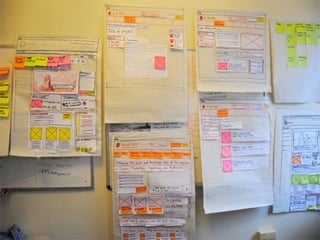
Paper prototyping
 Main idea:
 Sketch out prototypes of the interface on paper
 Potential users “walk through” task scenarios using the
paper interface
 A designer “plays computer”
 Change the design on-the-fly if helpful
 Widely practiced in industry
 Sounds silly at first, but is surprisingly effective
 Helps people work together on the design
12
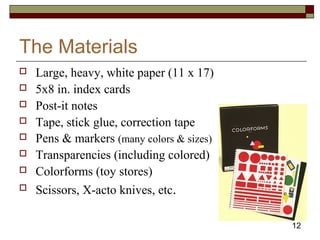
The Materials
 Large, heavy, white paper (11 x 17)
 5x8 in. index cards
 Post-it notes
 Tape, stick glue, correction tape
 Pens & markers (many colors & sizes)
 Transparencies (including colored)
 Colorforms (toy stores)
 Scissors, X-acto knives, etc.
13
14
Constructing the Model
 Set a deadline
 don’t think too long - build it!
 Draw a window frame on large paper
 Put different screen regions on cards
 anything that moves, changes, appears/disappears
 Ready response for any user action
 e.g., have those pull-down menus already made
 Use photocopier to make many versions
15
Preparing for a Test
 Select your participants
 understand background of intended users
 use a questionnaire
 don’t use friends or family
 Prepare scenarios that are
 typical of the product during actual use
16
Conducting a Test
 Three or Four testers (preferable)
 greeter : puts users at ease & gets data, gets forms
filled, assure confidentiality…..
 facilitator : only team member who speaks
 gives instructions & encourages thoughts, opinions
 computer: knows application logic & controls it
 always simulates the response, w/o explanation
 observer(s) : take notes & recommendations
 Typical session is approximately 1 hour
(preparing, testing, debriefing)
17
Evaluating Results
 Create a written report on findings
 gives agenda for meeting on design changes
 Make changes & iterate
18
Advantages of Low-fi Prototyping
 Takes only a few hours
 no expensive equipment needed
 Can test multiple alternatives
 Can change the design as you test
 Allows designers to work together
19
Example of paper
prototyping
We will use the rule we underlined in
constructing the model (Use photocopier to
make many versions)
20
Telebears example: Welcome, Registration time
21
Telebears example: Welcome, Not Registration time
22
Telebears example: Task 3: Plan Schedule
23Telebears example: Task 2: Switching discussion sections
24Telebears example: Task 4: Adding a course
25
Designing a content page
Using low-fi techniques
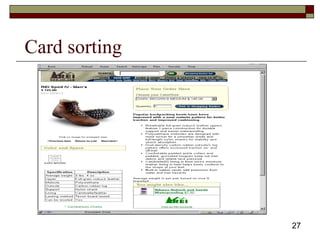
 Card sorting
 Idea from Peter Merholtz
26
Designing a content page
Using low-fi techniques
 Start with a page with all the features you
might want
 Cut it up into pieces
 Have people arrange the components
27
Card sorting
28
29
Low-fi Storyboards
 Where do storyboards come from?
 Film & animation
 Give you a “script” of important events
 leave out the details
 concentrate on the important interactions
30
31
Site map:
33
Sketch example:
34
Implemented prototypes
35
Wizard of Oz
Technique
 Faking the interaction.
 The term is from the film “The Wizard of OZ”
 “the man behind the curtain”
 Main idea:
 The participant interacts with a computer interface as
usual
 Instead of the program writing back, a person writes back
pretending to be the computer
 Very useful for assessing hard-to-implement features
 Speech & handwriting recognition interface design
36
pen-based interaction
37
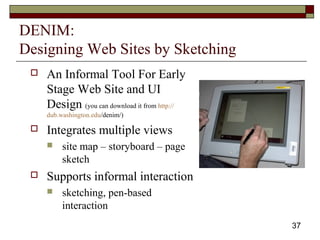
DENIM:
Designing Web Sites by Sketching
 An Informal Tool For Early
Stage Web Site and UI
Design (you can download it from http://
dub.washington.edu/denim/)
 Integrates multiple views
 site map – storyboard – page
sketch
 Supports informal interaction
 sketching, pen-based
interaction
38
DENIM example:
39
Designing Interfaces with Denim
1) Designer sketches ideas rapidly with
electronic pad and pen
 recognizes widgets
 easy editing with gestures
2) Designer or end-user tests interface
 widgets behave
 specify additional behavior visually
3) Automatically transforms to a “finished” UI
40
Specifying Behaviors
 Storyboards
 series of rough sketches depicting changes in
response to end-user interaction
 Expresses many common behaviors
before after
Sequencing behavior between widgets
41
Denim Storyboards
 Copy sketches to storyboard window
 Draw arrows from objects to screens
Switch to run mode to test
Denim changes screens on mouse clicks
43
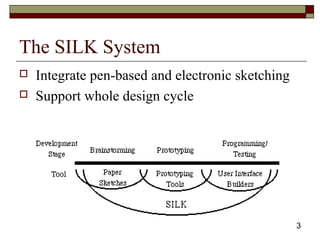
The SILK System
 Integrate pen-based and electronic sketching
 Support whole design cycle
44
The SILK System
 unlike a paper sketch, this electronic sketch is
interactive and can easily be annotated and
modified using editing gestures.
 SILK allows the designer to extend the
interactivity of the recognized widgets using
storyboards
45
SILK interface
46
SILK Vs. DENIM
 There are several key differences between
DENIM and SILK:
 DENIM supports more views of the design (e.g.
site map) than SILK and integrates those views
through zooming.
 SILK recognizes widgets that are sketched by the
designer. DENIM does not (yet).
47
Prototyping Assignment:
 Create a storyboard for a login page
 Create a sketch for an plane ticket booking
page.
 (use paper prototypes, no softwares)

UCD and low-fidelity prototyping

  • 1.
    1 User Centred Designand Low-Fidelity Prototyping Human-computer Interaction
  • 2.
    2 User Centered Design Design is based upon a user’s :  Abilities and real needs  Context  Work  Tasks Golden rule of interface design KNOW THE USER
  • 3.
    3 User Centered Design A UCD is based on understanding the domain of work or play in which people are engaged and in which they interact with computers, and programming computers to facilitate human action….
  • 4.
    4 User Centered Design Three assumptions:  The result of a good design is satisfied customer  The process of design is collaboration between designers and customers: the design evolves and adapts to their changing concerns  The customer and designer are in constant communication during the entire process
  • 5.
    5 User Centered Design This participatory design has some problems:  Intuitions wrong  Interview not precise  Designers can not know the user sufficiently well to answer all issues that come up during the design.  Solution:  Designers should have access to pool of representative users: End users, not their managers.
  • 6.
    6 Methods for involvingthe user  User : uses system after deployment  Tester: tests system after development, before deployment  Informant: help during development ( interview, observations…)  Design partner : equal partner.
  • 7.
  • 8.
    8 Why Do WePrototype?  Get feedback on our design faster (which saves money)  Fix problems before code is written
  • 9.
    9 Fidelity in Prototyping Fidelity refers to the level of detail  High fidelity?  prototypes look like the final product  Low fidelity?  Interfaces with many details missing
  • 10.
    1010 Types of low-fiPrototypes Paper “Low fidelity prototyping” Often surprisingly effective Experimenter plays the computer Implemented Prototype Visual Basic PowerPoint Web tools (even for non-web UIs) Html Scripting
  • 11.
    11 Paper prototyping  Mainidea:  Sketch out prototypes of the interface on paper  Potential users “walk through” task scenarios using the paper interface  A designer “plays computer”  Change the design on-the-fly if helpful  Widely practiced in industry  Sounds silly at first, but is surprisingly effective  Helps people work together on the design
  • 12.
    12 The Materials  Large,heavy, white paper (11 x 17)  5x8 in. index cards  Post-it notes  Tape, stick glue, correction tape  Pens & markers (many colors & sizes)  Transparencies (including colored)  Colorforms (toy stores)  Scissors, X-acto knives, etc.
  • 13.
  • 14.
    14 Constructing the Model Set a deadline  don’t think too long - build it!  Draw a window frame on large paper  Put different screen regions on cards  anything that moves, changes, appears/disappears  Ready response for any user action  e.g., have those pull-down menus already made  Use photocopier to make many versions
  • 15.
    15 Preparing for aTest  Select your participants  understand background of intended users  use a questionnaire  don’t use friends or family  Prepare scenarios that are  typical of the product during actual use
  • 16.
    16 Conducting a Test Three or Four testers (preferable)  greeter : puts users at ease & gets data, gets forms filled, assure confidentiality…..  facilitator : only team member who speaks  gives instructions & encourages thoughts, opinions  computer: knows application logic & controls it  always simulates the response, w/o explanation  observer(s) : take notes & recommendations  Typical session is approximately 1 hour (preparing, testing, debriefing)
  • 17.
    17 Evaluating Results  Createa written report on findings  gives agenda for meeting on design changes  Make changes & iterate
  • 18.
    18 Advantages of Low-fiPrototyping  Takes only a few hours  no expensive equipment needed  Can test multiple alternatives  Can change the design as you test  Allows designers to work together
  • 19.
    19 Example of paper prototyping Wewill use the rule we underlined in constructing the model (Use photocopier to make many versions)
  • 20.
  • 21.
    21 Telebears example: Welcome,Not Registration time
  • 22.
  • 23.
    23Telebears example: Task2: Switching discussion sections
  • 24.
    24Telebears example: Task4: Adding a course
  • 25.
    25 Designing a contentpage Using low-fi techniques  Card sorting  Idea from Peter Merholtz
  • 26.
    26 Designing a contentpage Using low-fi techniques  Start with a page with all the features you might want  Cut it up into pieces  Have people arrange the components
  • 27.
  • 28.
  • 29.
    29 Low-fi Storyboards  Wheredo storyboards come from?  Film & animation  Give you a “script” of important events  leave out the details  concentrate on the important interactions
  • 30.
  • 31.
  • 32.
  • 33.
  • 34.
    35 Wizard of Oz Technique Faking the interaction.  The term is from the film “The Wizard of OZ”  “the man behind the curtain”  Main idea:  The participant interacts with a computer interface as usual  Instead of the program writing back, a person writes back pretending to be the computer  Very useful for assessing hard-to-implement features  Speech & handwriting recognition interface design
  • 35.
  • 36.
    37 DENIM: Designing Web Sitesby Sketching  An Informal Tool For Early Stage Web Site and UI Design (you can download it from http:// dub.washington.edu/denim/)  Integrates multiple views  site map – storyboard – page sketch  Supports informal interaction  sketching, pen-based interaction
  • 37.
  • 38.
    39 Designing Interfaces withDenim 1) Designer sketches ideas rapidly with electronic pad and pen  recognizes widgets  easy editing with gestures 2) Designer or end-user tests interface  widgets behave  specify additional behavior visually 3) Automatically transforms to a “finished” UI
  • 39.
    40 Specifying Behaviors  Storyboards series of rough sketches depicting changes in response to end-user interaction  Expresses many common behaviors before after Sequencing behavior between widgets
  • 40.
    41 Denim Storyboards  Copysketches to storyboard window  Draw arrows from objects to screens Switch to run mode to test Denim changes screens on mouse clicks
  • 41.
    43 The SILK System Integrate pen-based and electronic sketching  Support whole design cycle
  • 42.
    44 The SILK System unlike a paper sketch, this electronic sketch is interactive and can easily be annotated and modified using editing gestures.  SILK allows the designer to extend the interactivity of the recognized widgets using storyboards
  • 43.
  • 44.
    46 SILK Vs. DENIM There are several key differences between DENIM and SILK:  DENIM supports more views of the design (e.g. site map) than SILK and integrates those views through zooming.  SILK recognizes widgets that are sketched by the designer. DENIM does not (yet).
  • 45.
    47 Prototyping Assignment:  Createa storyboard for a login page  Create a sketch for an plane ticket booking page.  (use paper prototypes, no softwares)

Editor's Notes

  • #9 <number>
  • #10 <number>
  • #11 <number>
  • #13 <number>
  • #14 <number>
  • #15 <number>
  • #16 <number>
  • #17 <number>
  • #18 <number>
  • #19 <number>
  • #30 <number>
  • #31 <number>
  • #33 <number> 1) Sketch rough pictures of screen layouts. Initial goal is to work on the overall layout and structure 3) Many UI designers have a graphic design or art background (over half) Disadvantages: 1) need to often throw away sketches and start over. 2) hard to visualize the different decision points of the design process. Design history and annotations are often more valuable to the client than the design itself. 3) manual translations may need to occur several times as we iterate 4) must have a human “play computer” to test the design. this is often unrealistic
  • #36 <number>
  • #38 <number> Sketch-based tool for information and navigation design for the early phase of web site design. REVIEW this slide.
  • #40 <number> SILK will blend the advantages of both paper-based sketching and traditional user interface builders, yet will avoid many of the limitations of these approaches. Widgets behave: e.g., the “elevator” of the sketched scrollbar can be dragged up & down. The designer may need to specify additional behavior to illustrate the sequencing between widgets. Transformation requires some guidance to finalize details of the UI (e.g., textual labels, colors) At this point, programmers can add callbacks and constraints that include the application-specific code to complete the application.
  • #41 <number> TRANSITION Unfortunately with hand-drawn storyboards, has been shown to be a powerful tool for designers making concept sketches for early visualization. Designers do this on paper now! Storyboards used to specify the dynamic behavior between widgets The success of HyperCard has demonstrated that a significant amount of behavior can be constructed from sequencing screen upon button presses alone!
  • #42 <number> Marks for sequencing may be similar to those that many people use when designing on a whiteboard or on paper. ARROWS can draw arrow from any object or background to any screen
  • #43 <number> Interaction is what computers can give us. So I have built a tool named SILK. The idea of SILK is to support the conceptual phases of design without the limitations we have seen for paper and existing electronic tools