
Introduction to human computer
interaction
Human
• As humans, we have many ways to perceive the
world around us like: seeing hearing and feeling.
• There are few others as well like smelling and
tasting but we won’t deal with those in our
course.
• Since we have senses, we have also memories,
experiences, skills, knowledge.
• In HCI, we have to take into consideration every
element in the human, from the way they
perceive and interact with the world, to their long
history of using computers and technology.
Computers
Computers
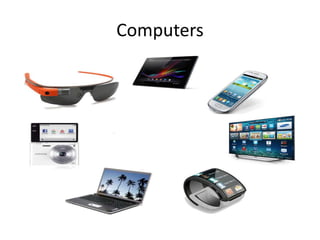
• With computer devices, augmented reality,
HCI is quite literally everything.
• Augmented reality games like pokemon go
turn effectively the entire world into an
instance of HCI.
Interaction
• So, we have humans and we have interaction
and we’re interested to the interaction
between them.
• The interaction can take different forms
though.
• The most obvious would be the human
interacts with the computer and the computer
interacts with the human in response
Interaction
• They go back and forth interacting and that’s a
valid view, but perhaps it misses the most
important part of HCI.
• We can also think of the human interacting
with the task through the computer.
• The interaction is really between the human
and the task, and the computer in the middle
just mediates that interaction.
Interaction
• Or to put this differently, the human and the
computer together interact with the task.
• Ideally in this case, we are interested in
making the interface as invisible as possible,
so the user can spend as little time as possible
focusing on the interface and instead focus on
the task that they’re trying to accomplish.
Interaction
• Realistically, our interfaces are likely to stay
somewhat visible.
• But out goal is to let the user spend as much
time as possible thinking about the task
instead of thinking about out interface.
• We can all probably remember times when
we’ve interacted with a piece of software and
we felt like we spent all our time thinking
about how to work the software.
Interaction
• So our goal as designers, is to help the human
feels like they’re interacting directly with the
task; while our interface kind of vanishes in
the middle of that interaction.
Reflexion
• Try to think about an example when you
spend much of your time thinking about the
task an example when you spend most of your
time thinking about the tool itself.
HCI space
• One of the most exciting parts about HCI is its
ubiquity (the state and capacity of being
everywhere).
• Computers are all around us and we interact
with them everyday.
• It’s exciting to think about designing the types
of tools and interfaces we spend so much time
dealing with, but there’s a danger here too
HCI space
• Because we’re all humans interacting with
computers, we think we’re expert in HCI, but
that’s not the case.
• “we might be experts at interacting with
computers, but that doesn’t make us experts
at designing interaction between other
humans and computers”.
• Just because we’re experts does not mean we
can help other people be expert.
HCI space
• We’ll learn together how complex and large
the field of HCI is.
• we’re taking the first step into a larger world.
HCI and human factors
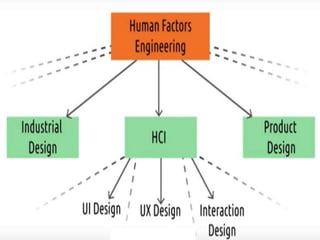
• This is a look at where HCI sits in a broader
hierarchy of fields.
• We can think if HCI as a subset of a broader
field of human factors.
• Human factors engineering is interested in a
lot of the same ideas that we’re interested in,
but they aren’t just interested in computers.
• Then there are sub disciplines within HCI
HCI and human factors
• Human factors in interested in designing
interactions between people and products,
systems and devices.
• But human factors are interested in non-
computing parts as well.
• As computers become more and more
ubiquitous, the number of application areas of
HCI is growing
• Things like shower heads and refrigerators has
started to become truly computerized devices.
HCI and human factors
• As computers integrate themselves into more
and more of our devices, the gap between HCI
and human factors engineering is shrinking.
HCI and user interface design
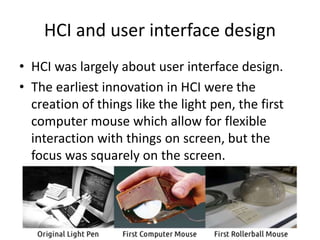
• HCI was largely about user interface design.
• The earliest innovation in HCI were the
creation of things like the light pen, the first
computer mouse which allow for flexible
interaction with things on screen, but the
focus was squarely on the screen.
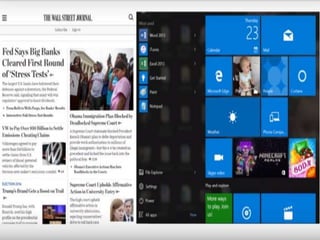
• And so, we developed many principles about
how to design things nicely.
• We borrowed from the magazines and print
industries and identify the value of grids in
displaying content and guiding the users eyes
around our interfaces
• We created laws that govern how difficult it is
for users to select what they want on the
screen: we examined for example whether it is
easier to select a menu on a Mac, where the
menus are always on the top of the screen or
on a pc where they are grouped with the
individual window
• We developed techniques for helping interfaces
adapt to different screen sizes and we develop
methods for rapidly prototyping user interfaces
using pen and paper or wire frames.
• Through this rich history, UI design really became
its well defined field.
• In fact, many of the concepts we’ll cove in HCI
were originally developed in the context of UI
design.
• But in HCI we’re interested in things that go
beyond the user’s interaction with a single
screen.
• In HCI, we’ll talk about the more general
methods that apply to any interface.
HCI vs. Human experience design
• The relation between HCI and human
experience design is a little bit closer.
• In fact, if you ask a dozen people working in
the field, you’ll probably get a dozen different
answers about the differences.
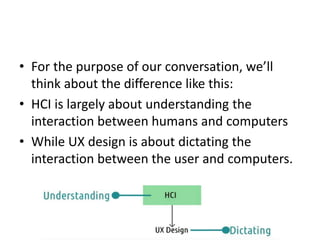
• For the purpose of our conversation, we’ll
think about the difference like this:
• HCI is largely about understanding the
interaction between humans and computers
• While UX design is about dictating the
interaction between the user and computers.
• In order to design UX very well, you need to
understand their interactions with interfaces.
• We will use the principles and methods of HCI
to inform how we design user experience.
• We use that understanding to inform how we
design UX but we evaluate those designs
based on their success or failure.
• If our understanding leads to create good
designs, that provides evidence that our
understanding is correct.
HCI vs. Psychology
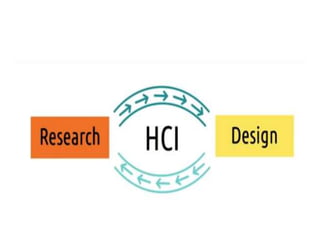
• The research side of HCI connects to the
relationship between HCI and psychology.
• Human factors engineering itself is in many
ways the merger of engineering and
psychology, as well as other fields of design
and cognitive science.
• In HCI, the engineering side takes the form of
software engineering, but this connection to
psychology remains symbiotic.
• We use our understanding of psychology, of
human perception, of cognition to inform the
way we design interfaces.
• We then use our evaluation of those interfaces to
reflect on our understanding of psychology itself.
• We came away with a better understanding of
the way humans think about their work spaces
because of our experience designing something
that was supposed to help them think about their
workspaces.
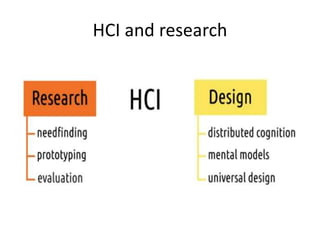
HCI and research
Introduction hci

Introduction hci

  • 1.
    Introduction to humancomputer interaction
  • 2.
    Human • As humans,we have many ways to perceive the world around us like: seeing hearing and feeling. • There are few others as well like smelling and tasting but we won’t deal with those in our course. • Since we have senses, we have also memories, experiences, skills, knowledge. • In HCI, we have to take into consideration every element in the human, from the way they perceive and interact with the world, to their long history of using computers and technology.
  • 3.
  • 4.
    Computers • With computerdevices, augmented reality, HCI is quite literally everything. • Augmented reality games like pokemon go turn effectively the entire world into an instance of HCI.
  • 5.
    Interaction • So, wehave humans and we have interaction and we’re interested to the interaction between them. • The interaction can take different forms though. • The most obvious would be the human interacts with the computer and the computer interacts with the human in response
  • 6.
    Interaction • They goback and forth interacting and that’s a valid view, but perhaps it misses the most important part of HCI. • We can also think of the human interacting with the task through the computer. • The interaction is really between the human and the task, and the computer in the middle just mediates that interaction.
  • 7.
    Interaction • Or toput this differently, the human and the computer together interact with the task. • Ideally in this case, we are interested in making the interface as invisible as possible, so the user can spend as little time as possible focusing on the interface and instead focus on the task that they’re trying to accomplish.
  • 8.
    Interaction • Realistically, ourinterfaces are likely to stay somewhat visible. • But out goal is to let the user spend as much time as possible thinking about the task instead of thinking about out interface. • We can all probably remember times when we’ve interacted with a piece of software and we felt like we spent all our time thinking about how to work the software.
  • 9.
    Interaction • So ourgoal as designers, is to help the human feels like they’re interacting directly with the task; while our interface kind of vanishes in the middle of that interaction.
  • 10.
    Reflexion • Try tothink about an example when you spend much of your time thinking about the task an example when you spend most of your time thinking about the tool itself.
  • 11.
    HCI space • Oneof the most exciting parts about HCI is its ubiquity (the state and capacity of being everywhere). • Computers are all around us and we interact with them everyday. • It’s exciting to think about designing the types of tools and interfaces we spend so much time dealing with, but there’s a danger here too
  • 12.
    HCI space • Becausewe’re all humans interacting with computers, we think we’re expert in HCI, but that’s not the case. • “we might be experts at interacting with computers, but that doesn’t make us experts at designing interaction between other humans and computers”. • Just because we’re experts does not mean we can help other people be expert.
  • 13.
    HCI space • We’lllearn together how complex and large the field of HCI is. • we’re taking the first step into a larger world.
  • 15.
    HCI and humanfactors • This is a look at where HCI sits in a broader hierarchy of fields. • We can think if HCI as a subset of a broader field of human factors. • Human factors engineering is interested in a lot of the same ideas that we’re interested in, but they aren’t just interested in computers. • Then there are sub disciplines within HCI
  • 16.
    HCI and humanfactors • Human factors in interested in designing interactions between people and products, systems and devices. • But human factors are interested in non- computing parts as well. • As computers become more and more ubiquitous, the number of application areas of HCI is growing • Things like shower heads and refrigerators has started to become truly computerized devices.
  • 17.
    HCI and humanfactors • As computers integrate themselves into more and more of our devices, the gap between HCI and human factors engineering is shrinking.
  • 18.
    HCI and userinterface design • HCI was largely about user interface design. • The earliest innovation in HCI were the creation of things like the light pen, the first computer mouse which allow for flexible interaction with things on screen, but the focus was squarely on the screen.
  • 19.
    • And so,we developed many principles about how to design things nicely. • We borrowed from the magazines and print industries and identify the value of grids in displaying content and guiding the users eyes around our interfaces
  • 21.
    • We createdlaws that govern how difficult it is for users to select what they want on the screen: we examined for example whether it is easier to select a menu on a Mac, where the menus are always on the top of the screen or on a pc where they are grouped with the individual window
  • 23.
    • We developedtechniques for helping interfaces adapt to different screen sizes and we develop methods for rapidly prototyping user interfaces using pen and paper or wire frames. • Through this rich history, UI design really became its well defined field. • In fact, many of the concepts we’ll cove in HCI were originally developed in the context of UI design.
  • 24.
    • But inHCI we’re interested in things that go beyond the user’s interaction with a single screen. • In HCI, we’ll talk about the more general methods that apply to any interface.
  • 25.
    HCI vs. Humanexperience design • The relation between HCI and human experience design is a little bit closer. • In fact, if you ask a dozen people working in the field, you’ll probably get a dozen different answers about the differences.
  • 26.
    • For thepurpose of our conversation, we’ll think about the difference like this: • HCI is largely about understanding the interaction between humans and computers • While UX design is about dictating the interaction between the user and computers.
  • 27.
    • In orderto design UX very well, you need to understand their interactions with interfaces. • We will use the principles and methods of HCI to inform how we design user experience. • We use that understanding to inform how we design UX but we evaluate those designs based on their success or failure.
  • 28.
    • If ourunderstanding leads to create good designs, that provides evidence that our understanding is correct.
  • 29.
    HCI vs. Psychology •The research side of HCI connects to the relationship between HCI and psychology. • Human factors engineering itself is in many ways the merger of engineering and psychology, as well as other fields of design and cognitive science. • In HCI, the engineering side takes the form of software engineering, but this connection to psychology remains symbiotic.
  • 30.
    • We useour understanding of psychology, of human perception, of cognition to inform the way we design interfaces. • We then use our evaluation of those interfaces to reflect on our understanding of psychology itself. • We came away with a better understanding of the way humans think about their work spaces because of our experience designing something that was supposed to help them think about their workspaces.
  • 31.