Part I
AWS fundamental services
Overview
 IAM
 VPC
 EC2
 CloudWatch
I A M : Identity Access Management
 Its main roles are to:
 centralize the management of individual or group
users.
 secure users thanks to the MFA (multi-Factor
Authentication)
 share certain accesses to your AWS account.
 manage the granularity of permissions (too finely
authorize access to resources).
 propose the federation of access to and from other
already existing directories (connect with Face book
,Google account ....).
 manage password rotations very finely
I A M : Identity Access Management
 So, we conclude that IAM service :
 decides who does what
 authorizes or prohibits accesses
 records who does what (cloudTrails, audits)
I A M : Identity Access Management
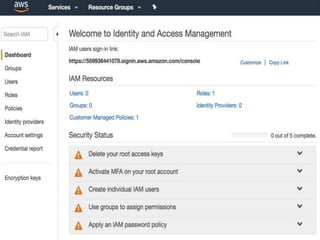
 When we create an Amazon account, we start
with a single connection identity that has full
access to all the resources regardless of regions.
 It can access all the account services and
resources .
 This identity is called « root ».
 After that, we will be able to create users, groups,
roles and policies.
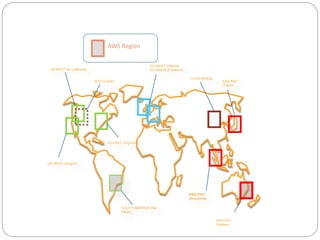
AWS Region
US-WEST (N. California)
EU-WEST (Ireland)
EU-Central (Frankfurt)
ASIA PAC
(Tokyo)
ASIA PAC
(Singapore)
US-WEST (Oregon)
SOUTH AMERICA (Sao
Paulo)
US-EAST (Virginia)
GOV CLOUD
ASIA PAC
(Sydney)
China (Beijing)
I A M : Identity Access Management
Administrators
group Policy
I A M : Identity Access Management
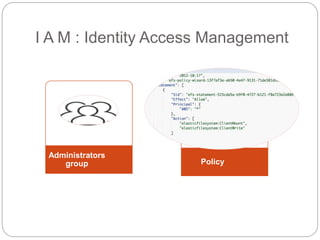
 For example, we create a group of administrators
and we assign policies to them.
 Once created, administrators can create other
users without going through the root.
 To execute commands, there are several
operating interfaces: the administration console
or the AWS command line.
I A M : Identity Access Management
 From the beginning, the root will decide which
ones will access or not the management console.
I A M : Identity Access Management
How will the user access ?
 Console interface:
 Users will input their username and password.
 Command line interface:
 Access key ID +secret access key
 During access key creation, AWS gives you one
opportunity to view and download the
secret access key part of the access key.
I A M : Identity Access Management
roles
 A role is a set of policies.
 A role can be associated with a user, a group or
an AWS service.
 for each role, you must define:
 Trust policy
 Permissions policy
 The trust policy specifies which trusted account
members are allowed to assume the role. When
you create a trust policy, you cannot specify a
wildcard (*) as a principal.
 The permissions policy define the details of
access rights.
So what is the difference between a
user and a role in AWS?
I A M : Identity Access Management
 An IAM user has permanent long-term
credentials and is used to directly interact
with AWS services.
 An IAM role does not have any credentials and
cannot make direct requests to AWS services.
IAM roles are meant to be assumed by
authorized entities, such as IAM users,
applications, or an AWS service such as EC2.
I A M : Identity Access Management
policies
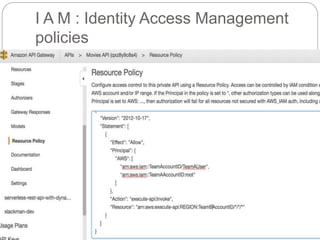
 policies are stored in AWS as JSON (JavaScript
Object Notation) documents.
 You manage permissions or access in AWS by
creating policies (see the figure below) and
attaching them to IAM identities (users, groups of
users, or roles).
I A M : Identity Access Management
policies
VPC : Virtual Private Cloud
VPC service: Virtual private
Cloud
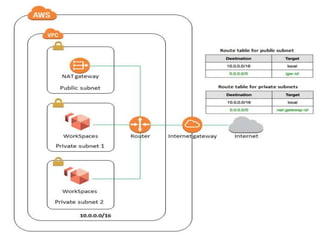
 It is a virtual private network in the AWS cloud.
 Complete access to your network configuration.
 It offers many levels of security control.
 Other AWS services are deployed inside VPC.
VPC service: Virtual private
Cloud
 AWS VPC functionalities:
 It launches resources in subnets that we have
created in our VPC: create endpoints to allow
services to have direct access to the interior of
your VPC.
 It is possible to create several VPC in a region.
 It is possible to create several VPC in several
regions.
 It is possible to interconnect between several
VPC from the same region or from different
regions.
VPC service: Virtual private
Cloud
 VPC components:
 Subnets (public : visible on internet, or private).
 Gateway Internet : IGW or NAT.
 NACL: control access to subnets.
 Routing tables : control outgoing network traffic
 Endpoints for AWS services.
Elastic Compute cloud (EC2)
EC2 service: Elastic Compute
Cloud
 This service is like one or more servers.
 Elastic: can dynamically increase or reduce its
capacities according to the demand of several
applications.
EC2 service: Elastic Compute Cloud
Features :
 Simplicity: provisioning in seconds.
 resizable: increase the number of machines that
will do the calculation.
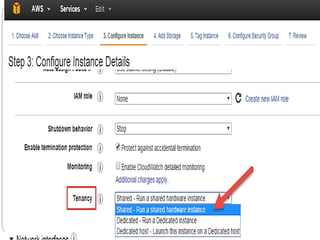
 Pay-as-you-go: there are several payment types
of EC2 instances (on-demand, spot instances,
saving plans, reserved instances, dedicated
hosts) that depend on the user need.
EC2 service: Elastic Compute Cloud
Features :
 Pause and Resume Your Instances:
 You will not be charged for instance usage while
your instance is hibernated.
 GPU Compute Instances:
 Customers requiring massive floating point
processing power will benefit from the next-
generation of general-purpose GPU compute
instances from AWS, Amazon EC2 P3
instances (computational finance, seismic
analysis, molecular modeling, genomics…)
EC2 service: Elastic Compute Cloud
Features :
 Dense HDD Storage Instances:
 provide customers with up to 48 TB of instance
storage across 24 hard disk drives.
 Optimized CPU Configurations:
 It gives greater control of your Amazon EC2
instances:
1) If you are enabling multithreading, you can
specify a custom number of vCPUs.
2) You can disable multithreading if you can
perform well your work with single-threaded
CPUs.
EC2 service: Elastic Compute Cloud
Features :
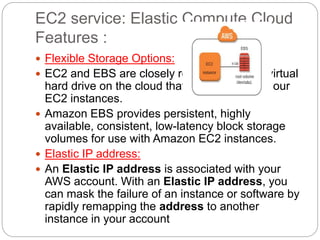
 Flexible Storage Options:
 EC2 and EBS are closely related: EBS is a virtual
hard drive on the cloud that we will attach to our
EC2 instances.
 Amazon EBS provides persistent, highly
available, consistent, low-latency block storage
volumes for use with Amazon EC2 instances.
 Elastic IP address:
 An Elastic IP address is associated with your
AWS account. With an Elastic IP address, you
can mask the failure of an instance or software by
rapidly remapping the address to another
instance in your account
Discussion
 Why are there several payment methods in EC2
service?
 What’s the benefit of elastic IP address?
 What makes EC2 storage flexible?
 How is CPU configuration optimized in EC2?
 What’s the interest of pausing and resuming
instances?
 What are GPU Compute Instances and for whom
are they destined?
EC2 service: Elastic Compute Cloud
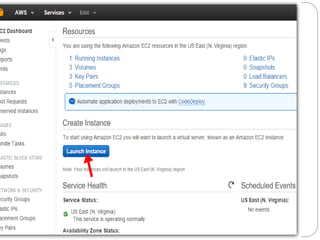
How to use?
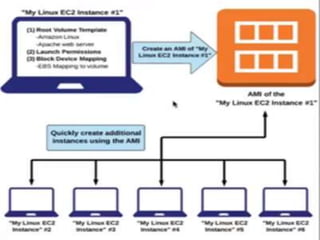
 Select a pre-configured, templated Amazon
Machine Image (AMI) Or create an AMI
containing your applications, libraries, data, and
associated configuration settings.
 Configure security and network access on your
Amazon EC2 instance.
 Choose which instance type(s) you want.
 Determine whether you want to run in multiple
locations, utilize static IP endpoints, or attach
persistent block storage to your instances.
 Pay only for the resources that you actually
consume.
EC2 service: Elastic Compute Cloud
instance types
 General Purpose Instances.
 Computer Optimized Instances: processor speed
 Memory Optimized instances.
 Accelerated Computing Instances : ( for tectonic
plates usage for example).
 Storage Optimized Instances.
CloudWatch
CloudWatch
 Amazon CloudWatch is a monitoring and
observability service.
 With CloudWatch, you can collect and access all
your performance and operational data in form of
logs and metrics from a single platform, set
alarms, and automatically react to changes in
your AWS resources.
CloudWatch
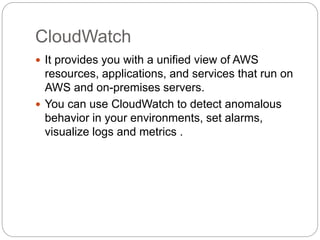
 It provides you with a unified view of AWS
resources, applications, and services that run on
AWS and on-premises servers.
 You can use CloudWatch to detect anomalous
behavior in your environments, set alarms,
visualize logs and metrics .
CloudWatch use cases
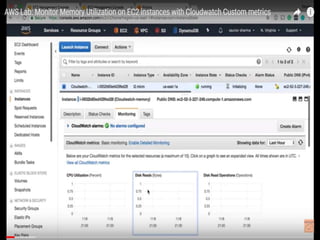
 Monitor Amazon EC2: View metrics for CPU
utilization, data transfer, and disk usage activity
from Amazon EC2 instances (Basic Monitoring)
for no additional charge.
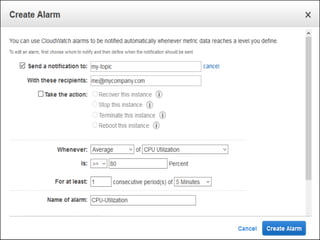
 Set Alarms: Set alarms on any of your metrics to
send you notifications or take other automated
actions.
 Monitor and React to Resource Changes:
CloudWatch Events provides a stream of events
describing changes to your AWS resources. You
can easily build workflows that automatically take
actions you define, such as stopping an Amazon
EC2 instance
Let us discuss
 What is the advantage of CloudWatch?
 Give an example for metrics you can set alarm
for?
 What can you do in order to react to undesirable
changes in your resources?
Conclusion
 IAM service decides who does what and keeps
track of that.
 VPC enables you to create your private network
over the cloud and configure and monitor it the
way you decide.
 EC2 is like renting servers over the cloud and
deciding of the details.
 CloudWatch is a way to control your resources
according to specific metrics

Aws principle services: IAM,VPC, EC2, Cloudwatch

  • 1.
  • 2.
    Overview  IAM  VPC EC2  CloudWatch
  • 3.
    I A M: Identity Access Management  Its main roles are to:  centralize the management of individual or group users.  secure users thanks to the MFA (multi-Factor Authentication)  share certain accesses to your AWS account.  manage the granularity of permissions (too finely authorize access to resources).  propose the federation of access to and from other already existing directories (connect with Face book ,Google account ....).  manage password rotations very finely
  • 4.
    I A M: Identity Access Management  So, we conclude that IAM service :  decides who does what  authorizes or prohibits accesses  records who does what (cloudTrails, audits)
  • 6.
    I A M: Identity Access Management  When we create an Amazon account, we start with a single connection identity that has full access to all the resources regardless of regions.  It can access all the account services and resources .  This identity is called « root ».  After that, we will be able to create users, groups, roles and policies.
  • 7.
    AWS Region US-WEST (N.California) EU-WEST (Ireland) EU-Central (Frankfurt) ASIA PAC (Tokyo) ASIA PAC (Singapore) US-WEST (Oregon) SOUTH AMERICA (Sao Paulo) US-EAST (Virginia) GOV CLOUD ASIA PAC (Sydney) China (Beijing)
  • 8.
    I A M: Identity Access Management Administrators group Policy
  • 9.
    I A M: Identity Access Management  For example, we create a group of administrators and we assign policies to them.  Once created, administrators can create other users without going through the root.  To execute commands, there are several operating interfaces: the administration console or the AWS command line.
  • 10.
    I A M: Identity Access Management  From the beginning, the root will decide which ones will access or not the management console.
  • 11.
    I A M: Identity Access Management How will the user access ?  Console interface:  Users will input their username and password.  Command line interface:  Access key ID +secret access key  During access key creation, AWS gives you one opportunity to view and download the secret access key part of the access key.
  • 12.
    I A M: Identity Access Management roles  A role is a set of policies.  A role can be associated with a user, a group or an AWS service.  for each role, you must define:  Trust policy  Permissions policy  The trust policy specifies which trusted account members are allowed to assume the role. When you create a trust policy, you cannot specify a wildcard (*) as a principal.  The permissions policy define the details of access rights.
  • 13.
    So what isthe difference between a user and a role in AWS?
  • 14.
    I A M: Identity Access Management  An IAM user has permanent long-term credentials and is used to directly interact with AWS services.  An IAM role does not have any credentials and cannot make direct requests to AWS services. IAM roles are meant to be assumed by authorized entities, such as IAM users, applications, or an AWS service such as EC2.
  • 15.
    I A M: Identity Access Management policies  policies are stored in AWS as JSON (JavaScript Object Notation) documents.  You manage permissions or access in AWS by creating policies (see the figure below) and attaching them to IAM identities (users, groups of users, or roles).
  • 16.
    I A M: Identity Access Management policies
  • 17.
    VPC : VirtualPrivate Cloud
  • 18.
    VPC service: Virtualprivate Cloud  It is a virtual private network in the AWS cloud.  Complete access to your network configuration.  It offers many levels of security control.  Other AWS services are deployed inside VPC.
  • 19.
    VPC service: Virtualprivate Cloud  AWS VPC functionalities:  It launches resources in subnets that we have created in our VPC: create endpoints to allow services to have direct access to the interior of your VPC.  It is possible to create several VPC in a region.  It is possible to create several VPC in several regions.  It is possible to interconnect between several VPC from the same region or from different regions.
  • 20.
    VPC service: Virtualprivate Cloud  VPC components:  Subnets (public : visible on internet, or private).  Gateway Internet : IGW or NAT.  NACL: control access to subnets.  Routing tables : control outgoing network traffic  Endpoints for AWS services.
  • 22.
  • 24.
    EC2 service: ElasticCompute Cloud  This service is like one or more servers.  Elastic: can dynamically increase or reduce its capacities according to the demand of several applications.
  • 26.
    EC2 service: ElasticCompute Cloud Features :  Simplicity: provisioning in seconds.  resizable: increase the number of machines that will do the calculation.  Pay-as-you-go: there are several payment types of EC2 instances (on-demand, spot instances, saving plans, reserved instances, dedicated hosts) that depend on the user need.
  • 27.
    EC2 service: ElasticCompute Cloud Features :  Pause and Resume Your Instances:  You will not be charged for instance usage while your instance is hibernated.  GPU Compute Instances:  Customers requiring massive floating point processing power will benefit from the next- generation of general-purpose GPU compute instances from AWS, Amazon EC2 P3 instances (computational finance, seismic analysis, molecular modeling, genomics…)
  • 28.
    EC2 service: ElasticCompute Cloud Features :  Dense HDD Storage Instances:  provide customers with up to 48 TB of instance storage across 24 hard disk drives.  Optimized CPU Configurations:  It gives greater control of your Amazon EC2 instances: 1) If you are enabling multithreading, you can specify a custom number of vCPUs. 2) You can disable multithreading if you can perform well your work with single-threaded CPUs.
  • 29.
    EC2 service: ElasticCompute Cloud Features :  Flexible Storage Options:  EC2 and EBS are closely related: EBS is a virtual hard drive on the cloud that we will attach to our EC2 instances.  Amazon EBS provides persistent, highly available, consistent, low-latency block storage volumes for use with Amazon EC2 instances.  Elastic IP address:  An Elastic IP address is associated with your AWS account. With an Elastic IP address, you can mask the failure of an instance or software by rapidly remapping the address to another instance in your account
  • 30.
    Discussion  Why arethere several payment methods in EC2 service?  What’s the benefit of elastic IP address?  What makes EC2 storage flexible?  How is CPU configuration optimized in EC2?  What’s the interest of pausing and resuming instances?  What are GPU Compute Instances and for whom are they destined?
  • 31.
    EC2 service: ElasticCompute Cloud How to use?  Select a pre-configured, templated Amazon Machine Image (AMI) Or create an AMI containing your applications, libraries, data, and associated configuration settings.  Configure security and network access on your Amazon EC2 instance.  Choose which instance type(s) you want.  Determine whether you want to run in multiple locations, utilize static IP endpoints, or attach persistent block storage to your instances.  Pay only for the resources that you actually consume.
  • 33.
    EC2 service: ElasticCompute Cloud instance types  General Purpose Instances.  Computer Optimized Instances: processor speed  Memory Optimized instances.  Accelerated Computing Instances : ( for tectonic plates usage for example).  Storage Optimized Instances.
  • 34.
  • 35.
    CloudWatch  Amazon CloudWatchis a monitoring and observability service.  With CloudWatch, you can collect and access all your performance and operational data in form of logs and metrics from a single platform, set alarms, and automatically react to changes in your AWS resources.
  • 37.
    CloudWatch  It providesyou with a unified view of AWS resources, applications, and services that run on AWS and on-premises servers.  You can use CloudWatch to detect anomalous behavior in your environments, set alarms, visualize logs and metrics .
  • 39.
    CloudWatch use cases Monitor Amazon EC2: View metrics for CPU utilization, data transfer, and disk usage activity from Amazon EC2 instances (Basic Monitoring) for no additional charge.  Set Alarms: Set alarms on any of your metrics to send you notifications or take other automated actions.  Monitor and React to Resource Changes: CloudWatch Events provides a stream of events describing changes to your AWS resources. You can easily build workflows that automatically take actions you define, such as stopping an Amazon EC2 instance
  • 40.
    Let us discuss What is the advantage of CloudWatch?  Give an example for metrics you can set alarm for?  What can you do in order to react to undesirable changes in your resources?
  • 41.
    Conclusion  IAM servicedecides who does what and keeps track of that.  VPC enables you to create your private network over the cloud and configure and monitor it the way you decide.  EC2 is like renting servers over the cloud and deciding of the details.  CloudWatch is a way to control your resources according to specific metrics

Editor's Notes

  • #8 Regions consist of 1 or more AZs AZs are equivalent to Clusters of DCs