Design principles
Introduction
• In this lesson, we’re going to talk about some
established principles that we’d discovered
after decades of designing user interfaces.
• We want to understand the fundamental
building blocks of HCI, and separately we’ll
talk about how to build on those foundations
to do new research and new development .
• To get started though, let’s first define some of
the overarching ideas of design principles.
Introduction
• In this lesson, we’re going to learn the way we
focus on users and tasks in HCI, not on tools
and interfaces on their own
• We’re going to talk about the role of the
interface and how it mediates between the
user and the task.
Interfaces : between user and task
• At the heart of HCI is the idea that users use
interfaces to accomplish some task.
• In general, that interface wouldn’t have to be
technological.
• In HCI, we’re going to focus on interfaces that
are in some way computational.
• To design a good interface, we need to
understand both the user and the tasks
they’re trying to accomplish.
Interfaces : between user and task
• One of the mistakes many novice designers make
is jumping too quickly to the interface, without
understanding the task.
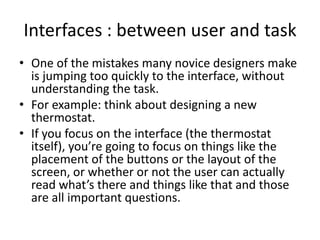
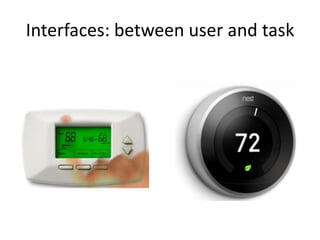
• For example: think about designing a new
thermostat.
• If you focus on the interface (the thermostat
itself), you’re going to focus on things like the
placement of the buttons or the layout of the
screen, or whether or not the user can actually
read what’s there and things like that and those
are all important questions.
Interfaces : between user and task
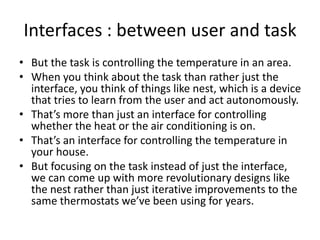
• But the task is controlling the temperature in an area.
• When you think about the task than rather just the
interface, you think of things like nest, which is a device
that tries to learn from the user and act autonomously.
• That’s more than just an interface for controlling
whether the heat or the air conditioning is on.
• That’s an interface for controlling the temperature in
your house.
• But focusing on the task instead of just the interface,
we can come up with more revolutionary designs like
the nest rather than just iterative improvements to the
same thermostats we’ve been using for years.
Interfaces: between user and task
Identifying a task
• Here are five quick tips for identifying a user task:
1) Watch real users: instead of just speculating or
brainstorming, get out there and watch real
users performing in the area in which you’re
interested.
2) Talk to them: recruit some participants to come
perform the task and talk their way through it:
find out what they’re thinking, what their goals
are, what their motives are
Identifying a task
3) Start small: start by looking at the individual little
tasks, it’s tempting to come in believing you already
understand the task, but if you do, you’ll interpret
everything you see in terms of what you already
believe.
Instead, start by looking at the smallest operators a user
performs.
4) Abstract up: working from those small observations
try to abstract up to an understanding of the tasks
that they’re trying to complete .
Keep asking why they’re performing these actions until
you get beyond the scope of your design.
Identifying a task
• For example: what is Ahmed doing?
• He is swiping his credit card.
• Why?
• To make a purchase
• Why?
• To acquire some goods.
• Why?
• To repair his car
• Somewhere in this sequence is likely the task for
which we want to design.
Identifying a task
5) You’re not your user: even if you yourself
perform the task for which you’re designing,
you’re not designing for you, you’re designing
for everyone that performs the task.
So leave behind you your own previous
experiences and preconceived notions about
it.
Usefulness and usability
• The ultimate goal of design in HCI is to create
interfaces that are both useful and useable.
• Useful means the interface allows the user to
achieve some tasks but usefulness is a pretty low
bar (not a big challenge).
• For example, a map is useful in finding your way
from one place to another, but it isn’t the most
useable thing in the world.
• You have to keep track of where you are, you
have to plot your own route, and you have to do
all of this while driving the car,
Usefulness and usability
• So before GPS navigation, people would often manually write down
the turns before they’re actually started driving somewhere that
they hadn’t been before.
• So our big concern is usability.
• That’s where we get things like navigation applications
• Notice how we have to focus on understanding the tasks when
we’re performing design.
• If we set up to design a better map, we probably wouldn’t have
ended up with a navigation app.
• It was through understanding the task of navigation itself that we
realized we could offload a lot of the cognitive load of navigation
onto the interface, closing the loop between the user and the task
of navigation.
• Cognitive load: the total mental effort being used in working
memory.
User-centered design
Views of the user
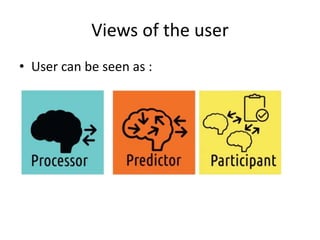
• User can be seen as :
– Processor
– Predictor
– Participant
View of the user: Processor
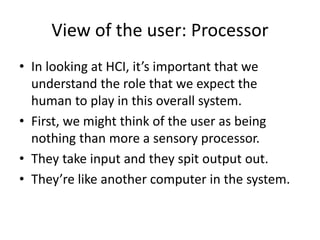
• In looking at HCI, it’s important that we
understand the role that we expect the
human to play in this overall system.
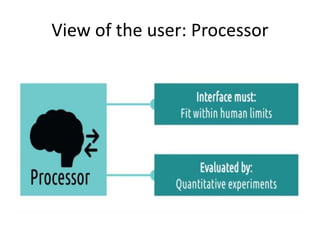
• First, we might think of the user as being
nothing than more a sensory processor.
• They take input and they spit output out.
• They’re like another computer in the system.
View of the user: Processor
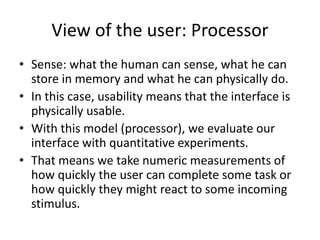
• Sense: what the human can sense, what he can
store in memory and what he can physically do.
• In this case, usability means that the interface is
physically usable.
• With this model (processor), we evaluate our
interface with quantitative experiments.
• That means we take numeric measurements of
how quickly the user can complete some task or
how quickly they might react to some incoming
stimulus.
View of the user: Predictor
• Here we care deeply about the human
knowledge, experience, expectations and their
thought process.
• We want them to be able to predict what will
happen as a result of some action they take: be
able to map input to output, getting inside their
head, understanding what they’re thinking, what
they’re seeing, what they’re feeling when they’re
interacting with some task
View of the user: Predictor
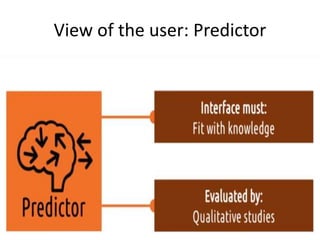
• If we’re taking this perspective, then the
interface must fit what humans know.
• It must fit with their knowledge and help
them know what they don’t already know and
impact positively what they already know.
• To do so, we evaluate these kinds of interfaces
with qualitative studies.
• They are often ex situ studies (in controlled or
inauthentic environments)
View of the user: Predictor
• We might perform task analyses to see where
users are spending their time, or perform
cognitive walk-throughs to understand the
user’s thought process throughout some task.
• Here we’re focusing on one user and one task.
• But sometimes, we want to look even more
broadly than that, that’s when we take the
third view of the user (participant)
View of the user: Participant
• Looking at the user as a participant means you’re
not only interested in what’s inside his head,
we’re also interested in what’s going on around
him at the same time: like what are other tasks or
interfaces they’re using, or what other people
they’re interacting with.
• We want to understand for example what’s
competing to his attention? what are his available
cognitive resources? What’s the importance of
the task relative to everything else that’s going
on?
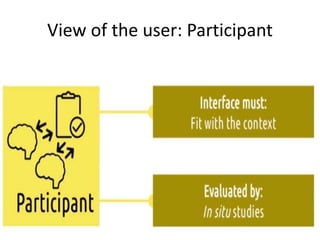
View of the user: Participant
• So if we take this view, then our interface
must fit in the context.
• It’s not enough that the user is able to
physically use the interface and knows how to
use the system, they must actually know how
to interact with the system in the context, and
because context is so important here, we
evaluate interfaces with in situ studies (within
the authentic context)
View of the user: Participant
• If we’re evaluating a new GPS application for
example, we need actually to go out and look
at it in the context of real drivers driving on
real roads.
Designing with the three views
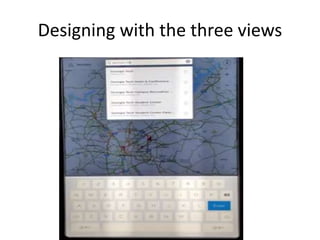
• Suppose we’re trying to redesign the previous
interface in order to make searches faster.
• With the processor model, we’re strictly
working at the processor’s observable
behavior.
• We construct a controlled study where we
bring participants in, give them addresses to
enter and different interfaces to use, and time
them on different versions.
Designing with the three views
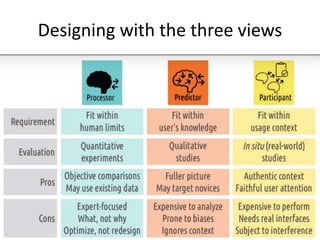
• (+)
• Objective comparisons
• (-)
• Can’t find reasons for differences
•  Generally, we use the processor model to
evaluate what we have designed, not to
redesign.
Designing with the three views
• With the predictor model, we’re going to start
asking our users for inputs, we can bring them for
interviews, conduct focus groups, send out
surveys , show them prototypes for new
interfaces and have them describe their thought
process while trying to interact with them.
• We might find that users find that some icon is
misleading compared to its real meaning.
• We might understand why users choose different
interfaces at different times
Designing with the three views
• (+)
• More complete picture of interaction
• (-)
• Analysis may be expensive
Designing with the three views
• With the participant model, we view the user and the
interface in the context they are actually interacting,
the broader activity of driving (our example is GPS
interface), not just a user interacting with an interface.
• (+)
• Evaluates user in context, capture real user attention
• (-)
• Real functional interfaces
• Expensive to perform and analyze.
Designing with the three views

Design principles

  • 1.
  • 2.
    Introduction • In thislesson, we’re going to talk about some established principles that we’d discovered after decades of designing user interfaces. • We want to understand the fundamental building blocks of HCI, and separately we’ll talk about how to build on those foundations to do new research and new development . • To get started though, let’s first define some of the overarching ideas of design principles.
  • 3.
    Introduction • In thislesson, we’re going to learn the way we focus on users and tasks in HCI, not on tools and interfaces on their own • We’re going to talk about the role of the interface and how it mediates between the user and the task.
  • 4.
    Interfaces : betweenuser and task • At the heart of HCI is the idea that users use interfaces to accomplish some task. • In general, that interface wouldn’t have to be technological. • In HCI, we’re going to focus on interfaces that are in some way computational. • To design a good interface, we need to understand both the user and the tasks they’re trying to accomplish.
  • 5.
    Interfaces : betweenuser and task • One of the mistakes many novice designers make is jumping too quickly to the interface, without understanding the task. • For example: think about designing a new thermostat. • If you focus on the interface (the thermostat itself), you’re going to focus on things like the placement of the buttons or the layout of the screen, or whether or not the user can actually read what’s there and things like that and those are all important questions.
  • 6.
    Interfaces : betweenuser and task • But the task is controlling the temperature in an area. • When you think about the task than rather just the interface, you think of things like nest, which is a device that tries to learn from the user and act autonomously. • That’s more than just an interface for controlling whether the heat or the air conditioning is on. • That’s an interface for controlling the temperature in your house. • But focusing on the task instead of just the interface, we can come up with more revolutionary designs like the nest rather than just iterative improvements to the same thermostats we’ve been using for years.
  • 7.
  • 8.
    Identifying a task •Here are five quick tips for identifying a user task: 1) Watch real users: instead of just speculating or brainstorming, get out there and watch real users performing in the area in which you’re interested. 2) Talk to them: recruit some participants to come perform the task and talk their way through it: find out what they’re thinking, what their goals are, what their motives are
  • 9.
    Identifying a task 3)Start small: start by looking at the individual little tasks, it’s tempting to come in believing you already understand the task, but if you do, you’ll interpret everything you see in terms of what you already believe. Instead, start by looking at the smallest operators a user performs. 4) Abstract up: working from those small observations try to abstract up to an understanding of the tasks that they’re trying to complete . Keep asking why they’re performing these actions until you get beyond the scope of your design.
  • 10.
    Identifying a task •For example: what is Ahmed doing? • He is swiping his credit card. • Why? • To make a purchase • Why? • To acquire some goods. • Why? • To repair his car • Somewhere in this sequence is likely the task for which we want to design.
  • 11.
    Identifying a task 5)You’re not your user: even if you yourself perform the task for which you’re designing, you’re not designing for you, you’re designing for everyone that performs the task. So leave behind you your own previous experiences and preconceived notions about it.
  • 12.
    Usefulness and usability •The ultimate goal of design in HCI is to create interfaces that are both useful and useable. • Useful means the interface allows the user to achieve some tasks but usefulness is a pretty low bar (not a big challenge). • For example, a map is useful in finding your way from one place to another, but it isn’t the most useable thing in the world. • You have to keep track of where you are, you have to plot your own route, and you have to do all of this while driving the car,
  • 13.
    Usefulness and usability •So before GPS navigation, people would often manually write down the turns before they’re actually started driving somewhere that they hadn’t been before. • So our big concern is usability. • That’s where we get things like navigation applications • Notice how we have to focus on understanding the tasks when we’re performing design. • If we set up to design a better map, we probably wouldn’t have ended up with a navigation app. • It was through understanding the task of navigation itself that we realized we could offload a lot of the cognitive load of navigation onto the interface, closing the loop between the user and the task of navigation. • Cognitive load: the total mental effort being used in working memory.
  • 14.
  • 15.
    Views of theuser • User can be seen as : – Processor – Predictor – Participant
  • 16.
    View of theuser: Processor • In looking at HCI, it’s important that we understand the role that we expect the human to play in this overall system. • First, we might think of the user as being nothing than more a sensory processor. • They take input and they spit output out. • They’re like another computer in the system.
  • 17.
    View of theuser: Processor
  • 18.
    View of theuser: Processor • Sense: what the human can sense, what he can store in memory and what he can physically do. • In this case, usability means that the interface is physically usable. • With this model (processor), we evaluate our interface with quantitative experiments. • That means we take numeric measurements of how quickly the user can complete some task or how quickly they might react to some incoming stimulus.
  • 19.
    View of theuser: Predictor • Here we care deeply about the human knowledge, experience, expectations and their thought process. • We want them to be able to predict what will happen as a result of some action they take: be able to map input to output, getting inside their head, understanding what they’re thinking, what they’re seeing, what they’re feeling when they’re interacting with some task
  • 20.
    View of theuser: Predictor • If we’re taking this perspective, then the interface must fit what humans know. • It must fit with their knowledge and help them know what they don’t already know and impact positively what they already know. • To do so, we evaluate these kinds of interfaces with qualitative studies. • They are often ex situ studies (in controlled or inauthentic environments)
  • 21.
    View of theuser: Predictor
  • 22.
    View of theuser: Predictor • We might perform task analyses to see where users are spending their time, or perform cognitive walk-throughs to understand the user’s thought process throughout some task. • Here we’re focusing on one user and one task. • But sometimes, we want to look even more broadly than that, that’s when we take the third view of the user (participant)
  • 23.
    View of theuser: Participant • Looking at the user as a participant means you’re not only interested in what’s inside his head, we’re also interested in what’s going on around him at the same time: like what are other tasks or interfaces they’re using, or what other people they’re interacting with. • We want to understand for example what’s competing to his attention? what are his available cognitive resources? What’s the importance of the task relative to everything else that’s going on?
  • 24.
    View of theuser: Participant • So if we take this view, then our interface must fit in the context. • It’s not enough that the user is able to physically use the interface and knows how to use the system, they must actually know how to interact with the system in the context, and because context is so important here, we evaluate interfaces with in situ studies (within the authentic context)
  • 25.
    View of theuser: Participant
  • 26.
    View of theuser: Participant • If we’re evaluating a new GPS application for example, we need actually to go out and look at it in the context of real drivers driving on real roads.
  • 27.
    Designing with thethree views
  • 28.
    Designing with thethree views • Suppose we’re trying to redesign the previous interface in order to make searches faster. • With the processor model, we’re strictly working at the processor’s observable behavior. • We construct a controlled study where we bring participants in, give them addresses to enter and different interfaces to use, and time them on different versions.
  • 29.
    Designing with thethree views • (+) • Objective comparisons • (-) • Can’t find reasons for differences •  Generally, we use the processor model to evaluate what we have designed, not to redesign.
  • 30.
    Designing with thethree views • With the predictor model, we’re going to start asking our users for inputs, we can bring them for interviews, conduct focus groups, send out surveys , show them prototypes for new interfaces and have them describe their thought process while trying to interact with them. • We might find that users find that some icon is misleading compared to its real meaning. • We might understand why users choose different interfaces at different times
  • 31.
    Designing with thethree views • (+) • More complete picture of interaction • (-) • Analysis may be expensive
  • 32.
    Designing with thethree views • With the participant model, we view the user and the interface in the context they are actually interacting, the broader activity of driving (our example is GPS interface), not just a user interacting with an interface. • (+) • Evaluates user in context, capture real user attention • (-) • Real functional interfaces • Expensive to perform and analyze.
  • 33.
    Designing with thethree views