User-Centred Design
   An Overview
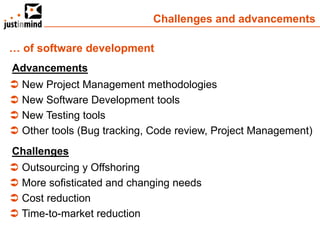
Challenges and advancements

… of software development
Advancements
 New Project Management methodologies
 New Software Development tools
 New Testing tools
 Other tools (Bug tracking, Code review, Project Management)
Challenges
 Outsourcing y Offshoring
 More sofisticated and changing needs
 Cost reduction
 Time-to-market reduction
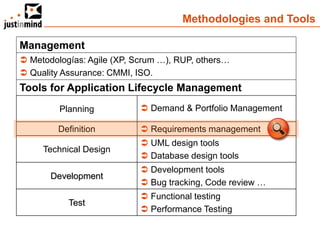
Methodologies and Tools

Management
 Metodologías: Agile (XP, Scrum …), RUP, others…
 Quality Assurance: CMMI, ISO.
Tools for Application Lifecycle Management
         Planning            Demand & Portfolio Management

         Definition          Requirements management
                             UML design tools
     Technical Design
                             Database design tools
                             Development tools
       Development
                             Bug tracking, Code review …
                             Functional testing
           Test
                             Performance Testing
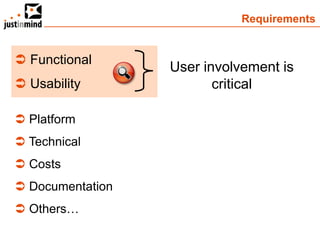
Requirements


 Functional
                  User involvement is
 Usability              critical

 Platform
 Technical
 Costs
 Documentation
 Others…
Application definition: User-centred Design


“ User-centred design is a process in
which the needs, wants, and limitations
of end users of a product are given
extensive attention at each stage of the
design process ”
                                    Wikipedia
User-centred Design: the Goal


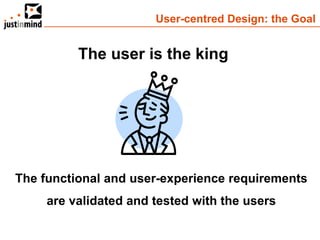
          The user is the king


The functional and user-experience requirements
     are validated and tested with the users
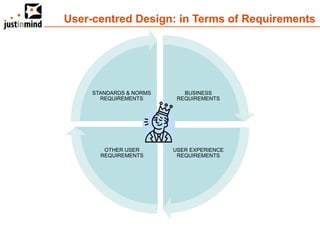
User-centred Design: in Terms of Requirements


     STANDARDS & NORMS      BUSINESS
       REQUIREMENTS       REQUIREMENTS


        OTHER USER       USER EXPERIENCE
       REQUIREMENTS       REQUIREMENTS
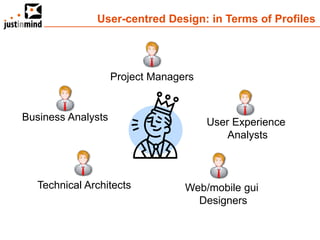
User-centred Design: in Terms of Profiles


                    Project Managers


Business Analysts                      User Experience
                                           Analysts


   Technical Architects           Web/mobile gui
                                    Designers
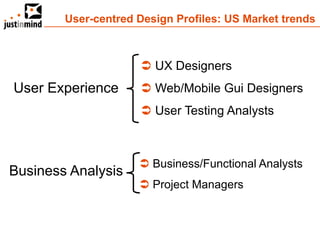
User-centred Design Profiles: US Market trends


                      UX Designers
User Experience       Web/Mobile Gui Designers
                      User Testing Analysts


                      Business/Functional Analysts
Business Analysis
                      Project Managers
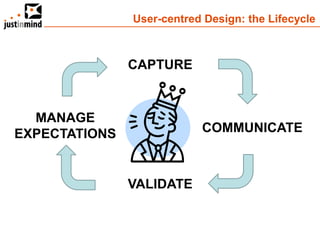
User-centred Design: the Lifecycle


               CAPTURE


  MANAGE
EXPECTATIONS               COMMUNICATE


               VALIDATE
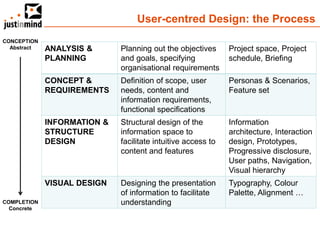
User-centred Design: the Process
CONCEPTION
  Abstract   ANALYSIS &      Planning out the objectives      Project space, Project
             PLANNING        and goals, specifying            schedule, Briefing
                             organisational requirements
             CONCEPT &       Definition of scope, user        Personas & Scenarios,
             REQUIREMENTS    needs, content and               Feature set
                             information requirements,
                             functional specifications
             INFORMATION &   Structural design of the         Information
             STRUCTURE       information space to             architecture, Interaction
             DESIGN          facilitate intuitive access to   design, Prototypes,
                             content and features             Progressive disclosure,
                                                              User paths, Navigation,
                                                              Visual hierarchy
             VISUAL DESIGN   Designing the presentation       Typography, Colour
                             of information to facilitate     Palette, Alignment …
COMPLETION                   understanding
  Concrete
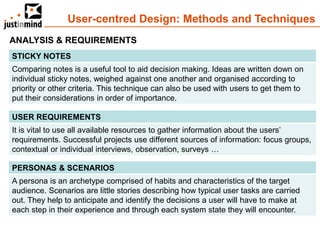
User-centred Design: Methods and Techniques
ANALYSIS & REQUIREMENTS
STICKY NOTES
Comparing notes is a useful tool to aid decision making. Ideas are written down on
individual sticky notes, weighed against one another and organised according to
priority or other criteria. This technique can also be used with users to get them to
put their considerations in order of importance.

USER REQUIREMENTS
It is vital to use all available resources to gather information about the users’
requirements. Successful projects use different sources of information: focus groups,
contextual or individual interviews, observation, surveys …

PERSONAS & SCENARIOS
A persona is an archetype comprised of habits and characteristics of the target
audience. Scenarios are little stories describing how typical user tasks are carried
out. They help to anticipate and identify the decisions a user will have to make at
each step in their experience and through each system state they will encounter.
User-centred Design: Methods and Techniques

INFORMATION, STRUCTURE & VISUAL DESIGN
RAPID VISUALISATION
Visualising ideas and concepts rapidly using pen and paper is helpful to
communicate them to the team and to test ideas quickly without investing time and
resources into polished design. Rough and unpolished looking sketches, wireframes
and storyboards encourage constructive feedback and stimulate discussion.

PROTOTYPING
Prototypes are models that can be used to evaluate responses to form (looks-like
prototype) or aspects of build and functionality (works-like prototype) of a product.
They typically evolve from concept sketches or wireframes to low and high-fidelity
models as they progress through the definition cycle.

USER TESTING
Evaluating a product by testing it with representative users helps to identify usability
problems by collecting quantitative data on the users’ performance (e.g. error rate)
and establishing their satisfaction with the product.
User-centred Design: the Benefits


 Increase User Adoption
 Reduce Rework / Costs
 Reduce Risks
 Reduce Time-to-market
 Increase Sales
APPLICATION PROTOTYPING

Gathering and Validating functional requirements
      through prototypes and simulations
User Centred Design: Prototyping


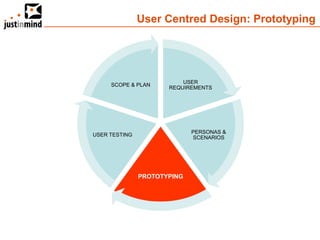
                          USER
     SCOPE & PLAN
                      REQUIREMENTS


                             PERSONAS &
USER TESTING
                             SCENARIOS


               PROTOTYPING
Application Prototyping: Questions


 Could you imagine VOLKSWAGEN
  producing cars without designing
  prototypes and testing these
  prototypes?

 Could you imagine IKEA producing
  furnitures without designing prototypes
  or proof of concepts?
The Value of Prototyping


1. It’s Generative
2. Show and Experience
3. Reduces Misinterpretations
4. Saves Time and Money
5. Reduces Waste
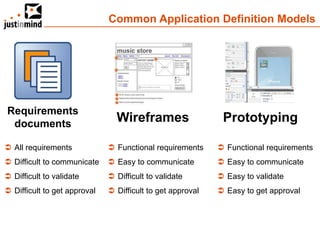
Common Application Definition Models


Requirements
 documents
                                Wireframes                   Prototyping

 All requirements             Functional requirements      Functional requirements
 Difficult to communicate     Easy to communicate          Easy to communicate
 Difficult to validate        Difficult to validate        Easy to validate
 Difficult to get approval    Difficult to get approval    Easy to get approval
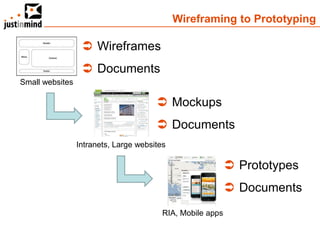
Wireframing to Prototyping

                   Wireframes
                   Documents
Small websites

                                        Mockups
                                        Documents
                 Intranets, Large websites

                                                             Prototypes
                                                             Documents
                                         RIA, Mobile apps
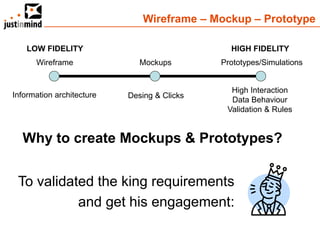
Wireframe – Mockup – Prototype

    LOW FIDELITY                               HIGH FIDELITY
      Wireframe               Mockups        Prototypes/Simulations


                                               High Interaction
Information architecture   Desing & Clicks
                                               Data Behaviour
                                              Validation & Rules


  Why to create Mockups & Prototypes?


 To validated the king requirements
           and get his engagement:
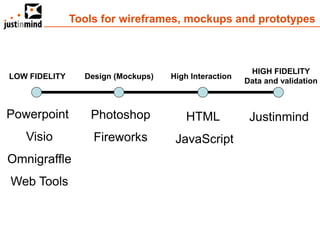
Tools for wireframes, mockups and prototypes


                                                        HIGH FIDELITY
LOW FIDELITY     Design (Mockups)   High Interaction
                                                       Data and validation


Powerpoint        Photoshop             HTML            Justinmind
   Visio           Fireworks         JavaScript
Omnigraffle
Web Tools
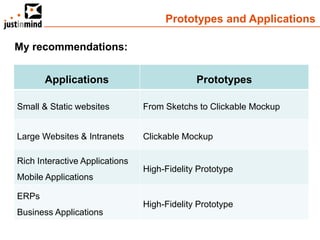
Prototypes and Applications

My recommendations:


       Applications                          Prototypes

Small & Static websites         From Sketchs to Clickable Mockup


Large Websites & Intranets      Clickable Mockup

Rich Interactive Applications
                                High-Fidelity Prototype
Mobile Applications

ERPs
                                High-Fidelity Prototype
Business Applications
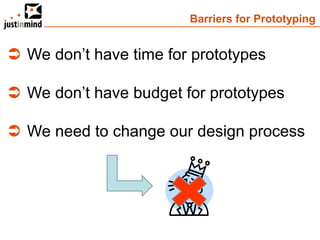
Barriers for Prototyping


 We don’t have time for prototypes

 We don’t have budget for prototypes

 We need to change our design process
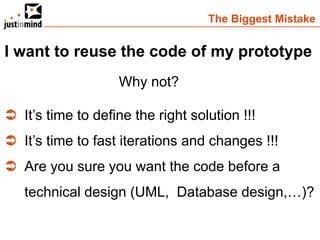
The Biggest Mistake


I want to reuse the code of my prototype
                    Why not?

 It’s time to define the right solution !!!
 It’s time to fast iterations and changes !!!
 Are you sure you want the code before a
   technical design (UML, Database design,…)?
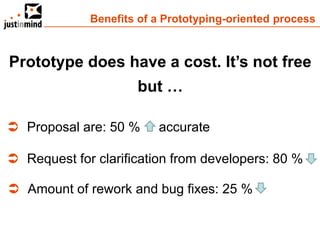
Benefits of a Prototyping-oriented process


Prototype does have a cost. It’s not free
                     but …

 Proposal are: 50 %     accurate

 Request for clarification from developers: 80 %

 Amount of rework and bug fixes: 25 %
JUSTINMIND SOLUTIONS

   If I can’t draw it…
              I can’t understand it
                           Albert Einstein


   If It can’t be experienced …
              it can’t be validated
Justinmind Products

Products
 Justinmind Prototyper: Prototyping and simulation tool
 Justinmind Usernote: Allows to Publish prototypes, Get
  Feedback from users and run User Tests

What kind of software can be prototyped?
 Web Apps
 Websites, Portals, Intranets
 Smartphones (Iphone, Android, Ipad, Blackberry …)
 SAP
Justinmind Prototyper
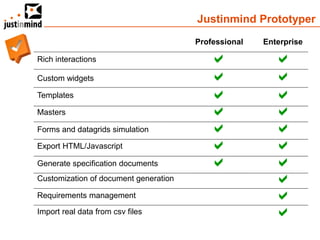
                                       Professional   Enterprise

Rich interactions                                      
Custom widgets                                         
Templates                                              
Masters                                                
Forms and datagrids simulation                         
Export HTML/Javascript                                 
Generate specification documents                       
Customization of document generation                    
Requirements management                                 
Import real data from csv files                         
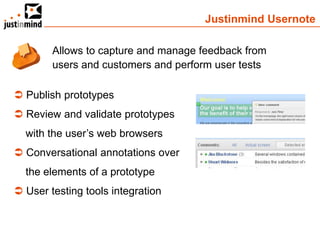
Justinmind Usernote

        Allows to capture and manage feedback from
        users and customers and perform user tests

 Publish prototypes
 Review and validate prototypes
  with the user’s web browsers
 Conversational annotations over
  the elements of a prototype
 User testing tools integration
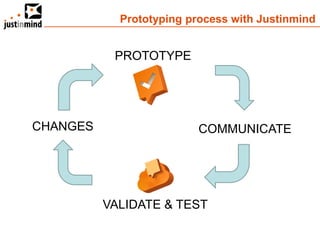
Prototyping process with Justinmind


           PROTOTYPE


CHANGES                   COMMUNICATE


          VALIDATE & TEST
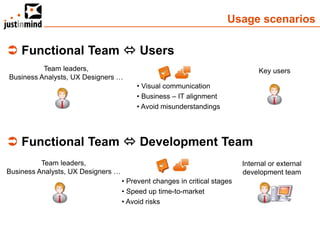
Usage scenarios

 Functional Team  Users
          Team leaders,                                                         Key users
Business Analysts, UX Designers …
                                        • Visual communication
                                        • Business – IT alignment
                                        • Avoid misunderstandings


 Functional Team  Development Team
          Team leaders,                                                    Internal or external
Business Analysts, UX Designers …                                          development team
                                    • Prevent changes in critical stages
                                    • Speed up time-to-market
                                    • Avoid risks
Some customers
Thank you very much for your time

     Questions and Answers

Application Prototyping - Pablo González - Capturing and Managing Requirements

  • 1.
  • 2.
    Challenges and advancements …of software development Advancements  New Project Management methodologies  New Software Development tools  New Testing tools  Other tools (Bug tracking, Code review, Project Management) Challenges  Outsourcing y Offshoring  More sofisticated and changing needs  Cost reduction  Time-to-market reduction
  • 3.
    Methodologies and Tools Management Metodologías: Agile (XP, Scrum …), RUP, others…  Quality Assurance: CMMI, ISO. Tools for Application Lifecycle Management Planning  Demand & Portfolio Management Definition  Requirements management  UML design tools Technical Design  Database design tools  Development tools Development  Bug tracking, Code review …  Functional testing Test  Performance Testing
  • 4.
    Requirements  Functional User involvement is  Usability critical  Platform  Technical  Costs  Documentation  Others…
  • 5.
    Application definition: User-centredDesign “ User-centred design is a process in which the needs, wants, and limitations of end users of a product are given extensive attention at each stage of the design process ” Wikipedia
  • 6.
    User-centred Design: theGoal The user is the king The functional and user-experience requirements are validated and tested with the users
  • 7.
    User-centred Design: inTerms of Requirements STANDARDS & NORMS BUSINESS REQUIREMENTS REQUIREMENTS OTHER USER USER EXPERIENCE REQUIREMENTS REQUIREMENTS
  • 8.
    User-centred Design: inTerms of Profiles Project Managers Business Analysts User Experience Analysts Technical Architects Web/mobile gui Designers
  • 9.
    User-centred Design Profiles:US Market trends  UX Designers User Experience  Web/Mobile Gui Designers  User Testing Analysts  Business/Functional Analysts Business Analysis  Project Managers
  • 10.
    User-centred Design: theLifecycle CAPTURE MANAGE EXPECTATIONS COMMUNICATE VALIDATE
  • 11.
    User-centred Design: theProcess CONCEPTION Abstract ANALYSIS & Planning out the objectives Project space, Project PLANNING and goals, specifying schedule, Briefing organisational requirements CONCEPT & Definition of scope, user Personas & Scenarios, REQUIREMENTS needs, content and Feature set information requirements, functional specifications INFORMATION & Structural design of the Information STRUCTURE information space to architecture, Interaction DESIGN facilitate intuitive access to design, Prototypes, content and features Progressive disclosure, User paths, Navigation, Visual hierarchy VISUAL DESIGN Designing the presentation Typography, Colour of information to facilitate Palette, Alignment … COMPLETION understanding Concrete
  • 12.
    User-centred Design: Methodsand Techniques ANALYSIS & REQUIREMENTS STICKY NOTES Comparing notes is a useful tool to aid decision making. Ideas are written down on individual sticky notes, weighed against one another and organised according to priority or other criteria. This technique can also be used with users to get them to put their considerations in order of importance. USER REQUIREMENTS It is vital to use all available resources to gather information about the users’ requirements. Successful projects use different sources of information: focus groups, contextual or individual interviews, observation, surveys … PERSONAS & SCENARIOS A persona is an archetype comprised of habits and characteristics of the target audience. Scenarios are little stories describing how typical user tasks are carried out. They help to anticipate and identify the decisions a user will have to make at each step in their experience and through each system state they will encounter.
  • 13.
    User-centred Design: Methodsand Techniques INFORMATION, STRUCTURE & VISUAL DESIGN RAPID VISUALISATION Visualising ideas and concepts rapidly using pen and paper is helpful to communicate them to the team and to test ideas quickly without investing time and resources into polished design. Rough and unpolished looking sketches, wireframes and storyboards encourage constructive feedback and stimulate discussion. PROTOTYPING Prototypes are models that can be used to evaluate responses to form (looks-like prototype) or aspects of build and functionality (works-like prototype) of a product. They typically evolve from concept sketches or wireframes to low and high-fidelity models as they progress through the definition cycle. USER TESTING Evaluating a product by testing it with representative users helps to identify usability problems by collecting quantitative data on the users’ performance (e.g. error rate) and establishing their satisfaction with the product.
  • 14.
    User-centred Design: theBenefits  Increase User Adoption  Reduce Rework / Costs  Reduce Risks  Reduce Time-to-market  Increase Sales
  • 15.
    APPLICATION PROTOTYPING Gathering andValidating functional requirements through prototypes and simulations
  • 16.
    User Centred Design:Prototyping USER SCOPE & PLAN REQUIREMENTS PERSONAS & USER TESTING SCENARIOS PROTOTYPING
  • 17.
    Application Prototyping: Questions Could you imagine VOLKSWAGEN producing cars without designing prototypes and testing these prototypes?  Could you imagine IKEA producing furnitures without designing prototypes or proof of concepts?
  • 18.
    The Value ofPrototyping 1. It’s Generative 2. Show and Experience 3. Reduces Misinterpretations 4. Saves Time and Money 5. Reduces Waste
  • 19.
    Common Application DefinitionModels Requirements documents Wireframes Prototyping  All requirements  Functional requirements  Functional requirements  Difficult to communicate  Easy to communicate  Easy to communicate  Difficult to validate  Difficult to validate  Easy to validate  Difficult to get approval  Difficult to get approval  Easy to get approval
  • 20.
    Wireframing to Prototyping  Wireframes  Documents Small websites  Mockups  Documents Intranets, Large websites  Prototypes  Documents RIA, Mobile apps
  • 21.
    Wireframe – Mockup– Prototype LOW FIDELITY HIGH FIDELITY Wireframe Mockups Prototypes/Simulations High Interaction Information architecture Desing & Clicks Data Behaviour Validation & Rules Why to create Mockups & Prototypes? To validated the king requirements and get his engagement:
  • 22.
    Tools for wireframes,mockups and prototypes HIGH FIDELITY LOW FIDELITY Design (Mockups) High Interaction Data and validation Powerpoint Photoshop HTML Justinmind Visio Fireworks JavaScript Omnigraffle Web Tools
  • 23.
    Prototypes and Applications Myrecommendations: Applications Prototypes Small & Static websites From Sketchs to Clickable Mockup Large Websites & Intranets Clickable Mockup Rich Interactive Applications High-Fidelity Prototype Mobile Applications ERPs High-Fidelity Prototype Business Applications
  • 24.
    Barriers for Prototyping We don’t have time for prototypes  We don’t have budget for prototypes  We need to change our design process
  • 25.
    The Biggest Mistake Iwant to reuse the code of my prototype Why not?  It’s time to define the right solution !!!  It’s time to fast iterations and changes !!!  Are you sure you want the code before a technical design (UML, Database design,…)?
  • 26.
    Benefits of aPrototyping-oriented process Prototype does have a cost. It’s not free but …  Proposal are: 50 % accurate  Request for clarification from developers: 80 %  Amount of rework and bug fixes: 25 %
  • 27.
    JUSTINMIND SOLUTIONS If I can’t draw it… I can’t understand it Albert Einstein If It can’t be experienced … it can’t be validated
  • 28.
    Justinmind Products Products  JustinmindPrototyper: Prototyping and simulation tool  Justinmind Usernote: Allows to Publish prototypes, Get Feedback from users and run User Tests What kind of software can be prototyped?  Web Apps  Websites, Portals, Intranets  Smartphones (Iphone, Android, Ipad, Blackberry …)  SAP
  • 29.
    Justinmind Prototyper Professional Enterprise Rich interactions   Custom widgets   Templates   Masters   Forms and datagrids simulation   Export HTML/Javascript   Generate specification documents   Customization of document generation  Requirements management  Import real data from csv files 
  • 30.
    Justinmind Usernote Allows to capture and manage feedback from users and customers and perform user tests  Publish prototypes  Review and validate prototypes with the user’s web browsers  Conversational annotations over the elements of a prototype  User testing tools integration
  • 31.
    Prototyping process withJustinmind PROTOTYPE CHANGES COMMUNICATE VALIDATE & TEST
  • 32.
    Usage scenarios  FunctionalTeam  Users Team leaders, Key users Business Analysts, UX Designers … • Visual communication • Business – IT alignment • Avoid misunderstandings  Functional Team  Development Team Team leaders, Internal or external Business Analysts, UX Designers … development team • Prevent changes in critical stages • Speed up time-to-market • Avoid risks
  • 33.
  • 34.
    Thank you verymuch for your time Questions and Answers