Universal Design and User Support
1
Human Computer Interaction
Chapter 5
May 26, 2016
Presented by Dr. J. VijiPriya,
Assistant Professor, Hawassa University,
Ethiopia
Universal design
2
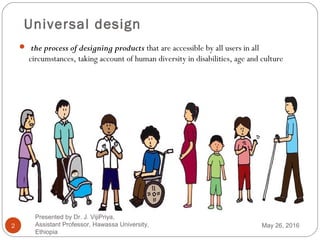
 the process of designing products that are accessible by all users in all
circumstances, taking account of human diversity in disabilities, age and culture
May 26, 2016
Presented by Dr. J. VijiPriya,
Assistant Professor, Hawassa University,
Ethiopia
Seven Universal Design Principles
3
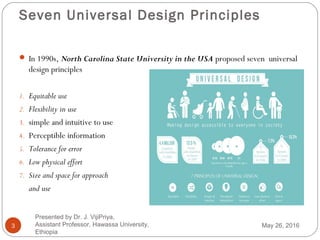
 In 1990s, North Carolina State University in the USA proposed seven universal
design principles
1. Equitable use
2. Flexibility in use
3. simple and intuitive to use
4. Perceptible information
5. Tolerance for error
6. Low physical effort
7. Size and space for approach
and use
May 26, 2016
Presented by Dr. J. VijiPriya,
Assistant Professor, Hawassa University,
Ethiopia
Seven Universal Design Principles Con…
4
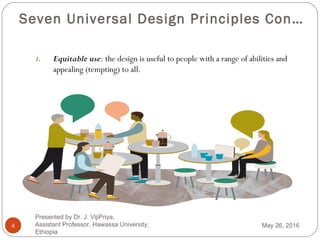
1. Equitable use: the design is useful to people with a range of abilities and
appealing (tempting) to all.
May 26, 2016
Presented by Dr. J. VijiPriya,
Assistant Professor, Hawassa University,
Ethiopia
Seven Universal Design Principles
Con…
5
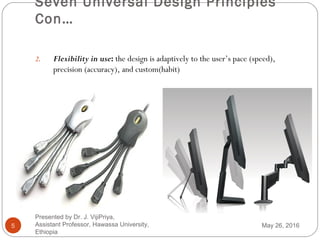
2. Flexibility in use: the design is adaptively to the user’s pace (speed),
precision (accuracy), and custom(habit)
May 26, 2016
Presented by Dr. J. VijiPriya,
Assistant Professor, Hawassa University,
Ethiopia
Seven Universal Design Principles
Con…
6
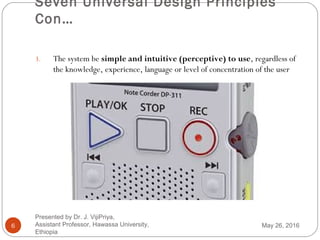
3. The system be simple and intuitive (perceptive) to use, regardless of
the knowledge, experience, language or level of concentration of the user
May 26, 2016
Presented by Dr. J. VijiPriya,
Assistant Professor, Hawassa University,
Ethiopia
Seven Universal Design Principles
Con…
7
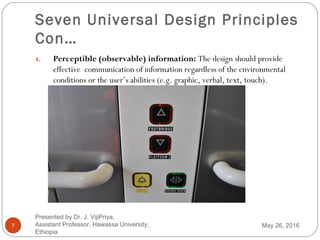
4. Perceptible (observable) information: The design should provide
effective communication of information regardless of the environmental
conditions or the user’s abilities (e.g. graphic, verbal, text, touch).
May 26, 2016
Presented by Dr. J. VijiPriya,
Assistant Professor, Hawassa University,
Ethiopia
Seven Universal Design Principles
Con…
8
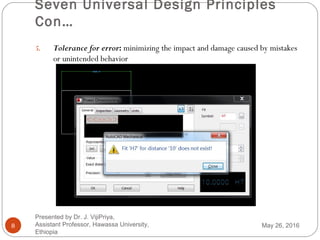
5. Tolerance for error: minimizing the impact and damage caused by mistakes
or unintended behavior
May 26, 2016
Presented by Dr. J. VijiPriya,
Assistant Professor, Hawassa University,
Ethiopia
Seven Universal Design Principles
Con…
9
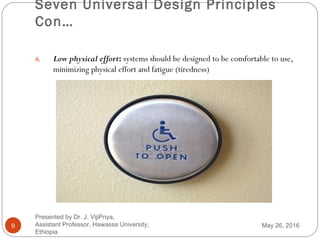
6. Low physical effort: systems should be designed to be comfortable to use,
minimizing physical effort and fatigue (tiredness)
May 26, 2016
Presented by Dr. J. VijiPriya,
Assistant Professor, Hawassa University,
Ethiopia
Seven Universal Design Principles
Con…
10
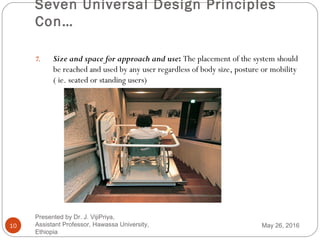
7. Size and space for approach and use: The placement of the system should
be reached and used by any user regardless of body size, posture or mobility
( ie. seated or standing users)
May 26, 2016
Presented by Dr. J. VijiPriya,
Assistant Professor, Hawassa University,
Ethiopia
Multi-modal Interaction
11
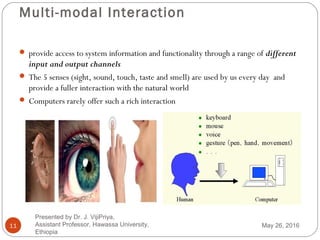
 provide access to system information and functionality through a range of different
input and output channels
 The 5 senses (sight, sound, touch, taste and smell) are used by us every day and
provide a fuller interaction with the natural world
 Computers rarely offer such a rich interaction
May 26, 2016
Presented by Dr. J. VijiPriya,
Assistant Professor, Hawassa University,
Ethiopia
Designing for Diversity
12
The designer considers three key areas:
1. Designing for users with disabilities
visual impairment
hearing impairment
physical impairment
speech impairment
dyslexia
autism
1. Designing for different age groups
− Old people
− Children
1. Designing for cultural differences
May 26, 2016
Presented by Dr. J. VijiPriya,
Assistant Professor, Hawassa University,
Ethiopia
Designing for Diversity Con…
13
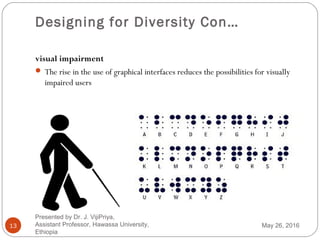
visual impairment
 The rise in the use of graphical interfaces reduces the possibilities for visually
impaired users
May 26, 2016
Presented by Dr. J. VijiPriya,
Assistant Professor, Hawassa University,
Ethiopia
Designing for Diversity Con..
14
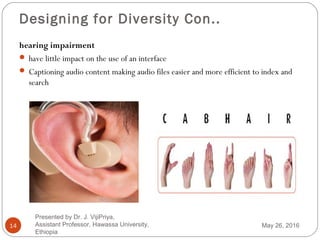
hearing impairment
 have little impact on the use of an interface
 Captioning audio content making audio files easier and more efficient to index and
search
May 26, 2016
Presented by Dr. J. VijiPriya,
Assistant Professor, Hawassa University,
Ethiopia
Designing for Diversity Con…
15
physical impairment
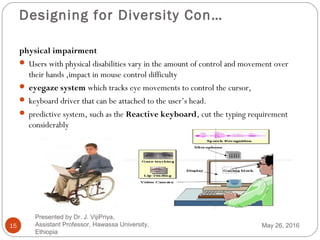
 Users with physical disabilities vary in the amount of control and movement over
their hands ,impact in mouse control difficulty
 eyegaze system which tracks eye movements to control the cursor,
 keyboard driver that can be attached to the user’s head.
 predictive system, such as the Reactive keyboard, cut the typing requirement
considerably
May 26, 2016
Presented by Dr. J. VijiPriya,
Assistant Professor, Hawassa University,
Ethiopia
Designing for Diversity Con…
16
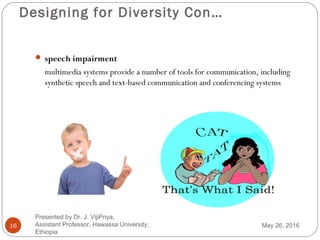
 speech impairment
multimedia systems provide a number of tools for communication, including
synthetic speech and text-based communication and conferencing systems
May 26, 2016
Presented by Dr. J. VijiPriya,
Assistant Professor, Hawassa University,
Ethiopia
Designing for Diversity Con…
17
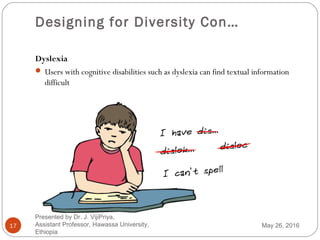
Dyslexia
 Users with cognitive disabilities such as dyslexia can find textual information
difficult
May 26, 2016
Presented by Dr. J. VijiPriya,
Assistant Professor, Hawassa University,
Ethiopia
Designing for Diversity Con…
18
Autism
 affects a person’s ability to communicate and interact with people around them
and to make sense of their environment
1. Social interaction – problems
2. Communication – problems
3. Imagination – problems
How might universal design of technology
assist people with autism?
communication and education.
May 26, 2016
Presented by Dr. J. VijiPriya,
Assistant Professor, Hawassa University,
Ethiopia
Designing for Diversity Con…
19
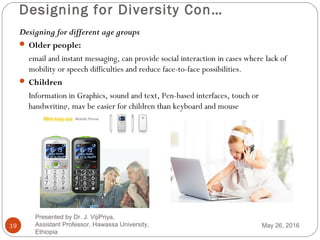
Designing for different age groups
 Older people:
email and instant messaging, can provide social interaction in cases where lack of
mobility or speech difficulties and reduce face-to-face possibilities.
 Children
Information in Graphics, sound and text, Pen-based interfaces, touch or
handwriting, may be easier for children than keyboard and mouse
May 26, 2016
Presented by Dr. J. VijiPriya,
Assistant Professor, Hawassa University,
Ethiopia
Designing for Diversity Con…
20
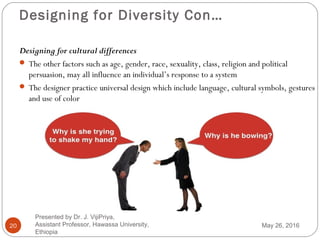
Designing for cultural differences
 The other factors such as age, gender, race, sexuality, class, religion and political
persuasion, may all influence an individual’s response to a system
 The designer practice universal design which include language, cultural symbols, gestures
and use of color
May 26, 2016
Presented by Dr. J. VijiPriya,
Assistant Professor, Hawassa University,
Ethiopia
User Support
21
 Even if an interactive system is properly designed, the user will require varies
assistance at various times, dependent on many factors:
their familiarity with the system,
the job they are trying to do, and so on.
There are four main types of assistance that users require:
1. quick reference
2. task-specific help
3. full explanation
4. tutorial
User support is provided by different types of support system
i. Help systems are problem oriented and specific
ii. Documentation is system oriented and generic
May 26, 2016
Presented by Dr. J. VijiPriya,
Assistant Professor, Hawassa University,
Ethiopia
User Support Con…
22
 Quick reference
used as a reminder to the user for the details of tools
Example: find a particular command option and the syntax of the command
 Task-specific help
 required how to apply the tool to his particular problem
 Full explanation
used when the more experienced or inquisitive (questioning) user may require a
full explanation of a tool or command
 Tutorial
particularly aimed at new users of a tool and provides step-by-step instruction
(perhaps by working through examples) of how to use the tool
May 26, 2016
Presented by Dr. J. VijiPriya,
Assistant Professor, Hawassa University,
Ethiopia
Requirements of user support
23
What features will the help system have? These features are:
 Availability
 access help at any time during his interaction with the system.
 Ideally, run concurrently with main application.
 Accuracy and completeness
 provided should be accurate and complete.
 If provided proves not to match the actual behavior of the system the user will become disillusioned
(disappointed) with the help facilities.
 Consistency
 Online help should also be consistent with paper documentation in terms of content, terminology and
style of presentation
May 26, 2016
Presented by Dr. J. VijiPriya,
Assistant Professor, Hawassa University,
Ethiopia
Requirements of user support Con…
24
 Robustness
 When the system is behaving unexpectedly or has failed altogether ,the help system should be
correct error handling and predictable behavior.
 Flexibility
 allow each user to interact with it in a way appropriate to his needs, experience and task.
 Unobtrusiveness
 The help system should not prevent the user from continuing with normal work.
 The textual help system on a non-windowed interface may interrupt the user’s work.
 A possible solution to this is split-screen presentation.
May 26, 2016
Presented by Dr. J. VijiPriya,
Assistant Professor, Hawassa University,
Ethiopia
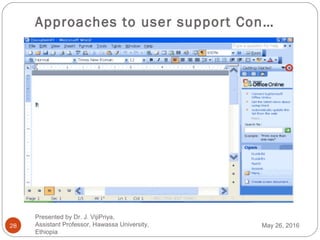
Approaches to user support
25
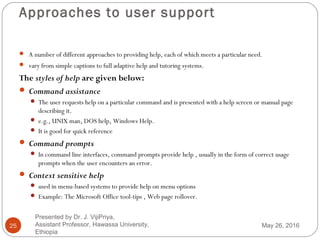
 A number of different approaches to providing help, each of which meets a particular need.
 vary from simple captions to full adaptive help and tutoring systems.
The styles of help are given below:
 Command assistance
 The user requests help on a particular command and is presented with a help screen or manual page
describing it.
 e.g., UNIX man, DOS help, Windows Help.
 It is good for quick reference
 Command prompts
 In command line interfaces, command prompts provide help , usually in the form of correct usage
prompts when the user encounters an error.
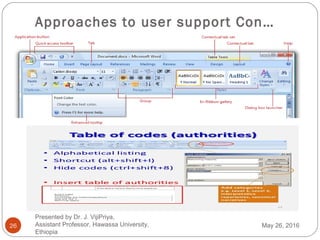
 Context sensitive help
 used in menu-based systems to provide help on menu options
 Example: The Microsoft Office tool-tips , Web page rollover.
May 26, 2016
Presented by Dr. J. VijiPriya,
Assistant Professor, Hawassa University,
Ethiopia
Approaches to user support Con…
26 May 26, 2016
Presented by Dr. J. VijiPriya,
Assistant Professor, Hawassa University,
Ethiopia
Approaches to user support Con…
27
 On-line tutorials
 The user get how the application works by experimenting with examples and demonstration
of how to perform a task
 The user can repeat parts of the tutorial if needed.
 On-line documentation
 paper documentation available on computer.
 material available continually (assuming the machine is running!) in the same medium to a large
number of users concurrently.
 difficult to browse.
 Documentation structured using hypertext supports browsing
May 26, 2016
Presented by Dr. J. VijiPriya,
Assistant Professor, Hawassa University,
Ethiopia
Approaches to user support Con…
28 May 26, 2016
Presented by Dr. J. VijiPriya,
Assistant Professor, Hawassa University,
Ethiopia
Approaches to user support Con…
29
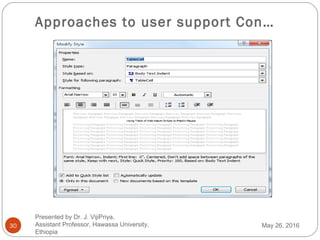
 Wizards
 A wizard is a task-specific tool.
 allow the user actually to complete the tasks safely, quickly and accurately.
 Example, the Microsoft Word resumé.
 allow the user to move back a step as well as forward, will provide a progress indicator showing
how much of the task is completed and how many steps remain, and will offer sufficient
information to allow the user to answer the questions
 Assistants
 software tools that monitor user behavior and offer suggestions or hints when they
recognize familiar sequences.
 Example : Eager, a software agent. When it notices the user repeating a sequence of actions, a
cat icon appears, suggesting the next action
May 26, 2016
Presented by Dr. J. VijiPriya,
Assistant Professor, Hawassa University,
Ethiopia
Approaches to user support Con…
30 May 26, 2016
Presented by Dr. J. VijiPriya,
Assistant Professor, Hawassa University,
Ethiopia
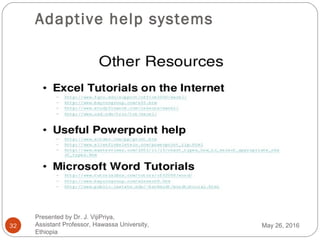
Adaptive help systems
31
 In any large or complex computer system, users will be
 familiar with a subset of the available functionality,
 demonstrating expertise in some applications
 having no experience with others,
 unaware of their existence.
 attempt to address these above problems by adapting the help to the individual
user and by actively suggesting alternative courses to the user may not be aware.
 Intelligent systems include domain-specific expert systems, intelligent tutoring
systems and general adaptive interfaces.
May 26, 2016
Presented by Dr. J. VijiPriya,
Assistant Professor, Hawassa University,
Ethiopia
Adaptive help systems
32 May 26, 2016
Presented by Dr. J. VijiPriya,
Assistant Professor, Hawassa University,
Ethiopia
Designing User Support Systems
33
There are a number of things which the designer should take into account.
1. User support is not an `add on’
 should be designed integrally with the system.
1. Concentrate on content and context of help rather than technological issues.
2. Make decisions about how the help will be presented to the user and how this will
be affected by implementation issues.
May 26, 2016
Presented by Dr. J. VijiPriya,
Assistant Professor, Hawassa University,
Ethiopia
Designing User Support Systems Con…
34
Presentation issues
 How is help requested?
command, button, function (on/off), separate application
 How is help displayed?
new window, whole screen, split screen,
pop-up boxes, hint icons
 Effective presentation requires
clear, familiar, consistent language
instructional rather than descriptive language
avoidance of blocks of text
clear indication of summary and example information
May 26, 2016
Presented by Dr. J. VijiPriya,
Assistant Professor, Hawassa University,
Ethiopia
Designing User Support Systems Con…
35
Implementation issues
1. Will help be an operating system command, a meta-command or an application?
2. What physical constraint does the machine impose in terms of screen space, memory capacity and
speed?
3. How the help data is to be structured: in a single file, a file hierarchy, a database? any structure
should be flexible and extensible
4. Will users be able to browse through the system or only request help on one topic at a time?
5. Will the user make a hard copy of part of the help system to study later (manuals and documentation).
6. The designer should consider the authors of help material as well as its users. Even if the designer
writes the initial help texts, these will be extended by other authors at different times.
May 26, 2016
Presented by Dr. J. VijiPriya,
Assistant Professor, Hawassa University,
Ethiopia

Human Computer Interaction Chapter 5 Universal Design and User Support - Dr. J. VijiPriya

  • 1.
    Universal Design andUser Support 1 Human Computer Interaction Chapter 5 May 26, 2016 Presented by Dr. J. VijiPriya, Assistant Professor, Hawassa University, Ethiopia
  • 2.
    Universal design 2  theprocess of designing products that are accessible by all users in all circumstances, taking account of human diversity in disabilities, age and culture May 26, 2016 Presented by Dr. J. VijiPriya, Assistant Professor, Hawassa University, Ethiopia
  • 3.
    Seven Universal DesignPrinciples 3  In 1990s, North Carolina State University in the USA proposed seven universal design principles 1. Equitable use 2. Flexibility in use 3. simple and intuitive to use 4. Perceptible information 5. Tolerance for error 6. Low physical effort 7. Size and space for approach and use May 26, 2016 Presented by Dr. J. VijiPriya, Assistant Professor, Hawassa University, Ethiopia
  • 4.
    Seven Universal DesignPrinciples Con… 4 1. Equitable use: the design is useful to people with a range of abilities and appealing (tempting) to all. May 26, 2016 Presented by Dr. J. VijiPriya, Assistant Professor, Hawassa University, Ethiopia
  • 5.
    Seven Universal DesignPrinciples Con… 5 2. Flexibility in use: the design is adaptively to the user’s pace (speed), precision (accuracy), and custom(habit) May 26, 2016 Presented by Dr. J. VijiPriya, Assistant Professor, Hawassa University, Ethiopia
  • 6.
    Seven Universal DesignPrinciples Con… 6 3. The system be simple and intuitive (perceptive) to use, regardless of the knowledge, experience, language or level of concentration of the user May 26, 2016 Presented by Dr. J. VijiPriya, Assistant Professor, Hawassa University, Ethiopia
  • 7.
    Seven Universal DesignPrinciples Con… 7 4. Perceptible (observable) information: The design should provide effective communication of information regardless of the environmental conditions or the user’s abilities (e.g. graphic, verbal, text, touch). May 26, 2016 Presented by Dr. J. VijiPriya, Assistant Professor, Hawassa University, Ethiopia
  • 8.
    Seven Universal DesignPrinciples Con… 8 5. Tolerance for error: minimizing the impact and damage caused by mistakes or unintended behavior May 26, 2016 Presented by Dr. J. VijiPriya, Assistant Professor, Hawassa University, Ethiopia
  • 9.
    Seven Universal DesignPrinciples Con… 9 6. Low physical effort: systems should be designed to be comfortable to use, minimizing physical effort and fatigue (tiredness) May 26, 2016 Presented by Dr. J. VijiPriya, Assistant Professor, Hawassa University, Ethiopia
  • 10.
    Seven Universal DesignPrinciples Con… 10 7. Size and space for approach and use: The placement of the system should be reached and used by any user regardless of body size, posture or mobility ( ie. seated or standing users) May 26, 2016 Presented by Dr. J. VijiPriya, Assistant Professor, Hawassa University, Ethiopia
  • 11.
    Multi-modal Interaction 11  provideaccess to system information and functionality through a range of different input and output channels  The 5 senses (sight, sound, touch, taste and smell) are used by us every day and provide a fuller interaction with the natural world  Computers rarely offer such a rich interaction May 26, 2016 Presented by Dr. J. VijiPriya, Assistant Professor, Hawassa University, Ethiopia
  • 12.
    Designing for Diversity 12 Thedesigner considers three key areas: 1. Designing for users with disabilities visual impairment hearing impairment physical impairment speech impairment dyslexia autism 1. Designing for different age groups − Old people − Children 1. Designing for cultural differences May 26, 2016 Presented by Dr. J. VijiPriya, Assistant Professor, Hawassa University, Ethiopia
  • 13.
    Designing for DiversityCon… 13 visual impairment  The rise in the use of graphical interfaces reduces the possibilities for visually impaired users May 26, 2016 Presented by Dr. J. VijiPriya, Assistant Professor, Hawassa University, Ethiopia
  • 14.
    Designing for DiversityCon.. 14 hearing impairment  have little impact on the use of an interface  Captioning audio content making audio files easier and more efficient to index and search May 26, 2016 Presented by Dr. J. VijiPriya, Assistant Professor, Hawassa University, Ethiopia
  • 15.
    Designing for DiversityCon… 15 physical impairment  Users with physical disabilities vary in the amount of control and movement over their hands ,impact in mouse control difficulty  eyegaze system which tracks eye movements to control the cursor,  keyboard driver that can be attached to the user’s head.  predictive system, such as the Reactive keyboard, cut the typing requirement considerably May 26, 2016 Presented by Dr. J. VijiPriya, Assistant Professor, Hawassa University, Ethiopia
  • 16.
    Designing for DiversityCon… 16  speech impairment multimedia systems provide a number of tools for communication, including synthetic speech and text-based communication and conferencing systems May 26, 2016 Presented by Dr. J. VijiPriya, Assistant Professor, Hawassa University, Ethiopia
  • 17.
    Designing for DiversityCon… 17 Dyslexia  Users with cognitive disabilities such as dyslexia can find textual information difficult May 26, 2016 Presented by Dr. J. VijiPriya, Assistant Professor, Hawassa University, Ethiopia
  • 18.
    Designing for DiversityCon… 18 Autism  affects a person’s ability to communicate and interact with people around them and to make sense of their environment 1. Social interaction – problems 2. Communication – problems 3. Imagination – problems How might universal design of technology assist people with autism? communication and education. May 26, 2016 Presented by Dr. J. VijiPriya, Assistant Professor, Hawassa University, Ethiopia
  • 19.
    Designing for DiversityCon… 19 Designing for different age groups  Older people: email and instant messaging, can provide social interaction in cases where lack of mobility or speech difficulties and reduce face-to-face possibilities.  Children Information in Graphics, sound and text, Pen-based interfaces, touch or handwriting, may be easier for children than keyboard and mouse May 26, 2016 Presented by Dr. J. VijiPriya, Assistant Professor, Hawassa University, Ethiopia
  • 20.
    Designing for DiversityCon… 20 Designing for cultural differences  The other factors such as age, gender, race, sexuality, class, religion and political persuasion, may all influence an individual’s response to a system  The designer practice universal design which include language, cultural symbols, gestures and use of color May 26, 2016 Presented by Dr. J. VijiPriya, Assistant Professor, Hawassa University, Ethiopia
  • 21.
    User Support 21  Evenif an interactive system is properly designed, the user will require varies assistance at various times, dependent on many factors: their familiarity with the system, the job they are trying to do, and so on. There are four main types of assistance that users require: 1. quick reference 2. task-specific help 3. full explanation 4. tutorial User support is provided by different types of support system i. Help systems are problem oriented and specific ii. Documentation is system oriented and generic May 26, 2016 Presented by Dr. J. VijiPriya, Assistant Professor, Hawassa University, Ethiopia
  • 22.
    User Support Con… 22 Quick reference used as a reminder to the user for the details of tools Example: find a particular command option and the syntax of the command  Task-specific help  required how to apply the tool to his particular problem  Full explanation used when the more experienced or inquisitive (questioning) user may require a full explanation of a tool or command  Tutorial particularly aimed at new users of a tool and provides step-by-step instruction (perhaps by working through examples) of how to use the tool May 26, 2016 Presented by Dr. J. VijiPriya, Assistant Professor, Hawassa University, Ethiopia
  • 23.
    Requirements of usersupport 23 What features will the help system have? These features are:  Availability  access help at any time during his interaction with the system.  Ideally, run concurrently with main application.  Accuracy and completeness  provided should be accurate and complete.  If provided proves not to match the actual behavior of the system the user will become disillusioned (disappointed) with the help facilities.  Consistency  Online help should also be consistent with paper documentation in terms of content, terminology and style of presentation May 26, 2016 Presented by Dr. J. VijiPriya, Assistant Professor, Hawassa University, Ethiopia
  • 24.
    Requirements of usersupport Con… 24  Robustness  When the system is behaving unexpectedly or has failed altogether ,the help system should be correct error handling and predictable behavior.  Flexibility  allow each user to interact with it in a way appropriate to his needs, experience and task.  Unobtrusiveness  The help system should not prevent the user from continuing with normal work.  The textual help system on a non-windowed interface may interrupt the user’s work.  A possible solution to this is split-screen presentation. May 26, 2016 Presented by Dr. J. VijiPriya, Assistant Professor, Hawassa University, Ethiopia
  • 25.
    Approaches to usersupport 25  A number of different approaches to providing help, each of which meets a particular need.  vary from simple captions to full adaptive help and tutoring systems. The styles of help are given below:  Command assistance  The user requests help on a particular command and is presented with a help screen or manual page describing it.  e.g., UNIX man, DOS help, Windows Help.  It is good for quick reference  Command prompts  In command line interfaces, command prompts provide help , usually in the form of correct usage prompts when the user encounters an error.  Context sensitive help  used in menu-based systems to provide help on menu options  Example: The Microsoft Office tool-tips , Web page rollover. May 26, 2016 Presented by Dr. J. VijiPriya, Assistant Professor, Hawassa University, Ethiopia
  • 26.
    Approaches to usersupport Con… 26 May 26, 2016 Presented by Dr. J. VijiPriya, Assistant Professor, Hawassa University, Ethiopia
  • 27.
    Approaches to usersupport Con… 27  On-line tutorials  The user get how the application works by experimenting with examples and demonstration of how to perform a task  The user can repeat parts of the tutorial if needed.  On-line documentation  paper documentation available on computer.  material available continually (assuming the machine is running!) in the same medium to a large number of users concurrently.  difficult to browse.  Documentation structured using hypertext supports browsing May 26, 2016 Presented by Dr. J. VijiPriya, Assistant Professor, Hawassa University, Ethiopia
  • 28.
    Approaches to usersupport Con… 28 May 26, 2016 Presented by Dr. J. VijiPriya, Assistant Professor, Hawassa University, Ethiopia
  • 29.
    Approaches to usersupport Con… 29  Wizards  A wizard is a task-specific tool.  allow the user actually to complete the tasks safely, quickly and accurately.  Example, the Microsoft Word resumé.  allow the user to move back a step as well as forward, will provide a progress indicator showing how much of the task is completed and how many steps remain, and will offer sufficient information to allow the user to answer the questions  Assistants  software tools that monitor user behavior and offer suggestions or hints when they recognize familiar sequences.  Example : Eager, a software agent. When it notices the user repeating a sequence of actions, a cat icon appears, suggesting the next action May 26, 2016 Presented by Dr. J. VijiPriya, Assistant Professor, Hawassa University, Ethiopia
  • 30.
    Approaches to usersupport Con… 30 May 26, 2016 Presented by Dr. J. VijiPriya, Assistant Professor, Hawassa University, Ethiopia
  • 31.
    Adaptive help systems 31 In any large or complex computer system, users will be  familiar with a subset of the available functionality,  demonstrating expertise in some applications  having no experience with others,  unaware of their existence.  attempt to address these above problems by adapting the help to the individual user and by actively suggesting alternative courses to the user may not be aware.  Intelligent systems include domain-specific expert systems, intelligent tutoring systems and general adaptive interfaces. May 26, 2016 Presented by Dr. J. VijiPriya, Assistant Professor, Hawassa University, Ethiopia
  • 32.
    Adaptive help systems 32May 26, 2016 Presented by Dr. J. VijiPriya, Assistant Professor, Hawassa University, Ethiopia
  • 33.
    Designing User SupportSystems 33 There are a number of things which the designer should take into account. 1. User support is not an `add on’  should be designed integrally with the system. 1. Concentrate on content and context of help rather than technological issues. 2. Make decisions about how the help will be presented to the user and how this will be affected by implementation issues. May 26, 2016 Presented by Dr. J. VijiPriya, Assistant Professor, Hawassa University, Ethiopia
  • 34.
    Designing User SupportSystems Con… 34 Presentation issues  How is help requested? command, button, function (on/off), separate application  How is help displayed? new window, whole screen, split screen, pop-up boxes, hint icons  Effective presentation requires clear, familiar, consistent language instructional rather than descriptive language avoidance of blocks of text clear indication of summary and example information May 26, 2016 Presented by Dr. J. VijiPriya, Assistant Professor, Hawassa University, Ethiopia
  • 35.
    Designing User SupportSystems Con… 35 Implementation issues 1. Will help be an operating system command, a meta-command or an application? 2. What physical constraint does the machine impose in terms of screen space, memory capacity and speed? 3. How the help data is to be structured: in a single file, a file hierarchy, a database? any structure should be flexible and extensible 4. Will users be able to browse through the system or only request help on one topic at a time? 5. Will the user make a hard copy of part of the help system to study later (manuals and documentation). 6. The designer should consider the authors of help material as well as its users. Even if the designer writes the initial help texts, these will be extended by other authors at different times. May 26, 2016 Presented by Dr. J. VijiPriya, Assistant Professor, Hawassa University, Ethiopia